

Description
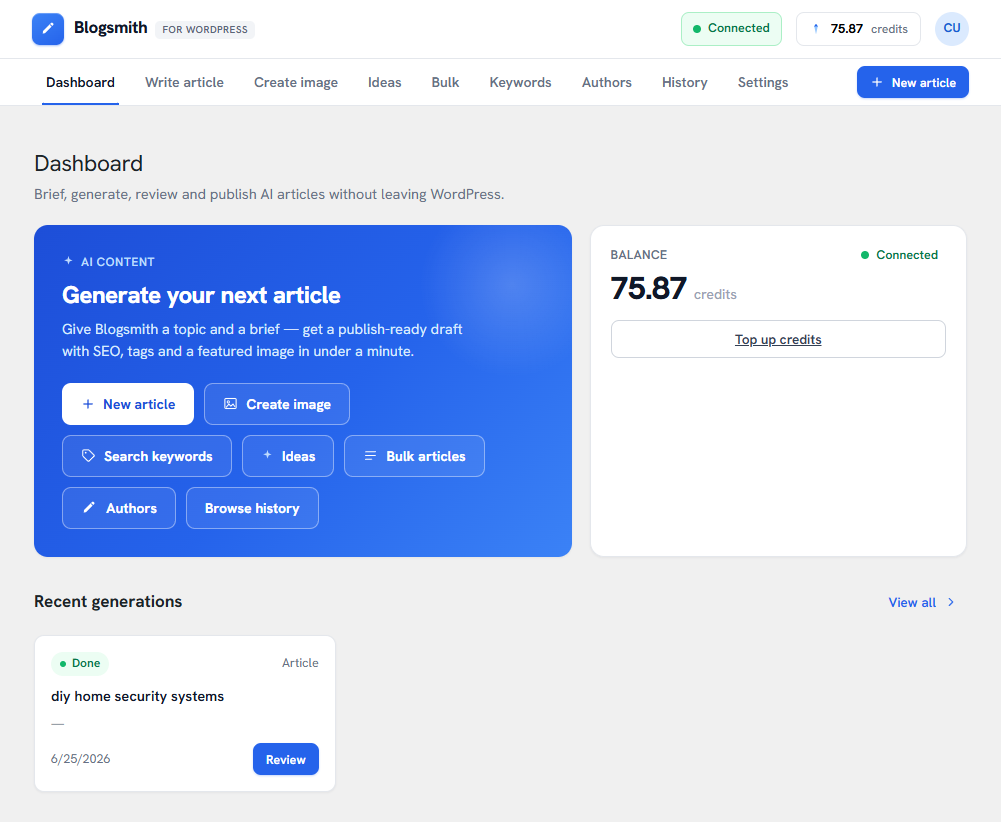
Blogsmith is an AI content studio for WordPress. Connect your site to the Blogsmith service and write, optimize and publish blog content — without leaving your dashboard.
The plugin adds a “Blogsmith” studio to wp-admin where you can:
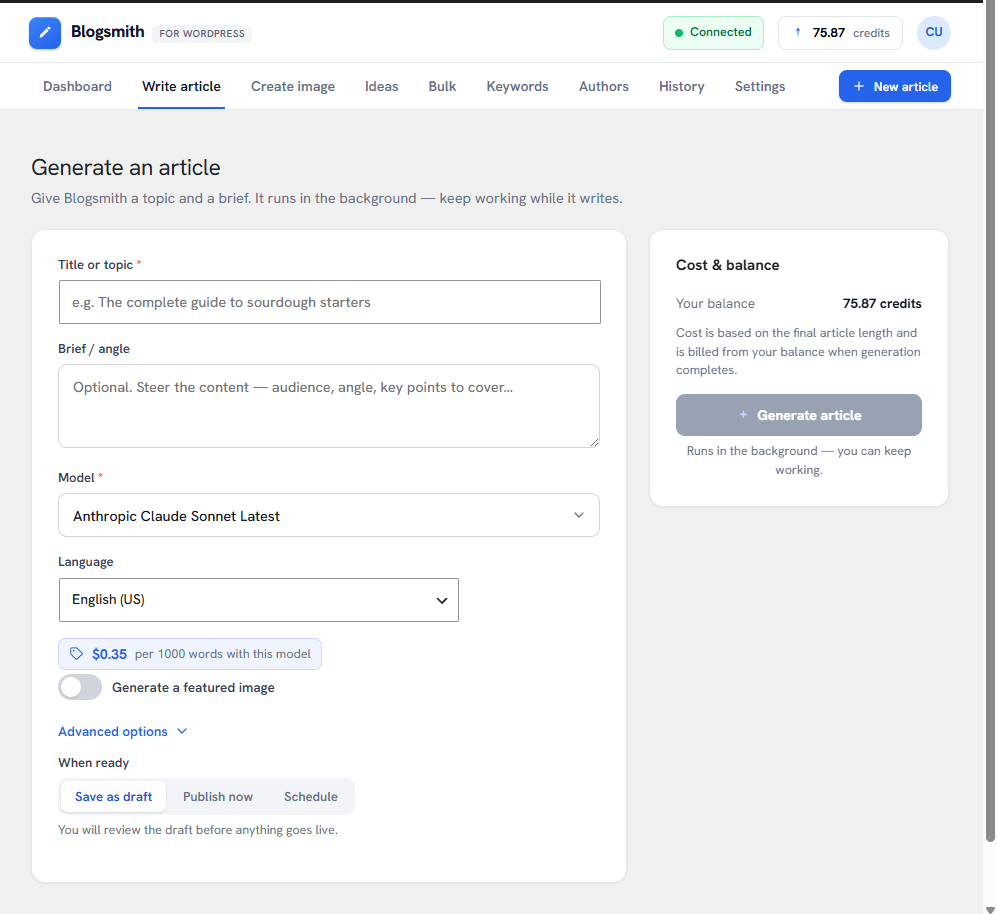
- Write articles with AI — give a title, brief and target keywords, pick a model, language and target-market region, and generate a ready-to-edit draft.
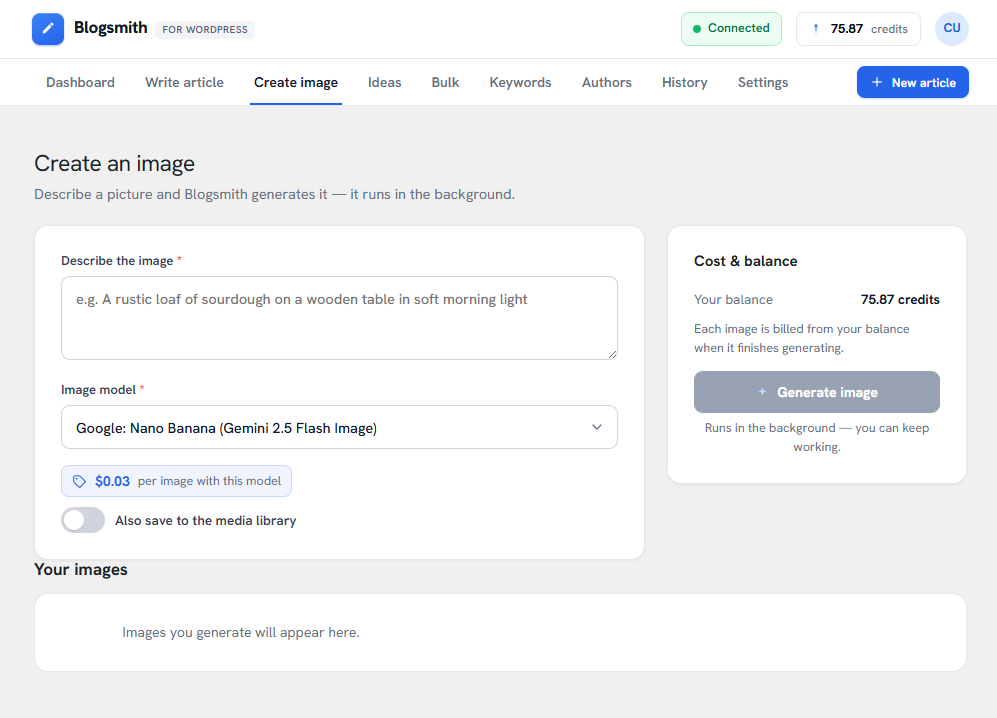
- Generate images — create a featured image or standalone artwork and save it straight to your media library.
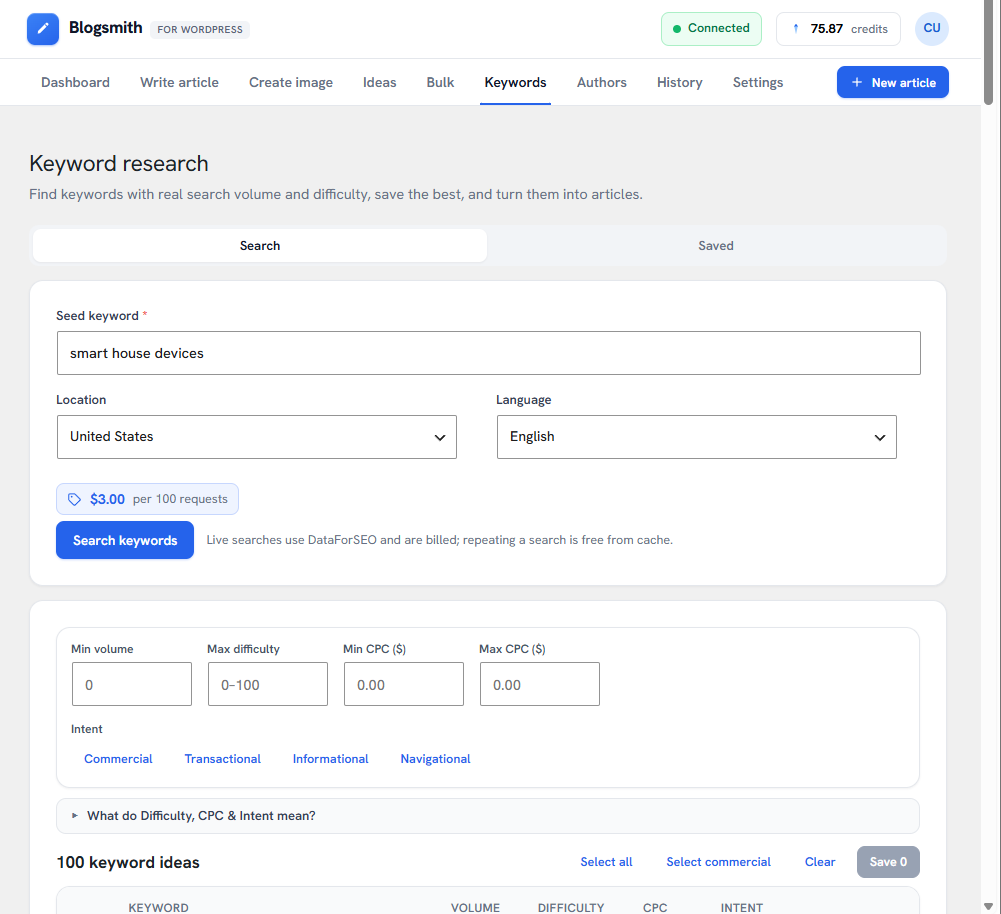
- Research keywords — real search volume, difficulty, CPC and intent (powered by DataForSEO), then turn a keyword into an article in one click.
- Brainstorm ideas — get suggested article topics and blog categories, and add the categories to your site.
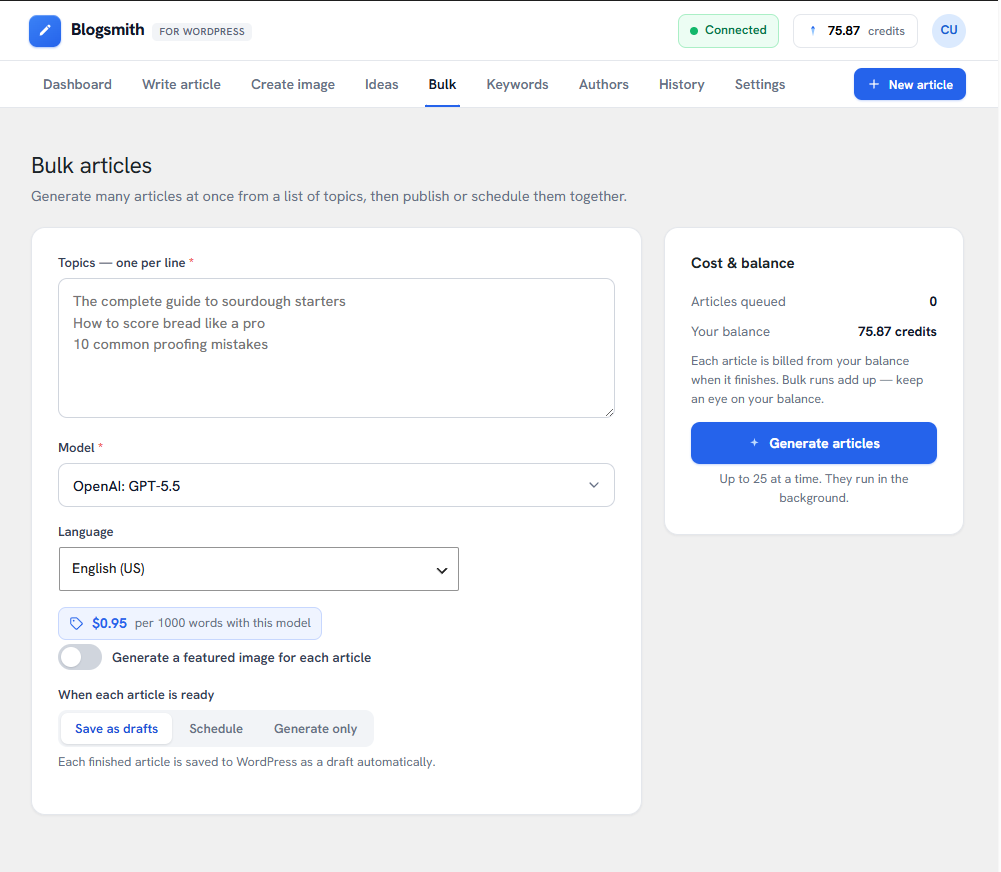
- Bulk-generate — paste a list of topics and produce many articles at once, saved as drafts or scheduled across days.
- Create authors — generate an author persona (name, bio and optional portrait) and add it as a WordPress user.
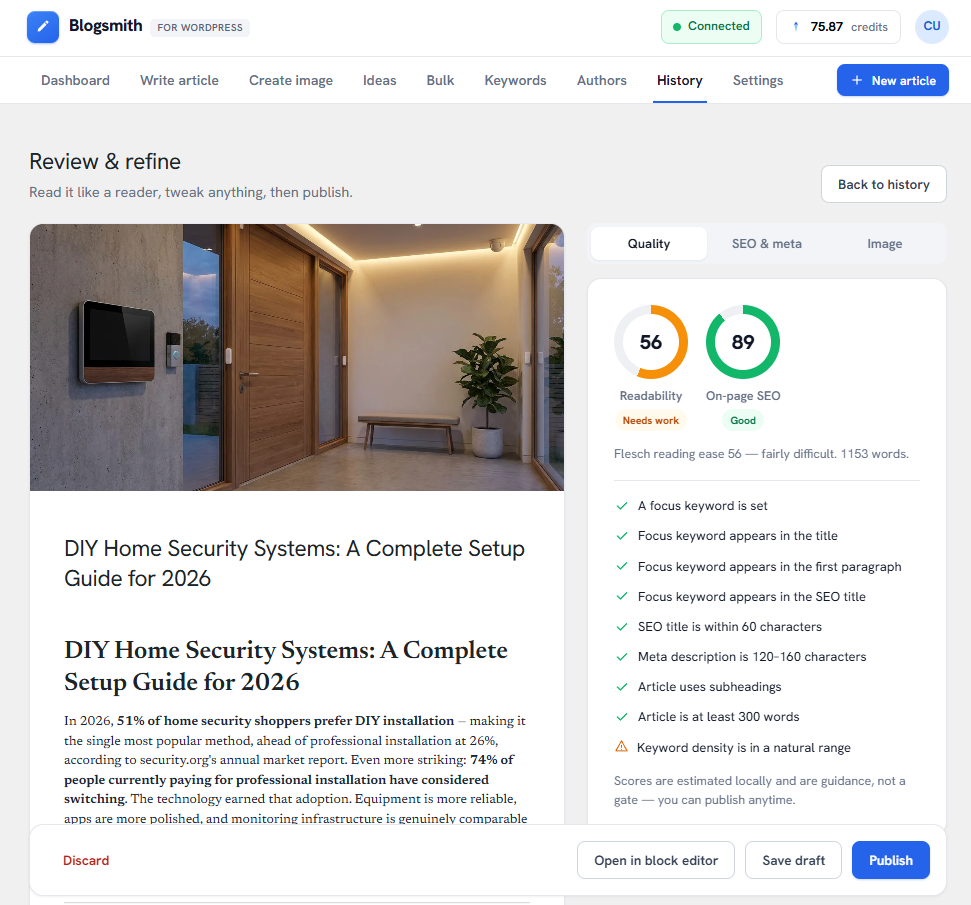
- Review and publish — in-plugin readability and SEO guidance, editable SEO meta and tags, then publish, schedule, save as a draft, or hand off to the block editor.
Under the hood the plugin also exposes a secure, API-key-authenticated REST API so the Blogsmith service can publish and manage posts, authors, categories, tags, media and custom post types on your site — including across a multisite network.
A Blogsmith account is required. The studio features call the Blogsmith service (blogsmith.pro) using the account you connect on the Settings screen, and content generation is billed to your Blogsmith balance. One-click pairing connects your site — there are no API keys to copy. See the External services section below for exactly what is sent and when.
Translations: the studio ships with Spanish (es_ES, es_MX, es_US) and Russian (ru_RU) and is fully translation-ready.
Older WordPress or PHP? This version needs WordPress 4.7 or newer and PHP 7.0 or newer. If your site runs an older WordPress, or PHP 5.6–6.x, download a compatible build for older systems from https://blogsmith.pro/downloads — it keeps you running until you can update.
External services
This plugin connects to third-party services. The connections below only happen
after you explicitly configure and enable the relevant feature.
- Blogsmith content management service (blogsmith.pro)
This plugin is the WordPress client for the Blogsmith content management service.
Blogsmith authenticates to this site’s REST API (using the API key shown on the
plugin’s settings page) to publish and manage posts, authors, categories, tags,
media and structured data. The plugin’s admin pages also link to your Blogsmith
control panel at blogsmith.pro. Site data (post content, authors, media, system
information) is exchanged with Blogsmith when you use the service.
In addition, the content-generation studio (the “Blogsmith” admin screen) calls
the Blogsmith public API at https://blogsmith.pro/api/v1 on your behalf, using the
account API key you enter on the Settings screen. These outbound requests happen
only after you enter a key and use the studio: they read your account balance and
available models, create and poll article-generation tasks (the title, brief and
keywords you provide are sent), and download generated images. No requests are
made to this endpoint until you configure a key.
Terms of service: https://blogsmith.pro/terms.html
Privacy policy: https://blogsmith.pro/privacy.html
- Google Search Console API (googleapis.com)
Used only when the optional “Google Indexation” feature is enabled and you have
supplied a Google service account key. The plugin sends the URLs of your
published posts to Google to check their indexation status. Requests go to
oauth2.googleapis.com (authentication) and searchconsole.googleapis.com (URL
inspection).
Google API Terms of Service: https://developers.google.com/terms
Google Privacy Policy: https://policies.google.com/privacy
- S3-compatible object storage / Cloudflare R2 (user-defined endpoint)
Used only when the optional “S3 Storage” feature is enabled. Images you upload
through the plugin are sent to the S3-compatible endpoint, bucket and credentials
that you configure on the Storage settings page. No data is sent to this service
until you enable and configure it. Review the terms and privacy policy of the
storage provider you choose (for Cloudflare R2: https://www.cloudflare.com/terms/
and https://www.cloudflare.com/privacypolicy/).
API Documentation
All API endpoints are available at: https://your-site.com/wp-json/blogsmith/v1/
Authentication:
Include your API key in the X-API-Key header with every request.
Available Endpoints:
GET /health– Check API status and plugin version (no authentication required)GET /system-info– Environment diagnostics: PHP/WordPress/database versions, server, limits (API key required)GET /websites– List all websitesPOST /keys/rotate– Rotate API keyGET /categories– Get all categoriesPOST /categories– Create/update categoriesPOST /topics– Create a new postGET /topics/{id}– Get a postPUT /topics/{id}– Update a postDELETE /topics/{id}– Delete a postGET /authors– List all authorsPOST /authors– Create an authorGET /authors/{id}– Get an authorPUT /authors/{id}– Update an authorGET /structured– Get available custom post typesPOST /structured– Create structured contentGET /structured/{id}– Get structured contentPUT /structured/{id}– Update structured contentDELETE /structured/{id}– Delete structured content
Screenshots
Installation
- Upload the
blogsmith-apifolder to the/wp-content/plugins/directory - Activate the plugin through the ‘Plugins’ menu in WordPress
- Open the “Blogsmith” menu in the WordPress admin sidebar to view your API credentials
- Copy the API URL and API Key to your Blogsmith service configuration
FAQ
-
How do I get my API key?
-
After activating the plugin, open the “Blogsmith” menu in the WordPress admin sidebar. Your API key will be displayed on the Dashboard page.
-
Can I regenerate my API key?
-
Yes, open the “Blogsmith” menu and click “Regenerate API Key”. Note that this will immediately invalidate the old key.
-
Does this work with WordPress Multisite?
-
Yes, the plugin fully supports WordPress Multisite installations. The API can list and manage content across all sites in your network.
-
Is the API secure?
-
Yes, all API requests require a valid API key sent via the X-API-Key header. We recommend using HTTPS for all API communications.
-
My site runs an older version of PHP and the plugin won’t install or activate. What can I do?
-
This version needs PHP 7.0 or newer (and WordPress 4.7 or newer). If your host still runs PHP 5.6–6.x, a compatible build is available to download from https://blogsmith.pro/downloads — it supports PHP 5.6+. The best long-term fix is to ask your host to update PHP, but the compatible build keeps you running until then.
Reviews
There are no reviews for this plugin.
Contributors & Developers
“Blogsmith API” is open source software. The following people have contributed to this plugin.
Contributors
“Blogsmith API” has been translated into 4 locales. Thank you to the translators for their contributions.
Translate “Blogsmith API” into your language.
Interested in development?
Browse the code, check out the SVN repository, or subscribe to the development log by RSS.
Changelog
1.22.2
- Fixed: clicking “Ask for changes” on the review screen appeared to do nothing. The form opened at the very bottom of the page, behind the action bar that floats over it. It now opens directly above the action bar, scrolls into view and puts the cursor in the field.
1.22.1
- The “Ask for changes” panel now uses the same controls as the rest of the studio — the standard toggles, hints and price chip — instead of its own set. The price is shown the way every other form shows it: in dollars, per 1000 words, with your plan discount applied.
1.22.0
- Ask the AI for changes. On the review screen, tell it what is wrong with a draft — “the intro is too generic”, “drop the pricing section” — and it corrects the article instead of you rewriting it by hand. Pick the model for each round.
- Nothing changes until you say so. A finished revision arrives as “New version ready”: the draft you are reading stays exactly as it is until you choose to show the new one, and you can undo it afterwards.
- Every round is kept. The list of what you asked for doubles as a version history, and any earlier version can be restored.
- “Resend full conversation” lets the AI re-read the research behind the article and your earlier revisions, for a real rewrite rather than a tidy-up. It costs more, and the price is shown before you send.
1.21.2
- Tables are now sized to the data. Earlier builds asked the AI to keep tables deliberately narrow — few columns, very short cells — which quietly dropped detail to fit a phone. Since tables are off unless you ask for them, asking for them now gets you the whole table; a wide one scrolls sideways and is yours to review before publishing.
1.21.1
- Tables in articles now follow the finished design: set apart from the prose, header row tinted rather than boxed, horizontal rules only, and the first column carried as the row’s anchor.
- A table too wide for the screen now says so. It scrolls sideways with a soft edge shading where the content is cut off and a “Scroll for more” cue underneath — both of which disappear the moment they are not needed. A table that fits shows no extra chrome at all.
1.21.0
- Tables in generated articles, when you ask for them. Tick “Embed tables if applicable” on the Generate or Bulk form and the AI may use a small table where the data is genuinely tabular — a comparison, a spec list, pricing. Off by default, so nothing changes unless you ask for it.
- Tables now publish as real WordPress table blocks, editable in the block editor. Previously a table arriving in an article was published as one paragraph per row of raw “| pipes |” — that is fixed for every article, whether or not you use the new option.
- Generated tables stay readable on a phone: they are kept short and narrow when written, and scroll sideways inside their own box on the published post instead of stretching the page.
1.20.3
- The brief field on the Generate and Bulk forms is now twice as tall, so a longer brief — or an inserted text style — is readable without scrolling inside it.
- Added longer options to the “Length” picker: Extra long (~5000 words), Full guide (~7500 words) and Pillar page (~10000 words).
- Added a note under “Length”: if none of the presets is the size you want, pick “Auto — size to the topic” and describe the length you need in the brief.
1.20.2
- Picking a text style on the Generate and Bulk forms is now obvious: the brief scrolls into view and down to the newly added text, the field flashes a highlight, and a notice names the style whose instructions were added. Previously the picker simply snapped back to “Insert a text style…” — the style’s text was added to the brief above, but on a brief that already had content it landed out of sight, so the insert looked like it had failed and people re-picked the same style repeatedly.
- Text styles that have no prepared text are no longer listed, so every style in the dropdown does something when picked.
1.20.1
- Safer activation on older systems: the plugin now checks the WordPress and PHP versions on activation and, if they are too old, refuses to activate with a clear message (instead of a fatal error) pointing you to a compatible build for older systems. The whole plugin source is now PHP 5.6-compatible.
- Added a link from the plugin description and FAQ to https://blogsmith.pro/downloads, where you can pick the right build for your WordPress and PHP version.
1.20.0
- Broader WordPress compatibility: the plugin now runs on WordPress 4.7 and newer (previously 5.0+). The in-dashboard content generator no longer hard-depends on the block-editor era
wp-api-fetch/wp-i18nscripts — on WordPress 5.0+ it uses them as before, and on 4.7–4.9 it loads a tiny built-in API-fetch shim instead. Minimum PHP lowered to 7.0. No functional changes to existing installs.
1.19.0
- Replaced the fixed “Tone” dropdown with a “Text style” selector next to the Brief on the Generate and Bulk forms. Picking a style now inserts its prepared prompt text straight into the brief, where you can read and edit it before generating — instead of being applied invisibly. Styles are your account’s own presets (managed in the dashboard). The Bulk form gains a shared “Brief / angle” applied to every article. The “Default tone” setting was removed.
1.18.1
- Added more target markets to the “Region” selector — Russia, Ukraine, Turkey, Chile, Peru, Israel, South Korea, China, Taiwan, and Vietnam — so every content language now has a matching market to target.
1.18.0
- Added a “Length” selector on the generate and bulk forms (and a “Default length” in Settings) to choose the preferred article length — Auto (size to the topic), Short, Medium, Long, or In-depth. “Auto” (the default) keeps the previous behaviour of sizing each article to its topic.
1.17.0
- Added a “Region” (target market) selector alongside Language on the generate, suggest-ideas, bulk and author forms, plus a “Default region” in Settings. Picking a region tailors the content to that market (local examples, currency, units) without changing the output language; “Global” (the default) applies no market slant.
1.16.1
- Keyword Research: added a collapsible “What do Difficulty, CPC & Intent mean?” help block above the results, using DataForSEO’s own definitions of each metric.
1.16.0
- Renamed the “Advanced” admin page to “Tools” so it’s clear these utilities are separate from the main content features.
- Split the Tools page into tabs — Header Code, Search Console, Close Website — instead of one long page, each with a short explanation of what it does.
- Search Console: removed the “Check frequency” and “Posts per check” options; automatic checks now run hourly (10 posts per run) with no setup.
1.15.5
- The model picker is now full-width on its own row (on the generate, bulk, suggest-ideas and settings forms) so long model names are no longer truncated. The language/secondary field drops to the next row.
1.15.4
- Model picker is now a proper dropdown: a compact box that opens to a searchable panel with the model name on the left and its price aligned on the right, a highlighted selection, and “Suggested”/”All models” groups. (Refines the 1.15.3 list into a drop-down.)
1.15.3
- Reworked the model picker to show the model name on the left and its price on the right, with a highlighted selection, “Suggested”/”All models” groups, and a search box for long lists. Replaces the cramped native dropdown.
1.15.2
- Image price hints now show the cost of a single image (the featured-image add-on previously showed the full per-unit quote, e.g. the per-10-images price, labelled as one image).
- Prices in the model picker and price hints are rounded to 2 decimals for an at-a-glance read. Billing is unchanged.
1.15.1
- Admin menu page slugs are now unique, literal “blogsmith-” prefixed strings (blogsmith-api, blogsmith-api-info, blogsmith-settings, blogsmith-advanced) for WordPress.org prefix compliance. No change to the menu or its URLs in practice.
1.15.0
- The content Studio is now fully translatable and ships with Spanish (es_ES, es_MX, es_US) and Russian (ru_RU) translations — matching the languages offered in the Blogsmith dashboard. WordPress automatically uses them when the site language is set to Spanish or Russian.
- Translation-readiness wiring: text domain is now loaded (load_plugin_textdomain) and JavaScript UI strings are served through WordPress’s script-translation pipeline, so additional languages can be dropped into /languages without code changes.
1.14.15
- Fixed: on the Create an image screen the price chip and the “Also save to the media library” toggle no longer overlap — the price now sits on its own line above the toggle.
1.14.14
- Fixed: previously generated authors no longer disappear from the Authors screen after a reload — the screen now reloads your recent authors.
- Tasks whose text is finished but whose image (article featured image / author portrait) is still rendering now show a “Rendering image…” status and keep updating until the image is ready.
1.14.13
- Tidied the featured-image options spacing: the “+ $X for the image” note now sits on its own line instead of crowding the “Also save to the media library” toggle.
1.14.12
- Fixed several studio features that broke on hosts which strip the query string from REST requests: saved keywords now load (previously “Not found”), the History status filters now actually filter, and the keyword “restore last search” works. The plugin now recovers these parameters from the request URL.
1.14.11
- The model picker now shows each model’s price (e.g. “$0.198 / 1000 words”), like the dashboard — pick the model that fits your budget at a glance.
- When “Generate a featured image” is on, the image model picker now shows a “+ $0.27 for the image” note so you know the image add-on cost.
1.14.10
- Fixed: price hints didn’t appear in the studio forms on some hosts (the per-task price lookup failed silently). Prices are now delivered up front with the rest of your account data, so the “$X per 1000 words” banner shows reliably on every task creation form.
1.14.9
- Dashboard hero now has quick-start buttons for every studio tool — New article, Create image, Search keywords, Ideas, Bulk articles, Authors — not just articles and images.
- Fixed the “Recent generations” cards showing the time twice; each card now shows the task type, model and a single timestamp.
1.14.8
- Keyword research search results can now be filtered: minimum volume, maximum difficulty, minimum/maximum CPC, and intent (multi-select). Filters apply before sorting, and “Select all”/”Select commercial” act on the filtered rows.
1.14.7
- New: the plugin now checks for its own updates. When a new version is released you’ll see the standard “update available” notice on the Plugins screen and can update with one click (no more manual re-uploads).
1.14.6
- Keyword research: click anywhere on a result row (e.g. the keyword) to tick or untick it, not just the checkbox.
- Fixed “Select commercial” leaving other intents selected — it now selects exactly the commercial/transactional rows, regardless of any prior selection or sorting. Same fixes on the Saved tab.
1.14.5
- Keyword research now shows the per-search price before you run it (final price, plan discount applied) — matching the article, image and other Studio forms.
1.14.4
- Per-task price hints in the Studio now refresh reliably and show the exact final price you pay (your plan discount already applied). Only the final customer price is sent to the plugin — base rates and the discount factor are never exposed.
1.14.3
- The Dashboard “Recent generations” and the History tab now show only article generations — site scans, keyword searches, category suggestions and other task types no longer appear there.
1.14.2
- Fixed: opening the History tab showed “Nothing here yet” until you toggled a status filter. History now loads (and refreshes) as soon as you open it.
1.14.1
- Keyword research now shows a “Restoring your last search…” indicator while it loads your most recent search, and surfaces a clear error with a Retry button if it can’t (previously it failed silently, leaving an empty form).
1.14.0
- Keyword research now restores your website’s most recent search — seed and full results — even on a fresh browser or device. Because each search is a real task on your account, the studio replays the last one from the server (not just this browser’s cache), so you always land on your latest request and results. Running a new search replaces them.
1.13.0
- New “Authors” studio: generate a believable author persona — name, bio and an optional AI portrait — then add it to this site as a WordPress author in one click.
- Pick the writing model and language for the persona, and an image model for the portrait; the exact per-task price is shown before you generate, like the rest of the studio.
- “Add to this site” creates the local WordPress user (role: author) with the generated avatar — available when Blogsmith has site-management access.
1.12.0
- Studio Settings Connection now shows your access levels: “Blogsmith tools” (this site can generate content) and “Site management” (Blogsmith can publish here), each marked Active/Inactive.
- Keyword research now remembers your last search — your seed and results stay put when you navigate away or reload.
1.11.0
- Keyword research: the “Save” button now reacts immediately when you tick individual rows (previously only “Select all”/”Clear” updated it).
- Sort keyword results and saved keywords by Volume, Difficulty, CPC or Intent — click a column header. Sorting by Difficulty or Intent breaks ties by Volume (high to low).
- New “Select commercial” button to quickly tick all commercial- and transactional-intent keywords.
- New “Keyword opportunities” block on the Saved tab — your highest-opportunity saved keywords (strong volume, rankable difficulty), with one-click Write, matching the dashboard.
- Fixed the Saved tab failing to load its list, and it now loads up to 200 saved keywords with a Retry on error.
1.10.0
- See the price before you generate. The article, image, ideas and bulk tools now show the exact per-task price for the model you picked — the same estimate as the Blogsmith dashboard, with any plan discount already applied.
1.9.0
- New “Keywords” studio: research keywords with real search volume, difficulty, CPC and intent (powered by DataForSEO), right inside WordPress.
- Save the best keywords to your website, browse your saved list, and remove ones you no longer need.
- Turn a keyword into an article in one click — “Write” loads it into the article writer as the title and a target keyword.
- Live searches are billed to your Blogsmith balance; repeating the same search is free from cache.
1.8.0
- New “Bulk” studio: paste a list of topics and generate many articles at once, with one shared set of options (model, language, featured image).
- Choose what happens to each finished article: save them all as drafts, schedule them across days (using WordPress scheduled posts), or just generate and review them yourself.
- Batch progress is tracked live and survives a page reload; review or open any article from the batch.
- Ideas Topic ideas now has a “Send all to Bulk” button to jump straight from suggestions to a bulk run.
1.7.0
- New “Ideas” studio: brainstorm article topics and blog categories with AI.
- Topic ideas come with a one-click “Write” button that loads the idea straight into the article writer (title, brief and category prefilled).
- Category suggestions can be added to your site as WordPress categories — pick the ones you want and add them in one click.
1.6.0
- New “Create image” studio: describe a picture, pick an image model and style, and generate it right inside WordPress — then download it or save it straight to the media library.
- Article generation now has real image controls: choose the featured-image model and style, optionally save it to the media library, and embed images from your library inside the article body.
- The featured-image option no longer depends on the writing model — images use their own dedicated image model.
1.5.2
- Fixed: after a one-click Connect, generating a topic could fail with “This key is limited to specific websites — provide an allowed websiteId”. The plugin now reliably identifies the connected website.
1.5.1
- Studio Settings: the Connection block is now a read-only status with a link to the Connection page (no more duplicate key-paste form).
- Model picker now groups models into “Suggested models” and “All models”, matching the dashboard.
1.5.0
- Simplified the Connection page: removed the Advanced (manual key) section and the Available Endpoints list.
- Removed the S3/R2 external storage feature. Gallery and images continue to use the WordPress media library.
1.4.1
- Fixed: connecting with only one access selected now enables exactly that one (it no longer turns both on).
- Fixed: turning off the last remaining access no longer lands on an “access denied” page.
1.4.0
- Choose what to connect: “Use Blogsmith tools” (generate content) and/or “Let Blogsmith manage this site” (publish posts, authors, gallery) — pick either or both when connecting.
- Add or remove an access later without disconnecting the other.
- Turning an access off actually cuts it off: tools off revokes the account key; content off blocks Blogsmith’s incoming calls to this site.
1.3.4
- Connect screen now notes you need to be signed in to your Blogsmith account to approve.
- Aligned the Connect / Reconnect / Disconnect buttons to a consistent size.
1.3.3
- Fixed: pairing callback failing with “Missing parameter(s): code, state” on servers that strip the query string from $_GET (e.g. some nginx/security-plugin setups). The callback now recovers the parameters from the request URI.
1.3.2
- Added a Disconnect button to the in-app Connection settings (Studio Settings), matching the Connection admin page.
1.3.1
- Until the site is connected, the plugin now shows only the Connection screen — Studio, Settings and Advanced stay hidden so there are no dead-end features before pairing.
- Clearer connected/disconnected state with a Disconnect button.
1.3.0
- New: one-click “Connect to Blogsmith” pairing — no API keys to copy or paste. Approve the connection in your dashboard and both directions are set up automatically.
- The Connection screen now shows a simple connected/disconnected status with Reconnect and Disconnect controls; the raw site key and URL move under “Advanced” for manual/self-hosted setups.
- Security: pairing uses a PKCE handshake; secrets are exchanged server-to-server and never travel through the browser.
1.2.0
- New: the “Blogsmith” admin screen is now a full content studio — brief, generate, review and publish AI articles without leaving WordPress
- New: async generation with background polling, completion notifications and a history view
- New: in-plugin review with locally-estimated readability/SEO guidance, editable SEO meta, tags and featured image (pick from the media library)
- New: publish, save as draft, schedule, or hand off to the block editor
- New: Settings screen to connect your Blogsmith account API key and set generation defaults
- Admin menu reorganized into Studio, Connection, Settings and Advanced
- Self-hosted webfonts (no third-party font requests)
- Internal: shared article publisher used by both the inbound publish endpoint and the new studio
1.1.0
- Security: hardened SQL ordering and dynamic table queries against injection
- Security: escape generated post HTML (links/images) and filter content through wp_kses_post
- Security: the public /health endpoint no longer exposes server, PHP, database or debug details
- New protected /system-info endpoint (API key required) for environment diagnostics
- Admin scripts are now properly enqueued instead of printed inline
- Added explicit capability checks to all admin settings forms
- Internal identifiers rebranded to a consistent “blogsmith” prefix
- Confirmed compatibility with WordPress 7.0
- Internationalization improvements across the admin UI
1.0.25
- Compatibility and security hardening for the WordPress.org plugin directory
- Confirmed compatibility with WordPress 6.9 and PHP 7.4+
- Added external services disclosure
1.0.0
- Initial release
- Health check endpoint
- Websites listing endpoint
- API key rotation
- Categories management
- Topics (posts) publishing
- Authors management
- Structured data (custom post types) support