Description
- One post per language, linked in a translation group. Deleting a post never deletes its translations.
- URLs: the default language has no prefix, other languages use /uk/, /de/ and so on. The front page of each language lives at its root.
- Language switcher: a block, the [blocklingo_switcher] shortcode, the blocklingo_language_switcher() template tag, or added to a menu of a classic theme without code.
- Per-language header and footer (block themes): header-uk replaces header on Ukrainian pages.
- Navigation menus and synced patterns per language: a block shows the menu or pattern of the page language.
- Categories, tags and other public taxonomies per language, with their own URLs (/uk/category/novyny/) and hreflang.
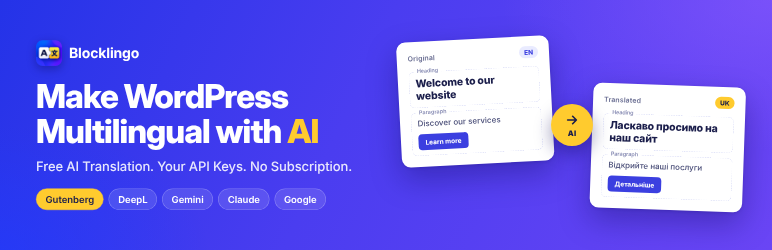
- Machine translation in the editor: Google, DeepL, Gemini, Claude, or on WordPress 7.0+ the AI provider set up in Settings > Connectors (no separate key). Block attributes are translated in the browser and re-serialized, so blocks stay valid.
- SEO: Slim SEO, Yoast, Rank Math and SEOPress titles and descriptions are translated; one sitemap with hreflang alternates (Slim SEO); hreflang tags and per-language locale.
- Sync like Polylang: categories and tags, featured image, template, parent and order stay identical across translations.
- WordPress, theme and plugin translation files are installed automatically for every language and kept updated.
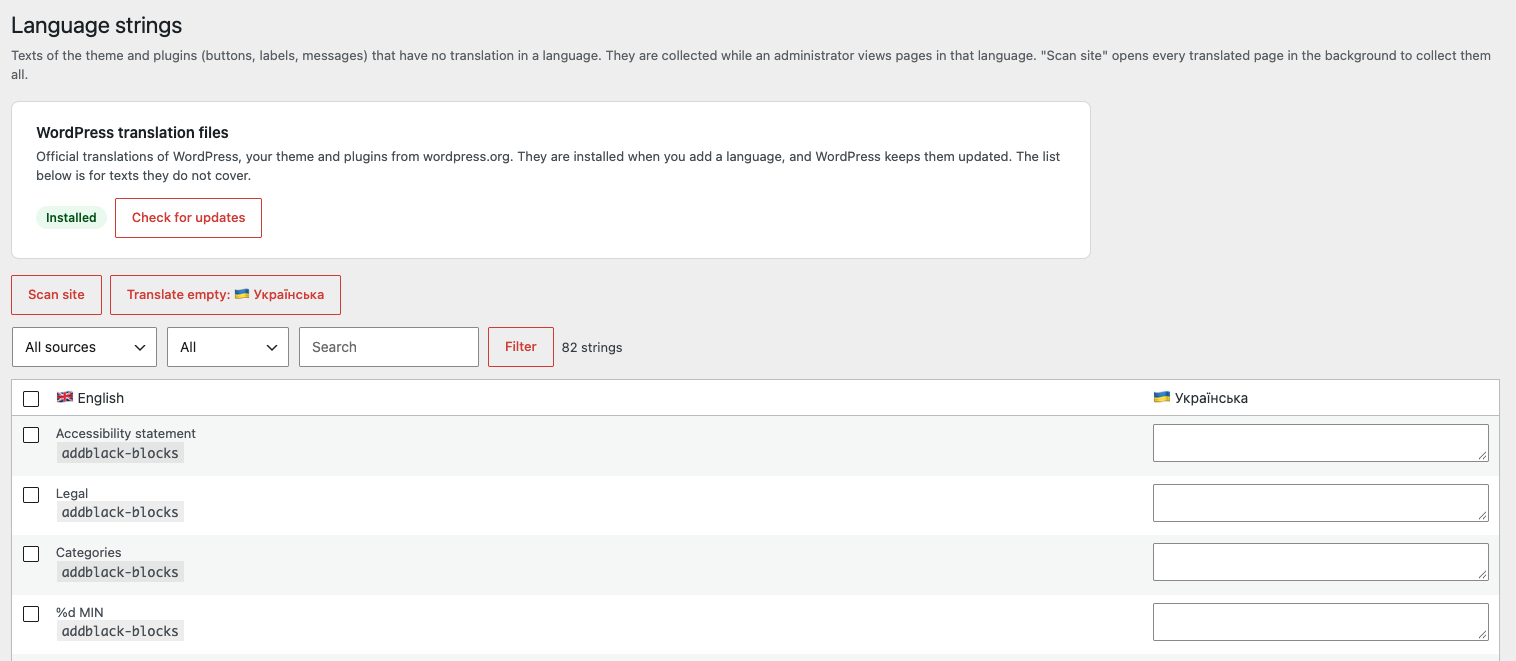
- Language strings (like WPML String Translation): texts of the theme and plugins without an official translation are collected while you browse the site (or with “Scan site”) and translated by hand or with machine translation.
- Latin slugs for Cyrillic titles, with a tool that converts existing slugs and redirects the old addresses.
- “Translate everything”: the whole site (pages, posts, categories, tags, menus, header and footer) machine-translated into a language at once, as drafts to review.
- The plugin’s own screens are translatable (Ukrainian included).
External services
Machine translation is optional and off until you choose a provider in Settings > Blocklingo and add your own API key. Only the provider you choose is contacted, and only when you translate (the Translate button, “Translate everything”, “Translate empty” on Language strings, “Test connection”, “Load models”). The plugin sends the texts being translated (page title, excerpt, block texts, SEO fields, menu labels, category names, theme strings), the source and target language, your glossary, style guide and extra instructions, and the page title as context. It sends your API key to that provider to authenticate. Nothing is sent in the background or when visitors browse the site.
- Google Cloud Translation API (translation.googleapis.com), by Google: Terms, Privacy.
- DeepL API (api.deepl.com, api-free.deepl.com), by DeepL SE: Terms, Privacy.
- Google Gemini API (generativelanguage.googleapis.com), by Google: Terms, Privacy.
- Anthropic Claude API (api.anthropic.com), by Anthropic: Terms, Privacy.
- WordPress AI (WordPress 7.0 and later): the plugin does not contact any service itself. It passes the same texts to the WordPress AI Client, which sends them to the provider the site owner set up in Settings > Connectors, under that provider’s terms and privacy policy.
Language files: when you add a language, the plugin asks WordPress to install the official translation files for WordPress, themes and plugins from wordpress.org (the same updates WordPress does itself), Privacy.
Screenshots

Blocks
This plugin provides 1 block.
- Language switcher
Installation
- Plugins > Add New > Upload Plugin, choose the zip, activate.
- Settings > Blocklingo:
- The default language is taken from Settings > General > Site Language. Add the other languages.
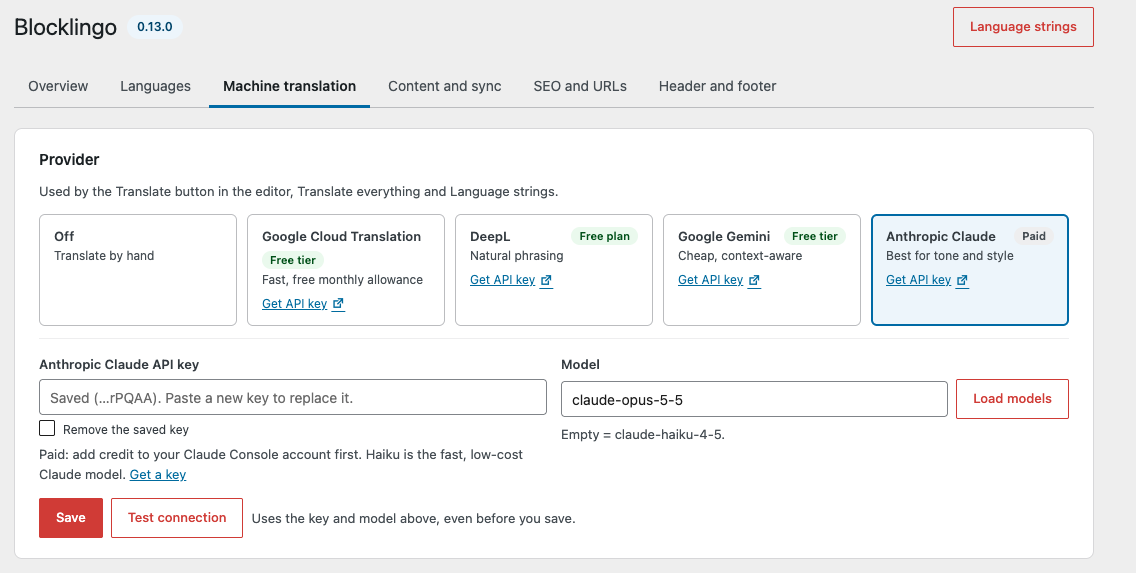
- Machine translation: choose a provider, paste the API key, press “Load models” and pick a model. Keys can also be set in wp-config.php: define( ‘BLOCKLINGO_CLAUDE_KEY’, ‘…’ ); (BLOCKLINGO_GEMINI_KEY, BLOCKLINGO_GOOGLE_KEY, BLOCKLINGO_DEEPL_KEY).
- Glossary: brand names that must never be translated, one per line.
- Settings > Permalinks: any pretty permalink structure (not “Plain”).
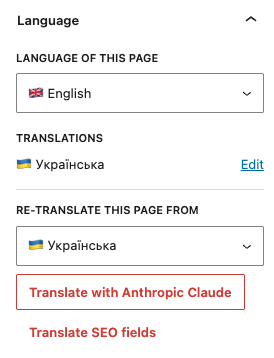
- Open a page in the editor, Language panel in the sidebar: “Translate” creates the translation as a draft. Review and publish.
- Translate the front page and the posts page so every language has its own home.
- Header and footer: on the settings page, create language copies of the header and footer, then edit their menus in the Site Editor.
- Add the “Language switcher” block to the header (Site Editor). Classic theme: Settings > Blocklingo > Header and footer > Language switcher > “Add to menu”, or use the [blocklingo_switcher] shortcode.
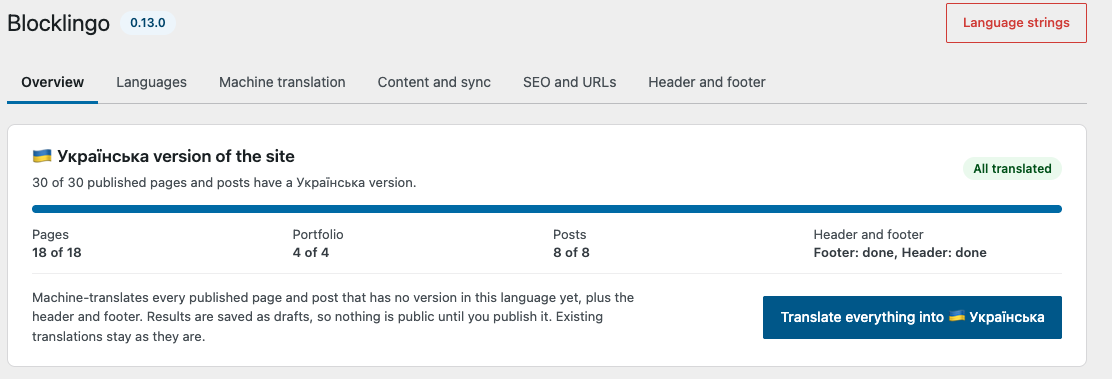
- To translate everything at once: Settings > Blocklingo > “Translate everything into …”, then review and publish the drafts.
- Settings > Language strings: press “Scan site”, then “Translate empty” (or type translations) and save.
- If the site already has Cyrillic slugs, use “Convert to Latin” at the bottom of the settings page.
FAQ
-
What happens to existing content?
-
On activation every existing post is assigned to the default language. Nothing else changes until you add translations.
-
Does it need the block editor (Gutenberg)?
-
It is made for it: the Language panel, the Translate button and block-safe translation live in the block editor. Content that uses the classic editor is still translated by “Translate everything” (on the server), and the plugin tells you which post types have the block editor turned off.
-
Does it work with classic themes?
-
Translations, URLs and SEO work. The language switcher can be added to a theme menu from the settings (no code), with the [blocklingo_switcher] shortcode or with blocklingo_language_switcher(). Per-language header and footer need a block theme.
-
Which options does the shortcode take?
-
[blocklingo_switcher display=”name” hide_current=”1″ hide_missing=”1″]. display: code, name, flag, flag-code or flag-name (default code). hide_current hides the current language, hide_missing hides languages without a translation of the page.
-
Which strings does “Language strings” cover?
-
PHP strings ((), _e(), esc_html(), _x() …) used while a page renders, when no translation file covers them. Not covered yet: plural forms (_n()), strings in JavaScript, texts saved in plugin settings (e.g. Contact Form 7 form fields).
-
What is removed when I delete the plugin?
-
Nothing, unless you ask for it. By default the links between translations, the language strings and the settings stay, so installing the plugin again brings everything back. To remove them, turn on “Remove all data when the plugin is deleted” (Settings > Blocklingo > Content and sync) before deleting. Posts, terms, menus and template parts in every language always stay – they are content. Deactivating the plugin keeps everything; while it is off, language URLs like /uk/ stop working and translations show up as ordinary posts and pages.
-
Developer hooks
-
Functions: blocklingo_languages(), blocklingo_default_lang(), blocklingo_current_lang(), blocklingo_is_language(), blocklingo_is_translatable_type(), blocklingo_get_post_lang(), blocklingo_set_post_lang(), blocklingo_get_post_translations(), blocklingo_get_post_translation(), blocklingo_language_switcher().
Filters: blocklingo_untranslated_blocks, blocklingo_strings_capture, blocklingo_strings_skip_domains, blocklingo_translatable_block_attributes, blocklingo_translatable_meta, blocklingo_per_language_meta, blocklingo_skip_meta_keys, blocklingo_sync_meta_key, blocklingo_sync_taxonomy, blocklingo_translatable_taxonomies, blocklingo_context_max_chars, blocklingo_pre_provider, blocklingo_support_url. Action: blocklingo_translation_created. Queries accept ‘lang’ => ‘uk’ or ‘all’.
Reviews
There are no reviews for this plugin.
Contributors & Developers
“Blocklingo” is open source software. The following people have contributed to this plugin.
Contributors
“Blocklingo” has been translated into 1 locale. Thank you to the translators for their contributions.
Translate “Blocklingo” into your language.
Interested in development?
Browse the code, check out the SVN repository, or subscribe to the development log by RSS.
Changelog
0.14.0
- New provider “WordPress AI” (WordPress 7.0 and later): translates with the AI provider, key and model set up once for the whole site in Settings > Connectors, through the WordPress AI Client. No key in Blocklingo. When no connector can write text, the error says so and points to Settings > Connectors.
- Security: machine translation of a post (in the editor, its SEO fields, or a new translation in machine mode) needs the publish_posts capability (Authors and up), like the block translation already did: Contributors can no longer spend the site’s API key.
- Fix: the Overview, Header and footer, Language strings and the category list showed machine translation as ready when the saved provider was no longer offered (for example WordPress AI with AI turned off on the site). The category list now also offers machine translation only to Authors and up.
- Hardening: the request URL is read through one sanitized helper, and the Language strings queries pass every value through prepared placeholders.
- The wordpress.org package no longer includes translation files: they come from translate.wordpress.org.
0.13.0
- Developers: every global name now uses the blocklingo prefix instead of abl (wordpress.org asks for prefixes of 4+ characters). Functions blocklingo_() (e.g. blocklingo_language_switcher()), filters and actions blocklingo_, constants BLOCKLINGO_* (wp-config keys: BLOCKLINGO_CLAUDE_KEY, BLOCKLINGO_GEMINI_KEY, BLOCKLINGO_GOOGLE_KEY, BLOCKLINGO_DEEPL_KEY), REST routes blocklingo/v1, CSS classes blocklingo-* (e.g. .blocklingo-switcher). Settings, tables and translation links are moved to the new names automatically on update; rename abl_* calls, ABL__KEY constants and .abl- CSS in your theme or wp-config.php.
- The plugin now installs into the folder blocklingo/ with the main file blocklingo.php and the text domain blocklingo (the wordpress.org slug). After this update WordPress shows the plugin as inactive once: click Activate – settings and translations stay.
- Fix: texts on the settings screen added by JavaScript (Testing…, Loading…, model list) stayed in English in the Ukrainian admin; their translation file was saved under a wrong name.
- Fix: the posts page (Settings > Reading > Posts page, e.g. /journal/ and /uk/zhurnal/) listed posts in every language; it now shows only posts in its own language.
- Translate everything: when it finishes without errors, the page reloads, so the overview, the steps and the buttons show the new state, and a notice links to the new drafts (Pages, Posts… in that language). When it was stopped or some items failed, the list stays on screen.
- Machine translation settings: “Load models” and “Test connection” use the key and model typed in the form, before saving (the key is not stored until you click Save). “Not saved yet” shows next to Save while there are changes.
- “WordPress translation files” moved from the Languages tab to the Language strings screen, with an “Install now” button. Files are still installed automatically when you add a language.
- Failsafe: a bug in Blocklingo no longer takes the site down. An error in one of its hooks is logged and that step is skipped (the page still loads); if the plugin cannot start at all (for example a file missing after a broken upload), it switches itself off for that request and shows administrators a notice with the details. Visitors see nothing. Developers: the plugin’s callbacks are wrapped, so use AddBlack\Lang\Hooks::remove() instead of remove_action().
- The plugin’s tables are checked once an hour and recreated if they disappeared (a migration or a partial restore), so post lists do not come back empty.
- Security: machine translations cannot add code – scripts, event handlers, javascript: links and embeds that the original text did not have are removed (post content and Language strings).
- Security: saved API keys are no longer printed in the settings page. The field shows the last characters; leave it empty to keep the key, or tick “Remove the saved key”.
- Security: translating text in the editor needs the publish_posts capability (Authors and up), so Contributors cannot use the site’s API key; the editor does not offer them machine translation.
- Fix: shortcodes ([contact-form-7 …] and others) are never sent to machine translation. Shortcode blocks and Contact Form 7 blocks are skipped (filter blocklingo_untranslated_blocks adds more), and shortcodes inside text stay exactly as written.
- Machine translation: every provider card shows whether it has a free allowance (Google, DeepL, Gemini) or is paid (Claude), and links to the page where you create the API key.
- Removed: OpenAI as a translation provider. Sites that used it show machine translation as Off; choose Claude, Gemini, DeepL or Google and add its key.
- Language switcher without blocks: the [blocklingo_switcher] shortcode, and “Add to menu” on the Header and footer tab, which adds the languages to a menu location of a classic theme, styled by the theme like its other menu links.
- Fix: the preview of a draft translation of the front page used the page template instead of the front-page template, so it looked narrower than the published page will.
- Search and feeds per language: on /uk/ the search form, search links, feed links (/uk/feed/, /uk/comments/feed/), author and date archive links keep the /uk/ prefix. The site-wide comments feed shows only comments on posts in its language.
- The language switcher on search results keeps the search (/uk/?s=garden -> /?s=garden). The home page with latest posts gets hreflang links to every language home.
- Deleting the plugin no longer removes the links between translations by default. A new option, “Remove all data when the plugin is deleted”, does that, and the Plugins screen says what Delete will do.
- The Overview counts translated content in the database, a single query per language, so it stays fast on large sites and is no longer limited to 2,000 posts.
- Fix: with Twenty Twenty-Five and other themes that keep the header or footer in a theme pattern, the language copy of the part only pointed at the same pattern, so the footer stayed in English. Theme patterns are now copied into the part, then translated.
- Translate everything copies only the header and footer parts your templates use. Twenty Twenty-Five has seven parts but shows two; the others (alternative designs) are marked “Not used by your templates” on the Header and footer tab and can still be copied by hand.
- When wordpress.org cannot be reached or a language file fails to download (firewall, SSL), the notice says so, instead of reporting the language as not available.
- First run: the Overview shows the steps – add a language, set up machine translation, translate everything – and marks what is done.
0.12.2
- Blocklingo is made for the block editor. When the block editor is turned off for translated content (Classic Editor plugin, post types without the editor), the Plugins screen and the settings page say so, and the Content tab marks those post types “Classic editor”. They are still translated by “Translate everything”, on the server.
0.12.1
- Fix: on hosts that cut requests at 60 seconds, a page could fail with “The response is not a valid JSON response” (the AI took longer for one big batch). Texts now go in smaller batches (15 texts or 1500 characters), and a batch that times out is split in two and sent again.
0.12.0
- Errors in plain words: “The translation provider rejected the API key”, “Your login session has expired”, “The site ran into an error” and so on, with what to do next, a “Contact the developer” button, “Copy details” and a “Show technical details” toggle (error code, HTTP status, PHP error with file and line). Filter blocklingo_support_url sets where “Contact the developer” leads.
- Translate everything stops by itself when nothing can work (no or rejected API key, empty provider account, rate limit, expired login, no connection) and pauses after 3 failures in a row, asking whether to continue. It shows the time left, and items translated meanwhile count as done.
- PHP errors in the plugin’s REST requests come back as readable errors instead of a broken response.
0.11.3
- Fix: Translate everything waited 6 minutes and failed for every item of a post type that does not use the block editor (classic editor, title and custom fields only). Such items are now machine-translated on the server.
- A page whose hidden editor does not start fails within a minute instead of 6; a page only times out after 3 minutes without progress.
0.11.2
- Fix: on sites where WordPress replaces emoji with images, flags showed as broken images in the “Translate everything” dialog and in the editor’s Language panel. Text added by the plugin’s scripts no longer contains emoji flags; the editor draws them with CSS.
0.11.1
- New name: Blocklingo – Translate Sites with AI (the settings page is Settings > Blocklingo). Folder, settings and data stay the same.
0.11.0
- Menus per language: create a translated copy of a navigation menu on the Header and footer tab; navigation blocks show the menu of the page language, and language copies of the header and footer point at it.
- Categories and tags per language: “+UK” in the Language column on the category and tag screens creates a translated version. Translations of posts get the translated terms (also posts translated before), term lists and links follow the page language (/uk/category/novyny/), term archives get hreflang.
- Translate everything also translates categories, tags and menus (first, so pages and the header pick them up).
- Synced pattern and navigation refs are found wherever “ref” sits among the block attributes.
- The plugin’s admin screens are translatable, with a Ukrainian translation.
- readme: External services section (what is sent to the translation provider and when).
0.10.1
- The editor shows translated patterns too: synced pattern blocks in translated content point at the pattern’s translation. New translations get it right away; publishing a pattern translation relinks pages already in that language; saving a translated page relinks it.
- A synced pattern block that points at an unpublished translation shows the original instead of nothing.
0.10.0
- Synced patterns per language. Turn on “Patterns” in Content and sync, open a pattern and translate it like a page. Once the translation is published, pages in that language show it instead of the original. Translate everything includes patterns too.
0.9.1
- Fix: a published translated page whose translated parent was still a draft showed 404. When a page is published, its unpublished parents now get a slug (they stay drafts), so the URL works, e.g. /uk/poslugy/rozrobka-plaginiv/.
0.9.0
- New settings screen with tabs: Overview, Languages, Machine translation, Content and sync, SEO and URLs, Header and footer.
- Overview shows how much of the site exists in each language (per post type, header and footer), the machine translation status and theme/plugin texts, with Translate everything right there.
- Providers are cards; each one has its key, model, Save and Test connection together. Switches instead of checkboxes, a sticky Save bar, and saving keeps you on the same tab.
0.8.1
- Flags in the language switcher and the plugin’s admin screens stay emoji: WordPress no longer replaces them with images.
0.8.0
- Translate the whole site: Settings > Blocklingo has a “Translate everything into …” button per language. It machine-translates every published page and post without a version in that language, plus the header and footer, as drafts – with a confirm dialog, progress, and Stop. Pages are translated in the block editor in the background, the same way as the Translate button, so blocks stay valid.
0.7.1
- Fixed: the Language panel in the block editor crashed on every edit screen (0.7.0).
- Settings: a Save button next to each API key; pressing Enter in a field saves without installing translation files.
0.7.0
- Rewritten inside: namespaced classes with a composition root, REST controllers, admin screens with templates. Settings, tables, URLs, REST routes, hooks and the blocklingo_* functions are unchanged.
- The legacy BLOCKLINGO_* classes are removed. Code that called them should use the blocklingo_* functions.
- Filter blocklingo_pre_provider now returns an object implementing AddBlack\Lang\MachineTranslation\Provider.
- New function blocklingo_current_lang().
- Requires PHP 8.1.
- Fixed: “Settings saved.” was shown twice after saving the settings.
0.6.0
- Language strings screen: collect, translate and machine-translate theme and plugin strings.
- Translation files for WordPress, themes and plugins are installed when a language is added.
0.5.0
- Default language detected from the site locale; glossary starts with the site name.
- Self-install when the activation hook did not run (multisite, FTP deploys).
- No site-specific defaults.