

Description
Biscotto is an open-source cookie consent manager with no artificial limits (no caps on pageviews, pages or Custom Post Types).
Features:
- Compliant consent banner: close (X) button, equal Accept/Reject buttons, link to the privacy notice, granular preferences.
- Prior blocking of scripts (
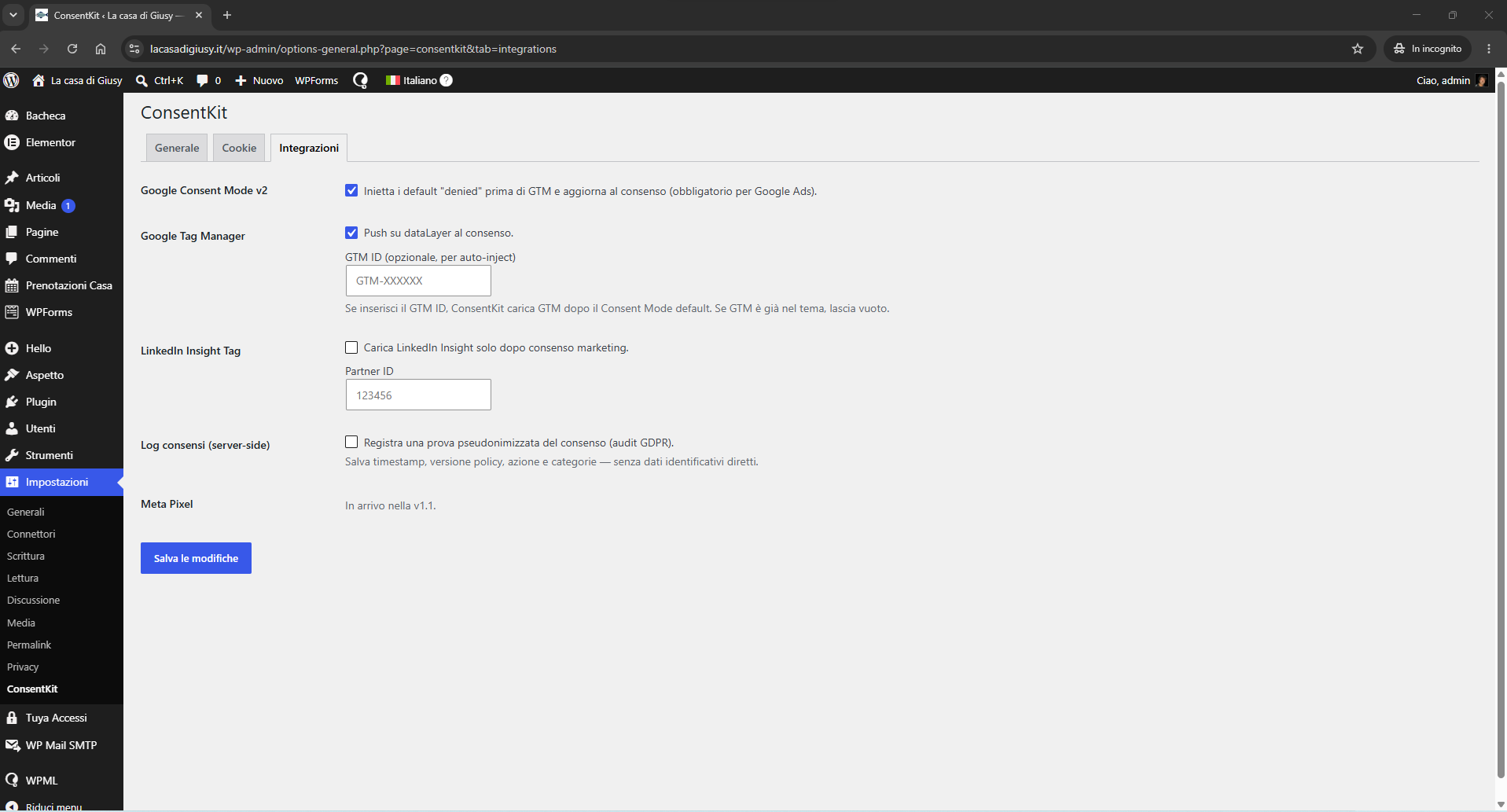
type="text/plain"+data-biscotto-category) until consent is given. - Google Consent Mode v2 (default denied before GTM, update on consent).
- Google Tag Manager via dataLayer.
- LinkedIn Insight Tag loaded only with marketing consent.
- Compliant banner re-prompt (minimum 6 months) and re-consent when the cookie policy changes.
- Optional pseudonymized consent log for GDPR audits.
- Runtime cookie scanner: loads your pages in a hidden iframe (admin only) and detects the cookies and third-party domains actually loaded, then suggests registry entries to review and save.
- Cookie database enrichment: fills in missing service, category, retention period and privacy-policy link using a bundled copy of Open Cookie Database (Apache-2.0), with an optional manual check for dataset updates.
- One-click “copy code” box for building your cookie policy page from the plugin’s shortcode.
The core is a dependency-free JavaScript engine, reusable on non-WordPress sites too.
Cookies are managed through a pre-filled registry of the most common services, editable by hand from the admin and extendable with the built-in scanner.
Roadmap (in progress):
- Automatic blocking of iframes and embeds (Google Maps, YouTube) and Google Fonts with a “click to load” placeholder.
External services
This plugin can connect to the third-party services listed below. They are all optional and disabled by default: the plugin does not contact them unless you enable the related feature or, for the update check, explicitly click the button.
Google Tag Manager
If you enable the “Google Tag Manager” integration and enter a container ID (Settings → Biscotto → Integrations), the plugin loads the GTM library from https://www.googletagmanager.com/gtm.js. GTM then runs the tags you configured in your own Google Tag Manager account. Thanks to Google Consent Mode v2 the storage is set to “denied” by default, so visitor data (such as IP address and cookies) is sent to Google only after the visitor consents. Service provided by Google LLC.
Terms of service: https://marketingplatform.google.com/about/analytics/tag-manager/use-policy/
Privacy policy: https://policies.google.com/privacy
LinkedIn Insight Tag
If you enable the “LinkedIn” integration and enter a Partner ID (Settings → Biscotto → Integrations), the plugin loads the LinkedIn Insight Tag from https://snap.licdn.com/li.lms-analytics/insight.min.js and sends analytics/conversion data to LinkedIn — but only after the visitor grants “marketing” consent. Service provided by LinkedIn Corporation (Microsoft).
Terms of service: https://www.linkedin.com/legal/l/service-terms
Privacy policy: https://www.linkedin.com/legal/privacy-policy
GitHub API (cookie-database update check)
Only when an administrator clicks “Check for database updates” (Settings → Biscotto → Scan), the plugin makes a single GET request to the public GitHub API at https://api.github.com/ to read the date of the latest commit that changed the bundled Open Cookie Database file. No personal data and no site data are sent — only the request for a public commit date — and the result is cached for 24 hours. There are no automatic or background calls. Service provided by GitHub, Inc. (Microsoft).
Terms of service: https://docs.github.com/site-policy/github-terms/github-terms-of-service
Privacy policy: https://docs.github.com/site-policy/privacy-policies/github-general-privacy-statement
Screenshots
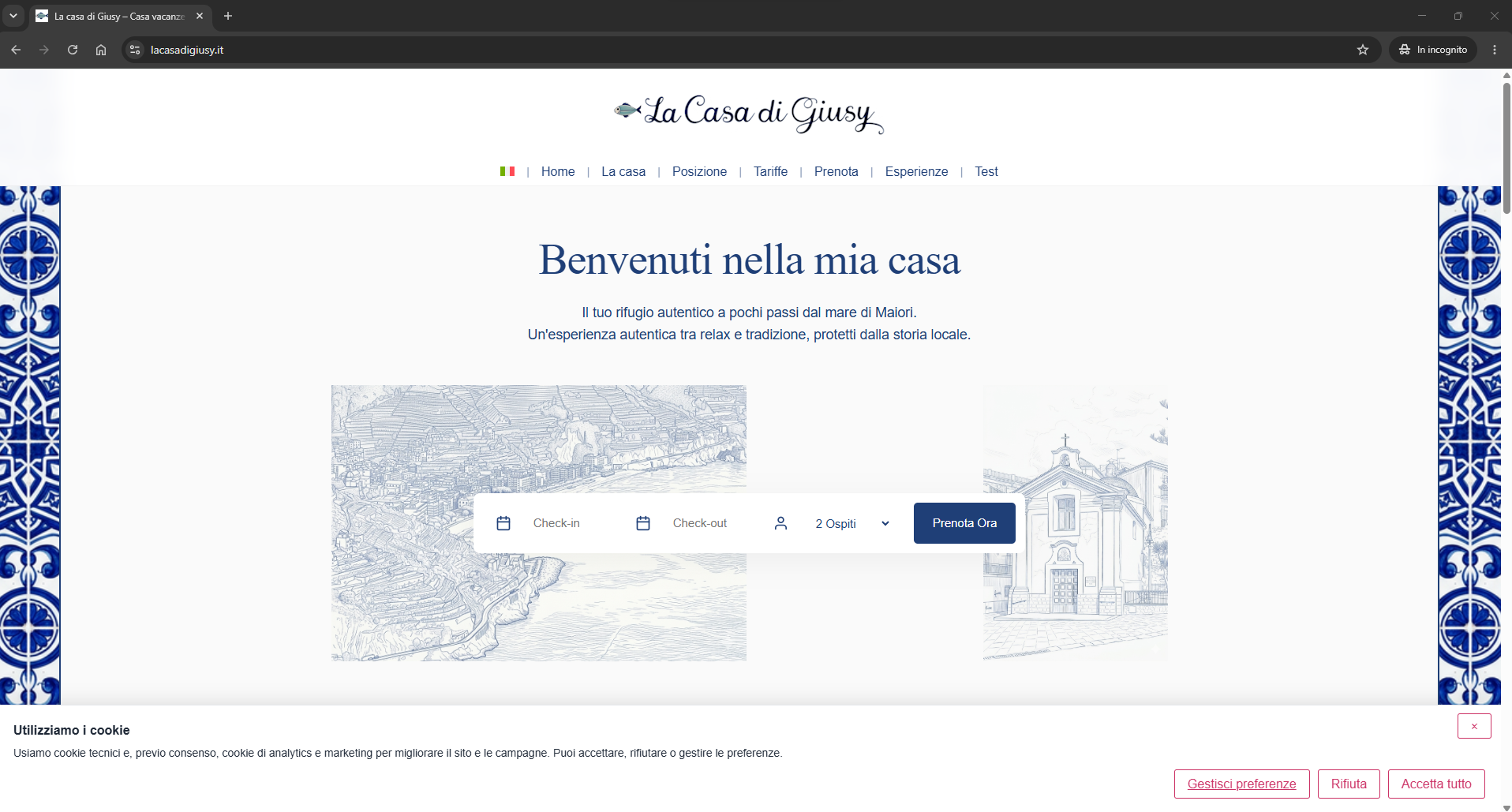
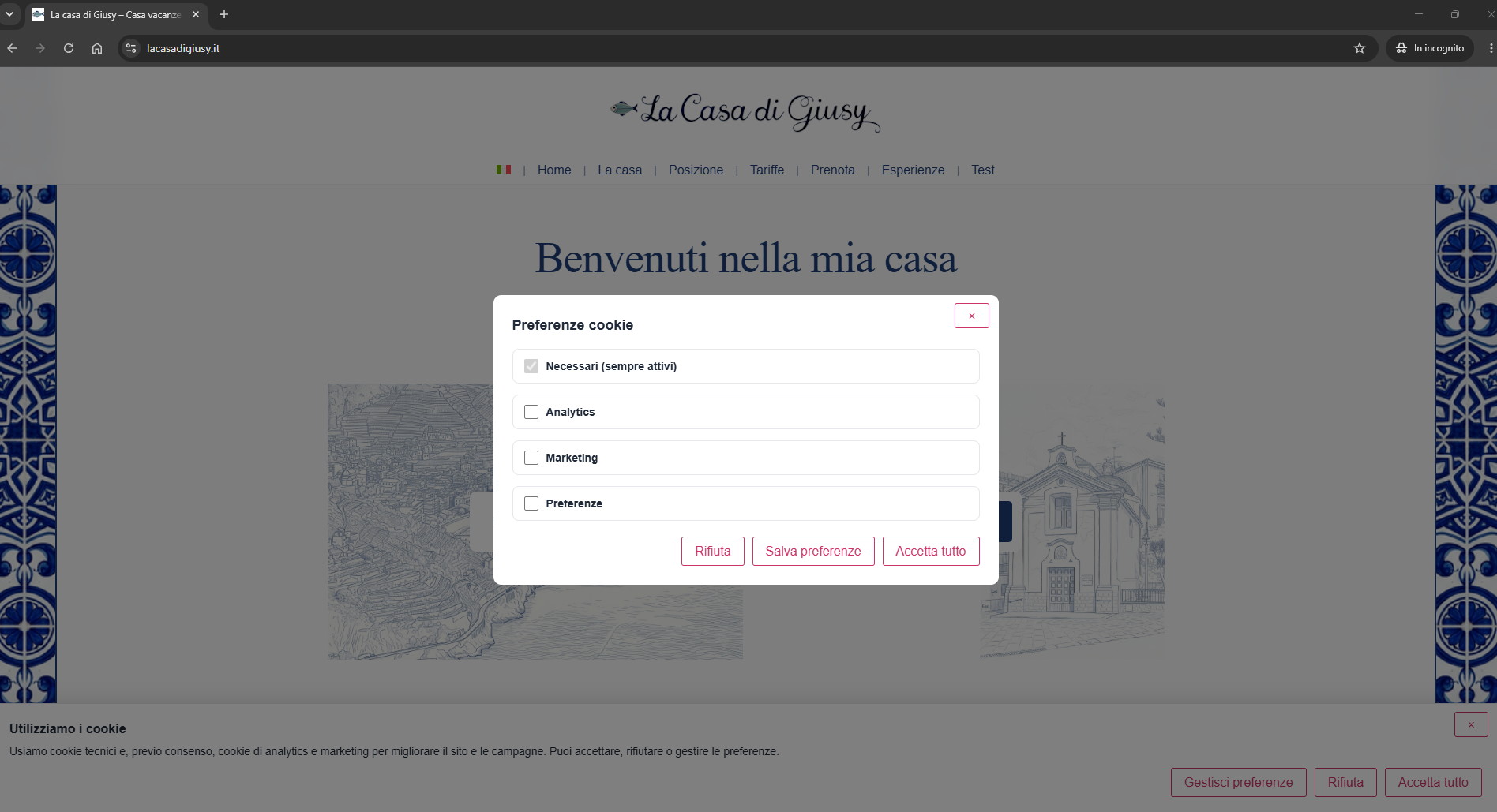
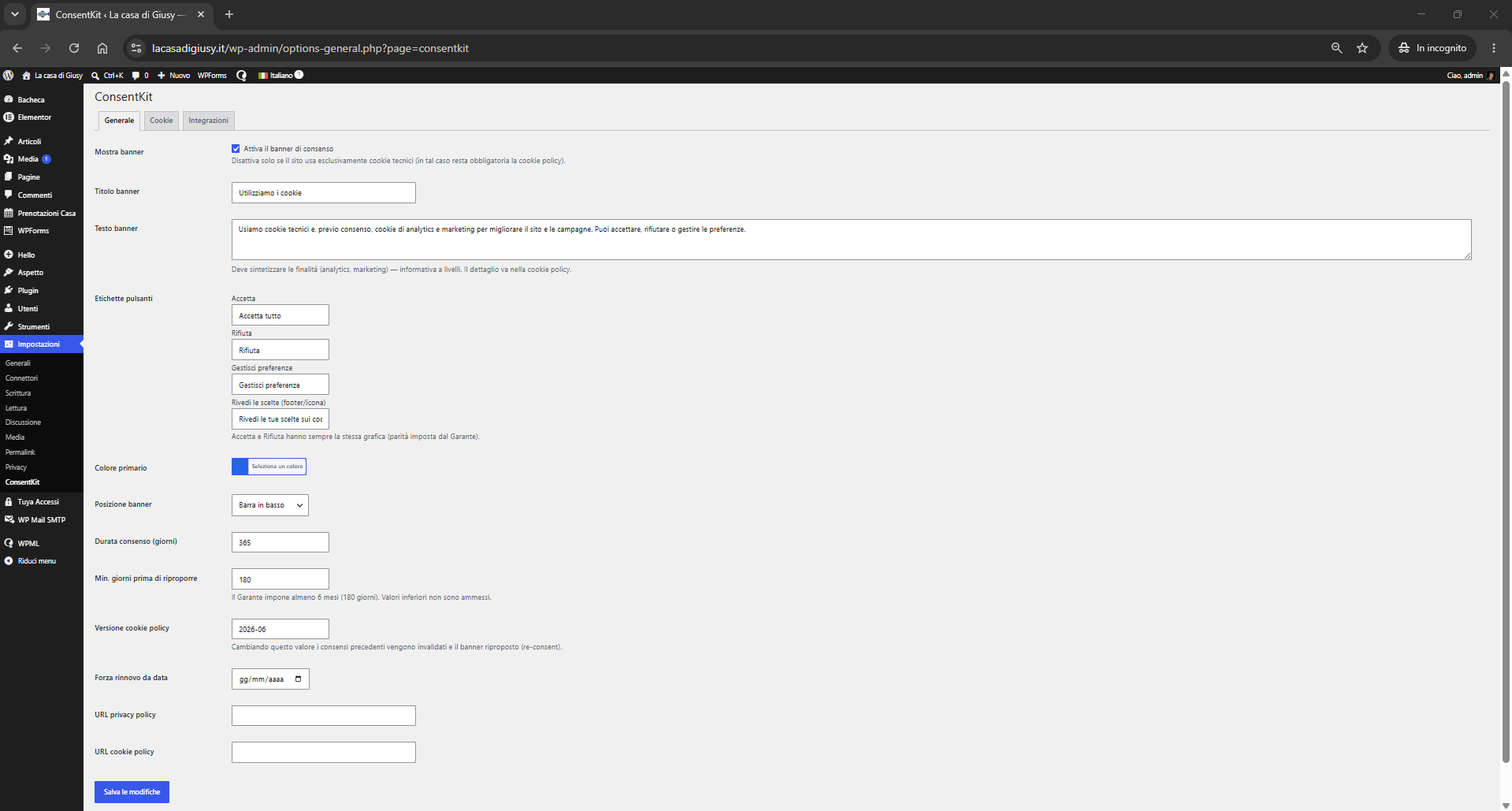
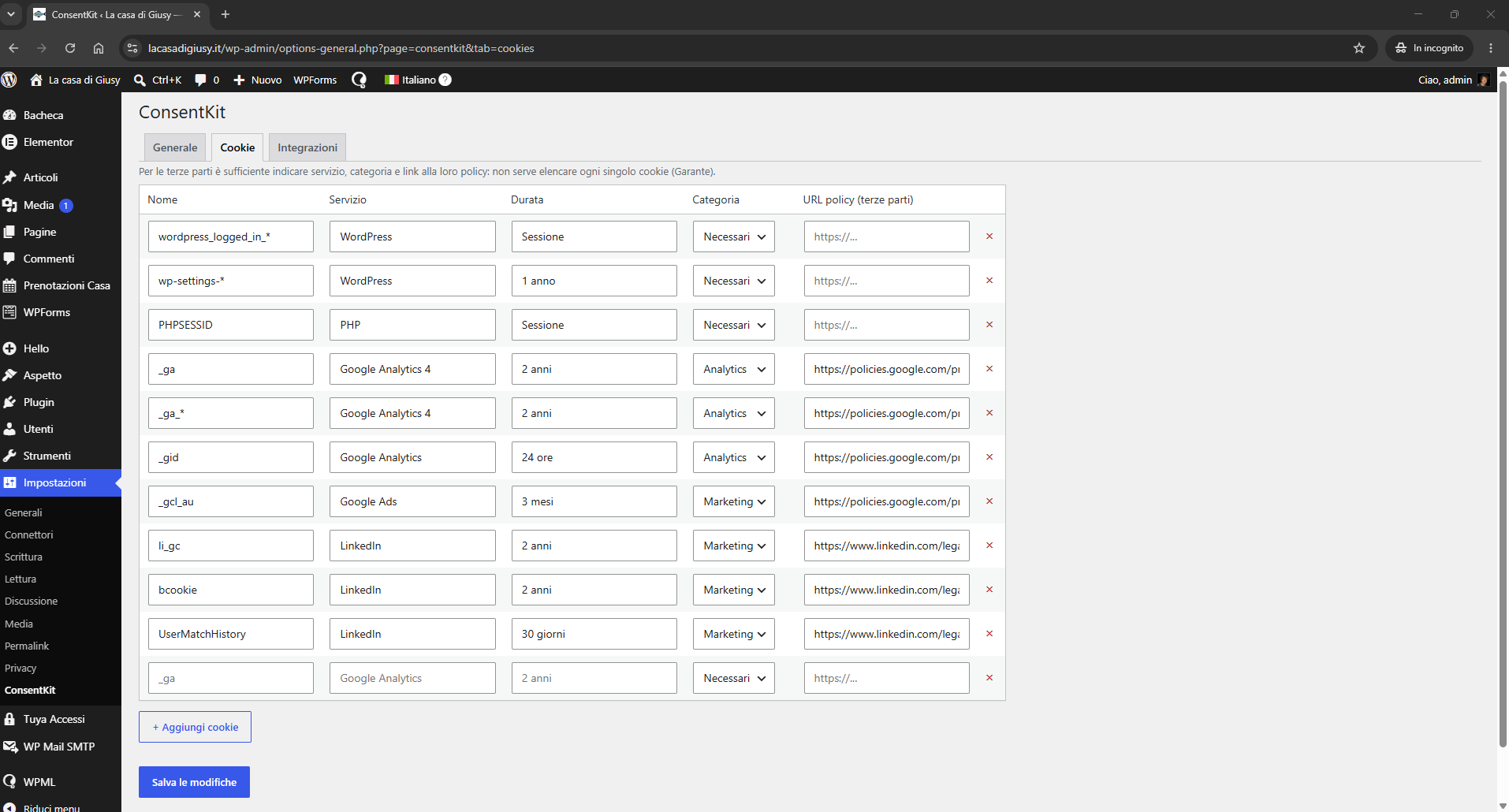
Installation
- Upload the
biscotto-cookie-consentfolder to/wp-content/plugins/. - Activate the plugin from the Plugins menu.
- Go to Settings → Biscotto and configure texts, cookies and integrations.
FAQ
-
Does it work with Custom Post Types?
-
Yes, with no extra configuration and no limits.
-
The plugin implements the technical requirements of the 10 June 2021 guidelines. Overall compliance also depends on a correct privacy notice and on the proper classification of each site’s cookies.
-
Does it send data to external services?
-
Yes, in the specific cases described under “External services” above, and always under your control. In short: the Google (Consent Mode/GTM) and LinkedIn scripts load only if you configure them and only after consent; the “Check for database updates” button contacts the public GitHub API only when you click it, sending no personal or site data. Everything else stays local — Biscotto does not otherwise communicate with any third-party server — and the optional consent log stays pseudonymized in your site’s database.
-
How is the optional consent log protected from abuse?
-
The log is disabled by default, and while it is disabled the REST route is not registered at all. When enabled, the route is public by necessity — anonymous visitors record their own consent through it via
navigator.sendBeacon, so there is no user to authorise — but writes are bounded by limits that do not depend on the nonce. Each address is allowed 10 writes per hour. Independently of that, the plugin counts the rows already written in the past hour immediately before inserting and refuses beyond a site-wide ceiling, so rejected requests cannot consume the quota; the ceiling can be adjusted with thebiscotto_write_ceilingfilter. Identical submissions from the same visitor write nothing for up to 24 hours (the visitor identifier is salted per day, so the effective de-duplication window is shorter for submissions made near midnight UTC), and records older than the configured retention period (12 months by default) are deleted daily.
Reviews
There are no reviews for this plugin.
Contributors & Developers
“Biscotto – Cookie Consent” is open source software. The following people have contributed to this plugin.
Contributors
Translate “Biscotto – Cookie Consent” into your language.
Interested in development?
Browse the code, check out the SVN repository, or subscribe to the development log by RSS.
Changelog
1.5.5
- New: “Create Cookie Policy page” button (Cookies tab) generates a draft WordPress page pre-filled with a GDPR/Garante-oriented cookie policy template and the
[biscotto_cookie_policy]shortcode already in place, so the automatically detected cookie list appears in the page. The draft is never auto-published: it is clearly marked as needing the site owner’s own details before publishing, and clicking again opens the existing draft instead of creating duplicates. - New:
[biscotto_last_updated]shortcode shows the policy’s “last updated” date, backed by a stored option and bumped on demand from the new “Update last-modified date” button, instead of freezing a date as static text.
1.5.4
- Internal: the scanner’s host and cookie classification tables no longer store the vendor’s public privacy-policy link inline next to each hostname; the link is now resolved from a separate service-name lookup. No functional change — the scanner still only matches hostnames found in the site’s own markup and never contacts them.
1.5.3
- Plugin renamed to “Biscotto – Cookie Consent”; slug and text domain are now
biscotto-cookie-consent. - Internal PHP layer renamed to Biscotto (classes, constants, option, log table, REST namespace). Existing installations must be reconfigured.
- Consent log endpoint hardened: the
/logREST route is registered only when the consent log is enabled; writes are limited by a per-visitor-IP rate limit and by a site-wide ceiling on rows written per hour (adjustable via thebiscotto_write_ceilingfilter), with 24-hour de-duplication per visitor. - New: automatic retention for consent log records, with a configurable retention period (default 12 months).
1.5.0
- Plugin renamed to “Biscotto – Cookie Consent & Consent Mode”; the text domain is now
biscotto. - Compliance: the Consent Mode v2 default and the Google Tag Manager loader are now added with
wp_add_inline_script()on enqueued handles instead of being printed inline; the cookie-registry admin behaviour moved toadmin/js/cookies.js, enqueued withwp_enqueue_script(). - Docs: added an “External services” section documenting Google Tag Manager, the LinkedIn Insight Tag and the on-demand GitHub update check (what is sent, when, and links to each service’s terms and privacy policy).
1.4.0
- New: “Enrich from database” button (Scan tab) fills in missing service, category, retention period and privacy-policy link for scan suggestions using a bundled copy of Open Cookie Database (Apache-2.0, no external calls). Never overwrites a field you already set.
- New: “Check for database updates” button (Scan tab) checks, only when you click it, whether a newer snapshot of Open Cookie Database is available upstream on GitHub. No automatic checks, no site data sent.
- New: “Copy code” box (Cookies tab) with the
[biscotto_cookie_policy]shortcode ready to paste into your cookie policy page.
1.3.3
- Fixed: mobile action buttons now share equal width regardless of label length; “Manage preferences” moved to its own centered row below Accept/Reject. Landscape phones: reduced typography/padding so the banner fits in about half the screen instead of overflowing.
1.3.2
- Fixed: primary/link buttons now resist being restyled by the host theme (explicit color/background/border rules) so the accent color and auto-contrast text always render correctly regardless of theme CSS.
1.3.1
- Fixed: mobile banner text and buttons now actually scale up on the “Bottom bar” position (fixed a CSS specificity issue where base rules were overriding the compact-mode typography).
1.3.0
- New: banner position “Bottom-left box”, mirroring “Bottom-right box”.
- Improved: responsive banner behaviour is now driven by width/orientation/height instead of special cases — compact full-width bar on phones (any orientation) and portrait tablets, unchanged desktop appearance otherwise.
- New: automatic text contrast (WCAG relative luminance) when background/accent colors are customized and the text-color fields are left empty.
1.2.4
- Fixed: on the “Bottom bar” position the enlarged title and body text were overridden by base rules (equal CSS specificity); the banner box grew but the fonts stayed small. Typography now uses a higher-specificity selector and renders large as intended.
1.2.3
- Improved: the “Bottom bar” banner position is now a full-width band about half the screen tall, with large readable text and buttons that scale with the viewport. More prominent, Complianz-style presence. Desktop keeps sensible size caps.
1.2.2
- Improved: banner text on smartphones enlarged further for readability (body 19px, title 23px, links 16px). Desktop appearance unchanged.
1.2.1
- Improved: larger, more legible banner text on smartphones (body 14→17px, title 16→20px, links 13→15px, bigger tap targets on buttons). Desktop appearance unchanged.
1.2.0
- New: banner position “Bottom-right box”. On desktop the banner shows as a compact card anchored to the bottom-right corner instead of a full-width bar; on mobile it falls back to a full-width bottom bar for easy tapping. Selectable under Settings → General → Banner position.
1.1.1
- Scan tab: “Load from sitemap” button populates the URL list from the site sitemap (wp-sitemap.xml / sitemap_index.xml), with REST fallback. Only same-origin URLs are added.
- Clearer help text: the scanner checks only the listed URLs (not the whole site); the homepage already covers site-wide scripts.
1.1.0
- New: runtime cookie scanner (Scan tab). Loads target pages in a hidden, admin-only iframe with consent forced to “accepted”, reads cookies, storage and third-party resource domains, and suggests registry entries to review and import.
- Internal classifier mapping common domains and cookie names to service and category. No external calls and no third-party data bundled.
1.0.0
- First release: banner, granular preferences, Consent Mode v2, GTM, LinkedIn, prior blocking, optional log.