Description
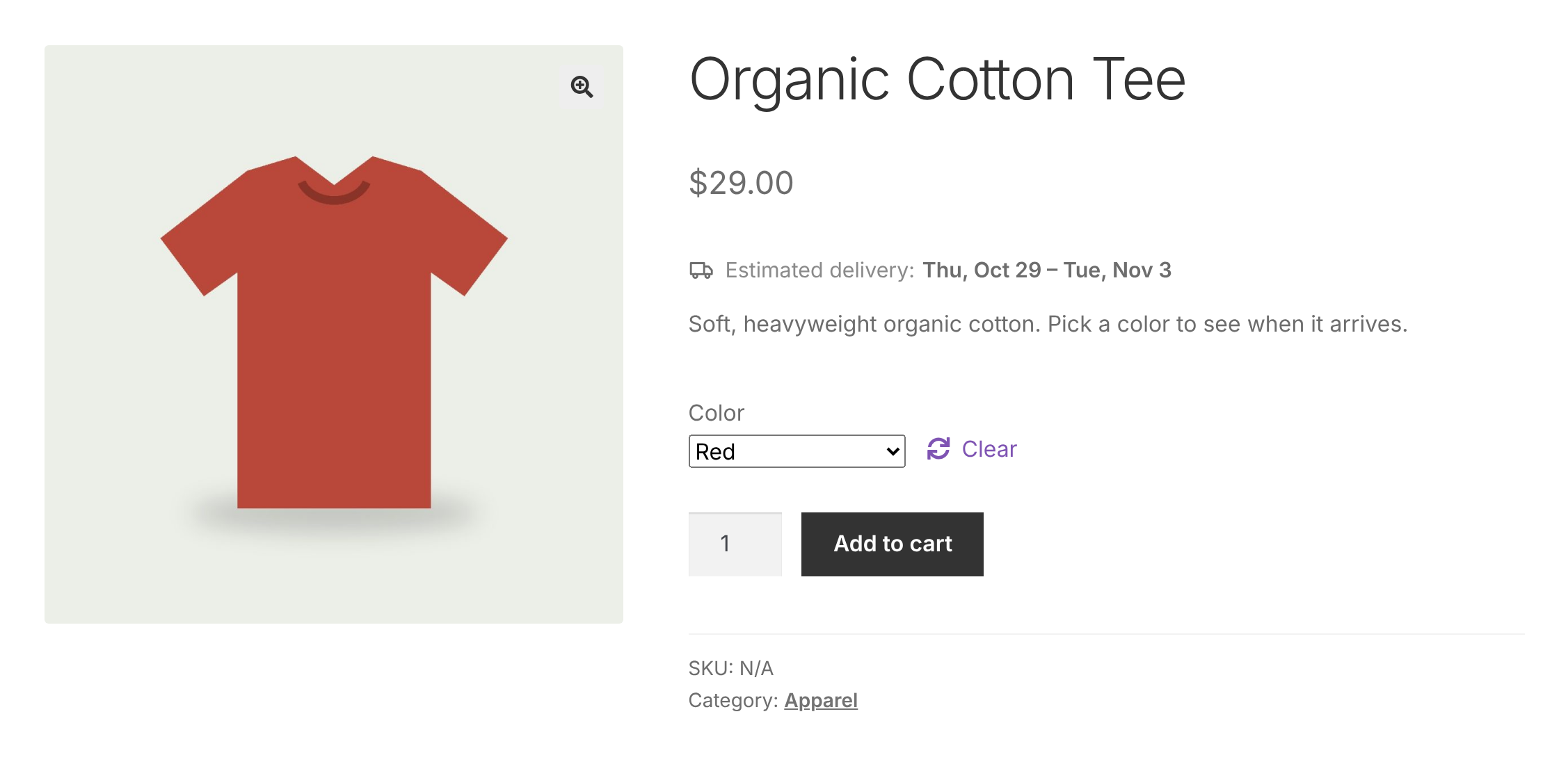
BigLoop Product Delivery Estimate is a free WooCommerce extension that shows customers when their order should arrive, for example “Estimated delivery: Thu, Oct 22 – Mon, Oct 26”.
The plugin is completely free. Every feature is included, nothing is locked, and it never contacts any outside server.
Features
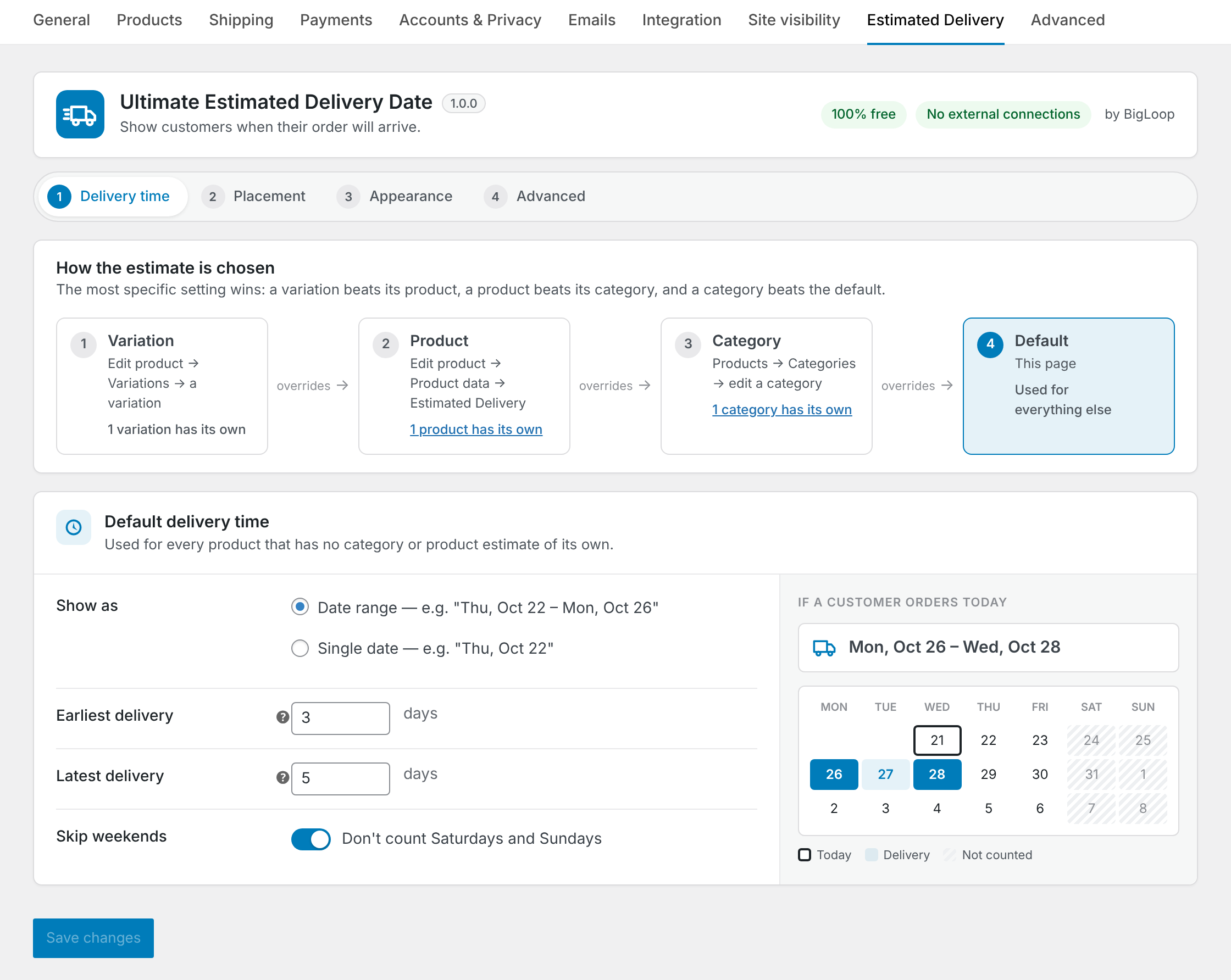
- Range or fixed days – show a date range (minimum and maximum days) or a single date (fixed days).
- Skip weekends – optionally leave Saturdays and Sundays out when counting days.
- Four levels of settings
- Default: one estimate for the whole store (WooCommerce > Settings > Estimated Delivery).
- Category: overrides the default for every product in that category and its subcategories (Products > Categories).
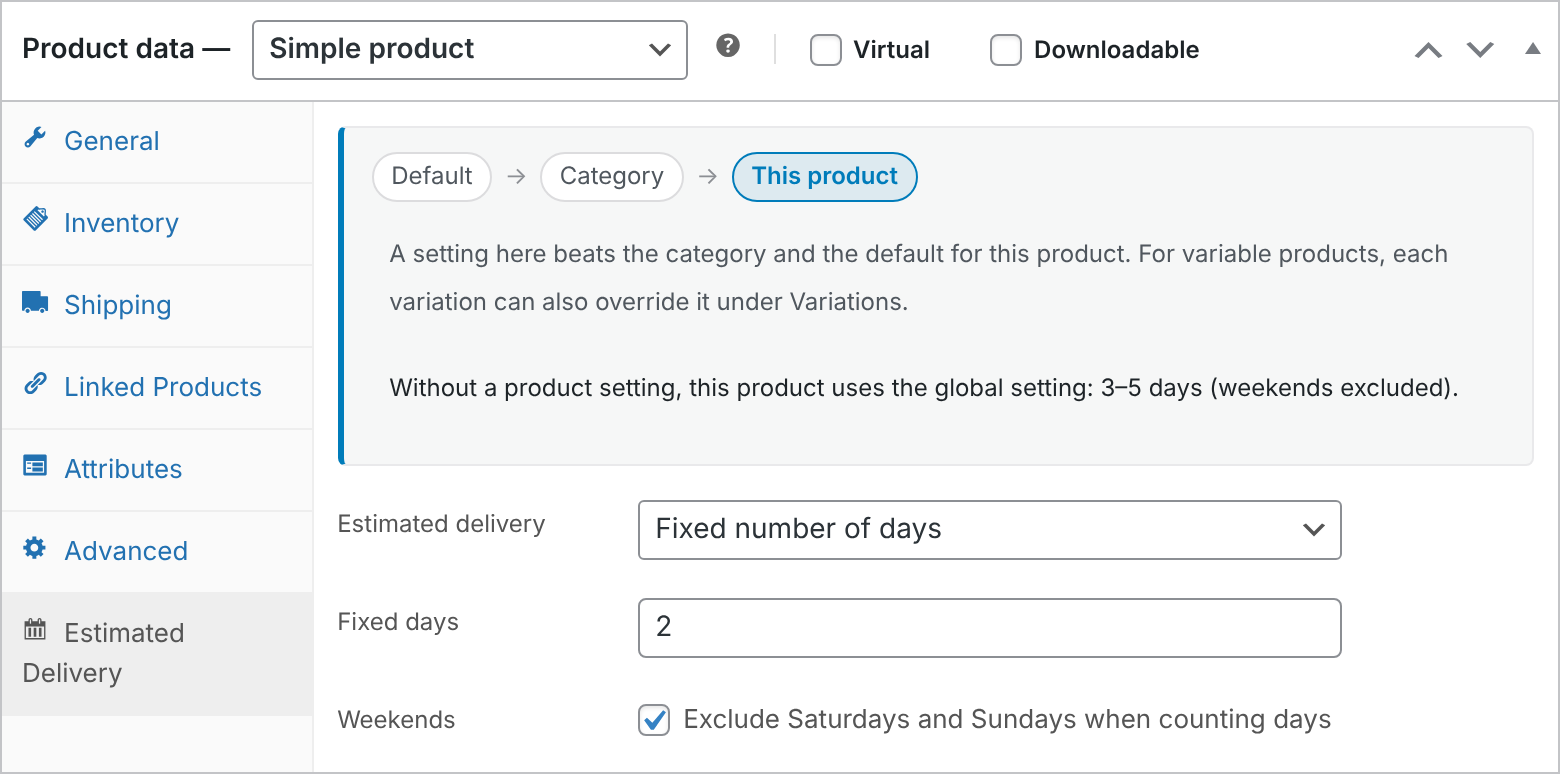
- Product: overrides the category and the default (Product data > Estimated Delivery tab).
- Variation: overrides the product, category and default for one variation (Product data > Variations).
- Variations – on variable products the estimate updates as soon as the shopper picks a variation.
- Hide per category, product or variation – choose “Do not show an estimate” at any level.
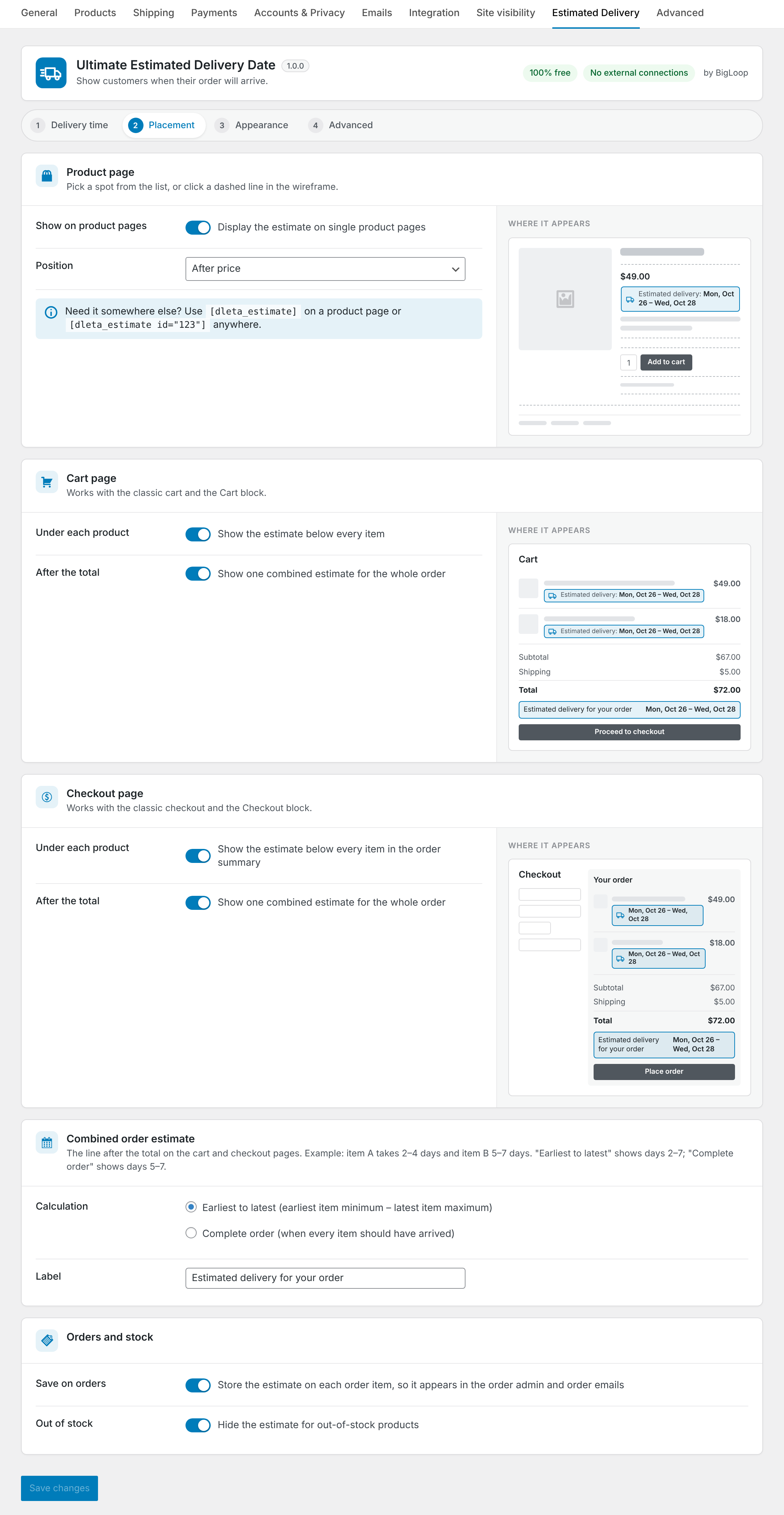
- Product page position – after the title, after the price, after the short description, before or after the add to cart button, after the product meta, after the summary, or shortcode only.
- Cart and checkout – show the estimate under each product in the cart and in the checkout order summary. Each can be switched on or off. Works with both the classic shortcodes and the Cart and Checkout blocks.
- Order estimate after the total – optionally show one combined estimate for the whole cart in a line after the total, on the cart and/or checkout page. Choose “earliest to latest” (earliest item minimum to latest item maximum) or “complete order” (when every item should have arrived). Use it together with the per-product estimates or on its own.
- Orders – optionally save the estimate on each order item so it appears in the order admin and order emails.
- Shortcode –
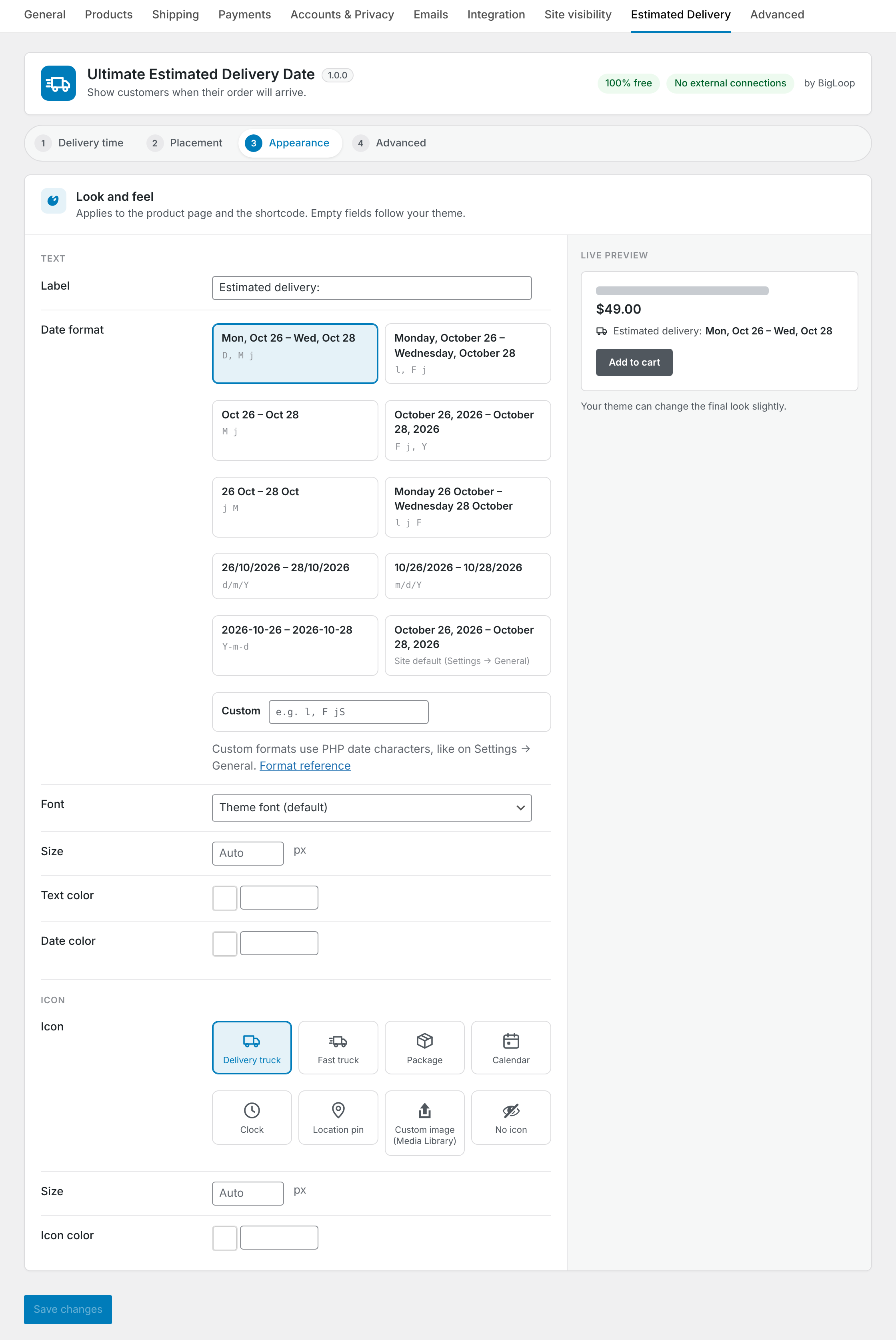
[dleta_estimate]on a product page, or[dleta_estimate id="123"]anywhere. - Icon – choose a built-in icon (delivery truck, fast truck, package, calendar, clock, location pin), upload your own from the Media Library, or show none. Built-in icons can take any color.
- Styling – change the font, text size, text color and date color, plus the icon size and color, with a live preview in the settings. Fonts come from your theme or the visitor’s device; nothing is loaded from outside your site.
- Date format picker – choose from ready-made formats (each shown with real example dates), use your site’s date format, or type a custom one with a live preview.
- Custom label, hide for out-of-stock products.
- WooCommerce Subscriptions – works with simple and variable subscription products. Each renewal order gets a fresh estimate (can be switched off).
- WPML and Polylang – includes a wpml-config.xml: estimates are copied to translated products and categories, and the label, order label and date format can be translated per language. Translations without their own setting fall back to the original’s.
- RTL – the settings and the storefront output work in right-to-left languages.
- Compatible with High-Performance Order Storage (HPOS) and the Cart and Checkout blocks.
- Translation ready.
How the estimate is chosen
- If a variation has its own setting, that is used for that variation.
- Otherwise, if the product has its own setting in the Estimated Delivery tab, that is used.
- Otherwise, if one of its categories (or a parent category) has a setting, that is used. If the product is in several categories with their own settings, the one with the latest delivery is used, so customers are never promised a date that is too early.
- Otherwise, the default setting is used.
Days are counted from today in your site’s timezone (Settings > General).
For developers
dleta_start_date– change the date counting starts from (for example to add an order cut-off time).dleta_is_skipped_day– mark extra non-delivery days, such as public holidays.dleta_resolved_rule– change which rule applies to a product.dleta_show_for_product– show or hide the estimate for a product.dleta_formatted_dates,dleta_product_html,dleta_icon_html– change the output.dleta_date_format_presets– change the ready-made date formats offered in the settings.dleta_style_css– change the generated styling. The estimate uses the CSS custom properties--dleta-font,--dleta-size,--dleta-color,--dleta-date-color,--dleta-icon-sizeand--dleta-icon-color, so themes can also override them in CSS.dleta_product_positions– add product page positions.dleta_cart_context– adjust cart/checkout detection.dleta_cart_dates– change the combined cart estimate. The Cart and Checkout blocks receive it in the Store API cart response underextensions.dleta.
Privacy
This plugin does not collect, store or send any personal data, and makes no connections to external services.
Screenshots

Installation
- Install and activate WooCommerce.
- Upload the plugin folder to
/wp-content/plugins/or install it from Plugins > Add New. - Activate BigLoop Product Delivery Estimate.
- Go to WooCommerce > Settings > Estimated Delivery to set the global estimate and choose where it appears.
- Optionally set estimates for categories (Products > Categories) or individual products (Product data > Estimated Delivery).
FAQ
-
Does the plugin send any data outside my site?
-
No. All calculations happen on your server. The plugin makes no external requests, loads no remote files and does not track anything.
-
The date does not change from day to day
-
If you use a page cache, product pages may be cached with yesterday’s date. Set your cache to expire at least once a day, or exclude product pages from the cache.
-
My theme uses blocks. Where does the estimate appear?
-
WooCommerce runs the classic product page hooks inside its block templates, so the positions work in most block themes. If a position does not show in your theme, choose “Shortcode only” and add a Shortcode block with
[dleta_estimate]where you want it. -
Can I exclude public holidays?
-
Not from the settings screen yet. Developers can use the
dleta_is_skipped_dayfilter. -
How is the order estimate after the total calculated?
-
It looks at every product in the cart that shows an estimate. Example: item A takes 2–4 days and item B takes 5–7 days. “Earliest to latest” shows days 2–7. “Complete order” shows days 5–7, the window in which everything should have arrived. Virtual products and products set to “Do not show” are left out.
-
Where do I find the settings?
-
WooCommerce > Settings > Estimated Delivery. The settings are split into four sections: Delivery time (with a live calendar showing what customers will see), Placement (with wireframes of the product, cart and checkout pages showing exactly where the estimate appears), Appearance (with a live preview) and Advanced.
-
Can I use a Google Font or other web font?
-
Yes, if your theme (or a font plugin) already loads it. Choose “Custom” under Font and type the font name, for example
"Open Sans", sans-serif. The plugin itself never loads fonts from outside your site. -
Where do the font, size and color settings apply?
-
To the estimate on the product page and in the
[dleta_estimate]shortcode. On the cart and checkout pages the estimate follows your theme’s styling, so it matches the rest of the cart. -
Does it work with WooCommerce Subscriptions?
-
Yes, with simple and variable subscription products. The estimate shows on the product page, in the cart and at checkout like any other product. The subscription itself does not store a date (it is not shipped); instead each renewal order gets a fresh estimate. You can switch that off under Placement > Orders and stock. Virtual subscriptions (for example memberships) show no estimate.
-
Does it work with WPML?
-
Yes. The plugin includes a wpml-config.xml. Estimates set on products, variations and categories are copied to their translations. Translate the label, the order label and the date format in WPML > String Translation; month and day names follow each language automatically.
-
Can I use my own icon?
-
Yes. Under WooCommerce > Settings > Estimated Delivery, set Icon to “Custom image (Media Library)” and choose an image. A small square SVG or PNG works best. The built-in icons follow your text color, or a color you pick.
-
What happens to virtual products?
-
Virtual products are not delivered, so no estimate is shown for them.
-
What happens to my data if I delete the plugin?
-
By default, settings are kept. To remove all settings and category/product estimates on deletion, tick “Uninstall” under WooCommerce > Settings > Estimated Delivery before deleting the plugin. Estimates already saved on orders are always kept as part of the order history.
Reviews

Contributors & Developers
“BigLoop Product Delivery Estimate” is open source software. The following people have contributed to this plugin.
Contributors
Translate “BigLoop Product Delivery Estimate” into your language.
Interested in development?
Browse the code, check out the SVN repository, or subscribe to the development log by RSS.
Changelog
1.0.0
- First release.