

Description
BG Couriers is shipping with Bulgaria’s own couriers inside WooCommerce: your customer chooses where the parcel goes and sees what that delivery costs, and you print the label and follow the parcel without leaving WordPress.
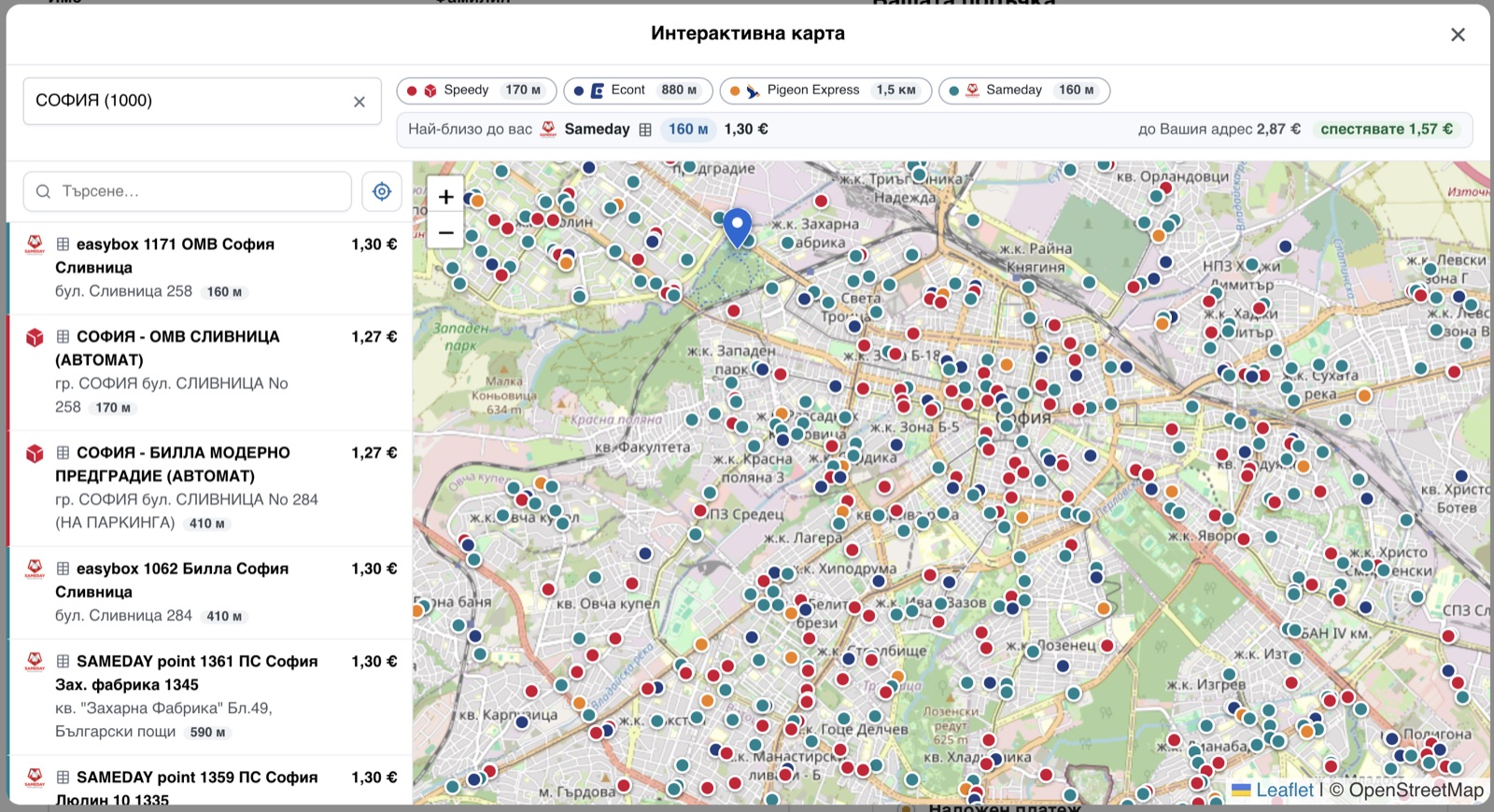
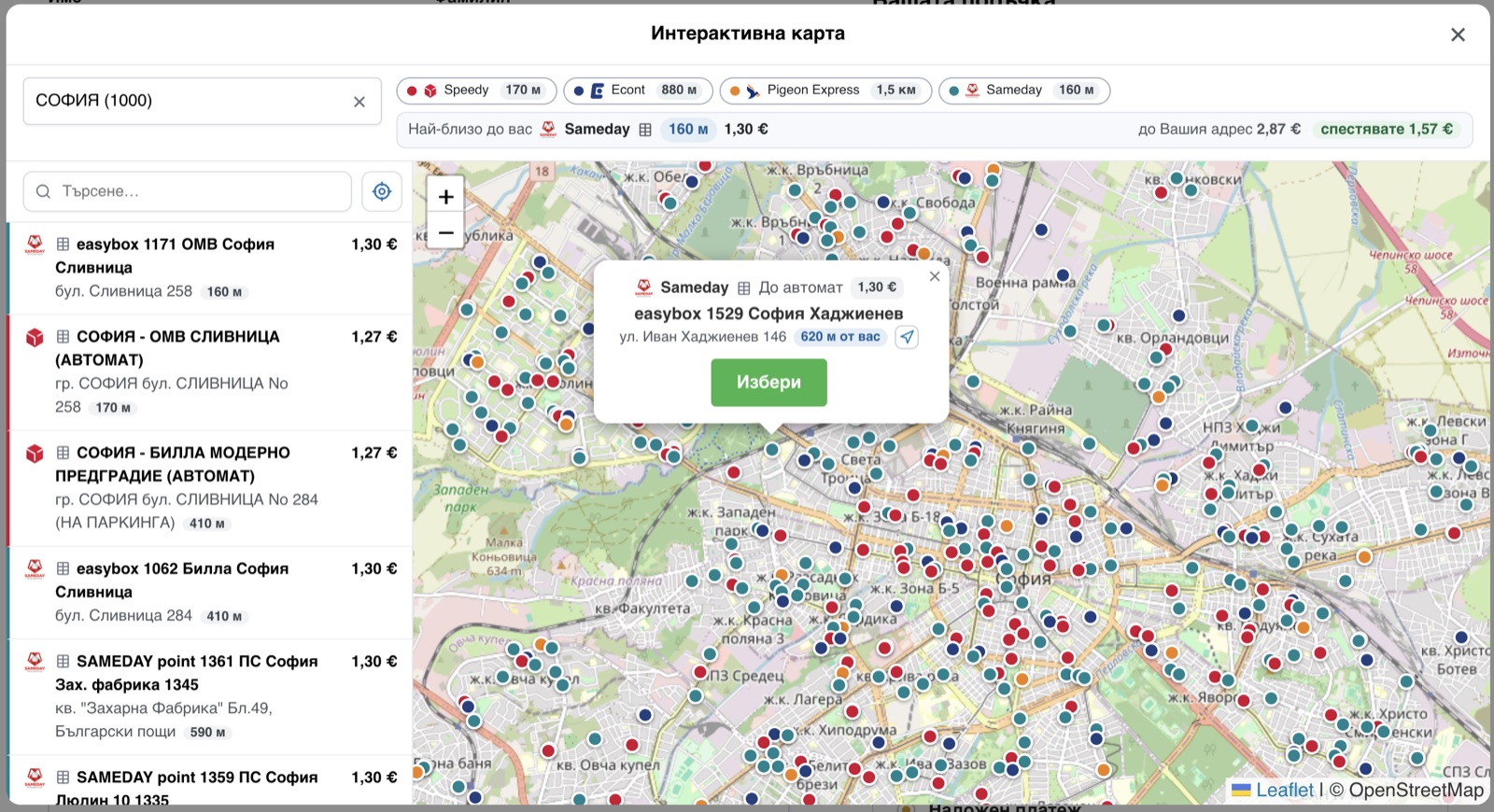
At the checkout every courier you switch on shows its own price for the basket, live from that courier’s API. Your customer picks how the parcel is delivered (to an office, to an address, or to a locker/APS) and finds the office by typing the town, or by pointing at it on one map that carries every courier’s offices and lockers at once, each with its own price. The map can also say which pickup point is closest to them.
In the admin one click issues the waybill and the label: one order, or fifty of them into a single PDF (A6 labels or an A4 sheet). The plugin then keeps each shipment’s status up to date by itself, and your customer sees the waybill and a tracking link on their order and in the e-mails you already send them.
It is free, GPL, and stays that way: every courier, every feature, no paid tier. Deliveries are within Bulgaria.
На български: доставка с куриер за WooCommerce: Спиди, Еконт, BOX NOW, Sameday (easyBox), Pigeon Express, Express One и Европът. Всички куриери в един плъгин: до офис, до адрес или до автомат, наложен платеж, товарителници и етикети с едно кликване, проследяване на пратката. Интерфейсът е изцяло на български.
Couriers
- Speedy (Спиди): office / address / APS. Live rates, labels, tracking.
- Econt (Еконт): office / address / Econtomat. Live rates, labels, tracking, and cash on delivery (наложен платеж) with an itemised packing list.
- Pigeon Express: office / address / locker. Live rates, labels, tracking.
- Sameday: office / address / easyBox. Live rates, labels, tracking.
- BOX NOW (BoxNow): lockers (APM) only, picked by town and locker like every other courier (the towns are read off its lockers). Flat rate.
- Express One: office / address / EXOBOX locker. Live rates, labels, tracking. The address is chosen from Express One’s own street list, which is what its waybills require.
- Европът (Evropat): office / address. Live rates, labels, tracking. The address is chosen from Европът’s own street list, which its waybills require.
Setting it up
You need your own account with each courier you want to offer: the prices your customers see and the labels you print are your own contract’s, and nothing is resold through this plugin. Once you have the API credentials, a courier takes a couple of minutes:
- Paste the credentials on that courier’s tab and switch the courier on; it checks them with the courier there and then, and says so plainly if they are refused.
- Sync its towns and offices: one button.
- Add it to your Bulgaria shipping zone, and to the zone of any other country you deliver to.
Everything else already has a working default: the prices, the map, the checkout fields and the label size all work as they ship.
Also included
- Cash on delivery (наложен платеж), with the choice of who pays the delivery, and the amount to collect follows that choice.
- Free-shipping thresholds, per courier and per delivery type.
- Several parcels in one shipment, and insurance for a value you set (Speedy, Sameday).
- A delivery estimate on the cart page, before the customer reaches the checkout.
- Labels issued automatically when an order reaches a status you choose, or per courier, or not at all.
- Works on both the classic and the block checkout.
- Fully translated to Bulgarian.
External services
The plugin uses the online API of each courier you enable, to price a delivery, to create a label and to track a parcel. Nothing is sent to a courier you have not configured.
What is sent, and when
- Price quote (cart / checkout): the parcel weight, the destination town or office, and the delivery type. When the customer views the shipping options.
- Label (admin): the recipient’s name, phone, e-mail, the chosen address or office/locker, the parcel weight, and, with cash on delivery, the amount to collect and the item list. When you generate the label.
- Tracking: the waybill number. When tracking is opened or refreshed.
Courier APIs
- Speedy: api.speedy.bg. Terms · Privacy
- Econt: ee.econt.com. Terms · Privacy
- Pigeon Express: api.pigeonexpress.com (api-demo.pigeonexpress.com in test mode). Terms · Privacy
- Sameday: api.sameday.bg (sameday-api-bg.demo.zitec.com in test mode). Terms · Privacy
- Express One: system.expressone.bg. Terms · Privacy
- BOX NOW: api-production.boxnow.bg (api-stage.boxnow.bg in test mode). Terms · Privacy
- Европът (Evropat): api.evropat.com. Terms · Privacy
Maps and address lookup
- OpenStreetMap tiles: tile.openstreetmap.org. Map tiles only, loaded when the customer opens a map. Tile policy · Privacy
- OpenStreetMap Nominatim: nominatim.openstreetmap.org. One set of coordinates, turned into an address or a town name. It happens in two cases only: the customer drops a pin on the address map picker (a setting, off by default), or presses “find me” on the map before naming a town, so the town can be filled in for them. Nominatim policy · Privacy
- Google Maps Geocoding: maps.googleapis.com. Takes over those same lookups, and only if you set a Google Maps API key in the settings (optional; OpenStreetMap is used if the key is empty or Google does not answer). It receives the coordinates and nothing else. Terms · Privacy
The map’s “closest to you” (on by default, switchable off) works out the distances in the customer’s own browser. Their position is never stored on the site and is forgotten when the page is closed.
No data is sent to any service you have not configured, and the plugin sends nothing to its author.
Contributing
The plugin is developed in the open. Bugs, ideas and pull requests are welcome on GitHub.
Screenshots




Installation
- Upload the plugin to
/wp-content/plugins/bg-couriers(or install via the Plugins screen) and activate it. WooCommerce must be active. - Go to WooCommerce Settings BG Couriers.
- Open a courier’s tab, enter its API credentials, click Validate, then Sync its cities/offices.
- Add the courier’s shipping method to your Bulgaria shipping zone (WooCommerce Settings Shipping), and to the zone of any other country you deliver to.
FAQ
-
Which countries are supported?
-
Bulgaria, by seven Bulgarian networks: Speedy, Econt, Pigeon Express, Sameday and Express One deliver to an office, to a street address or to a locker, Европът to an office or a street address, and BOX NOW to its lockers (APM). Delivery outside Bulgaria is not offered.
-
How can I support the development?
-
The plugin is free, GPL, and stays that way: every courier, every feature, no paid tier. If it has saved you work and you would like to put something behind it: revolut.me/danq6lus. It is entirely voluntary and changes nothing about the support you get. Reporting a bug in the support forum, or leaving a review, helps just as much.
-
When is the waybill created, and when should it be?
-
Either when you choose, or by itself. Auto-generate labels (BG Couriers -> General) issues the waybill the moment an order reaches the status you pick; each courier’s own tab can overrule that for itself. With it off, an order shows a Generate button instead, and the bulk action Print waybills A4/A6 creates any that are missing and hands you one PDF, so you print at the packing table and the waybill is made at that moment.
If the order says when it ships (a dispatch day shown at the checkout, the way the Order Delivery Date plugin records one), Wait for the dispatch day (General, on by default for new installs) holds the automatic waybill for the morning of that day rather than the moment of payment; the order says so in a note and the shipment panel shows the day. Generating by hand is never held back, and an order that names no day is labelled at once. Shops that were already running keep issuing at once until they tick the box. Any other source of a dispatch day can answer through the
bgcouriers_dispatch_timefilter.It matters more than it sounds. For most couriers a waybill is only data, and the visit is a separate request you make with Request a courier. Sameday has no such request: creating the AWB is what puts the parcel in that day’s collection list, and its courier comes for it, measured within two hours. A waybill issued the moment an order is paid therefore sends a van to a parcel nobody has packed yet, the courier finds an empty counter and voids the waybill. So for couriers that behave that way this plugin leaves automatic labels off by default, whatever the general setting says, and you turn them on only if your parcels really are ready that early. Shops that were already running keep whatever they had.
-
Do I need an account with the couriers?
-
Yes. Each courier requires its own API credentials, obtained from that courier. Enter them on the courier’s settings tab.
-
How are prices calculated?
-
Live from each courier’s API for the parcel weight and destination. If the API is briefly unreachable, a daily reference price (or your configured default) is used. BOX NOW uses a flat rate you set (it has no rate API).
-
Does it bundle any third-party libraries?
-
Yes, and all are GPL-compatible and shipped with their source: FPDF (permissive) and FPDI (MIT) to compose label PDFs, and Leaflet (BSD-2-Clause) with OpenStreetMap tiles for the map picker. The courier and courier brand names are used only to identify the services the plugin integrates with; this plugin is not affiliated with or endorsed by any of them.
Reviews
There are no reviews for this plugin.
Contributors & Developers
“BG Couriers for WooCommerce” is open source software. The following people have contributed to this plugin.
Contributors
Translate “BG Couriers for WooCommerce” into your language.
Interested in development?
Browse the code, check out the SVN repository, or subscribe to the development log by RSS.
Changelog
0.4.27
- Fixed: the Bulgarian catalogue is back in the package. Installs from WordPress.org have been reading the plugin in English since 0.4.26 – the whole of it, the checkout customers see included – on shops whose WordPress, WooCommerce and theme are all Bulgarian. The catalogue was never missing from the plugin’s code; it was being stripped out of the published package, and the directory has no language pack of its own to put back. The compiled catalogue ships again. If a language pack appears on WordPress.org later, it still wins: WordPress reads wp-content/languages before the plugin’s own folder.
0.4.26
- The Bulgarian catalogue now ships in the form WordPress reads first. Since 6.5 the loader asks for a
.l10n.phpbefore the.mo, so a leftover PHP catalogue elsewhere – one Loco Translate wrote, or a host’s translation cleanup – answered before the plugin’s own and the shop read the checkout in English. The plugin now carries both files, built from the same catalogue and checked against each other on every release. It also saves WordPress parsing a 130 KB binary on each request.
0.4.25
- Fixed: the plugin’s own strings could come out in English on a Bulgarian shop – “To office”, “City”, “Office” – while WordPress, WooCommerce and the theme around them were all translated. The Bulgarian catalogue ships with the plugin and is fine; what fails is WordPress’s just-in-time loading, which needs the plugin’s translation path to be registered, and that registration is lost on a renamed plugin folder, a stale plugin cache, or a string asked for before init. The plugin now loads its catalogue itself, from its own folder, on init – the path is taken from the plugin file rather than from that registry.
0.4.24
- Directory listing only: the BOX NOW tag was written “box now”, which WordPress.org turned into a tag of its own with exactly one plugin on it – ours – and a tag page with one plugin is not shown at all.
boxnow, which three plugins share, is shown. Nothing else changed.
0.4.23
- Directory listing only, no code change: the short description now says “Bulgarian courier shipping” – the word shops actually type – and one tag was swapped for
shipping. Measured in the directory before this: the plugin is found for “evropat” (1st), “куриер woocommerce” (1st) and “econt woocommerce” (8th), but not in the top 25 for “speedy woocommerce”.
0.4.22
- The delivery block no longer appears in the order totals for a blink before moving under the customer’s details. WooCommerce renders it on the right and the browser carries it to the left, so on a slow first paint it was drawn twice and jumped. The rows are hidden from the first paint instead – by the same script that does the moving, never by the stylesheet, and the hiding undoes itself after three seconds if nothing moved: with scripts blocked a hidden shipping row would be a checkout with no way to choose delivery.
0.4.21
- Added: when the delivery is paid to the courier (“Delivery in the order total” off), the order, the customer e-mail and My account now say how much that is, under the delivery row: “~3,06 EUR paid to the courier on delivery”. The amount is not added to the order total. It is re-quoted the moment the waybill is created, so it is what the courier is about to charge rather than what the basket guessed; cancelling a waybill leaves it alone. The shop sees the same line on the order screen, where the delivery row otherwise reads 0.
- Fixed: switching a courier on now asks for its towns and offices straight away. Until now that happened only on the weekly sync, so a courier enabled the day after one ran stood on the checkout for days with an empty town dropdown and no price, as if the plugin were broken.
0.4.20
- Fixed: on a shop using “delay JavaScript until interaction” (WP Rocket, perfmatters), the checkout now keeps its own scripts out of that delay. The delivery block is put in place by script, and the town and office pickers are built by one, so until the customer touched the page the block sat at the bottom and the pickers were bare dropdowns. Only the checkout is excluded; every other page keeps the shop’s speed settings as they are.
- Fixed: on a phone or a tablet, the courier tabs and the delivery-option sub-tabs on the settings screen could stop responding to taps until the page was reloaded. Both rows can be dragged to reorder them, and that drag listens for mouse events a touch screen never sends properly: once it believed a drag had begun and never saw it end, every tap after that was swallowed. Dragging is now left to devices with a mouse; on touch the tabs are simply tabs.
0.4.19
- Changed: the delivery type is now part of the shipping method on the order itself, so it reads “Speedy: To office” (or To address / To APS) wherever a shipping method is shown: the WooCommerce mobile app, the order screen, the customer’s e-mail, the invoice. For an office or locker order the address on the order IS the office’s, which reads like a home address with a company line above it, and nothing on the order said which kind of delivery it was.
0.4.18
- Changed: the reference price a courier row shows BEFORE a town is chosen is now measured per price zone (inside Sofia, and outside it), and the one shown by default is the outside-Sofia price. Every courier here charges two different prices for the same parcel, and the single cached reference was quoted against whichever town sorted first in the courier’s own list (a village), so the price moved the moment a customer named their town. Most customers now see that first number confirmed; a customer in Sofia sees it go down.
- Added: “Where the delivery block goes” (WooCommerce > Settings > Shipping > BG Couriers > Checkout). The couriers, their prices and the fields of the one chosen can now sit under the customer’s details, right after the phone number, instead of at the bottom of the page in the order review. On a checkout with add-ons, gift options or a long totals table, the couriers were the last thing a customer reached, after everything optional. The whole block moves as one, so every field stays inside the row of the courier it belongs to. Classic checkout only. Default: unchanged.
0.4.17
- Fixed: WooCommerce > Reports > Sales by date died with “add_to_reports(): Argument #1 must be of type array, false given”. WooCommerce passes false for its refund sub-queries there, and the plugin’s order-status filter refused it; the value now passes through untouched. Reported by a user, thank you.
- Fixed: the bulk “Print labels” action never marked its waybills as printed, so a shop that prints in batches saw every waybill flagged “not printed yet” for good.
- Changed: “not printed yet” is the Print button itself turning green, on the orders list and on the order screen, with the wording on hover; the separate printer badge and the green banner are gone. The button turns back the moment it is clicked, through every print route.
0.4.16
- Changed: the plugin page reads without dashes. Readme only, no code change.
0.4.15
- Changed: on the plugin page, every service address (api.speedy.bg, ee.econt.com, the map providers and the rest) is a link, like the terms and privacy links beside it. Readme only, no code change.
0.4.14
- Added: Speedy “Send parcels from”: choose the Speedy office you hand parcels in at, and every price quote and every waybill starts there (Speedy’s drop-off office) instead of a courier pickup from your address. Whether that is cheaper depends on your Speedy contract; the estimate shown before a town is picked is re-quoted the moment you change it.
- Fixed: the “Add X more for free delivery” notice keeps the text colour your theme gives it. On a theme that paints the notice blue with white text it read dark grey on blue.
0.4.13
- Changed: the plugin page’s tags and description carry the names people search for: Express One and BOX NOW as they are written, and Спиди, Еконт and Европът in Bulgarian, with a Bulgarian summary. Every courier’s terms and privacy policy is a link, and the page has real headings. Readme only, no code change.
0.4.12
- Fixed: the BOX NOW webhook accepts the header BOX NOW actually sends, and a refused message says why. When you register the webhook URL with BOX NOW, give them the header name X-BGC-Webhook-Secret with your secret as its value (the settings show both); a message BOX NOW signs is still accepted, as hex or Base64. A refusal now names the reason, and with debug logging on says what arrived.
- Fixed: a BOX NOW webhook message is read by its event, as BOX NOW’s guide says, so a parcel waiting in the locker, in the depot or expired and on its way back lands on its own stage instead of “in transit”.
0.4.11
- Fixed: the Европът privacy-policy link now shows as a link rather than a long encoded web address.
0.4.10
- Fixed: the estimated delivery price shown before a town is picked no longer reads about 20% low for a courier that charges its own VAT (Speedy, Express One, Sameday) on a shop WooCommerce adds no shipping tax to; the estimate now carries the courier’s tax and matches the price once a town is chosen.
- Added: the map, and the checkout’s automat dropdown, show which Sameday easyBox lockers are full and grey them out, kept live. A full locker cannot be chosen; “full” follows your parcel’s size against the box’s small, medium and large compartments. Only Sameday reports free compartments, and staffed points are never marked full.
- Fixed: the address map now shows a delivery as free once the order has earned free shipping, matching the checkout row instead of the ordinary per-office price.
- Fixed: the checkout block’s address hide and required phone now hold on the Store API even when another plugin reads the country locale early, so an order is no longer refused for a street or town the block never showed.
0.4.9
- Fixed: a delivery street that shares its name with another in the same town (Sofia’s бул. ВИТОША and ул. ВИТОША) is no longer refused by the courier; the order now carries the exact street. Covers Speedy, Express One, Европът and Pigeon, and streets chosen on the address map.
- Fixed: a Pigeon Express street can now be found in a big town (only the first page of its street list was read before).
- Checkout block: on WooCommerce’s block-based checkout the courier pickers now come to life and re-price after a tab click, the address is asked once instead of twice, the phone is required in place, cash on delivery re-prices the rate, a house number typed just before Place Order is kept, and a fresh cart no longer shows refusals before anything is done.
- Added: the waybill on the order screen and the orders list now shows when it is out of date (the order changed after it was issued) and when it still needs printing.
- Fixed: the “track this parcel” links for BOX NOW and Sameday now open the courier’s tracking page.
- Fixed: an Econt address refusal is shown in the courier’s own words.
- Faster: a town’s street list is fetched once a day instead of on every keystroke; town search now lists a name that starts with what you typed before one that merely contains it.
- Fixed: switching the plugin off clears its scheduled tasks; the “Checkout dropdown results” setting honours its default of 20.
Earlier versions, and the full account of every entry above (what each fix was and how it was found) are in docs/CHANGELOG.md in the plugin’s repository.