

Description
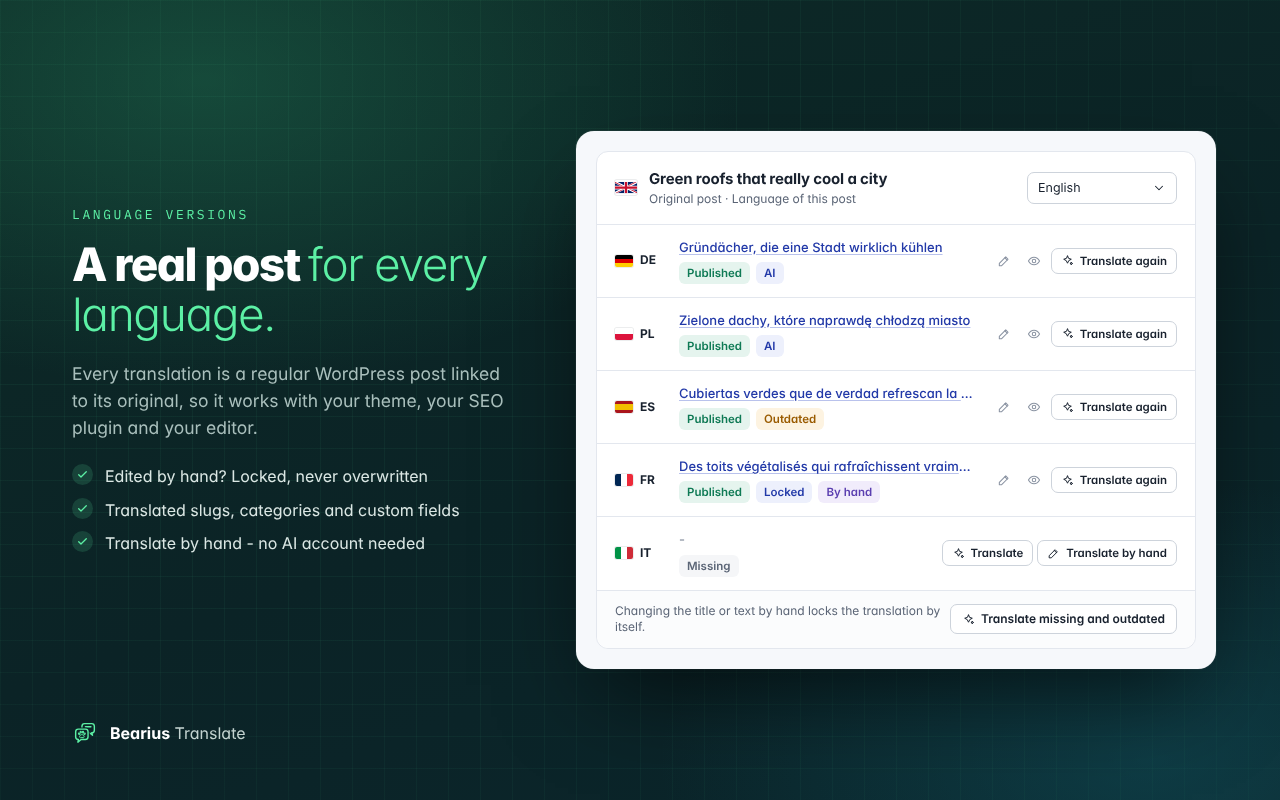
Bearius Translate turns a WordPress site into a multilingual one without a translation subscription. Every language version is a regular WordPress post linked to its original, so it works with your theme, your SEO plugin and your editor like any other post.
Translate by hand, or let an AI model of your choice do it with your own API key – through OpenRouter (hundreds of models with one key) or any OpenAI-compatible API, including models running on your own server. You pay the provider directly, usually a fraction of a cent per article. No words are counted and nothing is billed by the plugin. AI is optional: without a key everything else works.
Already using another multilingual plugin? Import the translations you have straight from your pages, keep your addresses and pay for nothing twice.
Languages and addresses
- Every language version is a regular post or page, edited like any other. Editing a translation by hand locks it, so later updates of the original never overwrite your changes.
- Language prefixes in addresses (example.com/de/…), translated slugs for posts and categories, no cookies and no browser redirects – friendly to page caches and Cloudflare.
- hreflang links with x-default and a canonical link pointing to each version itself.
- Categories, tags and custom fields follow the original, so sliders, featured posts and other theme sections work in every language.
- Theme queries by category, tag or chosen posts show the posts of the current language instead of staying empty.
Translating by hand
- “Translate by hand” creates a draft copy of the original in the chosen language – already linked, with the featured image, categories and custom fields – and opens it in the editor.
- A post written separately can be linked as the translation of an existing original, and a translation can be detached again.
- Categories and tags: type the name of a missing language version on the edit screen.
- Short site texts (site name, menu labels, theme options) and theme or plugin texts are translated in simple tables.
AI translation (optional)
- New and updated posts are translated in the background, a few per minute, with automatic retries when the provider is busy.
- Style instructions per language (filled in for you), a glossary, terms that are never translated and a choice how freely titles may be adapted.
- Every translation is checked: HTML, links, headings, paragraphs and length. Anything suspicious – also an answer of the model instead of a translation – is saved as a draft to check.
- SEO titles and descriptions and the custom fields you choose are translated with the post; texts in block settings and shortcode attributes too.
- Short site texts (site name, menu labels, texts from theme and plugin options) and theme or plugin texts can be translated by AI as well.
- A queue with costs reported by the provider, a log with automatic clean-up and plain explanations of every error.
Language switcher
- As a menu item, widget, block, shortcode, PHP function or floating button – one look everywhere.
- Hybrid style: codes on computers, a sheet at the bottom of the screen on phones. Colours and shape follow your theme or your settings.
- Menus are mapped to translations automatically; widgets can be shown per language.
Moving from another plugin
- Import of existing translations from TranslatePress, WPML, Polylang or Weglot by reading your own pages while the old plugin is still active. Addresses stay, nothing is paid for again.
- Test on one post first, then run the whole import in the background or from the command line.
- After the switch: an address test, 301 redirects for changed addresses and a list of addresses not found.
- A preparation mode: Bearius works next to the old plugin until you deactivate it, so visitors see no change before you are ready.
Compatibility
- wpml-config.xml files of the active theme and plugins are read automatically: custom fields, theme options, shortcode attributes, block settings and recommended content types.
- Public PHP functions, filters and actions, a REST API field and WP-CLI commands.
- Page builder layouts (Elementor, Divi, WPBakery and similar) are recognised and are not sent to AI as a whole – translate them by hand or import them from the old plugin.
The plugin interface is in English and fully prepared for translation on translate.wordpress.org.
External services
This plugin connects to an AI service chosen by the site owner, only when a translation job runs (automatic translation after publishing, a “Translate” action, translation of site texts or the connection test).
- OpenRouter (default): https://openrouter.ai – the text of the translated post (title, content, excerpt, slug, the alt text of the featured image and the custom fields chosen in the settings), short site and theme texts chosen for translation, the target language and the style instructions are sent to https://openrouter.ai/api/v1/chat/completions together with your API key. No site name or address is sent. Terms: https://openrouter.ai/terms – Privacy policy: https://openrouter.ai/privacy
- Custom OpenAI-compatible API (optional): the same data is sent to the address you enter in the settings. The terms and privacy policy of that provider apply.
The import and the address tools send requests only to your own site, to read pages that already exist. When you save the languages, missing WordPress language packs are downloaded from WordPress.org by WordPress itself.
Screenshots


Blocks
This plugin provides 1 block.
- Przełącznik języków (Bearius)
Installation
- Install and activate the plugin.
- Open Bearius Translate – Languages, add your languages and save. Missing WordPress language packs are downloaded.
- Translate by hand from the post list or the editor box (“Translate by hand”), or – for AI translation – open AI translation, paste your OpenRouter key (or the address and key of another OpenAI-compatible API) and choose a model.
- Add the language switcher to a menu (Appearance – Menus, “Language switcher” box) or use the widget, block or [bearius_languages] shortcode.
Moving from another multilingual plugin? Keep it active and follow the steps in Bearius Translate – Migration and import.
FAQ
-
Do I need an AI account?
-
No. Without it you translate by hand: “Translate by hand” makes a linked draft copy of the original in the chosen language, ready to overwrite. Importing existing translations and all other features work without AI too.
-
How much does AI translation cost?
-
It depends on the model and the length of your texts. The queue shows the cost reported by the provider for every job, so you always know what you pay.
-
What happens with my old multilingual plugin?
-
Keep it active while you import or translate – Bearius works in preparation mode and visitors keep seeing the old plugin. Deactivate it when everything is ready; language addresses and the switcher switch on by themselves.
-
Can I edit a translation?
-
Yes. A translation is a normal post. Once you change it by hand it is locked, so automatic updates never replace your work. You can unlock it in the editor box.
-
Does it work with page builders?
-
Pages built with a page builder are recognised and are not sent to AI as a whole, because a whole layout could break on the way. Use “Translate by hand” (the copy keeps the layout, you change the texts in the builder) or import them from your old multilingual plugin. Texts inside Gutenberg block settings and ordinary shortcodes are translated.
-
Does it work with a page cache or Cloudflare?
-
Yes. The language comes from the address only, without cookies or browser redirects.
Reviews
There are no reviews for this plugin.
Contributors & Developers
“Bearius Translate” is open source software. The following people have contributed to this plugin.
Contributors
Translate “Bearius Translate” into your language.
Interested in development?
Browse the code, check out the SVN repository, or subscribe to the development log by RSS.
Changelog
1.0.0
- First public release.
- Translation by hand without any AI account: linked draft copies, linking existing posts, term versions typed on the edit screen.
- Settings, translations and language links of the development builds (0.x) are taken over automatically.
- The “Powered by Bearius” link (optional, off by default) appears only once when several Bearius plugins have it switched on.