Description
AXIAL Audio Post Narration connects WordPress to the AXIAL Nebula Audio service and lets editors generate audio for already-published content.
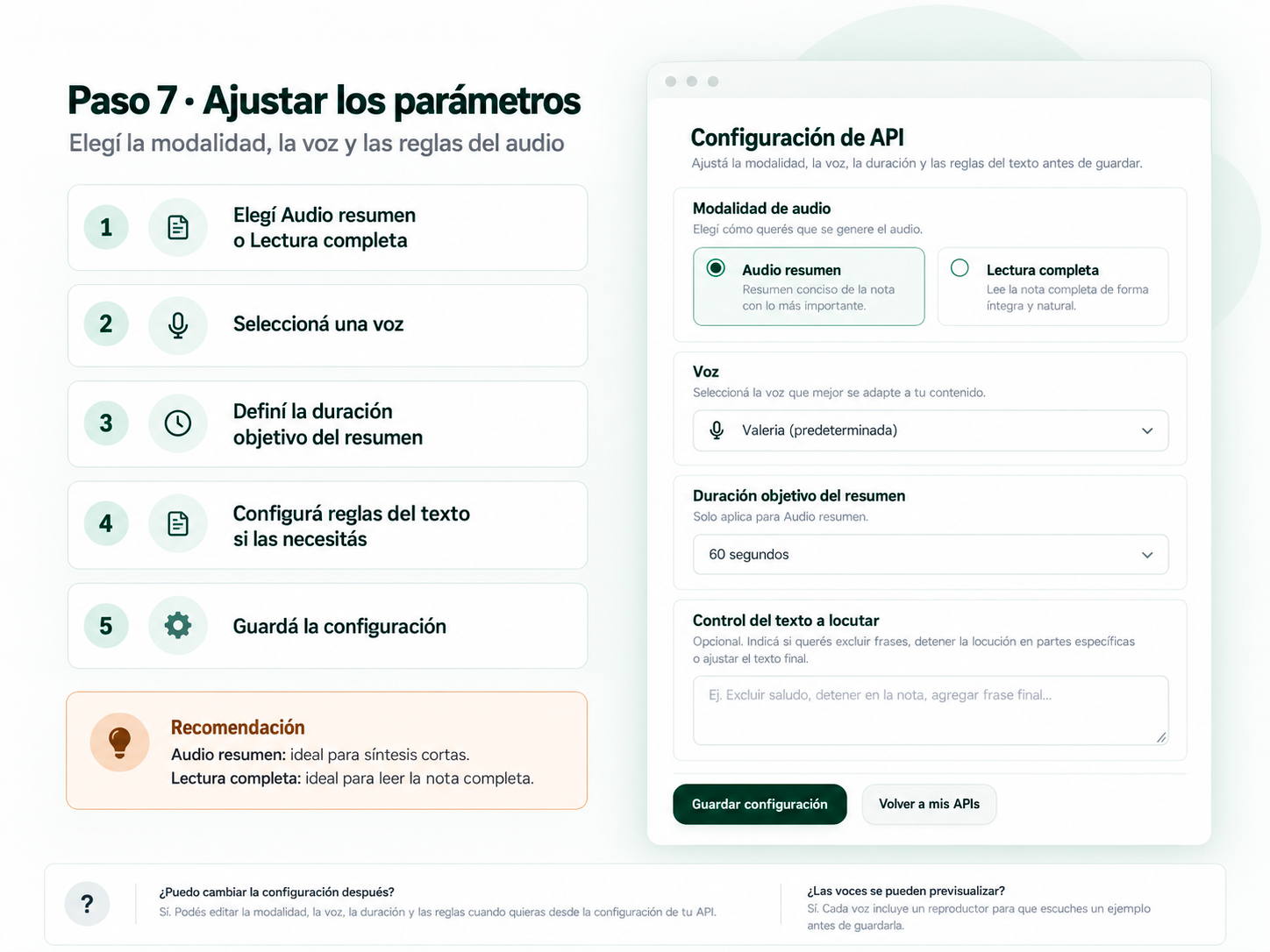
The plugin supports two audio modes, selected in the Nebula API configuration:
- Audio summary: Nebula prepares a shorter spoken version of the post.
- Full reading: Nebula prepares the complete article for natural narration without intentionally summarizing it.
The generated audio can be downloaded into the WordPress Media Library and displayed with an accessible audio player.
Features include:
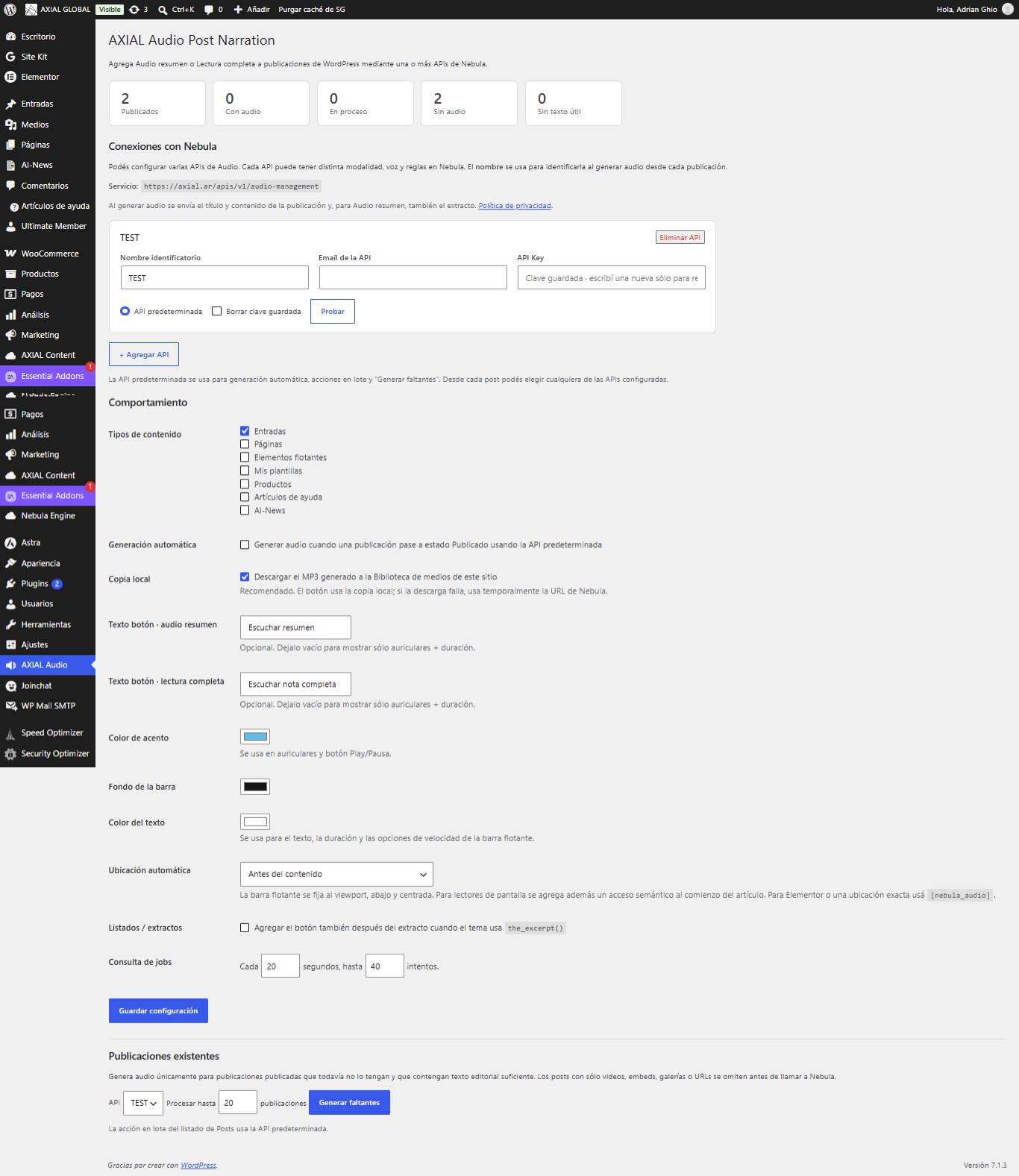
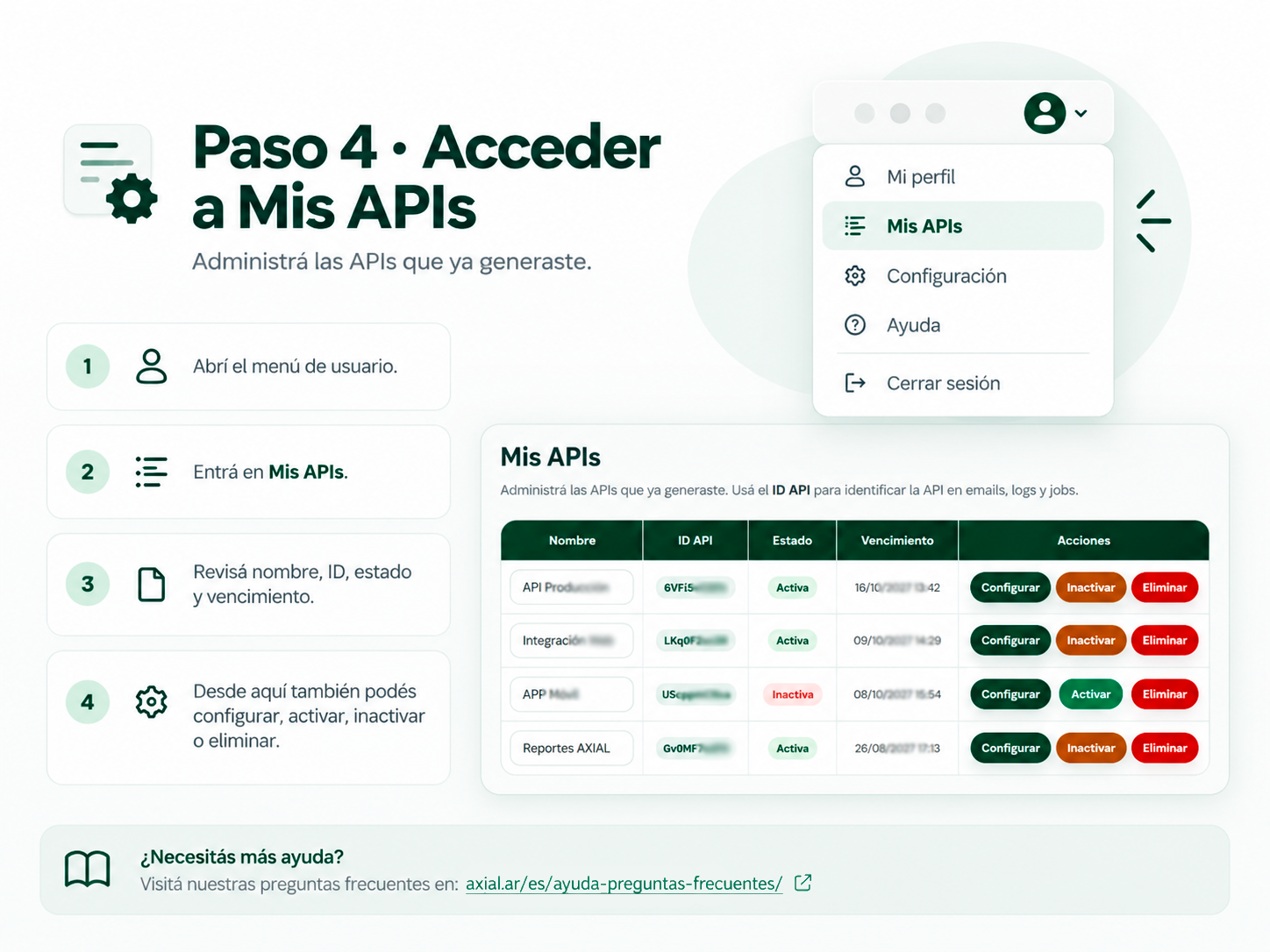
- Configure multiple Nebula Audio APIs, each with its own identifiable name.
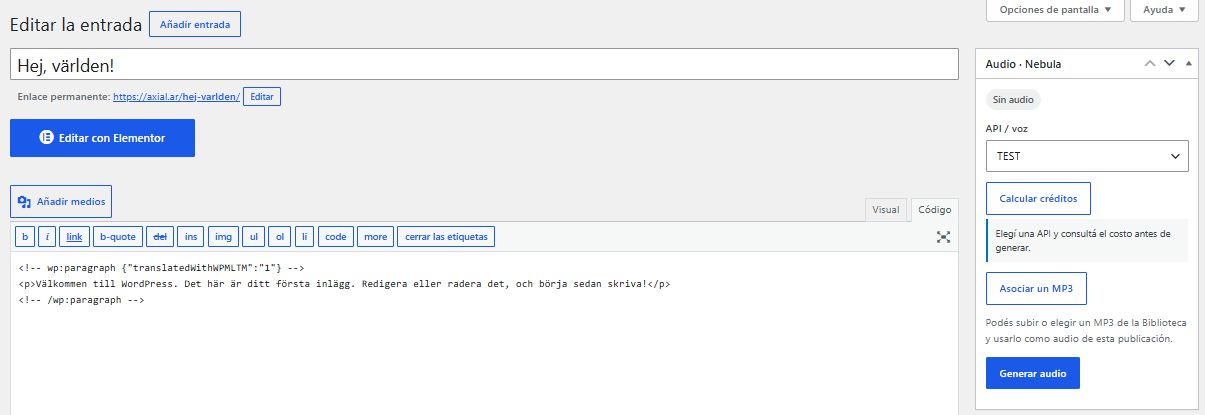
- Select which API to use from each post editor; different APIs can use different voices or audio rules.
- Choose one default API for automatic generation, bulk actions, and batch generation.
- Estimate the credits required for a post with its selected Audio API before generating audio.
- Generate audio from existing published posts.
- Optional automatic generation when a post is published.
- Generate audio for multiple existing posts.
- Local validation to avoid sending posts that contain no useful editorial text.
- Optional local MP3 copy in the Media Library.
- Accessible floating player with play/pause, duration, and 1x / 1.2x / 1.5x playback speeds on standard pages; default speed is 1.2x, with visitor preference preserved.
- AMP-compatible playback using native
amp-audioactions (Play/Pause) without custom JavaScript. - Configurable player accent, background, and text colors.
- Placement before content, after content, as a floating player, or through the
[nebula_audio]shortcode. - Background status polling for asynchronous Nebula jobs.
- Manual “Check status now” action from the post editor.
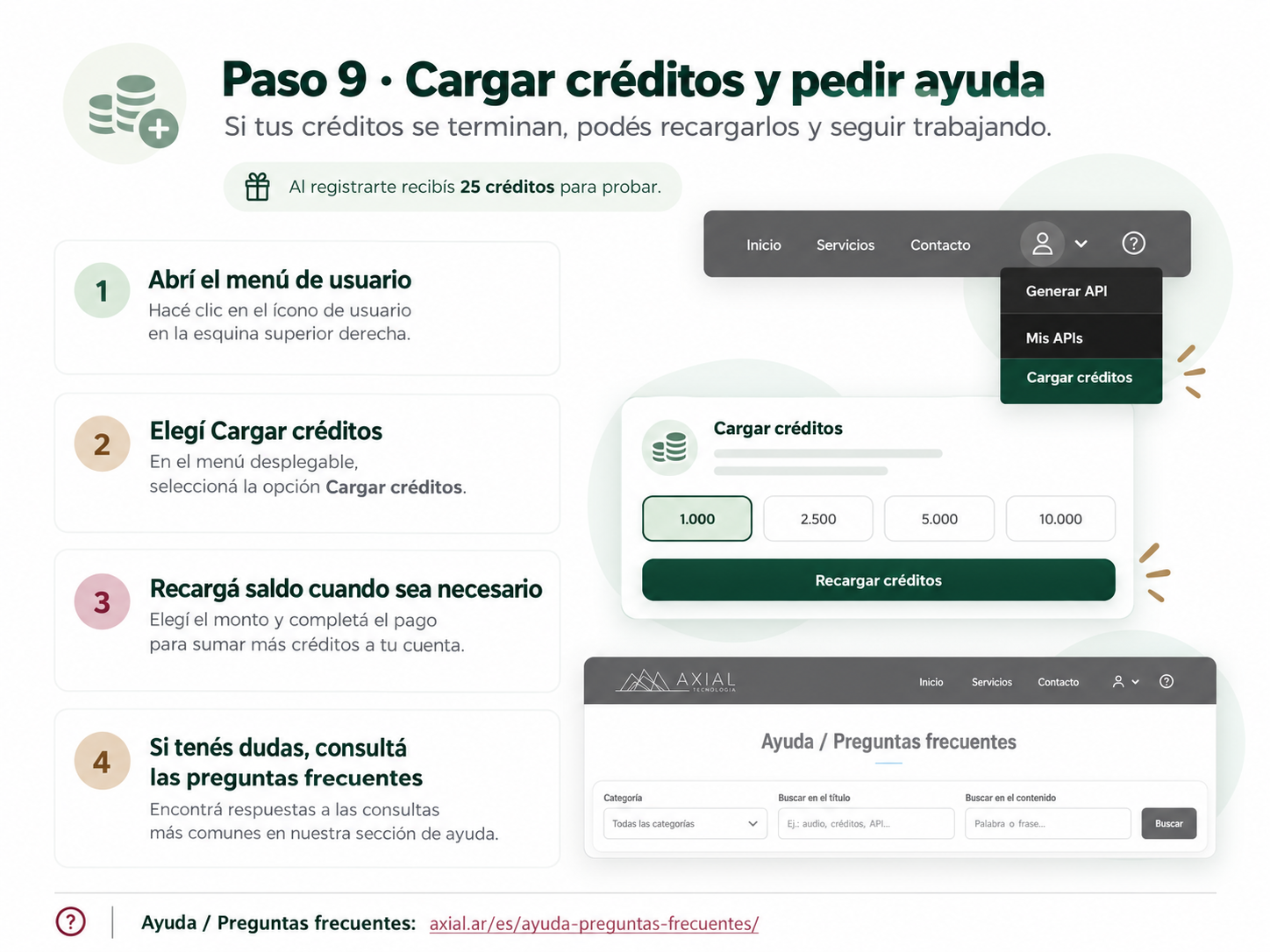
An AXIAL Nebula account, a Nebula Audio API key, and available service credits are required for audio generation. The WordPress plugin itself does not contain a paid-code unlock or local feature trial; charges apply to the external Nebula service.
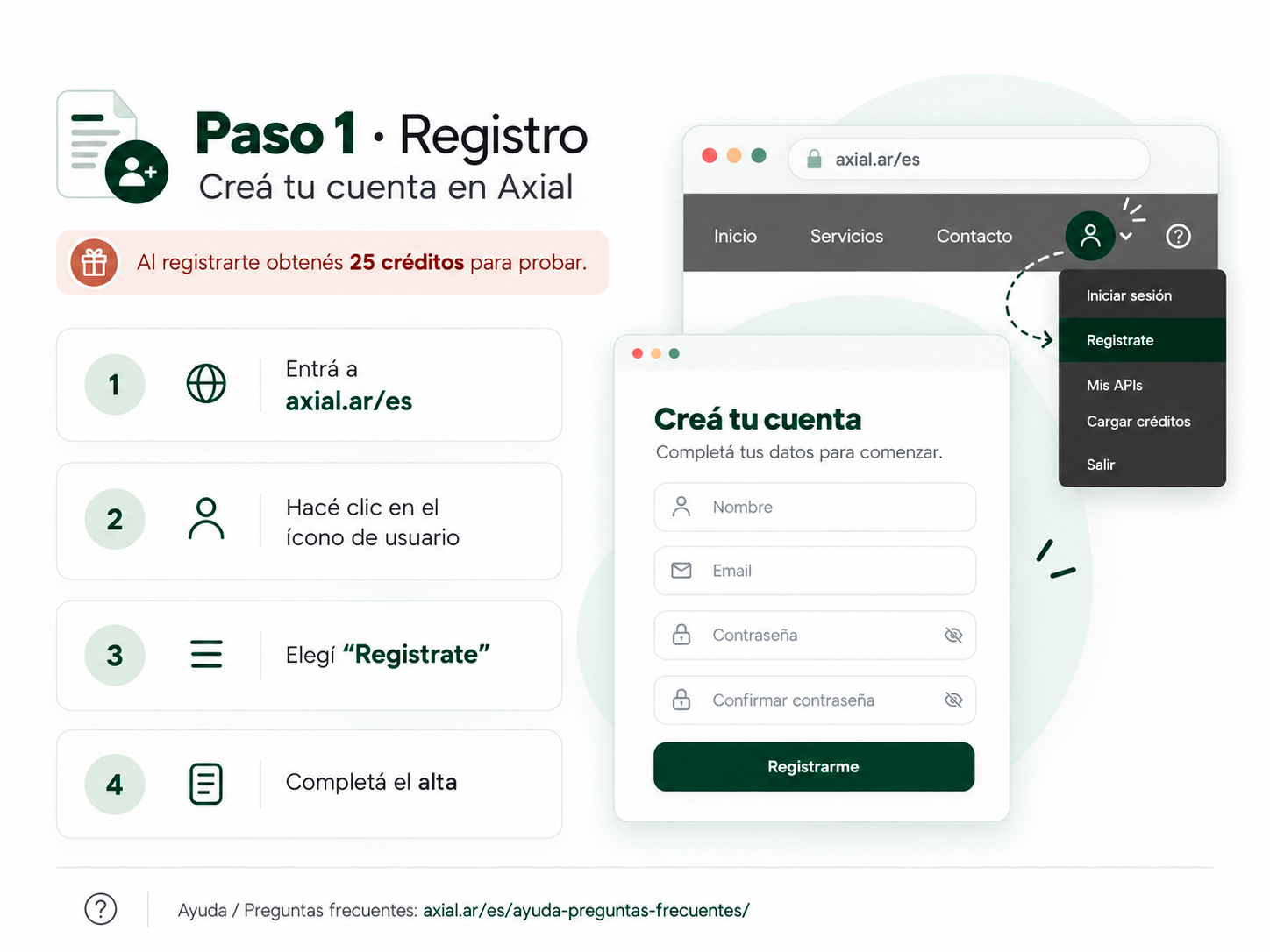
Create an AXIAL account:
https://axial.ar/es/register/
AXIAL website:
https://axial.ar/
External service
This plugin depends on the external AXIAL Nebula Audio service to generate audio.
Service endpoint used by the plugin:
https://axial.ar/apis/v1/audio-management
When an authorized editor requests audio generation, the plugin sends the following data to AXIAL Nebula:
- The configured AXIAL/Nebula account email.
- The configured Nebula API key in the Authorization header.
- The WordPress post title.
- The WordPress post content.
- The post excerpt when the configured API uses Audio summary mode.
- A request identifier used to avoid duplicate generation requests.
- The site URL as part of the HTTP User-Agent string.
This data is sent only when the plugin needs to query API capabilities, estimate/generate audio, or retrieve the result of a previously requested job. If local audio storage is enabled, the plugin also downloads the generated audio URL returned by Nebula into the WordPress Media Library.
The external service may consume paid credits according to the user’s AXIAL/Nebula account and API configuration.
Service provider:
https://axial.ar/
Privacy policy:
https://axial.ar/politica-de-privacidad/
Privacy
The plugin itself does not add advertising or tracking scripts. It communicates with AXIAL Nebula only as required to authenticate, generate audio, check asynchronous job status, and retrieve generated audio. See the External service section for the exact data transmitted.
The plugin also adds suggested disclosure text to WordPress Settings > Privacy so site owners can include the integration in their own privacy policy when appropriate.
Screenshots


Installation
- Upload the plugin folder to
/wp-content/plugins/or install the ZIP from Plugins > Add New > Upload Plugin. - Activate AXIAL Audio Post Narration.
- Create or use an AXIAL Nebula account.
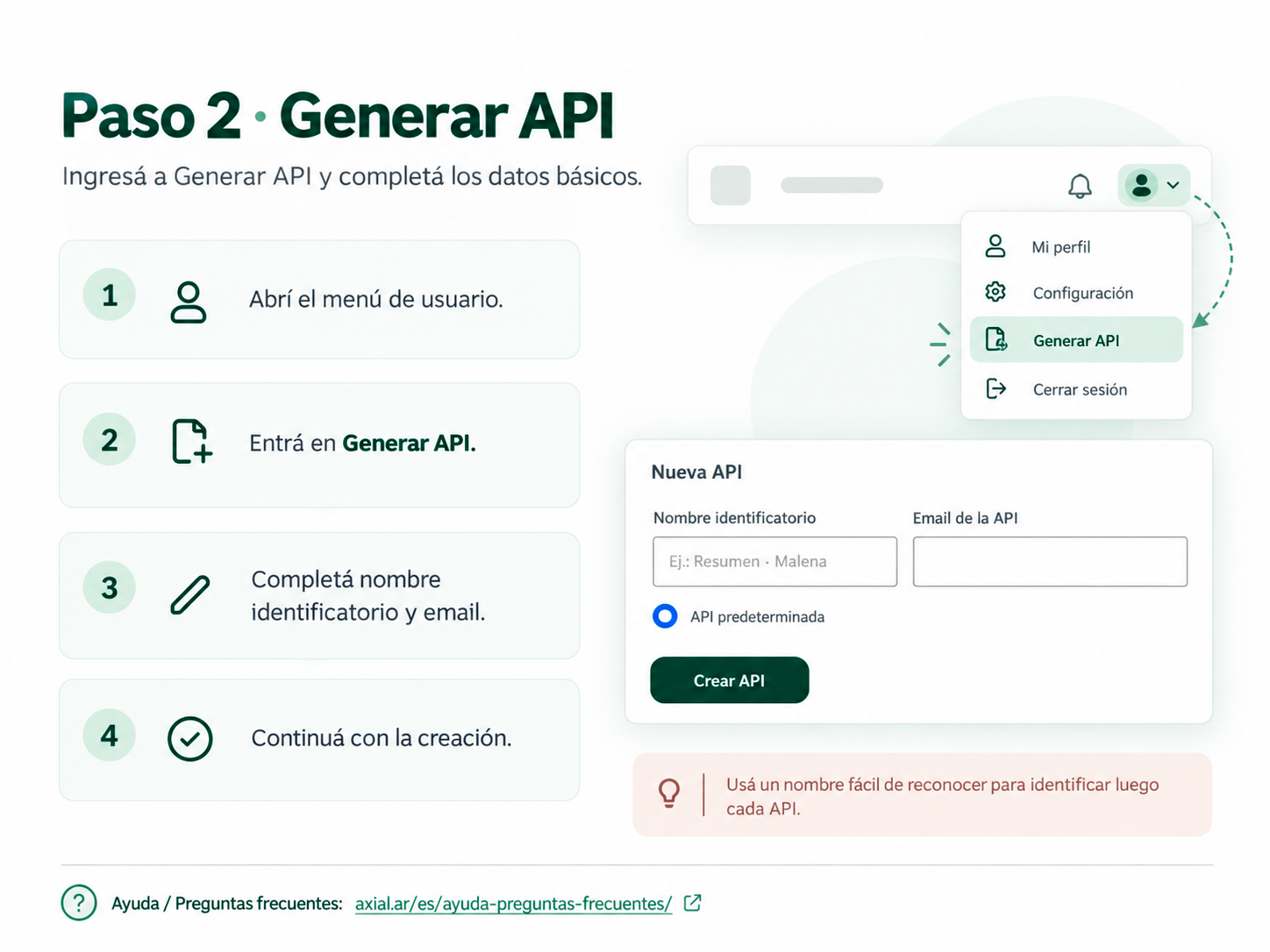
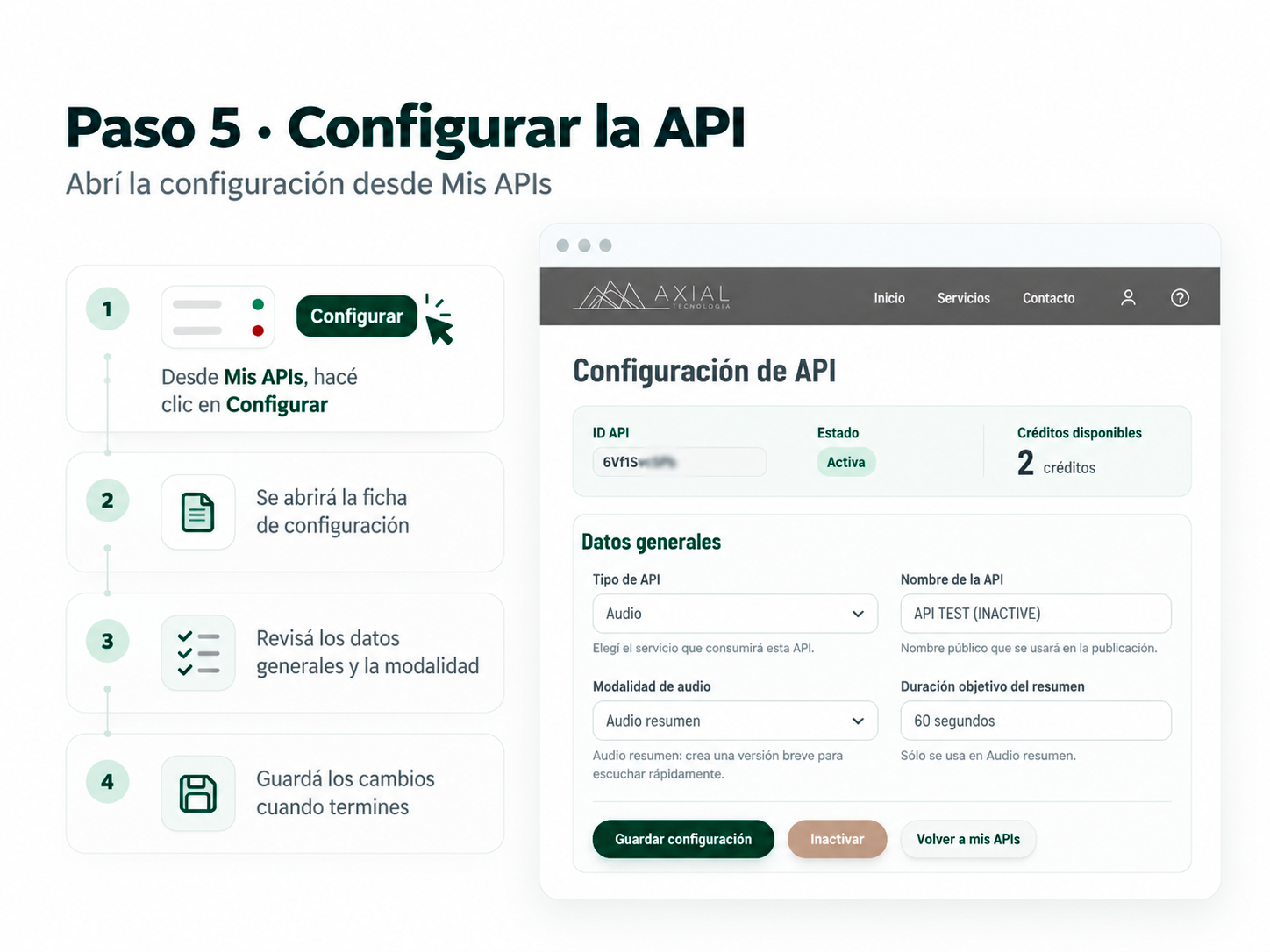
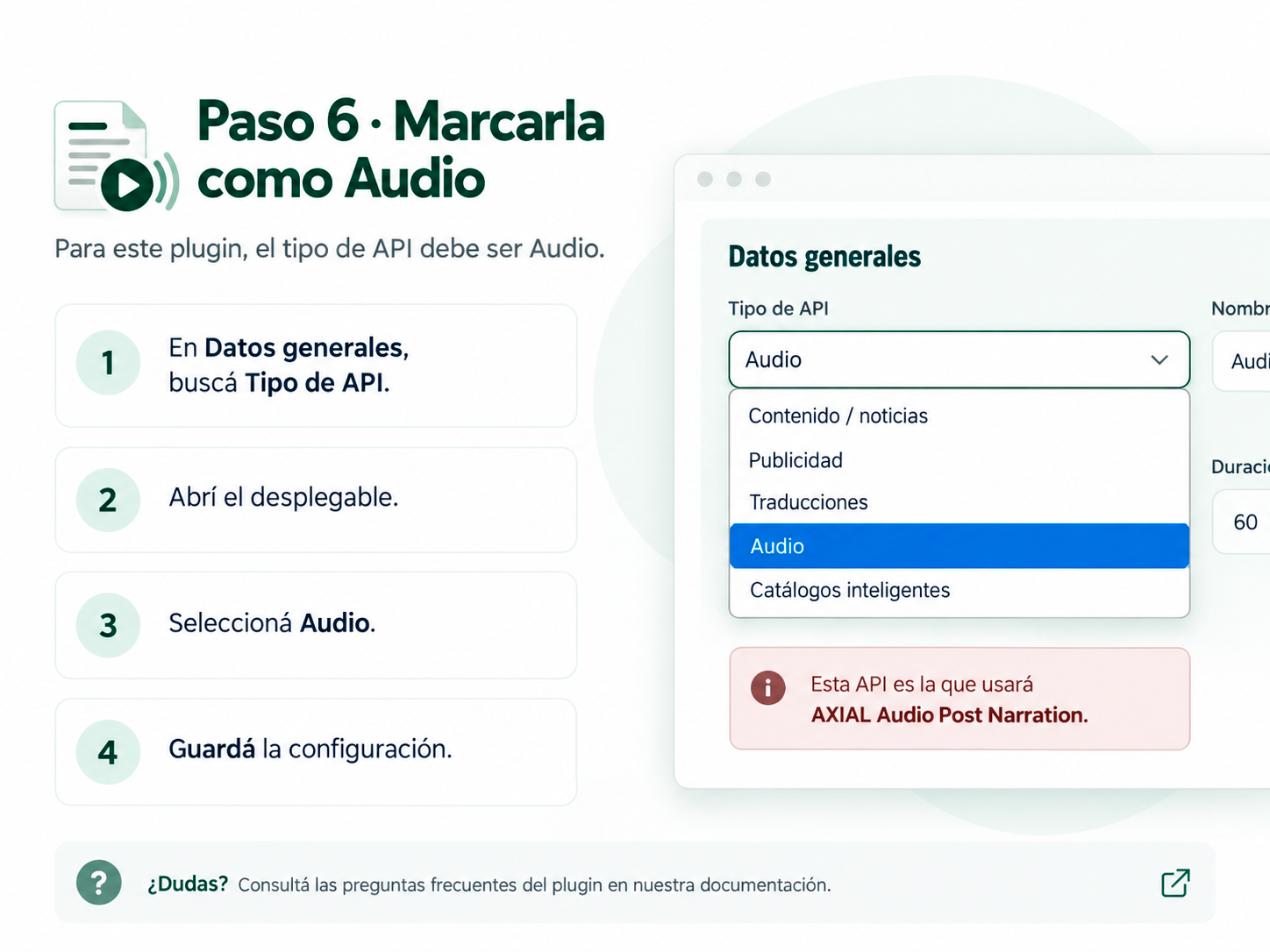
- Create one or more APIs of type Audio in AXIAL Nebula. Each API may use a different audio mode, voice, or editorial rules.
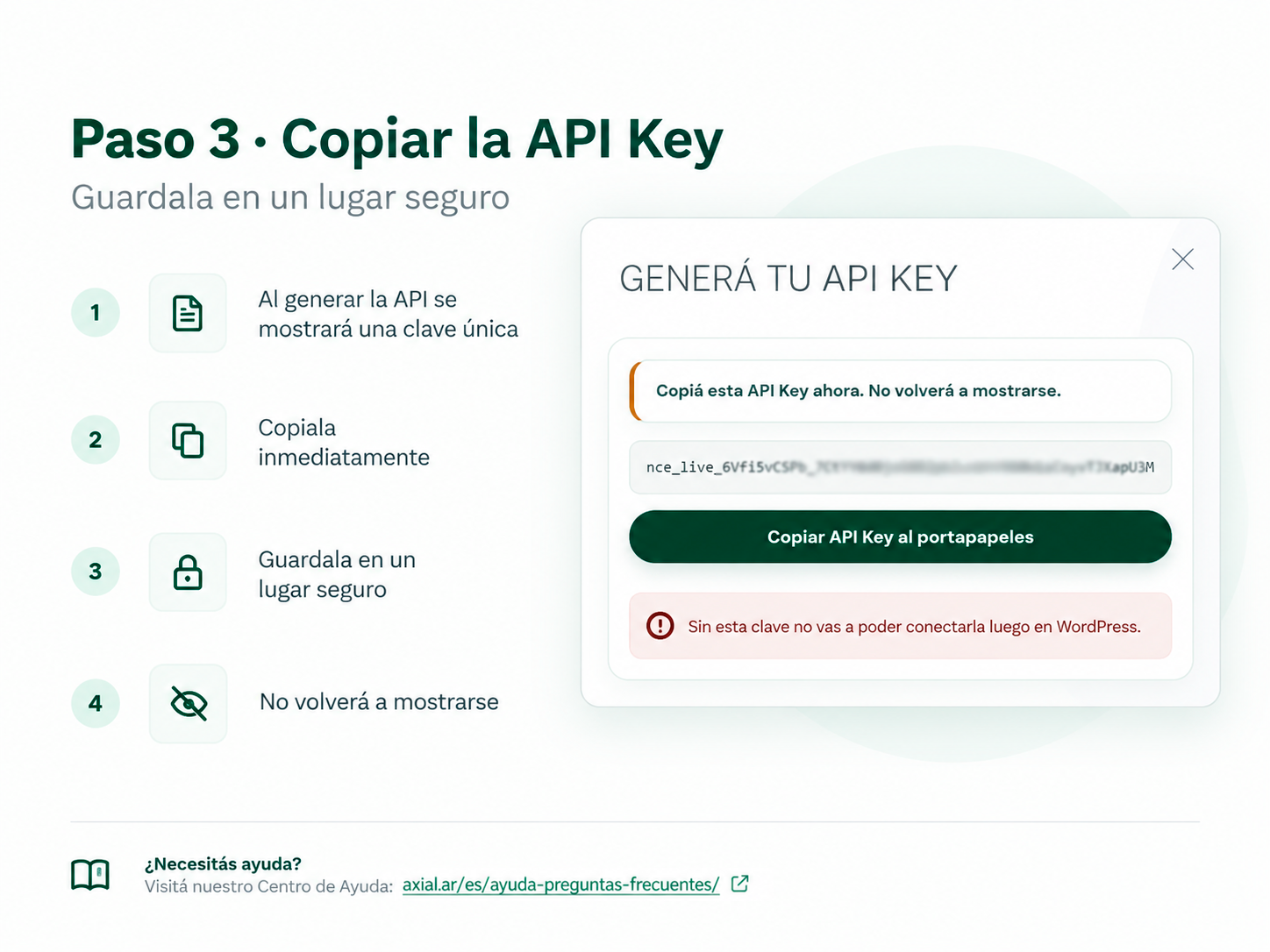
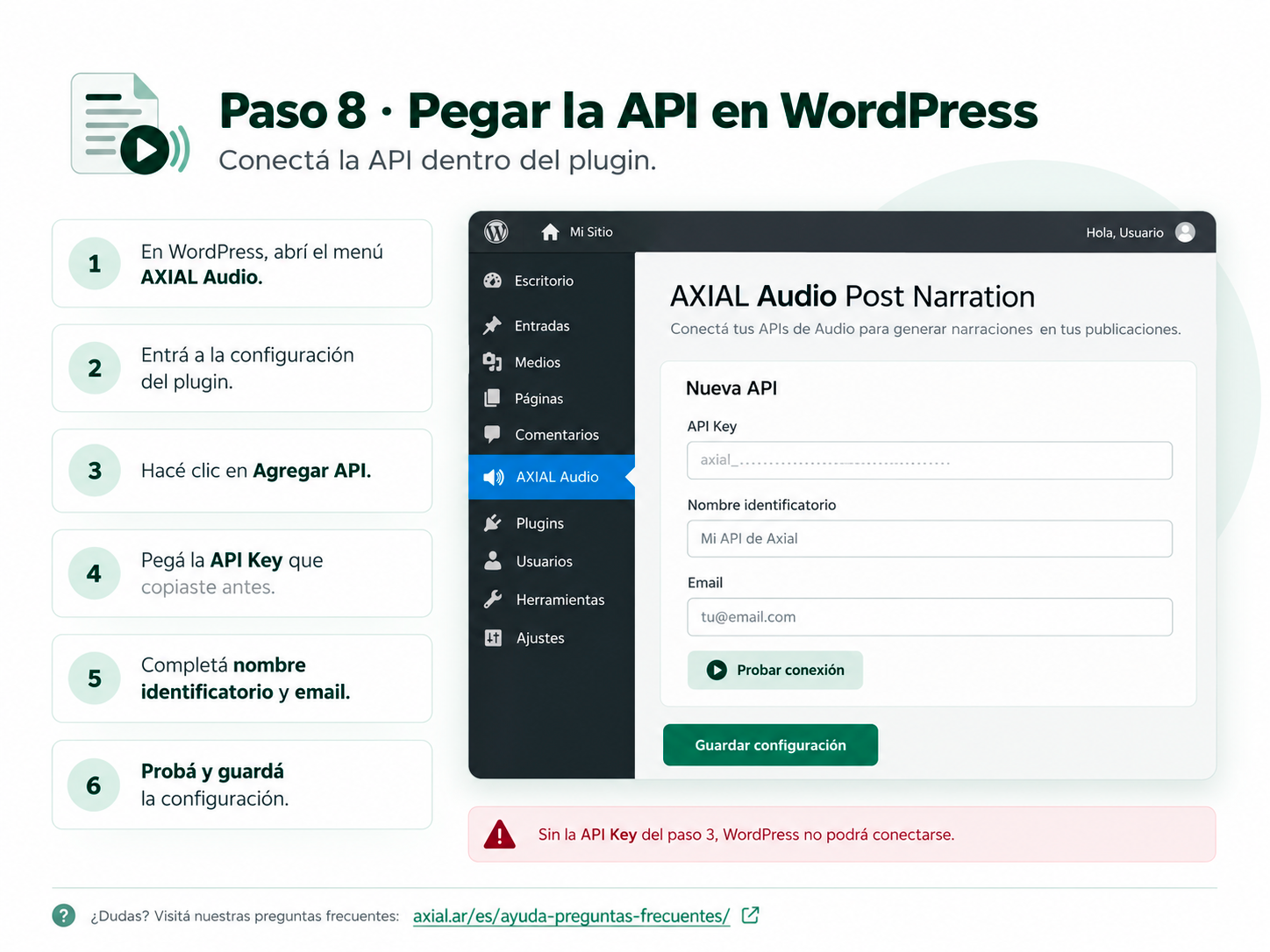
- Copy each API key when it is created.
- In WordPress, open AXIAL Audio.
- Add each API with an identifiable name, account email, and API key.
- Choose the default API and use Test on each connection. Testing saves the current form before contacting Nebula.
- Configure post types and player behavior.
- Open a published post, choose the desired API, and click Calcular créditos to estimate the cost.
- Click Generate audio when you are ready.
FAQ
-
Do I need an AXIAL Nebula account?
-
Yes. Audio generation is performed by the external AXIAL Nebula service and requires an account, an Audio API key, and available service credits.
-
Does the plugin send my whole WordPress database to Nebula?
-
No. For audio generation it sends the configured account information plus the title and editorial text of the specific post being processed. In Audio summary mode, the excerpt may also be sent.
-
Can I use different voices on the same WordPress site?
-
Yes. Configure multiple Nebula Audio APIs and assign a different voice to each API in AXIAL Nebula. Give each connection a clear name in WordPress, then choose the desired API from the post editor before generating or regenerating audio.
-
Which API is used for automatic or bulk generation?
-
The API marked as default is used for automatic generation, WordPress bulk actions, and batch generation. Manual generation from an individual post lets the editor choose any configured API.
-
Can I generate audio for old posts?
-
Yes. Open any supported published post and use Generate audio, use the bulk action in the post list, or use the “Generate missing” tool in the plugin settings.
-
What happens if a post only contains a video or embed?
-
The plugin performs a local text check before requesting generation. Posts without enough useful editorial text are marked accordingly and are not sent for audio generation.
-
Does manual generation depend on WP-Cron?
-
The initial manual request is sent to Nebula immediately. Background polling, automatic generation, and staggered batch generation use WordPress scheduled events. If scheduled events are delayed on your site, you can use Check status now from the post editor after a job has been accepted by Nebula.
-
Can I use an existing MP3 instead of generating audio with Nebula?
-
Yes. From the post editor you can upload or choose an existing MP3 from the WordPress Media Library and associate it with that post. The frontend player will use the associated file just like a generated audio file.
-
Can editors download the audio directly from the post editor?
-
Yes. When a post has an associated audio file, the editor shows a Download MP3 button so the file can be downloaded without opening the Media Library.
-
Where is the generated audio stored?
-
By default the plugin downloads the generated MP3 to the WordPress Media Library. This can be disabled in the plugin settings.
-
Can I hide the visible player text?
-
Yes. The visible button label can be left blank. The player keeps accessible labels for screen readers.
-
What shortcode can I use?
-
Use
[nebula_audio]in the current post. You can also specify a post ID with[nebula_audio id="123"].
Reviews


Contributors & Developers
“AXIAL Audio Post Narration” is open source software. The following people have contributed to this plugin.
Contributors
Translate “AXIAL Audio Post Narration” into your language.
Interested in development?
Browse the code, check out the SVN repository, or subscribe to the development log by RSS.
Changelog
1.1.2
- Added on-demand per-post credit estimation for the selected Audio API using the AXIAL estimate command.
- Playback defaults to 1.2x for visitors without a saved preference; 1x and 1.5x remain available.
1.1.1
- Added the ability to upload or select an existing MP3 and associate it with a post.
- Added a direct Download MP3 button in the post editor.
- Manually associated audio is tracked separately from Nebula-generated audio and prevents stale polling from overwriting it.
1.1.0
- Added support for multiple Nebula Audio APIs on the same WordPress site.
- Added an identifiable name for each API connection.
- Added per-post API selection before generating or regenerating audio.
- The selected API is stored with the post/job so status polling uses the same credentials.
- Added a default API for automatic generation, bulk actions, and batch generation.
- Existing single-API settings are migrated automatically to an “API principal” connection.
1.0.1
- Added AMP-compatible audio playback using
amp-audioand native AMP Play/Pause actions. - Custom frontend JavaScript is no longer enqueued on AMP requests.
- Standard pages keep the existing player and 1x / 1.2x / 1.5x speed controls.
1.0.0
- Initial WordPress.org submission candidate under the AXIAL Audio Post Narration name.
- Audio summary and Full reading support.
- Accessible floating player with configurable colors and playback speed.
- Manual generation sends the initial request to Nebula immediately.
- Background polling and batch generation support.
- Existing Nebula Audio Client settings and post metadata remain compatible.
- Added external-service and privacy disclosures.