Description
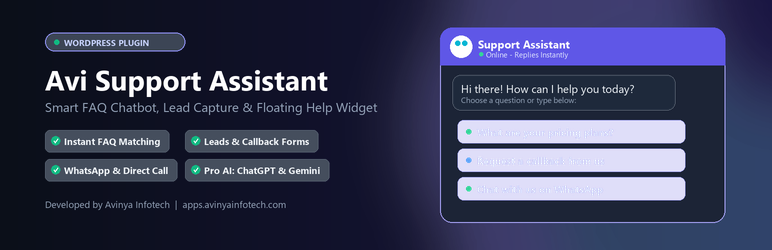
Avi Support Assistant adds a floating chat assistant to every page. Visitors tap a suggested question or type their own, and the bot replies instantly from the questions and answers you manage in the WordPress admin.
When it does not know the answer, it searches your site for helpful pages, invites the visitor to leave their details, and adds the question to your Unanswered Questions list so you can answer it next time.
Answers
- Your own questions, answers and keywords, managed in a simple table.
- Keyword matching understands differently worded questions (for example “price”, “prices” and “cost”).
- Suggested questions appear as quick-reply buttons. Choose how many to show.
- Quick link buttons that open any page, such as Contact Us or Shop.
When there is no answer
- Site search: suggests up to 3 matching posts, pages or products (you choose which content types).
- Lead form: name, email, optional phone and message. Leads are saved under Support Assistant Leads and emailed to you.
- Unanswered questions log: see the questions visitors ask most, then add them as FAQs with one click.
Call, callback and WhatsApp
- Click-to-call button that dials your number on mobile.
- Request a callback form: name, phone and best time to call, saved as a lead and emailed to you.
- Continue on WhatsApp button with a pre-filled message that can include the visitor’s question.
- Show these buttons all the time, or only when the bot has no answer.
Design
- Three launcher styles: robot mascot, round chat bubble, or button with label.
- Upload your own mascot or logo as the bot icon.
- Any brand colour, light or dark chat window, bottom-left or bottom-right.
- Works on desktop, tablet and mobile.
- Embed the chat inside any page with the
[avi_support_assistant]shortcode.
Display rules
- Auto-open after a delay you choose, once per visit.
- Show on all devices, desktop only, or mobile only.
- Hide on specific pages (for example checkout).
Pro Features (Unlock in-place)
Activate a license key from Avinya Infotech to unlock Pro features right inside this plugin:
* AI answers with your own API key: OpenAI (ChatGPT), Google Gemini, Anthropic Claude, OpenRouter or DeepSeek.
* Voice chat: visitors can speak their question, and replies can be read aloud.
* Zoho CRM sync & webhooks: automatically send chat leads to Zoho CRM or via webhook to Zapier, Make, or n8n.
* WooCommerce: product search in the chat with Add to Cart, plus Order Tracking by order number and email.
* Office hours: custom welcome message and button hiding when closed.
* Chat history & analytics: view full conversations, top queries, and export to CSV.
Built to be light and private
- No external services, no tracking, no cookies.
- Plain JavaScript, no jQuery on the front end, one small CSS and JS file.
- Keyboard accessible, screen-reader labels, and respects “reduce motion” settings.
- Translation ready.
How answers are matched
The bot does not use AI or any external service by default. It compares the visitor’s question with your questions and keywords and shows the best match. Pro users can optionally enable AI answers when no FAQ matches.
Privacy
This plugin does not send any data to external servers and does not set cookies.
- Leads and callbacks: when a visitor submits the lead or callback form, their details are stored in your database and emailed to the admin.
- Call and WhatsApp buttons are plain links.
- Unanswered questions: only the question text and count are stored.
- Rate limiting: a hashed IP address is kept in a temporary transient for up to one hour.
- Leads work with WordPress Export Personal Data and Erase Personal Data tools.
Installation
- Upload the plugin zip through Plugins Add New Upload Plugin, or search for Avi Support Assistant.
- Activate the plugin.
- Go to Support Assistant Settings, add your questions and answers, and click Save Changes.
- (Optional) If you have a Pro license, enter your key under Support Assistant Licence Key to unlock Pro features in-place.
FAQ
-
Does it use AI or ChatGPT?
-
In Free mode, no. It answers from your FAQs using keyword matching. If you activate a Pro license, you can connect your own OpenAI, Gemini, Claude, OpenRouter, or DeepSeek API key.
-
Where do I see leads?
-
Under Support Assistant Leads. Each lead is also emailed to the address in Support Assistant Settings Search & Leads.
-
How do I unlock Pro features?
-
Purchase a license at apps.avinyainfotech.com and enter your key under Support Assistant Licence Key. Pro features activate instantly without installing a second plugin.
-
Can I use my own mascot image?
-
Yes. Under Support Assistant Settings Appearance Bot Icon, click Choose Image and pick a square PNG or SVG from the Media Library.
-
How do I hide it on some pages?
-
Add the page IDs under Support Assistant Settings Display Rules Hide On Pages, use the
avca_display_buttonfilter, or untick Show Support Assistant to hide it everywhere. -
Can I put the chat inside a page?
-
Yes. Add the
[avi_support_assistant]shortcode to any page or post.
Reviews
There are no reviews for this plugin.
Contributors & Developers
“Avi Support Assistant” is open source software. The following people have contributed to this plugin.
Contributors
Translate “Avi Support Assistant” into your language.
Interested in development?
Browse the code, check out the SVN repository, or subscribe to the development log by RSS.
Changelog
2.2.2
- Unified architecture: Pro features integrated in-place with Avinya License Client SDK.
- Evaluation mode: test Pro features locally with
AVI-DEV-TEST. - Pro links point to apps.avinyainfotech.com.
- Tested up to WordPress 6.7 compatibility verification.
2.2.1
- Upgrade page shows Pro prices in Indian rupees.
2.2.0
- New: Settings page shows Pro add-on teasers with upgrade links.
2.1.0
- New: Click-to-call button.
- New: Request a callback form (name, phone, best time).
- New: Continue on WhatsApp button with pre-filled message.
- New: Leads list shows whether each entry is a lead or a callback.
2.0.0
- New: Site search suggests matching pages when no FAQ matches.
- New: Lead form in the chat.
- New: Unanswered Questions log with one-click “Add as FAQ”.
- New: Quick link buttons.
- New: Robot, round bubble and labelled-button launchers; light and dark themes.