Description
Automura for Gravity Forms adds webhooks and a REST API to Gravity Forms, so every form submission can trigger an automation in n8n, Make, Zapier, or any other platform that accepts an HTTP request. It is built for WordPress developers and agencies who need a reliable, self-hosted way to move Gravity Forms data out of WordPress without paying for a third-party connector or relying on a separate paid add-on.
Why use a webhook plugin for Gravity Forms
Gravity Forms does not include a free, built-in way to send form data to an outside app the moment it is submitted. Without it, you are stuck copying entries by hand, paying for a connector service, or writing custom code. Automura for Gravity Forms gives every WordPress site a direct, configurable webhook and REST API layer for Gravity Forms, at no cost.
Key features
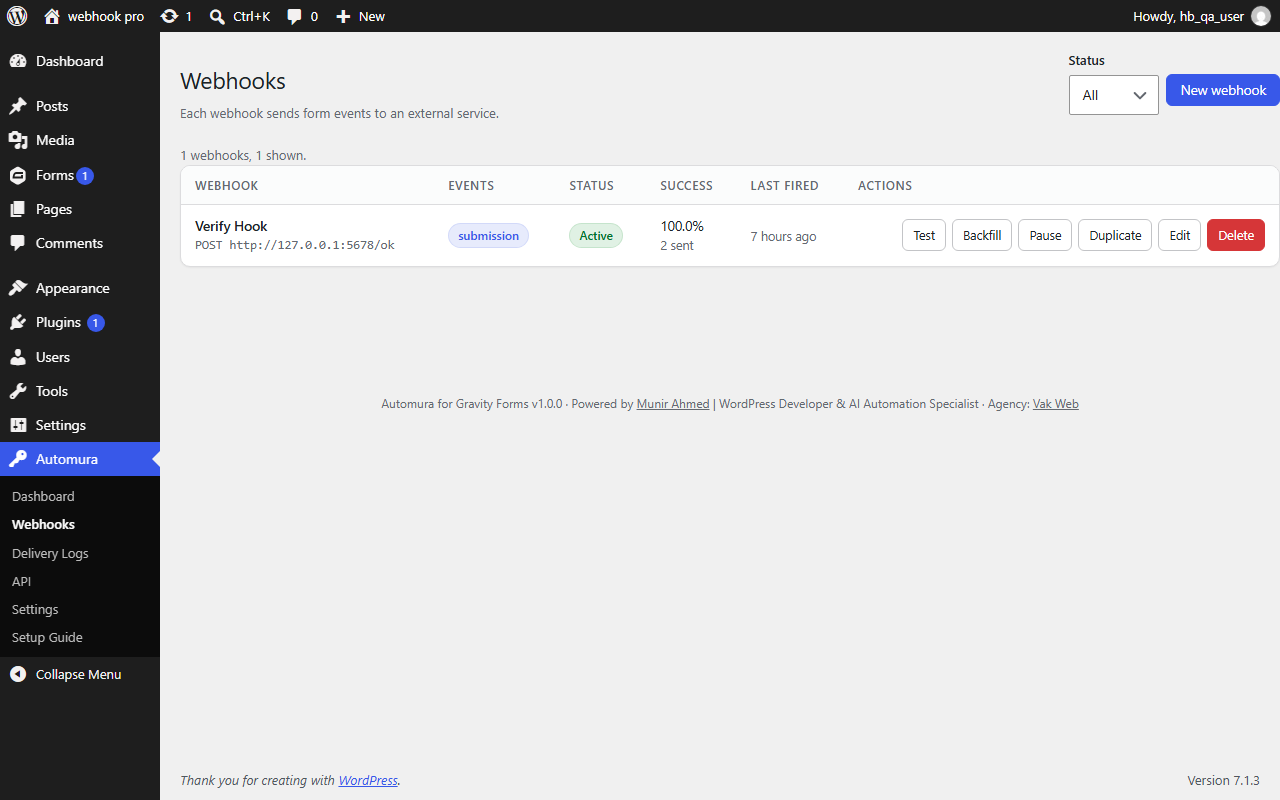
- Unlimited webhooks: set up one webhook for a single form, or one webhook that covers multiple forms
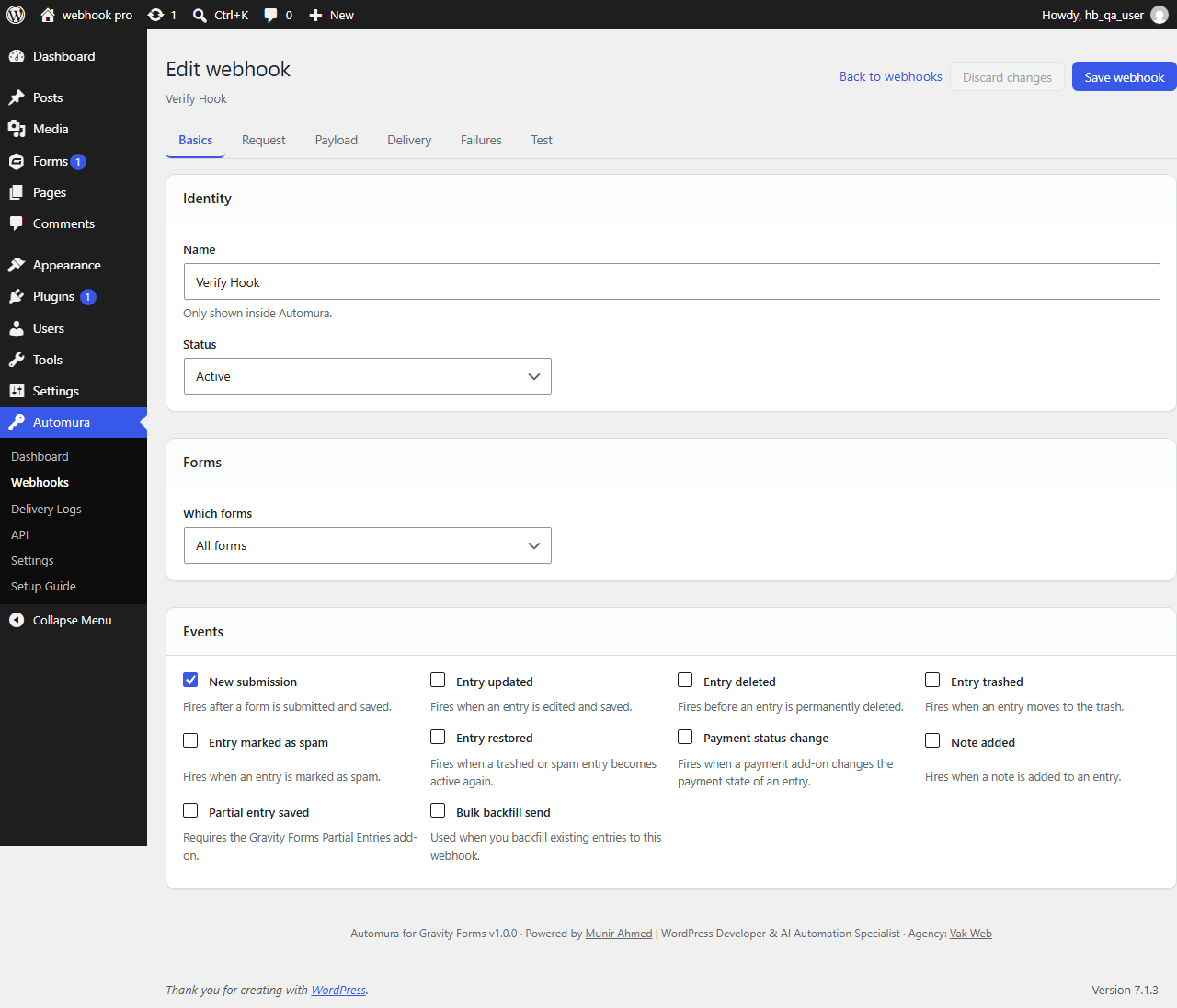
- Trigger on new submission, entry updated, entry deleted, entry trashed, entry marked as spam, entry restored, payment status change, or a note added to an entry
- Choose how each webhook authenticates: no authentication, a custom header (covers bearer tokens), Basic Auth with a username and password, or an HMAC signature the receiving app can verify
- Send instantly or in the background, so a slow automation endpoint never slows down a visitor’s form submission
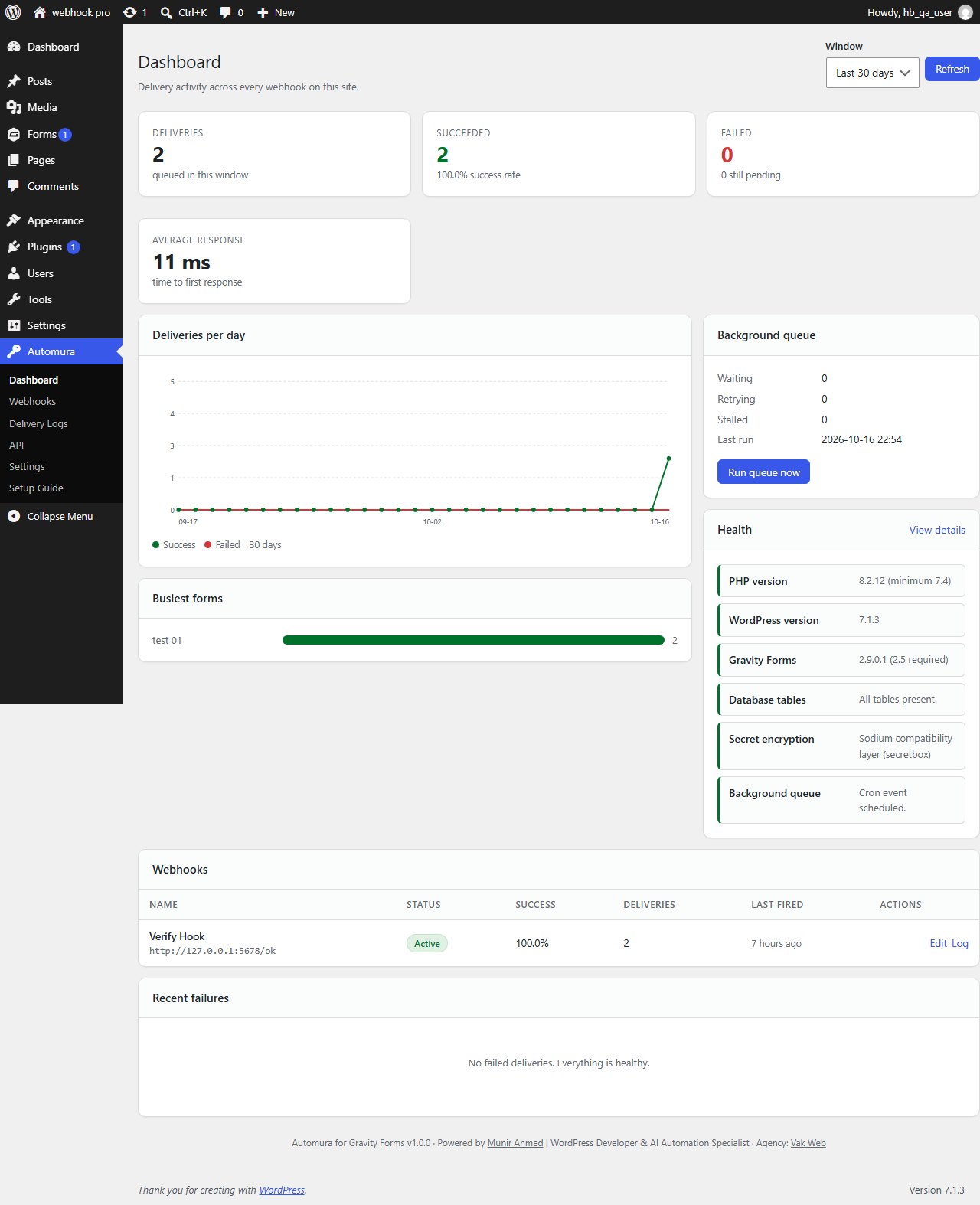
- Automatic retries with a delivery log, so a failed delivery is retried and never silently lost
- Delivery log shows a plain-language reason for every failure, with resend, clone, and a payload preview before you save
- A secure REST API to list forms, read fields, read or search entries, submit a new entry, update an entry, or delete an entry
- API keys with scopes, optional expiry, usage tracking, and a built-in “how to connect” guide with ready-made n8n, Make, Zapier, cURL, PHP and Node examples for every key
- Choose exactly which REST endpoints are turned on, per site
- Works with n8n, Make, Zapier, Pabbly, or any platform or custom endpoint that accepts a webhook
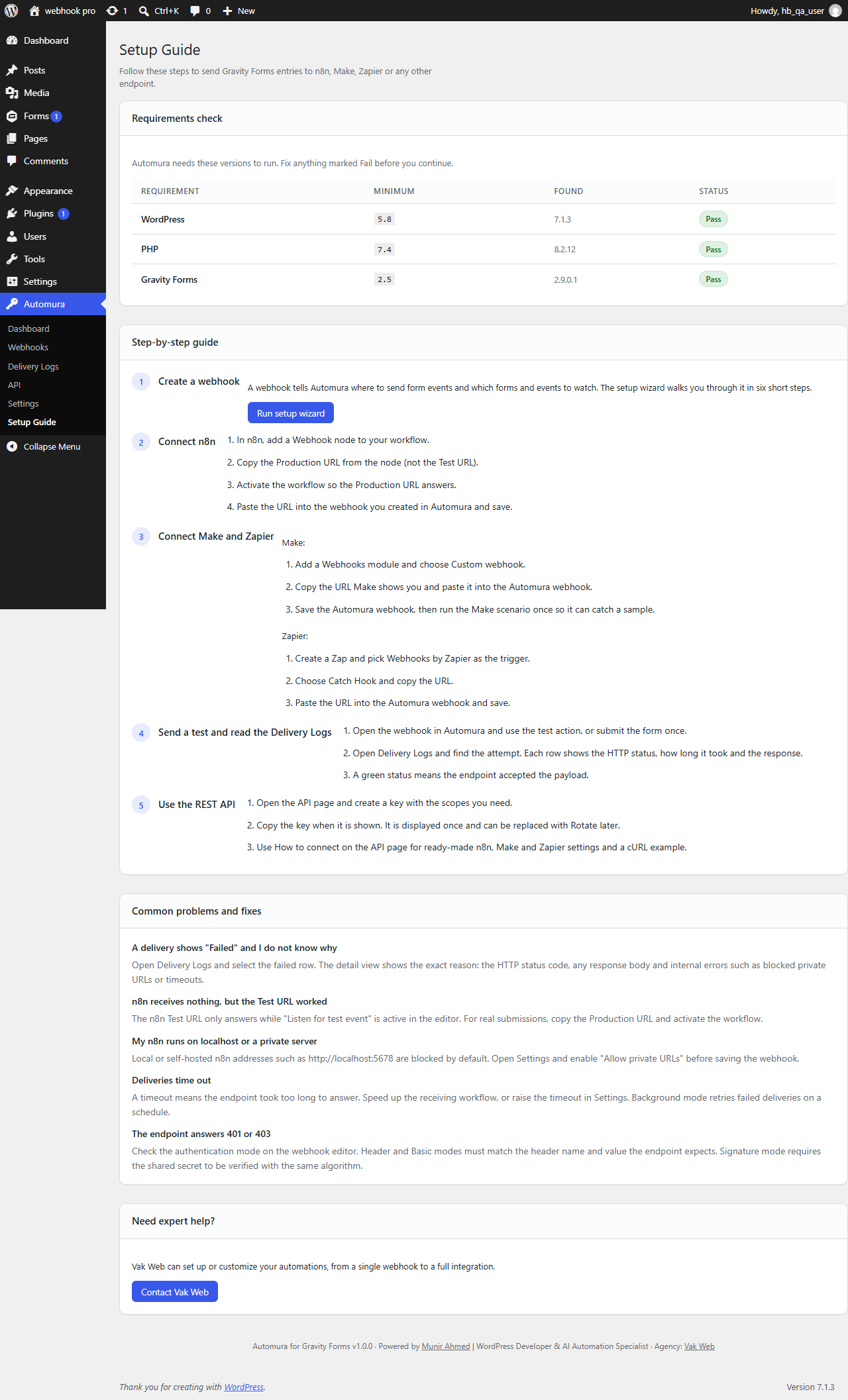
- A guided setup wizard walks you through your first webhook in under five minutes, no code required
- 100% free and open source under the GPLv2 license, with no tracking and no data sent anywhere except the destinations you configure
How it works
- Create a webhook for a Gravity Forms form from the setup wizard or the Webhooks screen.
- Choose which event should trigger it, and paste the webhook URL from n8n, Make, Zapier, or your own endpoint.
- Send a test submission and check the Delivery Logs screen to confirm it arrived.
- From there, your automation platform takes over: update a CRM, post to Slack, add a row to a spreadsheet, or anything else it can do.
Who this plugin is for
Automura for Gravity Forms is built for WordPress developers and agencies managing client automations, marketers running workflows in n8n, Make, or Zapier, and anyone who wants Gravity Forms entries flowing into a CRM, spreadsheet, email tool, or chat app without paying for a middleman connector service.
External services
This plugin sends form data only to the webhook URLs and API clients that you, the site owner, configure. It does not send data to the plugin author or to any third party. The REST API only responds to requests you authorize with an API key you create. Outgoing webhook requests are sent at the moment a Gravity Forms event occurs, carrying only the entry and form data you choose to include in that webhook’s payload settings.
Disclaimer
Automura for Gravity Forms is an independent plugin and is not affiliated with, endorsed by, or sponsored by Gravity Forms / Rocketgenius, n8n, Make, or Zapier. Gravity Forms is a separate, commercial plugin and is not included — you need an active Gravity Forms installation for this plugin to do anything.
Screenshots


Installation
- From your WordPress dashboard, go to Plugins Add New and search for “Automura for Gravity Forms,” or download the plugin and upload the zip file manually from Plugins Add New Upload Plugin.
- Activate the plugin through the Plugins screen in WordPress.
- Make sure Gravity Forms is installed and active, then open the Automura menu in your dashboard — the setup wizard opens automatically the first time.
- Follow the wizard to create your first webhook, or go to the API screen to create an API key for the REST API.
FAQ
-
Is Automura for Gravity Forms really free?
-
Yes. The plugin is 100% free and open source under the GPLv2 license. There is no paid tier, no locked features, and no license key required.
-
Do I need Gravity Forms installed for this to work?
-
Yes. Gravity Forms is a separate, commercial plugin sold by Rocketgenius and is not included with Automura. You need an active, licensed copy of Gravity Forms installed for this plugin to send webhooks or expose the REST API.
-
Does this work with n8n?
-
Yes. Paste your n8n Webhook node’s Production URL into a webhook in Automura, and every time your chosen Gravity Forms event fires, the data is sent to that URL. The API page also includes ready-made n8n HTTP Request settings for pulling data back out through the REST API.
-
Does this work with Make (formerly Integromat)?
-
Yes. Use a Make webhook trigger module’s URL as the webhook destination, the same way you would with any other platform.
-
Does this work with Zapier?
-
Yes, through Zapier’s “Webhooks by Zapier” trigger, using the URL Zapier provides.
-
Can I use this without n8n, Make, or Zapier?
-
Yes. Any URL that can receive an HTTP POST, PUT, or PATCH request works as a webhook destination, including your own custom script or endpoint.
-
How do I send Gravity Forms data to n8n?
-
Create a webhook in Automura, choose the Gravity Forms form and event, paste in your n8n webhook URL, and save. Submitting that form sends the entry data to n8n in real time.
-
How do I authenticate the webhook request?
-
Each webhook can use no authentication, a custom header and value (which covers bearer tokens), Basic Auth with a username and password, or an HMAC signature that the receiving app can verify using the secret you generate in the plugin.
-
What happens if the webhook delivery fails?
-
Automura retries a failed delivery automatically, using the retry settings you configure for that webhook. Every attempt is recorded in the Delivery Logs screen along with a plain-language reason for the failure, so you can see exactly what went wrong and resend it if needed.
-
Can I see a log of every webhook that was sent?
-
Yes. The Delivery Logs screen lists every delivery with its status, the event that triggered it, the response received, and the exact failure reason for anything that did not succeed.
-
Does this plugin provide a REST API for Gravity Forms?
-
Yes. Automura adds a REST API that can list forms, read a form’s fields, read and search entries, submit a new entry through the normal Gravity Forms validation and notification process, update an entry, or delete an entry.
-
Can I create, update, or delete Gravity Forms entries through the API?
-
Yes, provided the API key used has the matching scope and the relevant endpoint group is turned on in Settings. Each endpoint group can be enabled or disabled independently.
-
Is the REST API secure?
-
API keys are stored hashed, never shown again after creation, and can be scoped to specific permissions and specific forms with an optional expiry date. Requests are rate-limited against repeated failed attempts, and every API request can be logged.
-
Can my self-hosted n8n instance on a local or private address receive webhooks from this plugin?
-
By default, webhook destinations on private or local network addresses are blocked for security. If you run n8n or another tool locally or on a private network, you can allow private destination URLs from the plugin’s Settings screen.
-
Will this slow down my website or my form submissions?
-
No. Webhooks can be sent in the background, so a visitor’s form submission completes normally even if the destination automation is slow to respond. You can choose instant delivery per webhook if you need it to complete before the page confirms submission.
-
Does this plugin track or collect any of my data?
-
No. Automura does not send any data to the plugin author or to any third party. It only sends data to the webhook URLs and API clients that you configure yourself.
-
Is this plugin compatible with multisite?
-
Yes, Automura for Gravity Forms supports WordPress multisite installations.
-
What is the difference between a webhook and this plugin’s REST API?
-
A webhook is Automura pushing data out to your automation platform the moment something happens in Gravity Forms. The REST API works the other way: your automation platform (or any authorized client) pulls data from WordPress, or pushes data into it, whenever it needs to.
-
Can I send Gravity Forms entries to Google Sheets?
-
Not directly, since Google Sheets does not accept webhooks on its own. You can get there in one extra step by sending a webhook to n8n, Make, or Zapier, and letting that platform write the row into Google Sheets.
-
Who maintains this plugin?
-
Automura for Gravity Forms is developed by Munir Ahmed (hellomunir.com), a WordPress developer and AI automation specialist, through his agency Vak Web (vakweb.nl).
Reviews

Contributors & Developers
“Automura for Gravity Forms – Webhooks & REST API for Automation” is open source software. The following people have contributed to this plugin.
Contributors
Translate “Automura for Gravity Forms – Webhooks & REST API for Automation” into your language.
Interested in development?
Browse the code, check out the SVN repository, or subscribe to the development log by RSS.
Changelog
1.0.0
- Initial release: webhooks for Gravity Forms submissions, entry updates, deletions, trash, spam, restore, payment status changes, and notes.
- REST API for forms, fields, entries, and entry submission, update, and deletion.
- Scoped API keys with expiry, usage tracking, and per-key connection guidance.
- Delivery logs with automatic retries and plain-language failure reasons.
- Guided setup wizard and a Setup Guide screen.
- Multisite support.