

Description
This plugin automatically detects a domain name change, and updates all the WordPress tables in the database to reflect this change.
Features
- Easily migrate a WordPress site from one domain to another
- Migrate www.domain.com and domain.com at once
- Migrate http and https links at once
Feedback
- We are open for your suggestions and feedback – Thank you for using or trying out one of our plugins!
- Drop us a line @nuagelab on Twitter
- Follow us on our Facebook page
- Drop us a line at wordpress-plugins@nuagelab.com
Translations
- English
- French
- Spanish
- Slovak
Screenshots
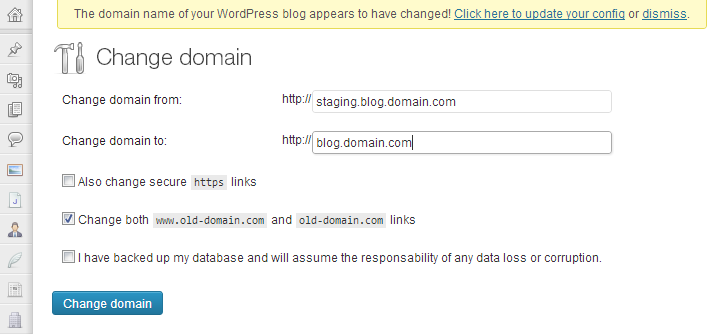
Installation
This section describes how to install the plugin and get it working.
Requirements
- The PHP CURL extension, usually installed on Un*x, Mac and Windows environments. See “Installing CURL on Linux” below for more help.
- Capability for your server to communicate with the outside work (or more specifically, to communicate with our servers)
Installing the Plugin
(using the WordPress Admin Console)
- From your dashboard, click on “Plugins” in the left sidebar
- Add a new plugin
- Search for “Automatic Domain Changer”
- Install “Automatic Domain Changer”
- Once Installed, if you want to manually change your domain, go to Tools > Domain Change
- If your domain changes, a notice will appear at the top of the admin screen with a link to the domain changing tool
(manually via FTP)
- Delete any existing ‘auto-domain-change’ folder from the ‘/wp-content/plugins/’ directory
- Upload the ‘auto-domain-change’ folder to the ‘/wp-content/plugins/’ directory
- Activate the plugin through the ‘Plugins’ menu in WordPress
- Once Installed, if you want to manually change your domain, go to Tools > Domain Change
- If your domain changes, a notice will appear at the top of the admin screen with a link to the domain changing tool
Making your blog/site address automatically reflect your server’s name
Add the following to your wp-config.php file:
define('WP_HOME', 'https://' . $_SERVER['SERVER_NAME']);
define('WP_SITEURL', 'https://' . $_SERVER['SERVER_NAME']);
See https://codex.wordpress.org/Editing_wp-config.php#WordPress_address_.28URL.29 for more information.
FAQ
-
What does this plugin do precisely?
-
It scans all the tables with the same table prefix as WordPress. It fetches each row, unserialize values as needed, and replace the old domain by the new.
-
Do you plan to localize this plugin in a near future?
-
Yes, this plugin will be translated to french shortly. If you want to help with translation in other languages, we’ll be happy to hear from you.
Reviews


Contributors & Developers
“Automatic Domain Changer” is open source software. The following people have contributed to this plugin.
Contributors
Translate “Automatic Domain Changer” into your language.
Interested in development?
Browse the code, check out the SVN repository, or subscribe to the development log by RSS.
Changelog
3.0.1
Hotfix for a regression introduced in 3.0.0.
- Fix: rows whose serialized payload contains a PHP class instance (for example, the
_site_transient_update_pluginstransient or any plugin-stored object) were being corrupted into__PHP_Incomplete_Classafter a domain change, which caused fatal errors in PHP 8 the next time something tried to mutate a property on those objects. The Replacer now leaves such rows byte-identical instead of round-tripping them throughunserialize(). URLs inside class instances are no longer rewritten — but they are no longer destroyed either. - Fix: no-op short-circuit when the old and new domains match (case-insensitively) and no protocol change was requested, so rerunning with the same values cannot itself damage the database.
- Test: add docker smoke-test cases that seed a
stdClassoption and an array containing astdClass, and assert both survive byte-identical.
If you ran 3.0.0 with old == new and now see “incomplete object” fatals (for example from wp-migrate-db-pro’s update-checker hook), clear the affected transients with wp transient delete update_plugins --network (and update_themes, update_core) — they regenerate on the next dashboard load.
3.0.0
Major modernization release. The user-facing behavior is unchanged: the same Tools Change Domain page with the same options and the same backup buttons. Everything else has been rewritten.
Security
- Replaced the raw SQL
UPDATEin the domain-change routine with prepared$wpdb->update()calls to eliminate a SQL injection risk on the primary-key value. unserialize()is now called withallowed_classes => falseso a malicious serialized payload in a row cannot trigger PHP object injection while the plugin scans the database.- Option writes (
auto_domain_change-https,auto_domain_change-www) are now gated behind both nonce verification and anupdate_corecapability check. Previously, any authenticatedPOSTto the admin page could flip them. - Dismissing the domain-change admin notice now requires a nonce and the
update_corecapability (previously a plain?dismiss-domain-change=1GET, vulnerable to CSRF). - All
$_POST,$_GET, and$_SERVERvalues are sanitized;force-protocolis validated against an allow-list; submitted domains are validated against a host-name pattern before being used. - Explicit capability checks at the top of the admin page and both backup routines (defense in depth).
- Drops the PHP-4
&$thisreference style and the manualpluggable.phprequire.
Compatibility
Requires PHP: 7.4,Requires at least: 5.0. Older PHP silently ignoredunserialize()‘sallowed_classesoption, defeating the object-injection guard, so older versions are now refused with a clear admin notice.- Tested up to WordPress 6.9.4.
Architecture
- Restructured into a PSR-4 layout under
NuageLab\AutoDomainChanger\with a tiny hand-rolled autoloader (no Composer required at runtime). - Extracted the admin form to a template, the styles to
assets/css/admin.css, and the click handler to vanillaassets/js/admin.js(no jQuery). - The serialize/JSON walker (
Domain\Replacer) is now a self-contained class that can be invoked independently of the admin UI.
2.0.2
- Tested up to WordPress 4.9.8
- Added a way to change the protocol to HTTP or HTTPS
2.0.1
- Tested up to WordPress 4.6.1
- Removed admin notice for users who don’t have update_core permission
2.0.0
- Tested up to WordPress 4.4.2
- Added backup functionality
- Removed usage of mysql_* functions in favor of $wpdb
1.0.1
- Tested up to WordPress 4.2.2
1.0
- Tested up to WordPress 4.2.1
0.0.6
- Bug fix with the processValue function generating a warning (thanks to @sniemetz for letting us know about this issue)
- Slovak translation (thanks to Marek Letko)
- Tested up to WordPress 4.1.1
0.0.5
- Minor text change
0.0.4
- Added JSON detection to fix values not being handled for plugins like RevSlider (thanks to Alfred Dagenais for letting us know about this issue)
- Added double serialize detection for plugins like Global Content Blocks (thanks to @pixelkicks for letting us know about this issue)
- Tested plugin up to WordPress 4.0.0
0.0.3
- Tested plugin up to WordPress 3.8.0
0.0.2
- Added error suppression on unserialize calls, as failing unserialize are normal and part of the game. Thanks to Kailey Lampert for pointing this out.
- Added serialize(false) detection.
0.0.1
- First released version. Tested internally with about 10 sites.