

Description
Auditra turns a WordPress site into a read-only MCP server. Enable the endpoint, generate a token, paste the URL into your client’s connector settings, and you have nine tools against the live site.
The tools
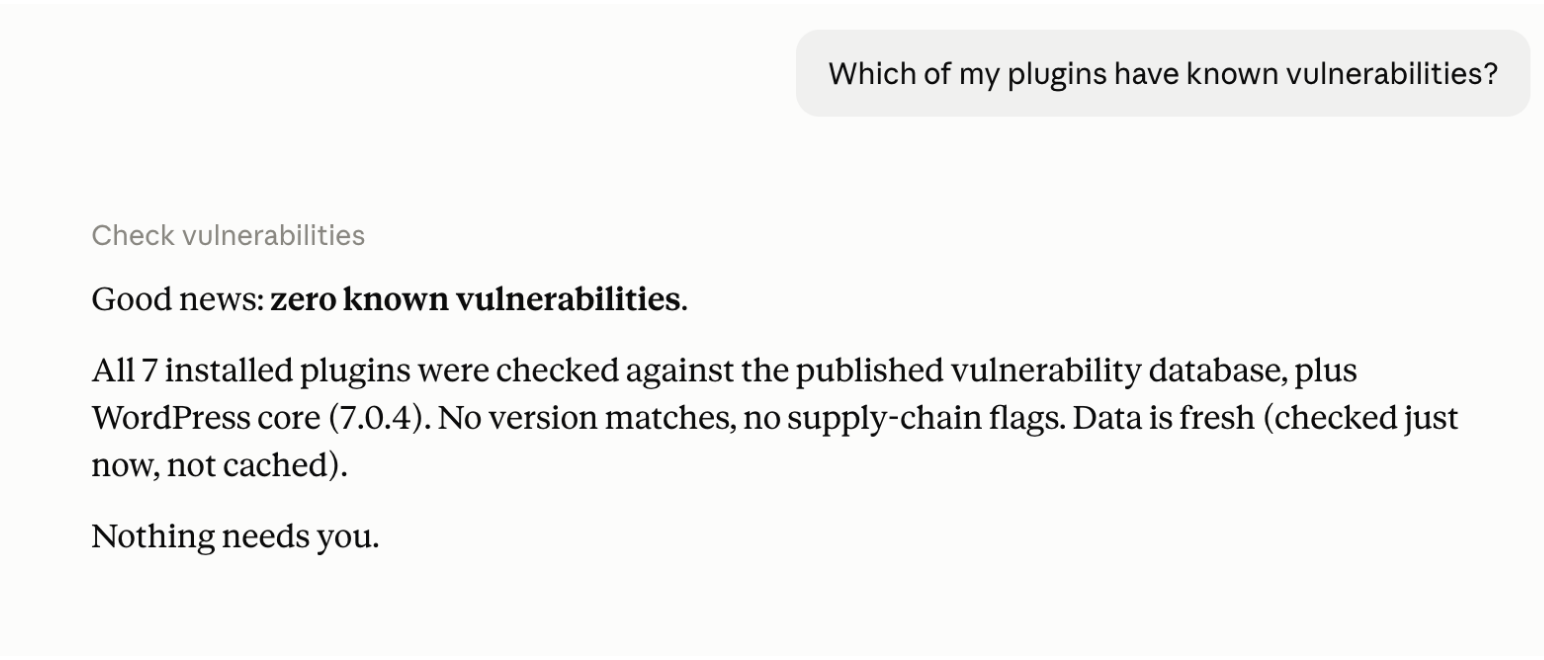
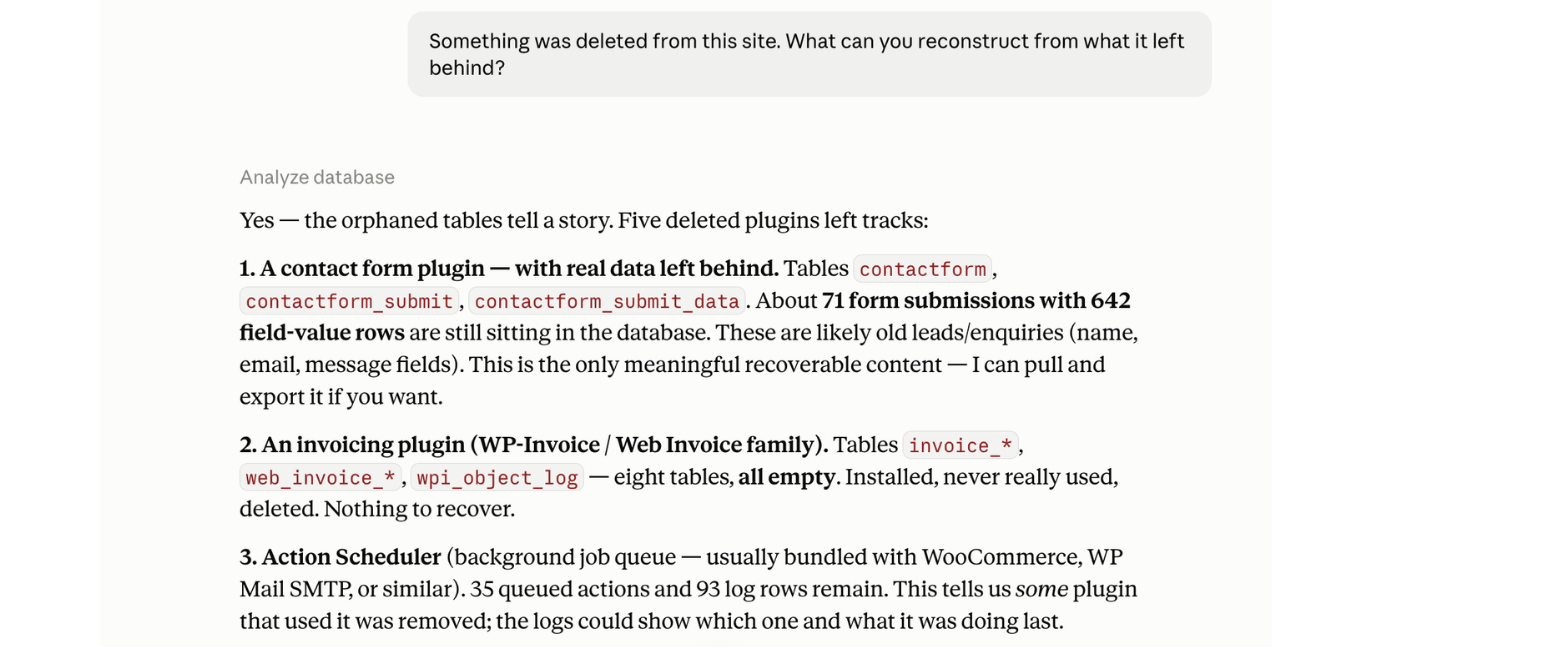
list_plugins— inventory with versions, update status, and health flags (has_vulnerability,closed_on_wporg,not_updated_2y/4y,untested_current_wp,no_wporg_record,single_file,mu_plugin,dropin). Paginated, compact rows by default.check_vulnerabilities— published CVEs matched against the versions actually installed, with CVSS as published, affected ranges, and fixed-in versions. Version matches only; a slug appearing in an advisory database is not a finding.get_site_overview— WordPress, PHP, and database versions with support status, plus object cache, debug state, memory limits, cron state, and plugin counts.analyze_autoload— autoloaded option weight attributed per plugin, largest options, and an explicit unattributed bucket.analyze_cron— scheduled events per plugin plus orphaned hooks with no registered callback.analyze_database— non-core tables with sizes and owners, orphaned tables listed separately.analyze_usage— registered shortcodes, blocks, post types, and taxonomies with real occurrence counts in content.get_plugin_details— everything above for up to five named plugins, composed in one call.get_capabilities— machine-readable description of what the server answers, every flag’s exact threshold, and what it refuses to measure.
Design constraints worth knowing before you wire it up
Facts, never verdicts. No scores, no grades, no recommendation strings — judgment belongs to the model reading the output, which means analysis improves without a plugin update.
Honest degradation. Every response carries _meta with sources_unavailable, and partial results carry a coverage object naming the slugs that went unchecked. A check that did not run returns null with a stated reason, never 0. Enrichment failures back off progressively (15 min 24 h) rather than hammering free community APIs.
Attribution confidence is always reported: high (curated slug-to-prefix map), medium (prefix derived from the slug), or visibly unattributed. Heuristics are never presented as facts.
Response size is bounded. Compact rows by default, detail: true capped at 10 rows, get_plugin_details capped at 5 slugs, free text truncated at 200 characters — a full estate stays inside a usable context window.
Not measured, and it says so instead of inventing numbers: per-plugin runtime cost, front-end asset weight. And it performs no write operation of any kind.
Enrichment comes from api.wordpress.org and wpvulnerability.net; both keyless, both cached, both optional. Support lifecycle dates for PHP, MySQL and MariaDB ship with the plugin, compiled from each vendor’s published policy, so no third service is contacted for them. A firewalled site still gets a complete inventory with the enrichment fields absent and the missing sources named.
The endpoint, stated plainly
Auditra exposes information about your site over an authenticated HTTP endpoint. You should understand exactly what that means before enabling it:
- On install, the endpoint is disabled and inert. It answers 404 to everything until an administrator explicitly enables it and generates an access token. A fresh install exposes nothing.
- When enabled, anyone holding the token URL can read: your plugin list with names, versions, and health flags; WordPress, PHP, and database versions; vulnerability findings matched to your installed versions; autoloaded option names and sizes; cron hook names and schedules; database table names, sizes, and approximate row counts; and shortcode/block usage counts. Treat the connection URL like a password.
- It never exposes: post content, user accounts or emails, comments, credentials, salts, or option values — only option names and byte sizes.
- It is structurally read-only. The codebase contains no plugin-management, database-write, or file-write calls, and our continuous integration fails the build if any is ever introduced. The endpoint cannot change anything on your site, and neither can an AI connected through it.
- Revocation is one click. Regenerating the token on the settings page invalidates every existing connection immediately. Disabling the toggle returns the endpoint to 404.
- The endpoint is rate-limited (60 requests per minute per IP by default) and failed authentication attempts are logged for your review on the settings page.
External services
To enrich its answers, Auditra contacts two public services. In every case the only data transmitted is plugin slugs and version strings. No site content, no URLs (beyond the API hosts), no user data, and no personal data ever leave your site. Both degrade silently: if a service is unreachable, the affected fields are absent and the response says which source was unavailable.
Support lifecycle dates for PHP, MySQL and MariaDB are not fetched from anywhere. They ship inside the plugin, compiled from each vendor’s own published policy, so no external service is involved in reporting them.
1. WordPress.org Plugin API (https://api.wordpress.org/)
What it is: the official plugin directory API, run by WordPress.org, which serves the public listing data for plugins hosted there.
What is sent: plugin slugs, one request per installed plugin. Separately, a request carrying no parameters at all fetches the public list of WordPress releases. Nothing else — no site URL, no version of your site, no identifiers.
When it is sent: only while answering a list_plugins, get_site_overview, or get_plugin_details call from your MCP client. Never on a page load, never on a schedule. Cached 24 hours, so repeat questions send nothing.
What comes back: last-updated dates, tested-up-to versions, active install counts, ratings, support activity, and the security status WordPress.org publishes for each release (latest, outdated, or insecure).
Terms of service: https://central.wordpress.org/tos/
Privacy policy: https://wordpress.org/about/privacy/
2. WPVulnerability (https://www.wpvulnerability.net/)
What it is: a free, volunteer-run database of published WordPress security advisories, operated from Spain by the maintainer of robotstxt.es.
What is sent: plugin slugs, one request per installed plugin, plus your WordPress core version string on the core lookup. Nothing else.
When it is sent: only while answering a check_vulnerabilities, list_plugins, or get_plugin_details call from your MCP client. Never on a page load, never on a schedule. Cached 12 hours, and up to 72 hours when the service is unreachable.
What comes back: published vulnerability records with CVE identifiers, CVSS scores, affected version ranges, and supply-chain audit verdicts.
Terms and legal notice: https://www.robotstxt.es/legal/
Privacy policy: https://www.wpvulnerability.com/privacy/
Supporting the data sources
WPVulnerability is a free, volunteer-run service that this plugin (and the whole WordPress security ecosystem) depends on. If Auditra is useful to you, consider supporting them: https://www.wpvulnerability.com/sponsorship/
Screenshots
Installation
- Install and activate Auditra.
- Go to Tools Auditra.
- Enable the MCP endpoint and generate an access token.
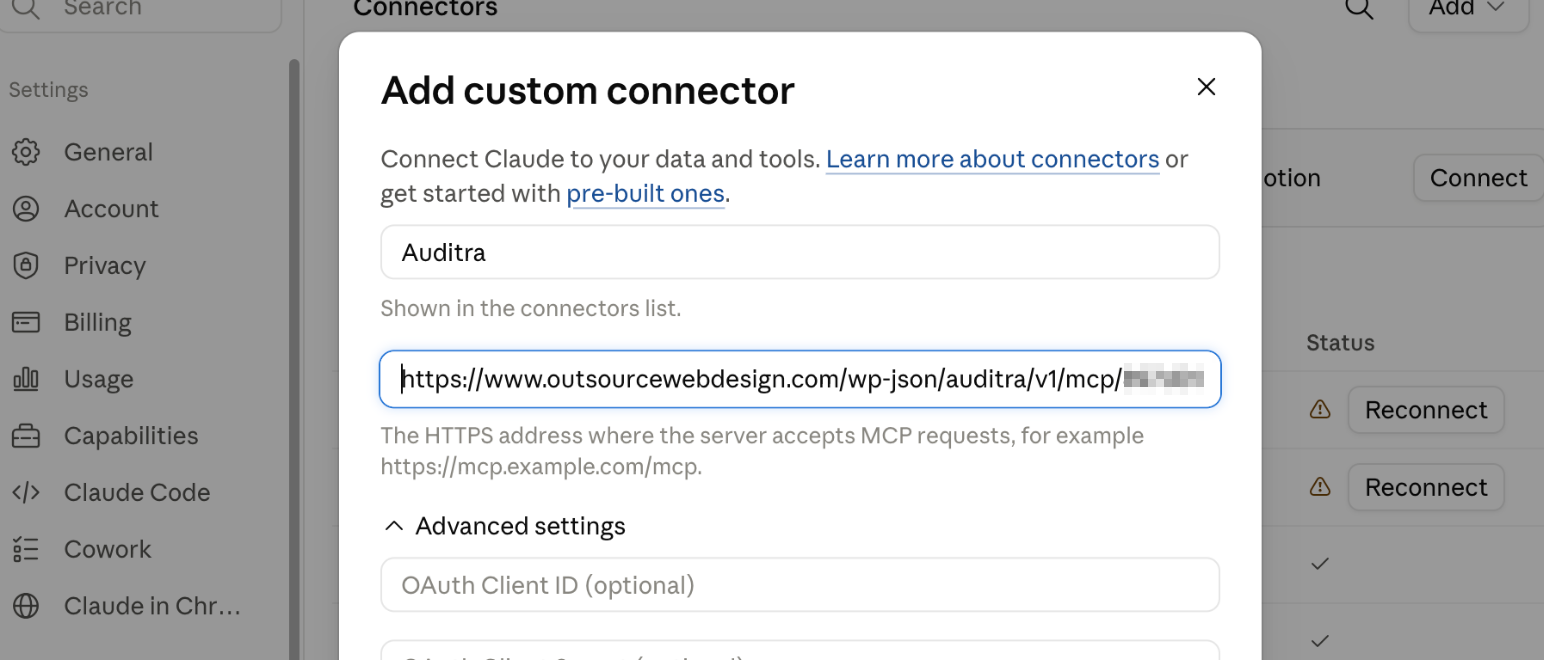
- Copy the connection URL and add it to your AI client as a custom connector (in Claude: Settings Connectors Add custom connector).
- Ask your assistant something real: “Which of my plugins have known vulnerabilities?” or “What did old plugins leave behind in my database?”
Your site must be reachable over HTTPS from the internet for a cloud AI client to connect to it. Pretty permalinks (Settings Permalinks, anything other than Plain) are required.
FAQ
-
Which clients and what does the transport look like?
-
Any MCP client supporting remote servers over HTTP. Transport is Streamable HTTP with a single
application/jsonresponse (no SSE), JSON-RPC 2.0, stateless — no session ID is issued and none ever was.Both MCP protocol generations are supported, decided per request with no server-side state. Clients speaking revision
2026-07-28send per-request metadata and may callserver/discover; the server validates theMCP-Protocol-Version,Mcp-Method, andMcp-Nameheaders against the request body and rejects disagreement outright. Clients speaking2025-11-25,2025-06-18, or2025-03-26use theinitializehandshake exactly as before, includingnotifications/initialized(202, empty body) andping. Nothing was dropped; the server was stateless from the first release, so the new revision’s model is the one this plugin always had.Clients on
2026-07-28receive a 24-hour freshness hint on the tool list, so a tool added by a plugin update appears within a day without reconnecting. Older clients cache the tool list with no expiry signal, so on those, reconnect after upgrading the plugin. -
How does authentication work?
-
A bearer token in the URL path:
POST /wp-json/auditra/v1/mcp/{token}. Generated fromrandom_bytes(32), hex encoded, compared withhash_equals, stored in a non-autoloaded option.permission_callbackreturns true and authentication happens inside the handler so error shapes stay under the plugin’s control: 404 when the endpoint is disabled, 401 on a bad token, 429 past the rate limit (60/min per IP, filterable viaauditra_rate_limit). No OAuth — token-in-path is the permanent design. -
Can I extend or tune it?
-
Tools are auto-discovered from
includes/mcp/tools/: one file per tool, each declaring its own name, description, and JSON Schema. Filters:auditra_rate_limit,auditra_http_timeout, andauditra_vulnerability_provider— the last swaps the vulnerability data source for any class implementing the provider interface, which is one file (see CONTRIBUTING.md). Attribution accuracy comes fromincludes/data/prefix-overrides.json, a curated slug-to-prefix map that takes pull requests — the easiest useful contribution. -
Is this safe to run on a production site?
-
The endpoint is disabled by default, token-authenticated, rate-limited, and structurally incapable of writing to your site. What it exposes when enabled is described honestly in the section above — read it and decide. Failed authentication attempts are logged on the settings page.
-
Does it slow my site down?
-
No. It does nothing on normal page loads. Work happens only when your AI client asks a question, and expensive lookups are cached (external data for 12–24 hours, disk scans for a day).
-
Why is the first question slow?
-
Because the cache is empty and the first call fills it. On a 45-plugin site the first
list_pluginstakes around 8 seconds and about 20 MB, because it looks every plugin up against wordpress.org and the vulnerability database and fetches release-cycle data, all in one request. Every call after that answers from cache in about 0.2 seconds until the data expires.This is expected behaviour rather than a fault, and it costs your visitors nothing: the work happens inside your client’s request, not on a page load. If your MCP client gives up on the first call, ask again — the second one is fast.
-
What is the supply_chain section, and how is it different from a vulnerability?
-
A vulnerability is a bug in a release. A supply-chain audit is the other kind of problem: someone with publishing rights on the plugin shipped a version the original author did not write, usually after buying or hijacking the plugin.
These are reported separately and never mixed into the CVE list, because they mean different things and carry no CVE or severity score. Verdicts are
malicious(attacker-supplied code confirmed in the affected versions),suspicious(changes consistent with a compromise, unconfirmed), andcleaned(compromised, later fixed in a clean release — which says nothing about a site still running an affected version). Where an audit publishes its range as a repository revision rather than a version number, the entry is still reported, marked as undetermined rather than quietly dropped.These verdicts are WPVulnerability’s, not Auditra’s. They are reproduced exactly as published, identified by audit ID and publication date. Auditra does not analyse plugin code, reaches no independent conclusion about any plugin or its authors, and neither endorses nor disputes a verdict. It reports that an audit exists, what it says, and whether your installed version falls inside the range it names.
A supply-chain verdict is a serious accusation by a third party about someone else’s software. Attribute it to its source, and take any question about a specific verdict — its evidence, its accuracy, or its removal — to WPVulnerability at https://www.wpvulnerability.net/ rather than to us or to the plugin’s author.
-
Why doesn’t it give my site a score?
-
Because scores would be invented. Auditra reports measurable facts — versions, dates, sizes, counts, published CVEs — and leaves judgment to the model reading them, which can weigh actual context instead of applying a formula.
-
Does a zero usage count mean a plugin is safe to delete?
-
No, and the tool is deliberately narrow about this.
zero_content_usagemeans exactly one thing: the plugin registers shortcodes, blocks, or post types and none appear in post content. A plugin registering no content features at all is reported as not measurable, never as unused — hooks, filters, admin screens, REST endpoints, and template code are all invisible to content scanning. Counts also scanpost_contentonly, so a shortcode living in a widget, an option, or a theme template counts zero while appearing on every page. -
Does it work on multisite?
-
Not properly in v1. It operates on the individual site it runs on; managing it on a network requires a network administrator. Full network support may come later.
-
What happens if one of the external services is down?
-
The affected answers degrade explicitly rather than quietly.
Every response carries a status object per source: whether it answered, why it did not, when it last answered successfully, and when the next retry is due. Failing services are retried with increasing backoff (up to 24 hours) to avoid hammering free community APIs.
If a source is unreachable but cached data survives, that data is served and labeled with its exact age — six-day-old wordpress.org data is far more useful than none. Vulnerability data is the exception: it is discarded after 72 hours, because a CVE published yesterday does not appear in a three-day-old cache.
check_vulnerabilities states which of four situations produced its answer: everything checked, everything checked from cached data past its expiry, some plugins checked and the rest named, or nothing checked at all. In the last case it returns **no findings list whatsoever** — an empty list is shaped like an answer, and "I looked and found nothing" is not the same statement as "I could not look".
Reviews
There are no reviews for this plugin.
Contributors & Developers
“Auditra” is open source software. The following people have contributed to this plugin.
Contributors
Translate “Auditra” into your language.
Interested in development?
Browse the code, check out the SVN repository, or subscribe to the development log by RSS.
Changelog
1.0.0
- Initial public release.
- Nine read-only MCP tools: get_capabilities, list_plugins, get_site_overview, check_vulnerabilities, analyze_autoload, analyze_cron, analyze_database, analyze_usage, get_plugin_details.
- MCP over JSON-RPC 2.0 on a single Streamable HTTP endpoint, stateless, protocol revisions 2026-07-28 (per-request metadata,
server/discover) and 2025-11-25 / 2025-06-18 / 2025-03-26 (initializehandshake), negotiated per request. - Enrichment from wordpress.org and WPVulnerability: keyless, cached, parallel-fetched, with per-source coverage reporting and progressive backoff on failure. PHP, MySQL and MariaDB lifecycle dates are bundled, not fetched.
- Explicit degradation: per-source status objects with reason codes, stale-but-labeled data served when an upstream is unreachable, and a four-state vulnerability response that returns no findings list at all when nothing could be checked.
- Attribution engine mapping options, tables, and cron hooks to owning plugins with explicit confidence levels and a visible unattributed bucket.
- Security: endpoint disabled by default, token authentication compared with hash_equals, per-IP rate limiting, failed-authentication log, and a CI gate that fails the build if any write operation is introduced.