

Description
Add an AI search assistant to your WordPress site. Ask My Content indexes your pages, posts, products, events, and custom post types so visitors can ask questions and get answers from your actual site content, with source links.
Turn your WordPress pages, posts, products, events, and archives into an AI-powered answer engine. Visitors ask questions; Ask My Content answers using your actual site content and shows sources.
Unlike standard content search plugins that rely on keyword matching, Ask My Content uses semantic embeddings and retrieval-augmented generation to return direct answers in full sentences.
Supports Gutenberg, Elementor, Avada, and WooCommerce content.
Demo website
Try the live demo: Ask My Content live demo
Click “AI Chat by Pavel!” in the bottom right corner.
Key Features
* Retrieval Augmented Generation (RAG) – answers are grounded in your actual site content.
* Uses AI for embeddings and completions (via a secure Node.js backend).
* Change tracking – edited pages/posts can be auto re-indexed immediately, or queued for manual re-indexing.
* Deleted content removal – auto notifies the backend when pages or posts are trashed or permanently deleted.
* Lightweight – no heavy admin UI or visual layout tools, just the essentials.
* Flexible – works with posts, pages, other content types, and header/footer.
* Website Admin can see Questions and Answers history, and related details.
How it works
1. After activating the plugin, go to Dashboard -> Ask My Content and press “Start Indexing” (or run wp amc index) to send your site content to the backend. Indexing must be completed before the chat can answer questions.
2. Enable the floating launcher to show the chat site-wide; or add the Ask My Content block to an existing or new page (or place the [ask_my_content] shortcode) and publish/update the page so the chat interface has a front-end location.
3. When a visitor asks a question, the chatbot retrieves the most relevant snippets from your indexed website content.
4. AI generates an answer based on that content.
After you edit content, enable Automatically re-index modified pages, posts, and content to sync changes in the background, or re-run indexing manually from Dashboard -> Ask My Content (or via wp amc index).
Deleted posts are sent to the backend automatically when they are trashed or removed.
Note: Your site’s content and user questions are securely sent to an external AI service for processing.
Command Line Usage
The plugin bundles a WP-CLI command suite (wp amc) for scripted indexing and status checks. It complements the Ask My Content Settings admin screen:
- Use the settings page for a guided UI, manual start/stop buttons, and real-time counters inside the WordPress dashboard.
- Use
wp amcwhen you need automation (cron jobs, SSH sessions, CI) or want to run indexing without opening a browser.
Available commands include:wp amc index [--include-posts] [--include-other-post-types] [--pages-only] [--force]wp amc statuswp amc stop
Run wp help amc index for full option descriptions:
NAME

  wp amc index

DESCRIPTION

  Run indexing immediately (pages always, posts and other public content types optional).

SYNOPSIS

  wp amc index [--include-posts] [--include-other-post-types] [--pages-only] [--force]

OPTIONS

  [--include-posts]
    Include posts in addition to pages.

  [--include-other-post-types]
    Include other public content types (for example products or books) in addition to pages.

  [--pages-only]
    Index pages only. Overrides any previously saved content-type settings.

  [--force]
    Steal an existing lock and run anyway (use with caution if another process may be running).

EXAMPLES
    wp amc index
    wp amc index --include-posts
    wp amc index --include-other-post-types
    wp amc index --pages-only
    wp amc index --force
Installing WP-CLI
Many hosts ship with WP-CLI pre-installed. If yours does not, install it manually:
- Download the Phar:
curl -O https://raw.githubusercontent.com/wp-cli/builds/gh-pages/phar/wp-cli.phar - Make it executable:
chmod +x wp-cli.phar - Move it into your PATH (optional):
sudo mv wp-cli.phar /usr/local/bin/wp - Confirm:
wp –info
See https://wp-cli.org/#installing for additional options (Homebrew, Docker, Windows packages).
Running the command successfully
Run wp amc ... from the WordPress installation root (where wp-config.php lives) or supply the path explicitly:
- Change directory, e.g.
cd /srv/www/wordpressthen runwp amc status - Or pass the path flag:
wp --path=/srv/www/wordpress amc status
If you run the command from another folder you will see:
Warning: No WordPress installation found. If the command ‘amc’ is in a plugin or theme, pass –path=
path/to/wordpress.
Point wp at your site root and re-run to resolve the error.
Screenshots
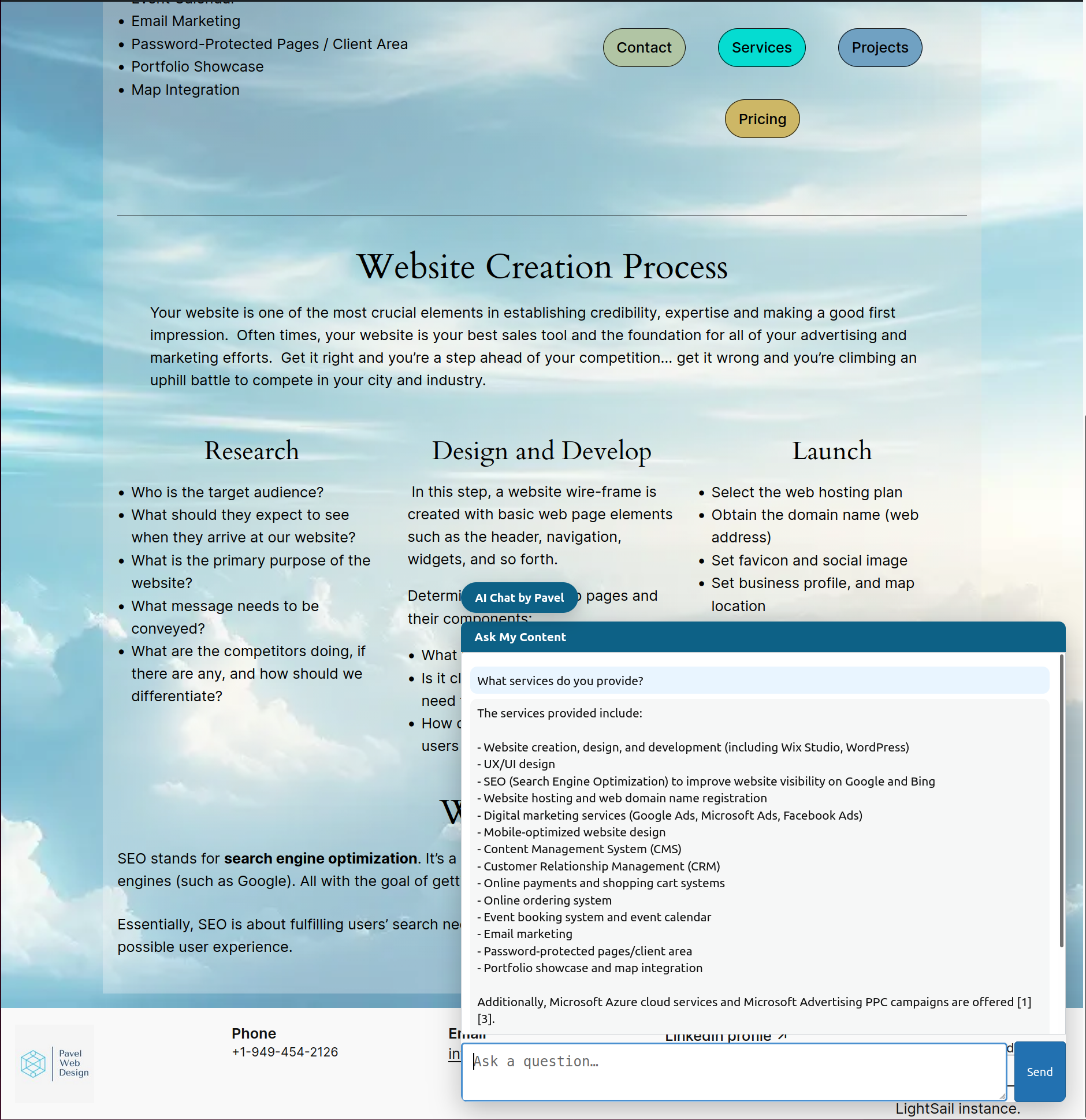
Chatbot on a page, answering a question using site content.

Dashboard – Ask My Content admin page.
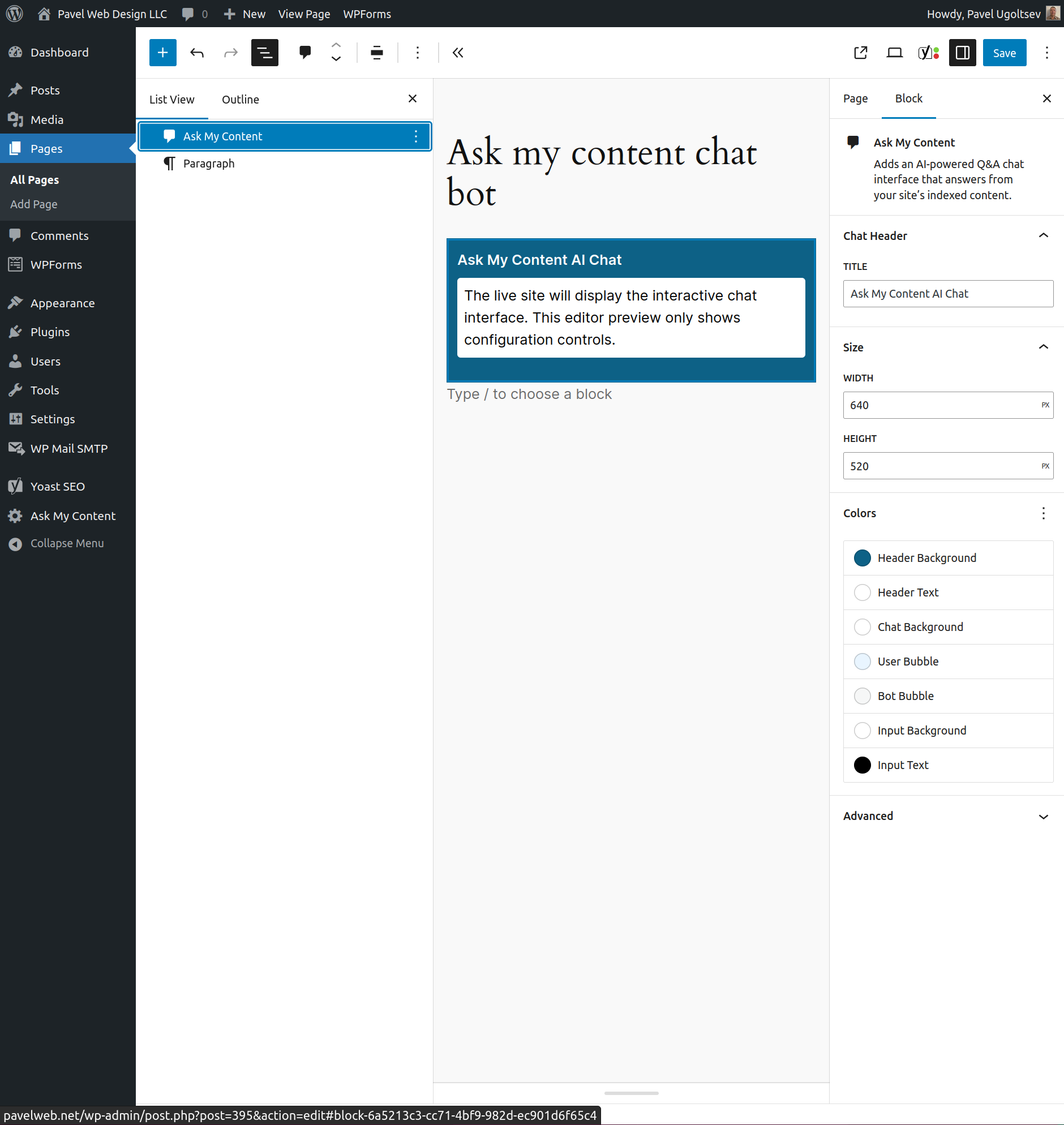
Block Editor – Ask My Content block with align, size and colors params.
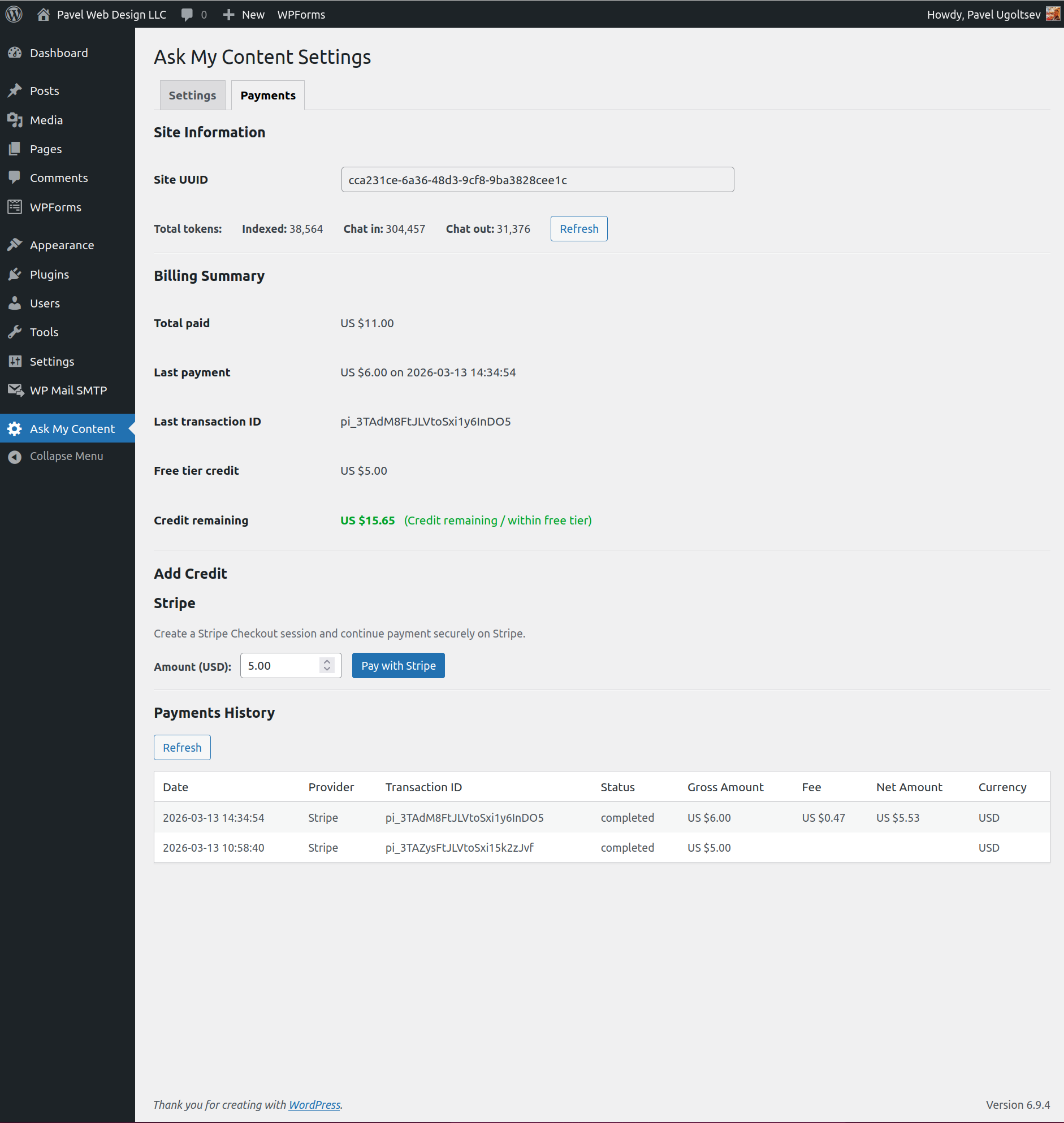
Dashboard – Ask My Content – Payments tab.
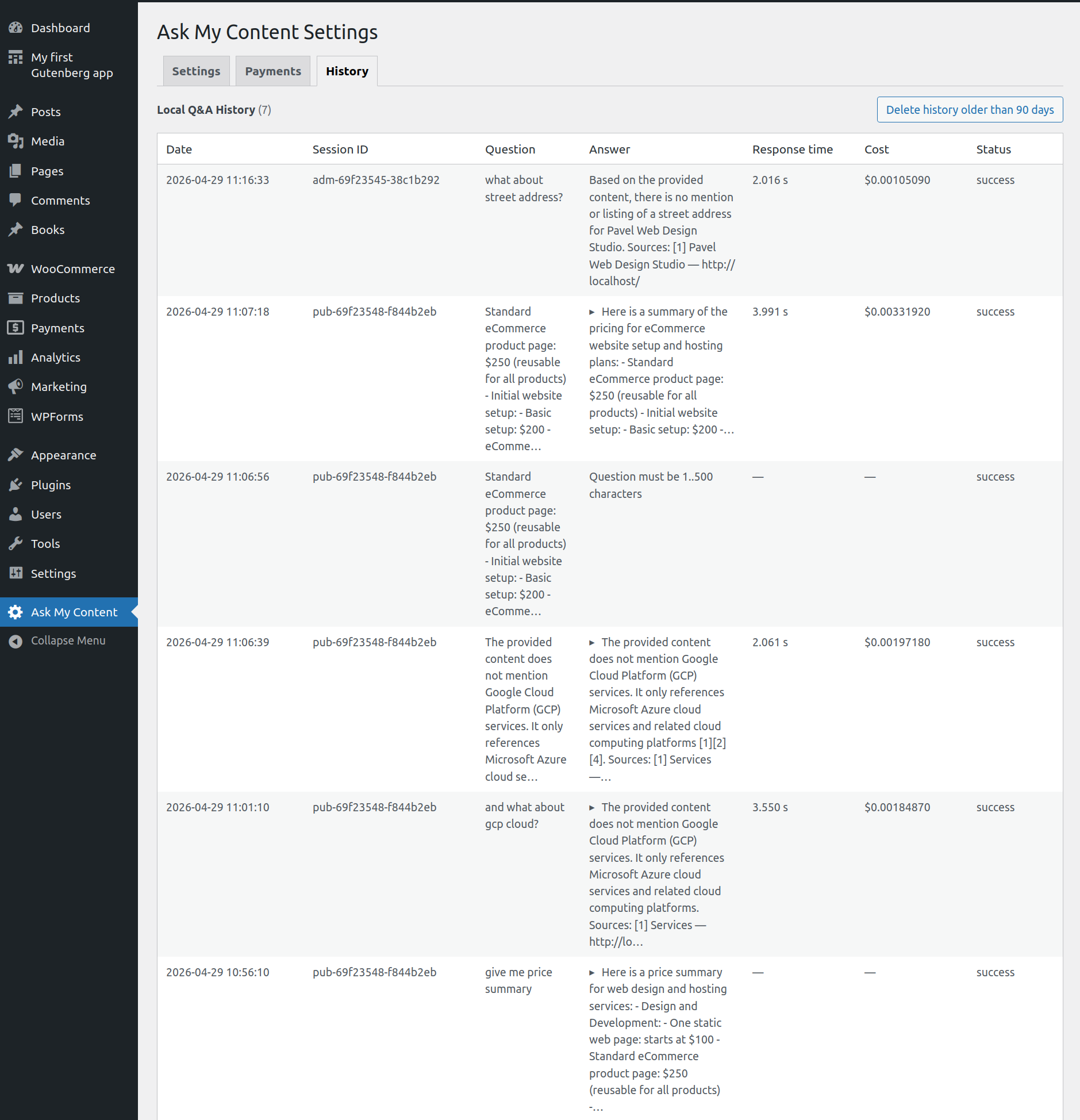
Dashboard – Ask My Content – History tab.

Dashboard – Ask My Content – Chat tab.
Blocks
This plugin provides 1 block.
- Ask My Content Adds an AI-powered Q&A chat interface that answers from your site’s indexed content.
Installation
- Upload the plugin files to
/wp-content/plugins/ask-my-content, or install via the WordPress Plugins screen. - Activate the plugin through the ‘Plugins’ screen in WordPress.
- Optionally configure settings in Dashboard -> Ask My Content (floating launcher, indexing posts).
- Run the initial indexing from Dashboard -> Ask My Content by pressing “Start Indexing”, or run
wp amc indexfrom the command line. - Add the chatbot to the website using either:
- Enable floating chat launcher site-wide
- The shortcode:
[ask_my_content] - The Gutenberg block: “Ask My Content”
FAQ
-
Payments
-
On the
Paymentstab you can see your tokens usage, balance, and make the payments.
You get one-time US $5.00 credit, which is applied to third-party AI services (like OpenAI and Gemini) indexing/embedding and chat completion/answers. -
Why is indexing stuck?
-
The admin “Start Indexing” button schedules a background task via WordPress cron. If your site uses aggressive caching (e.g., LiteSpeed Cache, WP Super Cache), cached pages may bypass cron triggers, causing indexing to appear stuck at “scheduled…” or “stopping…”.
Solutions:
1. Refresh the settings page — stale state is auto-detected and reset.
2. Usewp amc indexfrom the command line — it runs synchronously and doesn’t depend on cron. See Command Line Usage section. -
Should I enable auto re-index?
-
Enable Automatically re-index modified pages, posts, and content if you want content edits to appear in chat results quickly without running manual indexing.
Keep it disabled if your site has frequent edits to large pages (for example long landing pages or content-heavy builder pages). In that case, each update can trigger additional background embedding requests, which may increase API usage and add server/backend load.
Practical guideline:
* Enable it for low-to-moderate edit frequency or smaller pages.
* Disable it for high-frequency editing of large pages, and run indexing in batches when convenient. -
Why my indexed token count is low
-
Low indexed token count usually means the plugin did not find much readable page content to send for indexing.
This can happen if:
1. The page is mostly built from theme templates, banners, sliders, or other repeated global sections.
2. The important content is loaded by a plugin or builder widget that does not expose much text to WordPress.
3. Indexing finished before the latest content changes were re-run.Ask My Content now supports common WordPress content builders much better, including Gutenberg, Elementor, Avada, and WooCommerce product content.
If your indexed token count still stays unexpectedly low after re-running indexing, see the next FAQ section: What content is supported for indexing?
If the chat still answers with “No available content,” the page may rely heavily on content generated outside the main WordPress content flow.
-
What content is supported for indexing?
-
Ask My Content is designed to index the main readable text of your site content.
Currently supported:
* Standard WordPress pages and posts
* Gutenberg block content
* Elementor content in many common setups
* Avada content in many common setups
* WooCommerce product content, including product descriptions, short descriptions, price, SKU, weight, dimensions, and attributes
* Other public post types, if enabled in plugin settingsIn general, the plugin reads the main post content the way WordPress normally renders it, using the standard content pipeline (
apply_filters('the_content', ...)).That means it usually works well with content that lives inside the main editor content area, but it may still miss text that comes only from:
* headers or footers
* sliders, popups, and announcement bars
* heavily customized builder widgets
* content injected from external sources or loaded later with JavaScriptIf a page is important for search quality, open it in WordPress and make sure the main text is actually stored in the page, post, or product content itself before re-running indexing.
-
Does this plugin use my own AI API key?
-
By default, the plugin uses the developer’s AI API key on a secure backend (with generous usage limits). This means you don’t need your own AI API key.
-
Will this slow down my site?
-
No. Heavy AI processing (embeddings, search, completions) happens on a separate Node.js backend service.
-
Is my data safe?
-
Yes. Content is transmitted securely to the backend.
-
Does this plugin support WordPress Multisite?
-
Not yet. Ask My Content is not currently compatible with WordPress multisite installations, so it must be activated on individual sites (no network-wide support yet).
-
Can I customize the shortcode output?
-
Yes. The
[ask_my_content]shortcode accepts optional attributes such astitle,sessionId,width,height, and the various color tokens (headerBackground,headerTextColor,chatBackground,chatUserBubble,chatBotBubble,inputBackground,inputTextColor). They map to the same style variables used by the block. See the inline comment aboveamc_render_chat_shortcode()inask-my-content.phpfor the current list and defaults.
Reviews

Contributors & Developers
“Ask My Content – AI Search Chatbot” is open source software. The following people have contributed to this plugin.
Contributors
Translate “Ask My Content – AI Search Chatbot” into your language.
Interested in development?
Browse the code, check out the SVN repository, or subscribe to the development log by RSS.
Changelog
1.7.0
On the Chat tab in Ask My Content Settings added the option Chat Response Provider with current choices: OpenAI and Gemini.
1.6.0
On the Chat tab in Ask My Content Settings added the option Source Link Display.
It controls how source links are shown in chat answers: Title only (default) or Title and full URL.
Also URLs with non-English characters are decoded for display.
1.5.2
Tested with WordPress 7.0
1.5.1
Fixed issues related to the option Automatically re-index modified pages, posts, and content.
1.5.0
Added an option Automatically re-index modified pages, posts, and content on the Settings tab.
1.4.0
Added Chat tab to Ask My Content Settings, with additional chat customizations.
Improved The Events Calendar content capturing.
1.3.0
Added History tab to Ask My Content Settings, which shows Questions and Answers history, and related details.
1.2.2
Improved content indexing support for premium Elementor components.
1.2.1
Added X button to close the floating chat dialog (also can be closed by the Esc key)
1.2.0
Improved content indexing support for Gutenberg, Elementor, Avada, WooCommerce, and other post types.
1.1.0
Added support for other content types (Products, Books, Events, etc.), including WooCommerce products.
1.0.0
Added Payments tab to Ask My Content Settings, where you can check your usage and pay the balance (currently with Stripe)
0.9.0
Indexing in the backend is now async.
Remaining Count = 0 in the table means that all pages/posts have been sent to the backend.
The actual indexing status is reflected on the Indexing status line.
0.8.4
Added Use Theme Colors checkbox on the plugin admin page.
0.8.3
In the chat response, source links are now clickable.
0.8.2
Added warnings that WP-CLI may be required for indexing, in case WP-Cron is disabled, and similar cases.
0.8.1
Amended WP-CLI command suite (wp amc)
0.8.0
Added optional floating chat launcher that can appear site-wide.
New settings let you enable the floating widget and customize the launcher button label (default: “AI Chat”).
To enable: go to Dashboard -> Ask My Content and check “Enable floating chat launcher site-wide”, then Save Changes.
0.7.1
Minor fixes.
0.7.0
Chat now behaves more like a real conversation: each visitor/admin gets their own session so replies stick to their thread, and the chat window remembers recent history in the same tab when you come back.
0.6.0
Tested with WordPress 6.9
Fixed new Plugin Check complaints.
0.5.1
Improved chat error handling so the browser console surfaces the underlying API failure while the front-end shows a concise, user-friendly message.
Chats now recover automatically when the 12-hour security token expires, so long conversations continue without forcing visitors to reload the page.
0.4.2
Initial release – shortcode, block, automatic content sync, AI-powered answers.