
Description
AriConsent asks your visitors for consent before statistics and marketing cookies are used, and keeps the trackers on your site switched off until they say yes.
Everything in the free version stays free. There are no page-view caps, no visitor limits and no account to create. The banner, blocking and consent log all run on your own site.
What it does
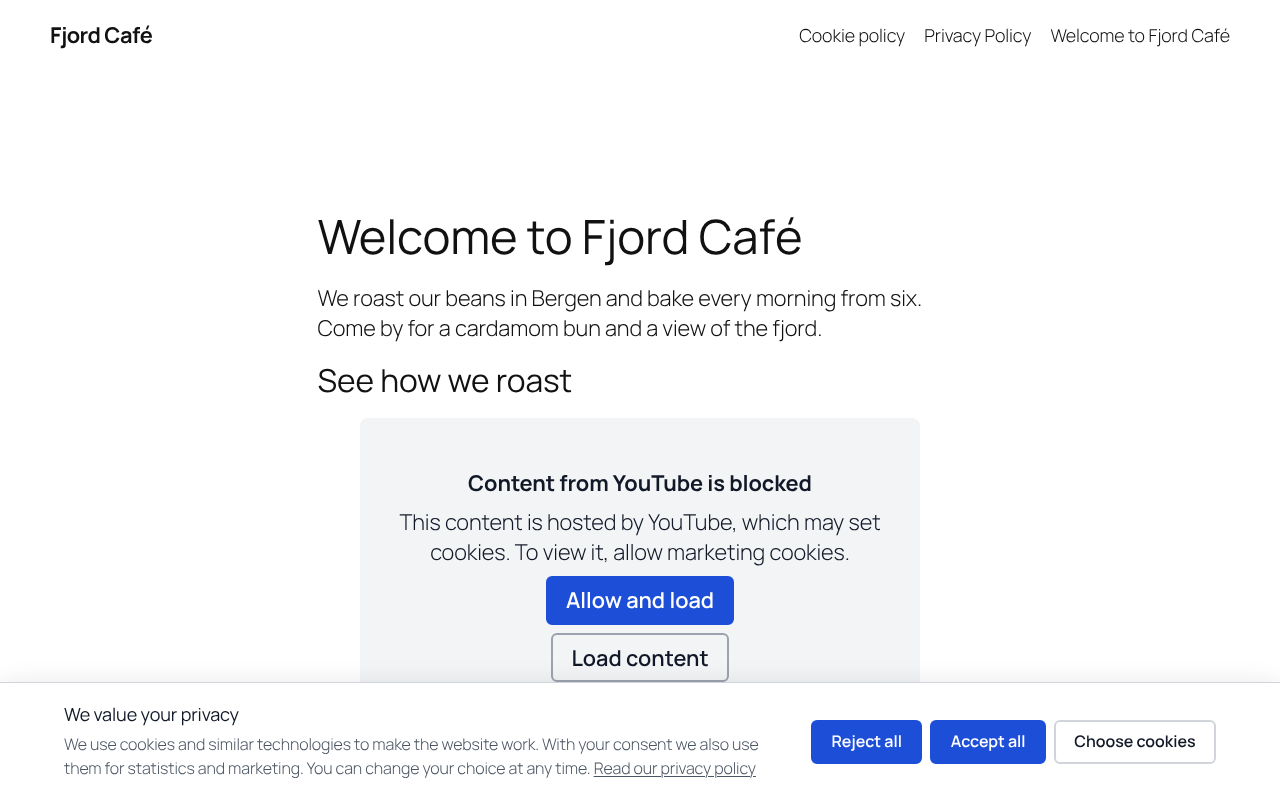
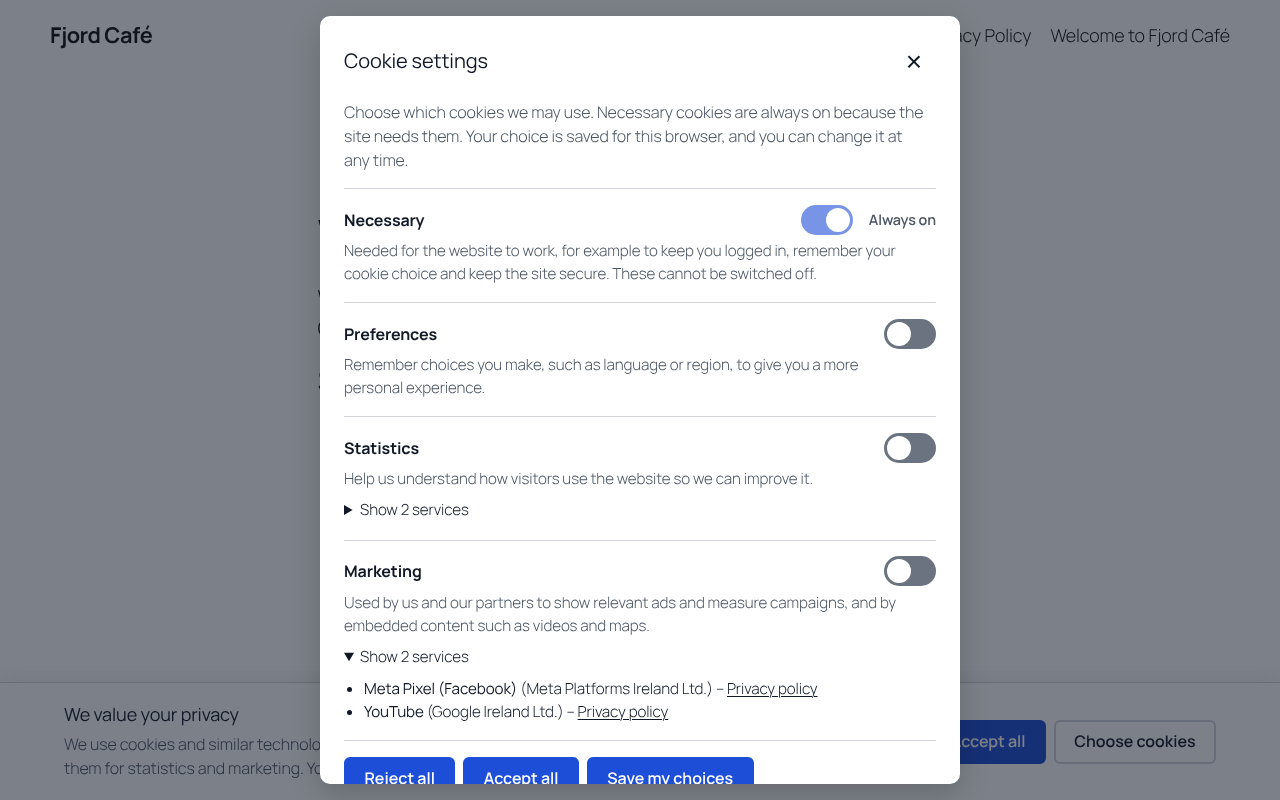
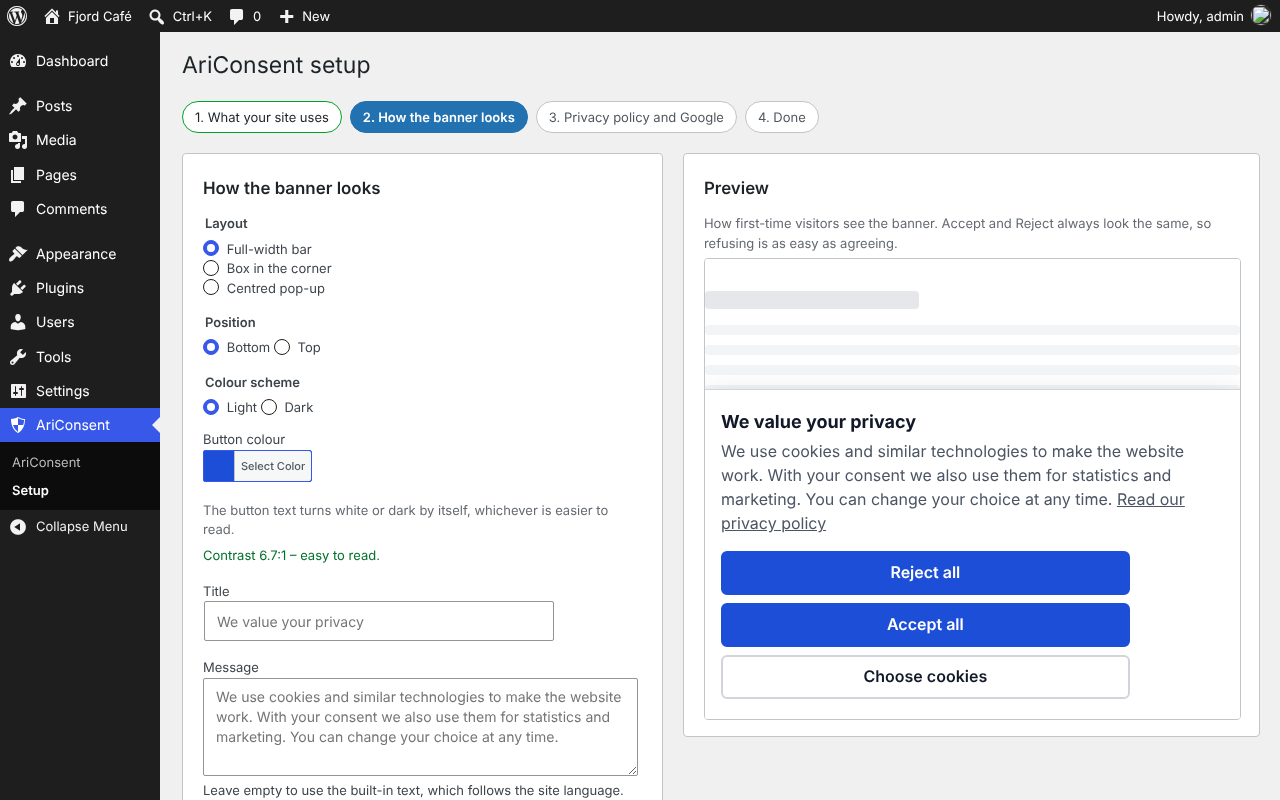
- Fair banner. “Accept all” and “Reject all” have the same colour, size and place, so refusing is as easy as accepting. Visitors can also choose per category: preferences, statistics and marketing.
- Blocks trackers until consent, also when they load later. Trackers in the page are blocked on the server, and a small guard in the browser stops scripts and embeds that other JavaScript (for example Google Tag Manager or a theme) adds after the page has loaded. Recognises Google Analytics, Google Tag Manager, Google Ads, Meta Pixel, Hotjar, Microsoft Clarity, Microsoft Advertising (UET), LinkedIn Insight, TikTok, Pinterest, Snap, Matomo Cloud, Jetpack Stats, WooCommerce Order Attribution, and embeds from YouTube (including Elementor’s video widget), Vimeo, Google Maps, Spotify, X and Instagram. Google reCAPTCHA is listed as necessary so forms keep working. You can add your own services.
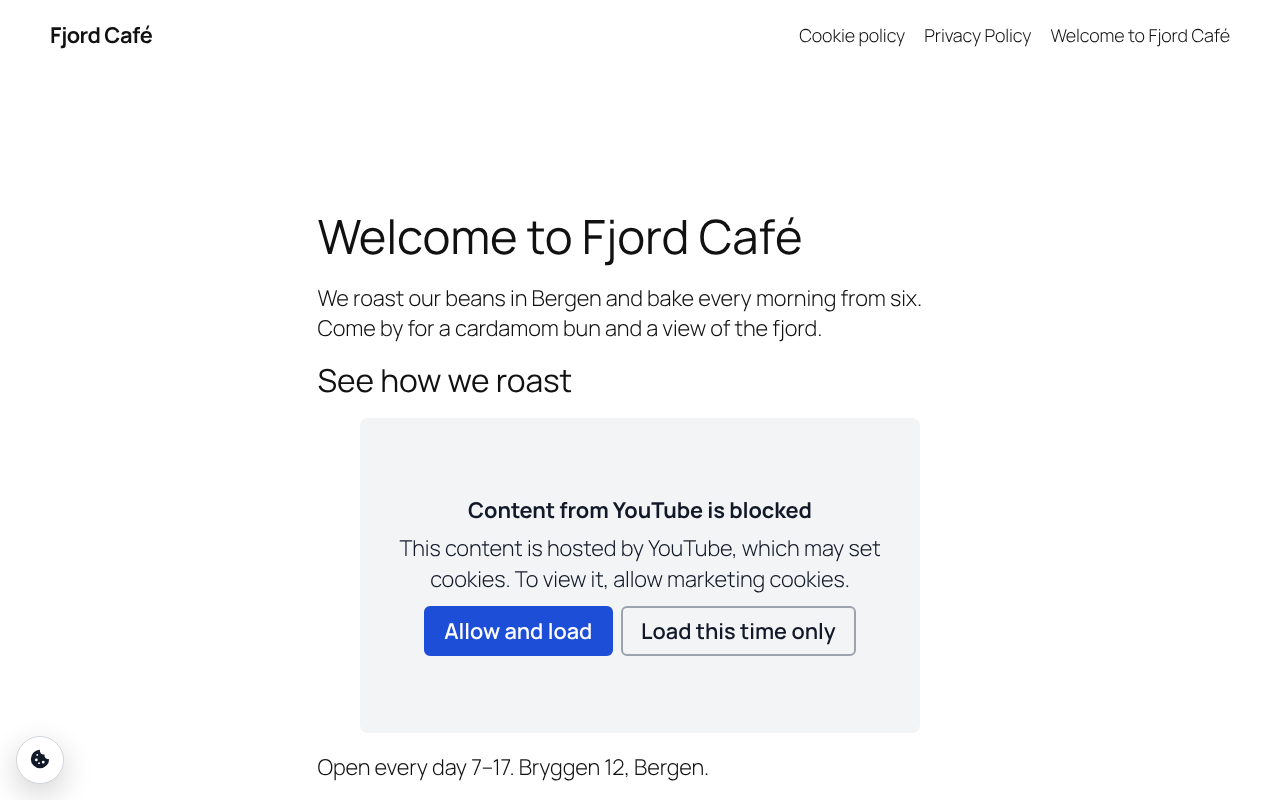
- Video and map placeholders. Blocked embeds show a clear message with “Allow and load” and “Load content” buttons.
- Google Consent Mode v2. Sets all Google consent types to “denied” before any tag loads, then updates them after the visitor’s choice. Basic mode (tags wait for consent) is the default; advanced mode is available.
- WP Consent API. Plugins that read consent through the WP Consent API follow the visitor’s choice, and cookies they register appear in your cookie declaration automatically.
- Sets itself up. Detects popular plugins that add trackers, such as Site Kit, MonsterInsights, PixelYourSite and Facebook for WooCommerce.
- Google Tag Manager events. Every choice sends an
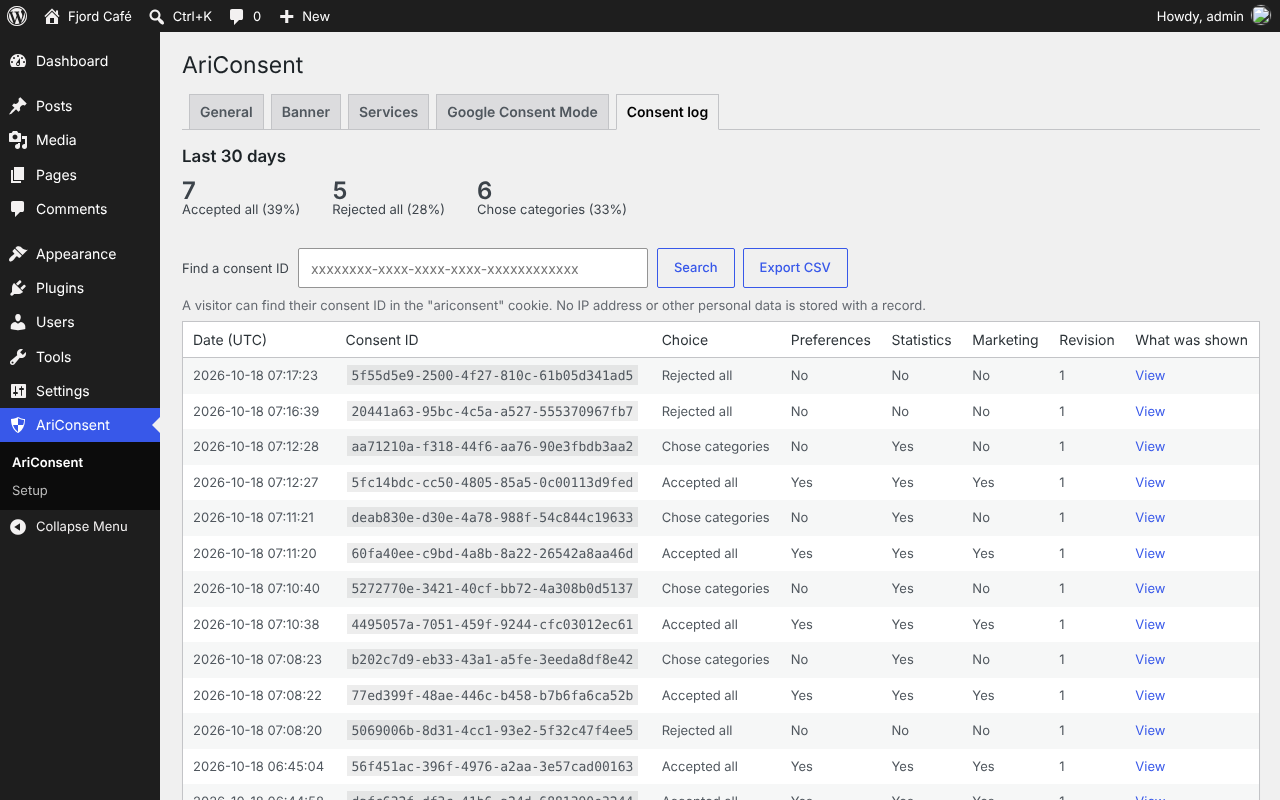
ariconsent_updateevent with the state of each category to the dataLayer. - Consent log. Keeps an anonymous record of every choice (random ID, time, choice, policy revision) so you can show when consent was given. No IP address is stored. Export to CSV. Old records are deleted automatically.
- Proof of what was shown. Every record links to a copy of the exact banner text and service list the visitor saw, so you can show what someone agreed to on a given day.
- Health check. A checklist in AriConsent and in Site Health flags problems such as a tracker that still loads before consent.
- Ask again when things change. One click makes every visitor choose again, for example after you add a new tracker.
- Easy to change your mind. A small floating button, the
[ariconsent_settings]shortcode or any link to#cookie-settings(for example a custom link in your footer menu) reopens the settings. When a visitor withdraws consent, cookies the trackers left are deleted and the page reloads so running trackers stop. - Accurate cookie declaration.
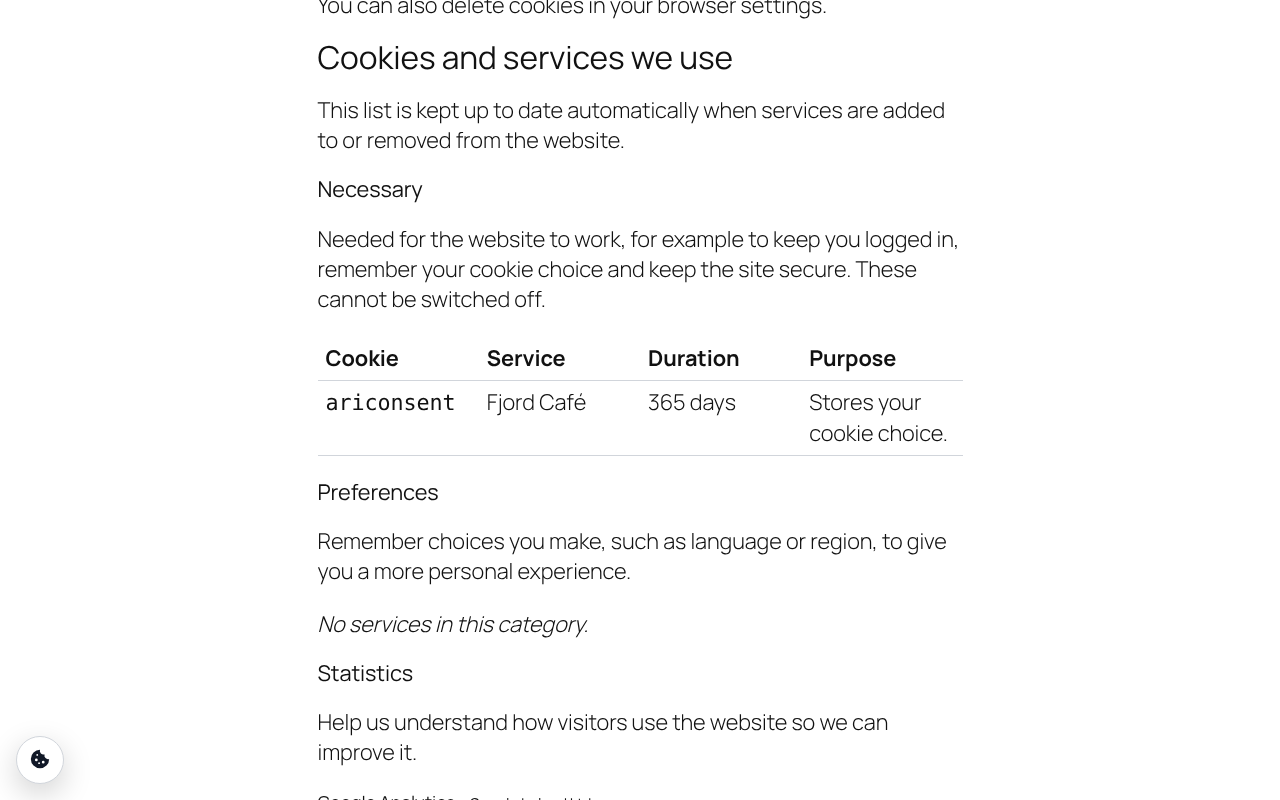
[ariconsent_declaration]lists only the services AriConsent has actually found on your site, with their cookies. - Accessible. Native dialog with keyboard support, visible focus, switches with proper roles, 44 px touch targets and tested with axe-core against WCAG 2.2 AA rules.
- Works with page caching. The page is the same for every visitor; the choice is applied in the browser.
- Nordic languages included. English, Norwegian Bokmål, Norwegian Nynorsk, Swedish, Danish and Finnish.
What it does not do
AriConsent is not a Google-certified CMP and does not support the IAB Transparency & Consent Framework (TCF). Google requires a certified, TCF-integrated CMP to show personalised AdSense, Ad Manager or AdMob ads to visitors in the EEA, the UK and Switzerland.
Installing a plugin does not by itself make a website compliant with the law. You remain responsible for which services you use and for your privacy policy.
External services
AriConsent itself does not connect to any external service. It sends no data to AriHub or to anyone else, and it loads no scripts, fonts or files from other servers. The consent log is stored in your own WordPress database, and the site scan loads your own pages from your own server.
The plugin contains the web addresses of well-known tracking and embed services only so that it can recognise them in your pages and block them until the visitor agrees. It never loads these services itself. When a visitor allows a category, the scripts and embeds that you (or your theme and other plugins) added to the site load as usual, directly from those services. What they collect and send is then governed by that service’s own terms, so list them in your privacy policy; the [ariconsent_declaration] shortcode does this for you.
Services AriConsent recognises, with their privacy policies:
- Google Analytics, Google Tag Manager, Google Ads, Google reCAPTCHA, Google Maps and YouTube (Google Ireland Ltd.): privacy policy, terms
- Meta Pixel and Instagram embeds (Meta Platforms Ireland Ltd.): Meta privacy policy, Instagram privacy policy
- Hotjar (Hotjar Ltd.): privacy policy
- Microsoft Clarity and Microsoft Advertising (Microsoft Ireland Operations Ltd.): privacy statement
- LinkedIn Insight Tag (LinkedIn Ireland Unlimited Company): privacy policy
- TikTok Pixel (TikTok Technology Ltd.): privacy policy
- Pinterest Tag (Pinterest Europe Ltd.): privacy policy
- Snap Pixel (Snap Group Ltd.): privacy policy
- Matomo Cloud (InnoCraft Ltd.): privacy policy
- Jetpack Stats (Automattic Inc.): privacy policy
- Vimeo (Vimeo.com, Inc.): privacy policy
- Spotify (Spotify AB): privacy policy
- X embeds (Twitter International Unlimited Company): privacy policy
Screenshots


Installation
- Install and activate AriConsent.
- Go to AriConsent Services and click Scan my site.
- Check the texts under AriConsent Banner.
- Add
[ariconsent_declaration]to your privacy or cookie policy page.
FAQ
-
How do I block a script AriConsent does not know?
-
Either add it under Services Your own services, or change the script tag yourself to
type="text/plain" data-ariconsent="statistics"(orpreferences/marketing). -
Does AriConsent send data to AriHub?
-
No. The plugin makes no requests to AriHub or any other outside server. The site scan loads your own pages from your own server.
-
What is stored in the visitor’s browser?
-
One first-party cookie called
ariconsentwith a random consent ID, the time, the policy revision and the chosen categories. -
Does it work on a multilingual site?
-
Yes, with Polylang or WPML. Leave a banner text empty and it follows the visitor’s language by itself (English, Norwegian Bokmål and Nynorsk, Swedish, Danish and Finnish are included). Texts you type yourself are listed under the group “AriConsent” in Polylang’s Languages Translations or in WPML String Translation, where you translate them per language. The privacy policy link points to the translated page. When the languages share one domain (for example example.com/nb/), one consent choice covers all of them; on separate domains each domain asks once.
-
Can I check what a visitor chose?
-
Yes. The visitor’s consent ID is in their
ariconsentcookie; search for it under AriConsent Consent log. -
How do I read consent from my own code?
-
In JavaScript, use
window.ariconsent.has( 'statistics' )(orwindow.ariconsent.hasService( 'hotjar' )when visitors can switch single services) and listen for theariconsent:changeevent ondocument. -
Can I manage AriConsent from the command line?
-
Yes, with WP-CLI:
wp ariconsent statusshows the health check and score,wp ariconsent scanscans the site,wp ariconsent reconsentasks every visitor again, andwp ariconsent export/wp ariconsent import <file>copy the settings between sites. -
Where do I report security bugs found in this plugin?
-
Please report security bugs found in the source code of the AriConsent plugin through the Patchstack Vulnerability Disclosure Program. The Patchstack team will assist you with verification, CVE assignment, and notify the developers of this plugin.
You can also email security@arihub.com. Please do not post security issues in the support forum. The full policy is in SECURITY.md in the plugin folder.
Reviews
There are no reviews for this plugin.
Contributors & Developers
“AriConsent” is open source software. The following people have contributed to this plugin.
Contributors

Translate “AriConsent” into your language.
Interested in development?
Browse the code, check out the SVN repository, or subscribe to the development log by RSS.
Changelog
0.4.1
- Fixed: Norwegian, Swedish, Danish and Finnish sites showed the banner and cookie policy in English. AriConsent now ships its translations and uses them when WordPress.org has no language pack for your language yet; a language pack from translate.wordpress.org still takes priority.
0.4.0
- Added: optional switches for single services in the cookie settings, so a visitor can for example allow statistics but keep Hotjar off. Off by default; switch it on under Banner. Turned-off services stay blocked, their cookies are deleted, Google and Microsoft consent signals follow the choice, and the consent log records it (“Yes, except Hotjar”). Plugins that ask the WP Consent API still see the category as a whole.
- Added: consent signals for Microsoft Clarity (Consent API v2) and Microsoft Advertising (UET consent mode), which Microsoft requires for visitors in the EEA, the UK and Switzerland. Microsoft Advertising’s UET tag is now recognised and blocked until marketing consent. Switch the signals off under Google & Microsoft if you don’t want them.
- Changed: the scan now checks your homepage plus up to nine other pages (newest posts and pages, the privacy page, the shop) and runs by itself once a week, so trackers added later show up in the health check. It still only loads pages from your own server.
- Added: a health score (0–100) above the health check.
- Added: copy settings to another site with “Download settings” and “Import settings” on the General tab. Each site keeps its own privacy page and consent revision.
- Added: WP-CLI commands:
wp ariconsent status,scan,reconsent,exportandimport. - Added: any link to #cookie-settings, such as a custom link in a menu, opens the cookie settings.
- Added: saving AriConsent settings or asking everyone again now clears the page cache of WP Rocket, LiteSpeed Cache, W3 Total Cache, WP Super Cache, WP Fastest Cache, SiteGround Optimizer, Cache Enabler, Breeze, Hummingbird and Nginx Helper, so visitors see the change straight away.
- Added: WooCommerce Order Attribution (the sbjs_ cookies) now waits for marketing consent. With the WP Consent API plugin installed, WooCommerce already waits by itself, and AriConsent leaves it to WooCommerce.
- Added: resource hints (preconnect, dns-prefetch, preload) to trackers that wait for consent are switched off, so the browser no longer contacts them before the visitor chooses.
- Added: Global Privacy Control. When a visitor’s browser asks sites not to share their data, “Accept all” leaves marketing off and the banner says so; the visitor can still allow marketing under “Choose cookies”. On by default; switch it off under Banner.
- Added: when a visitor refuses or withdraws a category, cookies its trackers already left (such as _ga or _fbp) are deleted from the browser. Your own and WordPress cookies are never touched.
- Fixed: the consent log now stores a choice in full when a visitor turns off many single services; before, such a choice could fail to be logged.
- Fixed: Safari visitors were asked again every week, because Safari keeps cookies written by JavaScript for 7 days only. The site now also sends the consent cookie itself, so the choice lasts as long as you set.
0.3.3
- Changed: translations now come from WordPress.org language packs and update automatically. Norwegian, Swedish, Danish and Finnish follow as soon as they are published on translate.wordpress.org.
- Changed: the invitation to run setup appears only on the Plugins screen and AriConsent’s own screens, no longer on the dashboard.
- Fixed: the Vimeo privacy policy link in the cookie declaration.
- Added: an “External services” section in the readme, explaining that AriConsent itself contacts no outside service.
0.3.2
- Changed: the plugin is now named “AriConsent” everywhere, ready for the WordPress.org directory. Nothing else changes.
0.3.1
- Fixed: after a visitor chooses in the banner or the cookie settings, keyboard focus moves to the cookie settings button instead of jumping to the top of the page.
- Fixed: loading a blocked video from its placeholder moves keyboard focus to the video.
- Changed: each video placeholder is announced by screen readers as a group named after the service (“Content from YouTube is blocked”), so its buttons make sense on their own.
- Changed: the placeholder’s “Load content” button is now “Load this time only”, and its two buttons sit side by side.
- Fixed: the consent log percentages always add up to 100.
- Added: a security policy. Report security bugs through the Patchstack Vulnerability Disclosure Program or to security@arihub.com.
0.3.0
- Added: proof snapshots. Each consent record links to an exact copy of the banner text, categories and services the visitor saw. View it from the consent log; the CSV export includes it.
- Added: health check on the AriConsent screen and in Tools Site Health. It flags trackers that load before consent, a missing way to change the choice, an unpublished privacy policy or cookie declaration, low button contrast, and Google tags without Consent Mode.
- Added: Polylang and WPML support. Banner texts you type, and the cookie purposes and durations of services you add, can be translated per language in the translation plugin’s string list (group “AriConsent”). The privacy policy link goes to the page in the visitor’s language.
- Added: guided setup in three steps (what your site uses, how the banner looks with a live preview, privacy policy and Google). An invitation shows on the dashboard and the Plugins screen until you finish or skip it; setup stays available under AriConsent Setup.
- Added: cookie policy page generator. One click creates a draft page in your site language that explains cookies and consent, with the live list of services and a button to change the choice. Review it and publish it; the list keeps itself up to date. Offered on the AriConsent screen, at the end of setup and from the health check.
- Added:
[ariconsent_declaration intro="no"]shows the list without its opening sentence and button, for pages that already explain them. - Changed: the button text on the banner now turns white or dark by itself, whichever is easier to read on your button colour. Light brand colours such as yellow are now readable without changes.
- Fixed: AriConsent’s early scripts now carry the attributes that Autoptimize, LiteSpeed Cache, WP Rocket, Cloudflare Rocket Loader and Jetpack Boost use to leave a script alone (tested with Autoptimize). Before, an optimiser that deferred them could let trackers run first.
- Fixed: trackers that an optimiser has rewritten into data: URLs (as Autoptimize does with inline scripts) are now recognised and blocked.
- Fixed: embedded videos and maps added through HTML strings (innerHTML and similar) are now stopped before the browser can request them, not just afterwards.
- Added: Elementor’s YouTube video widget shows a placeholder with “Allow and load” and “Load content” until the visitor agrees, instead of an empty box.
- Added: Jetpack Stats waits for statistics consent.
- Added: Google reCAPTCHA is listed in the cookie settings and declaration as necessary, so forms that use it keep working. To make it wait for consent instead, change its category under Services.
- Fixed: a cookie declaration with plugin-registered cookies but no known services no longer shows a PHP warning.
0.2.0
- Added: trackers and embeds that other scripts add after the page loads are now blocked until consent.
- Added: placeholders for videos and maps that are added to the page later.
- Added:
ariconsent_updatedataLayer event for Google Tag Manager. - Added: automatic detection of popular plugins that add tracking services.
- Added: cookies registered through the WP Consent API are listed in the cookie declaration.
- Changed: the consent log accepts up to 100 records per IP address per 10 minutes, so offices and mobile networks that share an address are not cut off.
- Fixed: the CSV export stops cleanly if it cannot start.
- Fixed: no browser console error when the consent log cannot be reached.
0.1.0
- First release.