

Description
AOS Comment Spam Cleanup helps you remove comment spam in bulk using URL pattern matching, and prevents future bot submissions with a honeypot and quality scoring. Whether you have hundreds of shortlink spam comments or want ongoing protection, this plugin has you covered.
It works alongside Akismet and other spam filters, not instead of them.
✨ What you can do
🔍 Pattern Scanner
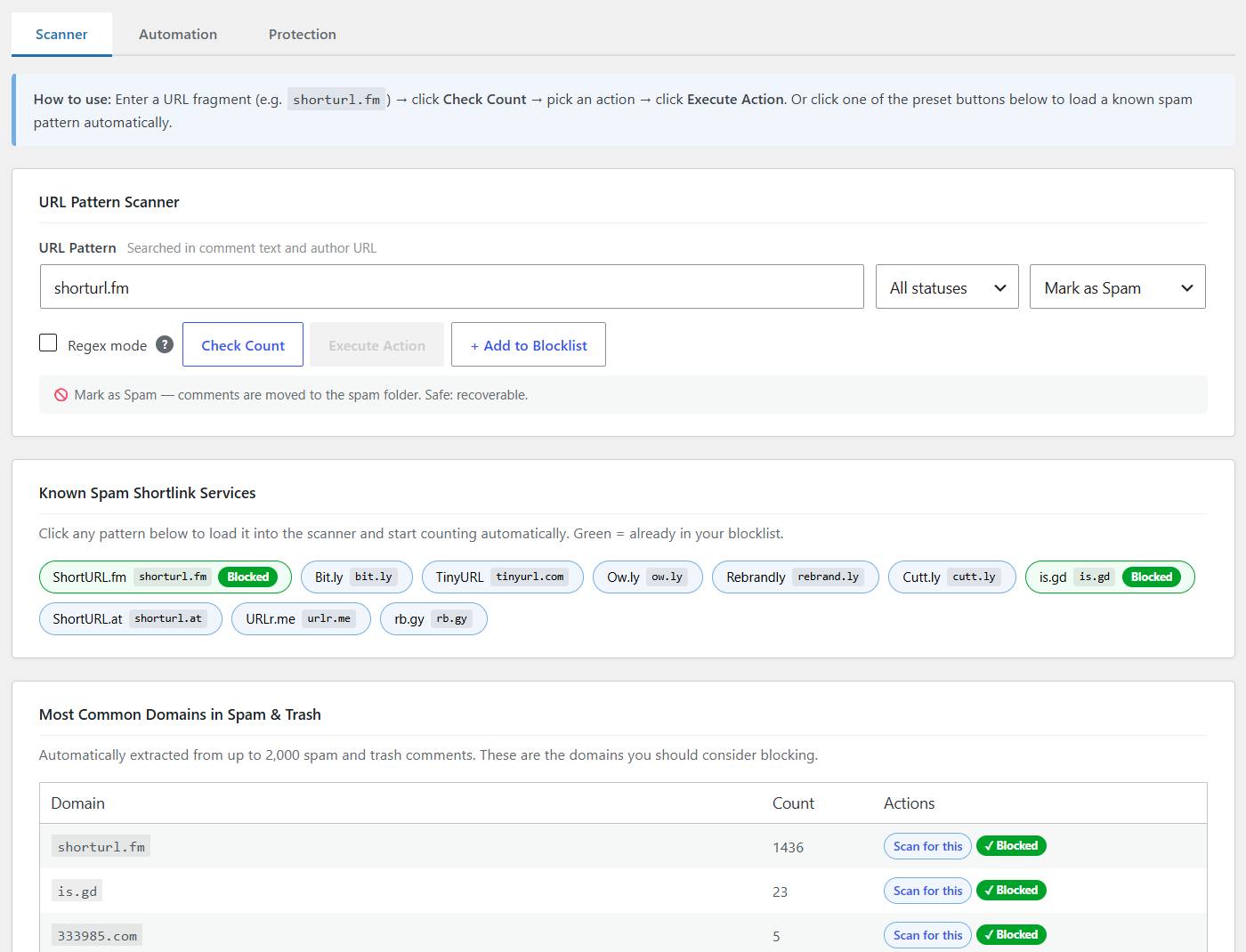
Type a URL fragment (e.g. shorturl.fm) into the scanner, click Check Count to see exactly how many comments match, then choose your action: mark as spam, move to trash, or delete permanently.
⏱ Scheduled Auto-Cleanup
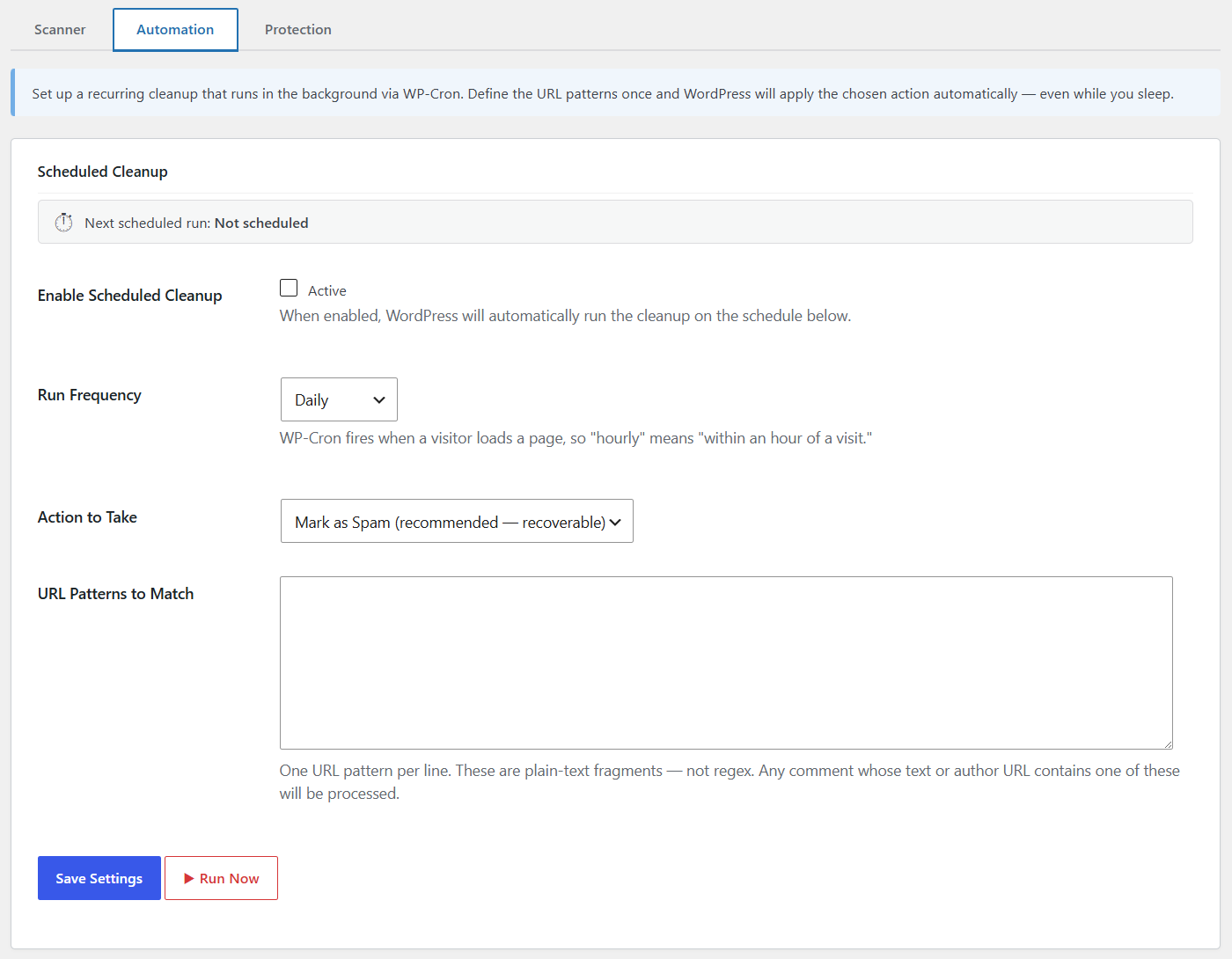
Set a WP-Cron job to run hourly, twice daily, daily, or weekly. Configure your patterns and action once — the plugin keeps your comment section clean automatically.
🤖 Honeypot Bot Protection
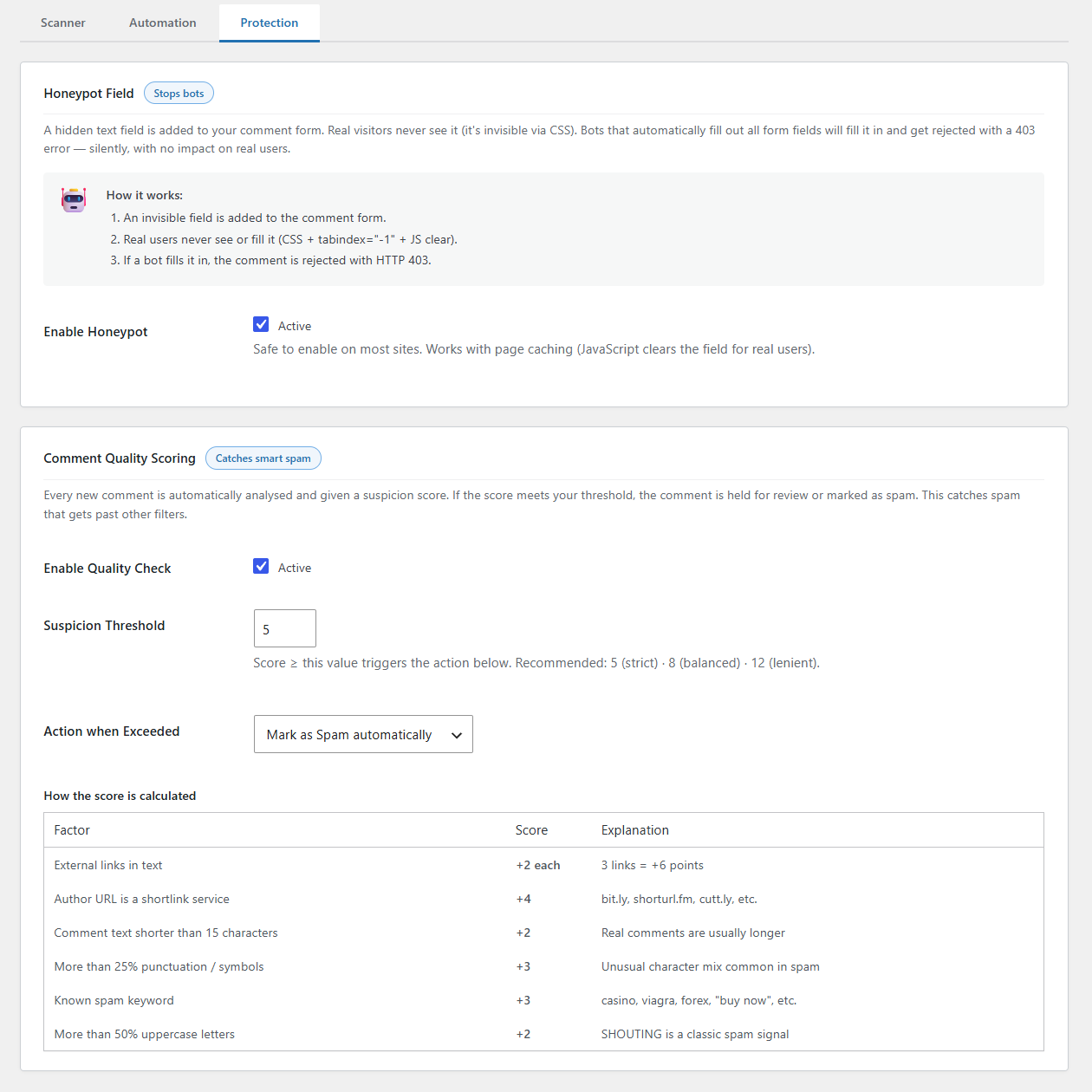
An invisible form field is added to your comment form. Real visitors never see or fill it. Bots that automatically fill every form field get rejected with a 403 error — silently, without affecting real users who never see or fill the field.
📊 Comment Quality Scoring
Every new comment is automatically scored based on:
– Number of external links (+2 per link)
– Shortlink in author URL (+4 points)
– Very short text under 15 characters (+2 points)
– High symbol/punctuation density (+3 points)
– Known spam keywords like “casino” or “viagra” (+3 points)
– Excessive ALL-CAPS usage (+2 points)
If the score exceeds your threshold, the comment is held for review or marked as spam automatically.
🚫 Gravatar Privacy (GDPR-friendly)
Optionally block all external requests to gravatar.com. When enabled, avatar images are suppressed completely, preventing third-party data transfers without visitor consent — helpful for GDPR / DSGVO compliance.
💬 Disable Comments Globally
Close comments and trackbacks / pingbacks on all posts, pages, and custom post types in one click. Existing comments are not deleted — only new submissions are blocked. Disabling the toggle restores original comment status immediately without any database changes.
🛡 WordPress Blocklist Integration
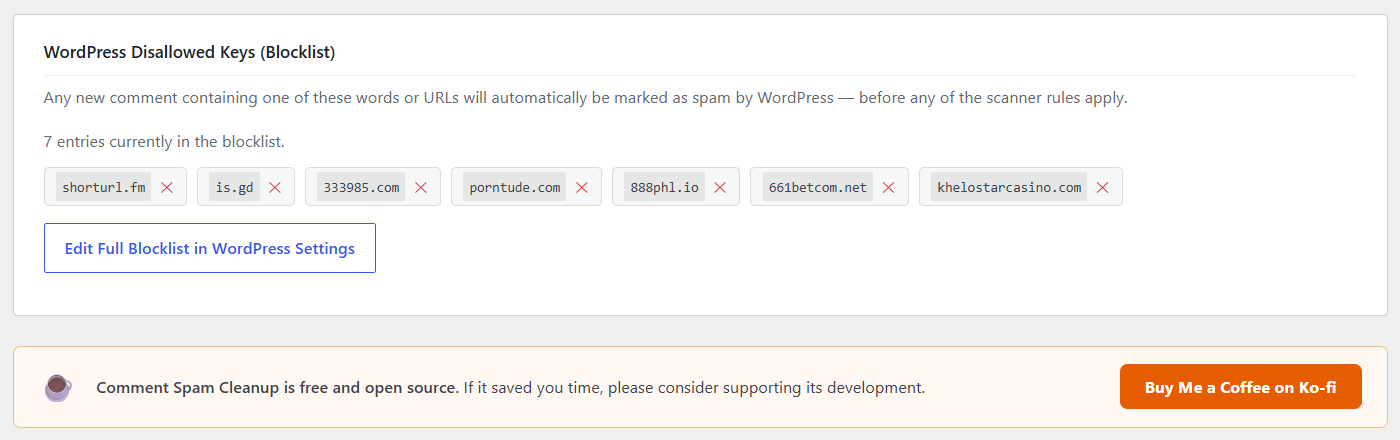
Add URL patterns directly to WordPress’s native disallowed_keys list — new comments containing those patterns are caught before they even reach the scanner.
📋 Spam Domain Analysis
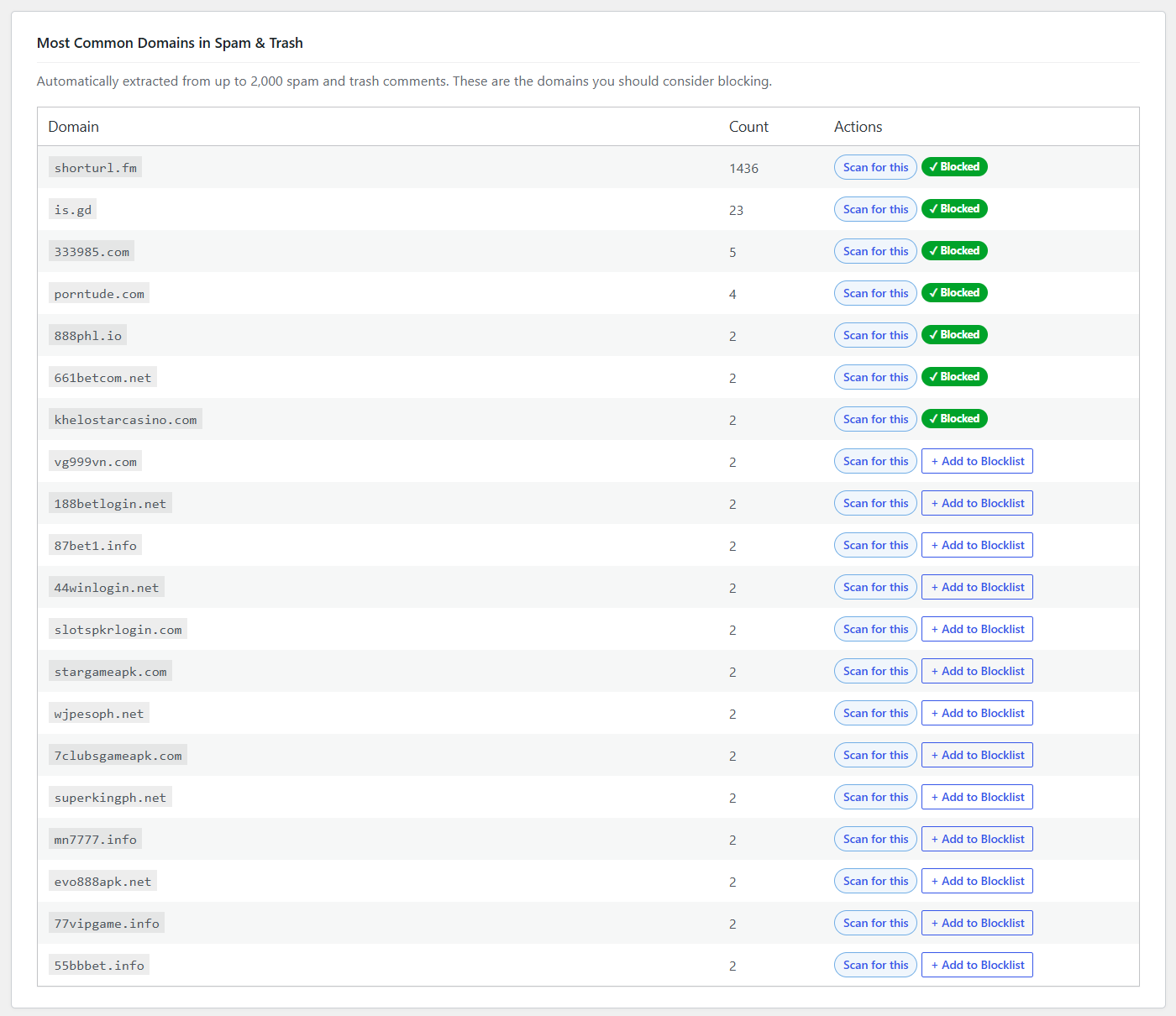
Automatically scans your existing spam and trash comments to surface the most common offending domains, so you always know what to block next.
🎯 Who is this for?
- Site owners who suddenly find hundreds of shortlink spam comments (you know who you are)
- Bloggers who want passive spam protection without a heavy third-party service
- Developers managing multiple WordPress sites who need efficient bulk moderation
- Anyone frustrated by shortlinks like
bit.ly,shorturl.fm,cutt.lyin their comments
❓ Why not just use Akismet?
Akismet is great for real-time filtering — but it doesn’t help you clean up existing spam, and it doesn’t support pattern-based bulk actions. AOS Comment Spam Cleanup fills that gap. Use both.
🔒 Privacy
This plugin does not collect, transmit or store any personal data on external servers. All processing happens on your own server. No external API calls are made during normal operation.
🌍 Translations
Ships with English and German (de_DE). Help translate at translate.wordpress.org.
👨💻 Developer
Made by AOS Digital — WordPress development from Germany.
Screenshots
Installation
- Upload the
aos-comment-spam-cleanupfolder to/wp-content/plugins/ - Activate the plugin in Plugins Installed Plugins
- Go to Comments Comment Cleanup
Quick start to delete shorturl.fm spam:
1. Open the Scanner tab
2. The pattern shorturl.fm is pre-filled — click Check Count
3. Once you see the count, click Execute Action (default action: Mark as Spam)
4. Done!
FAQ
-
Is it safe to delete comments permanently?
-
Permanently deleted comments cannot be recovered. We strongly recommend using Mark as Spam or Move to Trash first, reviewing the results, and only choosing “Delete Permanently” when you are certain.
-
Will this slow down my site?
-
No. The plugin only loads on your admin page and during comment submission (honeypot + quality check). There is zero frontend performance impact for visitors.
-
Does the honeypot work with page caching?
-
Yes. A tiny inline JavaScript snippet empties the honeypot field for real users on page load, so cached pages work correctly. Bots that do not execute JavaScript still fill the field and get caught.
-
What is Regex Mode?
-
Regex Mode uses MySQL REGEXP instead of LIKE for pattern matching, allowing complex patterns like
shorturl\.[a-z]+to match anyshorturl.*domain. Standard mode (LIKE) is recommended for simple domain matching. Patterns are validated before execution. -
Does it conflict with other comment plugins?
-
AOS Comment Spam Cleanup uses only standard WordPress hooks (
pre_comment_approved,preprocess_comment,comment_form_after_fields) and does not override or replace other plugins’ functionality. It has been tested alongside Akismet and Antispam Bee. -
Does the quality scorer affect legitimate comments?
-
The default threshold of 5 is conservative. A normal comment with one link scores 2 points — safely below the threshold. Test with “Hold for moderation” (not “Mark as Spam”) first to see which comments get flagged before applying stricter settings.
-
How do I reset all settings?
-
Use WP-CLI:
wp option delete aosc_settings
Or go to Tools Site Health Info WordPress and look for theaosc_settingsoption. -
Does it work on Multisite?
-
Yes, on individual sites. Network-wide management across all sites in a network is planned for a future version.
-
Can I use this to block future spam as well?
-
Yes — add patterns to the WordPress Blocklist (via the scanner or the blocklist card). Any future comment containing that pattern will automatically be marked as spam by WordPress before any other check runs.
Reviews

Contributors & Developers
“AOS Comment Spam Cleanup” is open source software. The following people have contributed to this plugin.
Contributors
Translate “AOS Comment Spam Cleanup” into your language.
Interested in development?
Browse the code, check out the SVN repository, or subscribe to the development log by RSS.
Changelog
1.5.0
- New: Disable Gravatar — blocks all external requests to gravatar.com (GDPR/DSGVO-friendly)
- New: Disable Comments Globally — closes comments and pings on all post types via WordPress filters; no database changes, reversible instantly
- New: “Rate this plugin” link in the admin header and Ko-fi bar
- Fix: Automation and Protection tab settings are now saved independently (no longer overwrite each other)
- Improved: Plugin version bumped to 1.5.0; German translation updated with new strings
1.4.0
- Fix: Plugin renamed to AOS Comment Spam Cleanup; slug changed to aos-comment-spam-cleanup
- Fix: All internal prefixes updated from WCC_ (3 chars) to AOSC_ (4 chars) per WP.org guidelines
- Fix: Honeypot inline script migrated from echo “” to wp_add_inline_script()
- Fix: Promotional claims (“fastest way”, “zero false positives”) removed from description
- Fix: Plugin URI updated to final WP.org plugin page URL
1.3.1
- Fix: phpcs:disable/enable blocks replace per-line ignores in scanner — all Plugin Check warnings resolved
- Fix: Main plugin file renamed to comment-spam-cleanup.php matching the plugin slug
- Fix: Remaining “WP Comment Cleanup” name references cleaned from readme.txt
1.3.0
- Fix: Inline nonce verification per AJAX handler (PHPCS NonceVerification.Missing resolved)
- Fix: Escape number_format_i18n() output via esc_html()
- Fix: wp_unslash() + absint() for quality_threshold input
- Fix: esc_attr() applied inline in honeypot field output
- Fix: wp_unslash() + sanitize_text_field() for honeypot POST check
- Fix: phpcs:ignore annotations for legitimate SQL interpolation in scanner
- Fix: Removed deprecated load_plugin_textdomain() call (auto-loaded since WP 4.6)
- Fix: Plugin name no longer contains restricted term; renamed to AOS Comment Spam Cleanup
- Fix: Tested up to updated to WordPress 7.0
- Improved: Text domain updated to comment-spam-cleanup
1.2.0
- New: Ko-fi donation link in plugin action row and admin header
- New: “Settings” link in plugin action row for faster access
- New: Action description hint strip in scanner (explains the chosen action)
- New: Responsive layout for mobile admin
- New: German (
de_DE) translation file - New: Score factor reference table in Protection tab
- New: Validation of allowed values in settings save (security hardening)
- Fix:
str_contains()replaced with PHP 7.4-compatiblestrpos()in quality scorer - Fix: All hardcoded German strings in JavaScript replaced with localised
i18nobject - Fix: Button labels after AJAX now use localised strings (no language regression)
- Improved: Full English-first UI with proper
Text Domaininternationalisation - Improved: Accessible markup (role, aria-controls, aria-label throughout)
- Improved: Settings input validation for cron_interval, cron_action, quality_action
- Improved: Clearer descriptions and help text for every setting
1.1.0
- New: Scheduled cleanup via WP-Cron (hourly/daily/weekly)
- New: Action selector — mark as spam, move to trash, or delete permanently
- New: Regex mode (MySQL REGEXP) in scanner
- New: Honeypot comment form field (Feature 5)
- New: Comment quality scoring with configurable threshold (Feature 4)
- New: Three-tab admin UI (Scanner · Automation · Protection)
1.0.0
- Initial release — URL pattern scanner, bulk delete, WordPress blocklist integration, preset shortlink patterns, spam domain analyser