

Description
AnyTry is an AI-powered virtual try-on system that lets your customers see how they’ll look wearing your products before they buy. The plugin integrates directly with WooCommerce product pages, adding a “Try On” button that uses cutting-edge generative AI.
External services
This plugin connects to the AnyTry API (https://api.anytry.ai) to generate virtual try-on images using generative AI. Using the plugin requires an AnyTry account (a free trial is available from the plugin settings screen).
Endpoints used at api.anytry.ai:
Service endpoints (the Try-On feature itself; all reachable without analytics opt-in):
POST /anytry— submit a virtual try-on job (customer photo + product image, multipart upload).GET /status/<job-id>— poll job progress.GET /status/stream/<job-id>— Server-Sent Events stream of progress updates (real-time alternative to polling).POST /cancel/<job-id>— cancel an in-flight try-on job when the customer closes the dialog or leaves the page mid-generation, so the reserved GPU work is released.GET <result image>— fetch the finished try-on image. The image URL is returned by/status(download_url) and is validated before the plugin fetches it (HTTPS only; host must beapi.anytry.aior an*.anytry.aisubdomain).POST /analyze/size— AI Size Advisor recommendation (only when the merchant has enabled the Size Advisor feature and the customer completes the quiz).POST /gpu/warmup— wake up the GPU pool when the customer opens the Try-On modal. No body; optional tracking token only. Reduces first-generation latency.
Admin-side service endpoints (operator workflow only; not customer-facing):
POST /tenant/trial— create a free-trial account on first plugin activation (admin email + WP username + store domain only).POST /auth/register-magic-link— send the activation magic-link email to the operator.POST /auth/get-key-by-email— recover the API key for an existing account.POST /auth/portal-token— single-sign-on to the AnyTry Portal from the admin Settings page.GET /account/status— validate the configured API key.GET /analytics?days=<N>andGET /analytics/insights— admin dashboard data (only requested when the operator opens the AnyTry admin Settings page).
Analytics + conversion-attribution endpoints (gated on analytics consent — default OFF on new installs):
POST /api/track-event— funnel events (button impressions, generation completes, add-to-cart, checkout-start, purchases, refunds).POST /api/abandon— abandon-tracking event when the customer closes the modal mid-generation.POST /api/tracking/lookup— server-side recovery of try-on attribution when cookies are unavailable (REST checkout flows).GET /api/tenant/tracking-token— fetch the per-tenant frontend tracking token (admin Settings page).
Enable analytics at WooCommerce AnyTry AI “Send analytics & conversion events”. The Try-On feature works regardless.
What is sent to the AnyTry API:
- The customer photo uploaded via the Try-On modal (transmitted only when the customer explicitly clicks “Try On”).
- The product image URL and product identifier from WooCommerce.
- A random session identifier (no personally identifiable information).
- WooCommerce order ID and product IDs on order completion — only when analytics consent is enabled.
- Optional: height, weight, and usual size values the customer enters in the AI Size Advisor quiz.
When the data is sent:
- Try-On generation: when a customer uploads a photo and clicks “Try On” on a product page.
- Size Advisor: when a customer completes the AI Size Advisor quiz.
- Conversion events: when an order containing a tried-on product is placed — only when analytics consent is enabled.
Cookies (server-set, persistent):
anytry_sessioncookie (90 days) — stores the random session ID and the list of product IDs the visitor has tried on, used to attribute orders to try-on sessions for the conversion dashboard. Set only when analytics consent is enabled.anytry_triedcookie (90 days) — stores a fallback list of tried product IDs for cases whereanytry_sessionis unavailable (third-party cookie blockers, REST checkout flows). Set only when analytics consent is enabled.anytry_legal_accepted_v2cookie (1 year) — remembers that the customer has accepted the Try-On legal/age-consent overlay so they are not asked again on every page. Set ONLY after the customer clicks “Accept” on the legal overlay. Not used for any analytics or attribution.
Persistent browser storage (localStorage):
anytry_legal_accepted_v2— mirror of the consent cookie above, same purpose, same trigger. No analytics or attribution use.anytry_tried— client-side mirror of theanytry_triedcookie value, used when third-party cookies are blocked. Written only when analytics consent is enabled.anytry_tried_products— same purpose asanytry_triedbut stored in a structured per-product map; used by the admin Conversions tab to attribute orders to try-on sessions. Written only when analytics consent is enabled.anytry_canonical_session_id— a randomsess_*identifier kept across reloads so the API can JOIN a try-on generation event to a later purchase event for conversion attribution. Persisted only when analytics consent is enabled. When consent is off, an ephemeral id is held in memory for the current page only and never written to localStorage.anytry_active_jobs— short-lived registry of in-flight try-on jobs (job IDs + status), used so the floating “still working…” widget can resume after a page reload. Cleared when the job finishes or after 24 hours. Not used for any analytics or attribution.
Ephemeral per-tab storage (sessionStorage):
These are scoped to the current browser tab and discarded the moment the tab closes. They exist purely to keep the Try-On UI responsive during a single visit and are never sent to any server.
anytry_before_<jobId>— the photo the customer uploaded, kept so the “before / after” toggle works after a result is generated.anytry_result_<jobId>andanytry_result_image— the generated result image data URL, used so the same result re-renders instantly when the customer reopens the modal in the same tab.anytry_feedback_state— whether the customer already rated 👍 / 👎 the current result.anytry_quiz_user_height,anytry_quiz_user_weight,anytry_quiz_usual_size,anytry_quiz_skipped— Size Advisor quiz answers, kept so the customer doesn’t have to re-enter them while comparing multiple try-ons.anytry_sw_blocks_sse— internal counter the plugin uses to detect a Service Worker that’s blocking real-time updates, so it can transparently fall back to the same-origin SSE proxy on the next try-on.
Persistent browser storage (IndexedDB):
Used as a local image cache to avoid re-downloading the same files. Both stores live entirely in the visitor’s browser, are never sent to any server, and are removed when the customer clears their browser data.
anytry_cacheobject storephotos— the most recent uploaded photo, so reopening the modal restores the previous photo selection without a re-pick.anytry_resultsobject storeimages— the data URL of generated result images keyed by job ID, so revisiting a recently-generated try-on renders instantly.
Analytics consent:
The plugin does NOT send analytics or conversion-attribution events by default. Enable them at WooCommerce AnyTry AI “Send analytics & conversion events”. The Try-On image generation itself works whether or not this is enabled — only the conversion-attribution dashboard in the AnyTry Portal depends on this opt-in.
Optional Google Fonts (default OFF):
By default the plugin uses system-sans typography and makes NO third-party font request — the AnyTry API is the only external service it contacts. An internal anytry_load_google_font option (OFF by default, with no user-facing control) would, if enabled, request the Outfit web font from Google Fonts (https://fonts.googleapis.com) on the storefront and the AnyTry admin Settings page; it stays off in a standard install.
- Service: Google Fonts (https://fonts.google.com)
- Data sent: visitor IP and User-Agent (standard HTTP request) at the moment a page that has this option enabled is rendered
- Terms of Service: https://policies.google.com/terms
- Privacy Policy: https://policies.google.com/privacy
Uploaded photos are automatically deleted from the AnyTry servers within 5 minutes of processing and are not used to train AI models.
This service is provided by AnyTry. By using the plugin, customers agree to the AnyTry Terms of Service and Privacy Policy:
- Terms of Service: https://anytry.pl/terms
- Privacy Policy: https://anytry.pl/privacy
Key Features:
- Photorealistic Try-On — Uses generative AI to create realistic images of customers wearing your products.
- Data Privacy — Customer photos are automatically deleted after processing. No biometric data stored. Try-on tracking data stored on orders (session ID, tried-product list, attribution job IDs) is included in WooCommerce’s built-in personal-data Export and Erase tools, so customer data requests cover it.
- High Performance — Real-time SSE streaming with a polling fallback; doesn’t burden your hosting.
- Responsive Design — Works perfectly on mobile and desktop devices.
- Variant Support — Works with simple and variable products (color/size).
- AI Size Advisor — Size recommendations from a short quiz (height and weight with photo silhouette analysis, or a single “what size do you wear?” question).
- Multilingual — The shopper widget ships 10 languages (EN, PL, DE, UK, IT, ES, FR, SV, DA, NB); admin settings are English, with translations delivered via WordPress.org language packs.
- HPOS Compatible — Full support for WooCommerce High-Performance Order Storage.
- WooCommerce Blocks — Compatible with the new block-based checkout.
- Multi-Job Navigation — Compare results from multiple try-ons with swipe navigation.
How It Works:
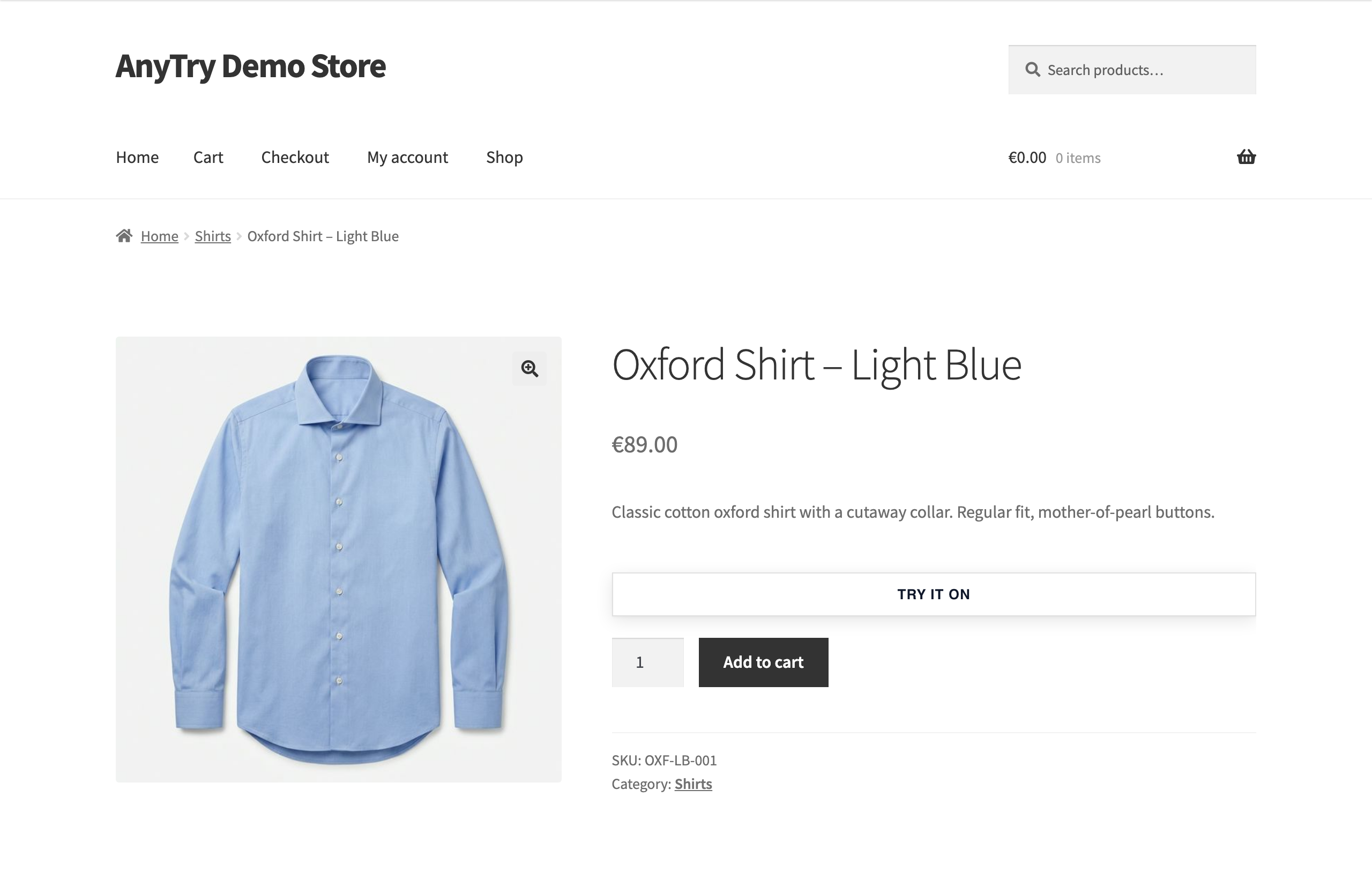
- Customer clicks “Try On” on a product page.
- They upload a photo of themselves.
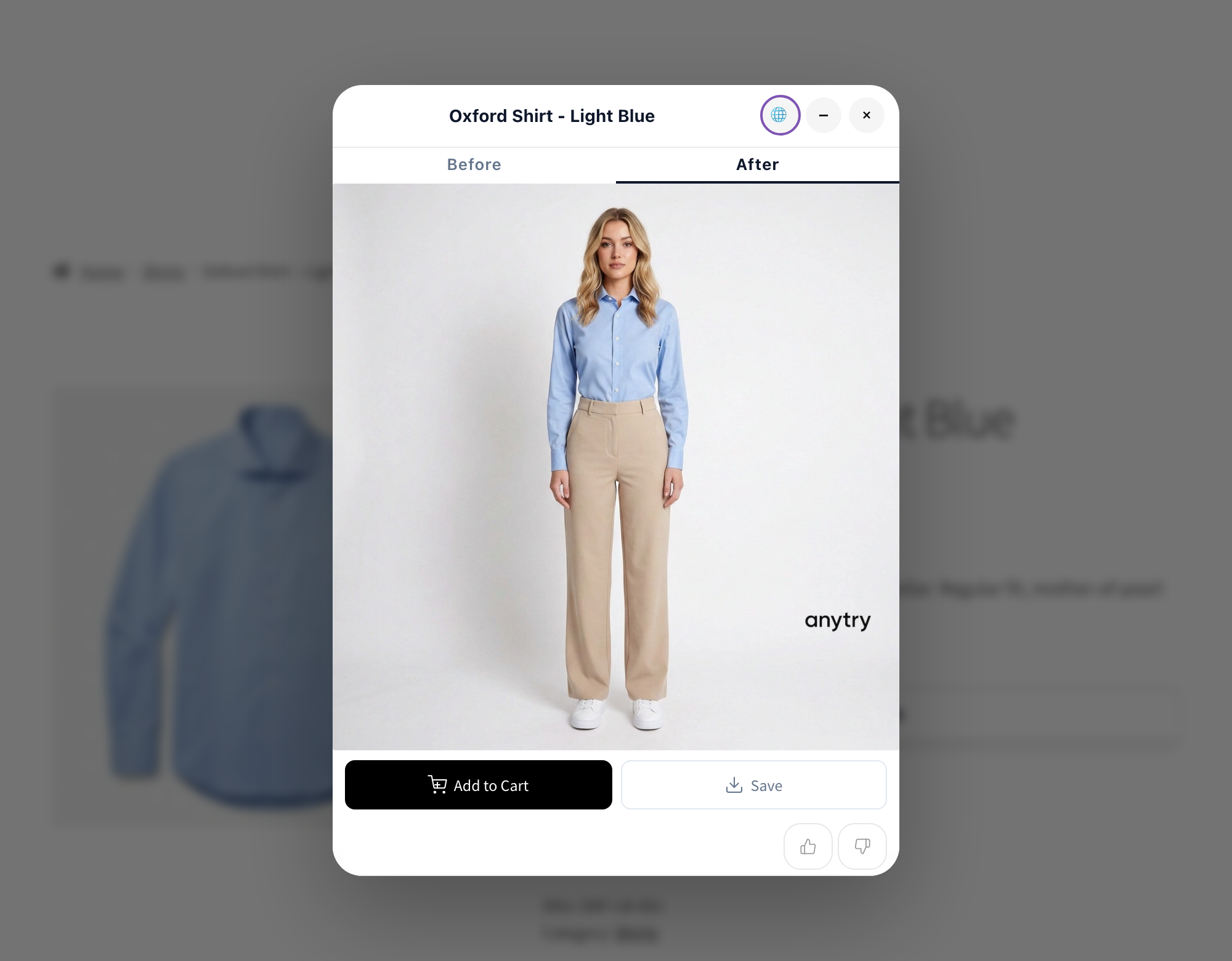
- AI generates a photorealistic image of them wearing the product.
- Optional: AI Size Advisor recommends the best size.
SaaS Model: This plugin connects to the AnyTry API for AI processing. An API key is required (free trial available). See Terms of Service and Privacy Policy.
Configuration
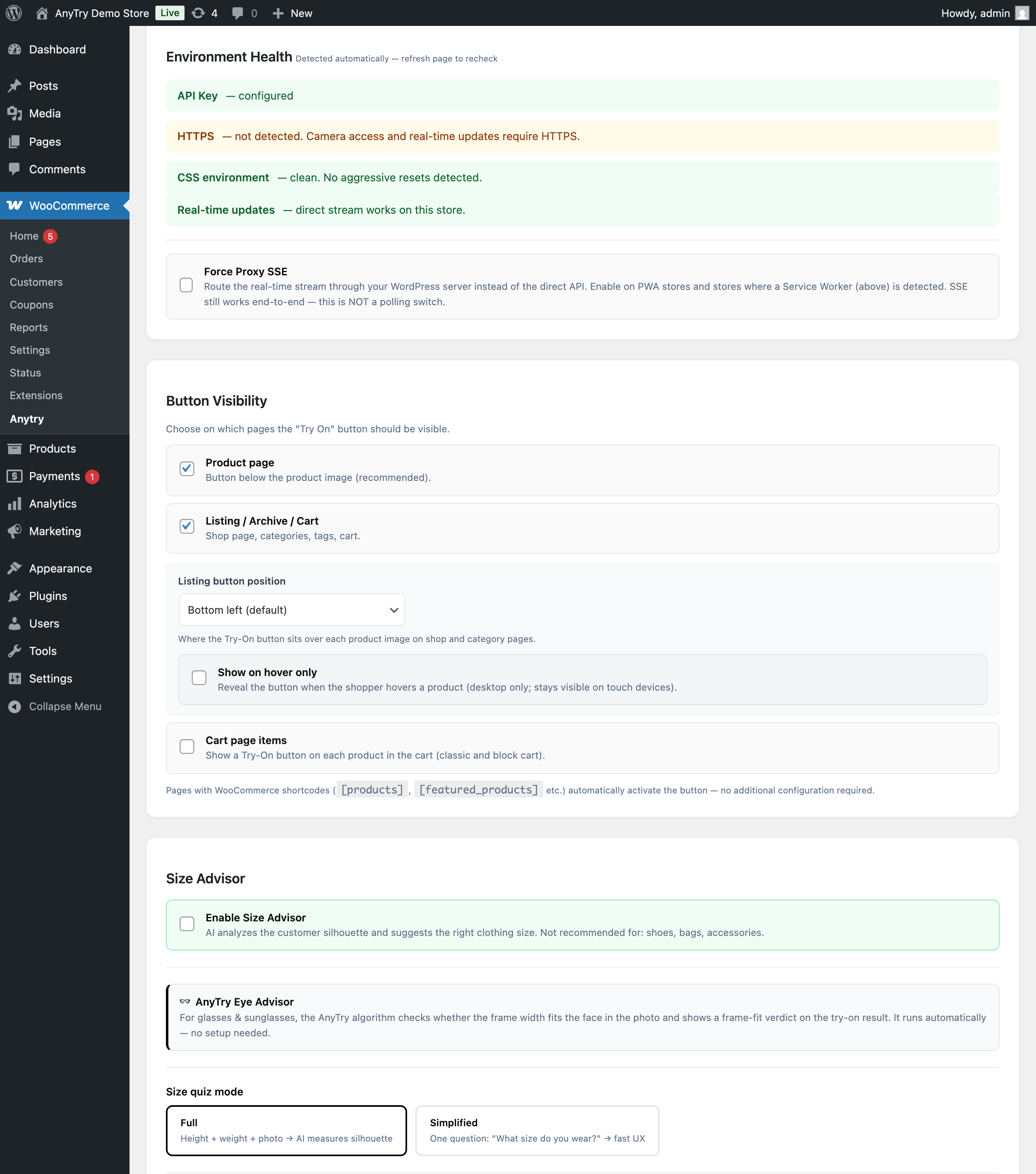
- Navigate to WooCommerce > AnyTry AI in the admin panel.
- Enter your API key or start a free trial.
- Customize the button appearance (color, text, position).
- Enable AI Size Advisor (optional).
- Ensure your products have featured images set (flat-lay or ghost mannequin photos work best).
Requirements
- WordPress 6.4 or newer.
- WooCommerce 5.0 or newer.
- PHP 7.4+ (recommended: 8.1+).
- Active internet connection (for API communication).
Source code & build
The plugin distribution includes the full unminified source under src/js/anytry.js and src/css/anytry.css alongside the minified runtime assets in assets/ — this satisfies the WordPress.org source-visibility guideline. The minified files are generated from those sources with the minify_wp.js build script. The build/development tooling lives in the plugin’s source repository and is intentionally not bundled in the distributed ZIP (only plugin runtime + the unminified src/ sources ship); the build process is documented below so anyone can reproduce the minified assets from source.
Build steps (run from a checkout of the plugin’s source repository, where the tools/ directory is present):
cd <repo-root>/tools/npm install esbuild(one-time)node minify_wp.js
Build dependencies: Node.js 18+ and esbuild. The build script (tools/minify_wp.js) generates 5 minified files from 5 sources:
src/js/anytry.jsassets/js/anytry.min.js(storefront runtime)src/css/anytry.cssassets/css/anytry.min.css(storefront styles)src/css/anytry-admin.cssassets/css/anytry-admin.min.css(admin Settings page styles)assets/js/anytry-admin-settings.jsassets/js/anytry-admin-settings.min.js(admin Settings page helpers; small enough that the unminified source lives inassets/directly rather thansrc/)assets/js/anytry-admin-packshot.jsassets/js/anytry-admin-packshot.min.js(WP media-library hook for the admin “Packshot” picker on product edit screens; small enough that the unminified source lives inassets/directly rather thansrc/)
Third-party libraries shipped with the plugin:
assets/js/heic2any.min.js— heic2any v0.0.4 (MIT licensed). Upstream repository: https://github.com/alexcorvi/heic2any. Used for client-side HEIC JPEG conversion before upload (iPhone camera output). Lazy-loaded only when the customer selects an HEIC file; can be disabled via the “iPhone HEIC support” toggle in WooCommerce AnyTry AI settings.
Screenshots
Installation
- Download the plugin ZIP file.
- In WordPress admin, go to Plugins > Add New > Upload Plugin.
- Select the file and click Install.
- Activate the plugin.
- Go to WooCommerce > AnyTry AI to configure your API key.
FAQ
-
Are customer photos safe?
-
Yes. Photos are transmitted over encrypted connections, processed by AI, and automatically deleted from the server within 5 minutes. They are not used to train AI models.
-
Why does generation take a few seconds?
-
The system creates an entirely new image using generative AI. This is a complex computational process that ensures a unique, personalized result.
-
What kind of photos should customers upload?
-
Best results come from full-body photos with good lighting on a plain background.
-
Does this plugin store any data locally?
-
The plugin stores only its WooCommerce configuration options (API key, button style, size advisor mode, etc.) and a small amount of WooCommerce order metadata for conversion attribution. No customer photos and no analytics tables are persisted on the merchant site — all AI processing and analytics are handled by the AnyTry cloud service.
-
Only when the merchant has enabled analytics consent (default OFF). When enabled,
anytry_sessionandanytry_triedcookies persist for 90 days on visitor browsers — both store a random session ID and a list of product IDs the visitor has tried on, used to attribute purchases to try-on sessions. See the “External services” section for full disclosure. -
Is this compatible with HPOS?
-
Yes. The plugin is fully compatible with WooCommerce High-Performance Order Storage (HPOS).
Reviews
There are no reviews for this plugin.
Contributors & Developers
“AnyTry – AI Virtual Try-On for WooCommerce” is open source software. The following people have contributed to this plugin.
Contributors
Translate “AnyTry – AI Virtual Try-On for WooCommerce” into your language.
Interested in development?
Browse the code, check out the SVN repository, or subscribe to the development log by RSS.
Changelog
1.0.21
- Reliability: the try-on window can no longer end up in a contradictory minimized-yet-open state. Re-showing the window cleared the internal flag but left the minimized marker on the element, so which state won was decided only by stylesheet order — a reorder would have hidden both the window and the floating progress bubble at once, leaving no way back except the Try-On button.
- Reliability: the background-jobs view no longer dismantles the window (hiding the result, the upload area and the floating bubble) before checking whether it has anything to display, which could leave an empty white window.
- Reliability: switching from one product to another now always shows the correct product’s size options — or none, when the Size Advisor is turned off — instead of briefly carrying over the previous product’s size choices.
- Reliability: switching to a different product while a result is still downloading no longer shows the wrong product’s result or freezes the try-on that is still running.
- Reliability: opening the same store in two browser tabs no longer lets one tab cancel or drop the other tab’s in-progress — and already paid-for — try-on.
- Reliability: a finished try-on is now picked up correctly after a phone browser tab is briefly frozen in the background and reopened, instead of appearing stuck.
- Reliability: the Save button, and restoring a saved try-on, no longer hang on browsers where the local image store is slow or blocked to open — the widget now falls back to fetching the result instead of waiting indefinitely.
- Reliability: a size suggestion that arrives late no longer appears on top of an error screen.
- Reliability: a finished try-on shown in the multi-item comparison list now becomes clickable on its own, instead of remaining on “loading result…”.
- Reliability: a temporary network or CDN hiccup while fetching a finished try-on no longer shows a dead error. The widget now retries the same, already-generated result a few times before giving up — it never re-runs or re-charges the try-on. This closes the most common “generated but not shown” case.
- Diagnostics: clearer error categories (a connection problem is now labelled as such, an unsupported image as an image problem, instead of a generic “unknown”), and error events now include the try-on identifier so a store can see exactly which requests hit a display problem.
1.0.20
- Maintenance: translations now follow the standard WordPress.org model — the plugin ships English source text, and translations are delivered as community language packs from translate.wordpress.org rather than as catalogs bundled inside the plugin. No change to any feature or behaviour.
- Compatibility: verified on WordPress 7.0.2 with PHP 7.4 through 8.5.
1.0.19
- Security: try-on and size requests now require a real, published, try-on-enabled product and no longer accept a caller-supplied product image, preventing use of the paid try-on pipeline outside the intended flow.
- Security: an anonymous request can no longer change the store-wide streaming-proxy setting, and malformed job tokens are now rejected instead of silently ignored.
- Privacy: with analytics turned off, the storefront now writes no tracking cookie, local storage, or data-layer event.
- Privacy: Size Advisor now stays fully disabled on both the storefront and the server when turned off in settings.
- Privacy: GDPR order-data erasure now reliably removes all AnyTry order data.
- Privacy: cancellation and refund analytics are now limited to products the shopper actually tried on.
- Reliability: the page-resume mini widget loads its stylesheet correctly, cancels only its own job when closed, and clears that job’s cached photo and result.
- Admin: the Data controller example now suggests your own store name.
- Maintenance: refreshed bundled translations and added third-party licence notices; aligned the main bundle version banner.
- Compatibility: removed global PHP
ini_set()overrides (max_execution_time / default_socket_timeout) that could push a host out of its configured limits — the request timeout is set on the HTTP call itself, and the live-status stream now restores its output settings on shutdown.
1.0.18
- Reliability: HEIC/HEIF photo uploads no longer emit a PHP notice during image-type detection on the try-on request (the image-info value is now always initialised).
- Maintenance: internal static-analysis hardening (PHPStan level 5, clean) and minor type-safety cleanups — no change to behaviour.
1.0.17
- Reliability: made result finalization idempotent so a very slow result download can no longer render twice or double-count a completion.
- Privacy: swapping to a new photo now clears the previous try-on’s cached result images from the browser immediately (previously cleared only on closing the try-on window).
- Accuracy: eyewear auto-detection on shop/quick-view cards no longer reads a neighbouring product’s description.
- Hardening: strip line breaks from the product category before it is sent to the API; apply the same Cloudflare source-IP verification to the conversion-tracking rate limit as the rest of the plugin.
1.0.16
- Analytics: refund/return events now report the order-level cumulative refunded value (the sum across all of an order’s refunds), fixing under-reporting on orders with multiple sequential partial refunds.
- Analytics: purchase attribution is now precise per tried product. When cookie-based tracking is lost (e.g. block-based checkout, privacy mode, cross-device), the plugin now recovers which of the purchased items were actually tried on — over a 90-day window — and reports each item’s own value, instead of falling back to the whole basket. Purchases where no tried-on product was bought are no longer counted, so reported conversion value and counts reflect only genuine try-on-driven sales.
- Admin: the Size Advisor settings now include a short note describing the Eye Advisor — AnyTry’s automatic eyewear frame-fit check shown on the try-on result for glasses and sunglasses.
1.0.15
- Reliability: closed three rare timing edge cases around a running try-on — removing one saved try-on while another was still being submitted; retrying after a connection timeout (the retry now reconnects to the in-progress try-on instead of starting a fresh one); and re-opening the try-on while one is already running (it now restores the running try-on instead of cancelling it).
- Size Advisor: split top/bottom and eyewear-fit recommendations now persist correctly across saved try-ons — they no longer collapse to a single size or display incorrectly when switching between results.
1.0.14
- Privacy (GDPR): analytics attribution is now written to the order only when the shopper has given analytics consent; and any leftover try-on preview images are cleared from the browser’s local storage on the next visit, so results are not retained longer than needed.
- Reliability: a try-on download that stalls mid-transfer now fails fast instead of spinning forever; pressing Escape while a try-on is still generating minimises it (the job keeps running) instead of closing and abandoning it; the daily free-try counter is now retry-safe so a network retry cannot double-count; and closing the window signals the server to cancel an in-flight job.
- Accessibility: broad keyboard and screen-reader improvements to the try-on dialog — focus moves into the dialog on open and returns to the launching button on close, focus stays trapped inside while it is open, progress updates are announced, keyboard focus outlines are visible, toggle buttons expose their pressed/expanded state, all controls are keyboard-operable, and animations respect the system “reduce motion” setting.
- Fix: after deleting saved try-ons down to a single result, the result card no longer shows leftover carousel navigation dots.
- Security / hardening: admin credential and settings changes now require full administrator capability; the internal service-worker diagnostic report is rate-limited per IP; and the translation text domain is loaded so non-Polish locales display correctly.
1.0.13
- Fix: the cart Try-On button now resolves the parent product for variable products (size / colour variants) — the category allowlist, the per-product exclusion list, and AI category routing now work correctly when a shopper opens Try-On from a cart line. Previously variations could be filtered out or mis-categorised.
- Fix (security / cost): the server-side product-exclusion check now resolves variations to their parent, so a product you have excluded can no longer be tried on (and billed) when launched from a cart line — the exclusion is now enforced on the job request, not just on the button.
- Quality: try-ons launched from the WooCommerce block cart (the default cart) now send the correct product category to the AI. Previously the block cart sent none — which could route garments to the fallback model and skip per-category settings. Classic cart, single product and listing were already correct; this brings the block cart in line.
- Fix: the listing button overlay is now keyboard-accessible (focusable + Enter / Space) — the optional “show on hover” mode no longer hides it from keyboard and screen-reader users.
- Fix: the Cart-block Try-On button now also appears in the mini-cart slide-out drawer on block themes.
- Compatibility: on block / full-site-editing themes (incl. the WordPress defaults Twenty Twenty-Four / Twenty Twenty-Five), the single-product Try-On button now appears reliably even when the theme hydrates the Add-to-Cart button after the page scripts load — previously it could be missing entirely on those themes.
- Housekeeping: all Button-Visibility options (incl. the image-format converter toggle) are removed on uninstall.
1.0.12
- Compliance (WP.org review): the storefront status / download REST endpoints now declare an explicit public permission_callback (__return_true), matching their intended use — unauthenticated shoppers checking and fetching their own try-on result. Authorization is unchanged and stays server-side (the unguessable per-job token and the tenant key, validated by the AnyTry API); the per-request rate limit simply moved from the route into each handler. No change to the Try-On flow.
- Compliance (i18n): the storefront language bundle no longer passes a runtime variable to a translation function, so every translatable string is now statically extractable by the translation tools. The displayed translations are unchanged.
- Compatibility: server-resolved product images are now validated against the WordPress uploads directory (wp_upload_dir()) instead of the site root, so stores whose uploads live outside the WordPress folder no longer have valid product images rejected; the path check is also tightened with realpath() containment.
1.0.11
- New: optional Try-On button on each product in the cart (WooCommerce -> AnyTry -> Button Visibility -> Cart page items). Off by default. Works on both the classic cart and the block (React) Cart.
1.0.10
- New: choose where the “Try On” button sits on shop and category pages — pick from nine positions (corners, edges or center) over each product image, under WooCommerce AnyTry Button Visibility.
- New: optional “show on hover only” mode reveals the listing button when a shopper hovers a product on desktop, while keeping it always visible on touch devices.
- Fix: turning off “Listing / Archive / Cart” now fully hides the listing button. Previously, on a configured store, an unstyled button could still appear on shop and cart pages even when the option was unchecked.
- Compatibility: more reliable listing-button placement on Flatsome and other themes that use a custom product-card layout.
1.0.9
- Fix: the registration screen no longer mislabels a brand-new account as a pre-existing one. When you register and your API key is issued instantly, the plugin now confirms the account was created and the key is active — previously it said “account already exists / API key retrieved”, which made first-time setup confusing.
- Improvement: the account-email field now explains which address to use (the email you first contacted AnyTry with) and notes that the API key activates instantly for a new store.
1.0.8
- Fix: try-on results no longer occasionally show a “result not available” message when the shopper switches away from the tab (or locks their phone) while the image is being generated and returns a few minutes later. The plugin now re-checks and fetches the finished result the moment the tab becomes active again — including after using the browser’s back/forward buttons.
- Fix: saving the result to the device now always uses the copy already held in the browser (in memory or local storage), so the Save button keeps working even after the temporary server copy has expired.
- Privacy: the try-on tracking data the plugin stores on orders (session ID, tried-product list, attribution job IDs) is now included in WooCommerce’s built-in personal-data Export and Erase tools, so a customer data request (export or erasure) covers it.
- Accessibility: the virtual try-on dialog is now correctly exposed to screen readers while open (it was previously hidden from assistive technology).
- Fix: the “Add to cart” conversion event is no longer double-counted on WooCommerce stores (the server-side and in-page trackers were both firing).
- Fix: the try-on button now appears on product pages built with block/Full-Site-Editing themes (previously it could be missing there).
1.0.7
- Fix (billing): canceling an in-progress try-on now reliably reaches the server, so a canceled job is no longer charged. The cancel request previously had no server handler registered, so the queued job could complete and consume a credit even after the shopper canceled.
- Performance: purchase events are now sent off the checkout thread (via WooCommerce’s Action Scheduler when available), so order completion and admin order saves no longer wait on the analytics call. Refund and cancellation events are unchanged.
- Security (defence-in-depth): added per-source-IP limits to the same-origin streaming, cancel, and event-tracking endpoints (so they cannot be bypassed by rotating a cookie); outbound API requests no longer follow redirects; and plugin removal is now hardened against symlinked cache directories. Authoritative limits remain server-side.
- Privacy: deleting the plugin now also removes the per-visitor try-on session identifier stored on orders, alongside the other plugin data it already cleans up.
- Maintenance: hardened the upgrade/migration runner (single-run guard + safer version advance) and added a timeout to the language-bundle fetch so a stalled request can no longer leave the language switcher unresponsive.
- Reliability (mobile / iOS Safari): the try-on status stream now escalates to status polling if the connection stalls without ever opening (a silent-hang pattern seen on some iOS Safari / service-worker setups), so a generation no longer appears to freeze until the safety timeout. The in-modal language menu now also closes on tap-outside and the Escape key, fixing a case where it could stay open on iPhone.
- Compatibility: minimum WordPress raised to 6.4. The plugin already used a few 6.4+ APIs behind version guards; this aligns the declared requirement with them.
1.0.6
- Fix (attribution accuracy): purchase tracking now counts only the products a shopper actually tried on. Previously, when the per-product try-on list could not be recovered at checkout but a try-on session was detected, every item in the order could be counted as a try-on purchase — inflating the conversion and attributed-revenue figures in the dashboard. Attribution is now a strict intersection against the order’s real line items.
- Fix (no double-count): purchase events are now emitted once, server-side, from the order’s actual line items. The duplicate client-side emit on the order-received page has been removed — it keyed on the displayed order number, which on stores using a sequential-order-number plugin differs from the internal order ID and could not always be de-duplicated, double-booking conversions. Try-On / status / download behaviour is unchanged.
- Fix (refunds): partial refunds are now reported only for orders that involved a try-on, matching the full-refund behaviour (previously every partial refund in the store emitted a return event).
- Security (defence-in-depth): uploaded images are now validated for pixel dimensions server-side (very large images are rejected) and HEIC/HEIF uploads are verified by magic bytes rather than filename alone. A per-source-IP ceiling now backs the existing per-session rate limit on job submission so it cannot be bypassed by rotating a cookie. The authoritative content and per-tenant limits remain server-side.
- Fix (language switcher): the language dropdown no longer appears already-open when the Try-On window first opens. Accepting the consent screen restored the modal’s hidden content and inadvertently forced the (self-managed) language menu open; it now stays closed until the globe is tapped. Affected every first-time open, independent of language.
1.0.5
- Feature: storefront language switcher. The Try-On widget now shows a globe button that lets shoppers switch the widget’s language directly on the product page, independent of the store’s language. Translations are served from the plugin’s bundled locale catalogs (10 languages) through a public, read-only, rate-limited REST endpoint (
anytry/v1/lang-bundle); the two-letter language code is validated against an on-disk allowlist. The switcher is wrapped in its own error boundary so it can never interfere with the core Try-On flow, and the Try-On / status / download behaviour is unchanged. - Compliance (WP.org review R
…/piezak/24May26/T1): the entire development & build tooling directory (tools/) is now excluded from the distribution ZIP per WordPress.org packaging guidance — the prior package leaked build/test scripts (minify_wp.cjs, smoke/matrix.sh,.py,.mjs,.yml,.log) that are not plugin runtime files. The unminifiedsrc/sources still ship and the build process stays documented under “Source code & build”, so the minified assets remain fully reproducible. - Compliance: the bundled heic2any third-party library banner now points at the upstream repository (
https://github.com/alexcorvi/heic2any); the stale fork URL that returned 404 is gone from every shipped file, not just readme.txt.
1.0.4
- Compliance (WP.org review R
…/piezak/24May26/T1): the prior 1.0.2 upgrade migration that auto-enabled analytics + conversion-attribution for existing installs has been removed. Analytics consent now defaults OFF for ALL installs (new + upgraded). Self-hosted operators upgrading from a pre-1.0.4 release must re-enable at WooCommerce AnyTry AI “Send analytics & conversion events” if they want the conversion dashboards to keep populating. - Compliance: the SSE same-origin proxy (
ajax_stream_status) was rewritten to use native PHP streams (fopen + stream_context_create) instead of cURL. wp_remote_*() cannot stream chunks back live as they arrive (it buffers the entire response); PHP streams are the documented escape hatch for streaming use cases. SSRF + timeout + nonce + rate-limit defenses preserved. - Compliance: removed the
load_plugin_textdomain()call. Since WordPress 4.6 translations are auto-loaded by WP core for plugins hosted on WordPress.org, and ourRequires at least: 5.8covers this entirely. - Compliance: all internal transient keys renamed from the 2-char
at_*prefix to the canonical 6-charanytry_*prefix (at_burst_*,at_daily_*,at_burst_sse_*,at_swbeacon_*,at_burst_default_*). Transients have explicit TTLs so no DB migration is needed — existing keys expire naturally. - Distribution: the build helper
tools/minify_wp.cjswas renamed totools/minify_wp.js. CommonJS semantics are unchanged (tools/package.json has no"type": "module"). - Documentation: the heic2any third-party-library attribution in the “Source code & build” section now points at the upstream repository (https://github.com/alexcorvi/heic2any).
1.0.3
- Hardening: cancelled-order tracking is now per-(order, product) idempotent. A new internal table (
{prefix}anytry_cancellations, UNIQUE on (order_id, product_id)) gatestrack_cancelled_eventso admin status thrash (Cancelled revert Cancelled) cannot inflate the portal “Cancelled orders” KPI by N × tried products. Mirrors the PrestaShop module’s parallel fix. Idempotent migration viadbDelta— no-op when the table already exists. - Hardening: the cancellation hook now skips the local idempotency latch when the API call fails. Combined with the API-side
ON CONFLICT DO NOTHINGsemantics, this closes a silent event-loss path under transient API outages. - Hardening: GDPR refund-tracking field minimization — the customer-typed refund reason is no longer forwarded to api.anytry.ai (it stays in the WooCommerce order data on the merchant site only).
1.0.2
- Compliance: analytics + conversion-attribution events are now opt-in (default OFF on new installs). Enable at WooCommerce AnyTry AI “Send analytics & conversion events”. The Try-On feature works regardless of this setting.
- Compliance: the 90-day
anytry_sessioncookie is now only set after analytics consent is granted. - Compliance: removed the freeform Custom CSS textarea — use the structured colour pickers, radius slider, and the active theme’s stylesheet for visual customisation. Per-merchant accent / radius settings are unchanged.
- Compliance: removed dead local-analytics scaffolding (
increment_daily_stat,record_local_conversion,maybe_create_tables) that had been kept as no-ops since v2.5; all analytics is centralised at api.anytry.ai. - Compliance: 3 inline
<script>echoes converted towp_register_script+wp_add_inline_script(canonical WP enqueue pattern). The post-install / post-upgrade redirect now uses server-sidewp_safe_redirectatadmin_init. - Hardening: per-field sanitisation on cookie + POST JSON payloads (
sanitize_session_arrayhelper). Cookie key debug logging now wraps withsanitize_key. Theanytry_vip_secretregister_setting callback usessanitize_text_field(wassanitize_key, which mutated secrets). - Distribution: full unminified
src/directory andtools/minify_wp.jsbuild script are now included in the plugin ZIP (per WP.org source-visibility guideline). See the new “Source code & build” section. - Distribution: the build script now also generates
assets/js/anytry-admin-packshot.min.jsfromassets/js/anytry-admin-packshot.js(was previously hand-maintained alongside its source; the .min is now reproducible from the .js). - Documentation: readme.txt now enumerates every endpoint contacted at api.anytry.ai, every cookie / localStorage / sessionStorage / IndexedDB key the plugin writes on the visitor’s browser, and the heic2any third-party library attribution.
- Hardening: every read of the
anytry_api_urlwp_option now goes throughAnyTry_API::get_api_base_url()(HTTPS-only allowlist, blocks private / reserved IPs). Previously the SSE proxy, tracking, public localization, and admin tracking-token fetch read the option raw, so a direct DB write of a malicious URL would have been honoured. Tightens defense-in-depth around SSRF. - Hardening: 4 admin AJAX endpoints (
anytry_start_trial,anytry_send_magic_link,anytry_fetch_key_by_email,anytry_get_status) lowered frommanage_optionstomanage_woocommerceso they match the Settings-page capability. Shop Manager users could see the buttons but the AJAX returned 403 on click — now the menu item and the action are gated by the same capability. - Hardening: multisite-network-aware uninstall. On network-active deletions the cleanup routine now loops every site (
get_sites()+switch_to_blog()) so subsite options, log tables, post meta, HPOS order meta, transients, anduploads/anytry/*files are removed across the whole network instead of just the primary blog.
1.0.1
- Hardening: cross-plugin survival via IIFE try/catch wrap — AnyTry now keeps initializing even when other plugins throw cascade pageerrors (
$ is not a function,addEventListener on null, etc.). - Hardening: block-theme compatibility — JS-side single-product trigger fallback when
woocommerce_after_add_to_cart_buttonPHP hook is unavailable (Twenty Twenty-Four / Twenty Twenty-Five and other block themes). - Hardening: Async JavaScript / page-optimizer compatibility — companion script handles (
anytry-script-js-before+anytry-script-js-extra) carrydata-no-optimize="1"to prevent base64 data: URI rewrite from breaking init order. - Hardening: listing-pill clone identity — pill clones now carry
.anytry-buttonclass +data-anytry="trigger"attribute so third-party quickview modules (IQIT, TvCMS) don’t double-open their own modals. - Hardening: hostile-CSS defense — pill clones inline
display: inline-flex !importantto beat[class*="anytry-"]{display:none!important}rules from hostile theme bundles. - Hardening: infinite-scroll memory leak fix — per-card
MutationObservernow uses aWeakMapregistry +target.isConnectedself-disconnect so observers clean up when product cards leave the DOM. - Bug fix: admin color settings now ALWAYS take effect —
:rootblock always emits all 8 CSS variables (was: empty when defaults matched, leaving 21 of 47var(--at-*)refs undefined and rendering as initial). Settings always reflect on the storefront, even when other values match defaults. - Bug fix: 0px corner radius now applies —
empty('0')returned true in PHP, silently rejecting operator-set 0px radius and stuck on default 2px. Now uses explicitabsint()so 0 wins. - Bug fix: button-background hex normalization —
#000(3-digit) and#000000(6-digit) are now treated as the same color, so the button-background override fires correctly regardless of which hex form the operator picks. - Bug fix: minimize-aware repaint guard — minimized modal no longer disappears when a background generation completes.
- Bug fix: HEIC race —
_fileConvertingflag prevents a double-click during HEIC convert from kicking off two generations.
1.0.0
- Initial public release.
- AI Virtual Try-On powered by generative AI (connects to the AnyTry API).
- AI Size Advisor with simple and full quiz modes.
- Conversion tracking (WooCommerce orders + AnyTry API attribution).
- Admin panel with CSS customization, button styles, and quiz modes.
- Full PL / EN / DE / UK localization.
- WooCommerce HPOS compatibility.
- WooCommerce Blocks checkout support.