

Description
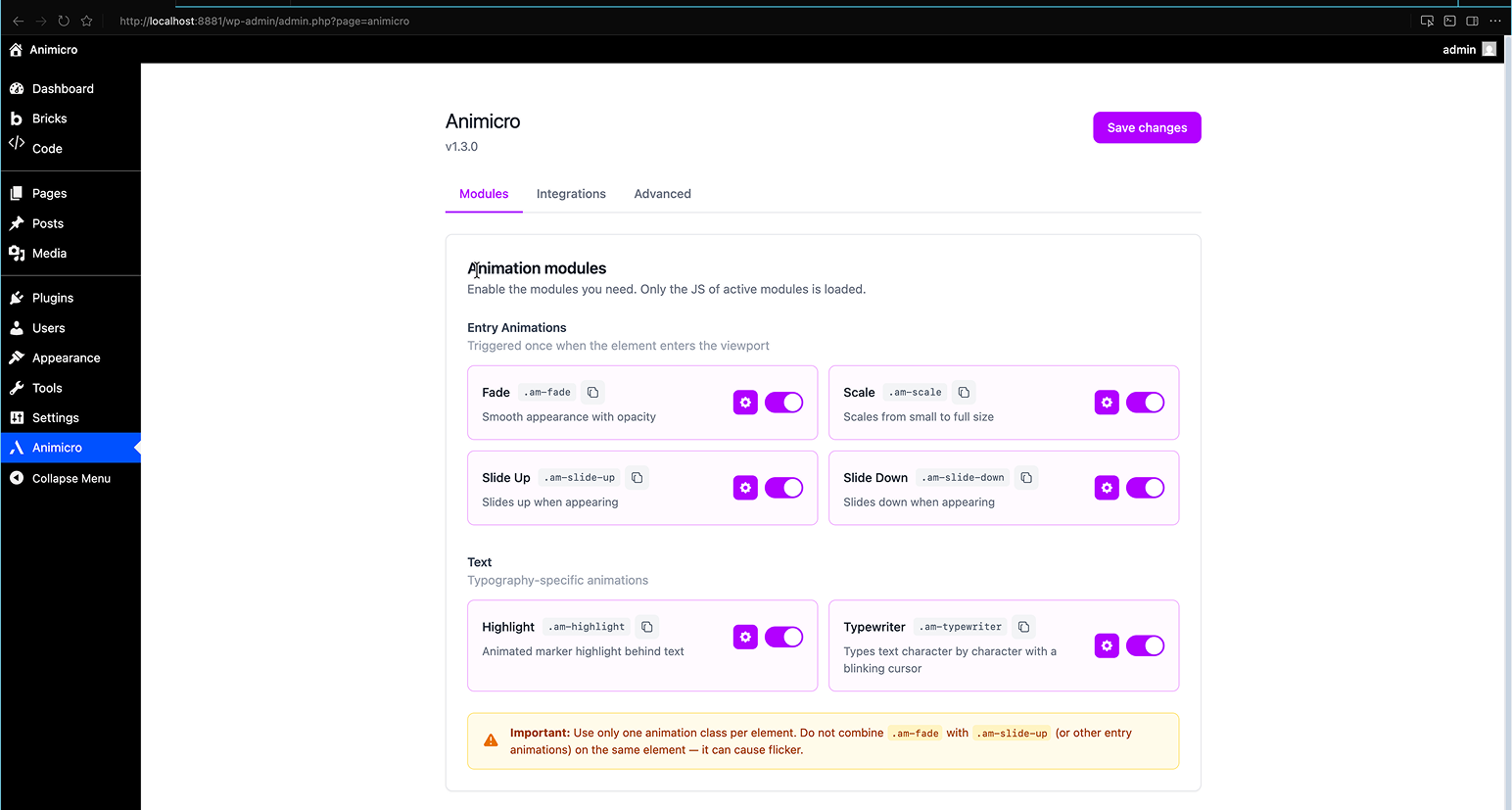
Animicro lets you add high-end animations (Awwwards-style) with minimal performance impact. Enable modules in the panel, apply classes like .am-fade, .am-scale, or .am-slide-up in your Page Builder, and you’re done.
Philosophy: Utility-first. No complex interfaces, no timelines. Just classes and data-am-* attributes.
Free modules
- Fade (
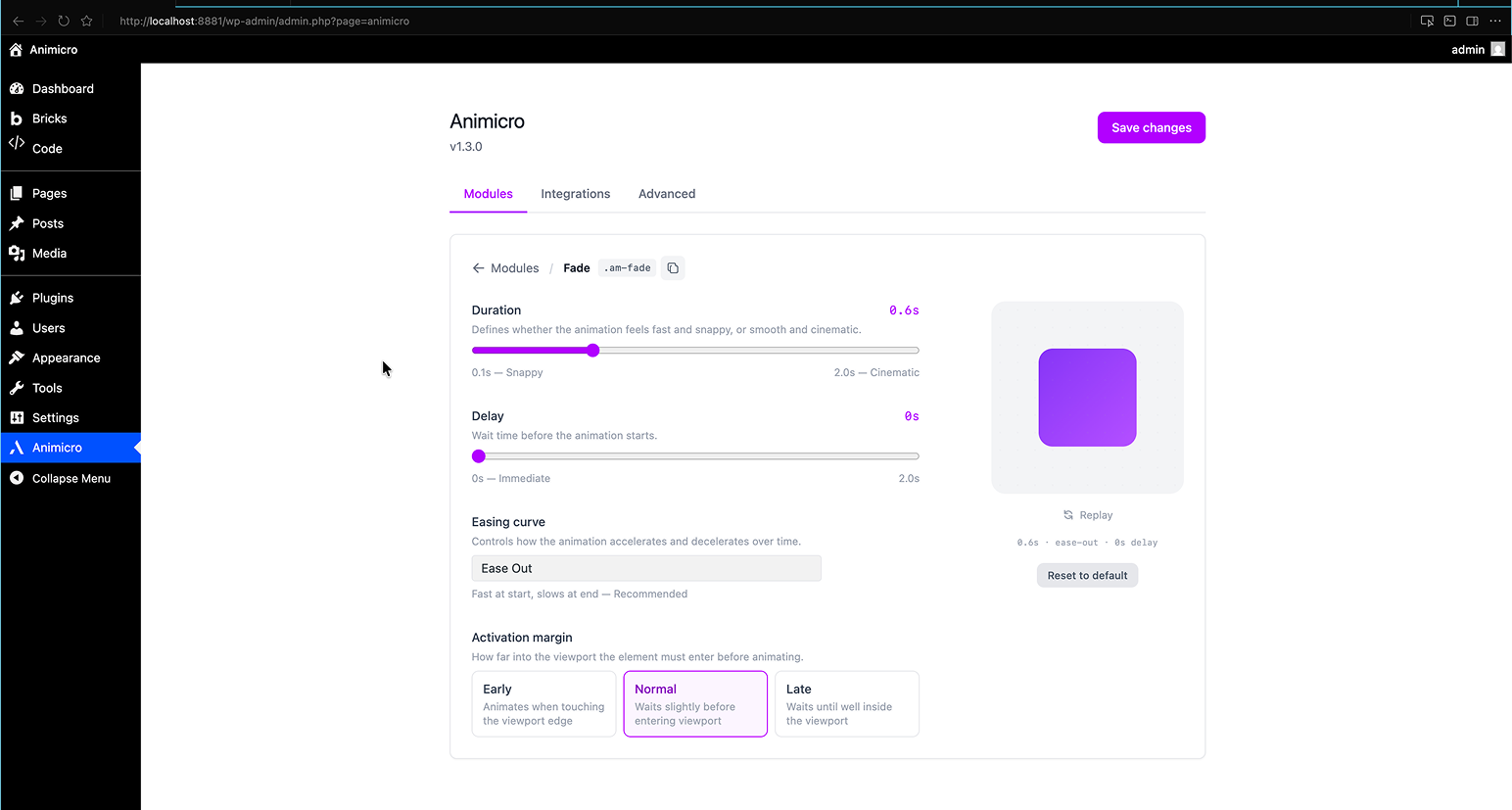
.am-fade) — Smooth appearance with opacity - Scale (
.am-scale) — Scales from small to full size - Slide Up (
.am-slide-up) — Slides up when appearing - Slide Down (
.am-slide-down) — Slides down when appearing - Slide Left (
.am-slide-left) — Slides in toward the left (from the right edge) - Slide Right (
.am-slide-right) — Slides in toward the right (from the left edge) - Skew Up (
.am-skew-up) — Slides up with a slight skew that straightens as it stops (Stripe / Vercel-style) - Float (
.am-float) — Infinite soft up/down floating motion (continuous) - Pulse (
.am-pulse) — Infinite gentle scale pulse — breathing-like (continuous) - Highlight (
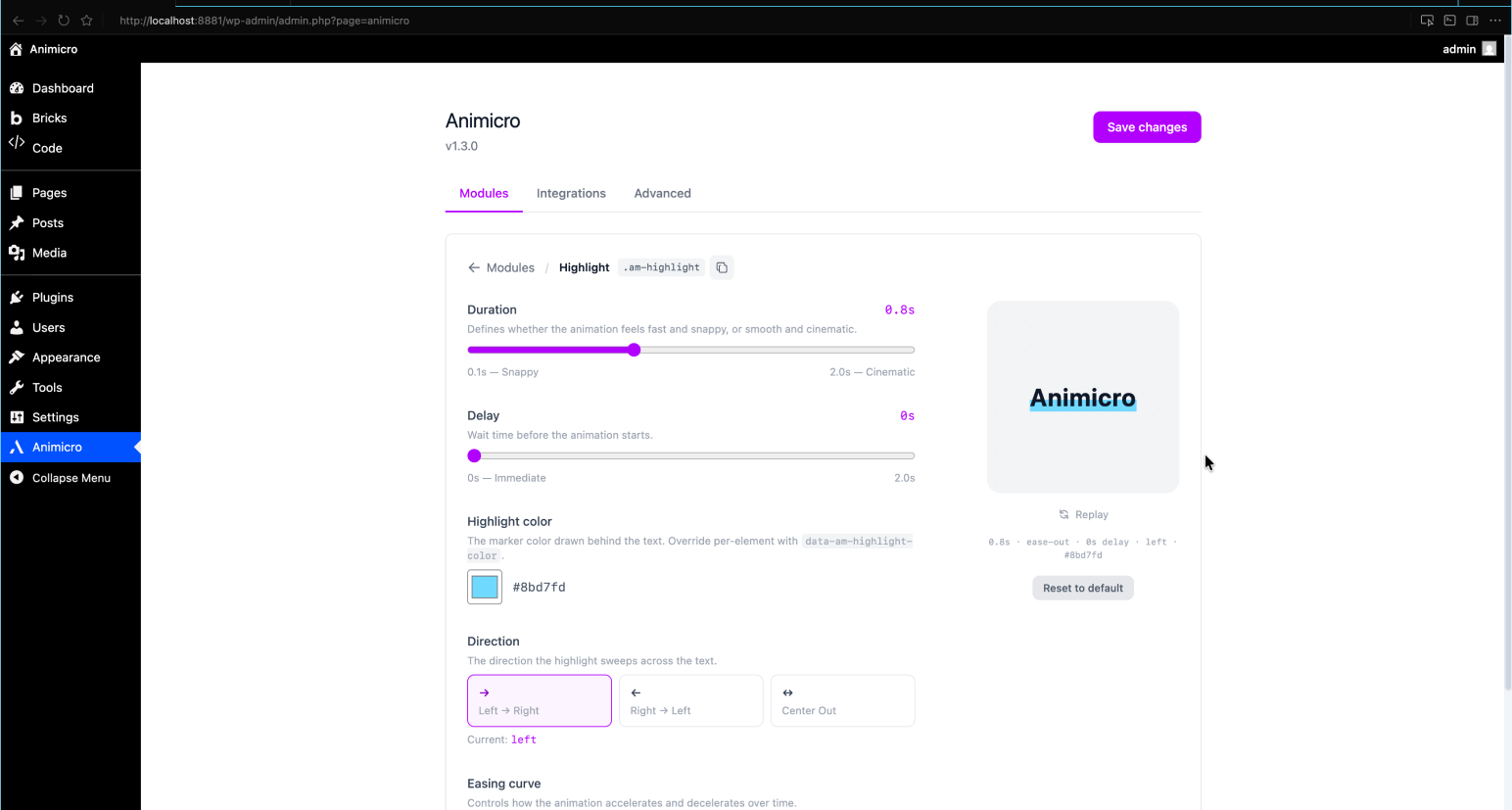
.am-highlight) — Animated marker highlight behind text on entry - Typewriter (
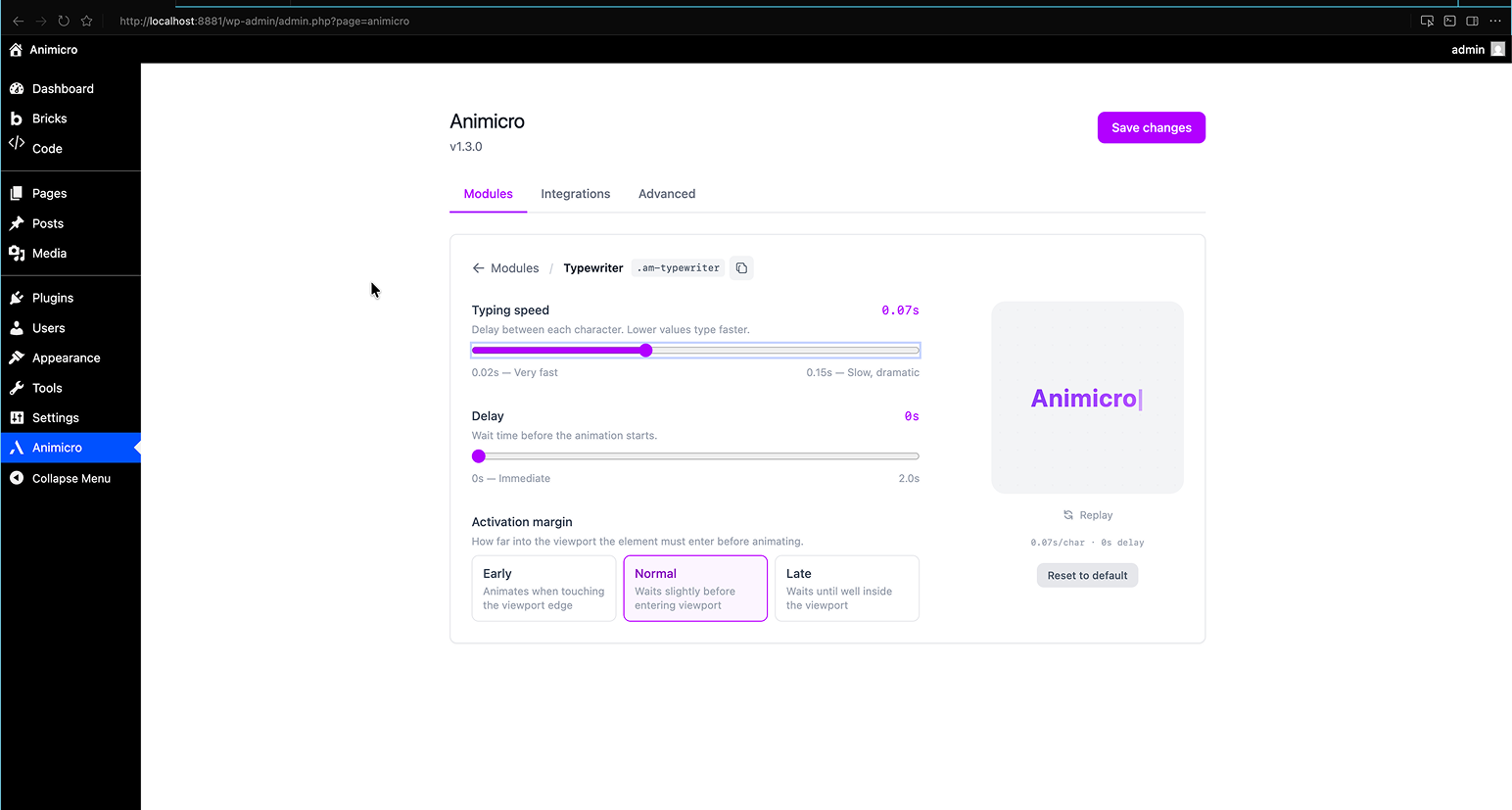
.am-typewriter) — Types text character by character with a blinking cursor - Zoom Hover (
.am-hover-zoom) — Image scales up smoothly on hover (parent needsoverflow: hidden) - Blur (
.am-blur) — Blur that clears as the element appears - Flip X / Flip Y (
.am-flip-x,.am-flip-y) — 3D card flip on entry, AOS-style - Ken Burns (
.am-ken-burns) — Slow infinite zoom for hero images (continuous) - Stagger (
.am-stagger) — Animates a container’s children in sequence - Parallax (
.am-parallax) — Scroll-linked parallax movement - Scroll Slide Left / Right (
.am-scroll-slide-left,.am-scroll-slide-right) — Horizontal drift across the viewport as you scroll - Page Curtain — Symmetric overlay transition between internal pages
Each module has its own settings panel with live preview so you can tune duration, easing, delay, and activation margin without leaving the admin.
Pro modules (available with Animicro Pro)
Twelve premium modules, grouped in three families:
- Mouse Interactions — Magnet, Magnetic and Custom Cursor: elements that react to the visitor’s pointer.
- Premium text — Split Text, Scatter Text, Scramble Text and Text Reveal.
- Premium reveals — Clip Reveal, Grid Reveal, Image Parallax, Text Fill on Scroll and Spin.
Plus Smooth Scroll. Learn more at animicro.com.
Builder compatibility
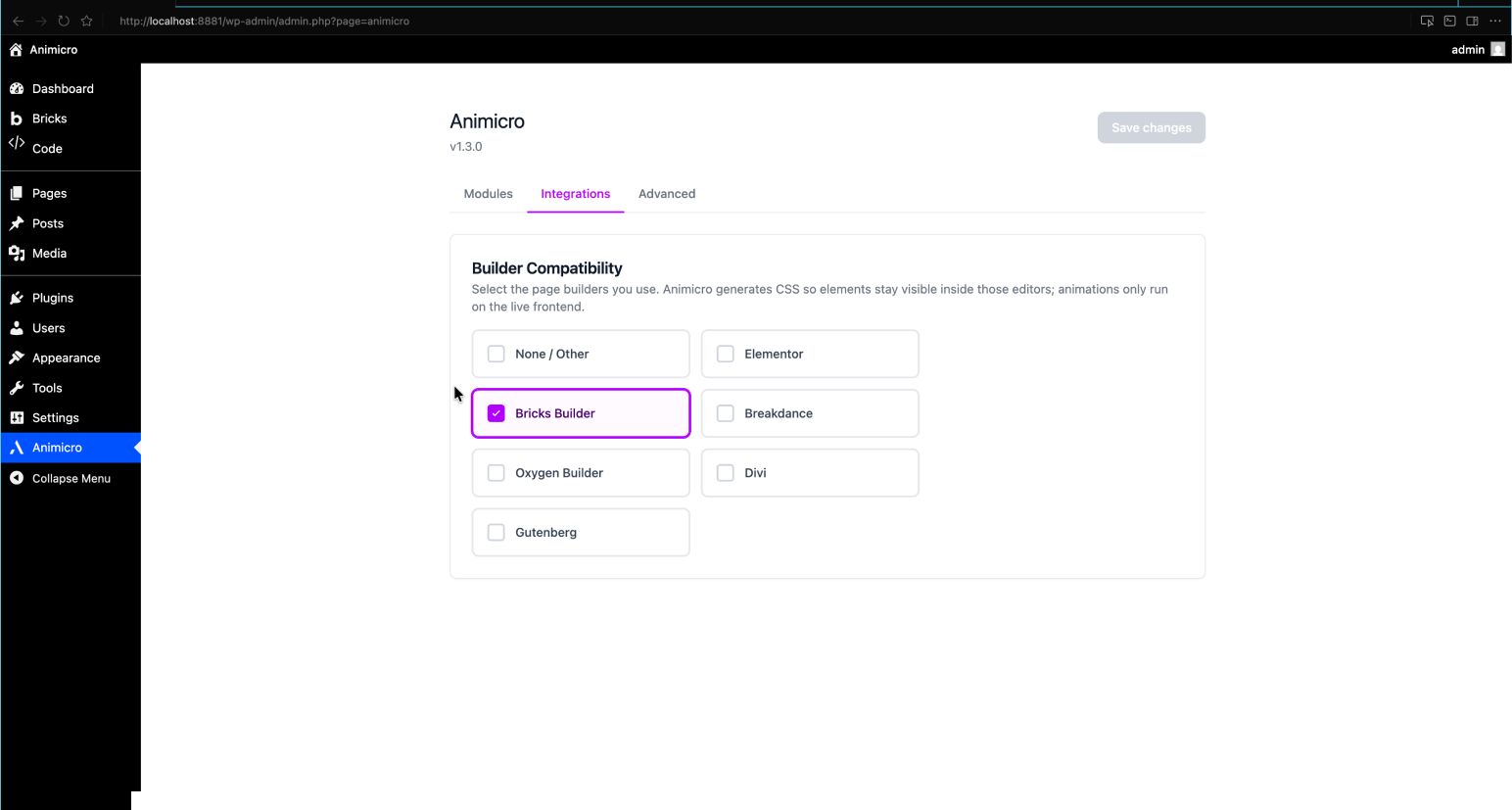
Works with Elementor, Bricks, Breakdance, Oxygen, Divi, and Gutenberg. Dynamic inline CSS adapts per builder so elements stay visible inside editors and animations only run on the live frontend.
Advanced
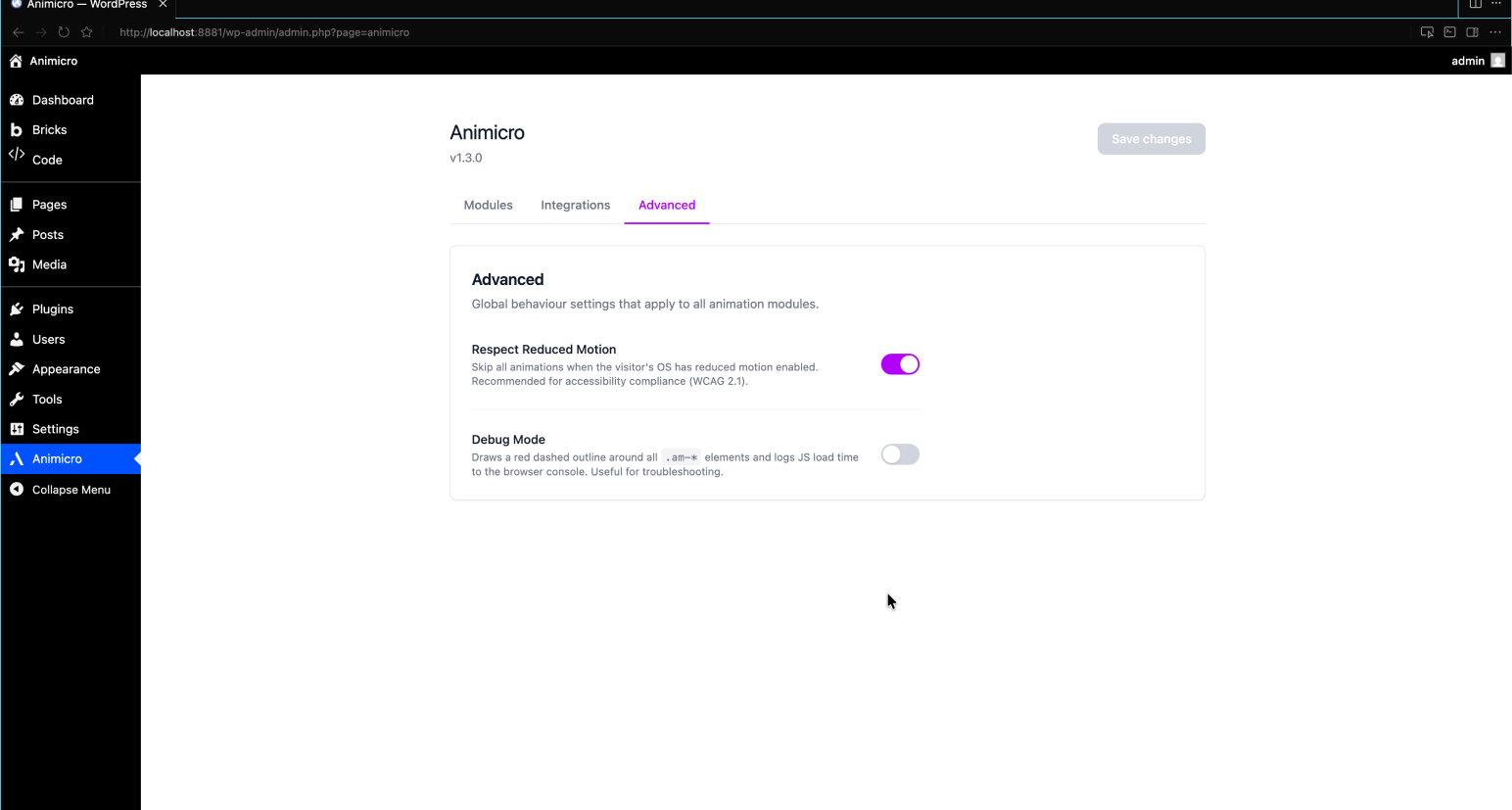
Under Animicro Advanced you can enable Respect Reduced Motion (skips JS-driven animations when the visitor prefers reduced motion) and Debug Mode (outlines .am-* elements and logs script timing in the browser console).
External Services
This plugin does not connect to any external services. All animation logic runs
locally in the visitor’s browser using JavaScript bundled with the plugin.
No data is collected, transmitted, or stored outside your WordPress installation.
Source Code
This plugin includes compiled JavaScript and CSS built with Vite from React (admin panel) and vanilla JS (frontend animations). The full, uncompressed source code is available at:
https://github.com/infojorgeml/animicro
Screenshots
Installation
- Upload the
animicrofolder to/wp-content/plugins/ - Activate the plugin from the WordPress dashboard
- Go to Animicro in the sidebar menu to configure modules
FAQ
-
Can I combine multiple animation classes on one element?
-
No. Use only one animation class per element. Combining
.am-fadewith.am-slide-upon the same element can cause flicker. -
How do I override settings per element?
-
Use
data-am-*attributes. For example:data-am-duration="1",data-am-delay="0.3",data-am-easing="ease-in-out". -
What is Animicro Pro?
-
Animicro Pro is a separate plugin that replaces the free version and unlocks 12 additional animation modules plus Smooth Scroll. Visit animicro.com to learn more.
Reviews
There are no reviews for this plugin.
Contributors & Developers
“Animicro” is open source software. The following people have contributed to this plugin.
Contributors
“Animicro” has been translated into 1 locale. Thank you to the translators for their contributions.
Translate “Animicro” into your language.
Interested in development?
Browse the code, check out the SVN repository, or subscribe to the development log by RSS.
Changelog
1.27.0
- Five modules moved from Pro to Free: Blur, Stagger, Parallax, Flip X and Flip Y. Stagger in particular is infrastructure rather than an effect — without it you cannot animate a list, a card grid or a menu in sequence — so it belongs in the free tier. If you are on Pro nothing changes for you; if you are on Free these five simply unlock, with all their settings and
data-am-*attributes, no markup changes needed. - The free tier now ships 21 modules and Pro keeps 12, grouped as Mouse Interactions (Magnet, Magnetic, Custom Cursor), premium text (Split, Scatter, Scramble, Text Reveal) and premium reveals (Clip Reveal, Grid Reveal, Image Parallax, Text Fill on Scroll, Spin), plus Smooth Scroll.
- Tested up to WordPress 7.1.
- Documentation: the free module list in this readme was out of date — Ken Burns, Scroll Slide Left/Right and Page Curtain were already free but never listed, and the Pro list still mentioned the Cheat Sheet panel that was removed in 1.25.0. Both are now accurate.
- Animicro Pro: licensing now points at the migrated LicenSuite backend and activation is a license key again (after purchase you receive a key and paste it in /wp-admin), replacing the OAuth “Connect” flow. Plugin deactivation no longer wipes the license, so toggling the plugin off and on is instant. Pro users upgrading from 1.25.x need a new key — the previous ones do not exist in the migrated database. This work was prepared as 1.26.0, which was never published; it ships here.
1.25.2
- Fixed:
data-am-delaywas ignored on Text Reveal, Split Text and Stagger. These three modules pass the delay through Motion’sstagger()helper, which renamed its option fromstarttostartDelayin a newer version — so the delay silently fell back to 0 and animations started immediately regardless of the configured value. Now the per-element and global delay work correctly on all three. The other modules were unaffected.
1.25.1
- Fixed: easing dropdown options “Bounce Out”, “Snap Out” and “Premium (Apple-like)” were silently reverting to the default on save. The server-side validator only accepted the four basic easings; the three richer curves added back in 1.12.8 were rejected when you saved. Now all seven dropdown options (plus any custom
cubic-bezier) save and apply correctly. - Hardening: defensive guard so the Spin module never creates a duplicate IntersectionObserver; rounded out the distribution ignore-list. No behaviour change.
1.25.0
- Per-module attribute cheat sheets. Every module drilldown now ends with a focused table listing exactly the
data-am-*attributes that apply to THAT module (generic ones likedata-am-duration+ module-specific ones). One copy button per row. - Global “Cheat Sheet” tab removed. Now that each module carries its own focused mini cheatsheet inline, the top-level tab was duplicate effort and one more knob to ignore. Admin sidebar goes from 5 tabs to 4: Modules / Page Transitions / Smooth Scroll / Advanced.
- No data loss — all attribute definitions still live in the same place, just rendered closer to where they’re useful.
1.24.1
- Tested and confirmed compatible with WordPress 7.0. Metadata-only patch — no code changes. Bumps the
Tested up toheader so the plugin’s wp.org directory listing no longer shows the “may be incompatible” warning to visitors on the upcoming WP 7.0. Requires at least: 6.0is unchanged — Animicro continues to work on WordPress 6.0 and newer.- Several admin UI polish commits since 1.24.0 also bundled in this release: refreshed Pro badge styling (custom gold palette, uppercase, unified 10px font-size) and the Page Transitions tab now uses the same compact-card + drilldown pattern as the Modules dashboard.
1.24.0
- Two new Free modules:
scroll-slide-leftandscroll-slide-right— scroll-linked horizontal drift. As the visitor scrolls vertically, the element translates horizontally across the viewport. Classic “newspaper strip” / “ticker tape” effect for Hero headlines and section dividers. .am-scroll-slide-left— element travels right left (classic)..am-scroll-slide-right— element travels left right (inverse).- Per-element
data-am-speed(default 1, range 0.1–3): travel multiplier. 0.5× is a subtle drift, 3× is a wild sweep that pushes the element fully off-screen. - Free tier — first scroll-linked module in the Free build (parallax + text-fill-scroll remain Pro). Honors
prefers-reduced-motion: reduceand never runs inside builder editor previews. IntersectionObserver-gated for performance on long pages.
1.23.0
- New
flip-xandflip-ymodules (Pro) — 3D card-flip entry animation, the classic AOS-style effect. Elements appear rotating on their X axis (.am-flip-x, like opening a book top-to-bottom) or Y axis (.am-flip-y, like turning a page left-to-right) from a configurable angle back to 0°. Perfect for pricing grids, testimonial cards, feature blocks. - Per-element
data-am-angle(default 180°, range -720..720) lets you do subtle flips (90°), reverse direction (-180°), or full spins (360°, 720°). - Built on Motion v12’s
transformPerspectiveso the rotation reads 3D without forcing perspective on the parent element. Standarddata-am-duration/-easing/-delay/-marginwork as usual. - Tip: try the
Bounce Outeasing for a “card lands with a snap” feel — looks great on pricing tables.
1.22.0
- New
ken-burnsmodule (Free) — Slow infinite zoom for hero images. Apply.am-ken-burnsto any image / element and it cycles between scale 1 and 1.15 over 15 seconds (configurable), giving static backgrounds the cinematic documentary feel. - Per-element overrides:
data-am-duration(cycle length),data-am-scale(zoom amount),data-am-easing,data-am-delay. - Tip: the parent of the image should have
overflow: hiddenso the zoomed-in image stays clipped to its frame. Most hero sections in builders already ship with that. - Honors
prefers-reduced-motion: reduce. Skipped inside Bricks / Elementor / Breakdance / Oxygen / Divi editor previews.
1.21.0
- New
cursormodule (Pro) — Replaces the system cursor with a custom circle that follows the mouse with smooth lerp interpolation. When the visitor hovers any element carrying.am-cursor-expand, the cursor grows, applies a glassmorphism style (backdrop-filter blur + semi-transparent background), and optionally shows text viadata-am-cursor-text="View". - Configurable from the admin panel: base size + color, hover size + color + opacity + blur, smoothness (lerp factor). Per-element overrides for size (
data-am-cursor-size) and text (data-am-cursor-text). - Auto-active globally if the module is enabled (no
.am-cursorclass on body needed). The native cursor is hidden via critical CSS while the module is active, with explicit exceptions for text inputs so the I-beam stays usable in forms. - Auto-disables on touch-only devices, screens narrower than 992px, when the visitor prefers reduced motion, and inside builder editor previews. Reactive to resize — re-evaluates the breakpoint with a debounced listener.
1.20.0
- New
magneticmodule (Pro) —.am-magneticbuttons / icons / links are pulled toward the cursor when it enters their proximity, and snap elastically back when the cursor leaves. Awwwards-style “premium feel” interaction for hero CTAs and nav links. - Per-element attributes:
data-am-range(attraction radius),data-am-strength,data-am-smoothness,data-am-axis(x/y/both). - New admin category “Mouse Interactions” that groups cursor-driven effects. The existing Magnet module has been moved into this category (from “Continuous”). No settings or behaviour changed for Magnet — only its placement in the Modules dashboard.
- Both magnetic and magnet skip touch-only devices, honor
prefers-reduced-motion: reduce, and never run inside Bricks / Elementor / etc. editor previews.
1.19.0
- New
clip-revealmodule (Pro) —.am-clip-revealimages (or any element) get a premium reveal via clip-path. Seven shapes:curtain-down,curtain-up,curtain-left,curtain-right,center-h,center-v,circle. Per-element viadata-am-shape="...", default configurable from the admin panel. - Triggered when the element enters the viewport (IntersectionObserver gated). Standard
data-am-duration/-easing/-delay/-marginattributes apply. - Safe by default: critical inline CSS clips the element entirely until JS arrives. If JS is disabled or the visitor prefers reduced motion,
@mediafallbacks forceclip-path: noneso the image stays fully visible.
1.18.0
- New
spinmodule (Pro) —.am-spinelements rotate continuously and accelerate momentarily when the visitor scrolls. Perfect for circular badges (“Award winning”, “100% Quality”, brand seals) that you see on Awwwards-style sites. - Per-element
data-am-direction="left|right"(CW / CCW) anddata-am-speed(degrees per second, 1–360). Default direction / speed / scroll-boost configured globally from the admin panel. - Performance: single global rAF loop + single scroll listener + IntersectionObserver, so 20 spinning badges off-screen cost zero CPU until they enter the viewport. Honors
prefers-reduced-motion: reduce(no animation), respects builder editor previews (no rotation inside Bricks / Elementor / etc.).
1.17.0
- New
scramblemodule (Pro) —.am-scramblecycles each character through random symbols (ASCII glitch + alphanumeric mix) and stabilises them left-to-right when the element enters the viewport. Cinema / cyberpunk decoding look. - Utility-first: only the class is needed. Stagger delay (how fast the decode wave races across) and scramble speed (how often each unrevealed char swaps to a new random symbol) are configured globally from the admin panel. Per-element
data-am-delay,-stagger,-marginstill work. - Preserves the original text as
aria-labelon the parent so screen readers announce the final phrase once instead of spamming character-by-character mutations. Honorsprefers-reduced-motion: reduce(text renders immediately without decoding). Builder-safe.
1.16.0
- New
scattermodule (Pro) —.am-scatter-charsand.am-scatter-wordsmake characters or words fly in from random offset positions (translate ± radius, rotate ± rotateMax) and converge to their final position when the element enters the viewport. - Utility-first design: only the class is needed on the element. Distance (50–500px) and rotation (0–90°) are configured once from the admin panel and apply to every scatter element on the site. Per-element
data-am-duration/-easing/-delay/-stagger/-marginstill work via the shared attribute API. - IntersectionObserver gated (only animates when the element enters viewport),
prefers-reduced-motion: reducerespected, never runs inside Bricks / Elementor / Breakdance / Oxygen / Divi editor previews.
1.15.0
- New
magnetmodule (Pro) —.am-magnetelements drift smoothly toward the mouse with LERP-based inertia. Three attributes:data-am-strength(1–100),data-am-smoothness(0.01–1),data-am-axis(x/y/both). One global rAF loop + one mousemove listener regardless of how many elements you mark — cost scales linearly with element count. - Safety: skipped on touch-only devices (no fine pointer signal), honors
prefers-reduced-motion: reduce, never runs inside Bricks / Elementor / Breakdance / Oxygen / Divi editor previews.
1.14.2
- Plugin icon in the WP “Update Plugins” screen. Bundled
assets/icon-128x128.pngso the standard WP-admin update list now shows the Animicro logo instead of the generic gray plug icon. Works automatically — no settings needed. - Internal: toolchain migrated from npm to pnpm. No product changes; only affects how the build is run locally and in CI. Existing settings, animations and styling are unchanged.
1.14.1
- Page Curtain: theatre-curtain directions. Slide-up and slide-down now feel natural — the cortina ENTERS from one side and LEAVES through the OPPOSITE side, like a real stage curtain (falls from above to cover, rises away to reveal). Previously both halves moved in the same direction which felt repetitive.
- Page Curtain: WordPress media library for logo. The Logo URL field is now a “Select image…” button that opens the standard WP media picker, with a thumbnail preview, “Change” and “Remove” actions. Plain URLs still work as a fallback if the media script can’t be loaded.
1.14.0
- New “Page Transitions” admin tab with a single new module:
- Page Curtain — symmetric overlay transition between internal pages. Click a link cortina covers the screen page changes cortina animates away. Three variants: fade, slide-up, slide-down. Configurable background color and optional logo URL.
- The cortina is mirrored between entry and exit: with
slide-upit rises across the screen on both legs of the navigation; withslide-downit descends; withfadeit crossfades. - Builder-safe (doesn’t run inside Bricks / Elementor / Breakdance / Oxygen / Divi / Gutenberg editor previews) and honors
prefers-reduced-motion(visitors who prefer reduced motion get instant browser navigation, no click interception). - Per-link opt-out: add
class="no-curtain"ordata-no-curtainto any<a>that should navigate instantly (downloads, ajax-driven UIs, etc.). External links,target="_blank", modifier-key clicks, middle-clicks,#anchorlinks andmailto:/tel:links are never intercepted. - Graceful degradation: if JavaScript is disabled or the theme doesn’t call
wp_body_open(), the module falls back cleanly. bfcache-safe (back button works correctly).
1.13.0
- Removed the “Integrations” tab from the admin panel. The toggle never had an observable effect for normal users — URL-based detection (
?bricks=run,?elementor-preview, etc.) already covers all mainstream page builders, and the body-class CSS exclusion is now applied to all known editors by default. One less knob to confuse you, same builder compatibility behaviour. No action needed if you had configured the toggle — your saved value is now ignored.
1.12.9
- Hotfix for the new easings shipped in 1.12.8: Bounce Out and Snap Out were silently falling back to Ease Out (looked identical). The translator missed the hyphenated forms
back-out/circ-outthat the dropdown emits, so these values weren’t being recognised by the underlying animation engine. Now both work as intended — Bounce Out actually bounces, Snap Out actually snaps.
1.12.8
- Three new easing options in the Modules settings panel: Ease In (slow start, fast end — useful for exits), Bounce Out (slight overshoot then settles — playful for CTAs), and Snap Out (sharper than ease-out — feels modern and snappy). Total goes from 4 to 7 easing curves. Existing
data-am-easingvalues keep working unchanged.
1.12.7
- Easing curves now actually work. Long-standing bug since v1.0: every easing option in the admin dropdown (Ease Out, Ease In Out, Linear, Premium Apple-like) was being silently ignored by the underlying animation engine, which fell back to its default ease for every single animation regardless of what was selected. Fixed across all 18 animation modules. Visual change: animations on existing sites will now respect the easing setting you picked — most look subtly different, and the Premium (Apple-like) curve in particular is dramatically smoother since it never applied at all before. If you preferred the old look, set the easing to “Ease In Out” (which is closest to Motion’s previous default).
1.12.6
- Updated the underlying Motion animation library from 11.18.x to 12.38.0. ~12 months of upstream bug fixes plus better hardware acceleration on scroll-linked animations (Parallax, Image Parallax, Text Fill on Scroll). Bundle size grows by ~3 KB gzipped on the main animation chunk; per-module chunks unchanged. No API or CSS class changes — your existing markup keeps working as-is.
1.12.5
- Animicro Pro: synced internal docs and tightened the licensing flow to match LicenSuite v4. Plugin deactivation now cleans the local connection (matches Bricks / WP Rocket / Elementor); the seat stays listed under “Connected sites” in the LicenSuite dashboard until the user revokes it manually. Dropped the v1.11.x v1.12.x migration scaffolding (no installations to migrate). No user-facing changes in the free tier.
1.12.4
- Animicro Pro: critical fix for the v3 Connect flow. The validation calls to LicenSuite were being rejected by the Supabase JWT layer before the function code ran (“Last check: Never” in the dashboard), so Pro modules never unlocked even after a successful Connect. The plugin now sends the public Supabase anon key in the Authorization header (to satisfy JWT verification) and the per-site connection secret in the request body (where the function reads it). No user-facing changes in the free tier.
1.12.3
- Animicro Pro: fixes a bug introduced by the v3 Connect migration where the License page showed “License active, Plan: PRO” but Pro modules stayed locked in the modules grid. The premium check now always re-derives the answer from current connection state instead of trusting a possibly-stale internal flag, and the premium-tier list is now filterable so custom dashboard plans (e.g.
agency,studio) can unlock Pro features without a code change. No user-facing changes in the free tier.
1.12.2
- Animicro Pro: license panel now shows the plan name as configured by the operator on the LicenSuite dashboard (e.g. “Pro”, “Agency”, “Enterprise 50 sites”), instead of an uppercased slug. Internal upgrade to LicenSuite v4.0 plan shape (rich object with
slug+name+max_sites). No user-facing changes in the free tier.
1.12.1
- Hotfix for Animicro Pro: the License page could crash with a blank screen right after a successful Connect when the LicenSuite server returned the
planfield as an object instead of a plain string. The plugin now normalizes the plan shape on the PHP side and the React UI is defensive against any shape. No user-facing changes in the free tier.
1.12.0
- No user-facing changes in the free tier. Animicro Pro migrates to the LicenSuite v3 Connect flow: instead of pasting a license key, users click a “Connect” button to link their account from the LicenSuite dashboard. Existing Pro users will see a one-time “Reconnect” banner after the upgrade.
1.11.3
- Cleaner admin UX: third-party admin notices (SEO plugins, security tools, etc.) are now suppressed on the Animicro settings screens. They keep showing on every other
/wp-admin/page — they just no longer break the Animicro panel layout. This is the standard practice in plugins like Bricks, Elementor and ACF Pro.
1.11.2
- No user-facing changes in the free tier. Internal release-pipeline tooling: GitHub Actions now publishes a Release with the built ZIPs on every
v*tag, and Animicro Pro gains in-dashboard auto-updates from those Releases. Free updates continue to flow through wordpress.org as usual.
1.11.1
- No user-facing changes in the free tier. Internal compatibility update for the licence backend used by Animicro Pro (multi-site licensing, automatic seat release on plugin deactivation, local-development bypass on
localhost/*.local/*.test).
1.11.0
- New Free module: Zoom Hover (
.am-hover-zoom) — image scales up on hover. Tunable viadata-am-zoom-scale. Parent needsoverflow: hidden. - New Pro module: Image Parallax (
.am-img-parallax) — “window effect” that translates the inner<img>on scroll inside anoverflow: hiddenframe. - New admin category: Media & Images.
1.10.3
- No user-facing changes in the free tier. Internal consistency pass: deduplicated the
data-am-looprow in the Pro Cheat Sheet, simplified the frontend module loader, and added.am-parallaxto the base visibility selector for consistency.
1.10.2
- No user-facing changes in the free tier. Internal hardening and reliability improvements for Pro-only modules (Text Reveal, Text Fill on Scroll).
1.10.1
- Accessibility: entry animations no longer stay hidden when the admin enables Respect Reduced Motion and the visitor prefers reduced motion. The CSS safety net now forces the final visible state (matching the no-JS behaviour).
- Docs: Slide Left / Slide Right descriptions rephrased for clarity.
- Internal: removed a dead fallback branch in skew-up.js.
1.10.0
- New Free module: Skew Up (
.am-skew-up) — entry animation that slides up with a slight skew and straightens as it stops (Stripe / Vercel-style). - New Free category: Continuous (Infinite) — animations that loop forever with no viewport trigger.
- New Free module: Float (
.am-float) — infinite soft up/down floating motion. Perfect for 3D illustrations, icons, and hero art. Tunable viadata-am-amplitudeanddata-am-duration(cycle length). - New Free module: Pulse (
.am-pulse) — infinite gentle scale pulse, breathing-like. Great for badges, CTAs, and call-to-action buttons. Tunable viadata-am-scale-maxanddata-am-duration(cycle length). - Float and Pulse respect
prefers-reduced-motion: reduceand skip the animation entirely for visitors who opt out of motion.
1.9.0
- Slide Left (
.am-slide-left) and Slide Right (.am-slide-right) are now part of the Free tier. Free users get four slide directions (up, down, left, right) out of the box. No configuration change needed if you’re upgrading — just enable them from the Animicro Modules panel.
1.8.0
- Loop support on entry animations —
fade,scale,slide-up,slide-down,slide-left,slide-rightandblurnow acceptdata-am-loop="true"to repeat forever. Usedata-am-loop-mode(pingpongdefault, orrestart) anddata-am-loop-delayto fine-tune. Loop is opt-in per element and automatically skipped underprefers-reduced-motion: reduce.
1.7.0
- Typewriter: major upgrade — rotating strings via
data-am-strings(pipe- or JSON-separated), withdata-am-prefix/data-am-suffixwrapping the rotating word. State machine types forward, holds, deletes, and cycles through the list. New controls: Back speed, Back delay, Loop, Shuffle, Cursor character, Cursor persist. - Typewriter: breaking change — the cursor now stays blinking after typing ends by default (classic typewriter look). Set
data-am-cursor-persist="false"(or disable the admin toggle) to restore the 1.6 fade-out behaviour. - Typewriter: accessibility improved —
aria-labelexposes the fullprefix + strings.join(", ") + suffixso screen readers announce the complete phrase once instead of per-character. - Admin: the Typewriter settings panel now exposes Typing speed, Back speed, Back delay, Cursor character, Loop, Shuffle and Cursor persist toggles, with a live rotating preview.
1.6.0
- Highlight: fixed delay bug where a stray
data-am-delayattribute on the page could produce absurdly long delays (e.g. 20 s). Delay and duration are now clamped in JS. Marker moved from::afterto::beforewithdisplay: inline-blockfor accurate width tracking inside all builders. Double-init guard added. - Typewriter: now respects
prefers-reduced-motion(shows full text immediately with no animation). Cursor CSS moved out of runtime style injection into the stylesheet. Newdata-am-cursorattribute for a custom cursor character. Double-init guard added. - Admin: color pickers for Highlight and Text Fill on Scroll now support opacity (alpha slider + 8-char hex) and CSS variable tokens such as
var(--brand-100).
1.5.0
- No user-facing changes in the free tier. Internal restructuring to align the free and Pro codebases.
1.4.0
- Security: REST API settings endpoint now verifies nonce on write requests (CSRF hardening)
- Security: Numeric animation settings (duration, delay, distance, scale, typingSpeed) clamped to safe ranges
- Security: margin setting validated against CSS shorthand whitelist
- Security: Module IDs validated as CSS-safe identifiers before CSS injection
- Performance: admin menu SVG icon pre-encoded as constant (eliminates runtime base64 computation)
- Performance: animicro_settings option now stored with autoload=false
- Reliability: manifest read failures now logged to PHP error log when WP_DEBUG is enabled
- Filter: animicro_upgrade_url filter added for white-label customisation
1.3.0
- WordPress.org compliance: free package contains only free functionality (no gated Pro code in the distributed plugin)
- Removed automatic deactivation of other plugins
- readme.txt: Source Code section linking to GitHub for full uncompressed sources
- Release ZIPs use versioned filenames (animicro-X.Y.Z.zip)
1.2.0
- Highlight and Typewriter modules moved to the Free tier — available to all users without a Pro license
- Dynamic builder-compatibility CSS now injected via wp_add_inline_style() (WP.org Plugin Check compliant)
- Free plugin row shows an “Upgrade” link pointing to animicro.com
- Added External Services disclosure section
- Minor internal hardening of script type injection
1.1.0
- Architecture improvements: free plugin ships without any license code or premium gating
- Module cards link to animicro.com for upgrade information
- Build tooling improvements
1.0.3
- Freemium architecture: free version fully functional without license checks
- Improved builder compatibility
1.0.0
- Initial release