
Description
Andamio Kit is the companion plugin of the Andamio theme. The theme brings the design; this plugin brings the part a theme cannot: the properties themselves.
It needs the Andamio theme to be active. Without it, the plugin does nothing at all and says so, in one line, in your dashboard. Nothing on your site is changed.
Everything, on one screen
The plugin adds a single entry to your dashboard menu, with seven tabs: Overview, Properties, Visit requests, Lists, Set up the site, Settings and Help. No stray entries, no pages hidden three levels down: the properties, the requests, the lists, the pages of your site and the settings live together, and every screen has a way back to every other.
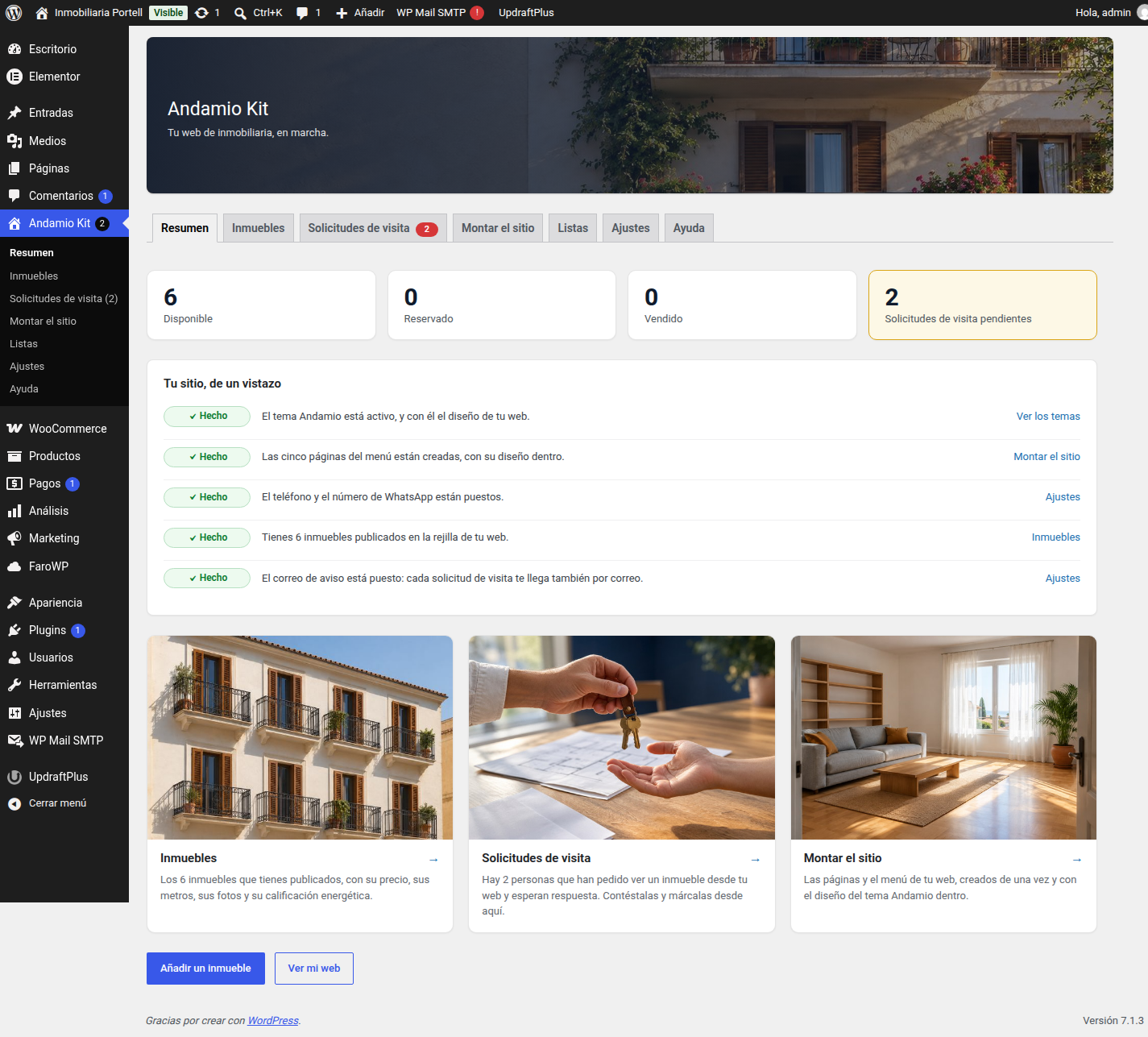
- The Overview tab answers “what have I got and what is still missing?”: how many properties are available, reserved and sold, how many visit requests are waiting, a checklist of the five things that make the site work (the theme, the pages, the phone number, the first property, the notification email) with a link to the screen that fixes each one, and three shortcuts to the tab you need.
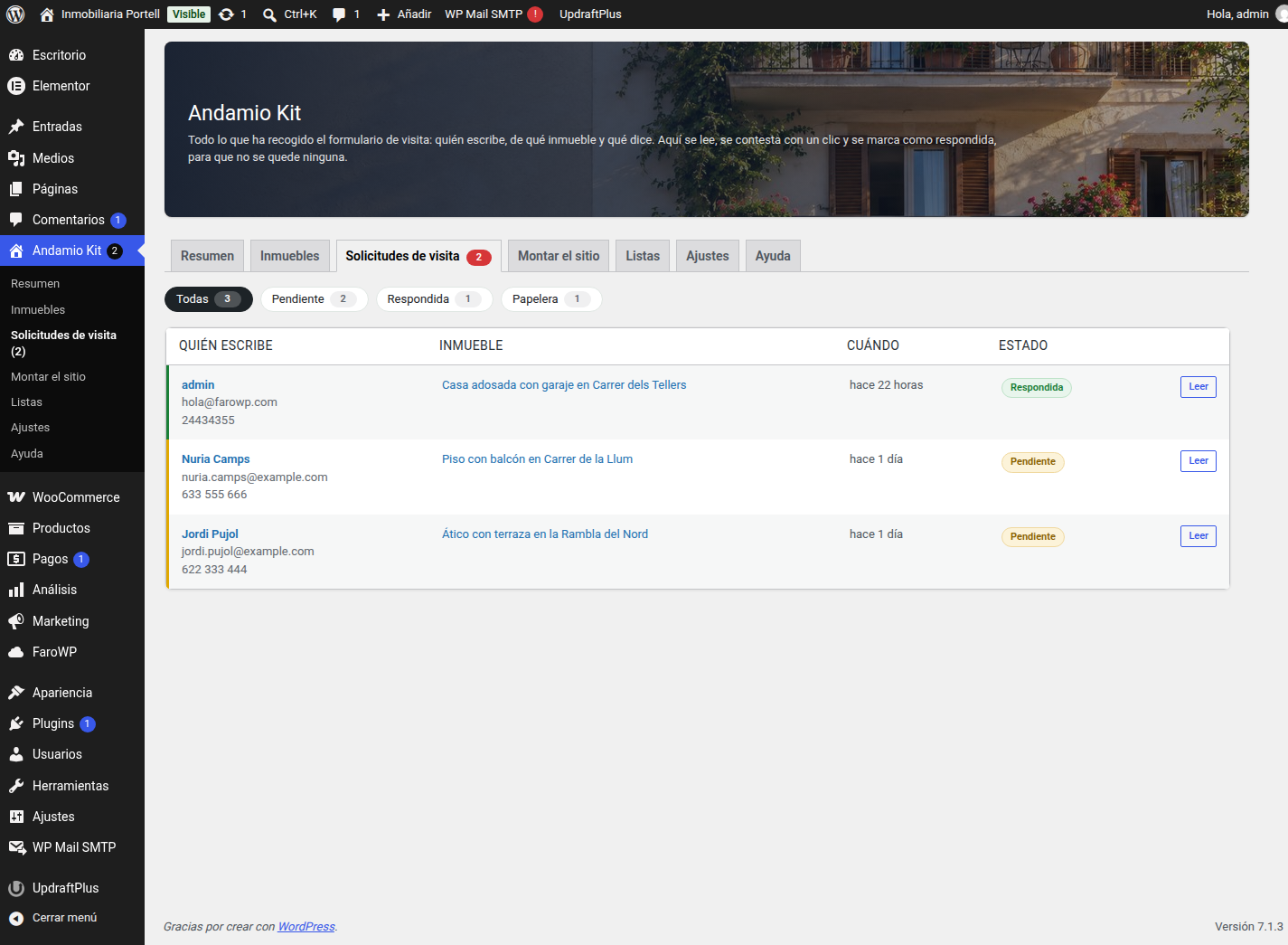
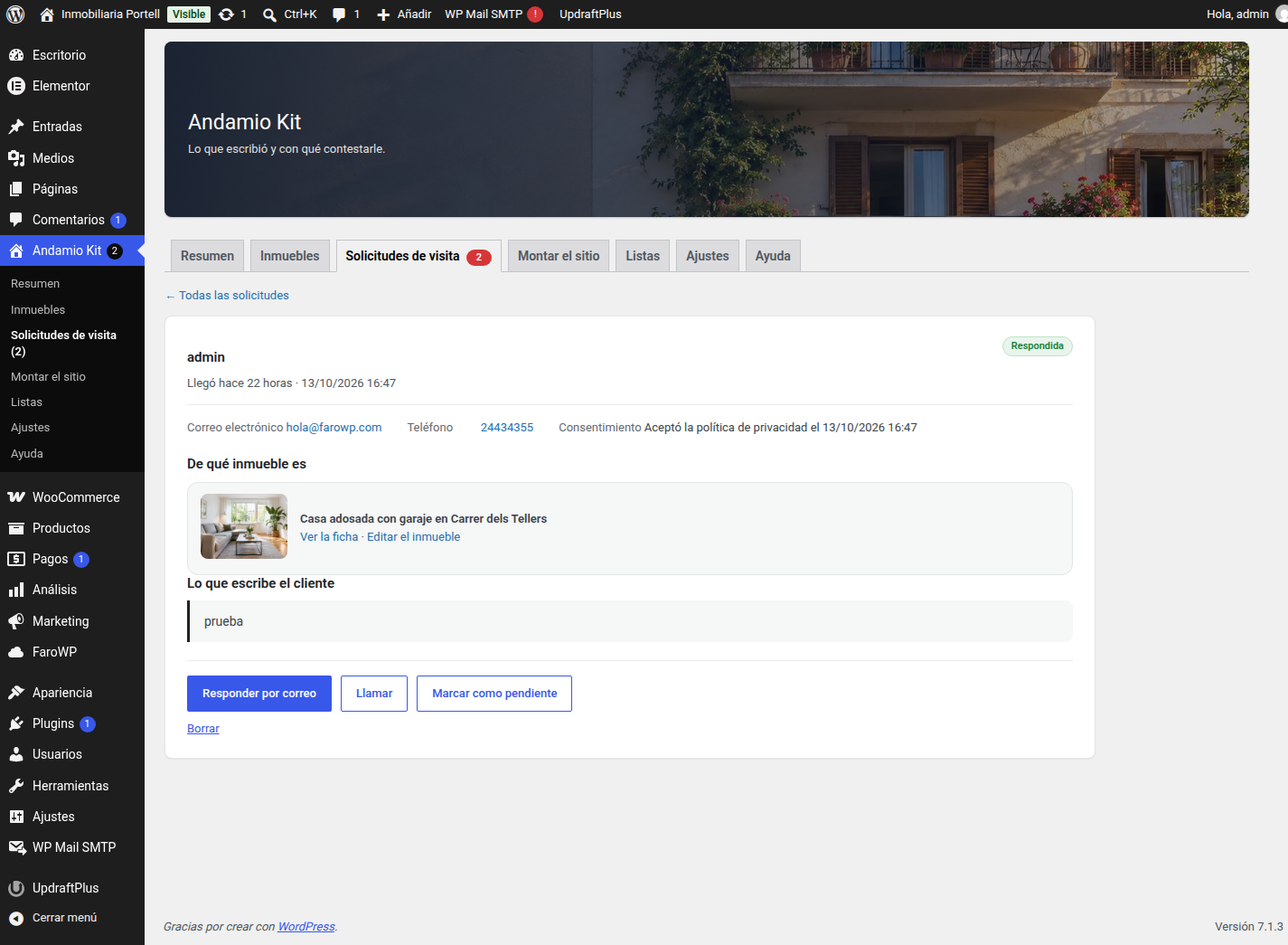
- The Visit requests tab is where the messages are read: the tray of everything the form has collected, filtered by all, pending and answered —who writes, which property it is about, when it arrived and in what state—, and each one opening on its own page with the message as it was written, the property with a link to its page and to its screen, the consent date, and the buttons to reply by email, call or send a WhatsApp. One click marks it as answered; deleting sends it to the trash, so a slip of the finger does not destroy anything.
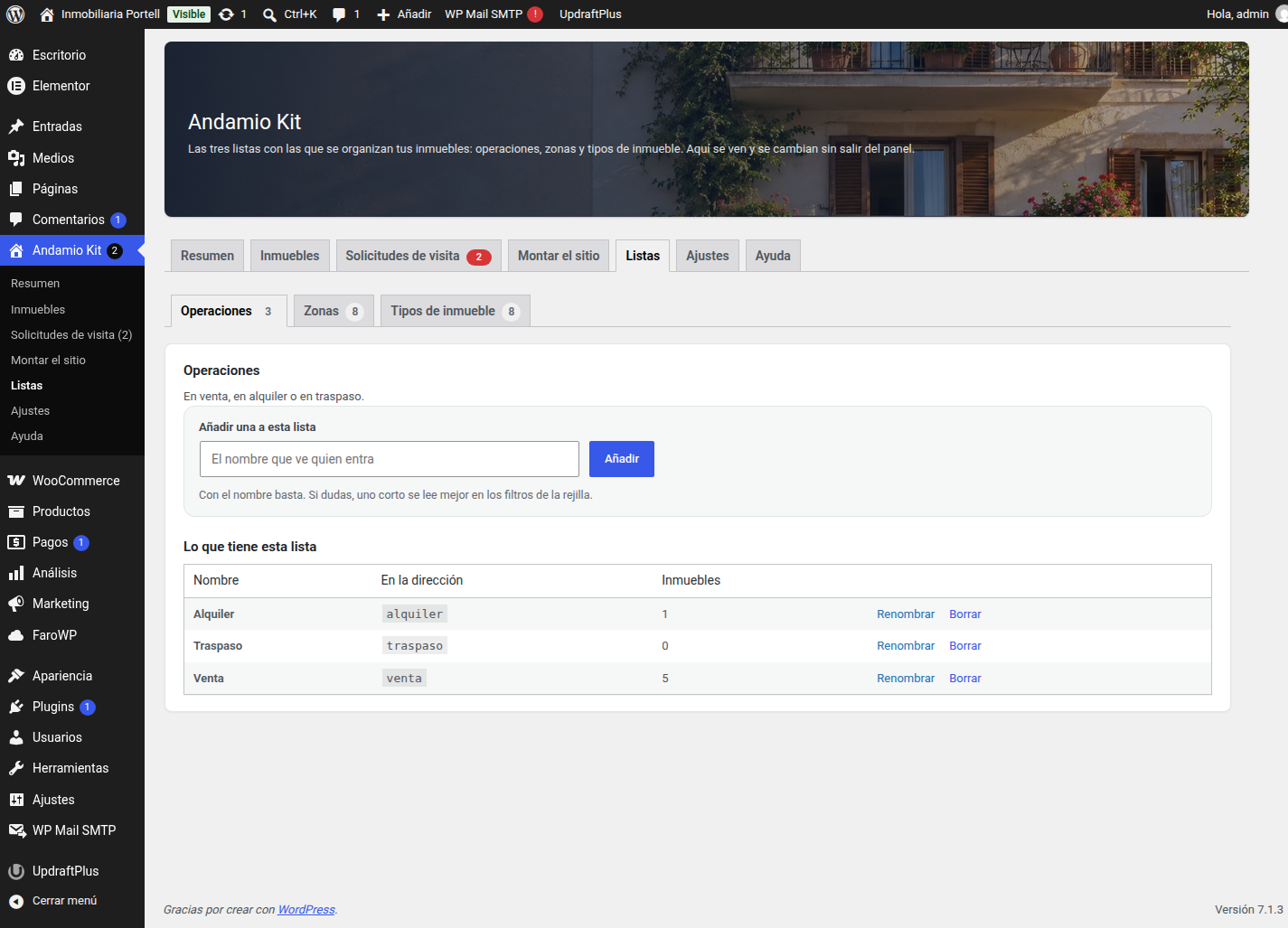
- The Lists tab holds the three lists that organise the properties —operations, areas and property types—, each one in its own tab: what is in it, how many properties use it, and buttons to add one, rename it or delete it. The same three lists the properties are ticked against, without going out to the WordPress screens.
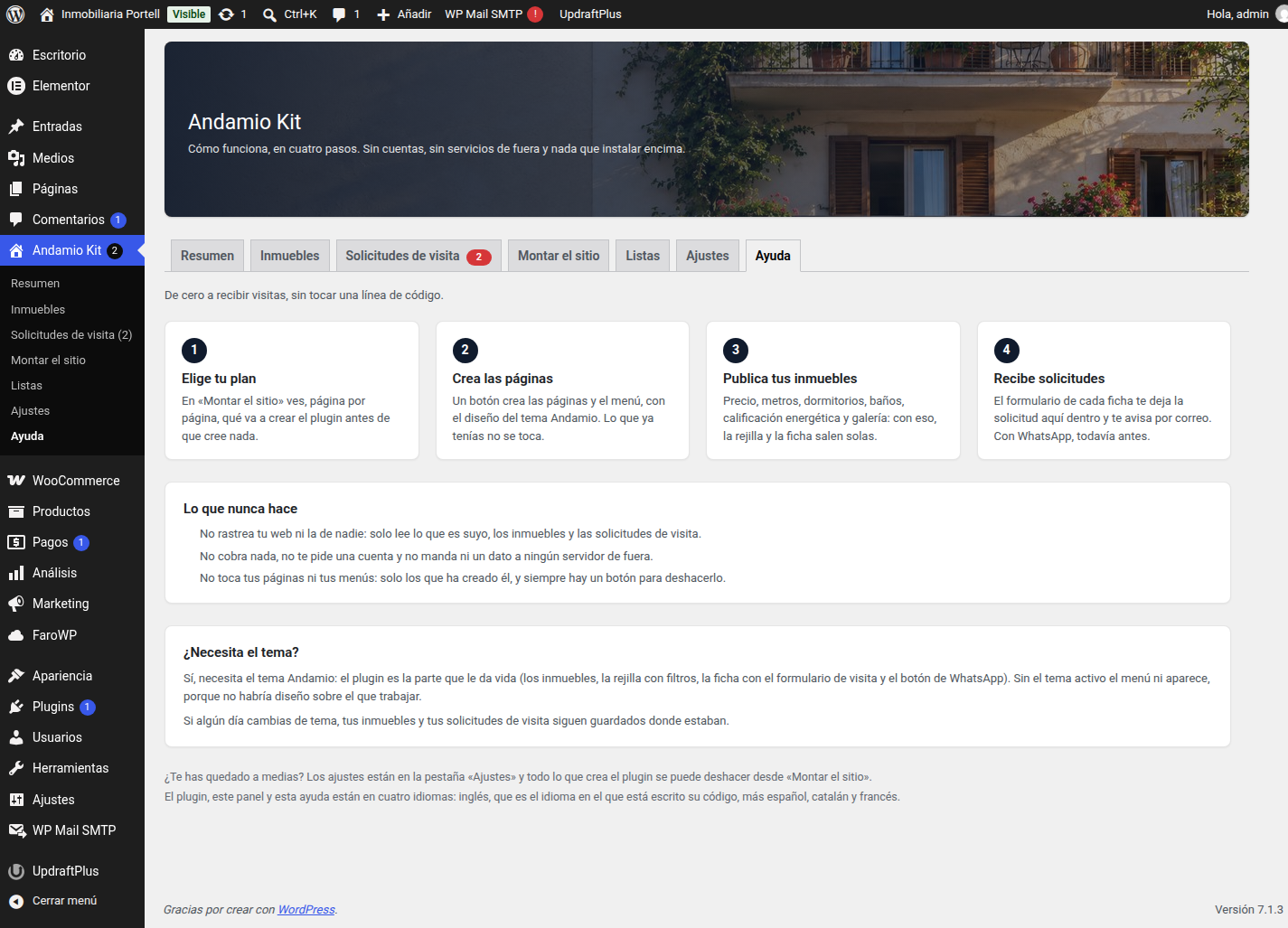
- The Help tab explains how it works in four steps, what the plugin never does and what it needs.
What it adds
- A Property post type with its own fields: reference, price, previous price, floor area, usable area, bedrooms, bathrooms, floor, year, service charge, lift, furnished, garage, storage room, orientation, views, energy rating (A to G), status (available, reserved, sold) and address.
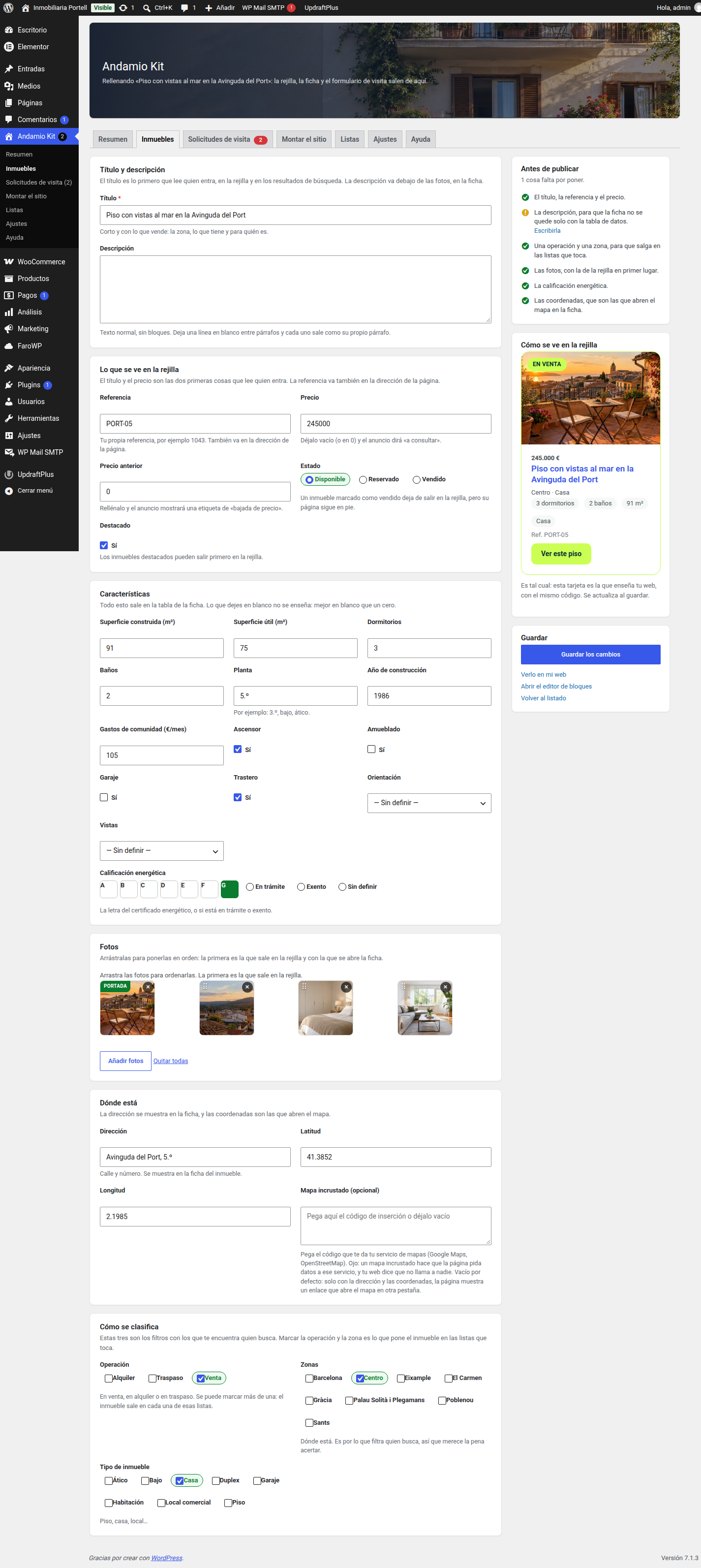
- A property screen, all on one page: the title and the description, what the grid shows, the details, the photos and the location, each field with the line of explanation it needs. It is where a property is written from now on, instead of the block editor, which is where someone who does not know it gets lost. It carries the checklist of what is still missing before publishing and a preview of the card exactly as your site will show it. The block editor is still one click away, for whoever prefers it.
- Three taxonomies to organise them: operation (for sale, for rent, for transfer), area (the neighbourhood) and property type (flat, house, etc.). They no longer take up room in the side menu: they are seen and kept in the Lists tab.
- A photo gallery per property, which you reorder by dragging.
- The live listings grid (
[andamio_kit_inmuebles]), with filters by operation, area, type, price and bedrooms, and sorting by newest, cheapest, most expensive or largest. No JavaScript: the filters are a normal form, so the search can be shared as a link and works on any phone. - The property page: gallery, details table, energy rating label, where it is, phone and WhatsApp buttons, and the visit form.
- Visit requests saved in your dashboard and read from a tab of their own —who writes, which property it is about, what they say, and whether it has been answered—, with an email to the agency for every request.
- A floating WhatsApp button and WhatsApp links with the property details already written in the message.
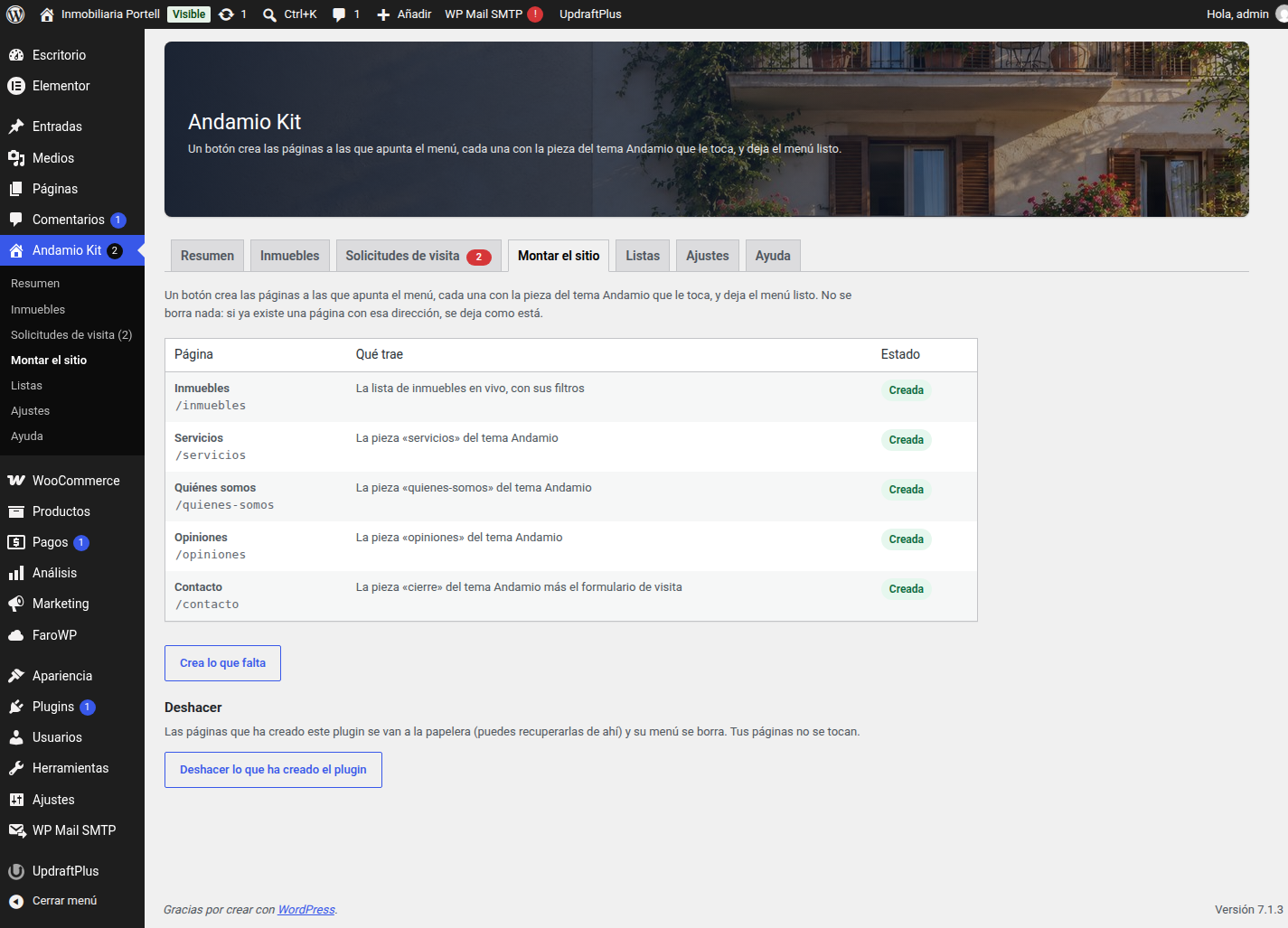
- Set up the site: one button creates the pages the menu points to, each one with the right piece of the Andamio theme inside, and leaves the menu ready. It can be undone from the same screen.
Four languages
The plugin is written in English, which is why that is its native language: it is the one that comes with the code. On top of it, three translations are compiled in the languages folder: Spanish, Catalan and French. That makes four languages in all. Change the language of your WordPress and the plugin’s screens, its notices and the pages it creates follow along.
What it does not do
It does not call any third-party service, it does not load a single JavaScript file on your site and it does not track anyone. The embedded map is off by default: an embedded map makes the page ask an outside service for data, so while that is off the property page shows the address and nothing else —no map and no button to open one— and the box to paste a map is not shown when a property is filled in.
Screenshots
Installation
- Upload the plugin and activate it.
- Activate the Andamio theme. The plugin starts working by itself as soon as the theme is on.
- Go to Andamio Kit and open the Set up the site tab: press the button.
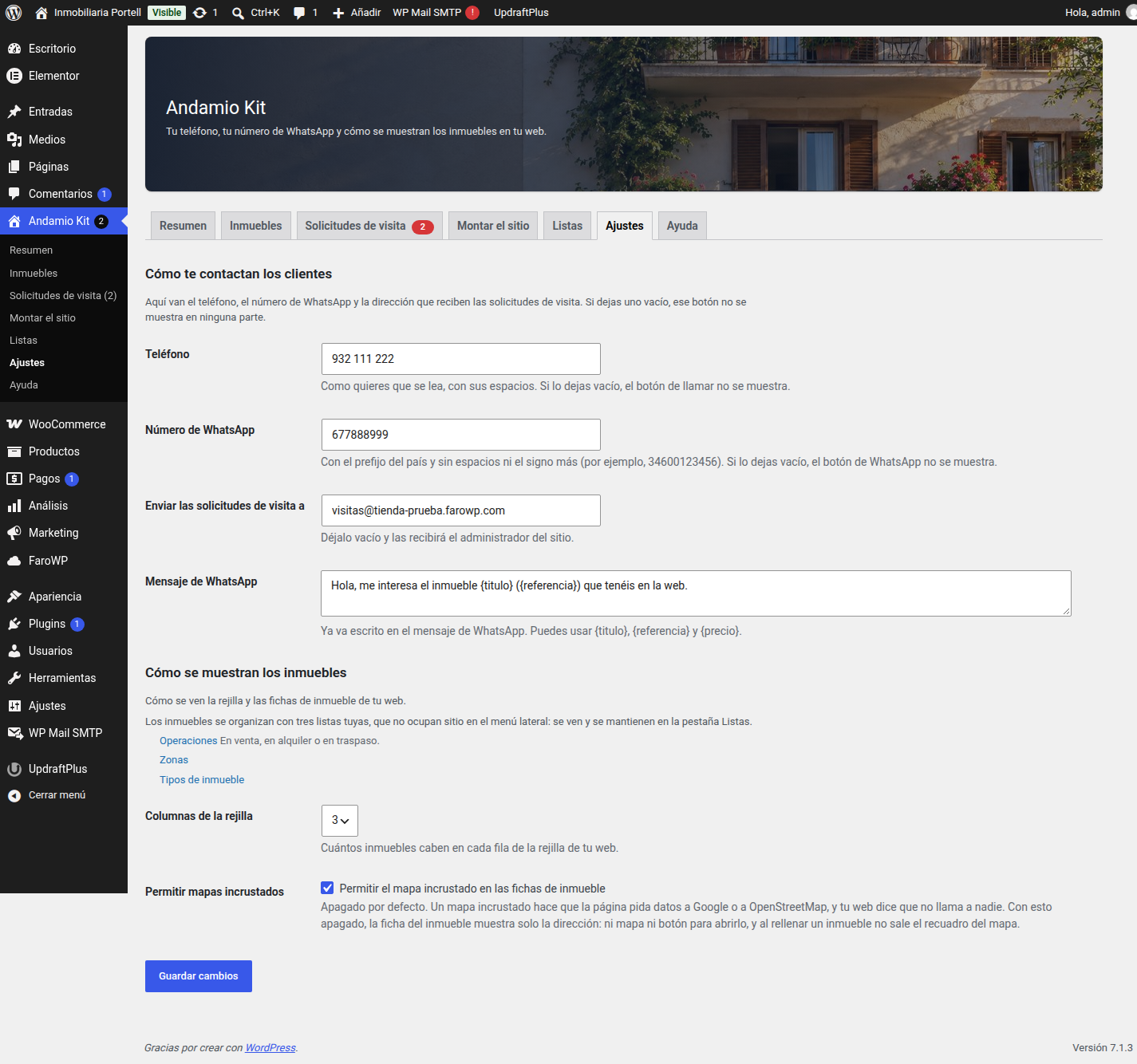
- Still in Andamio Kit, open the Settings tab and fill in your phone number, your WhatsApp number and where the visit requests should go.
- Add your properties in the Properties tab.
FAQ
-
What happens if I deactivate the Andamio theme?
-
Nothing breaks and nothing is lost. The plugin stops touching the site and shows a notice: your properties and their pages are still there. Turn the theme back on and everything returns.
-
Can I use it with another theme?
-
The plugin needs the Andamio theme: the pages it creates are built with the pieces of that theme. It is written so that it does not break anything on other themes, but it will not do its job.
-
Do I need WooCommerce?
-
No. Estate agencies take visits, not shopping carts.
-
What happens to my properties if I uninstall the plugin?
-
They stay in your database, and so do your pages. Only the plugin’s own settings are deleted, so reinstalling it finds everything where it was.
-
Does it send data anywhere?
-
No. The visit requests are stored in your own WordPress and emailed with your own mail server.
Reviews
There are no reviews for this plugin.
Contributors & Developers
“Andamio Kit” is open source software. The following people have contributed to this plugin.
Contributors
Translate “Andamio Kit” into your language.
Interested in development?
Browse the code, check out the SVN repository, or subscribe to the development log by RSS.
Changelog
0.5.2
- Fixed: the tab of the lists and the notices shown after an action are now tied to a nonce, so they are only rendered when the request comes from one of the plugin screens; each screen also checks its capability before reading them. Reported by the WordPress.org plugins team.
- Fixed: the translation files are no longer shipped in the package. The plugin stays fully internationalized and takes its translations from translate.wordpress.org, as the directory requires.
0.5.1
- New: every row of the Properties tray has a Delete button, which sends the property to the trash (it is not lost: it can be recovered), and the rows already in the trash carry Recover and Delete permanently, the second one asking first. There was no way to delete a property from the tray: you had to go to the WordPress list to do it.
- Fixed: Recover leaves the property where it was, published if it was published. WordPress hands whatever leaves the trash back as a draft, so a property you recovered came back unpublished and out of your site without a word. The same is now true of the visit requests.
- Deleting for good only works from the trash: a property that has not been through the trash is not deleted, it just gets a warning. One click less is one mistake that cannot be undone.
0.5.0
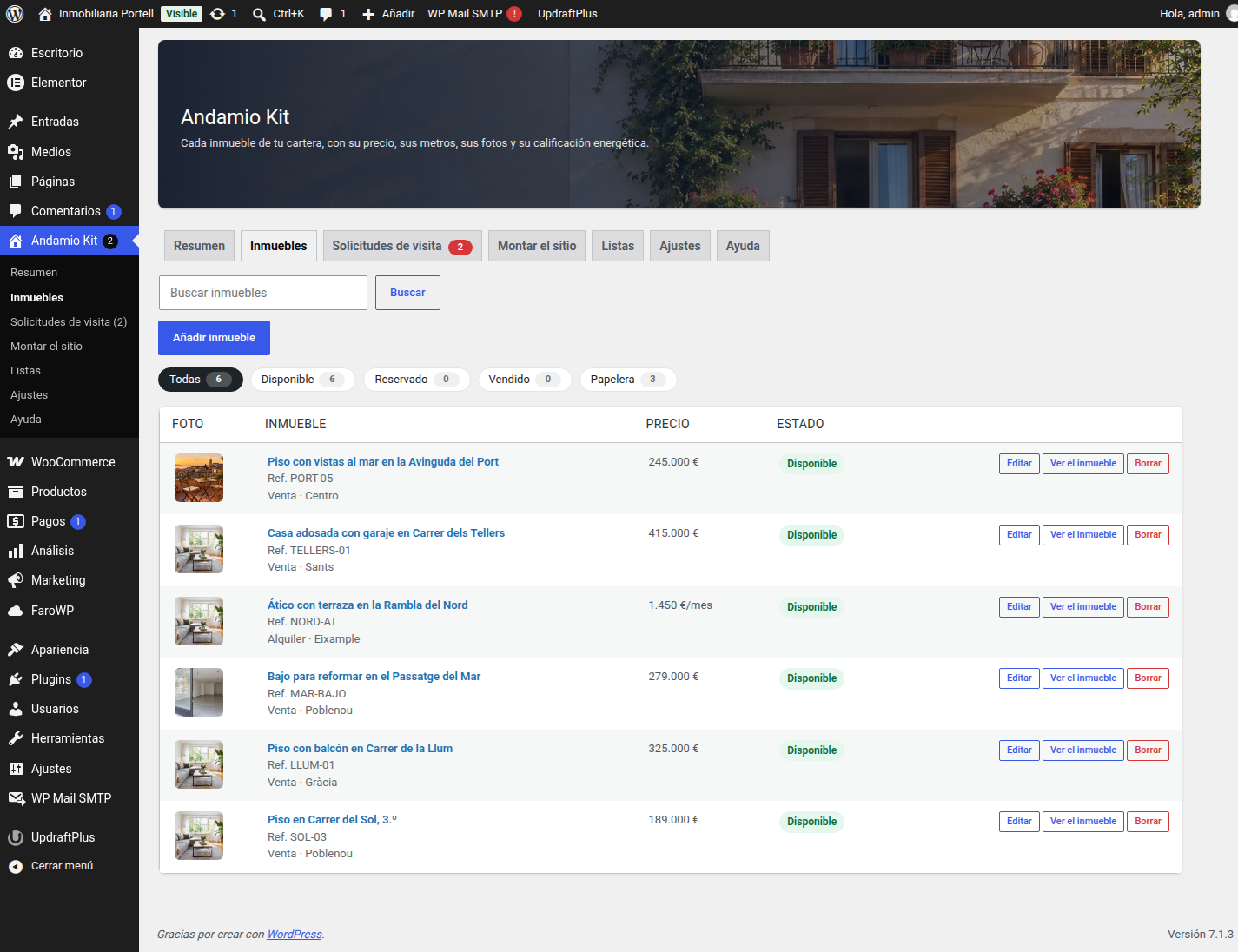
- New: the Properties tab is a tray of its own, like the visit requests. One tab per status — All, Available, Reserved, Sold, plus Drafts when there is something half-written and Trash — each one with its count, and a search box that keeps the tab you are on. Every row shows the photo, the reference, the areas and the price of the property, and carries a button to edit it, another to see it on your site and, if it is in the trash, one to recover it. Until now this list was the one WordPress gives by default: no counts, and no way to see the properties of one status at a glance.
- Fixed: the count of Available properties left out the ones saved before this version had a status field. They are available — the property screen says so — so the tab said one number and the cards of the overview said another.
- Fixed: a property half-written (a draft) no longer disappears from the tab: it is counted in All and has its own tab, so nothing goes missing without a word.
0.4.3
- New: the visit requests tray has a Trash tab with its own count, a warning when there is something inside, an “In the trash” mark on the row and a button to recover a request, both from the tray and from the request itself. Until now a request sent to the trash vanished from the screen without a word, and if it was the only one the screen said there was nothing.
- Fixed: the Lists tab was moved into its place by hand, touching
$submenu, which is a WordPress global: the plugin checker flags that as an error that blocks the release. It is now registered in its place, so the side menu and the tab strip say the same thing in the same order. - Fixed: a condition written the wrong way round in the admin, flagged by the same checker.
- The plugin’s four languages are updated with all of this.
0.4.2
- New: the Visit requests tab is a screen of its own inside the panel, instead of WordPress’s list. Everything the form has collected lands in a tray with its filter —all, pending, answered— with who writes, which property it is about, when it arrived and in what state. Opening one shows the message as it was written, the property with a link to its page and to its screen, the consent date, and the buttons to reply by email, call or send a WhatsApp. One click marks it as answered, and deleting sends it to the trash, so nothing is lost by a slip.
- The count of requests still waiting keeps showing on the tab and in the side menu.
- Fixed: the reference of a property was read without cleaning it first. It was the only warning Plugin Check had left.
0.4.1
- New: a Lists tab, between Set up the site and Settings. The three lists that organise the properties —operations, areas and property types— each one in its own tab, with what is in it, how many properties use it and buttons to add, rename or delete. They are made and kept inside the panel: the Settings tab no longer sends you out to the WordPress screens.
- Fixed: the embedded map setting did nothing on the property page. The button that opened the map was shown whether the setting was on or off, and, worse, the map a property had pasted was never shown at all:
wp_kses_post()hasiframeoff its list of allowed tags, so WordPress threw the map away both when a property was saved and when the page was painted. The map is now cleaned with a short list of its own —aniframeand nothing else— and the setting rules everywhere: on, the property page shows the button and the map; off, it shows the address and nothing else, the box for the map does not appear when a property is filled in, and the coordinates are no longer asked for in Before publishing. - Fixed: the grid and its search bar were squeezed into the content column of the theme (760 px) while the theme’s own wide blocks use 1200. On a wide screen the search bar broke into two rows and half the screen was left empty. They now use the theme’s width, centred and never wider than the window, so the seven fields fit in one row.
- The languages are updated with all of this, in Spanish, Catalan and French.
0.4.0
- New: a property is now filled in from a screen of its own, inside the Properties tab. Everything about the property on one page —title and description, what the grid shows, the details, the photos and the location— with a line of explanation under each field, instead of the block editor, which is where someone who does not know it gets lost.
- New: Before publishing, in the right-hand column: what is still missing for the property to look good in the grid (its title, the reference, the price, the energy rating, the photos, an operation and an area, the coordinates), each one with the button that takes you straight to it, and an all-clear when there is nothing left.
- New: the same column shows the card exactly as your site will show it in the grid, painted with the same code the site uses. It updates when you save.
- New: Save the changes keeps a property that is already published published, and a draft a draft: saving never takes a property off your site on its own.
- The block editor is still one click away, from the property screen and from the list, for whoever prefers it.
- The plugin’s four languages are updated with the new texts: the screen and its notices are in Spanish, Catalan and French as well as English.
0.3.1
- Fixed: the “View this property” button on every card of the home page grid went back to the listings page. That grid is the theme’s hand-written one —six example homes—, which cannot know each property’s address; as soon as the site has properties, the plugin now fills it with the live grid, whose cards carry the button that leads to that property.
- Fixed: the “Columns in the grid” setting did nothing on those pages, because the grid was the theme’s, with its three fixed columns. The setting now rules wherever the grid is shown.
- The Overview tab no longer opens with the line “The whole plugin fits on one screen”.
0.3.0
- New: the whole plugin is now one entry in the dashboard menu with six tabs —Overview, Properties, Visit requests, Set up the site, Settings and Help—, with a header of its own and the visit requests counted on the tab that holds them.
- New: the Overview tab, with the figures of your listings, a checklist of what is still missing with a link to the screen that fixes it, and shortcuts to the other tabs.
- New: a Help tab: how it works in four steps, what the plugin never does and what it needs.
- New: the settings are split into two sections —how clients reach you and how the properties are shown— with a line of explanation under every field and links to the three lists (operation, area and property type).
- Fixed: saving a property wiped its energy rating. The letter was being lowercased before it was checked against the A-to-G scale, so it never matched and an empty value was stored. Opening and saving a property no longer changes anything you did not change yourself.
- The three taxonomies and “Add new property” are no longer separate entries in the dashboard menu.
- The plugin now counts four languages wherever it mentions them: English, the language its own code is written in, plus Spanish, Catalan and French. The three translations compiled in its
languagesfolder are the Spanish (es_ES), Catalan (ca) and French (fr_FR) ones; English needs no translation file.
0.2.1
- Fixed: the Settings screen answered 403 because its submenu was registered before the main menu.
0.2.0
- The plugin now speaks four languages: English (the language of its code), Spanish, Catalan and French, and loads its translations the way WordPress 7.1 needs.
0.1.0
- First version: property post type with its fields, live grid with filters, property page with the visit form, visit requests in the dashboard, WhatsApp button and the guided setup.