

Description
The free MCP server and AI chatbot for WordPress. Claude and ChatGPT connect to your site with no account, no API key and no usage limits.
AI Engine connects WordPress and AI, both ways. AI comes into your site: chatbots that know your content, writing, images, forms and search, with OpenAI, Anthropic, Google, Mistral and more. And your site goes into AI: Claude, ChatGPT and other agents can read and edit it through MCP, safely and with your approval.
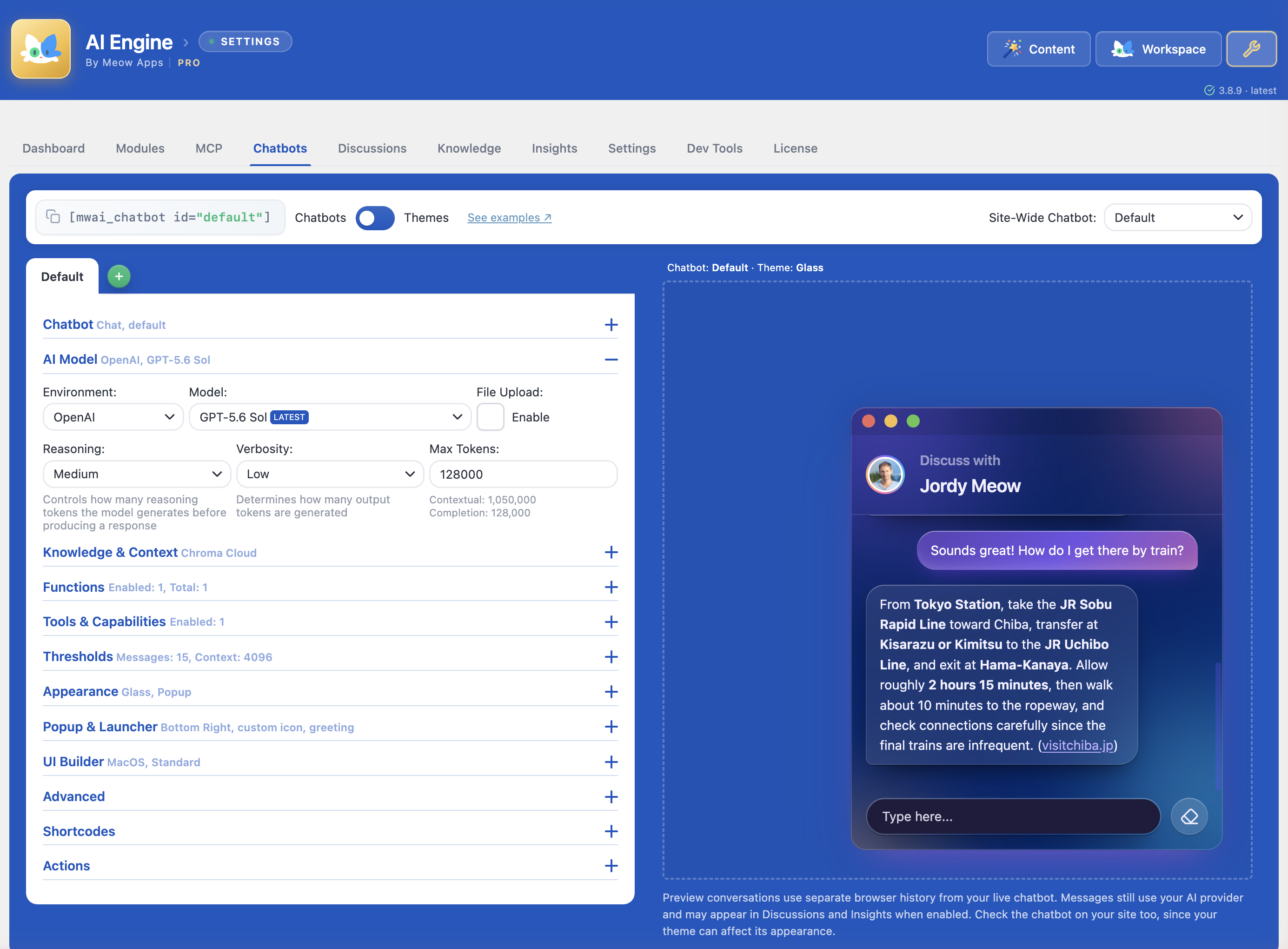
🤖 A chatbot that knows your site. Add it in a few clicks, with five themes, voice, file uploads, conversation memory and your own knowledge base. Here is how to add an AI chatbot to WordPress.
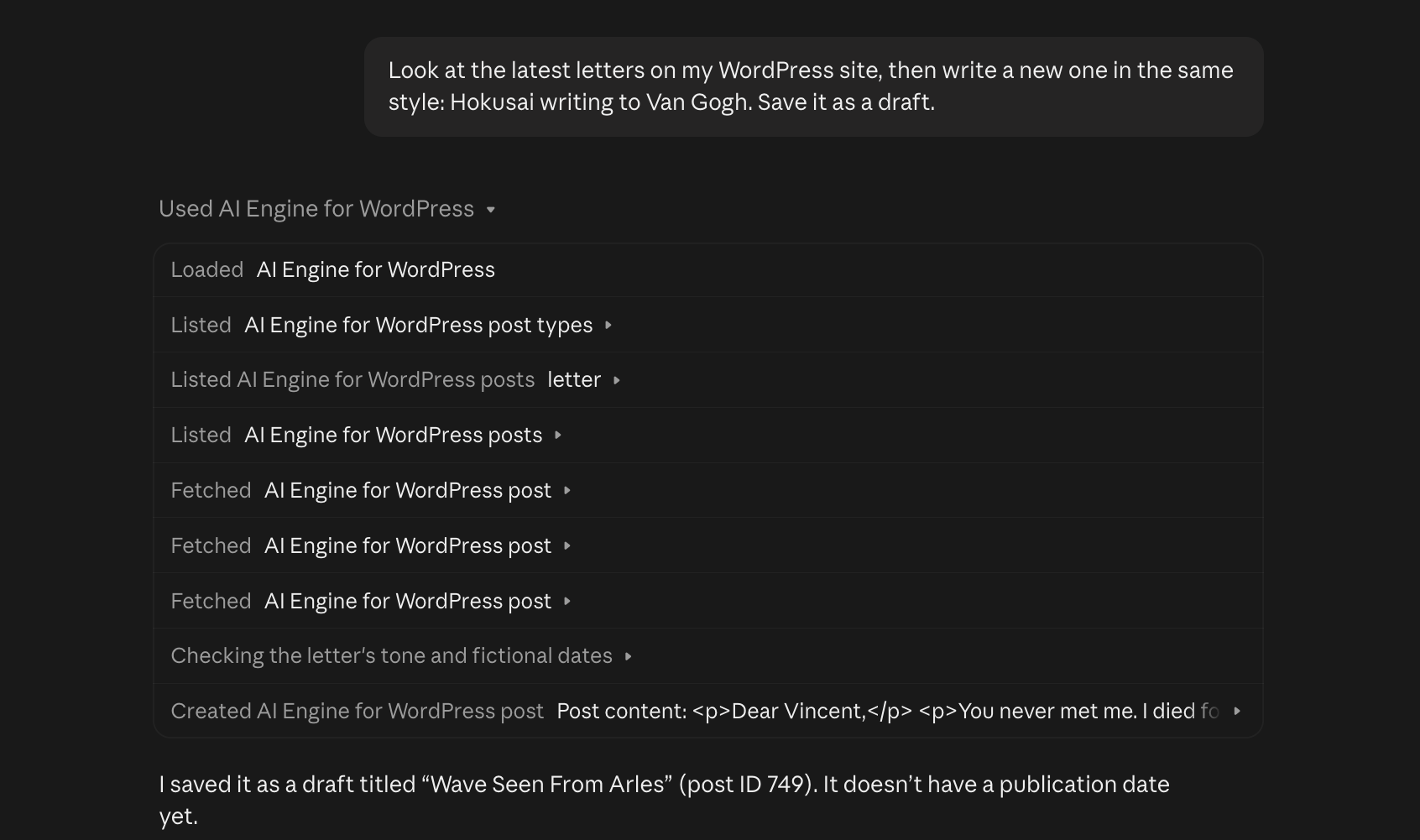
🔌 Your site, inside Claude and ChatGPT. More than 140 tools to write posts block by block, edit page builders, fill in SEO fields, manage WooCommerce and much more. Every change can be undone in one click, and deletions wait for your approval. Connect ChatGPT or Claude in a minute.
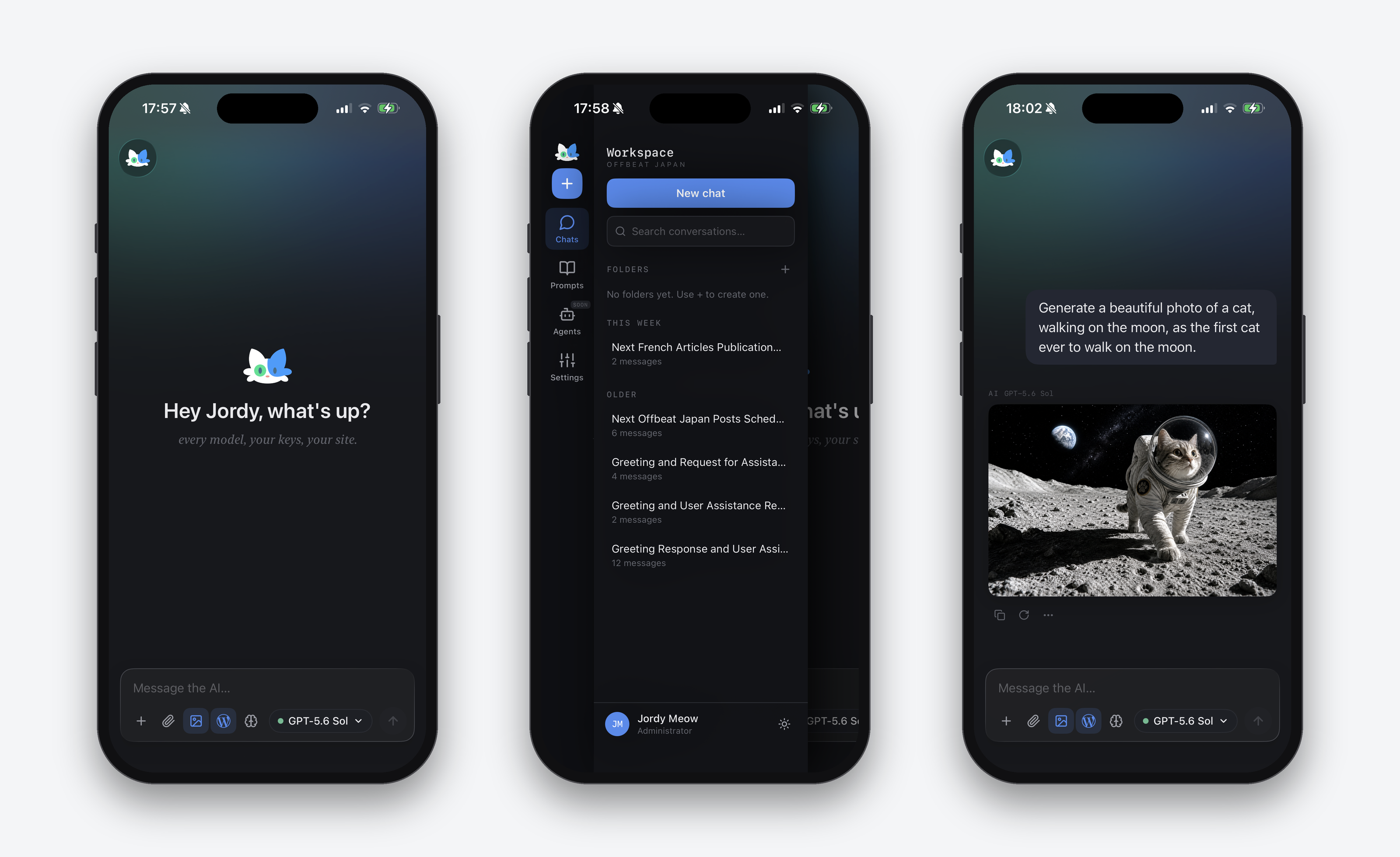
🖥️ Workspace, in your admin and on your phone. A full-screen AI chat with every model you set up, which can also work on your site, with free apps for iPhone and Android.
New here? Start with the AI Engine tutorial, or visit the AI Engine website. Please also read the disclaimer.
🤖 Chatbots
Chatbots for your visitors that answer from your own content, in your colors and your language. Add one in a few minutes.
Features:
- Five built-in themes: Timeless, Messages, ChatGPT, Foundation, and Glass, a frosted glass theme with a dark and a light mode
- A Themes editor for colors, fonts, and custom CSS
- Popup, inline, or fullscreen, with an optional macOS-style window
- Realtime audio conversations
- File and image uploads, several at once, or simply pasted
- Discussions list and conversation memory
- Every text translatable, and message actions reachable with the keyboard
- Cross-site embedding
- IP banning, word filters and content moderation
- GDPR compliance tools
MCP (Model Context Protocol)
AI Engine turns your WordPress site into an intelligent MCP server. AI agents like ChatGPT, Claude, Claude Code, and OpenClaw can connect directly, browse content, edit posts, manage media, and handle complex tasks through natural conversation.
More than 140 tools, over 200 with the Meow Apps family. Posts and pages (edited block by block), media, comments, users, taxonomies, menus, CSS and site styles, SEO fields in the SEO plugin you already use, Advanced Custom Fields, block patterns, editor notes, image generation and vision come free. Pro adds plugins, themes, database, Elementor, Beaver Builder, WooCommerce, Polylang and WPML. SEO Engine, Code Engine and Social Engine plug in their own, and any WordPress Ability can join. You choose which sets are on, so each AI only carries what it needs.
Direct and private. AI apps connect straight to your site. There is no relay service in between, your credentials never leave WordPress, and the MCP server is free, with no monthly fee and no usage cap.
Undo anything it did. Every change an assistant makes is recorded with what it replaced: posts, blocks, fields, categories, menus, styles, settings, Elementor pages, plugins and products. Undo it with one click in the MCP tab, or just ask: “undo what you just did”. If someone edited the same thing since, the undo stops instead of erasing their work. The full history is kept 30 days.
It asks before deleting. New sites ask you before an assistant deletes anything (or, if you prefer, before any site change too): you approve it in one click in the MCP tab. Or keep assistants on drafts only, and publish yourself.
Rather have it set up for you? Connect WP by Meow Apps adds your site to ChatGPT or Claude in a few clicks: it signs you in on your own site, passes each request along, and stores nothing.
Your agent can also add Today WP, a read-only MCP server by Meow Apps with current WordPress knowledge (versions, security releases, plugin facts and docs). AI Engine acts on your site, Today WP brings the knowledge.
What AI Agents Can Do:
- Create and edit posts, one block at a time
- Edit pages built with Divi, Avada, WPBakery or SiteOrigin (Elementor and Beaver Builder with Pro)
- Manage menus, CSS, site styles, and block theme headers, footers and templates
- Write SEO titles and descriptions in Yoast SEO, Rank Math, All in One SEO, SEOPress, The SEO Framework or Slim SEO
- Fill in Advanced Custom Fields (ACF)
- Check pages as visitors see them, read the error log, and restore earlier versions
- Undo any change, by asking or with one click
- Moderate comments, share draft previews, manage redirects, and read form entries
- Manage media files
- Install and manage plugins
- Customize themes
- Run SQL queries
- Create images for your posts, in the shape you need
- Manage WooCommerce products, variations, coupons, orders, inventory, customers and subscriptions
- Handle Polylang and WPML translations
Step-by-step guides: ChatGPT, Claude and Claude Code, OpenClaw, and the WordPress MCP FAQ. Developers will find every tool in the MCP documentation.
AI Engine can also connect to external MCP servers, extending your chatbots with tools and services beyond WordPress.
A note on safety and “full access”:
AI Engine’s MCP tools are curated and permission-aware on purpose. They do not run arbitrary code, so your site stays safe even while an AI agent works on it.
Each person connects with their own WordPress account, so every action shows up under their name. Administrators get full access. Editors can connect too once you turn on Editor Access, limited to the content they can already edit in WordPress: settings, users, plugins, themes and deleting stay with administrators.
Arbitrary PHP execution, as some tools offer, will never be part of AI Engine: it turns your site into remote code execution. For a development site only, the companion AI Engine YOLO adds it, switches itself off on production, and lives on GitHub only.
🖥️ Workspace (and its mobile apps)
A full-screen AI chat in your WordPress admin. Every model you configured is in the same conversation: start on Claude, continue on ChatGPT or Gemini, generate an image, search the web, and let it work on your site through the MCP tools, with an approval before anything changes. History, folders, a prompt library and file attachments are included. The free Workspace for WordPress app brings it to your phone and tablet (App Store, iOS 17 or newer, and Google Play, Android 8 or newer): you pair it once with a QR code, and your conversations and API keys stay on your site. There is no markup: you pay your AI providers directly. Workspace is off by default: turn it on in AI Engine Settings Modules. More about Workspace.
🎨 Content & Media
Write posts in the Content Studio, from a brief to a full draft, with templates you can reuse. Create images in the Image Studio, keep every version, and edit them with a brush. Compare models side by side in the Playground. In the editor, Copilot corrects, enhances, shortens, lengthens and translates text, writes alt text and analyzes images. The Advisor suggests how to set up and improve your site.
📝 AI Forms
AI-powered forms and small apps that take text, images, audio or files, with conditional logic, multiple steps and result templates.
🧠 Knowledge & Embeddings
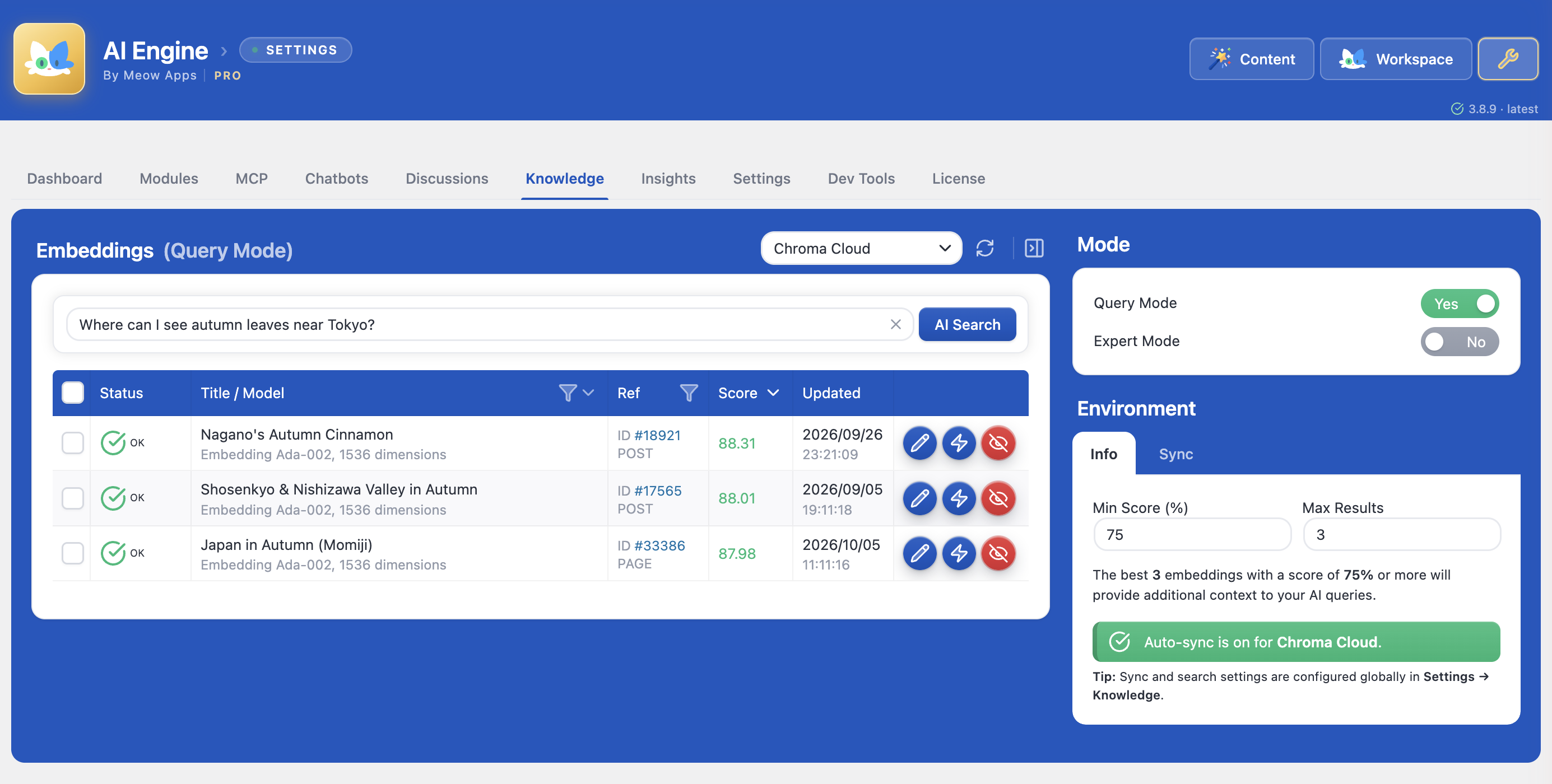
Turn your posts and PDFs into a knowledge base for your chatbots, with semantic search through Pinecone, Chroma, Qdrant or OpenAI Vector Store. Posts stay in sync automatically, PDFs are split into chunks for you, and your site search can use it too.
🔧 Developer Tools
A PHP API, a REST API, function calling to connect AI to WordPress functions, WooCommerce or any API, the MCP server, and many hooks and filters. Build AI features, automate workflows, or create SaaS applications on WordPress. AI Engine also works with SEO Engine, Social Engine, Code Engine and Media File Renamer. See the code examples.
Pro Features
- AI Forms: Create dynamic forms that generate answers, images, or files using AI.
- Embeddings & Vector Databases: Build knowledge bases from your content and PDFs for semantic search.
- Content-Aware: Let AI use your post and page content as context for smarter responses.
- Function Calling: Connect AI to WordPress functions, WooCommerce, or any custom API.
- Cross-Site Chatbots: Embed your chatbots on external websites.
- Editor Assistant: An AI sidebar in the post editor that can read, rewrite, insert, and rearrange your content blocks through chained function calls.
- Realtime Audio: Voice-based conversations on OpenAI’s GA Realtime API, with the latest voice reasoning capabilities.
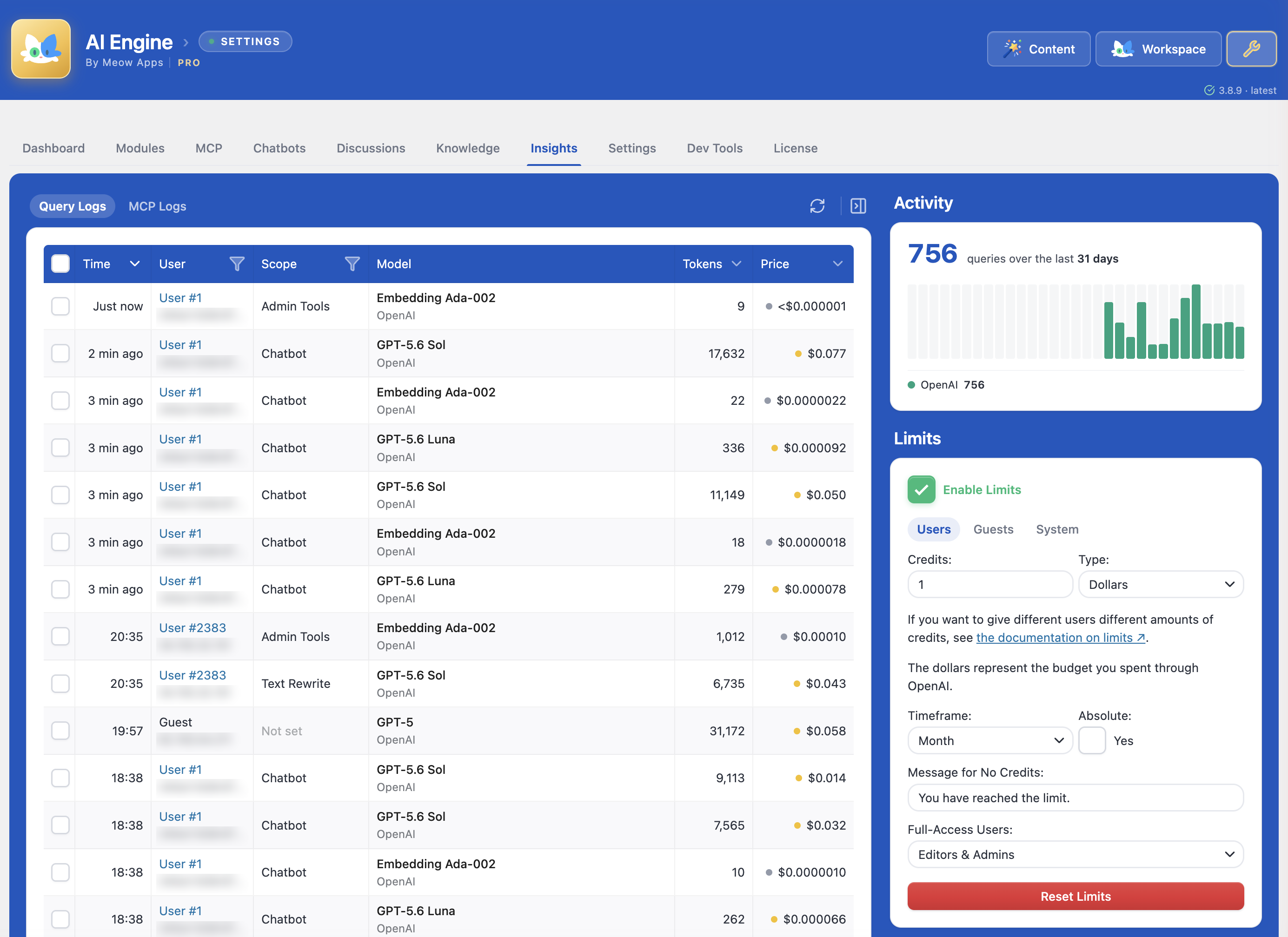
- Statistics & Usage Control: Track usage, set limits per role, and monitor costs.
- Extra MCP Tools: Adds plugin, theme, database, WooCommerce (with Subscriptions), Elementor, Beaver Builder, Polylang and WPML management to the MCP server.
- Models API: Let coding agents and OpenAI-compatible apps use your site’s AI models with one key, with usage tracked in Insights.
- Priority Support: Get faster help from the Meow Apps team.
Why AI Engine?
Native to WordPress
Built specifically for WordPress with seamless integration. No clunky interfaces, just native WordPress experience.
Flexible & Powerful
Built-in connectors for OpenAI, Anthropic, Google, xAI (Grok), Mistral, Perplexity, OpenRouter, Replicate, Azure (OpenAI), plus a Custom (OpenAI-compatible) connector for Ollama, LM Studio, vLLM, llama.cpp, LocalAI, or any self-hosted server. Use the models that work best for you.
Developer Friendly
Clean APIs, extensive hooks, and MCP support. Build custom AI features or entire SaaS applications on WordPress.
Real MCP, for Real WordPress
Generic MCP adapters wrap the REST API. AI Engine’s tools are crafted for AI agents, with rich context, smart defaults and practical actions, on any WordPress host. The REST API can be exposed as tools too, if you want it.
Privacy First
IP hashing, GDPR tools, secure file handling, and session-based tracking. You control your data. The free version sends nothing to us; the Pro version’s update check also says whether MCP was used in the last 30 days (a simple yes or no, nothing about what it did) and how many phones are paired with Workspace (a number only).
Constantly Evolving
Weekly updates based on real user feedback. We listen, we improve.
The Original
You’ll probably spot bits of AI Engine in plenty of other AI plugins, code and UI alike. Flattering, really… or fishy? 🤣 But only AI Engine keeps pushing forward with real care for its community, a drive toward perfection, and the patience to get the details right.
My Dream for AI
I am excited about AI, but I believe we need to use it with intention and clarity. Social media showed us how powerful tools can reshape our lives in ways we never expected, sometimes for the better, sometimes not. I want to avoid repeating those mistakes. AI should help us remove the meaningless, tedious work or enhance the work we enjoy. Modern tools should give us more time for what truly matters: spending beautiful moments with the people we love! 💕
Disclaimer
AI Engine is a plugin that helps you to connect your websites to AI services. You need your own API keys and must follow the rules set by the AI service you choose. For OpenAI, check their Terms of Service and Privacy Policy. It is also important to check your usage on the OpenAI website for accurate information. Please do so with other services as well.
The developer of AI Engine and related parties are not responsible for any issues or losses caused by using the plugin or AI-generated content. You should talk to a legal expert and follow the laws and regulations of your country. AI Engine does only store data on your own server, and it is your responsibility to keep it safe. AI Engine’s full disclaimer is here.
External services
AI Engine connects to the AI services you configure (OpenAI, Anthropic, Google and others) with your own API keys, only to run the features you use. See the Disclaimer above for their terms.
Compatibility
Please be aware that there may be conflicts with certain caching or performance plugins, such as SiteGround Optimizer and Ninja Firewall. To prevent any issues, ensure that AI Engine is excluded from these plugins.
Screenshots



Installation
- Upload
ai-engineto/wp-content/plugins/ - Activate through the ‘Plugins’ menu
- Get an API key from OpenAI (or your preferred AI provider)
- Add your API key in Settings (Meow Apps > AI Engine)
- Start creating! 🚀
FAQ
-
Why am I getting “Error 429: You exceeded your current quota”?
-
This error comes from OpenAI’s API, not AI Engine. Set up billing limits in your OpenAI account. Caching plugins can sometimes store error responses, so clear your caches too.
-
Who is AI Engine for, and how do I manage usage limits?
-
AI Engine can be used by site owners, administrators, and visitors via chat widgets. To set query limits and prevent unlimited model runs, follow the Managing Limits guide.
-
Does the chatbot support my language?
-
AI models support many languages, but quality varies. There’s no definitive list since models are constantly updated. Test your language in the AI Playground.
-
How does MCP work, and what can I do with it?
-
MCP (Model Context Protocol) exposes WordPress tools to AI agents. Learn how to enable the MCP endpoint, choose which tools to expose, and secure them. You can manage posts, comments, users, media, and more. Administrators get full access, and you can also let Editors connect with their own account for content only.
-
Is the MCP server free? Do I need an API key or my own server?
-
Yes. The MCP server is part of this free plugin, with no account and no daily cap. There is no extra server to host: Claude and ChatGPT connect to your WordPress site with OAuth and use the plan you already have, so no API key is needed. The facts, side by side with another MCP plugin.
-
Does AI Engine work with WordPress AI (the AI plugin, Connectors and providers)?
-
Yes, but you don’t need it. AI Engine already does everything WordPress AI offers, and more: it connects to every major provider, and adds chatbots, AI Forms, embeddings, a dedicated MCP server with more than 140 tools, and usage insights. That’s why we don’t recommend installing the WordPress AI plugin alongside it. If you already use it, that’s fine: we make sure both play nicely together. On the Connectors page, choose to let AI Engine manage your providers: the API keys you already saved there are reused, both screens stay in sync, and the AI features of WordPress run through AI Engine, so their usage shows up in its Insights.
-
Do I need the MCP Adapter plugin?
-
No. AI Engine has its own MCP server, with more than 140 tools (over 200 with SEO Engine, Code Engine and Social Engine), OAuth for Claude and ChatGPT, and per-user access, so there is nothing else to install. The MCP Adapter is the official WordPress bridge that turns the abilities other plugins register into MCP tools. Think of it as a power socket, and AI Engine as the appliance. If you already run it, both live side by side on different endpoints, and the Abilities option in the MCP tab lets AI Engine’s own server expose those abilities too.
-
Can I restrict the chatbot to answer only from my site content?
-
You can’t completely block the model’s built-in knowledge, but you can use smart prompts and embeddings to steer conversations toward your content.
-
The chatbot doesn’t appear or looks odd on my site
-
Check the Common Issues guide for solutions to REST API problems, caching conflicts, nonce errors, and layout glitches.
-
Where can I learn the basics and troubleshoot problems?
-
Start with the Basics guide for installation and key concepts. For specific issues, check Common Issues.
-
How do I report security issues?
-
Report security vulnerabilities through the Patchstack Vulnerability Disclosure Program.
Reviews


Contributors & Developers
“AI Engine – MCP Server & AI Chatbot for WordPress, with Claude, ChatGPT & Gemini” is open source software. The following people have contributed to this plugin.
Contributors
“AI Engine – MCP Server & AI Chatbot for WordPress, with Claude, ChatGPT & Gemini” has been translated into 16 locales. Thank you to the translators for their contributions.
Interested in development?
Browse the code, check out the SVN repository, or subscribe to the development log by RSS.
Changelog
3.9.4 (2026/11/12)
- Fix: Security: Block uploads of files that browsers would run as a web page (reported by ashv4ni via Patchstack).
- Add: MCP: wp_list_plugins now returns the WordPress, PHP and theme versions, plus each plugin’s slug, status and available update.
- Add: MCP: Knowledge entries can be deleted by filter, including posts that are no longer published.
- Add: MCP: Discussions now show the chatbot’s first reply and can be filtered by what it replied.
- Update: Marked o3 and GPT Image 2 as deprecated, since OpenAI retires them.
- Update: New sites now default to GPT Image 2.6 Flare for image generation; existing settings are kept.
- Update: GPT-5.6 Sol is now priced at its standard rate, as OpenAI’s promotional price ends on November 30.
- Fix: MCP discovery no longer answers for other plugins’ MCP servers, so ChatGPT can connect to both.
- Fix: The front search no longer shows old results for a day after Max Results or Min Score is changed.
3.9.3 (2026/11/10)
- Add: GPT Image 2.6 Sunburst and Flare models.
- Add: MCP now manage AI Engine itself: chatbots, discussions, insights, knowledge, settings and modules, with undo for chatbot and settings changes. MCP AI Engine tools can test a chatbot, read a knowledge entry in full, find entries by text or entries that lost their post, estimate costs, and keep removed content.
- Add: MCP Database tools can list the tables, describe one, and show what WordPress loads on every page.
- Add: Word, Excel, PowerPoint and other documents now work in chatbots on Azure OpenAI, read through Code Interpreter, while PDFs stay direct.
- Update: MCP’s Ask Before setting now also covers changes to AI Engine’s chatbots, settings, modules and knowledge.
- Update: The REST API settings only show when the Public API is enabled.
- Update: The Chatbots screen no longer overwrites changes made elsewhere meanwhile, by an AI assistant or another tab, and asks to reload instead.
- Update: The chatbot’s close and full screen buttons are cleaner and match each other in every theme.
- Update: When a save fails because the server’s reply is broken, the message now says why: a Cloudflare block, a PHP warning from another plugin, or the error page.
- Update: Admin tab switches are much faster.
- Update: Synced the shared Meow Apps library to 5.3 with the latest NekoUI.
- Fix: Saving a chatbot now sends only that chatbot, so large setups no longer hit the server’s upload limit.
- Fix: Importing settings works again after the chatbots were changed elsewhere since the page loaded.
- Fix: Chatbot calls through the PHP API without a chatId are no longer saved as discussions.
- Fix: The MCP chatbot read now shows instructions as the model reads them.
3.9.2 (2026/11/06)
- Fix: Security: Uploads are now validated against their actual content and not only their filename, so HTML disguised as audio or another media type is refused in chat uploads, form uploads, the Public API and generated files (reported by peppa via Patchstack).
- Add: Hint in the Connect card for sites behind Cloudflare, listing what to allow when Claude or ChatGPT can’t connect, with a link to the full steps.
- Fix: Documents sent to a chatbot on Azure OpenAI now upload to Azure itself, and PDFs work there.
- Fix: A full API address pasted as the Azure endpoint is now trimmed to the resource URL.
- Fix: Claude can now connect as a custom connector on hosts that answer /.well-known/ themselves, such as SiteGround.
3.9.1 (2026/11/05)
- Fix: Chatbots with image generation work again when a reasoning level is set.
- Fix: Knowledge sync marks a post as failed when the model returns no vector, instead of crashing and leaving half-written rows.
- Fix: Gemini 3.1 Flash Image is billed at its real price instead of half.
- Update: Turning Insights off now warns that the usage limits stop applying, since Insights is what enforces them.
- Add: MCP tools for WooCommerce Subscriptions: list and inspect subscriptions with their next payment dates and renewal orders, find overdue ones, and list failed renewals.
- Add: The MCP token panel also shows the address with the token inside it, for apps that cannot send headers like Claude’s custom connectors.
- Add: Discreet Disable link in Maintenance to turn off automatic settings backups, which also deletes the existing ones since they hold the API keys.
- Add: Nano Banana 2.1 is listed under its own name with Google’s prices.
- Update: After connecting an assistant, the Connect card shows a single status that turns green once the assistant reaches the site.
- Update: The MCP Connection Test now turns red when the MCP endpoint is blocked for every client, and names Cloudflare’s bot challenge when that is the cause.
- Update: The Connection Test’s Cloudflare advice now also allows the rest_route=/mcp/ query, which path-only rules missed.
3.9.0 (2026/11/02)
- Fix: Security: Image Studio now encodes the media ID in its requests, as extra hardening.
- Add: MCP Undo: every change an assistant makes can be undone in one click from the MCP tab, or just by asking, and the undo stops if someone edited the item since.
- Add: MCP approvals: approve deletions (or every site change) from the MCP tab, or keep assistants on drafts only.
- Add: MCP edits Gutenberg posts block by block, and turns Markdown into real blocks.
- Add: MCP works with your SEO plugin (Yoast SEO, Rank Math, All in One SEO, SEOPress, The SEO Framework, Slim SEO, SEO Engine) and with Advanced Custom Fields.
- Add: MCP edits pages built with Elementor and Beaver Builder, Divi, Avada, WPBakery and SiteOrigin.
- Add: MCP manages menus, CSS, site styles, block theme templates, classic widgets, WooCommerce coupons and variations, comments, draft previews and Redirection redirects, and reads form entries.
- Add: MCP checks pages as visitors see them, reads the error log and Site Health, and restores revisions.
- Add: Assistants get a short introduction to the site and starter prompts when they connect.
- Add: Auto Sync can target several embeddings environments, with the mwai_embeddings_sync_env_ids filter.
- Add: The chatbot launcher can reuse the AI avatar.
- Update: Redesigned MCP tab: the token setup lives in Connect, integrations show as chips, activity covers 30 days, and the Claude and ChatGPT directory links go through Meow Apps’ connector.
- Update: MCP tools that can break things are flagged so assistants ask before running them, and tool descriptions are shorter.
- Update: Turning on Cross-Site for a chatbot also turns on Popup.
- Fix: Trashing a post now deletes its vectors through each environment’s own vector DB.
- Fix: On mobile, the Glass and Timeless chatbots keep the input above the keyboard in long conversations.
- Fix: A page that places the site-wide chatbot as a popup no longer shows it twice.
3.8.9 (2026/10/30)
- Add: GPT-6.1 Terra model.
- Add: Restore link in Recent Changes, which opens the version from before an AI edit.
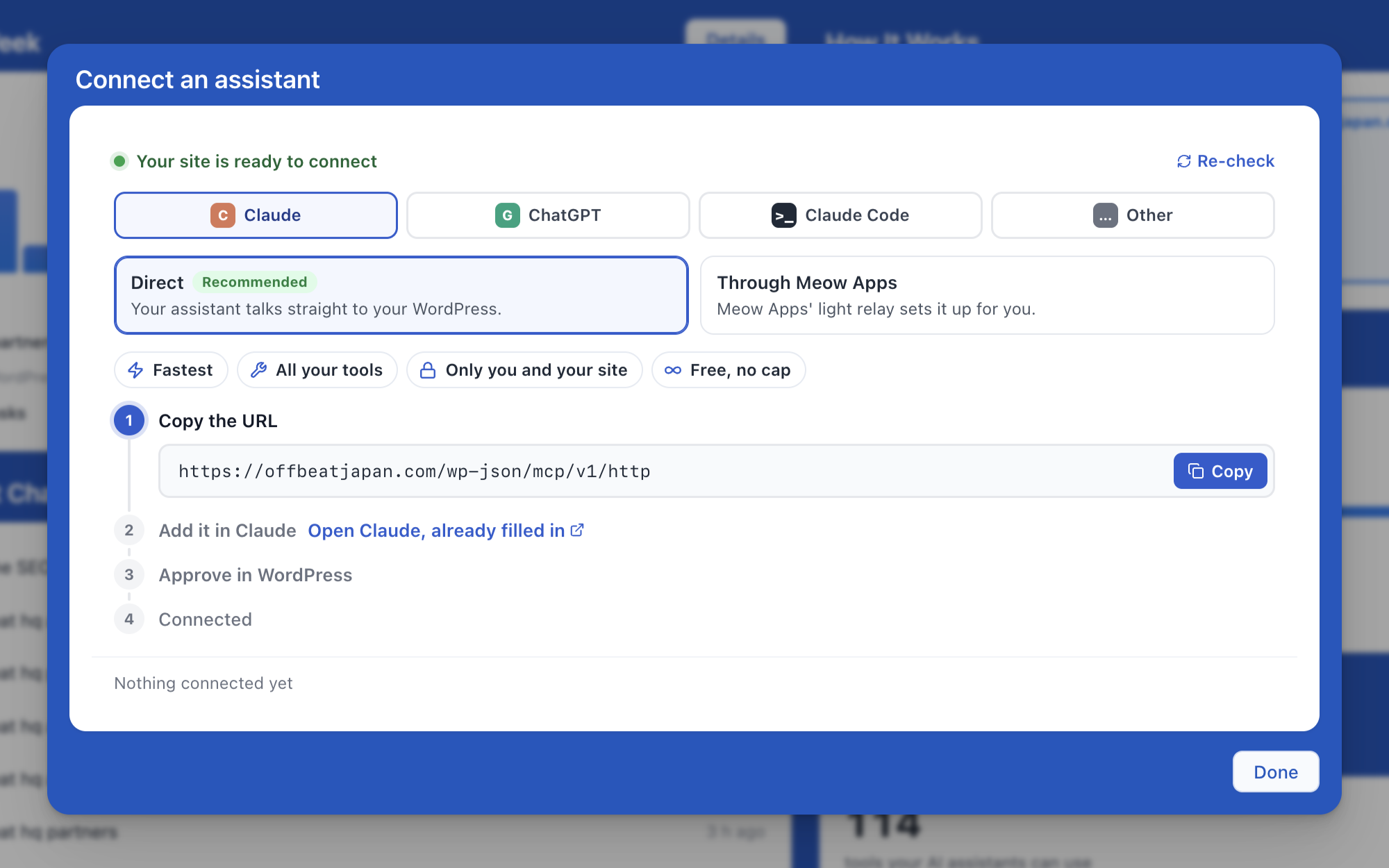
- Update: Connect card now offers a choice between a direct connection (recommended) and the Meow Apps relay, with labels under each choice explaining what it brings, and the address to copy now sits in the Copy step.
- Update: Connect card opens on the direct connection for Claude and ChatGPT, with the directory and the ChatGPT app one click away.
- Update: Image Studio’s edit link now only accepts a media ID.
- Fix: Chatbot now explains why a file could not be sent to OpenAI, instead of showing OpenAI’s “Expected an ID that begins with file” error.
- Fix: OpenRouter model list now waits up to 30 seconds to load, for slow hosts.
3.8.8 (2026/10/27)
- Fix: Security: Shop Managers can no longer edit administrator accounts through MCP, and the plugin and theme file tools now follow DISALLOW_FILE_EDIT.
- Fix: Security: Forms and the Public API can no longer read protected uploads, the Google voice chatbot no longer exposes its API key, voice chats cannot replace someone else’s conversation, and only admins can read the logs.
- Fix: Security: Guests can no longer reset their usage limits with a fake IP header, while proxies and Cloudflare are still recognized.
- Fix: Security: Chatbot replies now drop embedded frames and forms, and guest uploads are capped at 20 per hour.
- Add: MCP tab showing the week’s activity, recent changes with links to each WordPress diff, connections, access and tools.
- Add: Settings backups with a restore in Maintenance, and settings now save only what changed.
- Add: Chatbots panel in Workspace to chat with the site’s own chatbots, using their instructions, model and Knowledge.
- Add: Gemini 4 models such as gemini-4-argon now get vision, PDF, web search, Google Maps and thinking, as features follow the version number.
- Add: Keepalives for streams that stay silent from the start, so nginx no longer cuts them at 120 seconds.
- Add: The header shows the installed version and, when a newer one is out, how to update or renew.
- Update: The MCP connect card guides you through Claude’s directory first, confirms when your assistant reaches the site, points ChatGPT users to the official AI Engine app with Developer mode as the direct option, says the connector stores no password and none of your content, and offers an optional, unticked Meow Apps news signup.
- Update: MCP stays off on updated sites that never stored the setting, only new installs get it on by default.
- Update: The MCP Connection Test warns when the host strips the Authorization header and gives the .htaccess line, and AI Engine reads that header from Apache when WordPress cannot see it.
- Update: The MCP post list accepts several post types or statuses at once, returns everything when asked for all posts, understands an author given by name, and the post count and post list tools return clearer data.
- Update: In the Knowledge tab, creating an environment moved into the environment dropdown and Create New became Add Manually.
- Update: New Meow Apps dashboard, from the latest shared common code.
- Update: The admin now works on tablets, with the header, columns and Chatbots toolbar no longer breaking.
- Update: The header lights the button of the screen you are on.
- Update: Various labels and links, including the Dashboard footer now pointing to the Getting started guide and the Discussions setting pointing to the Discussions tab.
- Fix: Chatbots keep web search, MCP servers and their reasoning settings after calling a function, which also stops Claude’s “Invalid signature in thinking block” error.
- Fix: Chatbots keep their Knowledge context after calling a function on every provider, including Google, OpenRouter and other compatible providers.
- Fix: Syncing a large OpenAI Vector Store no longer times out, each step stops after about 25 seconds and the next one continues from there.
- Fix: The chatbot preview in the Chatbots tab shows the conversations held before 3.8.7 again instead of starting empty.
- Fix: Content Studio no longer shows each section heading twice when the model repeats it.
- Fix: MCP tools now accept text request ids as the JSON-RPC spec allows.
- Fix: Re-setting a featured image through MCP no longer fails, terms can be removed, and featured image errors say why.
- Fix: Admin scripts refresh when only the UI library changes instead of staying cached.
3.8.7 (2026/10/23)
- Fix: Security: Voice chatbots now only run functions attached to their own chatbot.
- Fix: Security: Editors on MCP can no longer publish other content types or file references through a decoy fields object, and Public API tools and MCP servers stay restricted to administrators.
- Fix: Security: Cross-Site requests are now matched on their real REST route, so other REST calls can no longer skip the nonce check by mimicking its URL.
- Fix: Security: Contributors can no longer take over a live chatbot through WordPress’ embed preview, and outside post content a shortcode can no longer replace a live chatbot’s prompt, model or API key.
- Fix: Security: The Gemini file upload now verifies TLS.
- Fix: Security: The MCP sign-in page can no longer be framed by another site, shows where the app sends you, and warns when an app calls itself Claude or ChatGPT without being it.
- Add: Explore AI Engine, a ten-goal tour from the dashboard that follows you as a slim bar onto each screen, with Knowledge guidance in the chatbot settings.
- Add: Workspace mobile app on the dashboard, with QR code, store links and a status line once a phone is paired.
- Add: Sakana AI (Fugu and Namazu) as a native provider, hidden until switched on with MWAI_SAKANA.
- Add: Read-only access for Claude and ChatGPT MCP connections, with a switch per connection in Connected Apps.
- Add: Clean Up button in Knowledge for rows of deleted environments and orphans.
- Add: The mwai_openai_body filter, to set any OpenAI parameter AI Engine leaves to the defaults, like high quality for the chatbot’s image tool.
- Update: Redesigned the dashboard with a Your AI card for models and providers, a This week chart compared with last week, shuffleable idea tiles and per-company AI visibility bars.
- Update: Glass now takes its colors from the lights you pick for the visitor’s bubbles, the launcher and the accent, and the theme editor preview opens with a sample conversation that is never saved or sent to the AI.
- Update: New popup chatbots now open in the macOS frame and header, while existing chatbots keep the frame they already have.
- Update: The MCP screen now shows how many tools each set brings and how many AI Engine has in all.
- Update: MCP deletes without force now always go to the trash (products, events, media and comments too) or refuse clearly, and deletes that would be permanent ask the AI to check with the user first.
- Update: The Settings screen, dashboard cards and feature showcase are now translatable, and Knowledge, Privacy First and Content Studio wording is clearer.
- Update: Every Pro link in the admin now points to the AI Engine page and is tagged, Pro-locked buttons open it instead of doing nothing, and Pro chatbot modes show their Pro pill for free users.
- Update: The License tab was redesigned, with an Activate your license link for Pro buyers who have not entered a key yet.
- Update: The Pro update check now reports whether MCP was used in the last 30 days and how many phones are paired.
- Update: The chatbot preview in the admin now keeps its own history, and the dashboard uses the same spacing as the other tabs.
- Fix: Insights logs work again on sites whose logs table predates 2.5.6, since tables now get their missing columns on update.
- Fix: Chatbots and forms no longer stay blank when one of their settings contains entity text like “.
- Fix: Posts containing an escaped “<” (like “<48 dB”) no longer lose everything after it in Knowledge and Content-Aware.
- Fix: AI Forms in chatbot mode now use the chatbot’s own Max Tokens, model and temperature instead of hidden form values that cut replies at 4096 tokens.
- Fix: Messages, uploads, stopping a reply and loading a conversation now follow the right chatbot’s discussion when a chat id belongs to another chatbot.
- Fix: Claude no longer rejects the answer after a function call when Knowledge is on (Invalid signature in thinking block).
- Fix: When a thinking model spends its whole Max Tokens reasoning, the reply now says so instead of showing the raw reasoning as the answer.
- Fix: Knowledge no longer retries rows of deleted environments, and large OpenAI Vector Stores sync page by page instead of timing out.
- Fix: MCP connections no longer drop when a client revokes the token it just replaced after a refresh, and sign-in responses say which site answered.
- Fix: Links in the GDPR consent text are now clickable instead of shown as raw text.
- Fix: The site-wide popup chatbot no longer leaves a screen of blank space at the bottom of the page on themes that give the body a height.
- Fix: The user’s IP is shown again under their name in Discussions and Insights for logged-in users, and in the discussion details.
- Fix: Chatbot names with & no longer show &.
- Fix: Admin screens no longer load blank, and the header now shows the Free and Pro tiles.
- Fix: Links on other plugins’ screens are no longer tagged as AI Engine traffic.
- Fix: OVHcloud and Sakana AI now follow one rule: hidden until switched on with MWAI_OVH or MWAI_SAKANA, and always shown where an environment of that type exists.
- 🎵 Discuss with others about Ai Engine on the Discord.
- 🌴 Keep us motivated with a little review here. Thank you!
- 🥰 If you want to help us, check our Patreon. Thank you!
- 🚀 Click here to vote for the features you want the most.
3.8.6 (2026/10/17)
- Fix: Security: Editors can no longer change the title or excerpt of posts they are not allowed to edit (coupons, menus, templates) through the AI helpers, and the other helpers taking a post ID now check permissions too (reported by Anatoly Gorbounov, x1will, via WPScan).
- Fix: Hotfix: Chatbot replies no longer crash on servers with an older cURL, such as Xserver, because of a constant added in 3.8.5.
- Add: The MCP screen’s Claude step now opens Claude with this site’s connector already filled in, so there is nothing to copy and paste.
- Fix: Messages like “0” or an image alone no longer fail the reply when Knowledge is on.
- Fix: Chatbot saves silently refused by the database now show an error.
- Fix: A Max Height set without a unit is now treated as pixels.
- Fix: AI Forms set to a specific environment with the Default model now work instead of failing with “Model not found”.
- Fix: Settings changed while a chatbot reply is running are no longer undone when that reply saves its usage stats, which could revert a refreshed model list.
For older releases, see changelog.txt.