
Description
Agevow asks visitors their age before they see the pages you choose, asks again at WooCommerce checkout for orders that hold an age-restricted product, and keeps a dated record that each check happened. It stores no birth date and no IP address: a date of birth is used to work out the age and is dropped.
The age question is drawn over a page that every visitor and every search engine receives in the same way, so page caches keep working and a search engine is never treated differently from a person. At checkout the question is asked on the classic checkout and the checkout block alike, and the order is refused on your server until it is answered, whichever way the order is sent.
Agevow is made for shops that sell wine, beer, spirits, vapes, tobacco, CBD or knives, and for any site with pages meant for people of a minimum age or older. Nothing is shown to your visitors until you turn the age gate on.
Age gate for the whole site, pages or categories
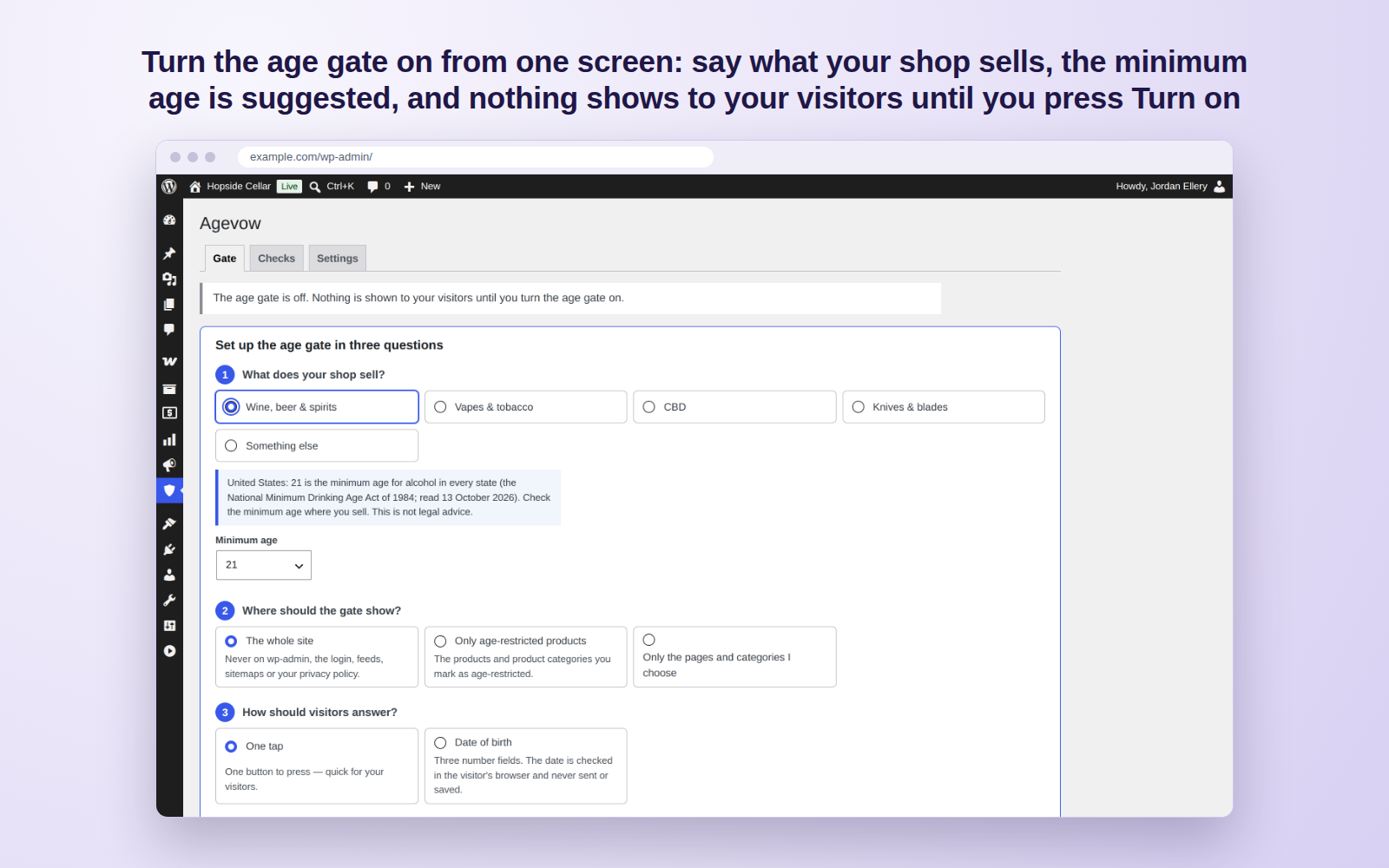
Show the age question on the whole site, only on your age-restricted products and their categories, or only on the pages and post categories you choose. Set one minimum age for the site, from 18 to 25; a product or a product category that needs a higher one asks its own. Pages you list stay open, logged-in visitors can skip the question if you choose, and the age gate is never shown on your admin screens, the log-in page, the privacy policy page, feeds, sitemaps or robots.txt.
Age-restricted products and categories
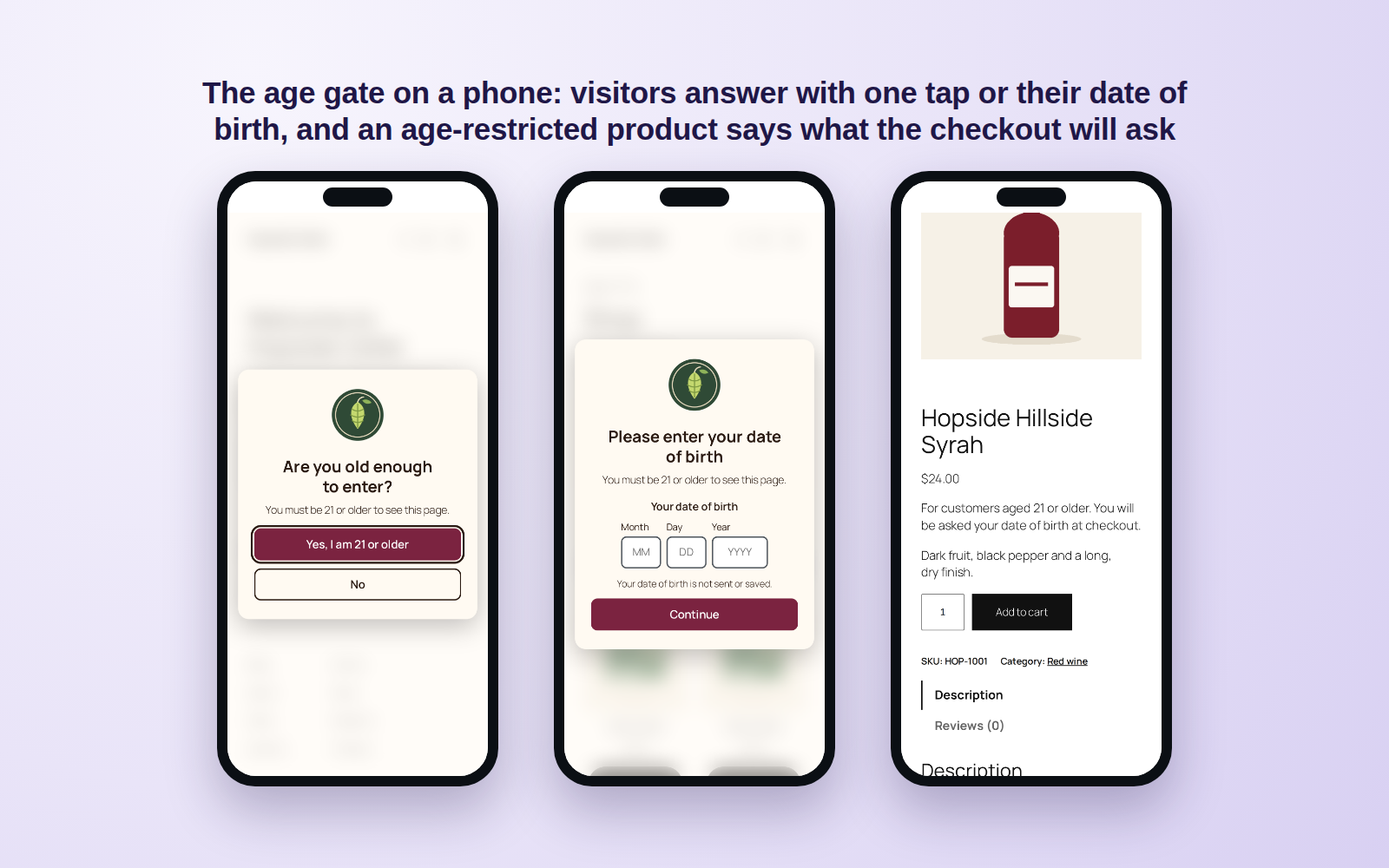
Mark a WooCommerce product, or a whole product category, as age-restricted with its own minimum age: on the product’s General tab, in quick edit and bulk edit, or on the category’s screen, where it covers the categories under it too. A product asks the higher of its own age and its categories’. The Products list shows each product’s age in its own column, and a line on a restricted product’s page can tell customers what the checkout will ask.
Age check at WooCommerce checkout
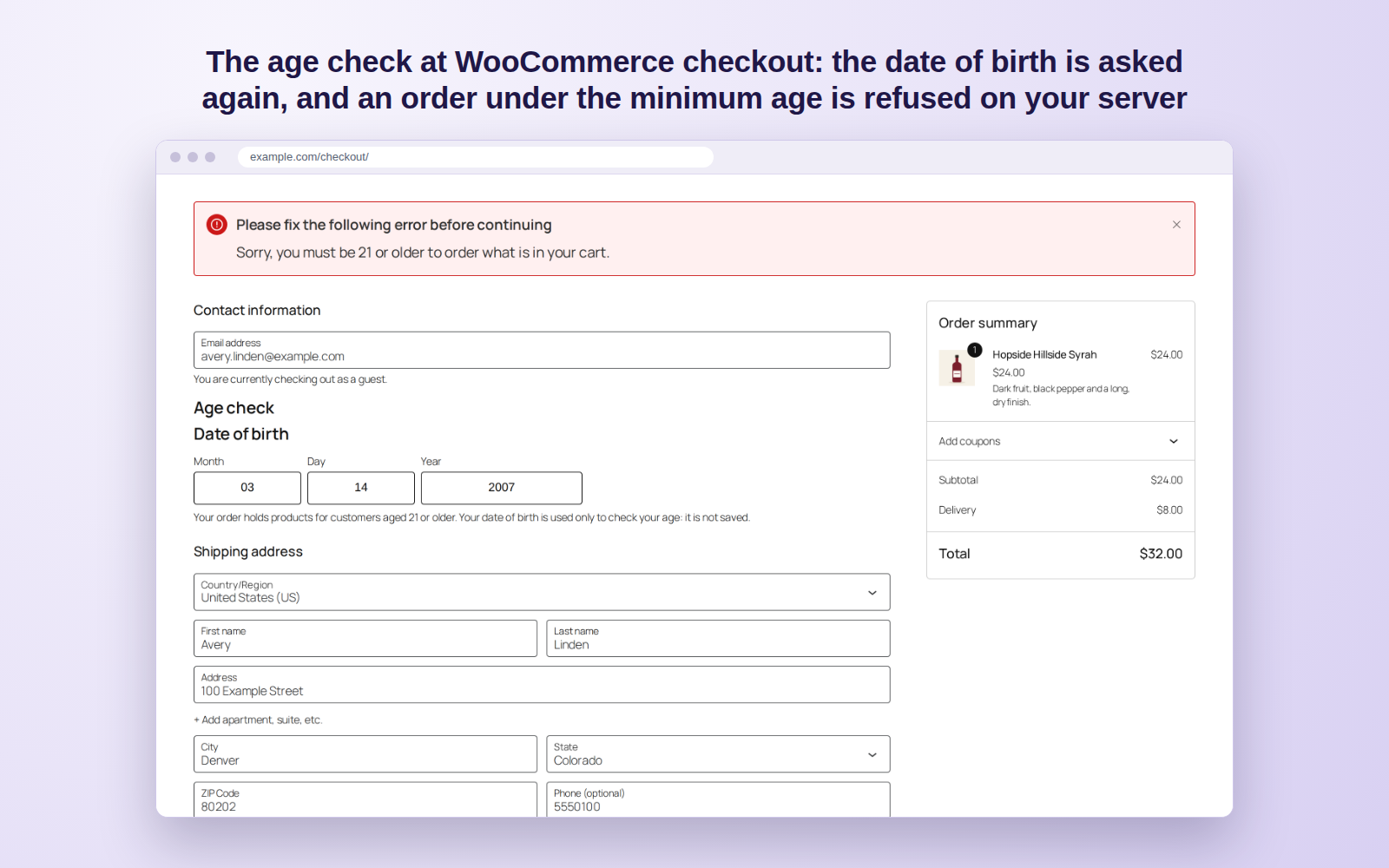
When the cart holds an age-restricted product, or every cart if you choose, the checkout asks the customer to enter their date of birth or to tick that they are old enough. It is asked on the classic checkout, the checkout block and the page where an order is paid later. The answer is checked on your server: an order sent without it, under the minimum age or with a date that does not exist is refused, whether it comes from the checkout form, an express payment button or a script, with WooCommerce’s order tables switched on or off.
Date of birth or one tap
Visitors answer with one tap (“Yes, I am 18 or older”) or with their date of birth, its day, month and year in the order their language writes them. Each mistake in a date is said in words next to its field. A visitor under the minimum age sees your message and a Leave button that can go to the address you choose. A visitor who passes is remembered in their own browser for the days you set (30 unless you change it), so they are not asked on every page.
A record that each check happened
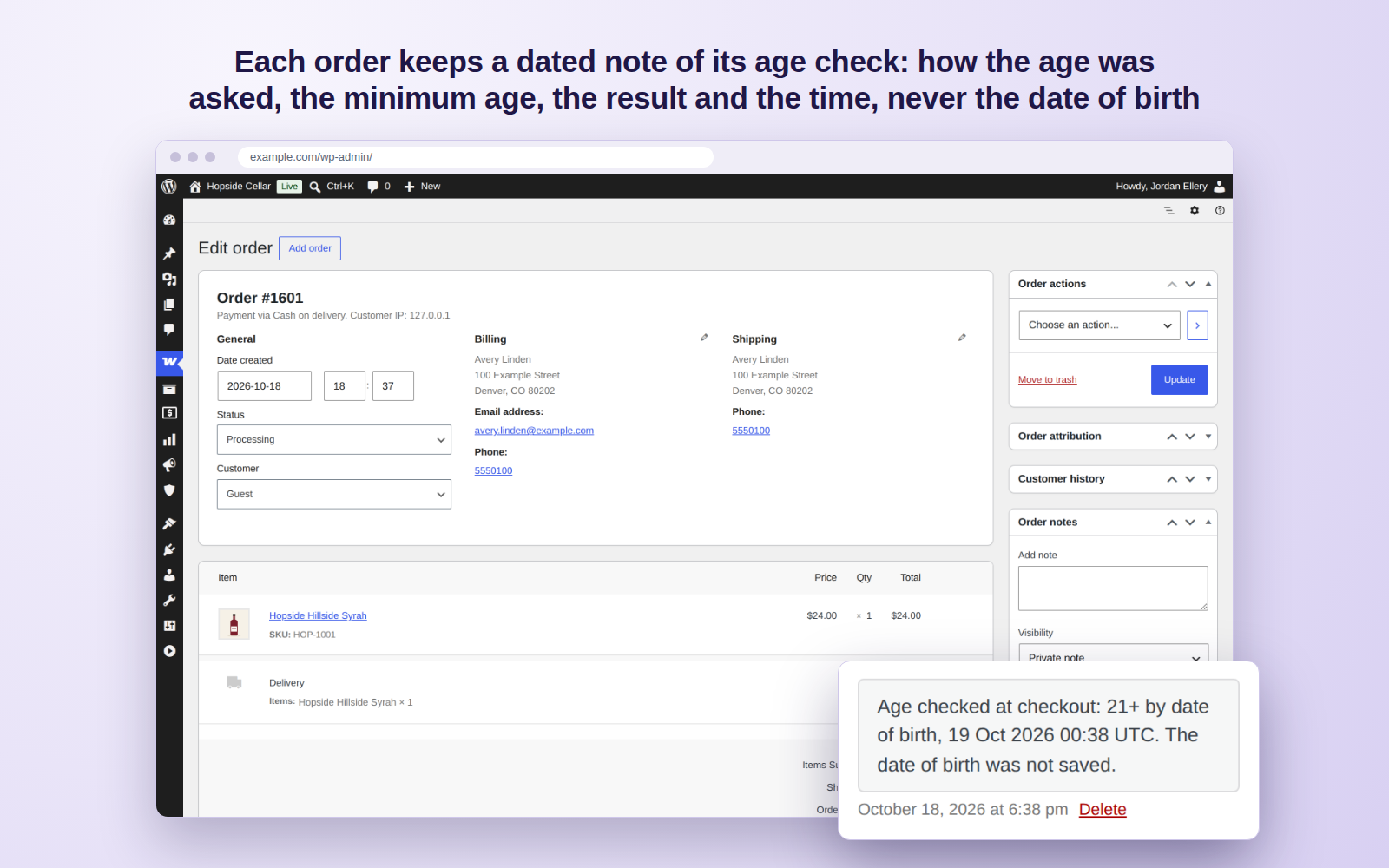
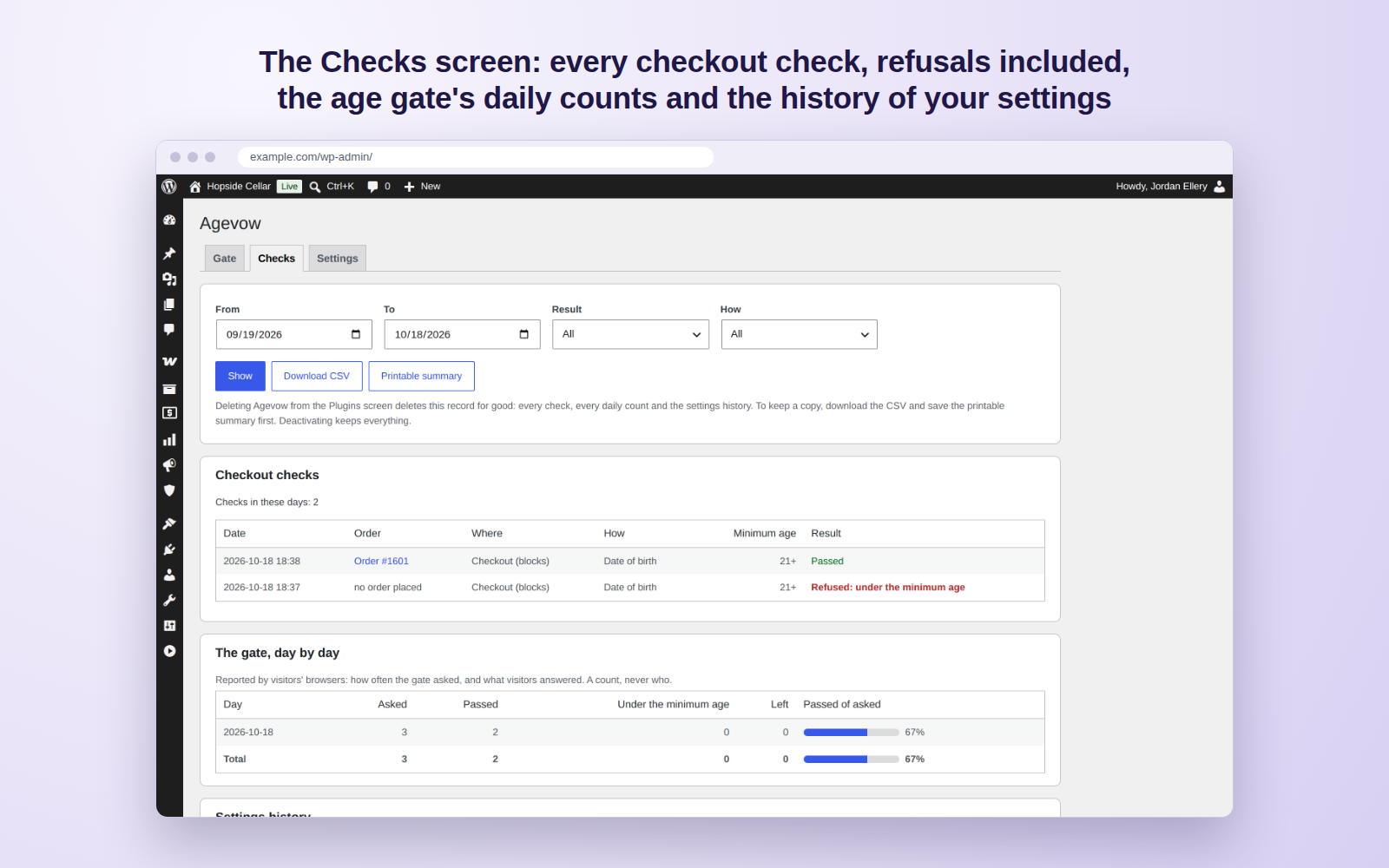
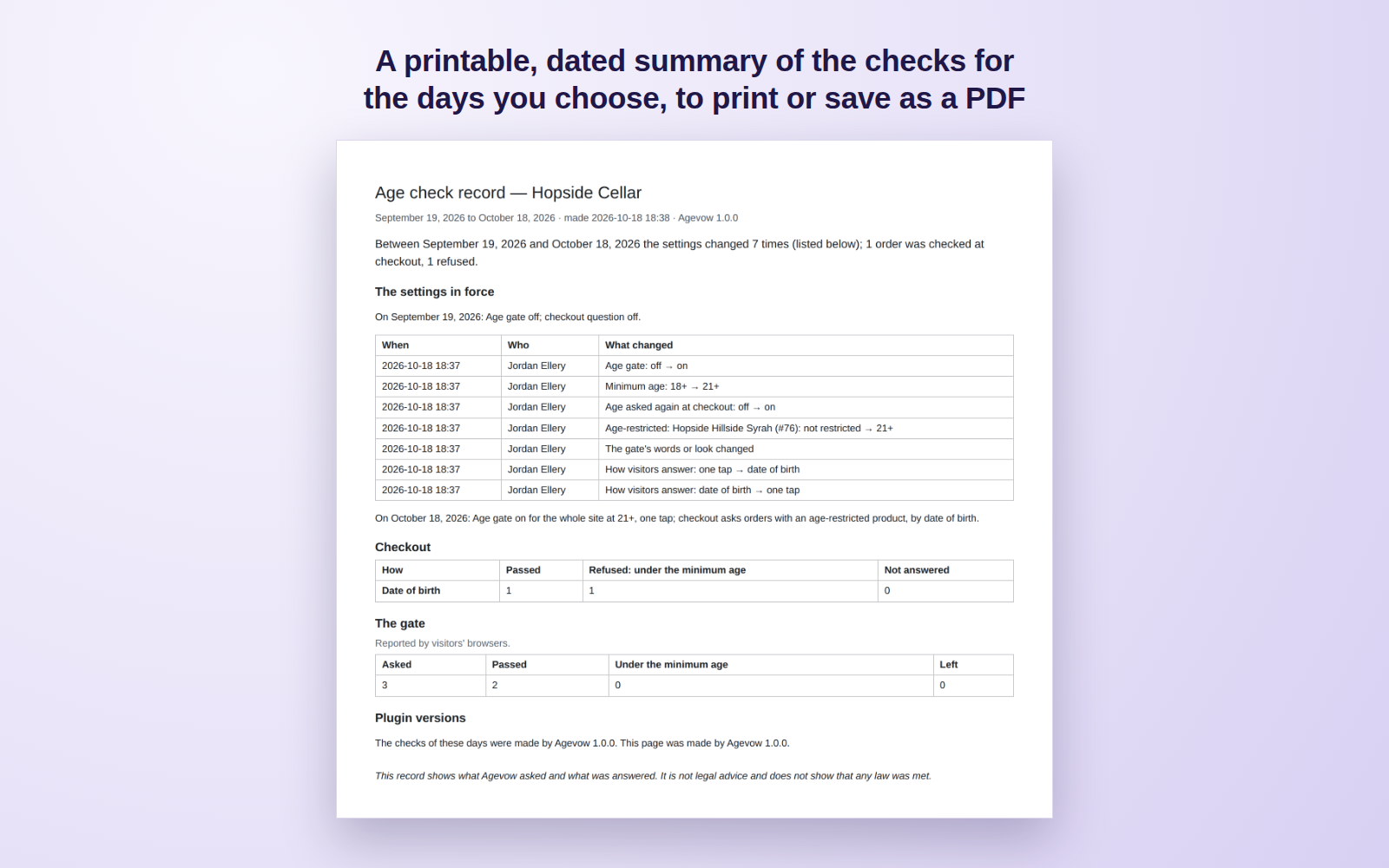
Each order checked at checkout keeps a note of how the age was asked, the minimum age, the result and the time. The Checks screen lists every one, refusals included, beside the age gate’s daily counts (as reported by visitors’ browsers) and the history of your settings: who changed what, and when. Choose the days, download the checks as a CSV file, or print a dated summary (or save it as a PDF).
Works with page caches and search engines
Every visitor gets the same page and the age question is decided in their own browser, so a page cache can keep one copy of each page for everyone. It is tested with WP Super Cache, W3 Total Cache, WP Fastest Cache and Cache Enabler, and behind a shared cache in front of the site, the way a CDN’s “cache everything” rule keeps one copy of every page. The content of a page stays in that page under the age question: Agevow never redirects to a separate age page and never checks who is visiting.
Phones, keyboards and screen readers
The age question fits a phone, a tablet and a desktop screen. The date of birth opens the phone’s number keyboard, the field stays above the keyboard and the page does not zoom in on it. The question is a dialog that a screen reader announces by its heading, the keyboard stays inside it until it is answered, and the page underneath does not move when it appears or goes away. Visitors who ask their device for less motion get no fade, and on right-to-left sites the question is mirrored.
No birth date, no IP address, nothing sent
A date of birth is used to work out the age and is never saved, sent or written to a log. Agevow reads no IP address, and its one cookie, agevow_ok, holds only the minimum age passed and the day. It adds suggested text to your privacy policy guide, works with WordPress’s tools to export and erase personal data, and removes everything it stored when you delete it.
Turn it on from one screen
Open Agevow in the admin menu, say what your shop sells (a minimum age is suggested, with the dated fact behind it), choose where the gate shows and how visitors answer, look at the preview at a desktop or a phone size, and press Turn on. Your heading, message, logo and colours are optional; a colour that would be hard to read is pointed out as you pick it.
How Agevow is different
- It asks again where it matters, at checkout: on the classic checkout, the checkout block and when an order is paid later, for orders with an age-restricted product, and the answer is checked on your server.
- It keeps a dated record that each check happened: on each order, the age gate’s daily counts, the history of the settings, and a printable summary for the days you choose.
- It stores no birth date and no IP address, and its record works with WordPress’s tools to export and erase personal data.
- Every visitor and every search engine gets the same page: the age question is decided in the visitor’s browser, with no exceptions by browser name, so page caches keep working.
- It is a real dialog: the keyboard stays inside it, phones get a number keyboard for the date, and nothing on the page moves.
This plugin does not connect to any external service.
Agevow checks ages and keeps a record. Whether a shop meets a law is decided by that law and its regulator. This is not legal advice.
Screenshots
FAQ
Does it store my customers’ birth dates?
No. A date of birth is used to work out whether the customer is old enough and is then dropped: it is never saved on the order, in the record, in a log or in any other place on your site. The order keeps how the age was asked, the minimum age, the result and the time.
Is WooCommerce required?
No. The age gate works on any WordPress site; the question at checkout joins when WooCommerce is active.
How do I turn the age gate on?
Open Agevow in the admin menu. Say what your shop sells (a minimum age is suggested, with the fact behind it), where the gate shows and how visitors answer, look at the preview on a desktop or a phone, and press Turn on.
Can I gate only some products?
Yes. Choose “Only age-restricted products” under where the gate shows, and mark the products or product categories that need it. The rest of the shop stays open, and the checkout asks only when the cart holds a marked product (or every cart, if you choose).
How do I mark a product as age-restricted?
Open the product and choose its minimum age under “Age-restricted” on the General tab. Quick edit and bulk edit in the Products list set it for many products at once, and a product category’s own screen sets it for every product in that category and in the categories under it. A product asks the higher of its own age and its category’s. The Products list shows each product’s age in its own column.
How does the age check at checkout work?
When the cart holds an age-restricted product (or every cart, if you choose), the WooCommerce checkout asks the customer to confirm they are old enough, or to enter their date of birth — the classic checkout and the checkout block alike, and the page where an order is paid later. The order is refused on your server until the question is answered, and refused if the date is under the minimum age, whichever way the order is sent. The date of birth is used to work out the age and is never saved: the order keeps a note of the check, its method, its minimum age and its time. A line on a restricted product’s page can tell customers what the checkout will ask.
Does it work with the block checkout?
Yes. The checkout block shows the same question as the classic checkout, and WooCommerce’s own checkout route refuses the order on your server when the answer is missing, under the minimum age or a date that does not exist. The check is made while the order is still a draft, before any payment is taken.
They are left in place. An order sent by an express payment button goes through the same check on your server as any other, so when the cart needs the question and it has not been answered, the order is refused with a message that says what is missing.
What does the record show?
The Checks screen lists every checkout check: the order, the date, how it was asked, the minimum age and the result, refusals included. Beside it are the age gate’s daily counts, as reported by visitors’ browsers, and the history of your settings: who changed what, and when. Choose the days, download the checks as a CSV file, or print a dated summary (or save it as a PDF). Nothing in it identifies a visitor.
What do I show an inspector or my payment provider?
The Checks screen and its printable summary: for the days you choose, which orders were asked their age, how, at which minimum age, with what result, and which settings were in force on each date. It shows what was asked and answered; it is not advice about any law, and it does not prove who a customer is.
Will search engines still index my pages?
Agevow sends every visitor and every search engine the same page. The page’s content is in that page, and the age question is drawn over it in the visitor’s browser; Agevow never redirects to a separate age page and never checks who is visiting. Google’s guide “Avoid intrusive interstitials and dialogs” (Google Search Central, last updated 10 December 2025) leaves out interstitials a site has to show, such as an age gate, and asks that the content be overlaid rather than redirected. How a search engine ranks a page is its own decision.
Does it work with page caches?
Yes. A page carries the same age question for every visitor, and each visitor’s answer is kept in their own browser, so a cache can keep one copy of the page for everyone. It is tested with WP Super Cache, W3 Total Cache, WP Fastest Cache and Cache Enabler, and behind a cache in front of the site that keeps one copy of every page for every visitor, the way a CDN’s “cache everything” rule does. When you change where the gate shows, its age or its look, Agevow clears those plugins’ caches. A cache in front of your site, such as a CDN, keeps the copies it already holds until they expire: purge it after you turn the gate on.
One, in the visitor’s own browser: agevow_ok, holding the minimum age passed and the day, for the number of days you choose (30 unless you change it). It holds no birth date and nothing that identifies the visitor. If the browser refuses cookies, the gate asks again on each page.
Does it work on phones?
Yes. The age question fits a phone, a tablet and a desktop screen. The date of birth opens the phone’s number keyboard, the field stays above the keyboard and the page does not zoom in on it, and the question keeps clear of the notch and the home bar. It is tested in Safari on an iPhone and an iPad, in Chrome on Android, in private windows, with cookies blocked, and in the browsers inside social apps, where the gate simply asks again after the app is reopened. On an iPhone the answer is remembered for the days you choose, not only the week Safari allows a page’s own cookie.
Can everyone use the age gate?
The age question is a dialog that a screen reader announces by its heading. The keyboard stays inside it until it is answered, Escape does not close it, each mistake in a date is said in words next to its field, and the fade is left out for visitors who ask their device for less motion. The page underneath does not move when the question appears or goes away.
What if a visitor has JavaScript turned off?
The page shows, with a line at the top saying the minimum age it is for. At the classic WooCommerce checkout the question is still asked, and the order is still refused until it is answered.
What if the gate’s script is blocked?
If the gate’s script has not started within 4 seconds (blocked by an extension, or lost on a failing network), the page opens. A broken script never locks a visitor out.
What does Agevow keep about people, and does it work with the WordPress privacy tools?
For each order checked at checkout it keeps how the age was asked, the minimum age, the result and the time — never the date of birth — and the settings history keeps which user account changed a setting. It adds suggested text to the privacy policy guide (Settings › Privacy) that says what it keeps, what it does not and what its cookie holds. Tools › Export Personal Data includes a customer’s age checks and a user’s own settings changes. Tools › Erase Personal Data takes the age checks off a customer’s orders whenever WooCommerce removes the personal data of those orders, and keeps them with the order when WooCommerce keeps it; a user’s name is taken off the settings history, which then says “a former user”. The daily counts hold nothing about anyone.
What happens to the record if I delete the plugin?
Deactivating keeps everything. Deleting the plugin from the Plugins screen removes everything it stored, on every site of a network: the checks, the daily counts, the settings history, its settings and the marks on products, categories and orders. The notes on your orders stay. To keep a copy, download the CSV and save the printable summary from the Checks screen first.
Which versions does it work with?
WordPress 6.9 and later, PHP 7.4 to 8.4, and WooCommerce 8.0 and later. Each version of Agevow is tested with the current WooCommerce and the versions before it, with WooCommerce’s order tables switched on and off, with block and classic themes, page caches, a persistent object cache, a multisite network, a right-to-left language and translations.
Is this enough for the law?
Agevow checks ages and keeps a record. Whether a shop meets a law is decided by that law and its regulator. This is not legal advice.
Is this the age check the UK’s Online Safety Act asks for?
No. Ofcom, the UK’s online safety regulator, has said that asking visitors to state their own age is not the kind of age check the Online Safety Act asks of the services it covers, which have had to use such checks since 17 January 2025 or 25 July 2025, depending on the service (read on 13 October 2026). Agevow asks visitors to state their age: it is made for shops and sites that want an honest age gate and a question at checkout. This is not legal advice.
Does it check a buyer’s details against a commercial database, as the US PACT Act asks of vape sellers?
No. The PACT Act, extended to vapes in December 2020, asks a seller to check a buyer’s name, date of birth and address against a commercially available database before a delivery sale (read on 13 October 2026). Agevow does not make that check: it asks the customer’s age at checkout and keeps a record that it was asked. This is not legal advice.
Is there a paid version?
No. Everything described here is free, with no limits: the age gate, the question at checkout, the record, its downloads and the privacy tools.
Reviews
There are no reviews for this plugin.
Contributors & Developers
“Agevow – Age Verification & Age Gate” is open source software. The following people have contributed to this plugin.
Contributors
Translate “Agevow – Age Verification & Age Gate” into your language.
Interested in development?
Browse the code, check out the SVN repository, or subscribe to the development log by RSS.
Changelog
1.0.0
- First release: an age gate for the whole site, age-restricted products and their categories, or the pages and post categories you choose, answered with one tap or a date of birth; the age asked again at the WooCommerce checkout (the classic checkout, the checkout block and the page where an order is paid later), refused on your server whichever way the order is sent; a minimum age on products and product categories, in quick edit and bulk edit; the Checks screen with every checkout check, the daily counts and the settings history, a CSV download and a printable dated summary; the same page for every visitor and every search engine, so page caches keep working; a dialog for the keyboard and screen readers that fits phones and tablets; privacy tools and a clean uninstall. It stores no birth date and no IP address.