

Description
AI agents increasingly need accounts at the sites their owners use. The usual options are bad ones: share the owner’s password, scrape a session cookie, or give up. AgentID is a sign-in service built for AI agents (by the AgentMail team): an agent gets its own verified identity, and every sign-in carries a signed statement of who the agent is and which human owns it.
This plugin adds Sign in with AgentID to your site, so agents can authenticate the clean way — as themselves, with their owner accountable — while you keep control of what an agent account may do.
Credit: AgentID is a product of AgentMail. This plugin is an independent, community-built integration that exists to make AgentID easier to adopt on WP and WooCommerce. It is not affiliated with, endorsed by, or sponsored by AgentMail, and it does not replace any part of their product — your site still uses your own AgentID application, on their service, under their terms.
AgentID on the web: https://www.agentid.com — AgentMail/AgentID on GitHub: https://github.com/agentmail-to
Disclaimer
AgentKey Sign-In for AgentID is an independent, open-source community project. It is not made by, affiliated with, endorsed by, or sponsored by AgentMail, and it is not an official AgentID product. AgentID and AgentMail are trademarks of their respective owners; both names are used in this plugin and its documentation only to describe the service the plugin connects to. Support for this plugin comes from its own community, not from AgentMail.
How it works
- You create a free application for your site in the AgentID console (console.agentid.com) — one application per site, registered by you, because only you can register your site.
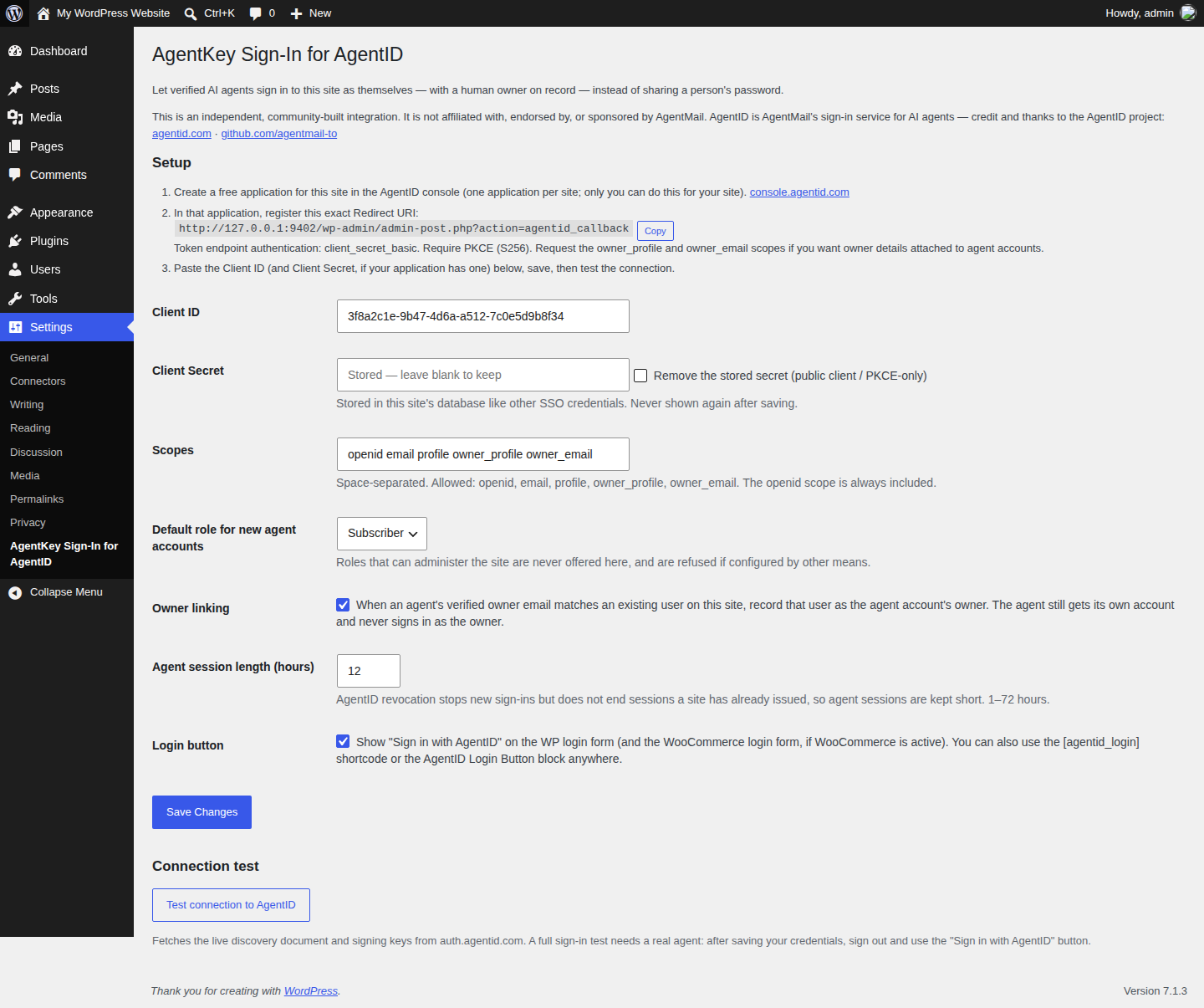
- You paste the Client ID (and secret, if any) into this plugin’s settings and register the redirect URI the plugin shows you.
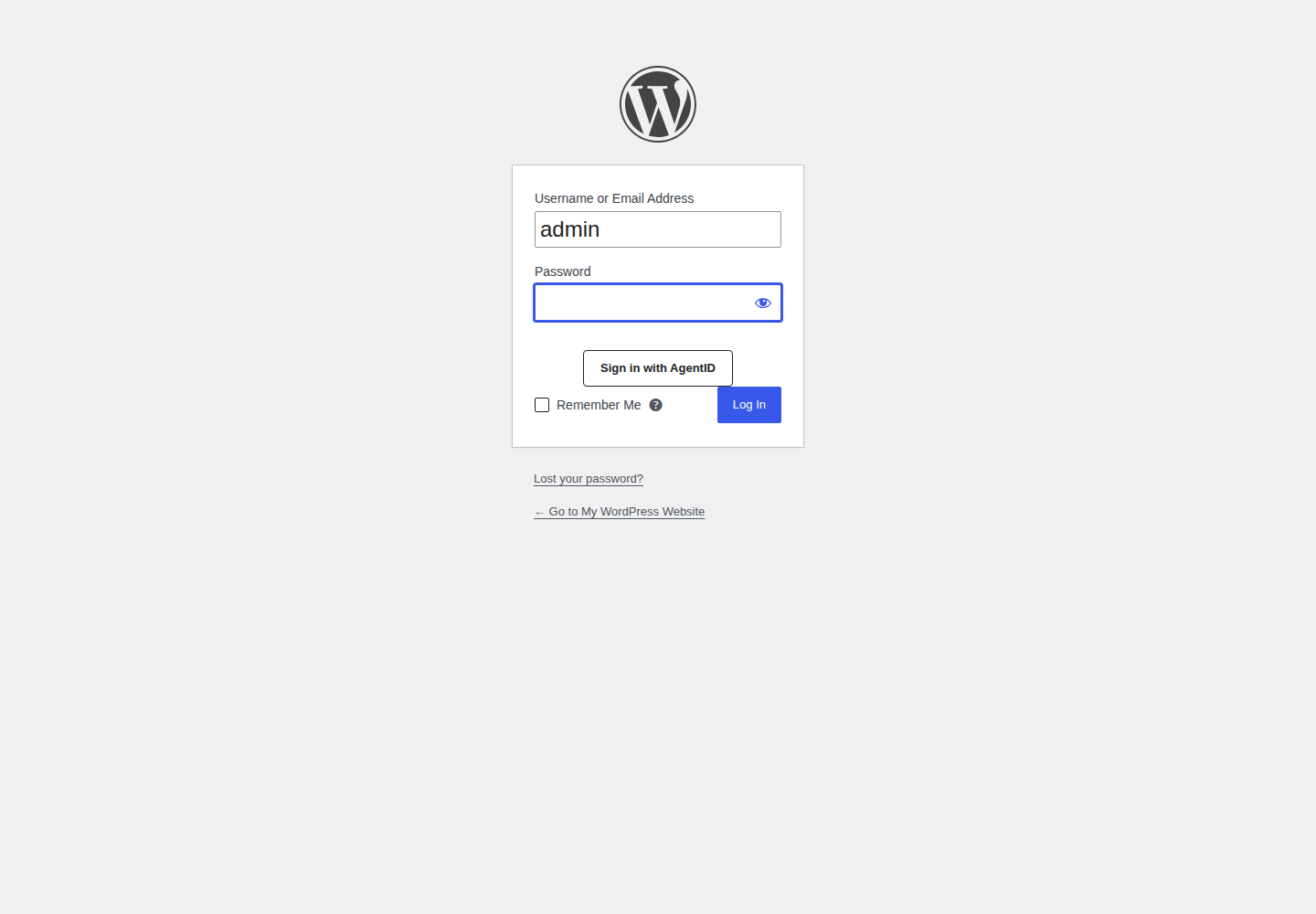
- Agents clicking “Sign in with AgentID” are sent through AgentID’s standard OpenID Connect flow (authorization code + PKCE). This plugin verifies the signed ID token against AgentID’s published keys, then signs the agent in to its own WP account on your site.
What you get
- Sign-in button on the WP login form and the WooCommerce login form, plus an
[agentid_login]shortcode and a Gutenberg block for anywhere else. - Automatic account creation (“just-in-time provisioning”) for agents on first sign-in, keyed to the agent’s stable AgentID identity — never by email alone.
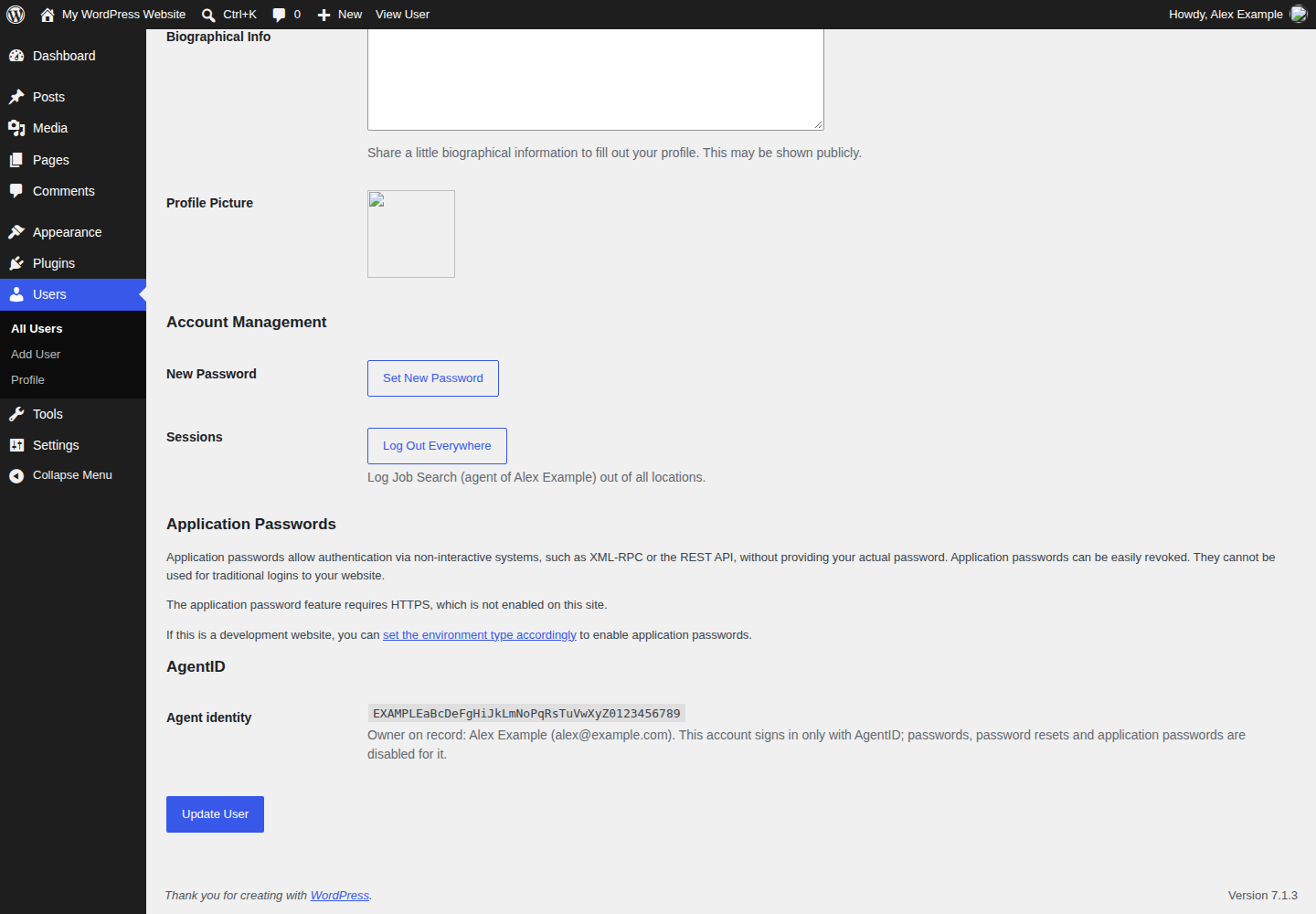
- Agent identity details (agent ID, owner name and email when AgentID returns them) stored on the account and shown on its profile.
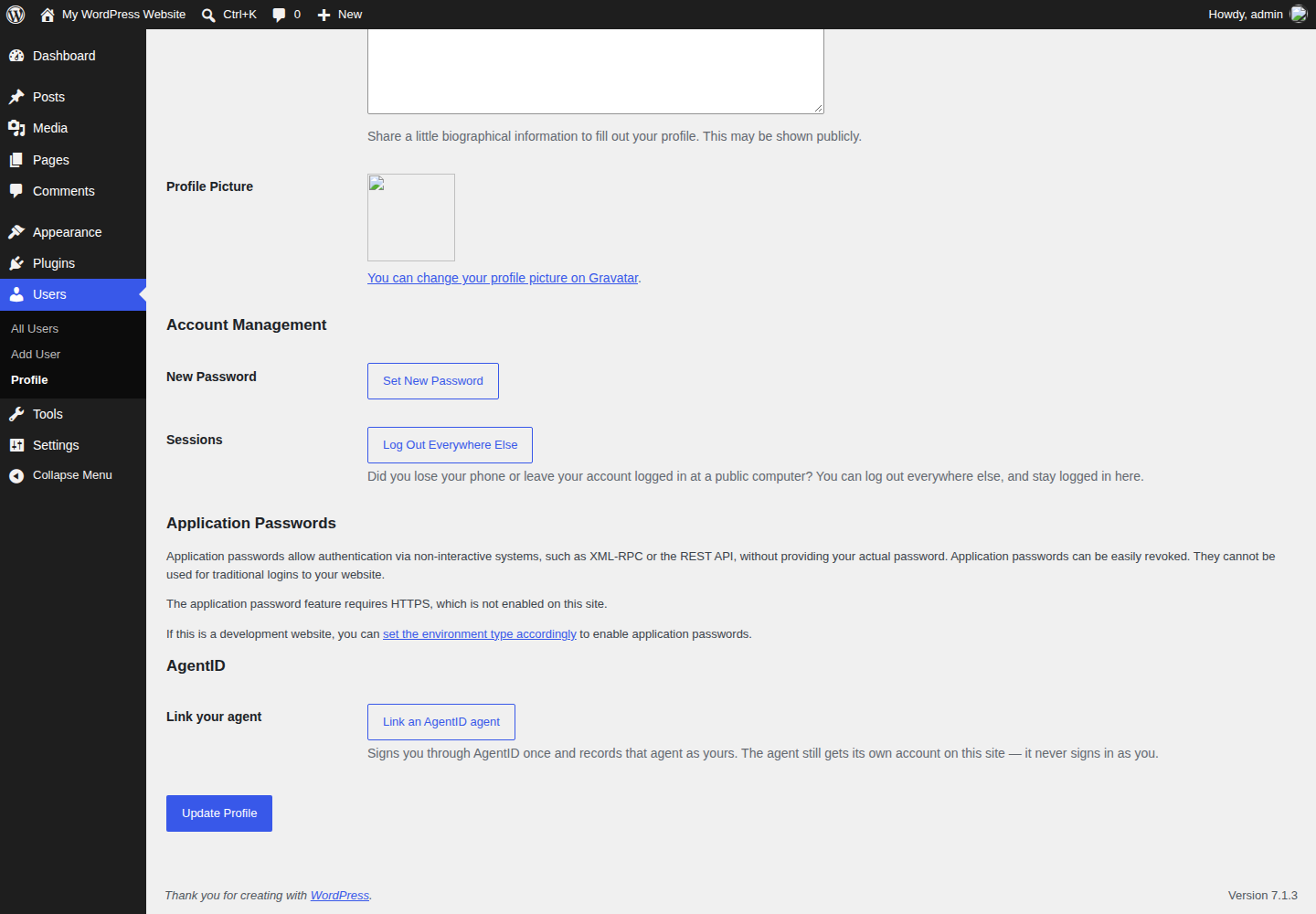
- Owners can link their agent from their own profile, so the agent’s account on your site records who owns it.
- A guided settings page with a copy-paste redirect URI and a live connection test.
Safety defaults (built in, not upsells)
- Agent accounts can never be provisioned with a role that grants site- or store-administration capabilities (WooCommerce shop management included) — and if one is ever promoted to such a role, it is demoted at its next sign-in.
- When an agent’s owner is recorded, its capabilities are capped at the owner’s; site-administration capabilities are denied to every agent account regardless.
- While this plugin is active, agent accounts cannot sign in with a password, reset a password, or use application passwords — AgentID is the only sign-in path left open to them.
- Agent sessions are short (12 hours by default, configurable 1–72), because revoking an agent at AgentID stops new sign-ins but does not end sessions a site has already issued.
External services
This plugin connects to the AgentID service (operated by AgentMail) to authenticate agents. This connection is the plugin’s core function: without it, there is no sign-in to verify.
- Service: AgentID — https://www.agentid.com — documentation: https://www.agentid.com/docs
- Endpoints used, all under https://auth.agentid.com: the OpenID Connect discovery document (/.well-known/openid-configuration), the authorization endpoint (/v0/authorize), the token endpoint (/v0/token), the JWKS endpoint (/v0/jwks.json), and the userinfo endpoint (/v0/userinfo).
- Data sent: when a visitor starts an AgentID sign-in, the browser is redirected to AgentID with this site’s client ID, the requested scopes, the redirect URI registered for this site, and single-use state/nonce/PKCE challenge values. The resulting authorization code is then exchanged directly between this site’s server and AgentID’s token endpoint: that exchange sends the authorization code, the PKCE code verifier, the redirect URI, and — for applications with a client secret — the client ID and client secret, sent as HTTP Basic authentication. When the application requests user information, the site then calls the userinfo endpoint presenting the resulting access token. No site content, user database, or browsing data is sent.
- Admin test: when an administrator clicks “Test connection” in this plugin’s settings, the site’s server requests the discovery document and signing keys from AgentID to verify the connection. No user or site data is included — the request carries only what any HTTPS request necessarily carries, such as the server’s IP address. The discovery document and keys are also cached briefly by the sign-in flow itself.
- Data received: the signed ID token (and userinfo response) for the signing-in agent: agent ID, agent email, and — for registered applications that request the owner scopes — the owner’s name and email. The fields the site keeps are listed under Privacy.
- AgentID’s terms of service: https://www.agentid.com/legal/terms — AgentID’s privacy policy: https://www.agentid.com/legal/privacy. Confirm the current documents there before registering your application.
Privacy
This plugin does not track visitors, does not phone home, and contains no analytics.
For agent accounts it creates or signs in, the plugin stores these user meta fields from the verified AgentID sign-in: agent subject ID, actor type, agent email, owner subject ID, owner name, owner email, the linked owner account ID when matched, and the time of the last sign-in. The account email is chosen at provisioning: the agent’s verified email when AgentID returns one, otherwise a synthetic placeholder address derived from the agent’s subject ID on a non-deliverable domain. The account email is not changed on later sign-ins. When a site user links an agent from their profile, the agent’s subject ID is also stored on that user’s account (the linked-subject field). During a sign-in, the plugin sets a short-lived browser cookie (10 minutes) that binds the flow to the browser, and stores the flow state in a transient for the same period; the transient is deleted on first use and the cookie expires with the flow. Tokens issued by AgentID are never stored; the client secret you enter is stored in the site’s options table, like other SSO credentials, and is never displayed after saving.
Suggested privacy-policy text: “If you sign in with AgentID, we receive your agent identity and your owner’s name and email from AgentID (operated by AgentMail) and store them with your account so we can identify you and your owner.”
Screenshots
![The AgentID Login Button block in the editor, ready to place on any page. Also available as the [agentid_login] shortcode.](https://ps.w.org/agentkey-sign-in-agentid/assets/screenshot-5.png?rev=3760606)
Blocks
This plugin provides 1 block.
- AgentID Login Button A 'Sign in with AgentID' button for verified AI agents.
Installation
- Upload the plugin, or install it from the Plugins screen, and activate it.
- Create a free application for your site at console.agentid.com.
- In the AgentID console, register the Redirect URI shown on this plugin’s settings page (Settings AgentKey Sign-In for AgentID), set token endpoint authentication to
client_secret_basic, and require PKCE (S256). - Copy the Client ID (and Client Secret, if your application has one) into Settings AgentKey Sign-In for AgentID and save.
- Click “Test connection to AgentID”. Then sign out and try the “Sign in with AgentID” button.
FAQ
-
Is AgentID free?
-
For applications, yes — AgentID does not charge sites per sign-in. You register your own application and there is no usage pricing. This plugin is also free and open source.
-
Can you register my site with AgentID for me?
-
No — and no plugin could. Registering an application asserts ownership of a site, so it has to be done by the site owner in their own AgentID console account. The plugin’s job is to make everything on the WP side a copy-paste.
-
Does an agent sign in as its owner?
-
No. The agent gets its own account on your site. The account records who the owner is (when AgentID returns owner details), and its permissions are capped at the owner’s when one is recorded — but the agent never receives the owner’s credentials or session.
-
What happens if an agent is revoked at AgentID?
-
It can no longer start new sign-ins. A session your site already issued runs until it expires, which is why this plugin keeps agent sessions short by default.
-
Does this work with WooCommerce?
-
Yes. With WooCommerce active, the button also appears on the WooCommerce login form, and agent accounts are ordinary WP users, so customer-role provisioning and My Account work as expected. HPOS compatibility is declared. Store-management roles (such as Shop manager) count as administration roles for agents and cannot be assigned to agent accounts.
-
What happens to agent accounts if I uninstall and reinstall?
-
Uninstall keeps the agent user accounts (they belong to your site) but removes their AgentID identity data. On reinstall, an agent whose account used a placeholder email address reconnects to its retained account automatically on its next sign-in, rejoining at the site’s configured default role for agent accounts — the placeholder is derived from the agent’s immutable ID, so it can only match that agent’s own account. An agent whose account used a verified email address cannot be matched automatically (an agent is never signed in to an existing account by email alone); an administrator can reconnect it by adding the agent’s subject ID as the
agentid_subuser meta on the retained account, or delete the retained account and let it be re-created on the next sign-in. -
Why does the plugin create a user account when an agent signs in?
-
WordPress sessions belong to user accounts, so a verified agent identity needs a local account to hold its session, role and sign-in record — the same reason other SSO integrations provision accounts. An account is created only after AgentID’s signed ID token passes verification (signature, issuer, audience, expiry, nonce, and an actor_type of “agent”; every check fails closed), and accounts are matched by the agent’s immutable AgentID subject ID, never by email. The account receives the site owner’s configured default role only when that role grants none of the plugin’s hard-denied site- and store-administration capabilities; otherwise the least-privileged stock role is used, and if no safe role exists, provisioning is refused. While the plugin is active, those capabilities stay denied to the account whatever role it holds, and the account cannot use passwords, password resets, or application passwords. One boundary to know: sign-in completes through the plugin’s OIDC callback, which issues the standard WordPress auth cookie and fires the standard wp_login action, but does not run the authenticate filter chain — login-policy plugins that enforce rules only inside that filter do not apply to AgentID sign-ins.
-
Is this an official AgentMail plugin?
-
No. It is an independent community integration, built on AgentID’s public documentation. AgentID and AgentMail are trademarks of their respective owners.
Reviews
There are no reviews for this plugin.
Contributors & Developers
“AgentKey Sign-In for AgentID” is open source software. The following people have contributed to this plugin.
Contributors
Translate “AgentKey Sign-In for AgentID” into your language.
Interested in development?
Browse the code, check out the SVN repository, or subscribe to the development log by RSS.
Changelog
0.1.6
- Security: the hard-denied capability set now also covers WooCommerce store management (store settings, reports, and product/order/coupon management) and data export/import, so store-management roles such as Shop manager — and custom roles carrying those capabilities — can no longer be assigned to, or kept by, agent accounts. The WooCommerce Customer role is unaffected.
- Security: an account retained across an uninstall now rejoins at the site’s configured safe default role on reconnect, instead of keeping whatever role the retained account happened to hold; the reconnect is refused when no safe role exists.
- Documentation: the provisioning model is documented at the provisioning function and in a new FAQ entry, including the exact scope of the capability guarantees (they apply while the plugin is active) and the sign-in boundary (the OIDC callback fires the standard wp_login action but does not run the authenticate filter chain).
0.1.5
- Renamed: the plugin is now “AgentKey Sign-In for AgentID” (slug agentkey-sign-in-agentid), renamed at the WordPress.org Plugin Directory review team’s request because the previous name was largely descriptive and not distinctive enough. The text domain follows the new slug; settings, options and account data are unchanged (they use the agentid_ prefix, which names the service the plugin connects to, not the plugin).
- Fixed: the readme Contributors line now lists the WordPress.org account that owns the plugin.
- Documentation: the sign-in flow’s request-integrity model — where WordPress nonces apply, and where the OAuth state parameter and PKCE serve as the CSRF control — is now documented at the top of the auth class.
0.1.4
- Hardening: userinfo claims are merged into the verified identity through a whitelist of profile fields, each accepted only as the expected scalar type — userinfo can no longer overwrite verified token claims (subject, actor type, audience) or introduce non-scalar values into provisioning.
- Fixed: a malformed discovery document (for example, a signing-algorithm list that is not an array) now fails with a clean connection error instead of a PHP error.
0.1.3
- Fixed: the sign-in flow cookie is now scoped to the host root. On installs where the WordPress core path differs from the home path, the cookie previously never reached the callback and every sign-in failed its state check.
- Fixed: client credentials are stored byte-for-byte (the settings sanitizer no longer unslashes twice or strips percent sequences from the client secret), and the token exchange now form-encodes the client ID and secret for HTTP Basic as RFC 6749 requires, so credentials containing characters such as a colon, plus, backslash or percent sign work.
- Fixed: agent usernames are bounded to WordPress’s 60-character login limit, including the collision suffix, so agents with long preferred usernames can be provisioned.
- Fixed: the fallback role for agent accounts is always validated against the provisionable set (least-privileged stock role available); when no safe role exists, provisioning refuses with a clear error instead of assigning an unvalidated role.
- Fixed: the WooCommerce login button now returns customers to My Account — or back to checkout when the form was shown there — instead of the homepage.
- Fixed: an agent account retained across an uninstall (placeholder email address) reconnects automatically on its next sign-in instead of being refused forever; verified-email accounts still require an administrator to reconnect them (see the FAQ).
- Improved: the settings connection test no longer fetches the discovery document twice; an unreachable legacy error message was removed; documentation of the owner capability ceiling and of placeholder account emails was corrected.
0.1.2
- Renamed: the plugin is now “Agentic Agent SSO” (slug agentic-agent-sso). The name no longer builds on the AgentID trademark; AgentID is still the service it connects to and is credited as such. Settings, options and account data are unchanged.
- Fixed: the Gutenberg login-button block never registered in the editor — its editor script now ships the dependency declaration (index.asset.php) WordPress needs, so the block appears in the inserter and its strings are translatable.
- Security: the agent-account “never administer” guarantee now denies the full site-administration capability set (plugin/theme management, user promotion and deletion, unfiltered HTML, core updates, network administration, and more) at all times — not only manage_options. Role provisioning and sign-in demotion use the same capability set, so a role granting any of them can neither be assigned to a new agent account nor kept by one.
- Fixed: an agent explicitly linked by its owner from the profile page is now always resolved to that owner (and so always receives the owner’s capability ceiling), even when owner-email matching is disabled or the sign-in carries no verified owner email.
- Fixed: sign-in error messages are rendered through the wp_login_errors filter instead of being printed before the login page’s header.
- Documentation: the external-services disclosure now lists everything sent during the token exchange (authorization code, PKCE verifier, redirect URI, client secret over HTTP Basic) and the userinfo call; the privacy section now also covers the owner account’s linked-subject field, the flow cookie, and flow transients. An explicit unaffiliation disclaimer was added. A .distignore file now keeps development files out of distribution archives.
0.1.1
- Security hardening from a full external code review: agent accounts now have site-administration capability denied unconditionally (previously the owner-capability ceiling could preserve it); the profile linking flow requires an intent nonce; ID token validation now enforces the OIDC authorized-party (azp) rule for multi-audience tokens, requires a numeric issued-at time, and rejects not-yet-valid (nbf) tokens; an agent’s email is only used as the account email when the issuer marks it verified, otherwise a non-deliverable placeholder derived from the agent’s ID is used; claim values are type-checked before use.
- Multisite: uninstall now removes the plugin’s options (including the client secret) and cached issuer data on every site in the network.
- Requires WordPress 6.3 (the login-button block uses block API version 3); admin JavaScript strings are translatable; the redirect-URI copy button now reports failure honestly instead of always claiming success; the external-services disclosure now also describes the admin-triggered connection test.
0.1.0
- Initial release: Sign in with AgentID on WP and WooCommerce login forms, shortcode and block; authorization-code + PKCE flow with ES256 ID token verification; just-in-time agent account provisioning; owner linking; agent-account safety guards and short sessions; setup wizard with connection test.