

Description
Affiliates for WooCommerce is a lightweight WooCommerce affiliate plugin that lets you create, manage, and grow your own affiliate program directly from your store.
When a customer buys through an affiliate’s referral link, your store tracks the click, applies the commission, and records it automatically. Your affiliates log into their own dashboard to see their earnings, generate new links, and save their payout details. You see everything from the admin and pay out when you’re ready. No SaaS subscription. No percentage cut taken from every sale. It all runs on your own site.
Most stores have their first affiliate program live within minutes of activation.
Quick Links
Why run your affiliate program on your own store?
Third-party affiliate networks charge a monthly fee on top of a percentage cut from every sale they track. That means you pay twice — once to your affiliate, once to the platform.
This plugin keeps the whole program inside your WordPress site. Your data, your rules, your payouts. The only person getting a cut is the affiliate who earned it.
And unlike generic affiliate plugins, this one is built around WooCommerce from the ground up. Commission calculation pulls directly from WooCommerce orders. Payouts connect to Bank Transfer, PayPal, and WooCommerce Wallet (Pro). The affiliate tab appears automatically inside your WooCommerce My Account page. It fits your store because it was designed for your store.
WooCommerce Affiliate Program – Free Version Features
Affiliate Registration
Affiliates apply through a signup form you embed anywhere on your site with a shortcode.
- Affiliate Dashboard page created automatically which has the affiliate login and registration forms.
- Use
[ddwcaf_affiliate_registration_form_shortcode]to create your custom affiliate registration page - Show a login form alongside the signup form, or just the signup form on its own
- Optionally show affiliate registration fields on the WooCommerce My Account registration page
- Approve or reject applications from the affiliates list in your admin panel
- Convert existing WordPress users into affiliates directly from the admin — no re-registration needed
Referral Tracking
Every affiliate link click gets tracked with a browser cookie. You control how that cookie behaves.
- Set how long the referral cookie lasts (in days) — if someone buys within that window, the affiliate earns their commission
- Choose whether a second affiliate link click should overwrite the first affiliate’s cookie
- Enable visit logging so every click gets saved with a timestamp and destination URL
- Block affiliates from earning commission on their own purchases
Commissions
Commissions are calculated and recorded automatically when an order reaches the status you choose.
- Set a global commission percentage for all affiliates
- Choose whether taxes and discounts are included or excluded from the commission base
- View all commissions in the admin panel with status, order reference, amount, and affiliate name
- Pay commissions manually when you’re ready
Payout Management
- Affiliates save their preferred payout method (Direct Bank Transfer or PayPal) from their own dashboard
- Review and process payouts from the payouts list in your admin panel
- Filter payouts by status to process them in batches
- Every payout record stores the affiliate, amount, method, and date
Affiliate Dashboard
Your affiliates can see their own data without ever contacting you.
- Dedicated affiliate dashboard accessible from the WooCommerce My Account page
- Shows total earnings, paid earnings, unpaid earnings, and total conversions at a glance
- Full commissions list filtered by status so they know what’s pending and what’s paid
- Payout history with current status for each request
- Click log showing every recorded visit with destination URL and timestamp
- Top Products list showing which of your products earned them the most commission
- Link generator to create referral links for any page or product on your site
- Affiliates save their bank or PayPal payout details themselves — you don’t need to collect it manually
- Dashboard accent color is configurable from your admin panel to match your store branding
Admin Reporting
- Affiliates list with status toggle and earnings summary per affiliate
- Full commissions log across all affiliates, filterable by status, date, and affiliate
- Click log across all affiliates showing referral source URLs and activity
- Top Products report showing which products generate the most affiliate revenue
- Payout log with status management per record
For Developers
- HPOS compatible — fully tested with WooCommerce High-Performance Order Storage
- Translation-ready with
.potfile included — works with WPML, Polylang, and Loco Translate - Works with all standard WooCommerce-compatible themes
- Clean object-oriented codebase with hooks and filters for custom development
- Mobile-friendly admin with dual-drawer navigation for smaller screens
Try the Free Version Live Demo
WooCommerce Affiliate Plugin Pro Version — What You Get On Top
The Pro version adds automation, advanced commission rules, anti-fraud tools, and marketing features that help your affiliates promote more effectively.
Commission Rules
- Set commission rates per product, per category, or per user role
- Automatically increase an affiliate’s commission rate when they hit lifetime earning milestones
- Assign a personal commission rate to any individual affiliate, overriding the global rate
- Require commissions to age past the refund window before they become payable — reduces chargeback risk
Coupon Assignment
- Ability to assign coupons to affiliates for discount based promotion.
- Coupon Assignment mails to affiliates
- Affiliates earn commissions when customers uses their assigned coupons to place orders.
Automated Payouts
- Schedule payout batches on specific days of the month — no manual triggering needed
- Set a minimum balance before an affiliate can request or receive a payout
- Step-by-step payout wizard for reviewing and batch-processing large volumes of commissions
- Supports Direct Bank Transfer, PayPal, and WooCommerce Wallet
Affiliate Marketing Tools
- Upload banners and text links as creatives that affiliates can grab directly from their dashboard
- One-click social sharing to 10+ platforms including Facebook, WhatsApp, LinkedIn, Twitter/X, and Email
- Pinterest-optimized image uploads for visual sharing
- Set default share titles and messages to keep your branding consistent across all affiliate promotions
Custom Registration
- Add unlimited custom fields to the affiliate signup form — text, select, radio, checkbox, textarea
- Control which profile fields affiliates can edit themselves
- Require affiliates to accept your program terms during signup
Anti-Fraud Controls
- Time-gated visit registration prevents the same visitor from being counted multiple times in quick succession
- IP and referrer logging for every affiliate click
- Full control over whether a second affiliate link replaces the first affiliate’s cookie
- Supports CAPTCHA using DevDiggers’ Advanced CAPTCHA plugin.
Advanced Reports
- Visual charts for earnings, visits, and conversions with month-over-month comparisons
- Conversion rate, total earnings, paid and unpaid earnings visible at a glance
- Top products report filterable by affiliate
Screenshots
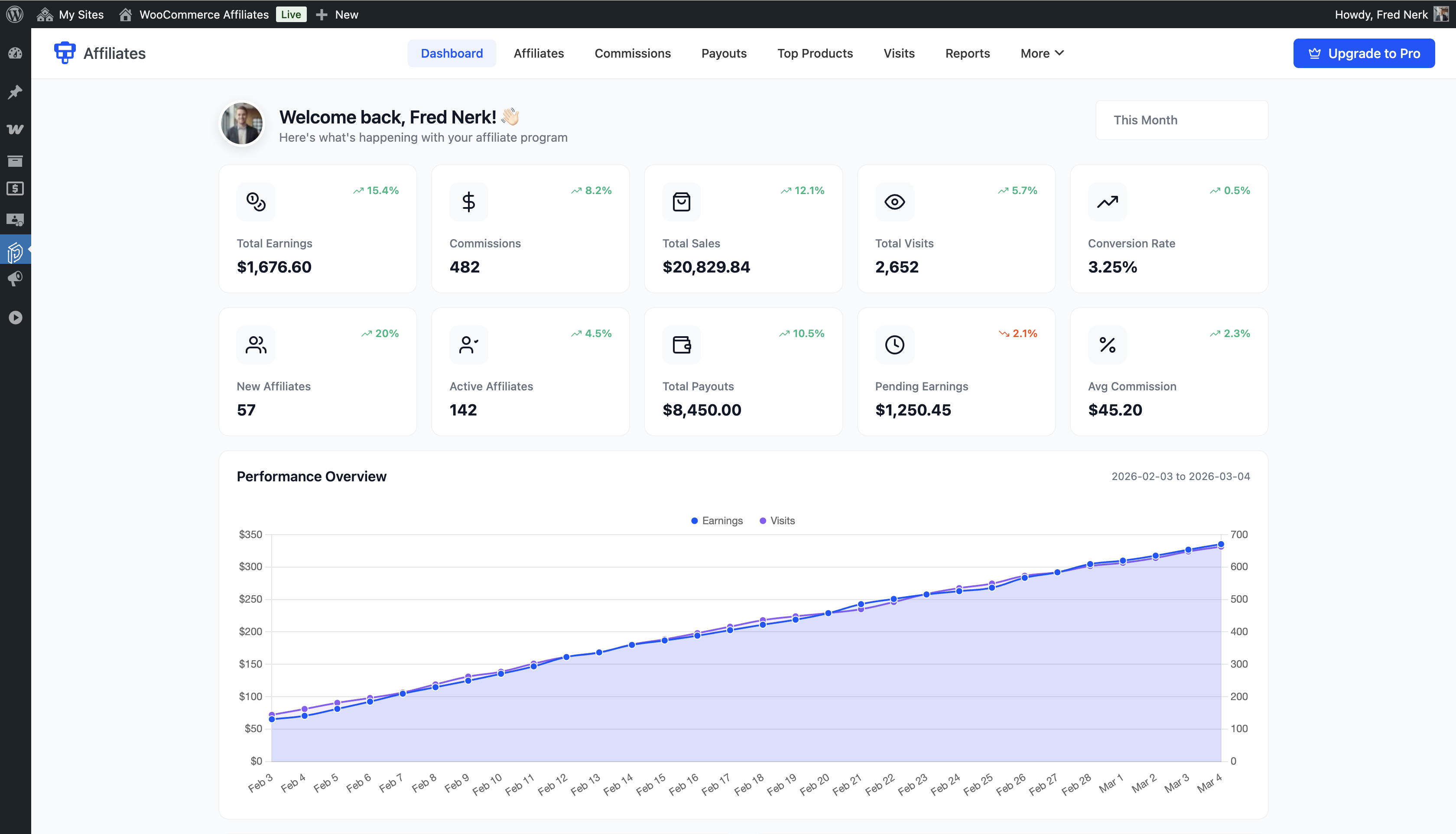
Admin panel affiliate dashboard showing total earnings, paid earnings, unpaid earnings, and quick stats at a glance along with various charts. 
Affiliate dashboard showing total earnings, paid earnings, unpaid earnings, and quick stats at a glance 
Affiliate commissions list showing commission amounts, order references, dates, and statuses 
Affiliate payouts page showing payout history and current payment status for each request 
Affiliate visits list showing click log with referral source URLs and timestamps 
Affiliate top products list showing which products generated the most commission revenue 
Affiliate link generator where affiliates create referral links for any page or product 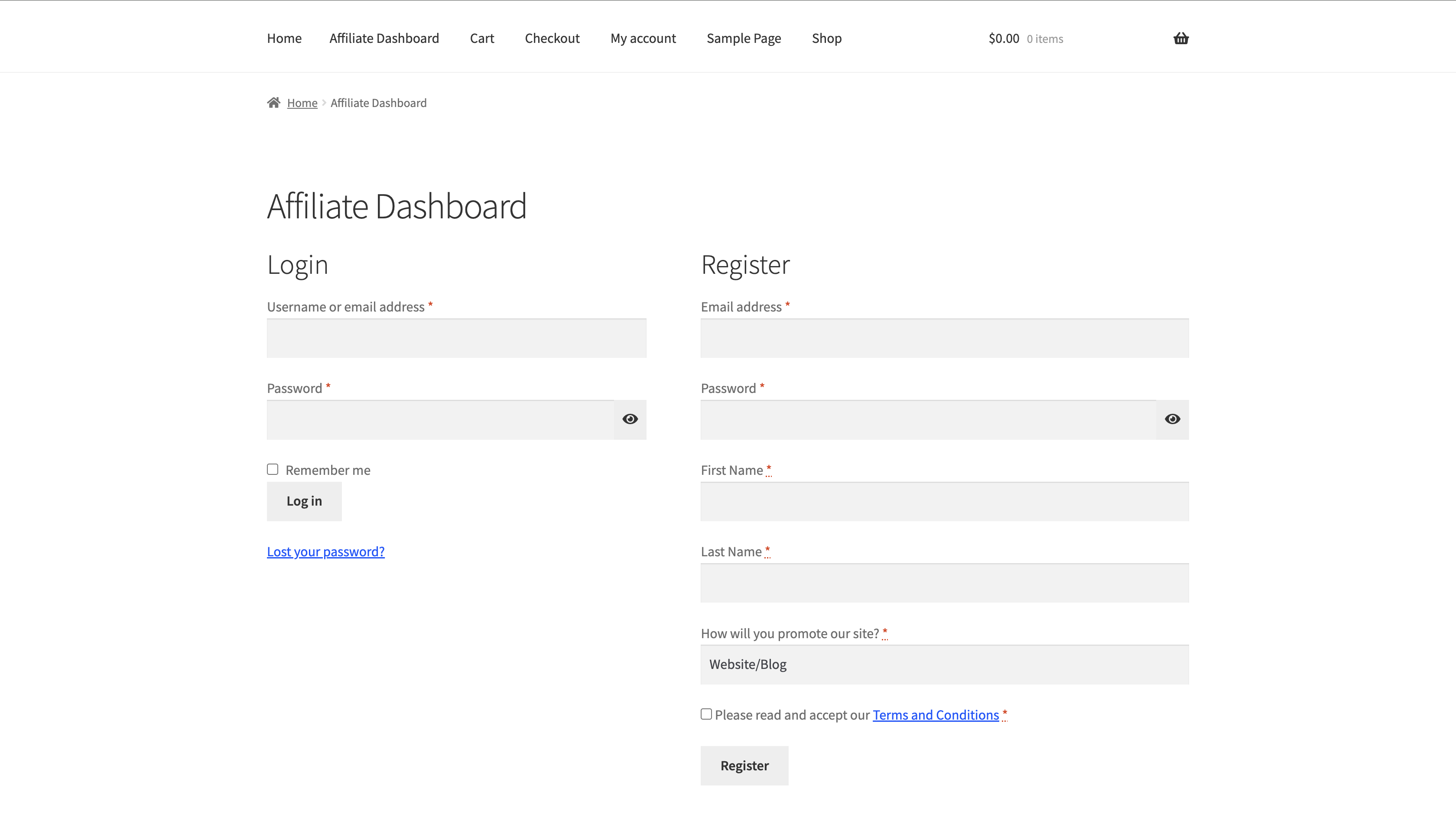
Affiliate registration and login page created using the provided shortcode 
Admin affiliates list showing all registered affiliates with status and earnings summary 
Admin view affiliate page showing full profile details and commission history for one affiliate 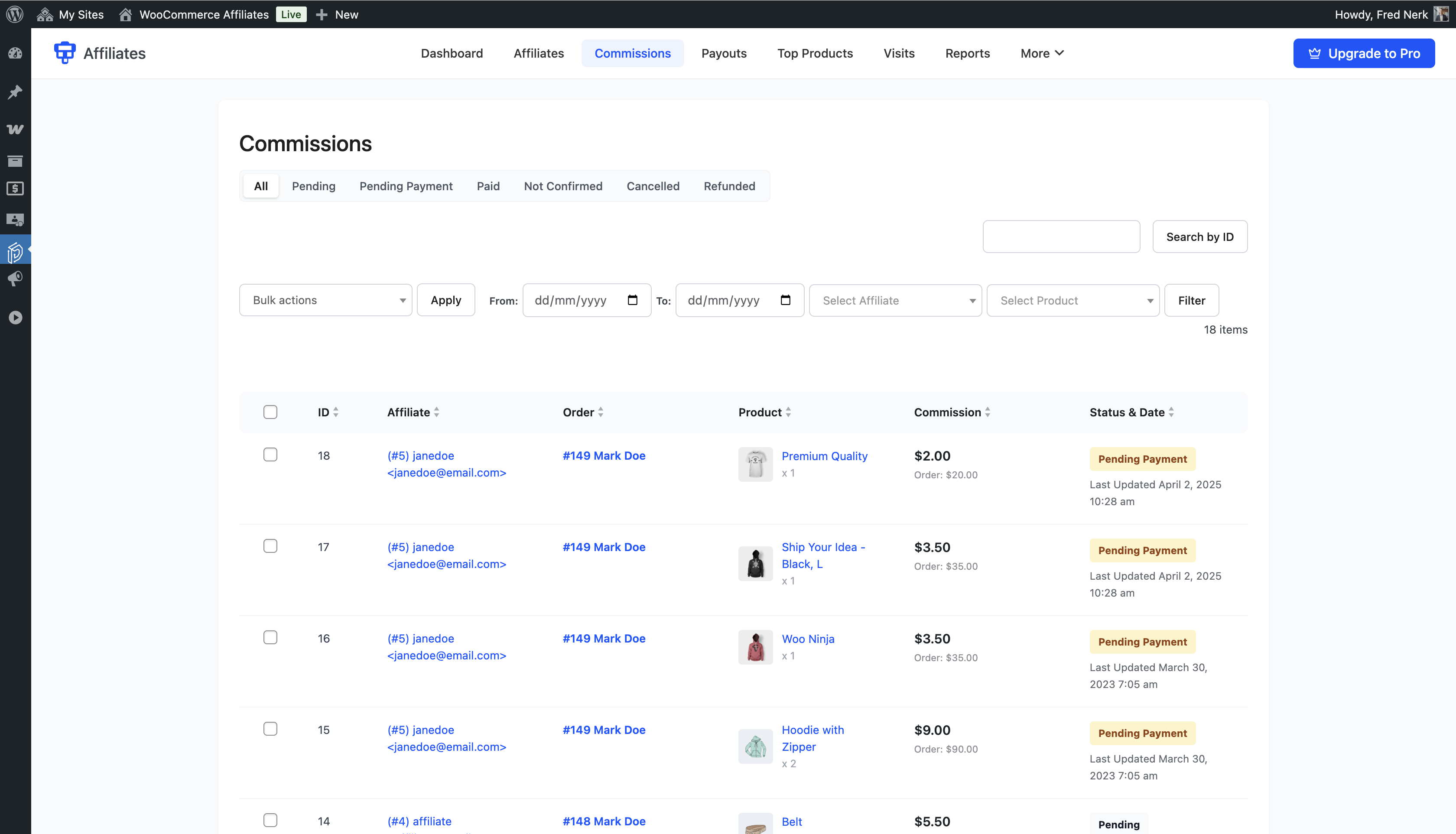
Admin commissions list with filters for status, date, and affiliate name 
Admin payouts list with manual payout management and status controls 
Admin top products report showing which products drive the most affiliate revenue across all affiliates 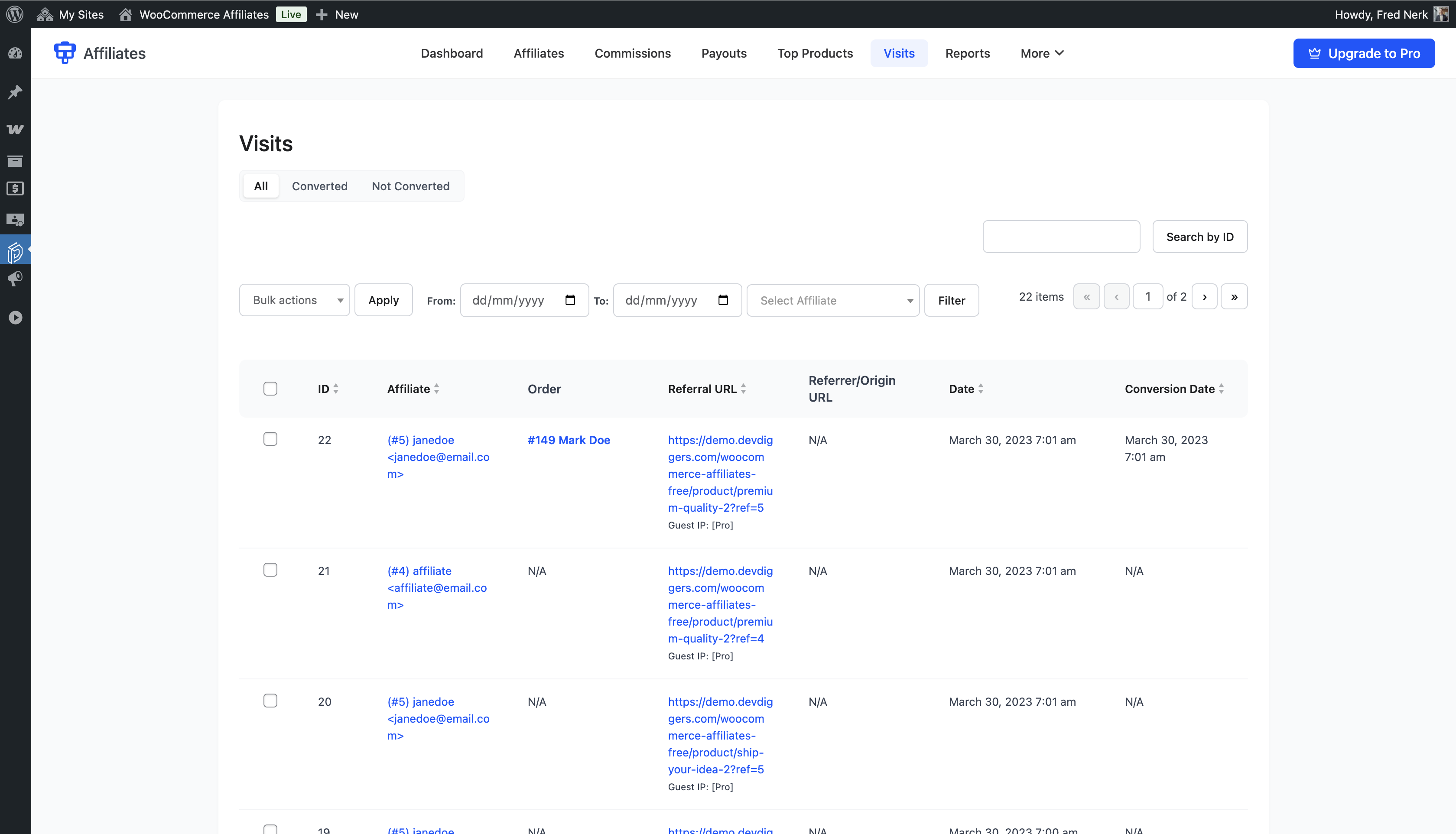
Admin visits log showing all referral clicks with affiliate, URL, and timestamp data 
Registration fields configuration panel
Installation
Automatic (recommended)
- Go to Plugins > Add New in your WordPress admin.
- Search for Affiliate Program for WooCommerce or Affiliates for WooCommerce.
- Click Install Now, then Activate.
Manual
- Download the plugin zip file from WordPress.org.
- Go to Plugins > Add New > Upload Plugin.
- Upload the zip, click Install Now, then Activate.
You can also unzip and upload to /wp-content/plugins/ via FTP, then activate from the Plugins menu.
After Activation
- Go to DevDiggers Plugins > Affiliates > Configuration > General and enable the affiliate module.
- Set your commission rate under Configuration > Commissions.
- Share the affiliate dashboard page URL and start approving affiliates.
FAQ
-
How does referral tracking work?
-
When a visitor clicks an affiliate link, a tracking cookie is saved in their browser. If they complete a purchase before the cookie expires, the commission is assigned to that affiliate automatically.
-
Is there a limit on how many affiliates I can have?
-
No limit. You can manage as many affiliates as your server can handle. The admin lists include filters so you can find any affiliate quickly.
-
How do I pay affiliates?
-
In the free version, you process payouts manually. Affiliates save their bank transfer or PayPal details in their dashboard. You review the commissions list, create a payout record, and mark it paid after you send the payment. The Pro version adds scheduled automatic payout processing and WooCommerce Wallet support.
-
Can I set different rates for different products or affiliates?
-
In the free version, one global commission rate applies to all affiliates. Per-product, per-category, and per-affiliate rates are Pro features.
-
Is this plugin compatible with WooCommerce HPOS?
-
Yes. The plugin is fully declared compatible with WooCommerce High-Performance Order Storage and has been tested with HPOS enabled.
-
Can affiliates check their performance without accessing my WordPress admin?
-
Yes. Affiliates have their own dashboard inside the WooCommerce My Account page (or a custom page you create). They see earnings, commissions, payouts, visits, and top products — and generate their own referral links. They never touch your admin.
-
How do I create the affiliate registration page?
-
Create a WordPress page, add the
[ddwcaf_affiliate_registration_form_shortcode]shortcode, publish it, and assign it as the affiliate dashboard page in your Configuration panel. -
Can I stop affiliates from earning commission on their own purchases?
-
Yes. There is a setting to block self-referral commissions. When it is on, a logged-in affiliate who buys using their own referral link does not earn a commission.
-
What happens when a visitor clicks multiple affiliate links?
-
You control this. The default is to keep the first affiliate’s cookie. You can change the setting to let a newer affiliate link overwrite the existing cookie. Pro adds time-gating and IP logging for deeper fraud protection.
-
Does this work with the WooCommerce My Account page?
-
Yes. The affiliate dashboard appears as a tab in WooCommerce My Account automatically after activation. You can also use shortcodes to create a standalone affiliate portal on any page.
-
Is there a live demo I can try?
-
Yes — free version demo and Pro demo.
-
Do I need to know how to code?
-
No. Everything is set through labeled admin fields. The registration page uses a shortcode, and the rest is point-and-click. Developers who want to extend the plugin will find hooks and filters throughout.
-
Where can I get help?
-
Free version questions: post in the support forum here on WordPress.org. Full documentation: devdiggers.com/affiliates-for-woocommerce/. Pro license holders get direct priority support from the DevDiggers team.
Reviews


Contributors & Developers
“Affiliates for WooCommerce – Affiliate Program, Referral Tracking & Commissions” is open source software. The following people have contributed to this plugin.
Contributors
Interested in development?
Browse the code, check out the SVN repository, or subscribe to the development log by RSS.
Changelog
2.0.2
- Resolved the issue of plugin conflict with other DevDiggers plugins.
2.0.1
- Resolved compatibility issue when used alongside Affiliates for WooCommerce Pro below v2.0.0
- Added compatibility with latest WordPress and WooCommerce versions
2.0.0
- Added DevDiggers Framework integration for a centralized modern admin experience
- Redesigned the affiliate dashboard with a new responsive UI
- Improved admin dashboard with completely redesigned, mobile-ready layout
- Added dual-drawer mobile navigation for admin settings on smaller screens
- Refactored backend to use object-oriented architecture
- Added new SVG icon set for the affiliate dashboard
1.1.1
- Added compatibility with latest WordPress and WooCommerce
- Resolved security issues
1.1.0
- Added WooCommerce HPOS compatibility
- Added compatibility with latest WordPress and WooCommerce
- Resolved security issues
1.0.1
- Added compatibility with latest versions of WordPress and WooCommerce
- Resolved security issues
1.0
- Initial release