

Description
A WooCommerce product is either simple, one price and one Add to cart, or variable, a fixed grid of combinations you generate and stock one by one. Neither fits a product a customer configures: a shirt in twelve colours with a name printed on it, a banner cut to a size they type in, a bag with a logo they upload.
AddOnBoss adds that middle ground, without generating a single variation. A product with five colours and five sizes would be twenty-five variations to build and maintain. Here it is one option set, attached in a click, and the product stays a single simple product. Your product editor stays fast, and adding a colour next month does not mean rebuilding every combination.
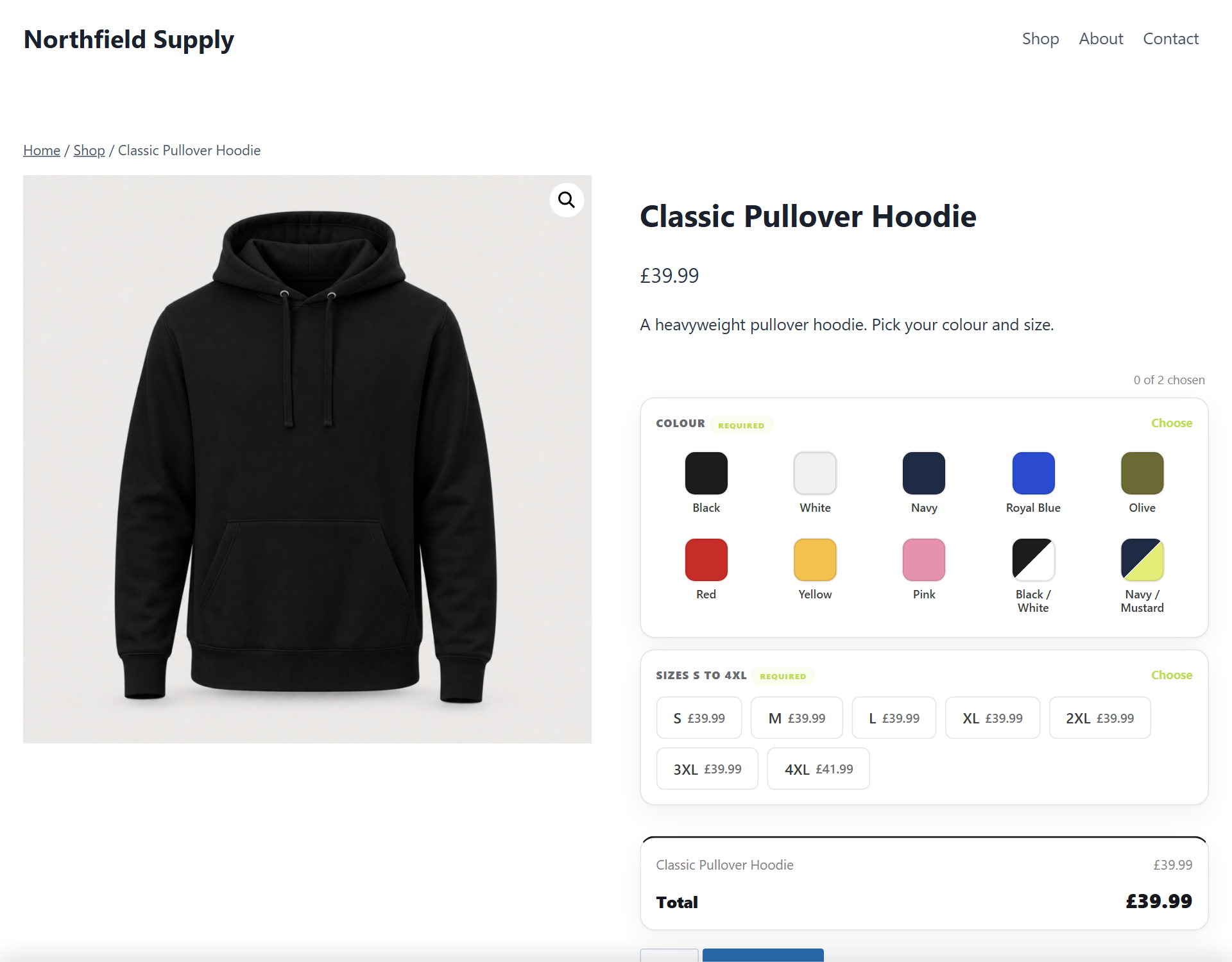
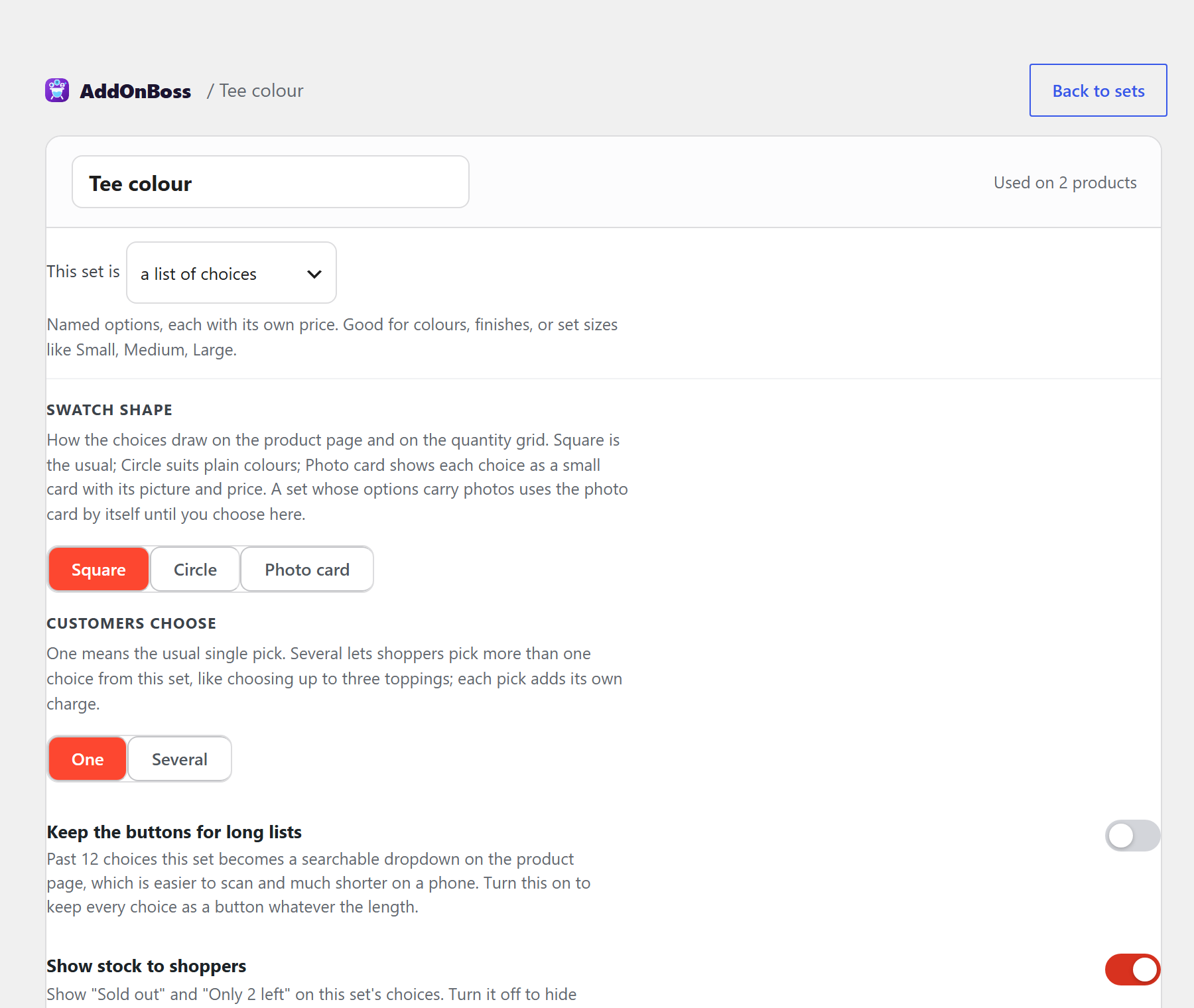
Build a set once, attach it anywhere. Colours as swatches, finishes as buttons, weights as a dropdown. Add a field for the name to engrave or the message to print. Each choice can carry a charge, and that charge behaves like part of the price rather than something stapled on afterwards.
Try it live: demo.bossmage.com is a full demo store running Pro. Put a name and number on a team kit, pick a colour and watch the photo change, order a whole size run in one grid. Click around and configure things, nothing breaks.
What you can sell with it
- A gift shop. An engraved board with a finish to choose, a name to engrave and gift wrap as an optional extra, each carrying its own charge.
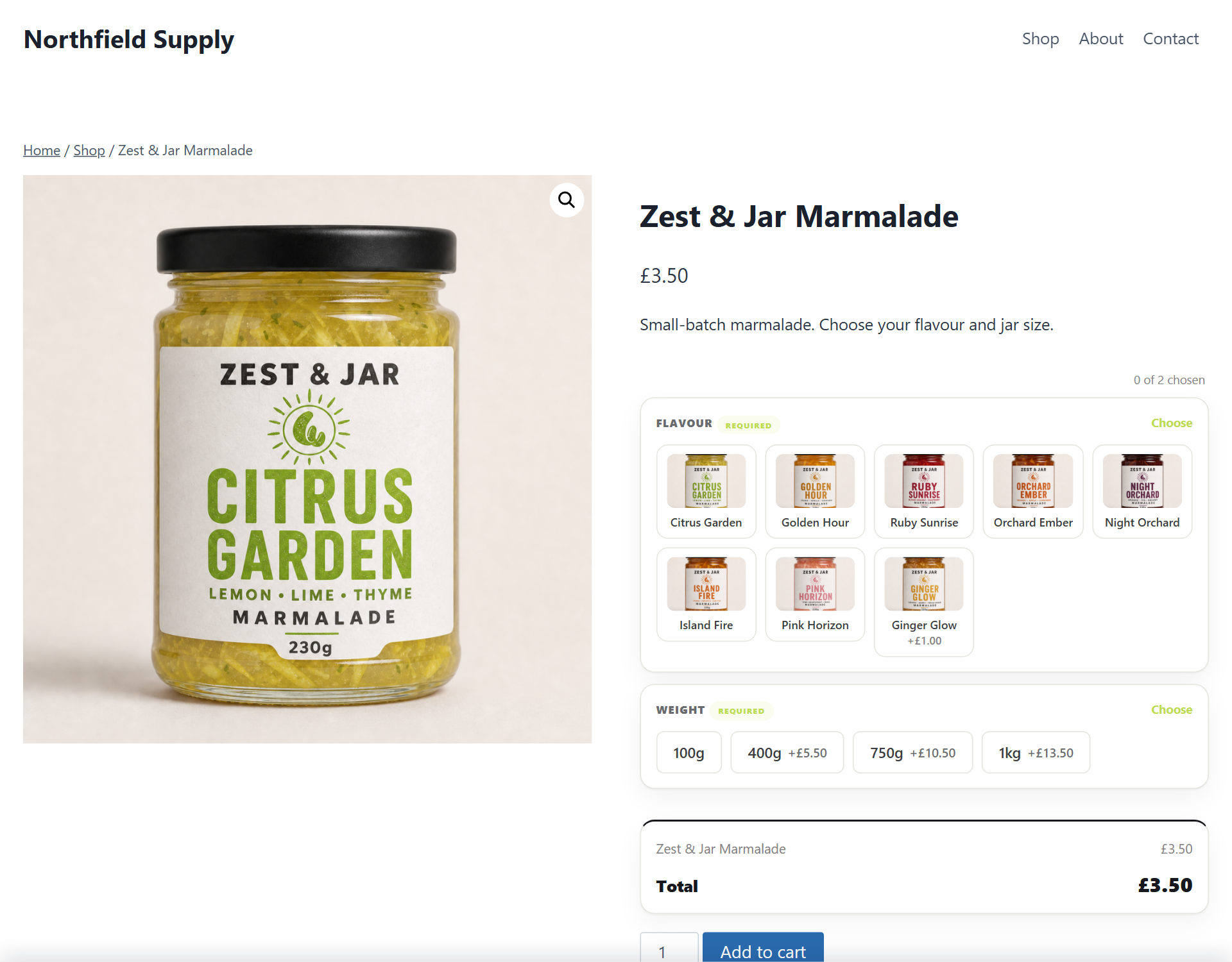
- A sweet shop. Pick and mix by the choice, with a limit on how many, and any single flavour able to sell out on its own while the rest stay on sale (the per-choice count is Pro).
- A signage, framing or blinds shop. A price grid with width down one side and height across the other, or a rate per square metre applied to the exact size a customer types in (Pro).
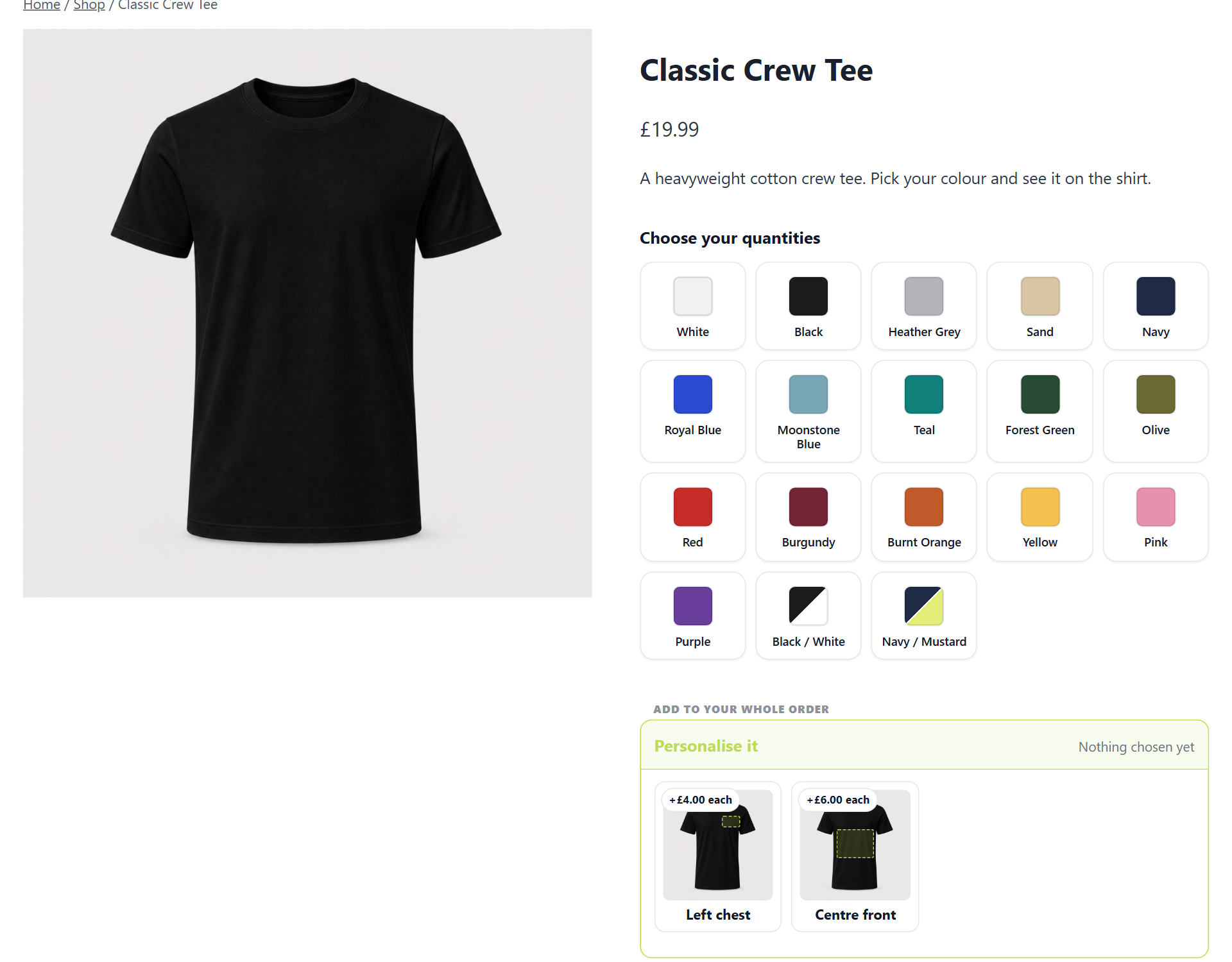
- A workwear or print shop. A whole size run ordered in one grid, priced down by quantity band, with the customer’s logo uploaded, checked for resolution before it reaches your printer, and drawn on your own product photo as they type (Pro).
- Any shop with a variation problem. Five colours by five sizes offered as choices, instead of twenty-five variations to build and price. A made-to-order shop needs nothing else. A shop that counts stock on each colour and size wants Pro, where a single choice holds its own stock.
What makes AddOnBoss different
A library, not a form on every product. Most plugins in this category have you build a form on each product, so the same five colours get rebuilt fifty times and adding a sixth means fifty edits. Here an option set is a thing in its own right. Build Colours once, attach it wherever it belongs, and editing it in one place updates every product using it. If one product cannot be had in two of those colours, tick them off for that product alone and the rest of the shop is unaffected.
The free plugin is a whole product, not a taste of one. Option sets, several-choice sets with bounds, fourteen field types, groups and the full cart and order path are all here, and every one of them charges and taxes correctly. Pro adds jobs the free plugin does not attempt, like artwork upload and made-to-measure pricing. It is not the same plugin with something switched off.
Pro handles the jobs that usually need a second plugin. Price by the square metre from the dimensions a customer types, or from a width-by-height grid, the way the made-to-measure trade writes its own price lists. Order a whole size run in one grid, every colour by every size, priced down by quantity band as the run grows. Hold stock on a single choice, so one flavour sells out on its own while the rest stay on sale. Take the customer’s artwork, check it is high enough resolution before it reaches your printer, and draw their name or logo onto your own product photo as they type.
One engine, two plugins. AddOnBoss and BundleBoss run the same options engine and share one option-set library. A Colour set you build in either one is ready in the other, with no export, no second copy to keep in step, and no double charging when both are active.
And the money is right. Every charge joins the cart line through WooCommerce’s own pricing and tax, so it is taxed exactly as the product is, in the basis your store displays, and it lands on the order as part of the line. It is never a surcharge bolted on after tax. Worth checking before you commit to any options plugin, because getting it wrong is invisible until an accountant finds it.
What the free plugin does
This is the whole options product for a simple product. Build a set once, attach it anywhere, and the choices are priced and taxed as part of the line.
- Reusable option sets: define colours, sizes, finishes or weights once, attach them to any product, reorder and rename from one library. They show as swatches, buttons or a dropdown, and each choice can carry a charge.
- Choose one or choose several: a set can let shoppers pick more than one choice, like choosing up to three toppings, with an optional “at least” and “up to” bound. Every pick keeps its own charge and each one reads separately in the cart and on the order.
- Custom fields: a name to print, a message, a number, a date, a time, a dropdown, a tick box, an email address, a web address, a section label and an info block, each optional or required, each able to charge once or for each item.
- A colour field: the colour they want you to use, picked from swatches you define, each with its own optional charge, or typed as any colour if you allow it. The order carries the colour name and code, and your order screen paints the swatch.
- A price they choose: a field where the shopper enters an amount of their own, for donations, tips and pay-what-you-wish extras. You set the floor, the ceiling and a suggested figure, and one-tap suggested amounts fill the box.
- A hidden note for your own orders: a value that rides on every order of the product, a production route or a supplier code, shown only on your order screen and never to the customer.
- Long lists search themselves: past a dozen choices, any dropdown becomes a searchable list that filters as the shopper types, with unavailable choices shown but not pickable. Phones get the same control, sized for thumbs.
- Groups: gather related options under their own headings, so a long list reads in sections instead of one run.
- A product can refuse a choice: use one shared Colour set across the shop and tick off the two colours this particular product cannot be had in. The set stays one set, so a colour added to it later is offered everywhere it was not refused.
- A correct cart and order path: options join the line through WooCommerce’s own pricing and tax, and the picks read on the order screen, in emails and on reorder.
Part of the BossMage family
AddOnBoss is made by BossMage, alongside BundleBoss.
BundleBoss builds bundles, mix and match packs and build-your-own boxes. AddOnBoss puts options, add-ons and personalisation on a product’s own page. They are separate plugins and either works alone, but they were built as one engine, so running both gives you a single option-set library rather than two lists to maintain. Build a Colour set for a bundle and it is already there for a simple product, and the other way round.
Neither plugin needs the other. If you run both, keep BundleBoss updated to a version that ships the shared engine. AddOnBoss detects an older BundleBoss and waits, with a notice, rather than risking a conflict; once BundleBoss is updated it switches on by itself.
Guides and screenshots for every feature are at bossmage.com/docs/addonboss.
What AddOnBoss Pro adds
AddOnBoss Pro is a separate paid plugin. The Solo plan has a 14-day trial, no card needed. It adds:
- Options on variable products, so a parent can offer sets alongside its own variations
- A quantity grid: order a whole range at once, every colour by every size, as one order
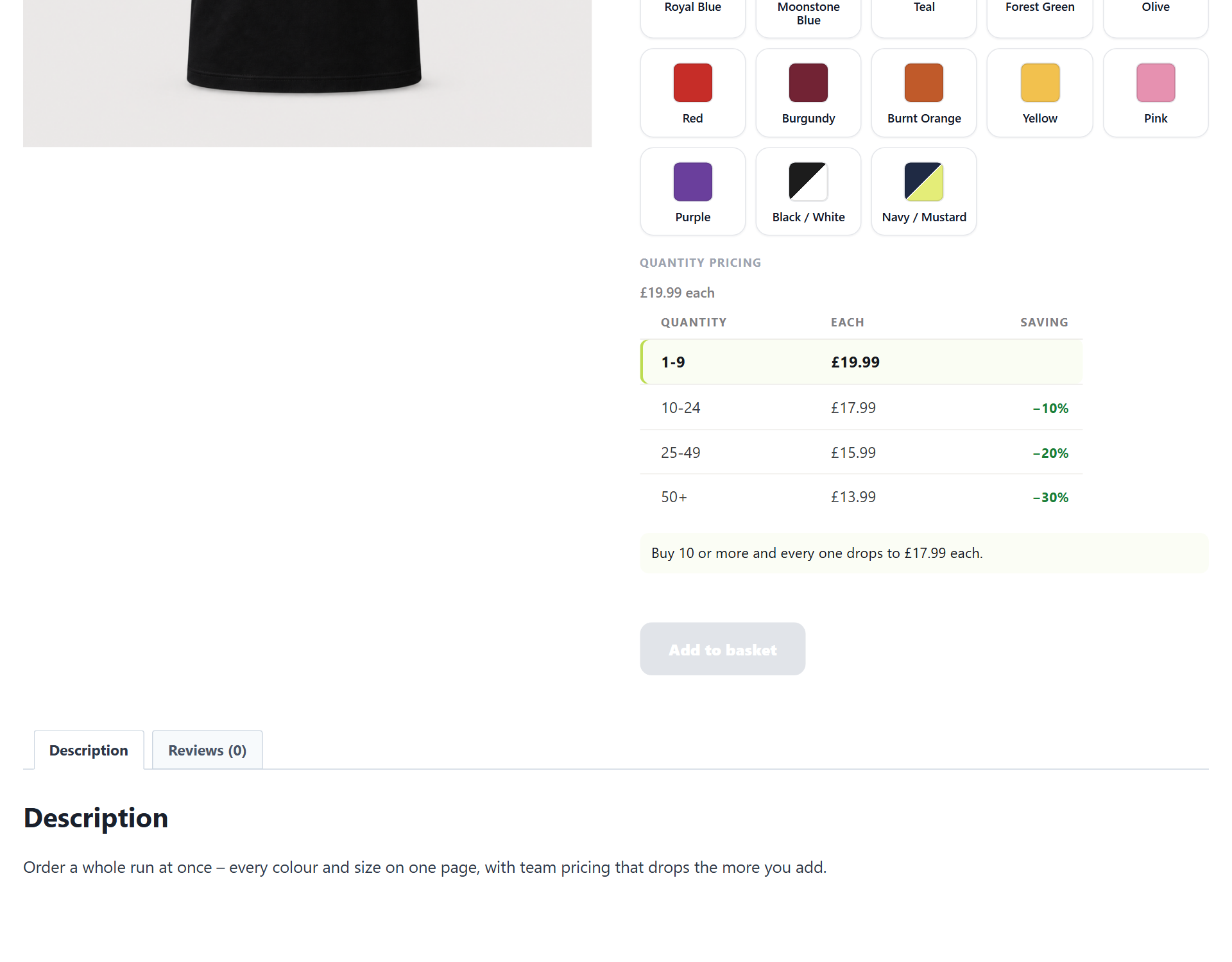
- Quantity discounts: price breaks by how many they buy (10 to 24 pay one price, 25 to 49 a lower one), shown as a trade price table or a card ladder, counted across a whole size run
- File and artwork upload, with a confined upload area, resolution checks before you print, and GDPR export and erase
- Print areas and product sides, with the customer’s name or logo drawn on your own product photo as they type
- Conditional choices: reveal or hide a set or a field depending on another answer, written in the words you would say out loud
- Choices that can’t go together: in a pick-several set, group the choices that exclude each other, like print and embroidery on the same breast. A blocked choice greys out and says why, the till refuses the pair whatever a browser posts, and a choice like “no printing needed” can stand alone
- Measured sizes: price by length, area or volume from the dimensions a customer types
- Price tables: a grid of prices, width down one side and height across the other, with a minimum charge and an optional margin on a cost grid. Shoppers pick a size or type their own and the right cell prices it
- Stock per option: hold a count on a single choice, so ten jars of one flavour sell out on their own while the rest stay on sale. A sale takes it off, a cancel or refund with restock puts it back, and nobody can order more than you have. The count lives on the option itself: nothing is added to your product list
- A photo per choice that swaps the product image when they pick it
- Per-letter, percentage and per-unit-entered pricing for add-on fees
- Ask a field more than once: let a shopper add another engraving line, or ask for a name for each item they buy, so six shirts collect six names. Each one is priced and shows on the order separately
- Folding sections for a product with a lot of choices, so a long page reads as a handful of headings. A group holding something the shopper has to answer is never folded away
- Tags across the library: tag sets one at a time or forty at once, narrow the library by one tag or two, and rename, recolour, merge or delete your tags from one dialog. If you also run StockBoss the supplier’s own label arrives by itself, and imports never touch your own tags
Nothing you build in the free plugin is lost if you add Pro later, and nothing you built with Pro is deleted if you stop. Those settings stay on disk and come back with the plugin.
Requirements
- WordPress 6.4 or newer
- WooCommerce 8.0 or newer, tested to 10.0
- PHP 8.0 or newer
Declared compatible with WooCommerce High Performance Order Storage and with the block cart and checkout.
Tell us what you need
If AddOnBoss almost does what your shop needs, say so on the support forum for this plugin. We read every thread, and a specific description of the job you are trying to do is worth more to us than a feature name. What is being worked on next is at bossmage.com/roadmap.
Privacy
AddOnBoss does not collect, store or transmit any personal data of its own.
- A customer’s option choices and any text they enter, such as a name to engrave, are stored only as part of their cart and order: standard WooCommerce order data under your control, removed whenever you erase the order.
- Entered field values are covered by WordPress’s personal-data export and erase tools, so a data request returns them and an erase request deletes them. In Pro, where a customer can upload a file, those files are covered the same way.
- The plugin sets no advertising or tracking cookies.
Third-party services
The free version of AddOnBoss does not connect to any external service or send any data off your site.
AddOnBoss Pro is a separate, paid plugin that uses Freemius for checkout, licensing and updates. None of that is included in this free version.
Screenshots
Installation
- Upload the plugin to
/wp-content/plugins/or install it from the Plugins screen, and activate it. - WooCommerce must be active.
- Open Products, edit any product, and use the Product Options panel to attach an option set or add fields.
- Build and reuse option sets from the Option Sets library in the menu.
If you also run BundleBoss, keep BundleBoss updated to a version that ships the shared engine before activating AddOnBoss. AddOnBoss detects an older BundleBoss and waits, with a notice, rather than risking a conflict; once BundleBoss is updated it switches on by itself.
FAQ
-
How is this different from using a variable product?
-
A variable product creates a real variation for every combination, so five colours by five sizes is twenty-five things to create, price and keep in stock. An option set offers the same five colours as choices on the product page without generating anything, so the product stays one product. Use variations when each combination genuinely needs its own price, SKU and stock. Use option sets when they do not, which is most of the time.
-
How do I add options without creating variations?
-
Build an option set, for example a list of colours each with an optional charge, and attach it to any product from the Product Options panel. The product offers those choices on its page like a variable product would, but no variations are generated, so the product stays light and the editor stays fast.
-
Will it create dozens of variations?
-
No. That is the point. An option set offers the choices a variable product would without generating any variations, so a product with many colours and sizes stays a single light product.
-
Are the extra charges taxed correctly?
-
Yes. A charge joins the cart line through WooCommerce’s own pricing, so it is taxed exactly as the product is, in the same basis your store displays. Nothing is added as an untaxed surcharge, and this is true in the free plugin, not only in Pro.
-
Can I use the same option set on more than one product?
-
Yes, that is what the library is for. Build a Colour set once and attach it to as many products as you like. Edit it in one place and every product follows. If one product cannot be had in two of those colours, tick those choices off for that product and the rest of the shop is unaffected.
-
Do the customer’s choices show on the order?
-
Yes. Every pick and every typed answer reads on the order screen, in the order emails and on the customer’s account, and they survive a reorder. Whoever makes the thing sees what was asked for.
-
On products with required options, AddOnBoss automatically hides Apple Pay, Google Pay and PayPal express buttons on the product page. Those buttons skip the option form, so the order would arrive without the answers you require. Products whose options are all optional keep their buttons, and express payment still appears in the cart and at checkout, where the chosen options are already included. It covers the major express providers; developers can override it per product with the addon_boss_allow_express_pay filter.
-
Do I need BundleBoss to use AddOnBoss?
-
No. AddOnBoss works entirely on its own. If BundleBoss is also installed, the two share one option-set library, so a set you build in one is available in the other. Each plugin runs its own engine and they are built to run side by side without conflict.
-
Does it work with variable products?
-
The free plugin puts option sets on simple products. Options alongside a variable product’s own variations are a Pro feature, because a page offering two choice systems at once has to reconcile them.
-
Will it slow my product page down?
-
Options are drawn by the plugin rather than generated as variations, so a product with fifty choices is still one product with one set of data behind it. There is no variation table to load and no combination matrix to build.
-
Does it work with the block cart and checkout?
-
Yes. AddOnBoss declares compatibility with the block cart and checkout, and with WooCommerce High Performance Order Storage.
-
Can customers upload a logo or a file?
-
That is a Pro feature. With Pro, a file upload field lets the customer attach a logo or artwork, the file shows on the order for you to work from, and it is covered by WordPress’s personal-data export and erase tools. The free plugin has no upload field, so it never accepts or stores a customer file.
-
How do I price something by its size?
-
Two ways, and which one you want depends on how you sell. A price table is a grid: you type the price for each width and height, and a shopper who asks for something in between is priced from the band it falls in, which is how the made-to-measure trade prints its own price lists. Measured sizes work the other way round, from a rate per square metre and the exact dimensions the customer types. Both are in Pro.
-
Can one choice sell out while the others stay on sale?
-
In Pro, yes. Put a count on a single option and WooCommerce owns it from there, so ten jars of one flavour sell out on their own while every other flavour carries on. A sale takes it off, a refund puts it back, and a sold-out choice says so and cannot be picked.
-
What happens to my settings if I stop paying for Pro?
-
Nothing is deleted. Your option sets, fields, prices and configuration stay exactly where they are, and the free plugin keeps rendering and charging everything it can. The Pro-only behaviour stands down and waits, so if you come back later your setup is as you left it.
-
How long does setup take?
-
A couple of minutes. Open a product, use the Product Options panel, and attach a set or add a field. Building a reusable set the first time takes a little longer; after that you attach it in a click.
-
What is removed if I uninstall?
-
AddOnBoss removes its own settings and cached data, and nothing else. Your option-set library and the options attached to each product are your configuration, not ours, and BundleBoss may be sharing that same library, so uninstalling never touches them. Products and orders are WooCommerce data and are left alone, so the record of what a customer ordered stays intact. Reinstall later and your sets are as you left them.
Reviews
There are no reviews for this plugin.
Contributors & Developers
“AddOnBoss – Product Addons, Product Options & Personalization for WooCommerce” is open source software. The following people have contributed to this plugin.
Contributors
Interested in development?
Browse the code, check out the SVN repository, or subscribe to the development log by RSS.
Changelog
1.12.4 – 2026-09-23
- Fixed (Pro): on the quantity grid, the running total now follows a rush date, a measured size, a look-up table or an upload the moment it changes the price. It listened only for print positions, so the total trailed one pick behind and could differ from what the basket charged.
- Fixed (Pro): a percentage rush charge on the quantity grid now shows as money, on the date itself and in the running total. It showed only its rule and the total left it out, so two hoodies at 39.99 read 79.98 while the basket charged 97.98. The figure comes from the product’s own price, the same one the basket takes it from.
- Fixed (Pro): when your plan no longer covers choices that can’t go together, the set editor now says your rules are kept but not being applied. Before, it showed nothing at all.
- Changed (Pro): rush charges on date and time fields now say per item on the product page, for example “+25% per item (minimum £5.00 each)”. That is how they have always been charged; the label now says so, and the settings hints spell it out.
- Fixed (Pro): the Spanish, French, Italian and Portuguese translations cover the reworded rush labels, so translated shops keep them in their own language. The time field’s pricing hint, which had been showing in English, is translated too.
1.12.3 – 2026-09-22
- Fixed (Pro): choices that can’t go together now stand down with the licence. Every other module stops when the plan does; this one kept refusing pairs after a lapse. Your rules stay saved and untouched through every edit, so relicensing enforces them again exactly as written.
- Fixed: the listing stops selling tags as a free feature. The library tags bullet moved to the Pro list where the feature lives, the 1.10.0 and 1.11.0 changelog entries now carry the Pro marker like their neighbours, and the Pro list now describes choices that can’t go together, which had shipped without a word.
1.12.2 – 2026-09-22
- Fixed: picking a photographed colour now changes the product photo on shops where a gallery plugin has replaced the standard WooCommerce gallery. Gallery Slider for WooCommerce removes the gallery the image swap was looking for, so the swap quietly did nothing there; it now drives the slider’s own main image, remembers which slide it borrowed so swiping cannot confuse the restore, and keeps the photo ahead of the slider’s lazy loading.
1.12.1 – 2026-09-22
- Fixed: picking a photographed colour on the quantity grid now changes the product photo. The image-swap setting worked on the one-at-a-time layout and did nothing on the grid: the grid never loaded the script that performs the swap, and a variable product’s colour tiles did not carry their photographs at all. Both are fixed, so the photo follows the open colour on simple and variable products alike.
1.12.0 – 2026-09-20
- New: rebuild a variable product as one product with option sets. Open a variable product and the Product options tab now offers it: a plain list of what carries over and what does not, then a draft copy built beside the original, which is never touched. Each pair keeps its own price, including any you set by hand that no colour step plus size step could add up to. Check the draft, and when it reads right it can take the original’s name and web address, bringing its reviews with it, while the original retires to a draft. Nothing is deleted.
- New: rules that show and hide now work in every build. Show or hide a set or a field on what a shopper picks or types, with and/or groups and no limit on how many, is free from this release. The comparisons that read a number as more than, less than or exactly stay in Pro, and a rule using one is left alone rather than half applied, so nothing is ever hidden for a reason the build cannot judge.
- New: the plugin’s opening checklist counts your own shop. It now says how many variable products you have and how many variations they carry between them, with a link to see them.
- Improved: a store with no option sets yet can still add a field. Add a field, Add a section and the arranged list waited behind the option-set library, so a brand new store had no way to put a field on a product at all. Only the set picker waits for the library now.
- Improved: the copy-a-setup panel explains itself. Searching says why a product does not match instead of refusing silently, a shop with nothing to copy from says so rather than offering a search that can only fail, and taking a setup into a product that already has one warns before it replaces it.
- Fixed: a bundle carrying leftover quantity-table settings showed £0.00 with an Add to cart that did nothing. The table is a choice made on a product, and it stayed behind when that product later became a bundle. A bundle is never offered the quantity table now, whatever it was set to before.
1.11.0 – 2026-09-18
- New: an option set can show shoppers a different name than the one it is filed under. File a set under an internal code so it is easy to find across a large shop, and give it a clean label for the product page. Leave the label blank and the set’s own name is shown, exactly as before.
1.10.3 – 2026-09-11
- Fixed: a bundle could offer two ways to buy it. The quantity table is a choice made on a product, and it stayed behind if that product later became a bundle. The table then laid itself over the bundle’s own builder, so the page carried two Add buttons: the builder’s, which priced the picks, and the table’s, which knew nothing about them. A bundle never takes the quantity table now, whatever the product was set to before it became one.
1.10.2 – 2026-09-09
- Fixed (Pro): rules that stop two choices going together were doing nothing at all on the block themes WordPress now ships by default. The script that greys the blocked choice was written into the page itself, where the theme rewrote a character inside it, and it stopped before it began. Nothing was reported, because nothing appeared to be wrong: the choices were simply all still pickable.
- Fixed (Pro): a date can be taken back. Picking a day that carries a rush charge left no way to change your mind, so an optional question kept its charge until the page was reloaded. There is a cross in the box now, and the Delete key does the same.
1.10.1 – 2026-09-07
- Fixed (money): the quantity table quoted a price nobody could buy. Ten of one colour with a size or colour uplift and a volume band read the band taken off the plain shelf price, so every uplift dropped out of the table, the header figure and the saving nudge together. It now prices the cells the shopper actually filled. Order totals were always right; only the figures read before buying were short.
- Fixed (money): every price a script prints now rounds the way the server does. A unit assembled from separate multiplications arrived a fraction under, and the browser printed a penny less than the row the page itself had shown a moment earlier.
- Fixed: a selection of two or more groups in the Option sets library did nothing. Delete, Duplicate and Empty each named the whole selection in one string, so the shop looked for a group of that name, found none, and reported success. One group at a time always worked, which is why it went unseen.
- Fixed: deleting a group now asks what should happen to the option sets inside, with the numbers from your own shop, and offers both answers: keep the sets, or delete them with the group. The selection bar asks the same question in the same words instead of the browser’s own box.
- Fixed (Pro): a tag can be taken off from the tag itself. The chips on a group’s header carry a remove control, so removing no longer means ticking the group and using the bar below. Tags kept up to date by a supplier feed still cannot be removed by hand.
- Fixed: searching the Attach option set box by a folder’s name keeps that folder’s rows. A heading is not selectable, so a search that matched only the folder hid the very rows it named.
- Fixed (Pro): the date field’s line stops contradicting the control beneath it. Where rush charges are on sale it names both the earliest free date and the soonest a rush charge reaches, rather than one date above a calendar offering earlier ones.
- Fixed (Pro): an optional date field arrives unanswered again. The browser was rewriting its “Choose a date” placeholder into the earliest date on every load, so a field nobody had answered came pre-filled with no way back to no answer.
1.10.0 – 2026-09-07
- New (Pro): a date field with the trade’s own rules. Set your lead time in working days, an order cut-off hour, days you are closed and one-off holidays, and every date the calendar offers is one you can meet; the earliest day is free and named. Rush bands charge for coming in sooner – a percentage of the item price or a flat floor, whichever is more – and the shopper can pick from a calendar or a plain list of turnarounds with the real date beside each.
- New (Pro): a time field that offers only slots you can work. Opening hours, a slot every 5 minutes to 2 hours, and windows that cost more for the busy part of the day. Offer a list of your slots or a free clock, and the page prices the window the chosen time falls in.
- New (Pro): tags across the Option sets library. Tag groups singly or in bulk, filter by tag, and rename, recolour, merge or delete your own tags from one dialog; tags that came from a supplier feed keep themselves up to date. The New tag button opens the same dialog everything else uses.
- New: every field can carry a Description shown to shoppers under it, and the editor shows a “Shoppers will see” preview while you type.
- Changed: “Their price” is now “Name your price”, and it speaks the shopper’s basis end to end. The chips, the bounds and the box all read the figure the shopper is browsing in – on a shop showing inc-VAT prices, type 6 and pay exactly 6 – and the charge underneath converts to the entry basis like every other fee. On a shop with a tax toggle, every figure on the field follows the switch, including the one in the box.
- Changed: a minimum or maximum on Name your price now refuses at the field, in the same words the till uses, instead of only at Add to basket. The running total never quotes an amount the till would refuse.
- Changed: refusals stopped wearing the shop’s brand colour. The message, the marked field and the receipt line have their own colour that no Colours-screen choice can repaint, and the complaint prints beside the rule it broke.
- Changed: the two scheduling fields say what they pick. “Date, with lead time and rush charges” and “Time of day, in slots” replace two names that both led with “collection”.
- Fixed: a searchable dropdown’s chosen answer now follows the VAT toggle like every other price on the page, and the committed answer is replaceable rather than editable – a keystroke starts a fresh search instead of chewing up your own answer.
- Fixed: a colour or dropdown value stored unslugged (an import, an older format) is accepted as the answer its own page offered, instead of silently never matching.
- Fixed: the date cut-off no longer shifts twice on shops away from UTC.
- Every locale updated: the nine shipped languages cover the date field, the time field, the tags screens and every new sentence a shopper can meet.
For the full history of earlier releases, see changelog.txt in the plugin folder, or
https://plugins.svn.wordpress.org/addon-boss/trunk/changelog.txt