

Description
AddOnBoss gives any product its options, add-ons and personalisation without generating a single variation. A product with five colours and five sizes would be twenty-five variations to build and maintain. Here it is one option set, attached in a click, and the product stays a single simple product. Your product editor stays fast, and adding a colour next month does not mean rebuilding every combination.
Build a set once, attach it anywhere. Colours as swatches, finishes as buttons, weights as a dropdown. Add a field for the name to engrave or the message to print. Each choice can carry a charge, and that charge behaves like part of the price rather than something stapled on afterwards.
What makes AddOnBoss different
The money is correct, in the free plugin. Every add-on charge joins the cart line through WooCommerce’s own pricing and tax. It is taxed exactly as the product is, in the same basis your store displays, and it lands on the order as part of the line. It is not a fee added after tax and it is not a surcharge that quietly ignores your tax class. This is the thing worth checking before you commit to any options plugin, because getting it wrong is invisible until an accountant finds it.
The free plugin is a whole product, not a taste of one. Option sets, several-choice sets with bounds, seven field types, groups and the full cart and order path are all here, and every one of them charges and taxes correctly. Pro adds jobs the free plugin does not attempt, like artwork upload and made-to-measure pricing. It is not the same plugin with something switched off.
One engine, two plugins. AddOnBoss and BundleBoss run the same options engine and share one option-set library. A Colour set you build in either one is ready in the other, with no export, no second copy to keep in step, and no double charging when both are active.
What the free plugin does
This is the whole options product for a simple product. Build a set once, attach it anywhere, and the choices are priced and taxed as part of the line.
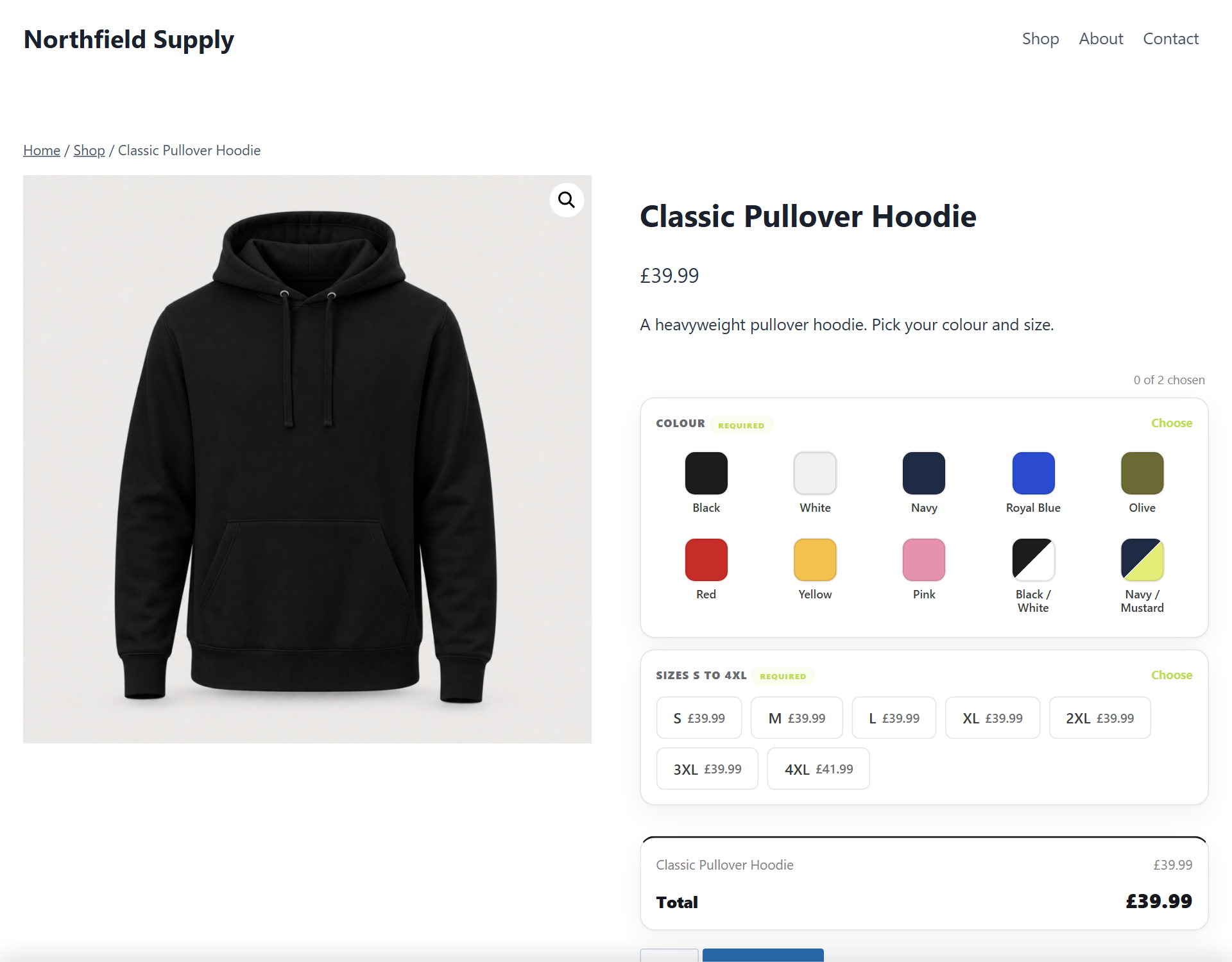
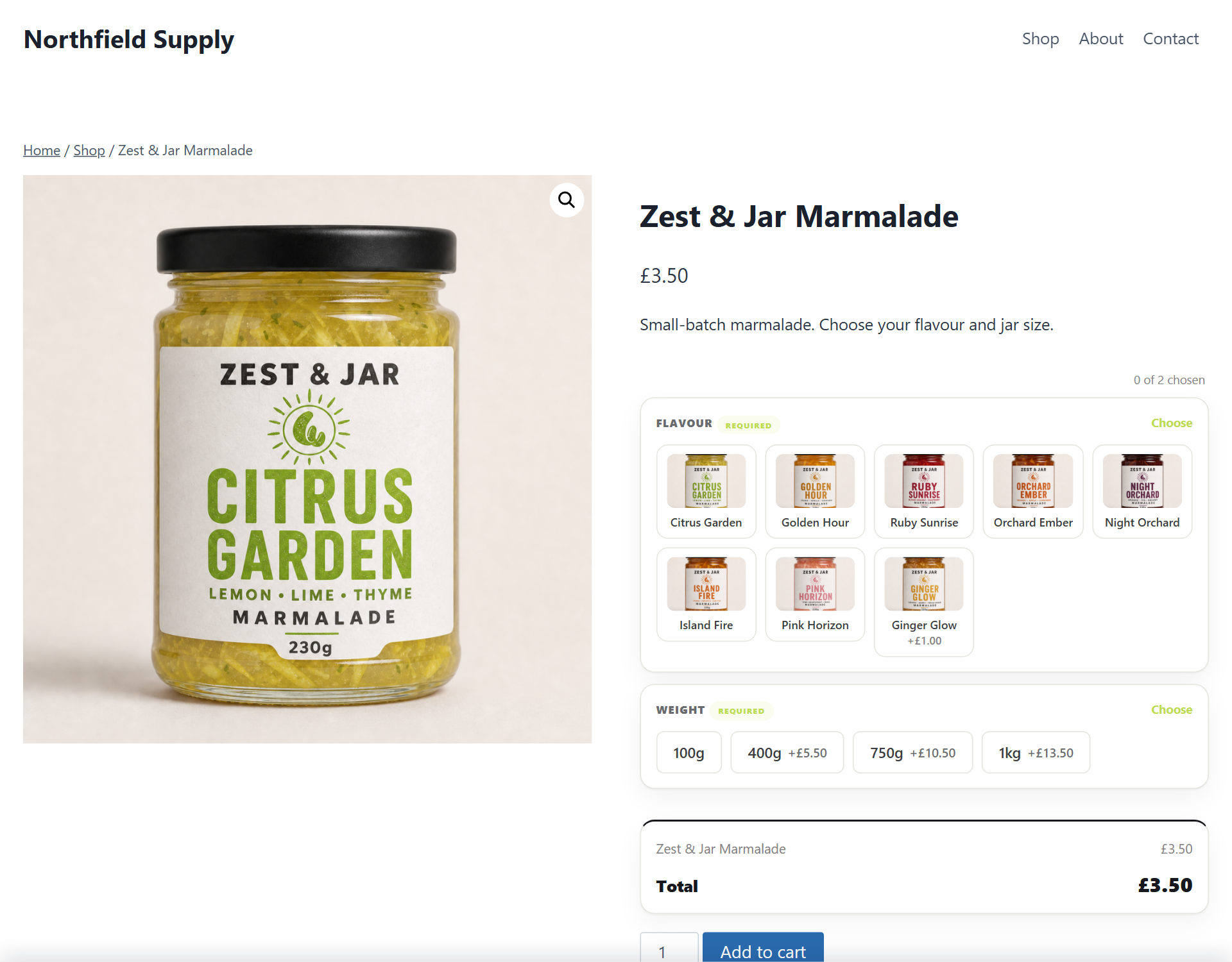
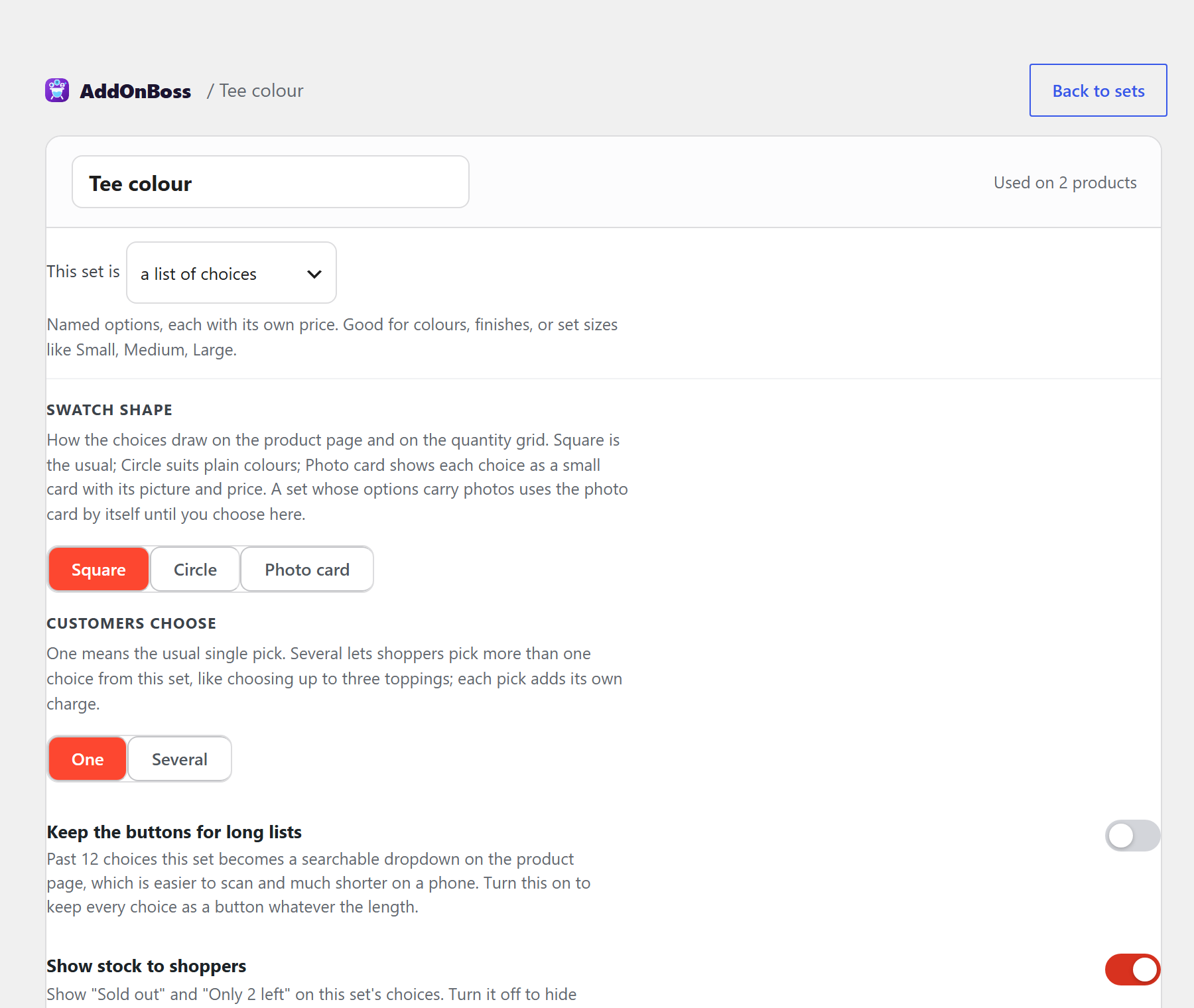
- Reusable option sets: define colours, sizes, finishes or weights once, attach them to any product, reorder and rename from one library. They show as swatches, buttons or a dropdown, and each choice can carry a charge.
- Choose one or choose several: a set can let shoppers pick more than one choice, like choosing up to three toppings, with an optional “at least” and “up to” bound. Every pick keeps its own charge and each one reads separately in the cart and on the order.
- Custom fields: a name to print, a message, a number, a dropdown, a tick box, a section label and an info block, each optional or required, each able to charge once or for each item.
- Groups: gather related options under their own headings, so a long list reads in sections instead of one run.
- A product can refuse a choice: use one shared Colour set across the shop and tick off the two colours this particular product cannot be had in. The set stays one set, so a colour added to it later is offered everywhere it was not refused.
- A correct cart and order path: options join the line through WooCommerce’s own pricing and tax, and the picks read on the order screen, in emails and on reorder.
Part of the BossMage family
AddOnBoss is made by BossMage, alongside BundleBoss.
BundleBoss builds bundles, mix and match packs and build-your-own boxes. AddOnBoss puts options, add-ons and personalisation on a product’s own page. They are separate plugins and either works alone, but they were built as one engine, so running both gives you a single option-set library rather than two lists to maintain. Build a Colour set for a bundle and it is already there for a simple product, and the other way round.
Neither plugin needs the other. If you run both, keep BundleBoss updated to a version that ships the shared engine. AddOnBoss detects an older BundleBoss and waits, with a notice, rather than risking a conflict; once BundleBoss is updated it switches on by itself.
Guides and screenshots for every feature are at bossmage.com/docs/addonboss.
What AddOnBoss Pro adds
AddOnBoss Pro is a separate paid plugin. It adds:
- Options on variable products, so a parent can offer sets alongside its own variations
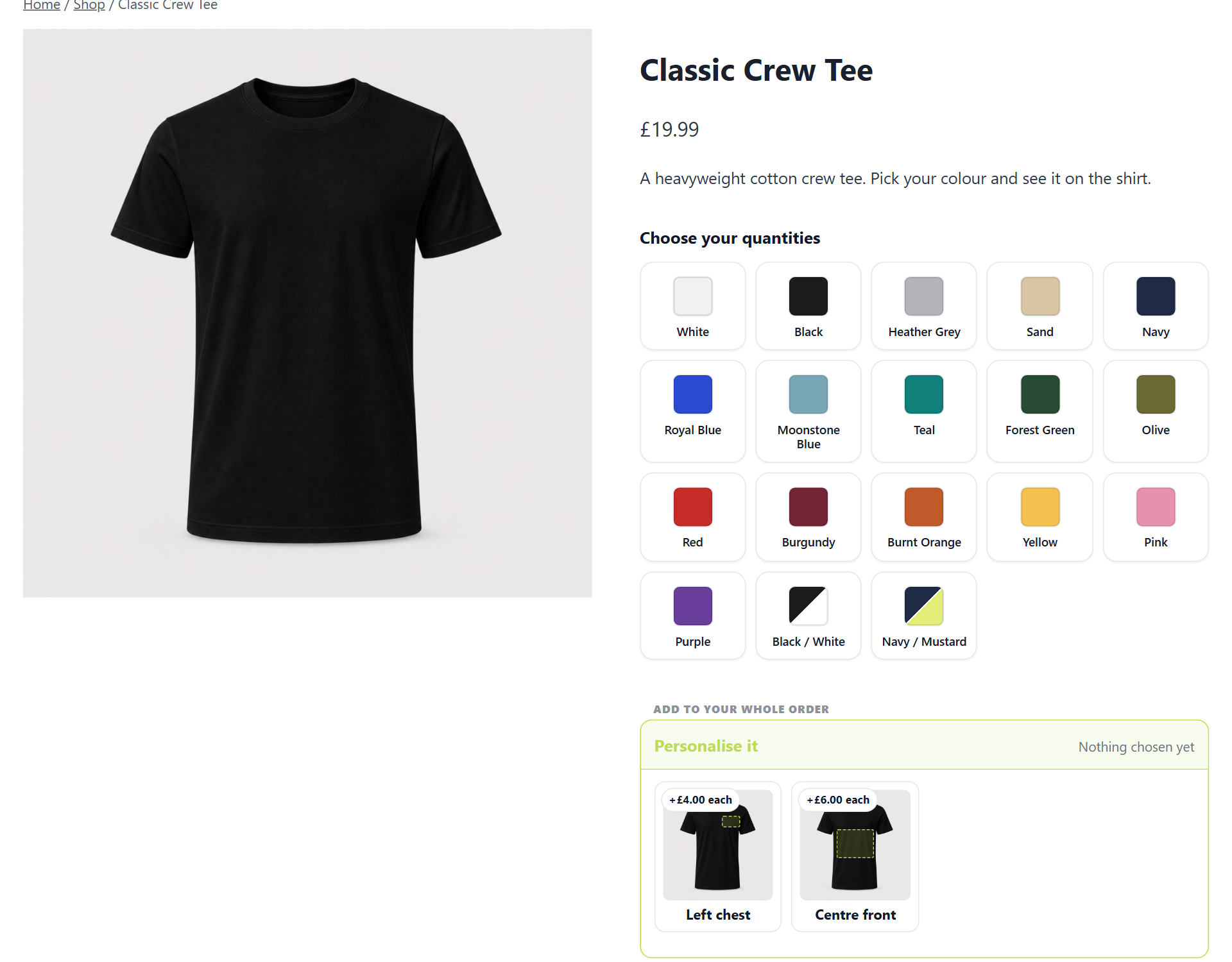
- A quantity grid: order a whole range at once, every colour by every size, as one order
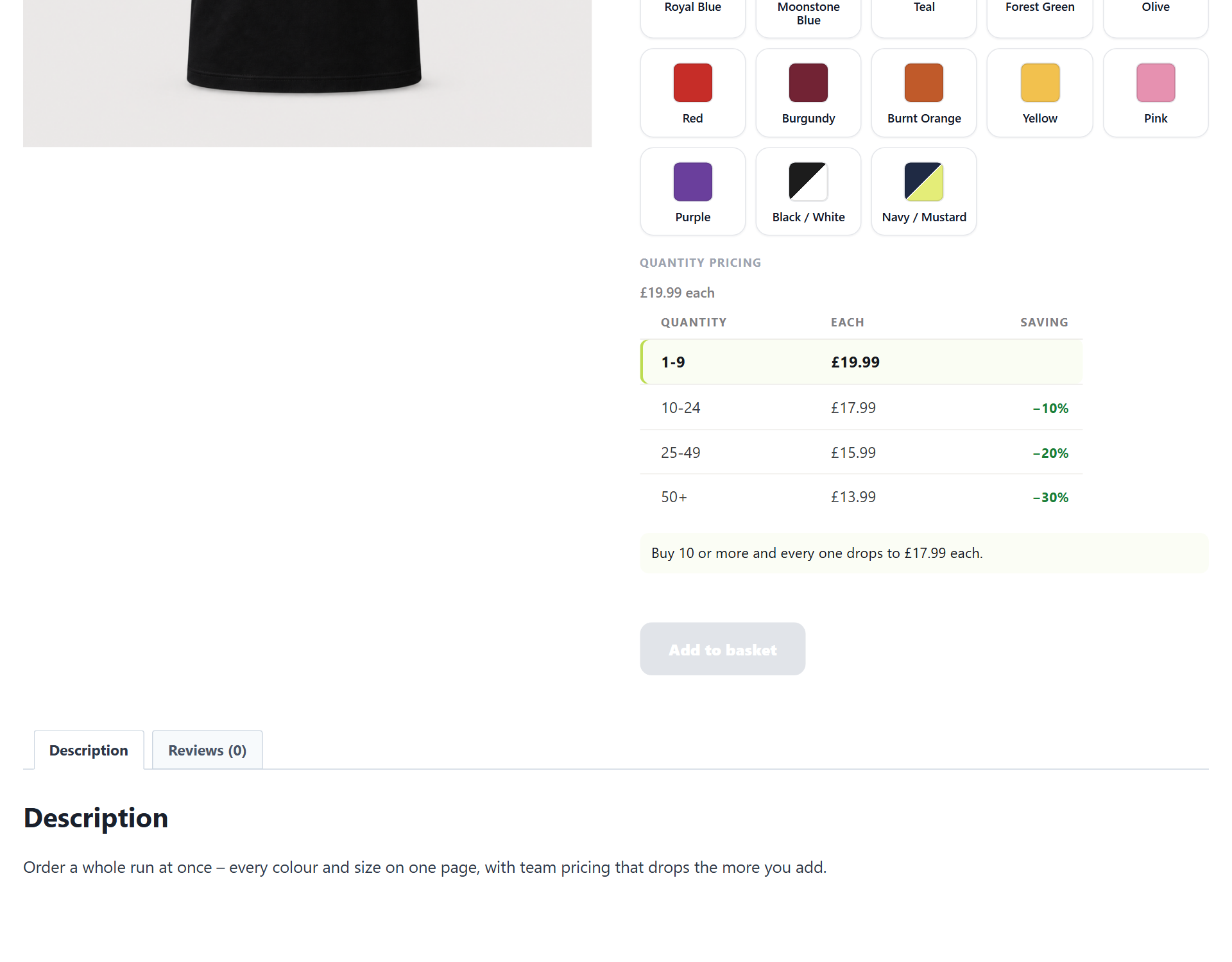
- Quantity discounts: price breaks by how many they buy (10 to 24 pay one price, 25 to 49 a lower one), shown as a trade price table or a card ladder, counted across a whole size run
- File and artwork upload, with a confined upload area, resolution checks before you print, and GDPR export and erase
- Print areas and product sides, with the customer’s name or logo drawn on your own product photo as they type
- Conditional choices: reveal or hide a set or a field depending on another answer, written in the words you would say out loud
- Measured sizes: price by length, area or volume from the dimensions a customer types
- Price tables: a grid of prices, width down one side and height across the other, with a minimum charge and an optional margin on a cost grid. Shoppers pick a size or type their own and the right cell prices it
- Stock per option: hold a count on a single choice, so ten jars of one flavour sell out on their own while the rest stay on sale. WooCommerce does the counting, so a sale takes it off, a cancel or refund puts it back, and nobody can order more than you have
- A photo per choice that swaps the product image when they pick it
- Per-letter, percentage and per-unit-entered pricing for add-on fees
- Ask a field more than once: let a shopper add another engraving line, or ask for a name for each item they buy, so six shirts collect six names. Each one is priced and shows on the order separately
- Folding sections and steps for a product with a lot of choices. A group holding something the shopper has to answer is never folded away
Nothing you build in the free plugin is lost if you add Pro later, and nothing you built with Pro is deleted if you stop. Those settings stay on disk and come back with the plugin.
Requirements
- WordPress 6.4 or newer
- WooCommerce 8.0 or newer, tested to 10.0
- PHP 8.0 or newer
Declared compatible with WooCommerce High Performance Order Storage and with the block cart and checkout.
Tell us what you need
If AddOnBoss almost does what your shop needs, say so on the support forum for this plugin. We read every thread, and a specific description of the job you are trying to do is worth more to us than a feature name. What is being worked on next is at bossmage.com/roadmap.
Privacy
AddOnBoss does not collect, store or transmit any personal data of its own.
- A customer’s option choices and any text they enter, such as a name to engrave, are stored only as part of their cart and order: standard WooCommerce order data under your control, removed whenever you erase the order.
- Entered field values are covered by WordPress’s personal-data export and erase tools, so a data request returns them and an erase request deletes them. In Pro, where a customer can upload a file, those files are covered the same way.
- The plugin sets no advertising or tracking cookies.
Third-party services
The free version of AddOnBoss does not connect to any external service or send any data off your site.
AddOnBoss Pro is a separate, paid plugin that uses Freemius for checkout, licensing and updates. None of that is included in this free version.
Screenshots
Installation
- Upload the plugin to
/wp-content/plugins/or install it from the Plugins screen, and activate it. - WooCommerce must be active.
- Open Products, edit any product, and use the Product Options panel to attach an option set or add fields.
- Build and reuse option sets from the Option Sets library in the menu.
If you also run BundleBoss, keep BundleBoss updated to a version that ships the shared engine before activating AddOnBoss. AddOnBoss detects an older BundleBoss and waits, with a notice, rather than risking a conflict; once BundleBoss is updated it switches on by itself.
FAQ
-
How is this different from using a variable product?
-
A variable product creates a real variation for every combination, so five colours by five sizes is twenty-five things to create, price and keep in stock. An option set offers the same five colours as choices on the product page without generating anything, so the product stays one product. Use variations when each combination genuinely needs its own price, SKU and stock. Use option sets when they do not, which is most of the time.
-
How do I add options without creating variations?
-
Build an option set, for example a list of colours each with an optional charge, and attach it to any product from the Product Options panel. The product offers those choices on its page like a variable product would, but no variations are generated, so the product stays light and the editor stays fast.
-
Will it create dozens of variations?
-
No. That is the point. An option set offers the choices a variable product would without generating any variations, so a product with many colours and sizes stays a single light product.
-
Are the extra charges taxed correctly?
-
Yes. A charge joins the cart line through WooCommerce’s own pricing, so it is taxed exactly as the product is, in the same basis your store displays. Nothing is added as an untaxed surcharge, and this is true in the free plugin, not only in Pro.
-
Can I use the same option set on more than one product?
-
Yes, that is what the library is for. Build a Colour set once and attach it to as many products as you like. Edit it in one place and every product follows. If one product cannot be had in two of those colours, tick those choices off for that product and the rest of the shop is unaffected.
-
Do the customer’s choices show on the order?
-
Yes. Every pick and every typed answer reads on the order screen, in the order emails and on the customer’s account, and they survive a reorder. Whoever makes the thing sees what was asked for.
-
Do I need BundleBoss to use AddOnBoss?
-
No. AddOnBoss works entirely on its own. If BundleBoss is also installed, the two share one option-set library, so a set you build in one is available in the other. Each plugin runs its own engine and they are built to run side by side without conflict.
-
Does it work with variable products?
-
The free plugin puts option sets on simple products. Options alongside a variable product’s own variations are a Pro feature, because a page offering two choice systems at once has to reconcile them.
-
Will it slow my product page down?
-
Options are drawn by the plugin rather than generated as variations, so a product with fifty choices is still one product with one set of data behind it. There is no variation table to load and no combination matrix to build.
-
Does it work with the block cart and checkout?
-
Yes. AddOnBoss declares compatibility with the block cart and checkout, and with WooCommerce High Performance Order Storage.
-
Can customers upload a logo or a file?
-
That is a Pro feature. With Pro, a file upload field lets the customer attach a logo or artwork, the file shows on the order for you to work from, and it is covered by WordPress’s personal-data export and erase tools. The free plugin has no upload field, so it never accepts or stores a customer file.
-
How do I price something by its size?
-
Two ways, and which one you want depends on how you sell. A price table is a grid: you type the price for each width and height, and a shopper who asks for something in between is priced from the band it falls in, which is how the made-to-measure trade prints its own price lists. Measured sizes work the other way round, from a rate per square metre and the exact dimensions the customer types. Both are in Pro.
-
Can one choice sell out while the others stay on sale?
-
In Pro, yes. Put a count on a single option and WooCommerce owns it from there, so ten jars of one flavour sell out on their own while every other flavour carries on. A sale takes it off, a refund puts it back, and a sold-out choice says so and cannot be picked.
-
What happens to my settings if I stop paying for Pro?
-
Nothing is deleted. Your option sets, fields, prices and configuration stay exactly where they are, and the free plugin keeps rendering and charging everything it can. The Pro-only behaviour stands down and waits, so if you come back later your setup is as you left it.
-
How long does setup take?
-
A couple of minutes. Open a product, use the Product Options panel, and attach a set or add a field. Building a reusable set the first time takes a little longer; after that you attach it in a click.
-
What is removed if I uninstall?
-
AddOnBoss removes its own settings and cached data, and nothing else. Your option-set library and the options attached to each product are your configuration, not ours, and BundleBoss may be sharing that same library, so uninstalling never touches them. Products and orders are WooCommerce data and are left alone, so the record of what a customer ordered stays intact. Reinstall later and your sets are as you left them.
Reviews
There are no reviews for this plugin.
Contributors & Developers
“AddOnBoss – Product Options, Add-Ons & Personalisation for WooCommerce” is open source software. The following people have contributed to this plugin.
Contributors
Interested in development?
Browse the code, check out the SVN repository, or subscribe to the development log by RSS.
Changelog
1.3.1 – 2026-08-06
- Fixed: on a page that had already finished its stylesheets, a block of styling was written out by the plugin rather than handed to WordPress. It is handed over now, so WordPress builds the tag. Nothing looks different; the plugin simply stops doing a job that is not its own.
- Changed: every block of output the plugin gathers up before printing is now closed even if something in the middle of it fails. A theme or another plugin throwing an error part-way through can no longer take the rest of the page down with it.
- Changed: the BossMage home page works out which of our plugins you are running instead of asking them to announce themselves. Still one shared menu, and nothing has to be agreed between plugins, so the page is right whatever versions you have installed. If you also run BundleBoss, its own home page will not list AddOnBoss until BundleBoss next updates.
- Fixed: a rule that turns on when a field holds a particular answer now matches answers with an apostrophe in them, such as O’Brien. Before, the row that rule governed stayed shut for those customers and opened for everybody else.
1.3.0 – 2026-08-05
- Fixed (Pro): a rule that starts from a field now works on the quantity grid too. A tick box above an upload did nothing there, because the grid was leaving every conditional field off the page altogether rather than showing it locked. A rule that starts from an option set still stands down on a grid, where one line covers every colour and size at once and there is no single pick to read.
- Fixed (Pro): a rule could not reach the fields it was allowed to use. A field you had just added offered nothing to point at until the product was saved and the page reloaded, so “show this only when that is ticked” looked like it did not exist. The list is now built from the questions actually on the panel.
- Changed (Pro): where a question sits below the one you are writing a rule for, the editor now names it and says to drag it above, instead of quietly leaving it out of the list.
- Fixed (Pro): the quantity break rows had no columns. The two boxes now fill their headings, How many and Price each, and the heading follows whether you are typing prices or percentages.
- Changed (Pro): the quantity break starting points are named by the breaks they fill in, 10, 25, 50 rather than “Trade ladder”.
- Fixed (Pro): the swatch shape you choose on an option set now reaches the quantity grid, and the grid draws its swatches exactly as the single-pick page does, without the white ring around the colour.
- Fixed: ticking “Not on this product” against a choice now strikes it through as you tick it, rather than waiting for a save. The tick box is also clearer: it used to read “Not on this one”, which could mean the choice or the product.
- Fixed: AddOnBoss shows its own logo on the BossMage home, its own screens and the licence screens, instead of a placeholder badge.
- Fixed: the BossMage home card offers Positions, which was the one screen it left out.
- Fixed: activating AddOnBoss dropped you on an error page saying you were not allowed to view it. The plugin had installed correctly and nothing was actually wrong, but it was the first thing a new user saw. Activating now opens the AddOnBoss screen.
- Fixed: the colours you choose now reach the quantity grid. A shop selling by grid could set a brand colour and watch nothing change, because the grid was still drawing itself in the old built-in colour.
- New: attach a whole group of option sets in one pick. Where your library keeps sets in groups, the attach menu lists them under their group and offers the lot, so a product that needs five of them takes one click instead of five. A set already on the product is skipped rather than added twice.
- New: a product can refuse some choices of a shared set. Use the same Colour set everywhere and tick “Not on this product” against the two colours this product cannot be had in. The set stays one set, so a colour added to it next month is offered everywhere it was not refused.
- New (Pro): a rule can start from a field, not only an option set, and a rule can hide as well as show. Tick a box and the upload goes, in the words you would use out loud: “Hidden when Use my own artwork is ticked”. A rule may point at any question asked above it.
- New: an info block can keep its label to itself. The name still finds the block in the editor; untick one box and the customer sees the content on its own.
- Changed: the template link on an upload field says what it is and what the shopper gets, instead of being an empty box with a web address in it.
- Fixed: a rule with more than one condition could shut a field the moment any choice changed, even where the rule was satisfied.
- New (Pro): stock on a single choice. Type a count on one option and WooCommerce counts it from there, so eleven jars of one flavour sell out on their own while every other choice carries on. A sold-out choice says so and cannot be picked. The same count is held however the sale is dressed: the product’s own page, the quantity grid, two separate cart lines, a re-order, or inside a BundleBoss bundle.
- New (Pro): the quantity grid shows option photos. A set built from pictures draws its cards as pictures on the grid, not just colour swatches, so a flavour or a design is chosen by sight.
- New (Pro): price breaks work on the quantity grid too, not only the single-pick page, and the band table renders alongside it so a shopper sees what the next band is worth.
- Changed: a choice that costs extra says so on its own card. Where a shop hides its item prices the card shows the extra rather than the price, so a dearer choice is never a surprise at the till, and the extra is only shown where it is actually charged.
- Fixed: a cart line listing repeated blocks read across the blocks instead of down one, so whoever made the thing saw the second engraving’s words above the first one’s font. Each block now reads whole before the next begins.
- Fixed: a price break could not make a product free. A band left blank, typed as zero, or set to a hundred percent off no longer gives the item away.
- Fixed: a per-item field kept charging for entries that were no longer being bought after the quantity was lowered.
- Fixed: a sold-out choice now tells a screen reader it is unavailable, not just the eye.
- Fixed: quantity grid cells keep an even height when a label wraps to two lines, and photo-card option rows align in an even grid.
1.2.0 – 2026-08-03
- New (Pro): personalisation you can see. Mark on your own product photo exactly where a logo or a line of text goes, and the customer’s words are drawn onto the picture live as they type. A set can hold a photo per view, so a front and a back are two pictures and each spot picks the one it sits on. The block shows as a card, a bar that opens, or a button that opens a panel, and on a phone a slim Add to cart follows the shopper down the page.
- New (Pro): quantity price breaks. Set bands so the price per item falls as the order grows.
- New (Pro): ask one field several times on a single line, with “add another” or one instance per item, and gather grouped options under a heading that folds away.
- Fixed: the price on the page now includes the personalisation. On a product that carries both options and positions, the live total adds the personalisation fee the cart will charge, so a shopper reads the figure they will pay.
- Fixed: a colour or photo option set stays as swatches however many it holds. Past a dozen options it used to fall back to a dropdown that hid every swatch; now the swatches survive, and editing the set for something else no longer loses them.
1.1.0 – 2026-07-30
- New (Pro): file uploads gained the round they were missing. A file-type ladder from images to everything, one odd extra format when you need it, a drag and drop area with a real progress bar, a smallest accepted resolution that warns or refuses before you print, width and height bounds, a smallest number of files, crop and rotate and resize applied as the file arrives, a filename pattern built from tokens, a folder per order, artwork attached to the order email, and every file on an order as one zip.
- New (Pro): price tables grew up. Bands read the way the trade prints them (“up to 600”, “601-699”, “501+”, fractions), a shopper can type a measurement instead of picking, each axis decides on its own whether to round up or down, a minimum charge floors every cell, and a pasted cost grid can carry your margin. Overlapping bands are now pointed out instead of quietly picking one.
- Changed: price tables are a Pro feature, alongside measured sizes. Both price the same made-to-measure product, one from a grid and one from a rate, so they belong together.
- Fixed: a typed size in the wrong unit is refused by name rather than priced as the wrong number, and a size past the widest band is refused instead of being given the top band’s price.
- Fixed (Pro): a multi-file upload field showed only its first file on the order, so the rest were invisible to whoever had to make the thing.
- Fixed: switching a price table between one option and two no longer destroys the grid you had typed.
- Fixed: the product options panel no longer breaks the product editor when the upload module is absent.
- Changed: the plugin’s screens sit lower in the admin menu, below Settings, and its scripts and styles now load through WordPress’s own enqueue system.
1.0.0
- First release. Reusable option sets with an optional charge per choice, shown as swatches, buttons or a dropdown. Custom fields (text, message, number, dropdown, tick box, section label, info block), each optional or required and each able to charge once or for each item. Grouped options under their own headings. A native cart, order and email path, with every charge priced and taxed through WooCommerce itself. Shares one option-set library with BundleBoss and runs safely alongside it.