
Description
Abhinavdev Environment Badge is a lightweight, zero-bloat utility plugin created for WordPress developers, agency teams, and site owners.
Have you or your clients ever accidentally edited posts, deleted products, or updated theme options on a Live Production site believing you were safely working on a Staging or Local sandbox?
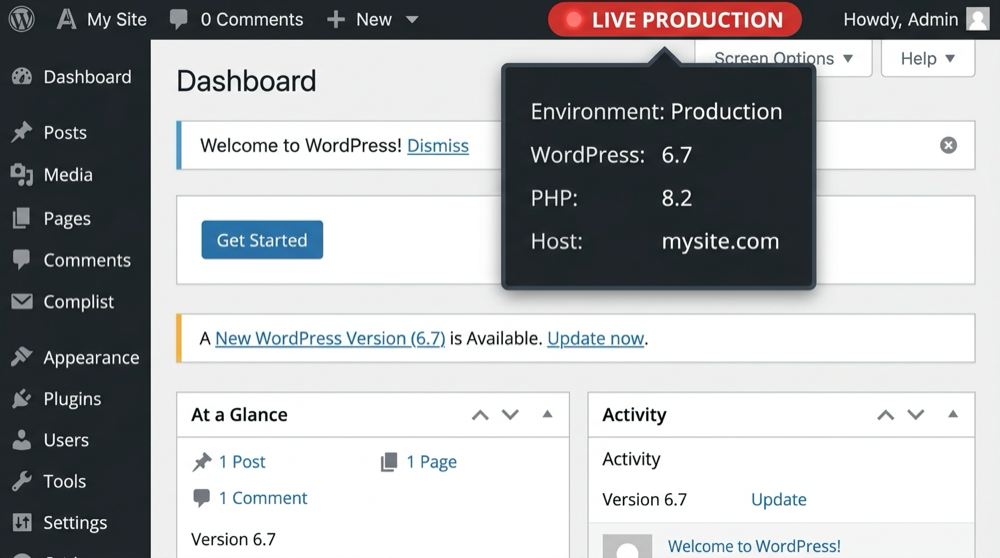
This plugin eliminates that risk by injecting an unmistakable, color-coded visual indicator directly into the top WordPress Toolbar (Admin Bar) on both backend and frontend.
Key Features
- Intelligent Environment Detection: Automatically identifies your environment using native WordPress
wp_get_environment_type(),WP_ENVIRONMENT_TYPEconstants, or domain heuristics (localhost,.test,.local,staging.*). - Manual Override & Custom Labels: Need to specify a custom label like “Client UAT” or “Feature Branch”? Override detection with a single click.
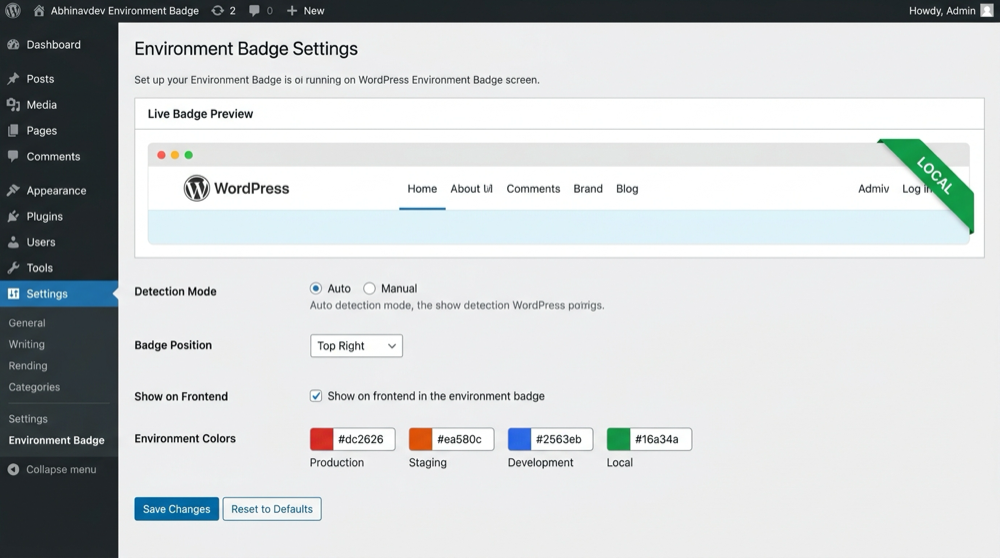
- Custom Color Palettes: Full control over background and text colors for each environment using native WordPress color pickers.
- Live Settings Preview: See your badge update in real-time right inside the settings dashboard before saving.
- System Info Dropdown: Hovering over the badge displays key diagnostic data: Active Environment, WordPress Version, PHP Version, and Host name.
- Position Controls: Position the badge on the right or left of the admin bar.
- Frontend Visibility Option: Choose whether logged-in administrators see the badge on the frontend or backend only.
- 100% Native & Lightweight: Zero third-party JavaScript libraries or external CDN dependencies. Clean CSS and native WordPress Settings API.
Screenshots
Installation
- Upload the
abhinavdev-environment-badgefolder to your/wp-content/plugins/directory, or install the.zipfile via Plugins > Add New > Upload Plugin in your WordPress admin dashboard. - Activate the plugin through the Plugins screen in WordPress.
- Navigate to Settings > Environment Badge to customize your environment colors, labels, and display preferences.
FAQ
-
Does this plugin work with WordPress core’s WP_ENVIRONMENT_TYPE?
-
Yes! If you define
define( 'WP_ENVIRONMENT_TYPE', 'staging' );inside yourwp-config.php, the plugin automatically recognizes it and applies the corresponding staging badge. -
Will site visitors see this badge?
-
No. The badge is strictly rendered inside the WordPress Admin Bar for logged-in users who have administrative or post-editing privileges. Public visitors will never see it.
-
Does this plugin affect site performance?
-
Not at all. The plugin enqueues less than 2 KB of pure CSS and runs zero external requests or heavy database queries.
-
Can I use custom colors?
-
Yes. Under Settings > Environment Badge, you can use the color pickers to set any hex color for production, staging, development, local, or custom environments.
Reviews
There are no reviews for this plugin.
Contributors & Developers
“Abhinavdev Environment Badge” is open source software. The following people have contributed to this plugin.
Contributors

Translate “Abhinavdev Environment Badge” into your language.
Interested in development?
Browse the code, check out the SVN repository, or subscribe to the development log by RSS.
Changelog
1.0.0
- Initial public release.
- Automatic environment detection via
wp_get_environment_type()and host matching. - Live preview in settings dashboard.
- Customizable color palettes and label text for all environments.
- System information dropdown sub-nodes.
- Fully compliant with WordPress.org security and coding standards.