
Description
Doujinavi – Affiliate Studio for DLsite は、DLsiteの作品をWordPressのブログで紹介するための、非公式・独立したアフィリエイト支援プラグインです。DLsiteが提供・公認するプラグインではありません。
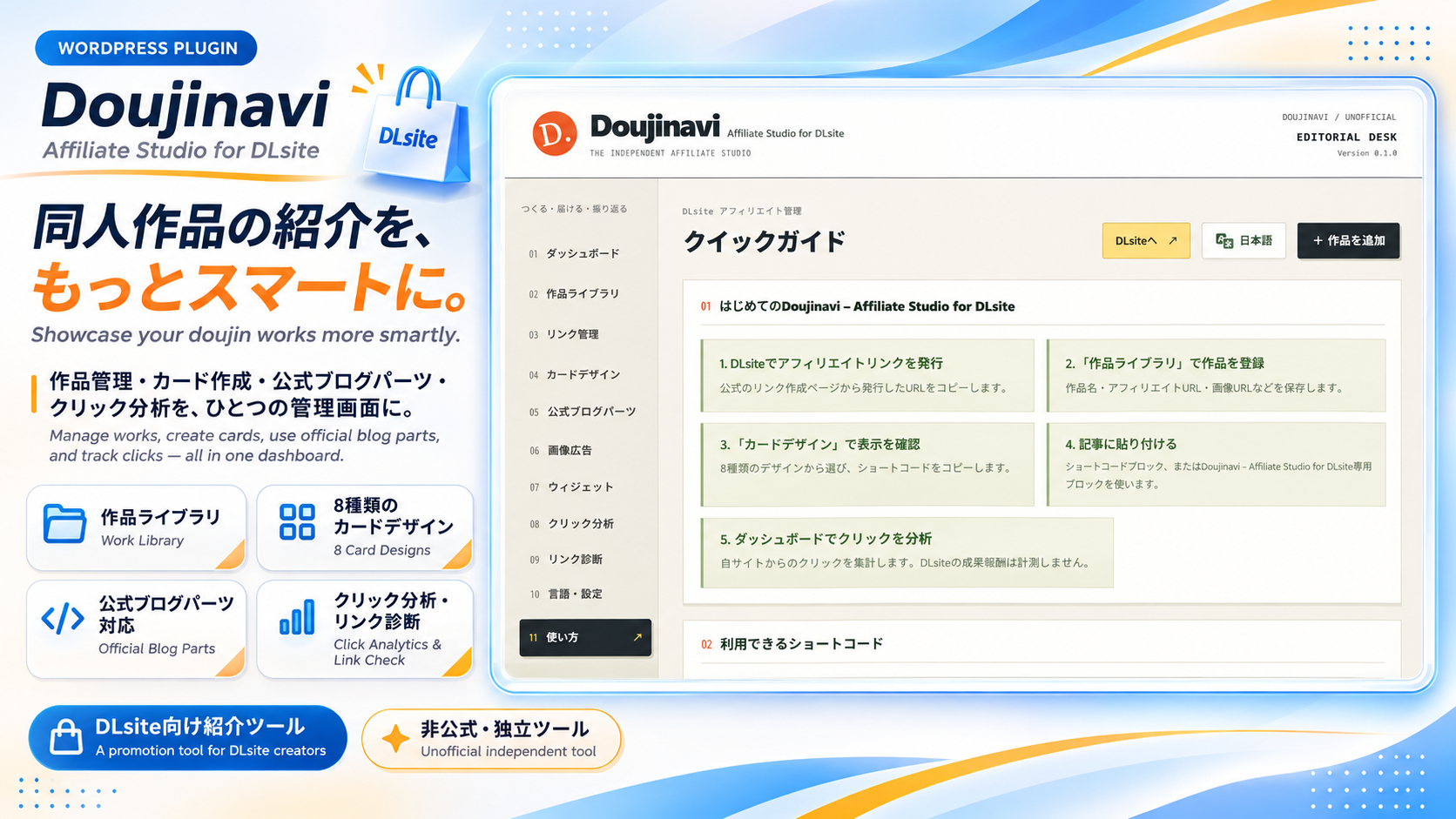
作品名・画像URL・紹介文・正式に発行されたアフィリエイトURLを手動で登録し、記事やサイドバーに見やすい作品カードを設置できます。登録した作品をランダムに紹介したり、自分のサイトでクリックされた作品をランキングにしたりと、作品紹介から反応の確認までをWordPress内でまとめて行えます。
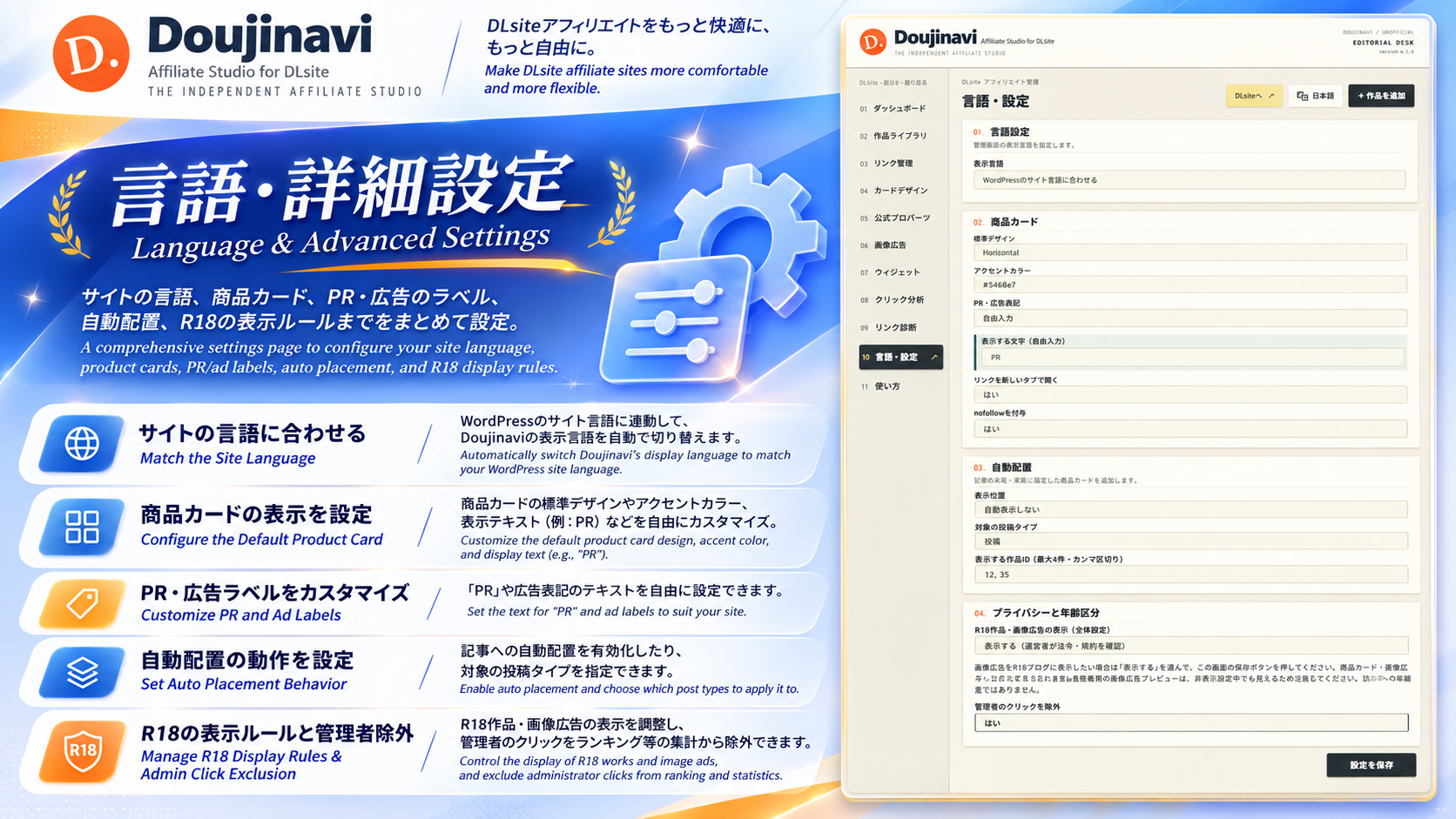
管理画面は日本語・英語に対応しています。WordPressの言語に合わせた自動選択に加え、プラグインの設定から言語を選べます。
こんな方におすすめ
- DLsiteの作品紹介をブログに掲載していて、作品情報やリンクをまとめて管理したい方。
- 記事ごとにHTMLを組み立てず、デザインを選んで作品カードを設置したい方。
- サイドバーなどで、登録した作品をランダム・新着・指定順に紹介したい方。
- 自分のブログで、どの作品リンクがクリックされたかを確認したい方。
主な機能
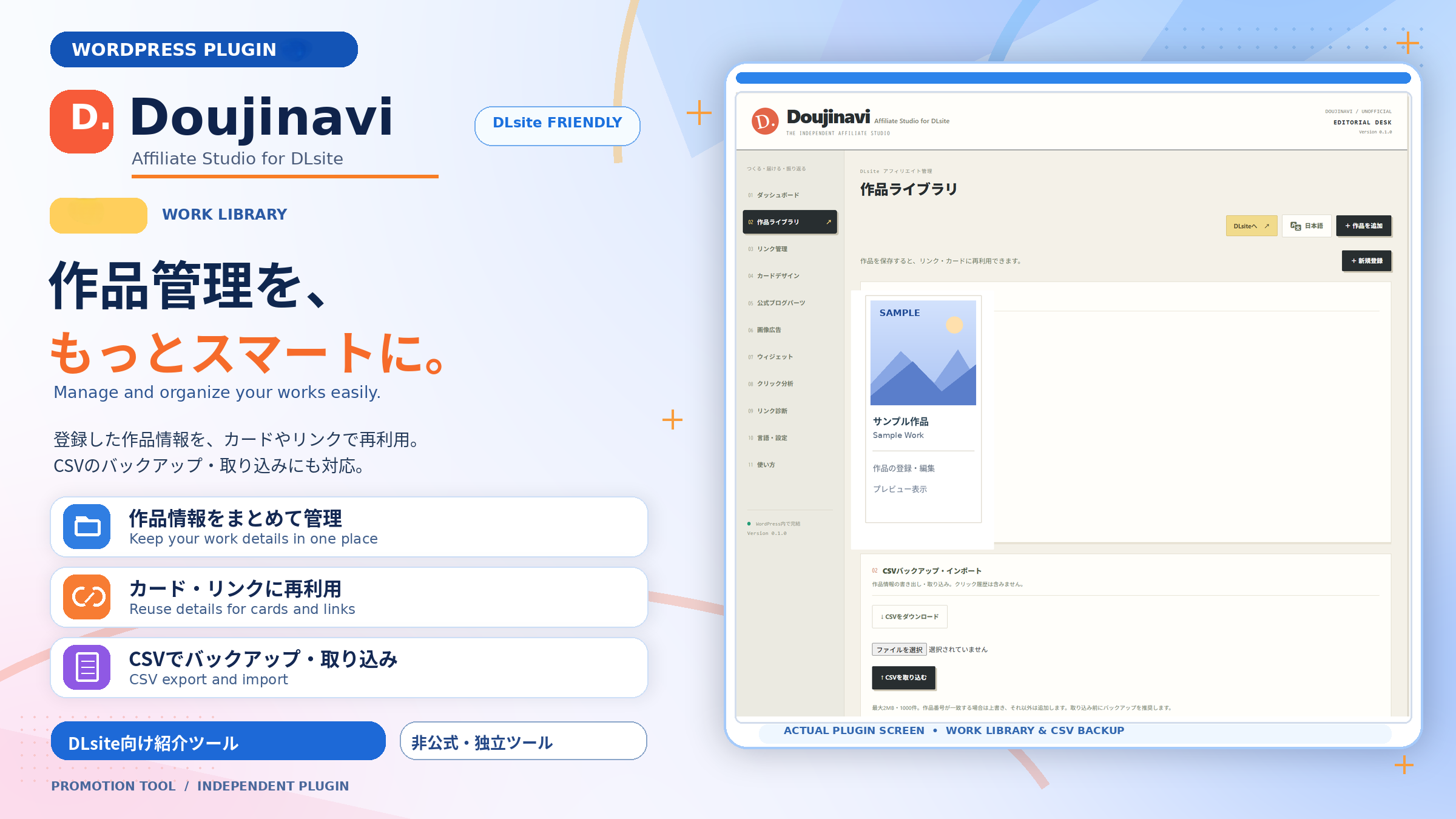
- 作品ライブラリ:作品名、画像URL、サークル・作者、紹介文、価格などを手動で登録・管理します。アフィリエイトURLはHTTPSのdlaf.jp / dlsite.comドメインを検証します。
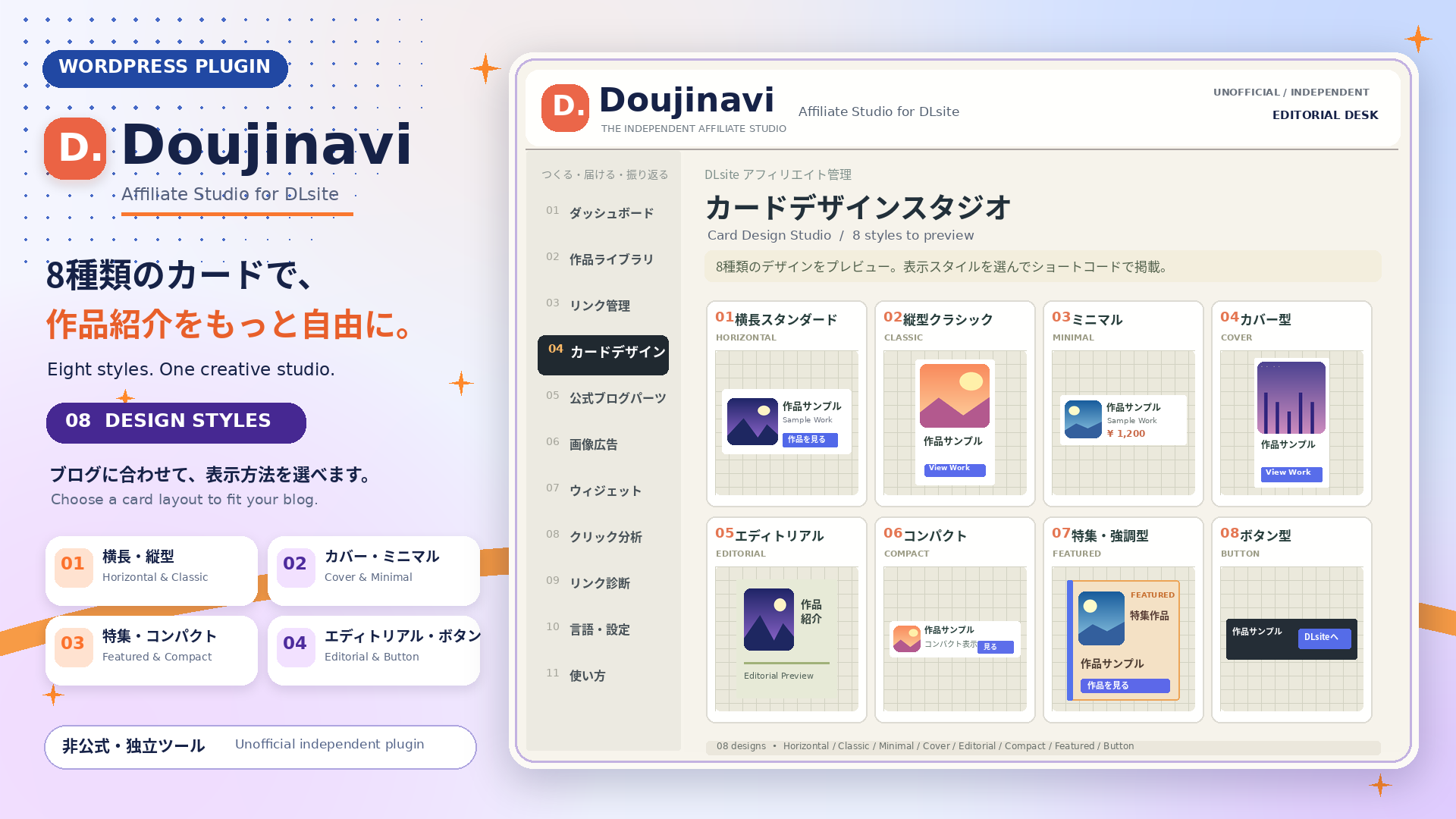
- 8種類のカードデザイン:横長、表紙を大きく見せる形式、コンパクト表示などから選択できます。プレビューを見ながら、サイトに合う表示を探せます。
- 3種類のブロック:作品カード、公式ブログパーツ、ランダム・おすすめ作品を、ブロックエディターから設置できます。
- ウィジェット・ショートコード:記事内だけでなく、テーマのウィジェットエリアにも作品を掲載できます。
- ランダム・新着・指定順の作品表示:表示する作品や除外する作品、件数、列数、色、表示項目などを調整できます。
- クリック集計とランキング:自分のサイトで計測したクリックを、7日・30日・全期間で確認できます。クリック数をもとにした作品ランキングも表示できます。
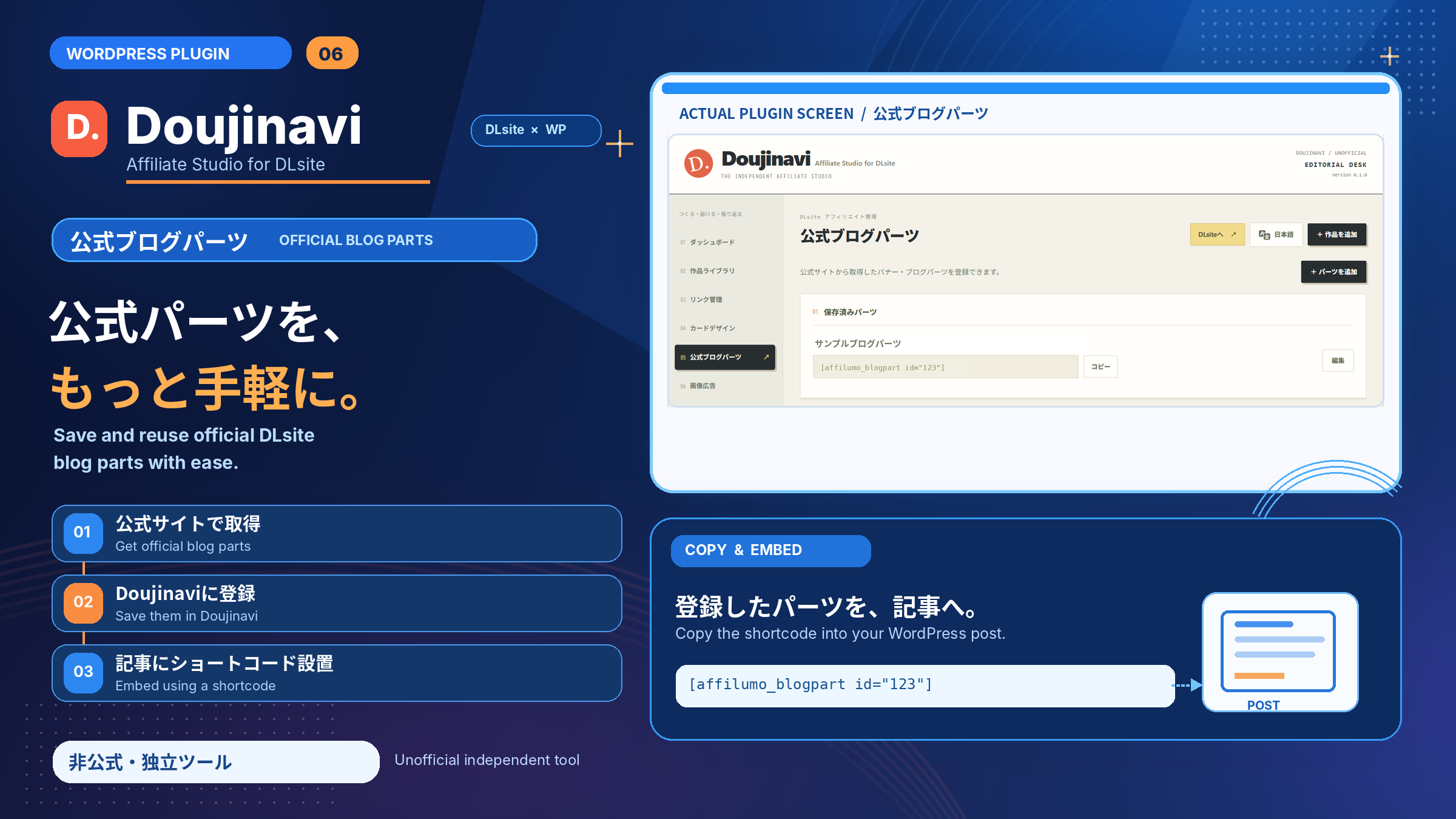
- 公式ブログパーツ:DLsite公式のブログパーツ用HTMLを登録できます。安全のため、スクリプトやiframeなどは除去されます。
- 画像広告の管理:DLsiteの画像リンクを個別に保存し、グループにまとめてランダム表示できます。
- 記事の前後への自動表示:設定に応じて作品カードを記事の前後に挿入できます。
- CSVでの書き出し・取り込み:作品情報の移行やまとめての登録を補助します。取り込みは2MB・1,000行までです。
- 表示設定・登録情報の診断:PR・広告表記、成人向け作品の表示、デザインなどを設定し、登録情報を確認できます。
はじめて使うときの流れ
- プラグインを有効化し、WordPress管理画面のDoujinaviを開きます。
- 言語・設定で日本語を選び、広告表記や成人向け作品の表示設定を確認します。
- 作品ライブラリで作品を追加し、作品情報と正式に発行されたアフィリエイトURLを入力して保存します。
- 投稿編集画面で「Doujinavi」を検索し、作品カードなどのブロックを追加します。ショートコードでの設置も可能です。
- プレビューでカードやリンクを確認してから公開します。公開後はダッシュボードでクリック状況を確認できます。
3種類のブロックの使い分け
- Doujinavi – 作品カード:登録した作品を1件選び、画像・紹介文・リンクなどをカードとして表示します。個別の作品レビューに向いています。
- Doujinavi – 公式ブログパーツ:あらかじめ登録した公式ブログパーツを選んで表示します。静的HTML・画像リンク用で、スクリプトやiframeを必要とする形式には対応していません。
- Doujinavi – ランダム・おすすめ作品:登録作品を複数並べ、ランダム・新着・指定順で紹介します。記事内のおすすめ欄や、対応するサイトエディターでの設置に利用できます。
ウィジェットの使い方
ウィジェットに対応したテーマでは「外観 ウィジェット」からDoujinaviの「ランダム・おすすめ作品」を追加します。ブロックテーマでは、サイトエディターで対応するブロックをご利用ください。
表示件数は1~12件、列数は最大3列です。表示・除外する作品ID、8種類のデザイン、4種類の色設定、画像や価格などの表示項目を調整できます。全体設定の成人向け作品の表示制限やPR表記も適用されます。
ランダム表示はページが生成されるたびに選ばれます。一定時間ごとに自動で切り替わるスライドショーではありません。ページキャッシュを利用している場合は、キャッシュが更新されるまで同じ作品が表示されることがあります。
ショートコードの使い方
「ショートコード」ブロックなどに、次のコードを貼り付けて使えます。id=”123″ は、登録した作品・ブログパーツ・画像広告グループの該当IDに置き換えてください。
登録作品をランダムに3件表示:
[affilumo_widget mode="random" count="3" style="compact"]
指定した作品を横長のカードで表示:
[affilumo id="123" style="horizontal"]
直近30日間のクリック数をもとに、上位5件の作品を表示:
[affilumo_ranking days="30" limit="5" style="compact"]
登録した公式ブログパーツを表示:
[affilumo_blogpart id="123"]
登録した画像広告グループを表示:
[affilumo_ads id="123"]
ご利用前にご確認ください
- 本プラグインは、アフィリエイトIDの発行や、発行済みURLの改変、DLsiteからの作品情報の自動収集を行いません。正式に発行されたURLをご用意ください。
- 作品情報・価格・画像URLは手動登録です。価格や作品情報の自動更新は行わないため、管理者が最新の内容をご確認ください。画像などは権利者の利用条件に従って使用してください。
- 計測できるのは、自分のサイト上の対象リンクのクリックです。DLsiteが提供する売上データではなく、購入・成約・注文金額・アフィリエイト報酬は取得できません。
- 公式ブログパーツのすべての形式に対応するわけではありません。スクリプトやiframeを使う形式は埋め込めないため、利用が認められた静的HTMLや画像リンクをご利用ください。
- 成人向け作品のカードは初期設定で非表示です。必要に応じて設定を変更し、年齢確認や広告表示などを管理者の責任で行ってください。
- 成人向け表示の制御は登録した作品カードが対象です。公式ブログパーツ内の内容までは判定しません。
- 誤ってデータを失わないよう、停止・削除時も登録データは保持されます。不要な記録は必要に応じて手動で削除してください。
- 本番サイトへの導入・更新前に、テスト環境で表示や動作をご確認ください。
クリック計測と外部画像について
クリック計測では、クリックされた作品とリンク元のページを記録します。IPアドレスとユーザーエージェントは、60秒間の重複クリックを抑制するため、ソルト付きハッシュとしてWordPressの一時データ(transient)で利用します。生のIPアドレスやユーザーエージェントを恒久的なクリック記録テーブルに保存しません。
管理者が設定した外部画像は、表示時に画像の配信元へ接続します。その際、閲覧者のIPアドレスなどが配信元へ伝わる場合があります。本プラグインが外部JavaScriptを読み込むことはありません。
管理画面の広告について
管理画面の「DLsiteへ」には、開発者のアフィリエイトリンクを使用しています。このリンク経由の購入により、開発者が紹介料を受け取る場合があります。該当リンク・案内枠には広告である旨を表示しています。
案内枠はプラグイン内のテキストとCSSのみで表示し、広告用の外部JavaScript・画像・iframeは読み込みません。管理画面を開くだけでは、この案内枠からDLsiteへ通信しません。リンクをクリックすると外部のアフィリエイトサービスへ移動します。利用者が登録した作品・広告のリンク先は変更しません。
English overview
Doujinavi is an unofficial, independent WordPress toolkit for DLsite affiliate publishers. It is not endorsed by or affiliated with DLsite. Manually register product information and officially issued affiliate URLs, then display products using eight card layouts, three editor blocks, widgets or shortcodes. Japanese and English administration interfaces are available.
Features include random/latest/manual product displays, on-site click reports for 7/30 days/all-time, click-based rankings, filtered static official blog-part HTML, image-ad groups, before/after-post placement, and CSV import/export (2MB and 1,000 rows for imports).
It does not issue affiliate IDs, modify issued URLs, scrape DLsite, automatically update product details, or track purchases, sales or commissions. Prices and image URLs are entered manually. Use images in accordance with the publisher’s rights. Scripts and iframes are not supported in blog parts. Adult-rated product cards are hidden by default; this filter does not inspect blog-part contents. Administrators are responsible for age-gating and advertising disclosures.
Click records contain clicked products and source pages. IP address and user-agent data are used only through a salted hash in WordPress transients to suppress duplicate clicks for 60 seconds; raw values are not stored in the permanent click table. Remote images contact their hosting services and may expose visitor IP addresses. No external JavaScript is loaded. Data is retained on deactivation and uninstall; delete unwanted records manually. Test updates on a staging site first.
The administration links labelled “Visit DLsite (Ad)” and the disclosed promotional panels use a developer affiliate link. Purchases through the link may earn the developer a commission. These panels use local text and CSS only, without remote advertising scripts, images, iframes or impression requests. Clicking a link opens the external affiliate service. User-entered product and advertisement URLs are not replaced.
ソースコード / Source code
JavaScript・CSSは、読みやすい非圧縮のソースとしてassets/に同梱しています。ビルドやnpmのインストールは不要です。
- assets/editor.js:ブロックの登録・編集操作。
- assets/admin.js:管理画面の操作。
- assets/admin.css、assets/editorial.css、assets/frontend.css:表示スタイル。
- blocks/*/block.json:公開用のブロック名・説明などのメタデータ。
All JavaScript and CSS is included in readable, unminified form and loaded directly by WordPress. No compilation, bundling, npm installation or build step is required. The plugin uses WordPress-provided block editor APIs and bundles no third-party JavaScript libraries.
Screenshots




Blocks
This plugin provides 3 blocks.
- Doujinavi – ランダム・おすすめ作品 登録作品をランダム・新着・指定順でまとめて表示します。
- Doujinavi – 作品カード 登録した作品を選び、画像や紹介文付きのカードで表示します。
- Doujinavi – 公式ブログパーツ 登録したDLsite公式ブログパーツの静的HTMLを表示します。
Installation
- WordPress管理画面で「プラグイン 新規プラグインを追加 プラグインのアップロード」を開き、doujinavi-for-dlsite-0.1.2.zipをアップロードします。
- 「Doujinavi – Affiliate Studio for DLsite」を有効化します。
- 管理画面のDoujinaviを開き、言語・広告表記・成人向け作品の表示設定を確認します。
- 作品ライブラリで作品情報と正式なDLsiteアフィリエイトURLを登録します。
- 投稿編集画面でDoujinaviのブロックを追加するか、ショートコードを貼り付けます。表示を確認してから公開してください。
English: Upload the ZIP via Plugins > Add Plugin > Upload Plugin, activate Doujinavi, review Language & Settings, add products with officially issued affiliate URLs, and insert a Doujinavi block or shortcode into your content.
FAQ
-
DLsiteの公式プラグインですか?
-
いいえ。DLsiteとは提携していない、非公式・独立したプラグインです。
-
作品情報を自動で取得できますか?
-
いいえ。作品名・画像URL・価格・紹介文・アフィリエイトURLなどは手動で登録します。
-
売上やアフィリエイト報酬も確認できますか?
-
いいえ。確認できるのは、自分のサイト上で計測したクリックです。DLsite側の購入・成約・報酬データとは異なります。
Reviews
There are no reviews for this plugin.
Contributors & Developers
“Doujinavi – Affiliate Studio for DLsite” is open source software. The following people have contributed to this plugin.
Contributors
Translate “Doujinavi – Affiliate Studio for DLsite” into your language.
Interested in development?
Browse the code, check out the SVN repository, or subscribe to the development log by RSS.
Changelog
0.1.2
- 管理画面のDLsiteリンクを広告表記付きのリンクに更新しました。
- 各画面の末尾と左メニュー下部に静的な案内枠を追加しました。広い画面では左の案内枠がスクロールに追従します。
- 旧名称についての補足説明を整理しました。
- Updated disclosed administration affiliate links and added responsive, static promotional panels without external advertising scripts.
0.1.1
- 画像広告をおすすめの入口として、メニュー上部・ダッシュボード・使い方に案内を追加しました。
- 管理画面の使い方を拡充。画像広告の登録・デザイン・設置・更新手順、機能別ガイドとトラブル対処を日本語・英語で追加しました。
- WordPress.org向けのブロックメタデータを追加し、3種類のブロック表示名をDoujinaviに統一しました。
- 紹介文を日本語中心に刷新し、機能・導入手順・ブロックの使い分け・ショートコード・注意事項を丁寧に説明しました。英語の概要も掲載しています。
- 既存のブロック内部ID、ショートコード、保存データとの互換性を維持しています。
- Added Doujinavi block metadata and Japanese-first documentation with an English overview; retained existing content identifiers.
0.1.0
- Aligned the distributable folder, main file and text domain with the public plugin name.
- Added selectable disclosure labels including custom text and hidden labels, plus individual image-ad saves and removals.
- Added image-ad groups: save DLsite image links one at a time and place a randomized, styled group using [affilumo_ads id=”…”].
- Editorial Desk layout with cover collage, product gallery and printed-card styling.
- Add Visit DLsite links to administration header and Plugins screen (https://www.dlsite.com/home/).
- Use content-based CSS versions while retaining plugin version 0.1.0.
- Storefront-inspired blue/orange administration and artwork-first card/widget designs.
- Dashboard action link on the Plugins screen; timestamped CSS URLs for same-version design updates.
- Add classic widget, dynamic showcase block and affilumo_widget shortcode.
- Random / latest / manual product order, include/exclude IDs, 1–12 products and responsive columns.
- Per-instance colors, eight styles, visibility controls, corner radius, spacing and button labels.
-
Preserve global age restrictions, PR disclosure and tracked links.
-
Preserve escaped metadata and omitted CSV columns; validate CSV structure before writes.
- Filter executable scripts from blog parts and enforce administrator-only management capabilities.
- Fix visible rankings, timezone-aware charts, clipboard feedback and editor rendering compatibility.
- Harden redirect inputs and deduplication; skip HEAD/prefetch measurement.
-
Initialize database tables on version changes and newly visited network sites.
-
First release with dashboards, affiliate product management, card studio, blog parts, tracked links and CSV tools.