

Description
CauseWise Analytics adds the hosted CauseWise tracker to public WordPress pages and shows analytics in wp-admin.
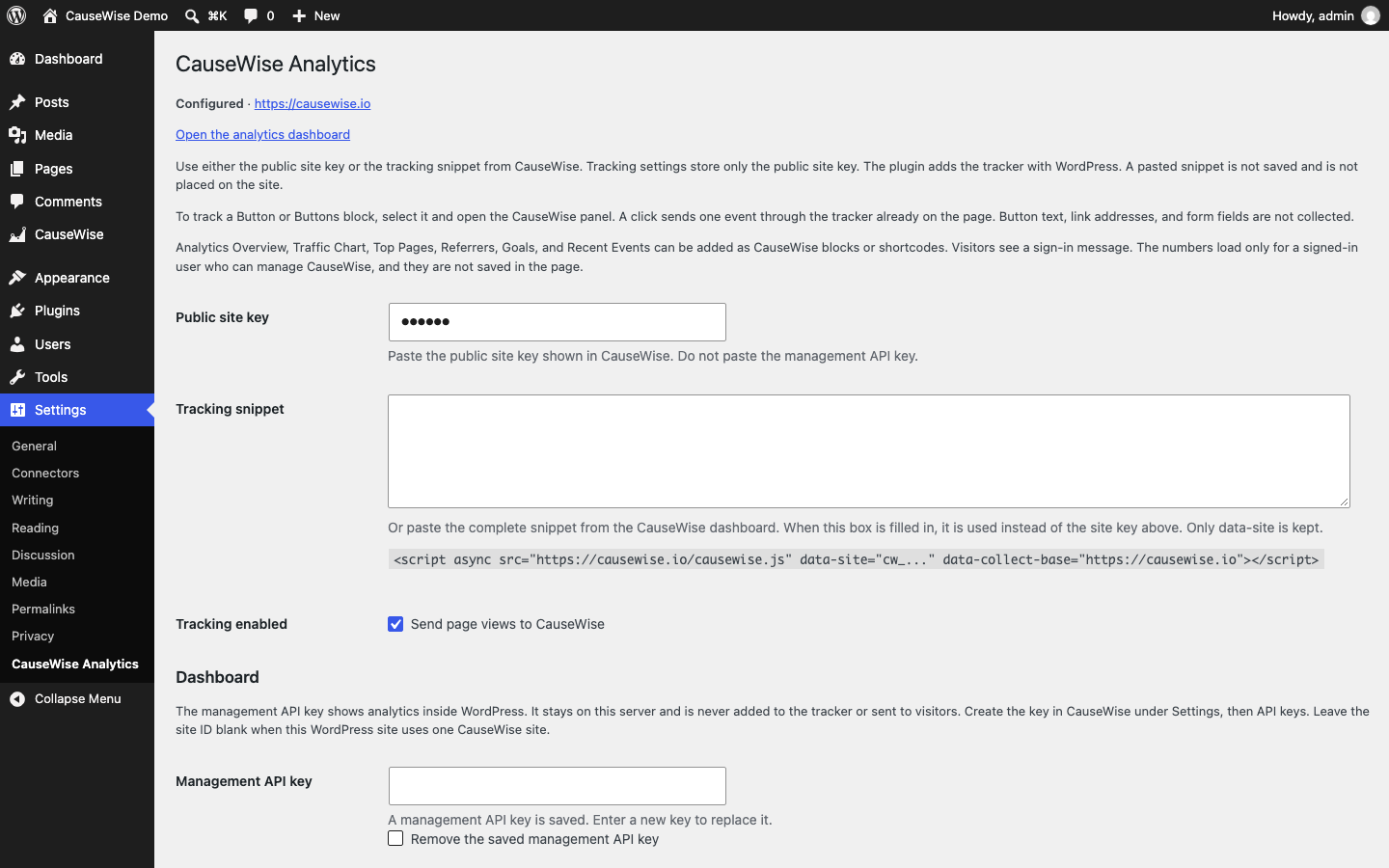
Enter the public site key from https://causewise.io, or paste the tracking snippet from the CauseWise dashboard. The plugin reads data-site from a snippet and stores only that public key. It then loads https://causewise.io/causewise.js through WordPress. The pasted snippet is not saved and is not added to the page. Do not also paste the snippet into the theme, or the page will send two page views.
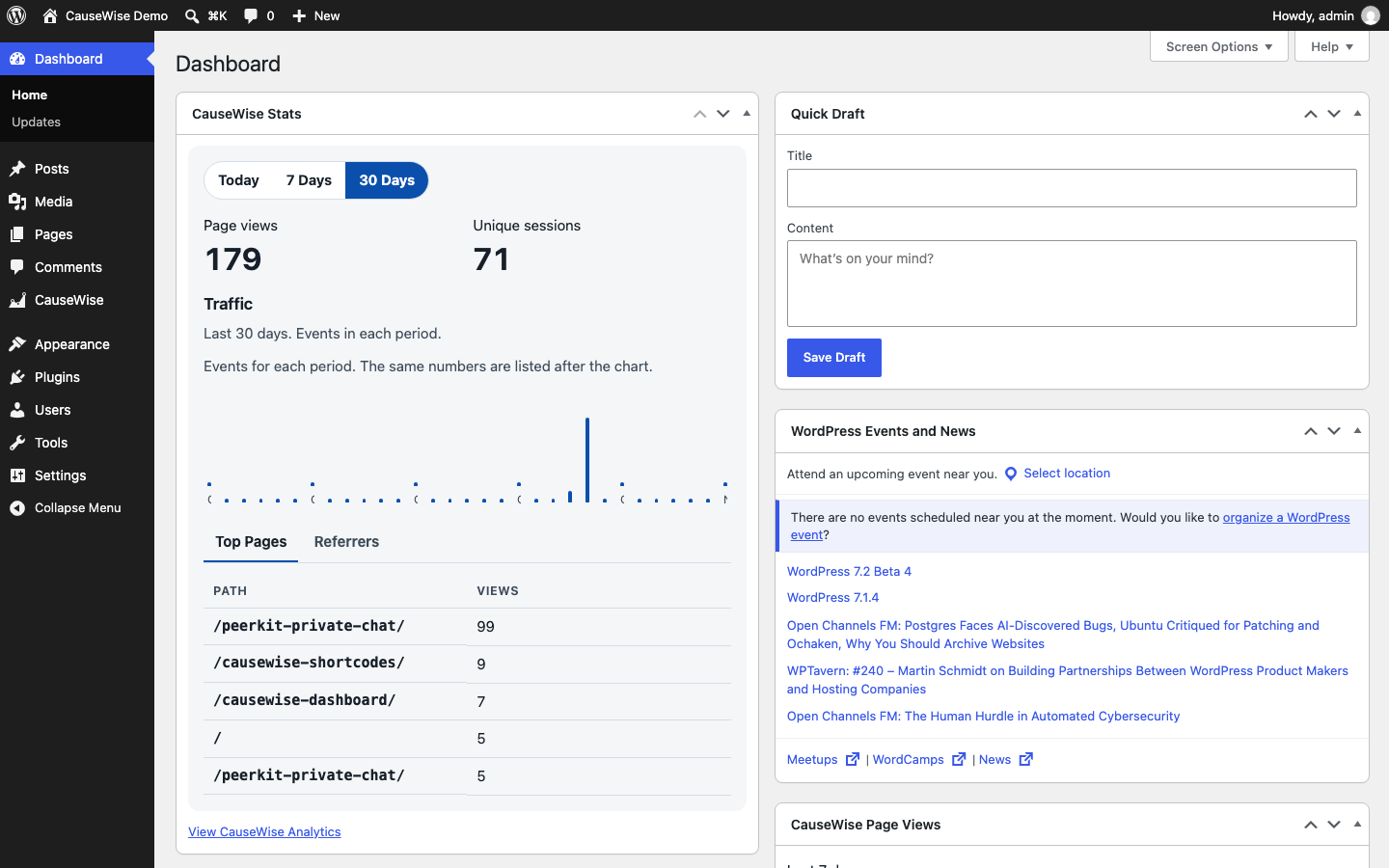
Dashboard Home shows a CauseWise Stats widget in the main column: a traffic chart, page views, unique sessions, Today / 7 Days / 30 Days, and Top Pages / Referrers. Four smaller widgets for page views, sessions, traffic, and top pages stay available in Screen Options. Show, hide, drag, and collapse them with the normal Dashboard controls. Configure sets the date range for a smaller widget. Each widget links to the CauseWise Analytics screen.
The CauseWise Analytics screen shows overview counts, the traffic chart, top pages, referrers, sessions, goals, funnels, and recent events for today, the last 7 days, or the last 30 days. A navigation bar at the top jumps to each section on that same screen. Recent events load separately from the charts. Each row shows the event name, type, time, and page path. The list can be filtered, paged, and refreshed without reloading WordPress. It reads the CauseWise API. It does not calculate a second set of metrics. Charts use @razorsoft/causewise-react 0.1.2. See licenses/causewise-react.txt.
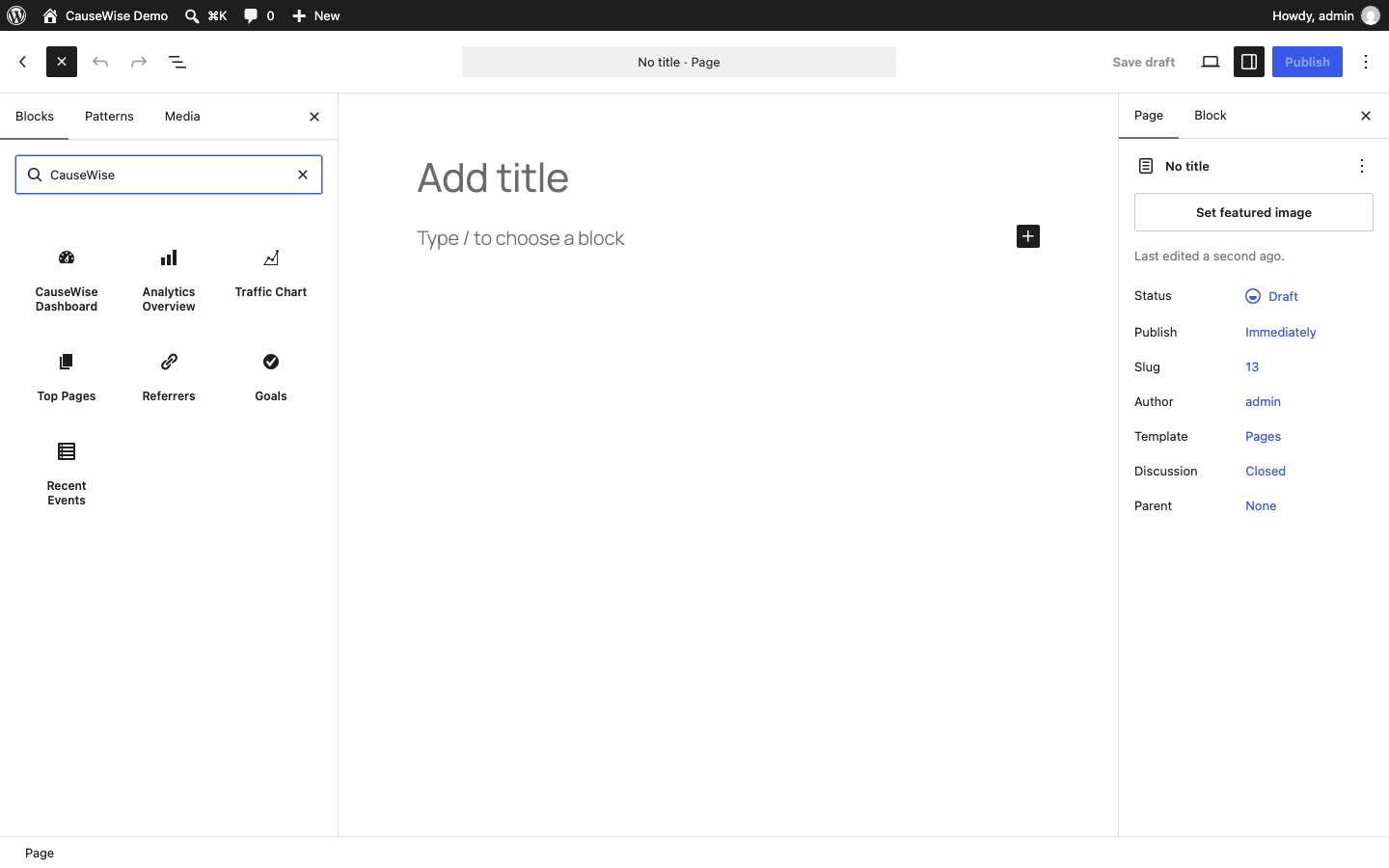
The same charts can be placed on a page with a CauseWise block or a shortcode. Analytics Overview, Traffic Chart, Top Pages, Referrers, Goals, and Recent Events are in the CauseWise block category. The shortcodes are [causewise_stats], [causewise_traffic], [causewise_top_pages], [causewise_referrers], [causewise_goals], and [causewise_events]. Each accepts range (today, 7d, or 30d), an optional title, and theme (light, dark, or system). Top Pages, Referrers, and Recent Events also accept limit from 1 to 20. The default range is 7d.
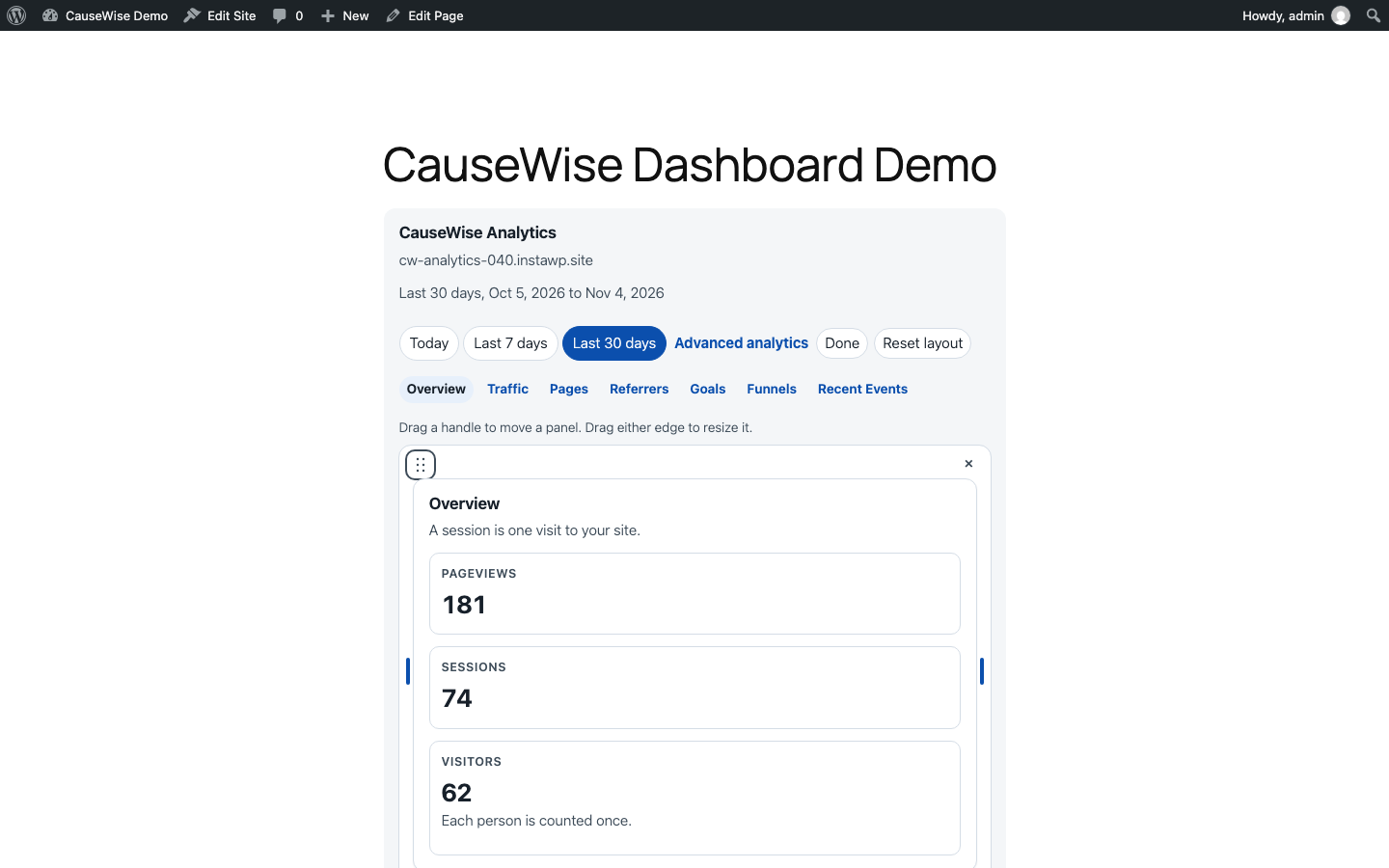
CauseWise Dashboard, shortcode [causewise_dashboard], shows those sections together with goals and funnels. It has one date range, one theme, an optional title, and a link to advanced analytics. show_stats, show_traffic, show_pages, show_referrers, show_goals, show_funnels, and show_events can be 0 to hide a section. The block uses the theme alignment controls: default, wide, and full width. It can sit inside a Group, Row, Columns, or Cover block. Width in the inspector can also be a custom maximum in pixels. The shortcode accepts width="1100px", width="100%", width="wide", or width="full". A custom width uses width: 100% and that maximum, so it stays inside its parent. Panels follow the dashboard’s own width: one column when narrow, two when medium, and three overview cards when wide. The traffic chart is a bar chart. Dates on that chart use a short label such as Oct 20. Top Pages omits invitation tokens and other secrets from the path. The page still shows a sign-in message, and the numbers are not saved in the post. The dashboard heading is CauseWise Analytics unless a title is set. A saved title that is only an older versioned label, such as CauseWise Analytics WP 0.4.0, shows CauseWise Analytics instead. A title you wrote is kept, even if it includes a number. The installed plugin version is not shown on the dashboard. An authorized viewer can choose Customize layout to drag panels by a handle, resize them from either edge to one third, half, two thirds, or full width, and move or resize the focused handle with the arrow keys. A small hide control and Restore panels are available while editing. Reset layout returns the author’s sections. Those choices are saved in that viewer’s WordPress account for that dashboard, so the same layout is there when they sign in from another browser or device. A shortcode can set instance so two dashboards stay separate. The saved layout does not include analytics numbers. If WordPress cannot be reached, the browser keeps a temporary copy. A section the page author turned off stays hidden.
A page shows a sign-in message to everyone else. The numbers load in the browser only after WordPress confirms the viewer can activate plugins, through the same private analytics route the Dashboard uses. They are not saved in the post, the block, or the shortcode. Event properties are not shown. The management API key stays on the server. Page caches are asked not to store the response when that viewer is signed in.
A management API key is required for that screen. Create one in CauseWise under Settings API keys. Leave the site ID blank when the key belongs to one site; enter the site ID when it can see more than one. The key is stored in WordPress and is sent only from the server to CauseWise. It is not added to the tracker and it is not included in the admin page.
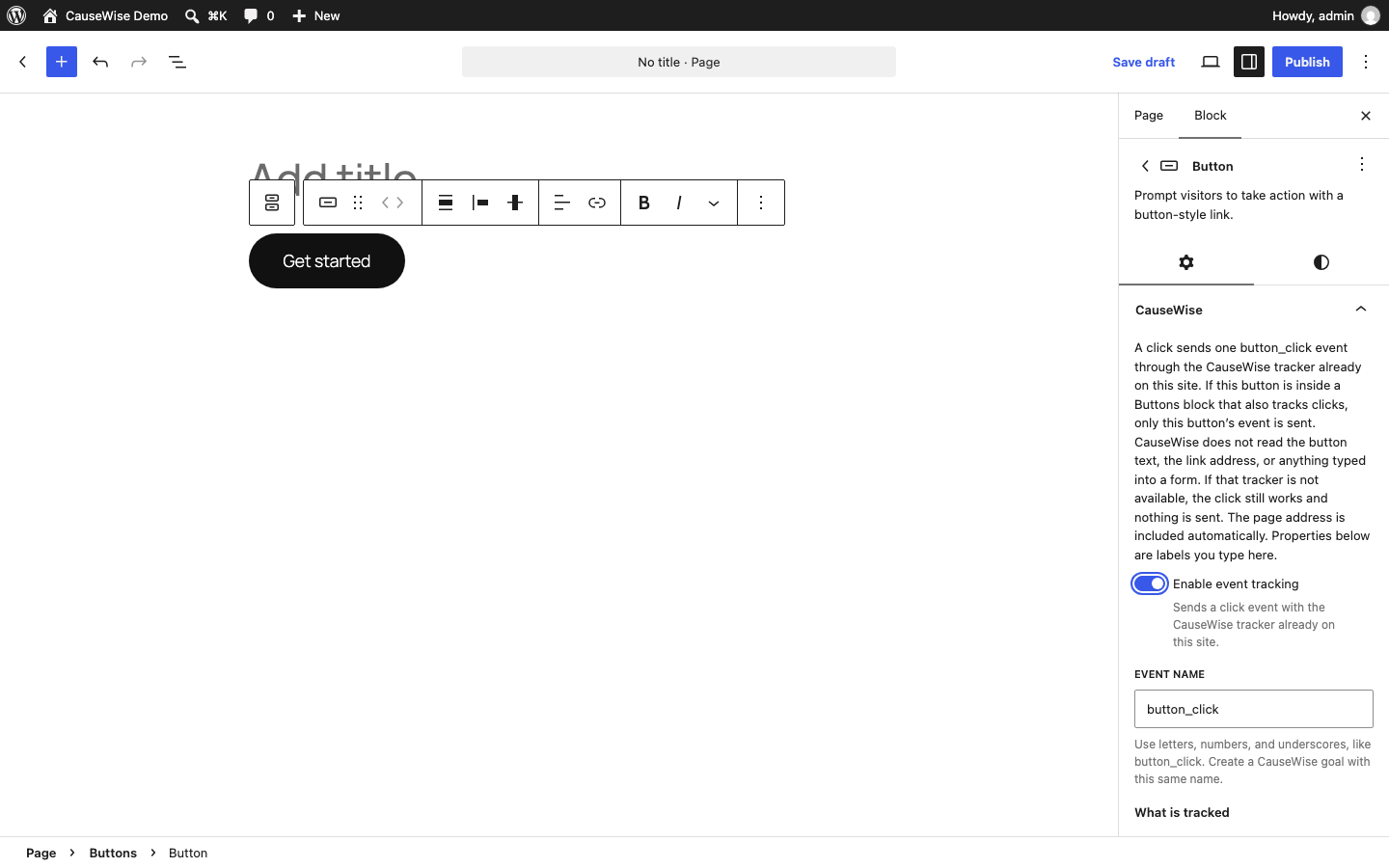
Select a Button or Buttons block and open the CauseWise panel to record clicks without writing JavaScript. Turn on Enable event tracking, choose an event name such as button_click, and add optional properties such as location = hero. A click sends one event through window.causewise.track on the CauseWise script already on the page. The plugin does not add a second analytics backend. Page views stay automatic. Do not name a click pageview.
The panel explains what is sent. CauseWise records the event name, the properties you type, and the page address the tracker already includes. It does not read the button text, the link address, or anything typed into a form. Property names that look like emails, passwords, tokens, or other personal data are not saved. If the CauseWise script is missing, the button still works and nothing is sent.
A Buttons block and a Button inside it can both be configured. The click is sent once, for the button. A second copy of the click listener does not send a second event.
The choice is stored with the block. The button’s saved HTML is unchanged, so existing buttons stay valid. Data attributes are added when the page is rendered. Other blocks, classic HTML buttons, and form submissions are not tracked.
Settings use the activate_plugins capability so the screens work on WordPress.com installations that do not grant manage_options. The block panel uses the WordPress block editor filters and does not require manage_options.
The readable plugin source is in src/. The chart component source shipped with this plugin is in src/causewise-react/. React 19.2.4 is the MIT-licensed library compiled into the admin and embed scripts. See licenses/react.txt. React Grid Layout 2.3.0 draws the dashboard editor. See licenses/react-grid-layout.txt. Production sites do not need Node.js.
External service and privacy
CauseWise Analytics contacts https://causewise.io, an external service operated by RazorSoft, Inc. Nothing is sent until an administrator saves a public site key and turns tracking on. The plugin does not phone home on activation.
- Public pages then load
https://causewise.io/causewise.jsin the visitor’s browser. That script sends the page address, path, title, referrer, time, a random visitor id, a session id, and the browser user agent tohttps://causewise.io/api/collect. It does not send the management API key. wp-admin is not tracked. A public page is tracked only after tracking is enabled. - A Button or Buttons block with event tracking sends one custom event through that same script. The event includes the name and properties saved on the block, plus the page address the tracker already sends. It does not read the button text, the link address, or form fields. Property names that look like emails, passwords, tokens, or other personal data are not saved.
- Analytics screens, Dashboard widgets, blocks, and shortcodes send the management API key from the WordPress server to
https://causewise.io/api/v1. The browser does not receive the key. The numbers are not saved in the post. Visitors who cannot manage CauseWise see a sign-in message and do not receive the analytics script. - The plugin stores the public site key, the tracking switch, and the management API key in WordPress options. It does not send WordPress user accounts, comments, or post content to CauseWise.
- Uninstall deletes those options. It does not delete pages or the CauseWise account. Deactivation leaves the options in place.
- CauseWise has free and paid plans. Every feature in this plugin is included in the plugin. Plan limits are enforced by the CauseWise service, not by locked plugin code.
- Privacy statement: https://causewise.io/#privacy
- Service: https://causewise.io
Screenshots

Installation
- Upload
causewise-analytics-0.4.6.zipin Plugins Add New Upload Plugin, or copy thecausewise-analyticsfolder intowp-content/plugins/. - Activate CauseWise Analytics.
- Open Settings CauseWise Analytics.
- Enter the public site key (
cw_plus 36 hexadecimal characters) or paste the CauseWise tracking snippet, then enable tracking. - To view analytics in WordPress, paste a management API key in the Dashboard section of the same screen. Enter a site ID when the key can see more than one site.
- Remove any CauseWise snippet already pasted into the theme or a header plugin.
- View a public page while logged out. Confirm one request to
https://causewise.io/api/collect. - Open CauseWise Analytics, or Dashboard Home, to see the widgets.
FAQ
-
Does this send a page view itself?
-
No.
causewise.jssends one page view when it loads and ignores a second event for the same URL. -
Which key do I paste for tracking?
-
The public tracking key, or the whole install snippet from CauseWise. A management API key is rejected in the public site key field. Other scripts are rejected.
-
Which key loads the WordPress dashboard?
-
A management API key from CauseWise. It stays in the WordPress database. Visitors never receive it.
-
Edit the page, select a Button or Buttons block, and open the CauseWise panel. Enable event tracking and set an event name. Publish the page. The public site must have CauseWise tracking turned on in Settings CauseWise Analytics.
-
One custom event with the name you chose, plus any safe properties you added. The CauseWise tracker also sends the page address, as it does for every event. The button text, the link, and form fields are not added.
-
Why was a click not recorded?
-
Tracking has to be enabled for the site and for that block, and the event name has to be valid.
pageviewis reserved. A click that happens beforecausewise.jsfinishes loading is not queued. Clicks in the block editor are not recorded. A preview of the public page can record a click. -
Can I show analytics on a page?
-
Yes. Add a block from the CauseWise category, or paste one of the shortcodes in the Classic Editor or a page builder that runs shortcodes.
rangecan betoday,7d, or30d. Example:[causewise_stats range="7d" title="This week"]. The complete dashboard is[causewise_dashboard range="30d" theme="dark" show_funnels="0"]. Someone who cannot manage CauseWise sees a sign-in message. The numbers are not stored in the page. -
What data is sent to CauseWise?
-
After an administrator enables tracking, the public tracker sends the page address, path, title, referrer, time, a random visitor id, a session id, and the browser user agent to
https://causewise.io/api/collect. A configured button click also sends the event name and the properties saved on that block.The management API key is sent only from the WordPress server to
https://causewise.io/api/v1. Visitors do not receive it. The plugin does not send WordPress accounts, comments, or post content.Privacy statement: https://causewise.io/#privacy
-
Do I have to pay to use the plugin?
-
No. The plugin is free, and its code is not locked behind a payment. CauseWise is a separate hosted service with free and paid plans. Those plans limit the service, not features hidden inside this plugin.
-
Can I hide a widget?
-
Yes. On Dashboard Home, open Screen Options and uncheck the CauseWise widgets you do not want. Drag the remaining widgets to rearrange them. Collapse a widget from its title bar. Configure changes the date range for a smaller widget. CauseWise Stats changes the range from the buttons inside the widget.
Reviews
There are no reviews for this plugin.
Contributors & Developers
“CauseWise Analytics” is open source software. The following people have contributed to this plugin.
Contributors
Translate “CauseWise Analytics” into your language.
Interested in development?
Browse the code, check out the SVN repository, or subscribe to the development log by RSS.
Changelog
0.4.6
- Choosing a section keeps that section selected while the page scrolls to it. The highlight follows the page again when you scroll it yourself. Recent Events can still become the selected section when you scroll to the end of the page.
0.4.5
- Section navigation highlights only the section in view. The selected section keeps the gray background. Keyboard focus keeps the blue outline, and hovering another section no longer looks selected.
0.4.4
- The CauseWise Dashboard heading defaults to CauseWise Analytics. A saved title that is only the old versioned label, such as CauseWise Analytics WP 0.4.0, shows that heading. A title you wrote stays as you wrote it.
- Removes the installed plugin version from the dashboard.
0.4.3
- Lets an authorized viewer customize the embedded dashboard by dragging panels and resizing them from their edges. Arrow keys move and resize the focused handle. React Grid Layout 2.3.0 provides the grid. See licenses/react-grid-layout.txt.
- Remembers that layout in WordPress user meta for the signed-in viewer and that dashboard, so the same arrangement follows them across browsers and devices. Analytics numbers are not saved there. The browser keeps a temporary copy only when WordPress cannot be reached.
- Keeps sections turned off by the page author hidden. Reset layout restores the author’s dashboard.
0.4.1
- Adds the CauseWise Dashboard block and the
[causewise_dashboard]shortcode. - Shows overview statistics, the traffic chart, top pages, referrers, goals, funnels, and recent events with one date range, theme, title, and section visibility.
- Lets the dashboard use the theme’s default, wide, and full-width alignment, or a custom maximum width that stays inside its parent.
- Lays panels out from the dashboard width: one column when narrow, two when medium, and three overview cards when wide.
- Uses short chart dates such as Oct 20, keeps long paths inside the table, and leaves invitation tokens out of Top Pages.
- Shows the installed plugin version on the embedded dashboard.
- Keeps the traffic chart as a bar chart. Visitors still see a sign-in message, and event properties are not shown.
0.4.0
- Adds CauseWise blocks and matching shortcodes for the overview, traffic, top pages, referrers, goals, and recent events.
- Renders those sections with
@razorsoft/causewise-react0.1.2 through the existing private analytics route. - Keeps analytics out of the saved page. Visitors see a sign-in message, and event properties are not included.
- An empty goal list says that no goals have been configured yet.
- Documents the CauseWise service, the data sent from public pages, and the privacy statement. The plugin and the bundled chart components are GPLv2 or later.
0.3.0
- Adds a CauseWise panel to Button and Buttons blocks with event tracking, an event name, and optional properties.
- Sends one click through the existing CauseWise browser tracker. Page views are unchanged.
- Skips personal or secret property values, missing trackers, and a second event for the same click.
- Adds section navigation on the analytics screen, and a paged recent-event list with filters and refresh for checking custom events.
0.2.0
- Adds a CauseWise Stats widget to Dashboard Home, plus widgets for page views, sessions, traffic, and top pages.
- Adds a CauseWise Analytics screen with overview cards, a traffic chart, date ranges, top pages, referrers, sessions, and empty, loading, and error states.
- Reads analytics from the CauseWise API. The management key stays on the server.
- Explains empty goals, funnels, recent activity, errors, and permissions in plain language.
0.1.0
- Initial release. Accepts a public site key or the CauseWise tracking snippet.