

Description
Sensbot Store Assistant reviews your WooCommerce store every month and tells you, in plain language, what changed and what to do about it. It is not another stats dashboard: each review leads with findings and recommendations, and every number in it comes from your own store data.
The monthly store review
- Revenue, orders and average order value for the closed month, compared with the month before.
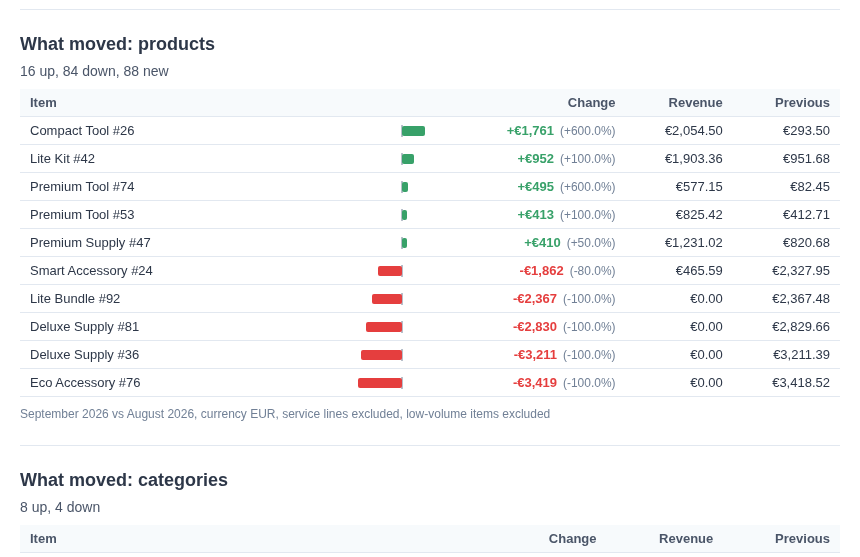
- Which products and categories grew, which declined, and by how much.
- Cancelled and refunded orders, and anything unusual worth a second look.
- A short list of findings, each with a recommended next step.
- Readable on the web, downloadable as a PDF, and easy to forward to whoever runs the store.
White-label for agencies
Agencies that look after WooCommerce stores can connect a client store with an agency code, and the review can carry the agency’s own name and logo. It fits into a monthly care plan next to updates and backups: the agency sends the client a store review instead of a list of plugin updates. Agency installs are billed to the agency, not to the store owner.
Ask your store
In the Sensbot dashboard you can ask questions about your store in your own words: “what sold best last month?”, “how many orders are still pending?”, “which category is down compared with the summer?”. Answers come from your synced products and orders.
Read-only, nothing written to your store
The plugin creates one WooCommerce REST API key with read permission only. Sensbot can read your catalogue and orders; it cannot change products, prices, orders or settings. The plugin adds nothing to your storefront and loads no script for your visitors.
Price
A 14-day free trial, then paid plans from 39 EUR per month, billed by Sensbot. A Sensbot account is created for you when you connect. Agency installs use the agency’s own plan.
Works on any WordPress site
The plugin installs and activates on any WordPress site. The store review and “ask your store” need WooCommerce; without it, the settings screen tells you so and nothing else changes on your site.
External services
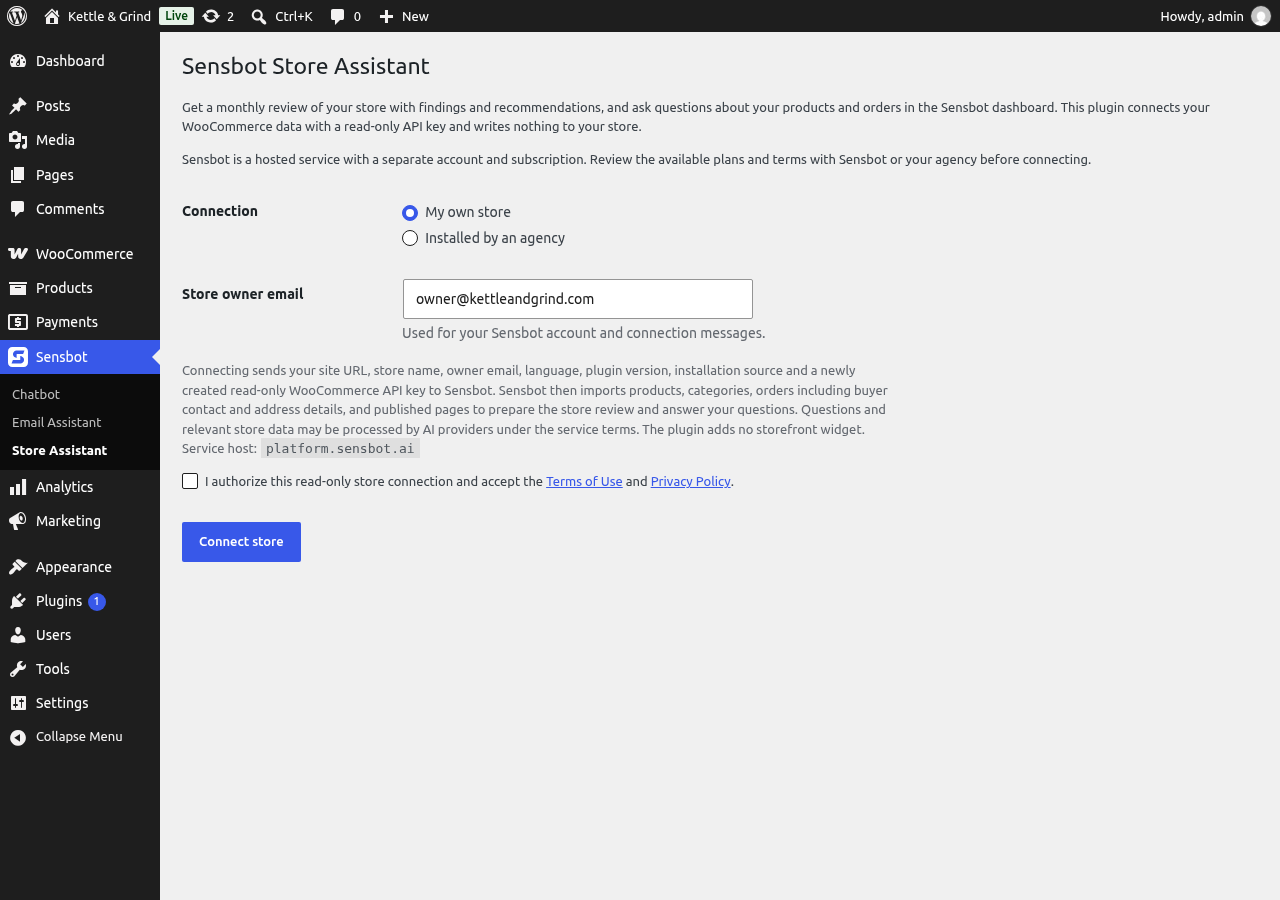
This plugin connects your site to Sensbot, a hosted service operated by Sensnet d.o.o. (https://sensbot.ai), at https://platform.sensbot.ai. Nothing is sent until an administrator ticks the consent box and clicks Connect store.
When you connect: the plugin creates a read-only WooCommerce REST API key and sends Sensbot your site URL, store name, the owner email you entered, the site language, the plugin version, how the plugin was installed (wordpress.org or a manual upload), the read-only consumer key and secret, your acceptance of the terms, and the agency code if you entered one.
While connected: Sensbot uses that key, from its own servers, to read products, categories, orders (including buyer names, contact details and addresses) and published WordPress pages, and keeps reading updates while the connection is active. This data is used to prepare the store review and to answer your questions in the Sensbot dashboard. Questions and the store data needed to answer them are processed by AI model providers that work for Sensbot under contract.
From the settings screen: opening the screen or clicking Refresh status asks Sensbot for the connection state, sending the connection ID and install secret. Open Sensbot Store Assistant requests a short-lived sign-in link and opens the dashboard in a new tab.
When you disconnect or delete the plugin: the plugin tells Sensbot to end the connection (sending the connection ID and install secret), which also cancels the Sensbot subscription for this store, and it revokes the WooCommerce key it created. Deactivating the plugin does not disconnect anything. If Sensbot cannot be reached, the key is still revoked locally; contact info@sensbot.ai to confirm the cancellation. To have your hosted data deleted, write to info@sensbot.ai.
Nothing is contacted when a visitor loads your storefront.
Developers can point the plugin at a different Sensbot environment with the SENSBOT_API_BASE_URL and SENSBOT_APP_BASE_URL constants in wp-config.php.
- Terms of Use: https://sensbot.ai/terms-of-use/
- Privacy Policy: https://sensbot.ai/privacy-policy/
Screenshots

Installation
- Install and activate WooCommerce (needed for the store review).
- Install Sensbot Store Assistant from Plugins > Add New, or upload the ZIP, and activate it.
- Open Sensbot > Store Assistant in wp-admin (also linked under WooCommerce).
- Choose “My own store”, or “Installed by an agency” and paste the code your agency gave you.
- Check the owner email, read the disclosure, tick the consent box and click Connect store.
- Wait for the first import, then click Open Sensbot Store Assistant.
Your store must be reachable from the internet over HTTPS, with the WordPress REST API answering at /wp-json/ (pretty permalinks on). A store on localhost or behind a login wall cannot be connected.
FAQ
-
Does it change anything in my store?
-
No. The key it creates is read-only, and the plugin adds nothing to your storefront.
-
When does the first review arrive?
-
Reviews cover closed months only. After the first import, the review for the last full month is prepared in the Sensbot dashboard.
-
What can the review not see?
-
WooCommerce orders carry no visit or conversion data, so the review explains sales from the order side. Refunds are reported together with cancellations, and stock history is not available.
-
I run an agency. How do I connect a client store?
-
Install the plugin on the client’s site, choose “Installed by an agency” and paste your agency code. The store then appears in your Sensbot agency login, and the review can carry your agency’s name and logo.
-
Does this add a chatbot to my site?
-
No. Sensbot Store Assistant works in the Sensbot dashboard for store managers. The Sensbot chatbot is a separate plugin.
-
Do I need other Sensbot plugins?
-
No. The chatbot and email assistant plugins are separate and can be installed alongside this one.
-
Does it work without WooCommerce?
-
It installs and activates cleanly on any WordPress site. The store review and “ask your store” need WooCommerce.
-
What happens if I deactivate or delete it?
-
Deactivating keeps the connection. Click Disconnect, or delete the plugin, to end the connection, cancel the subscription for this store and revoke the key.
-
The import does not finish. What now?
-
Click Refresh status after a few minutes. Check that the site is public, on HTTPS, and that /wp-json/ opens. If it stays stuck, write to info@sensbot.ai with your store URL.
Reviews
There are no reviews for this plugin.
Contributors & Developers
“Sensbot Store Assistant” is open source software. The following people have contributed to this plugin.
Contributors
Translate “Sensbot Store Assistant” into your language.
Interested in development?
Browse the code, check out the SVN repository, or subscribe to the development log by RSS.
Changelog
1.0.0
- First release: connect a WooCommerce store with a read-only key, monthly store review, ask your store, agency codes.