

Description
Classic Honeypot for CF7 adds a [honeypot] form tag to Contact Form 7 (CF7) that stops spam bots without a CAPTCHA.
The principle of a honeypot is simple: bots are stupid. While some spam is hand-delivered, the vast majority is submitted by bots that blindly fill in every field they find. The honeypot adds an extra field that is hidden from people; if it gets filled in, the submission is flagged as spam.
The plugin also includes an optional submission time check: if a form is submitted faster than a configurable number of seconds, it is treated as spam, since bots usually submit forms in one or two seconds while people take much longer.
Features
- A
[honeypot]form tag, with its own button in the Contact Form 7 form editor. - An optional submission time check.
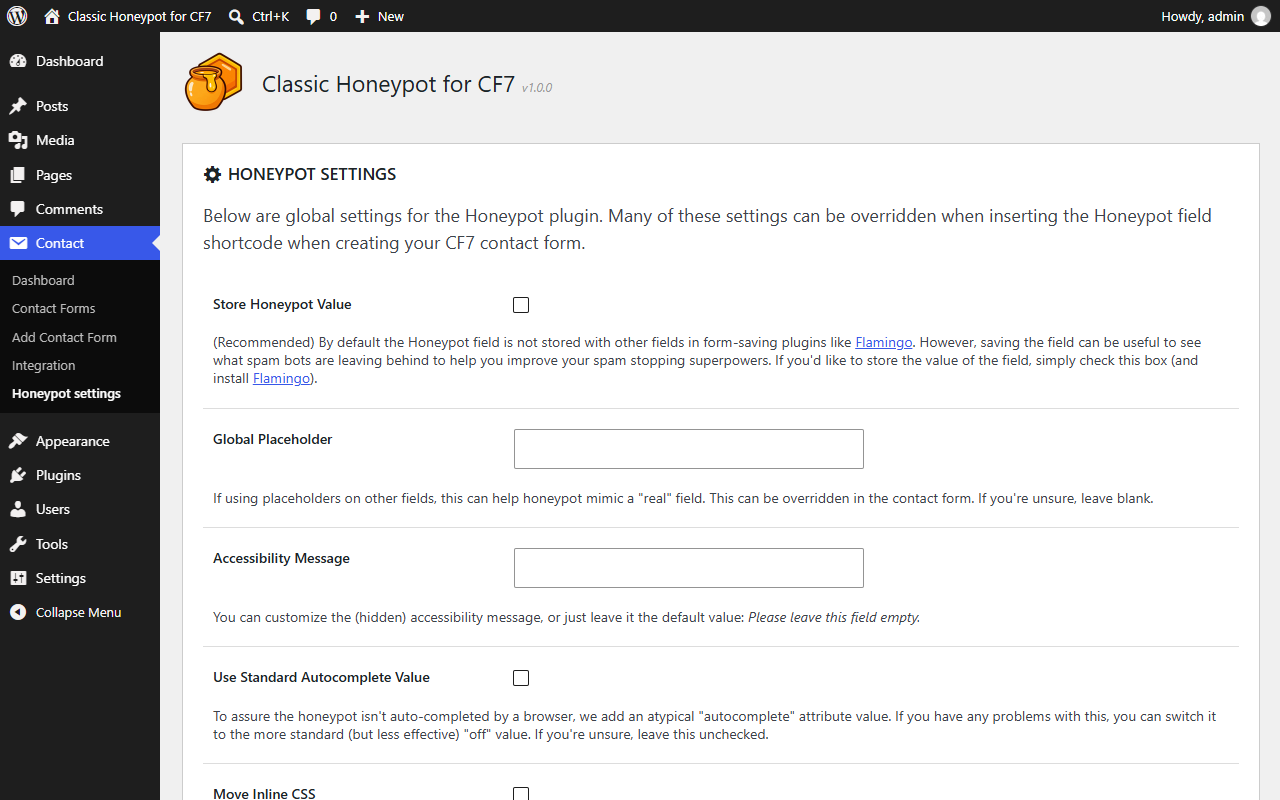
- Global settings for the placeholder, the accessibility message, the autocomplete value and how the field is hidden, which each form tag can override.
- Blocked submissions are recorded in the Contact Form 7 spam log, with the reason.
- Works with Flamingo to review blocked submissions.
About this fork
Classic Honeypot for CF7 is a fork of Honeypot for Contact Form 7, written by Nocean and contributors and released under the GPLv2 or later. It is based on version 2.1.1 and has been developed independently since then, in parallel with the original plugin.
This fork keeps the scope of version 2.1.1, the honeypot field and the time check, and maintains it for current versions of WordPress, PHP and Contact Form 7.
All credit for the original idea and code goes to Nocean and the contributors of Honeypot for Contact Form 7. Any bugs in this fork are ours, not theirs.
Classic Honeypot for CF7 is not affiliated with or endorsed by the authors of Honeypot for Contact Form 7 or Contact Form 7.
Switching from Honeypot for Contact Form 7
Classic Honeypot for CF7 can replace Honeypot for Contact Form 7 without changes to your forms:
- It uses the same
[honeypot]form tag and the same tag options, so your existing forms keep working. - It uses the same public filters (see below), so your customizations keep working too.
- The first time it runs, it imports the settings of Honeypot for Contact Form 7.
The two plugins cannot run at the same time, because they register the same form tag. Deactivate Honeypot for Contact Form 7 before activating this plugin. While it is active, Classic Honeypot for CF7 stays inactive and shows a notice.
Recommended plugins
We recommend Flamingo together with CF7 and this plugin. Flamingo stores spam submissions in its Inbound Messages / Spam section, showing you what got caught in the honeypot and why. Enable “Store Honeypot Value” in the settings to see what the bots left behind.
Privacy
This plugin does not track users, store any user data, send data to external servers, or use cookies. It is an add-on for Contact Form 7; please review Contact Form 7’s privacy policy for more information.
Screenshots
Installation
- Make sure Contact Form 7 is installed and activated.
- If you were using Honeypot for Contact Form 7, deactivate it.
- Install and activate Classic Honeypot for CF7.
- Edit a form in Contact Form 7.
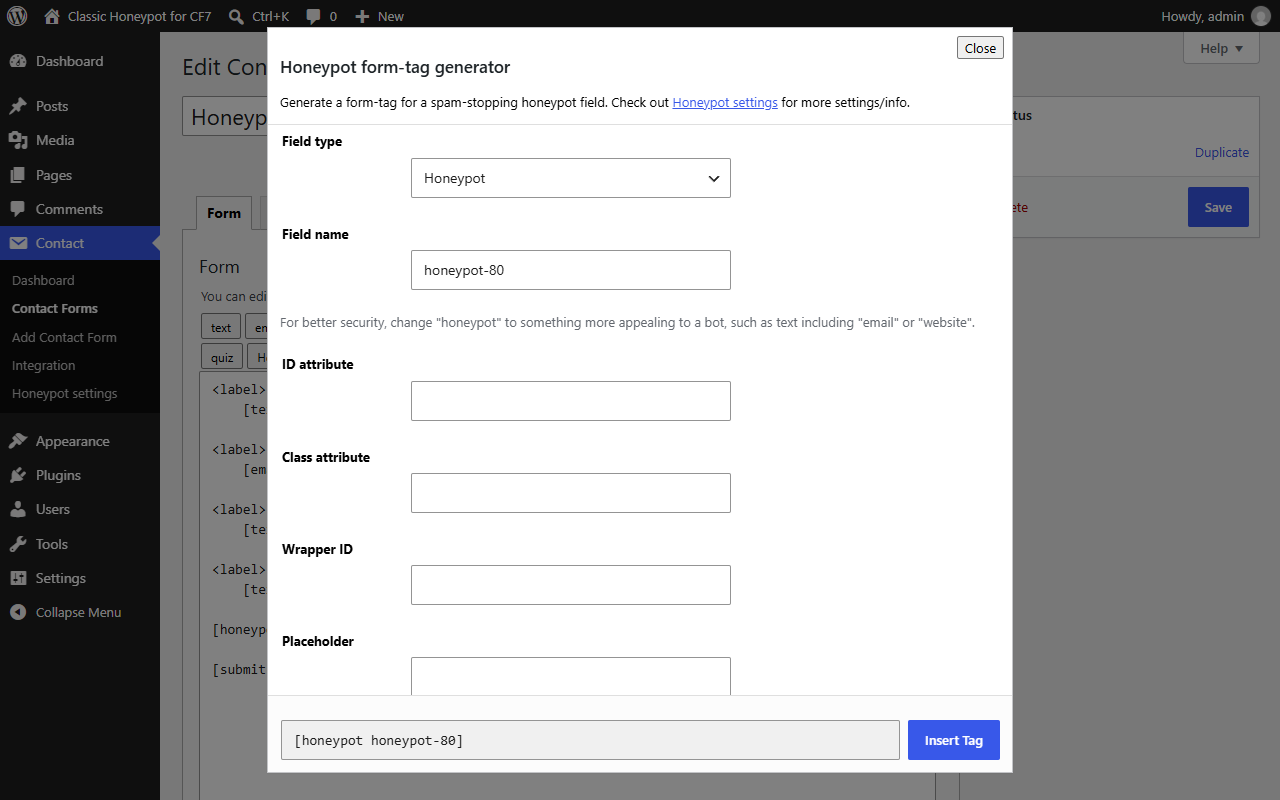
- Choose “Honeypot” from the CF7 tag generator. Recommended: change the honeypot field name to something appealing to a bot, such as “website” or “email-confirm”.
- Insert the generated tag anywhere in your form. The field is hidden from your visitors with inline CSS.
Altering the honeypot output HTML [ADVANCED]
The global settings should cover most needs, but these filters let you customize the honeypot field further:
wpcf7_honeypot_accessibility_message– Adjusts the default text of the (hidden) accessibility message. This can also be done on the settings page.wpcf7_honeypot_container_css– Adjusts the CSS applied to the honeypot container to keep it hidden from view.wpcf7_honeypot_html_output– Adjusts the entire HTML output of the honeypot element.
The filter names are the same as in Honeypot for Contact Form 7, so existing snippets keep working.
Development
The source code is on GitHub: nilovelez/classic-honeypot-for-cf7. Bug reports and pull requests are welcome there.
FAQ
-
Will this plugin stop all my contact form spam?
-
Probably not. But it should reduce it to a level where you don’t need additional spam challenges (CAPTCHA, math questions, etc.).
-
Are honeypots better than CAPTCHAs?
-
It depends on the CAPTCHA. Unfortunately, the harder a CAPTCHA is to break, the more unfriendly it is to real people. Try a honeypot first, and if it doesn’t stop enough spam, add more challenging anti-spam techniques.
-
Can I use more than one honeypot field in a form?
-
Yes, and it may catch even more spam, since it increases the chances of a bot falling into the trap. Just make sure each honeypot field has a unique name.
-
How does the time check work?
-
When enabled, the honeypot field includes the time the form was loaded. If the form is submitted sooner than the configured number of seconds, or the time is missing, the submission is treated as spam. The threshold is only stored on the server. A determined bot could still fake an older start time; the time check is meant to stop the common, fast and careless ones.
-
Does this plugin work with Flamingo?
-
Yes. If the honeypot is triggered, no email is sent, and the submission is added to the spam section of Flamingo so you can review what tripped it.
-
Contact Form 7 warns about “unsafe email” without protection. Why?
-
Contact Form 7 shows this configuration warning when a mail setting uses an address typed by the visitor, such as an autoresponder sent to
[your-email], and the form has no CAPTCHA. A honeypot stops most bots, but it does not stop a person who misuses the form on purpose, so this plugin does not hide the warning. See the Contact Form 7 documentation for your options. -
Why is this a separate plugin?
-
Since version 2.1.1, Honeypot for Contact Form 7 has grown into a wider set of tools for Contact Form 7. This fork exists for people who just want the honeypot, without extra modules.
Reviews
There are no reviews for this plugin.
Contributors & Developers
“Classic Honeypot for CF7” is open source software. The following people have contributed to this plugin.
Contributors
“Classic Honeypot for CF7” has been translated into 1 locale. Thank you to the translators for their contributions.
Translate “Classic Honeypot for CF7” into your language.
Interested in development?
Browse the code, check out the SVN repository, or subscribe to the development log by RSS.
Changelog
1.0.1
- Security hardening: the wrapper ID and the CSS from the
wpcf7_honeypot_container_cssfilter are sanitized before they are added to the inline stylesheet.
1.0.0
- First release of Classic Honeypot for CF7, forked from Honeypot for Contact Form 7 2.1.1 by Nocean.
- New name, slug and text domain (
classic-honeypot-for-cf7). Internal prefixes changed fromhoneypot4cf7tochoneypot4cf7. - Kept the
[honeypot]form tag and thewpcf7_honeypot_*filters for drop-in compatibility. - Settings are imported from the original plugin on first run.
- The plugin stays inactive, with an admin notice, while the original plugin is active.
- Requires WordPress 6.5, PHP 7.4 and Contact Form 7 6.0 or later. Compatibility code for older versions of Contact Form 7 has been removed.
- Added the
Requires Plugins: contact-form-7header, which replaces the old “Contact Form 7 must be installed” notice and its dismiss script. - The settings page only contains the settings. The promotional boxes and the links to the support forum of Honeypot for Contact Form 7 were removed, since this fork has its own support forum.
- Security: all settings are sanitized when saved, and all output (settings page and honeypot field HTML) is escaped.
- Security: the time check threshold is read on the server. The form no longer sends it, so bots can’t change it, and a submission without the start time is treated as spam.
- New form-tag generator for the Contact Form 7 6.0 editor (tag generator API version 2), written from scratch.
- Time check: a start time in the future is treated as spam, and the spam log shows the minimum number of seconds required.
- The settings page appears again as “Honeypot settings” at the end of the Contact menu. Since Contact Form 7 6.2 it was hidden from the menu.
- Fixed a possible fatal error in the spam check when Contact Form 7 had no current form.
- A honeypot value of “0” is now treated as spam.
- “Reset to Defaults” no longer re-imports the settings of the original plugin.
- Settings are now stored as booleans, and reading them no longer writes to the database.
- The settings stylesheet is loaded only on the settings page. Settings are deleted on uninstall through
uninstall.php. - Removed the spam counter. It wrote to the database on every blocked submission and could overwrite settings; the Contact Form 7 spam log (and Flamingo) already show what was blocked and why.
Changelog of Honeypot for Contact Form 7 up to version 2.1.1, by Nocean
2.1.1
Fixes small bug when enabling in bulk with other plugins.
2.1
Added new feature: additional submission time check to improve bot-stopping power! Also, fixed small HTML issue and tidied up shortcode interface.
2.0.5
Improved backwards compatibility. Solves issues when plugin installed on older versions of CF7.
2.0.4
Better error checking for missing config problems.
2.0.3
General code cleanup, better adherence to WP coding standards and fixes for i18n functions.
2.0.2
Replaced text domain constant with plain string for better i18n compatability.
2.0.1
Hotfix for issue with options not being set on upgrade.
2.0
A significant update with a bunch of new things.
1.14.1
Minor update to change name to comply with CF7 copyright notice.
1.14
Added do-not-store for when forms are stored in the DB (i.e. Flamingo). Improved wrapper ID masking and customization.
1.13
Additional functionality to improve spam-stopping power.
1.12
Introduces ability to force W3C compliance.
1.11
Addresses accessibility concerns regarding a missing label and disables autocomplete to prevent browser autocomplete functions from filling in the field.
1.10
Updates for Function/Class changes related to CF7 4.6. Removed plugin local language support, instead use translate.wordpress.org.
1.9
Added i18n support, French language pack. Thx chris-kns
1.8
Added wpcf7_honeypot_accessibility_message and wpcf7_honeypot_container_css filters, i18n support.
1.7
Provides backwards compatibility for pre-CF7 4.2, introduces ability to remove accessibility message.
1.6.4
Quick fix release to fix PHP error introduced in 1.6.3.
1.6.3
Updates to accommodate changes to the CF7 editor user interface.
1.6.2
Small change to accommodate validation changes made in CF7 4.1.
1.6.1
Small change to accommodate changes made in CF7 3.9.
1.6
Quite a lot of code clean-up. Added the ability to add custom CLASS and ID attributes when generating the Honeypot shortcode (in the CF7 form editor).
1.5
Added filter hook for greater extensibility.
1.4
Update to make compatible with WordPress 3.8 and CF7 3.6. Solves problem of unrendered honeypot shortcode appearing on contact forms.
1.3
Update to improve outputted HTML for better standards compliance when the same form appears multiple times on the same page.
1.2
Small update to add better i18n and WPML compatibility.
1.1
Small update for W3C compliance.
1.0.0
- Initial release.