

Description
Your page flashes, jumps or scrolls sideways. Which CSS rule caused it?
RobArt CatchNet is a front-end visual debugging tool for WordPress administrators. It records the early moments of a page load, flags suspicious visual changes and helps you trace them to the responsible element and CSS rule. Instead of another performance score, you get actionable findings you can inspect and reproduce.
Find elusive front-end bugs faster:
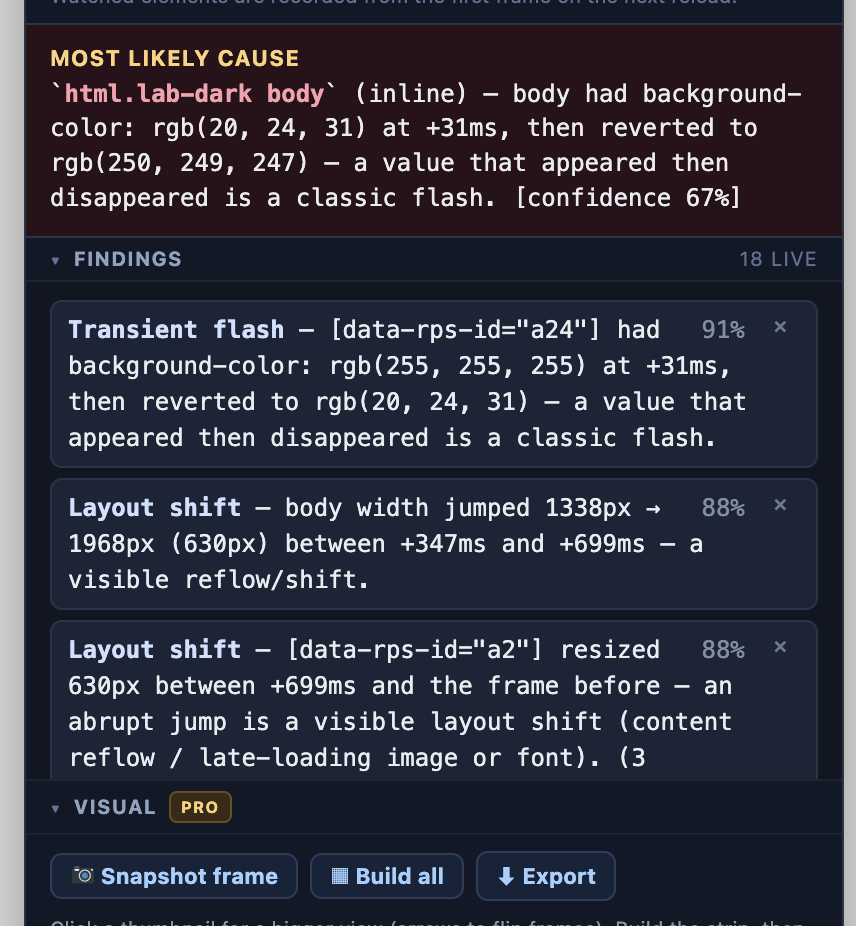
- FOUC and unstyled flashes: catch elements that briefly appear without their intended styling.
- Layout shifts: locate elements that jump or resize during loading.
- Phantom horizontal scrolling: find content extending beyond the viewport.
- Transient flashes: spot styles that appear briefly and then revert.
- Lingering overlays: identify splash screens and overlays that fail to disappear.
- Rogue positioning and shrinking content: track unexpected movement and size changes.
From symptom to CSS culprit
- Open a front-end page while logged in as an administrator and select CatchNet in the admin bar.
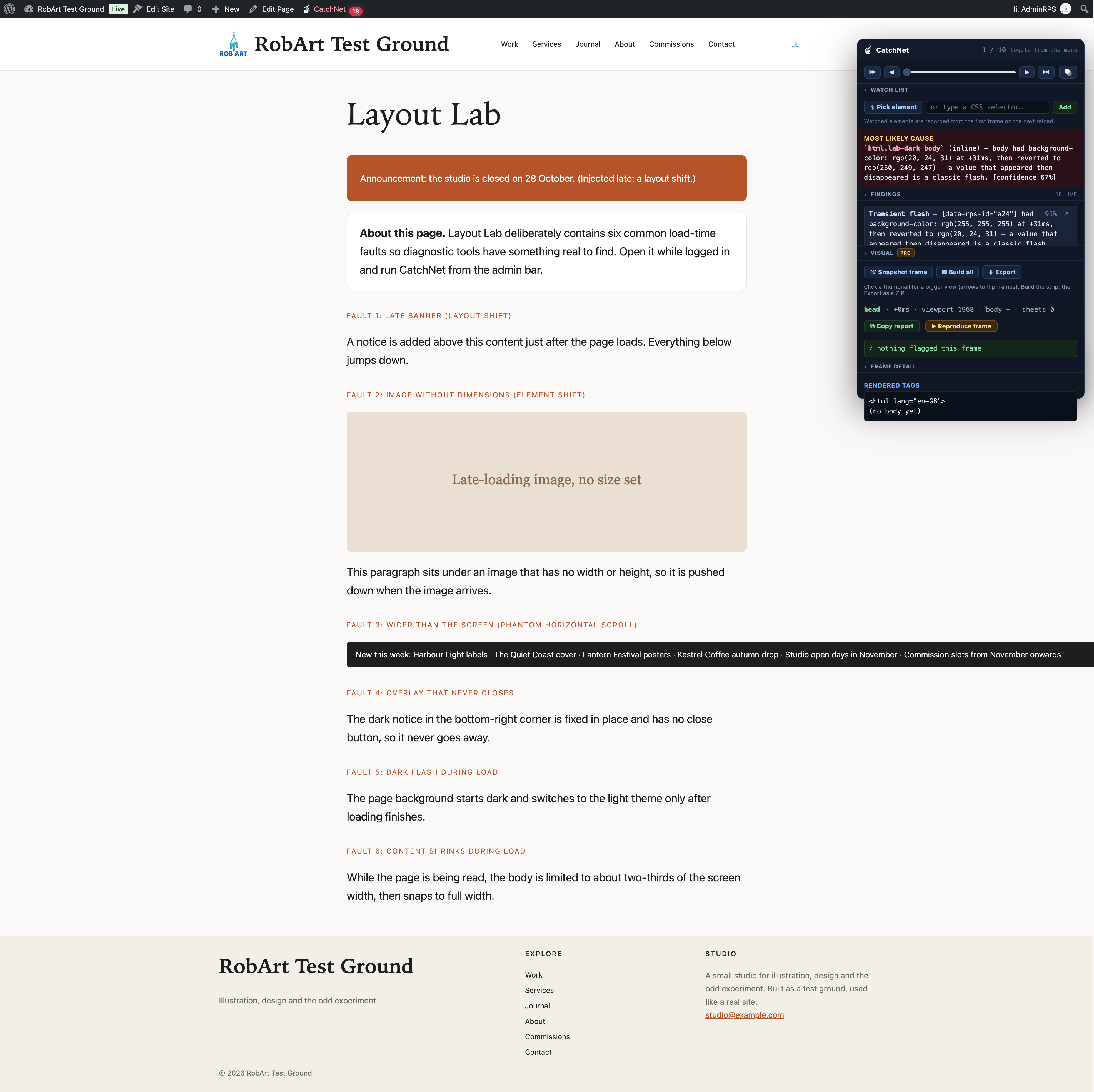
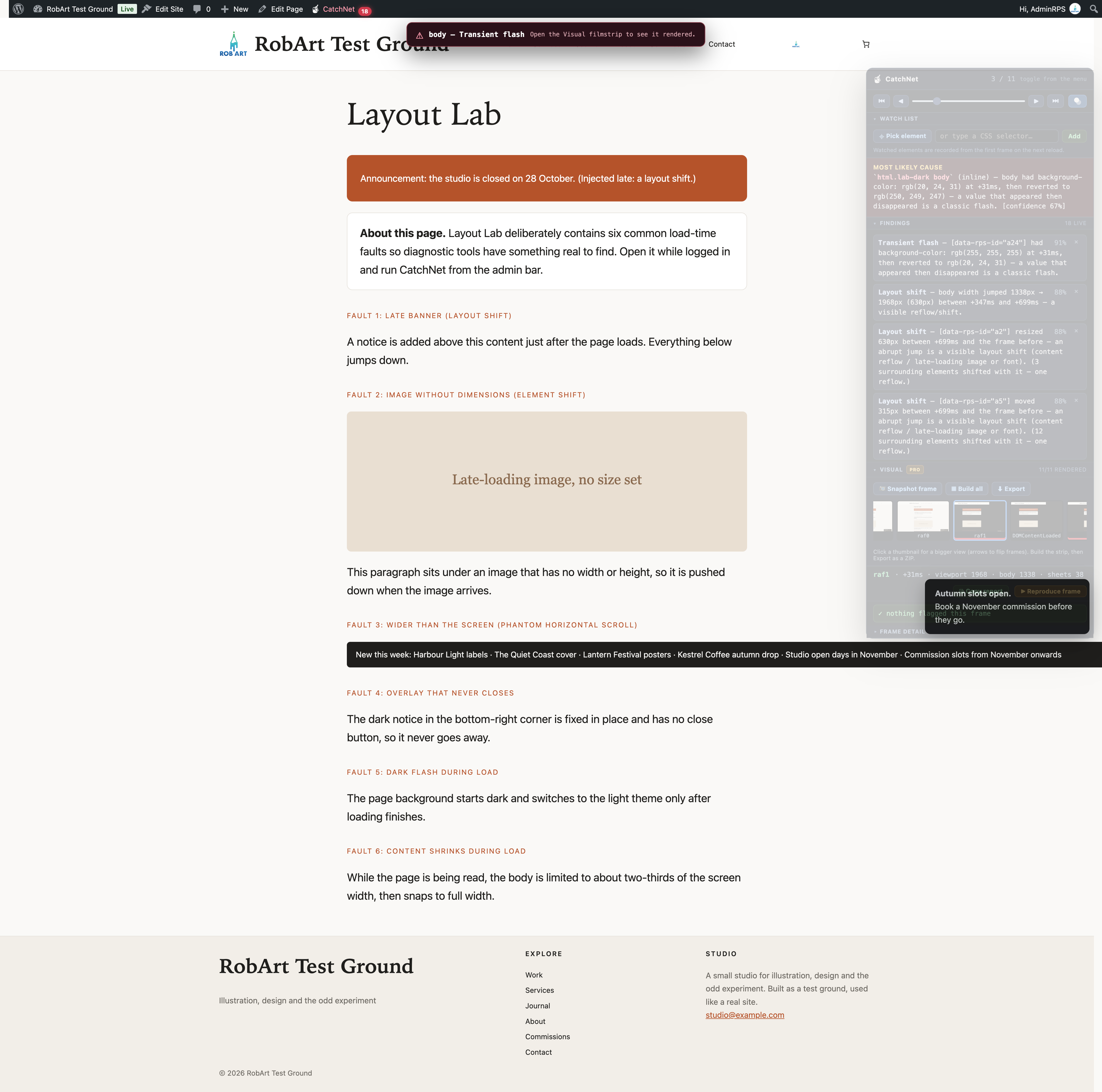
- Review the ranked findings and the most likely cause, including the implicated selector, recorded frame and confidence estimate.
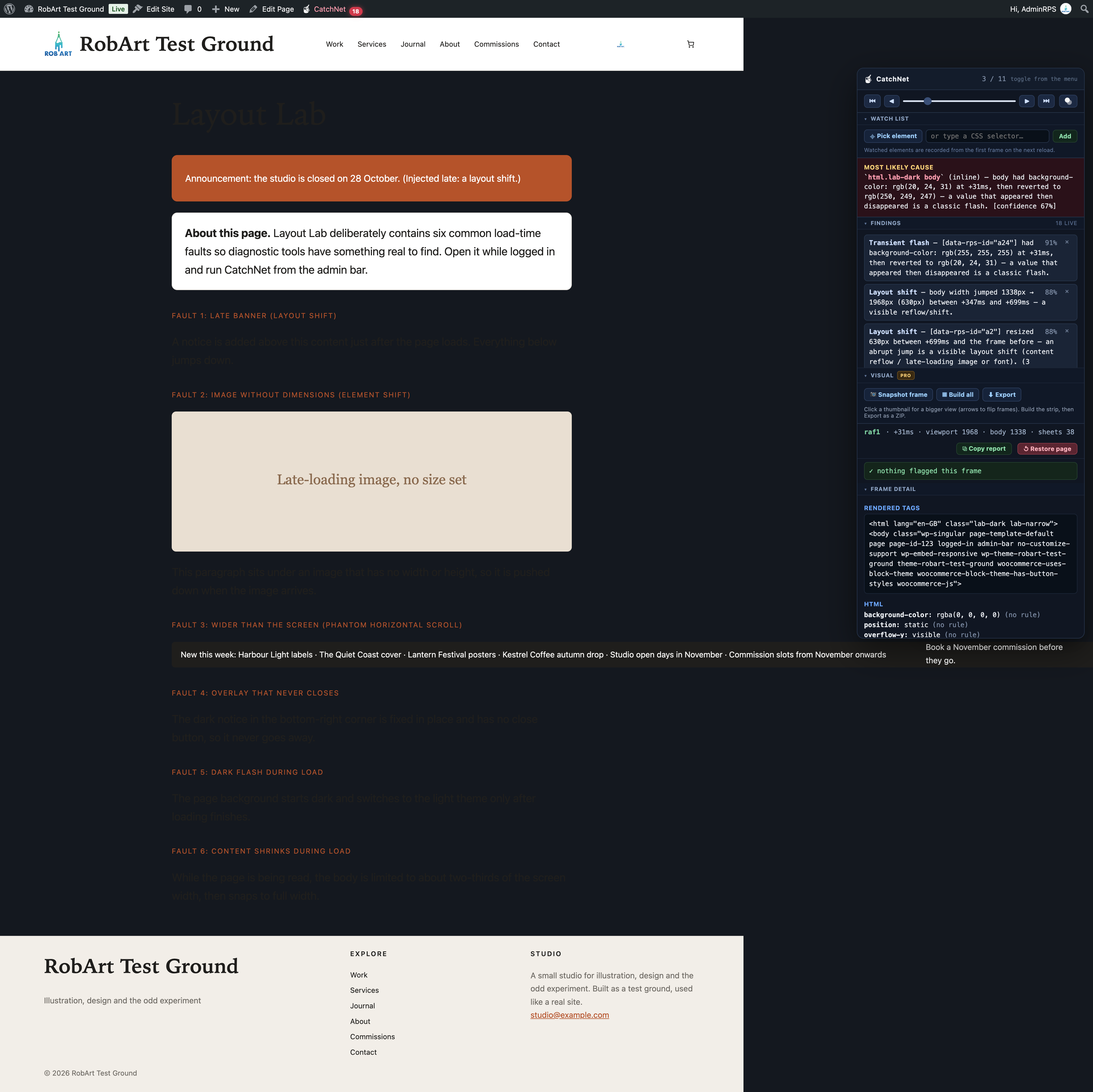
- Scrub through the page-load frames to inspect the CSS properties and winning rules at each moment.
- Reproduce a recorded frame on the live page, then restore the original state.
- Copy a plain-text report for a developer, support ticket or AI-assisted debugging session.
Use the element watch list to inspect a specific selector. Enable the see-through floating panel to observe the page underneath as you investigate.
Built for developers, site maintainers and agencies: useful when a header flashes unstyled, a late-loading image pushes content down, a modal remains on screen or an unexplained scrollbar appears.
Lightweight and private by design
CatchNet’s diagnostics run in your browser for logged-in administrators only. Ordinary visitors do not load its diagnostic interface. The free plugin does not transmit your page data to an external service.
Free vs Pro
Free includes the complete diagnostic workflow: page-load recorder, ranked verdict and findings, CSS/frame inspection, frame reproduction, copyable reports, element watch list and see-through panel.
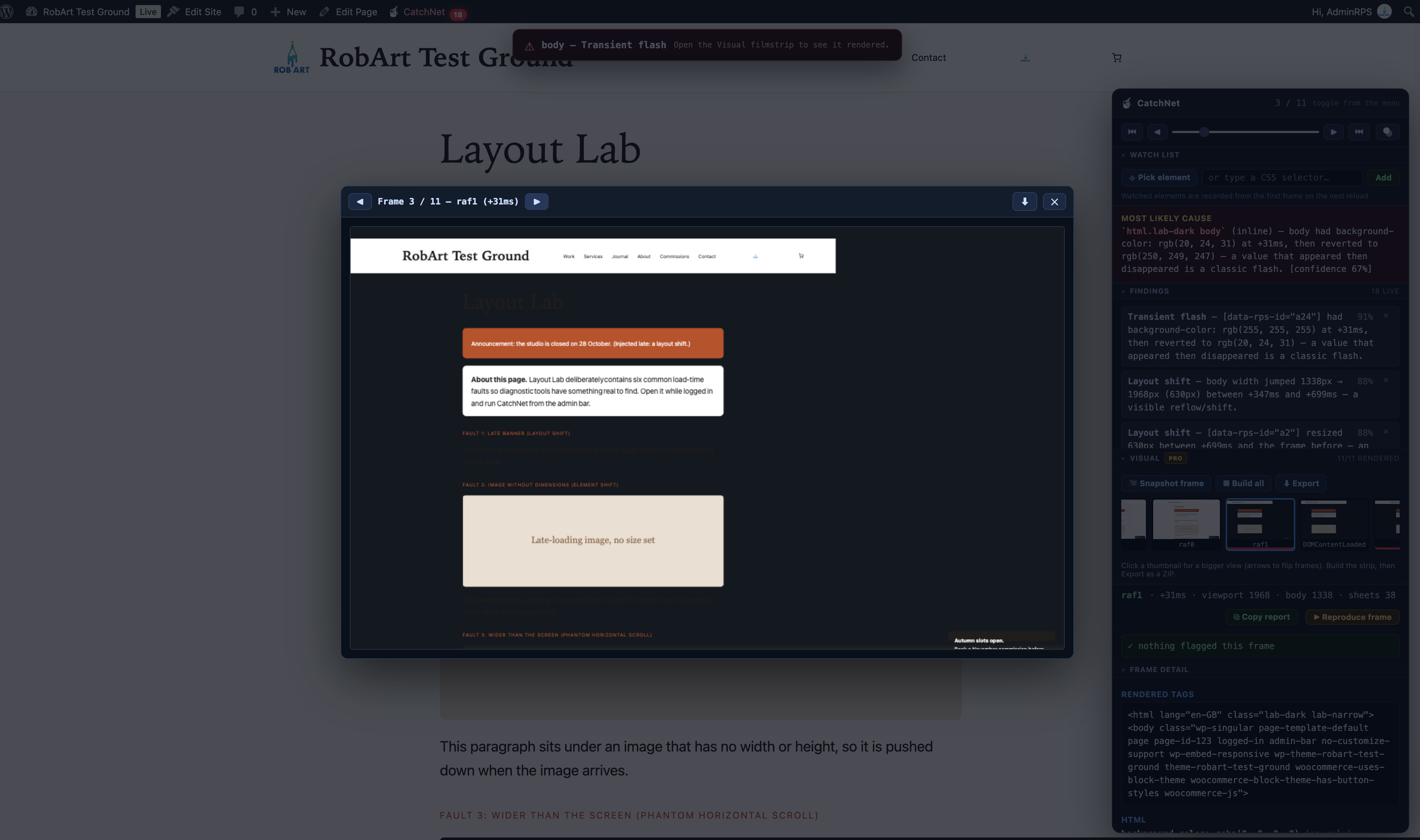
Pro adds the Visual Filmstrip: browser-generated image reconstructions of recorded frames, highlighted frames with findings, larger pop-out previews with navigation, and ZIP export in WebP or PNG. The paid add-on contacts the author’s licensing server to validate its licence; visual reconstructions stay in your browser.
Note: CSS attribution is best-effort. When JavaScript applies inline styles or the cause cannot be reliably identified, CatchNet reports that limitation rather than inventing a selector.
Uninstall
When you delete RobArt CatchNet from the Plugins screen, its uninstall script runs automatically and removes everything the plugin stored in your WordPress database:
- The see-through opacity settings and the filmstrip export format
- The stored licence record and its cached licence tier (Pro)
- Older settings left over from before the plugin was renamed
CatchNet keeps nothing else on your server. Your dismissed findings, watch list and panel layout are saved in your own browser (local storage), not on the site, so they stay in that browser until you clear its site data.
Deactivating the plugin without deleting it keeps your settings.
Screenshots
Installation
- Upload to
/wp-content/plugins/robart-catchnet(or install via the Plugins screen). - Activate via the Plugins menu.
- View any page on the front end while logged in as an administrator, and click CatchNet in the admin bar.
- Settings and licence live under Tools CatchNet.
FAQ
-
Does this run for my visitors?
-
No. CatchNet only loads for logged-in administrators on the front end. Visitors and non-admins never load any of it, so it adds nothing to a real visitor’s page.
-
Does it send my page anywhere?
-
No. The diagnostic runs entirely in your browser. The Pro Visual filmstrip also reconstructs frames locally — no image is uploaded. Only the paid Pro add-on contacts the author’s licence server, and only to validate your licence key and site URL.
-
Why does the panel say “an unidentified rule” sometimes?
-
Some flashes are caused by a style applied directly by JavaScript (an inline style), not by a stylesheet rule. There is no CSS selector to name in that case, so CatchNet says so honestly rather than blaming the wrong rule.
-
The panel stutters an animation while I’m testing.
-
The recorder samples the page as it loads, which can briefly compete with a page’s own load-time animation on your admin view (never a visitor’s). It samples every other frame to minimise this; a splash or heavy animation will still be perfectly smooth for your visitors.
-
What is the Visual filmstrip?
-
A Pro feature that reconstructs how the page actually looked at each recorded frame as a real image, so you can see the flash or shift, not just read about it. Export the strip as a ZIP to attach to a bug report.
Reviews
There are no reviews for this plugin.
Contributors & Developers
“RobArt CatchNet” is open source software. The following people have contributed to this plugin.
Contributors
Translate “RobArt CatchNet” into your language.
Interested in development?
Browse the code, check out the SVN repository, or subscribe to the development log by RSS.
Changelog
0.8.11
- Fixed (Pro): the developer licence bypass now looks for its key in the same place as every other RobArt plugin, outside the web root.
- Changed: the Upgrade to Pro button now goes straight to checkout.
- New readme: rewritten description, plus an Uninstall section listing exactly what is removed when you delete the plugin.
0.8.10
- Changed: the front-end recorder is now loaded through WordPress’s standard enqueue system (register plus enqueue) rather than a printed tag, while still running in the document head ahead of the stylesheets so it can sample the first paint. No change to behaviour. (WordPress.org compliance.)
0.8.9
- Fixed: “Reproduce a frame” no longer distorts the page around the diagnostic notice — the reconstruction never re-anchors fixed elements, so the on-page finding notice stays a clean floating overlay instead of appearing to drop into the layout.
- The on-page finding notice now has a larger, clearer warning icon.
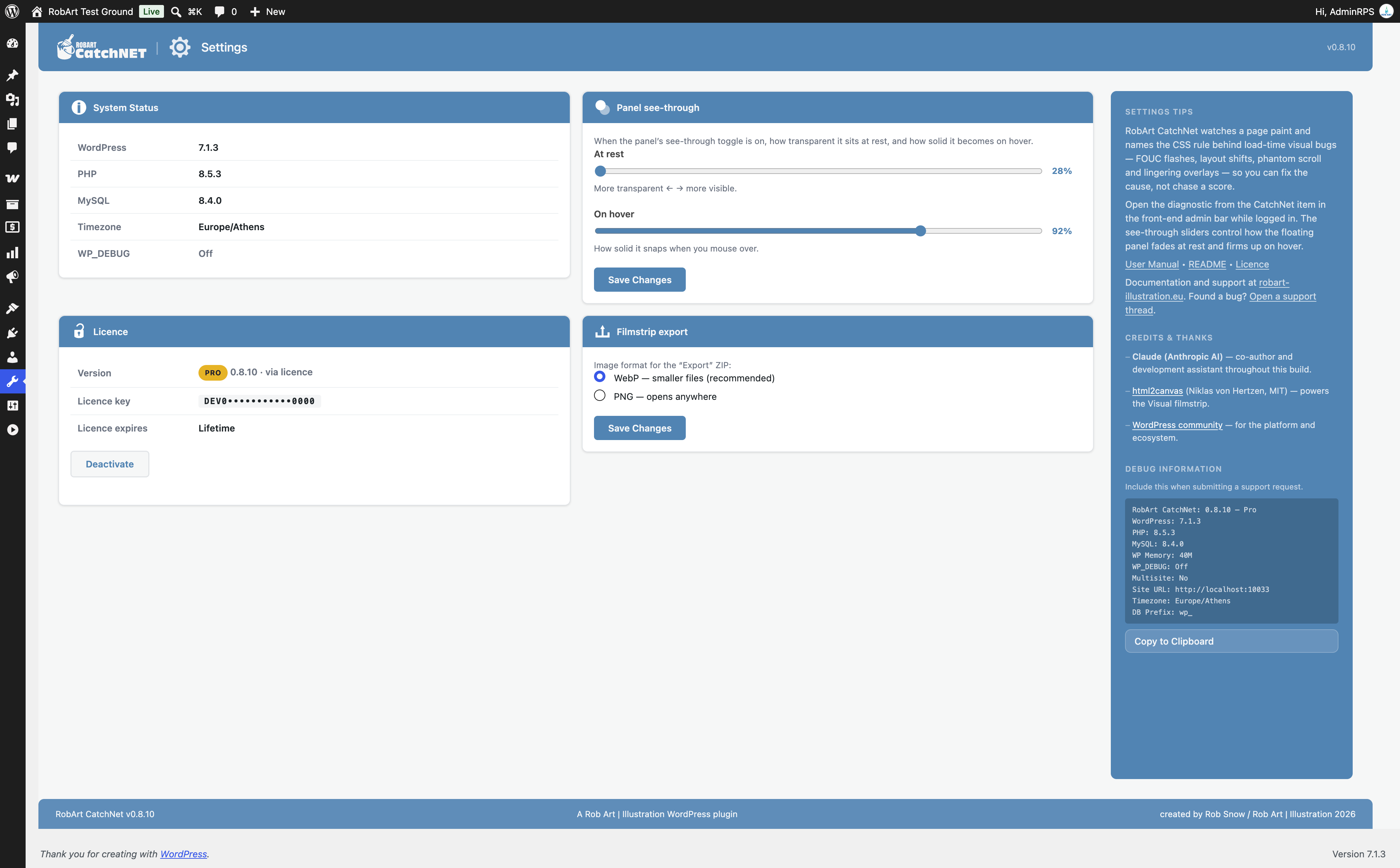
- Tools CatchNet now shows an in-page overview of what Pro adds and its one-off pricing (single site, five sites, unlimited), replacing the licence-key field the free build can’t include.
0.8.8
- Fixed: the diagnostic panel no longer reports its own floating window as a lingering overlay — CatchNet now excludes its own interface from the page it inspects, so findings describe the page under test, not the tool.
- Fixed: the panel’s icons are escaped at the point of output, satisfying the WordPress.org output-escaping checks with no change to what you see.
- Translation template (POT) added under /languages.
0.8.7
- WordPress.org compliance pass (PCP + scanner): the engine, panel and Visual scripts and the panel stylesheet now load through the standard enqueue system with proper dependencies; the recorder stays inline in the document head (it must run before the page styles to catch the first paint). Input on the settings page is sanitised on read, and the short description trimmed. No functional change.
0.8.6
- The scrubber’s on-page bug notice is now tier-aware: Pro points to the Visual filmstrip; free explains the bug was detected and that Pro reconstructs it — no dangling of a feature you don’t have.
- Reliability: if the filmstrip is built but a detected bug can’t be re-drawn on the finished page (every frame identical), it now says so honestly instead of showing identical frames as if nothing happened.
0.8.3
- The Visual filmstrip now reconstructs layout shifts: the recorder watches a dimension-less image (or flat block) from its collapsed state, and reproducing an early frame restores that geometry, so the shift is visible frame-to-frame.
- The on-page finding notice is hidden while the filmstrip renders, so it never flashes on the page or appears in a thumbnail.
0.8.2
- The frame scrubber now shows an on-page notice when the current frame carries a detected issue, so scrubbing a transient bug (which the finished page can’t re-draw) no longer looks like nothing is wrong — it points you to the Visual filmstrip.
- The filmstrip scrolls the highlighted frame into view as you scrub.
- The filmstrip reconstruction shows a load flash more faithfully (it paints the frame’s recorded page background), and the scrubber range now covers every recorded frame, including the late post-load checkpoints.
0.8.1
- Pro gating is now real: the tier resolves from an admin bypass, a dev-config bypass, or a validated licence, and the Visual filmstrip only appears when Pro is active.
- New Tools CatchNet settings page: status, licence activation, filmstrip export format (WebP/PNG), and see-through opacity sliders, in the standard two-column layout with an About / Support / Credits sidebar.
- The filmstrip now opens each frame in a pop-out viewer (bigger image, prev/next arrows, per-frame download) and exports all rendered frames as a ZIP.
- Bundled documentation: a User Manual, README and Licence, viewable inside the plugin.
- Plugins-screen row links (Settings / Docs / Support).
0.8.0
First public build. The full diagnostic (recorder, panel, ranked verdict, findings, reproduce, copy report, watch list, see-through mode) plus the Pro Visual filmstrip with a pop-out viewer and ZIP export. Nine detection rules for flashes, layout shifts, phantom scroll, content shrink, rogue positioning and lingering overlays.