
Description
WP Zbridge connects WordPress and WooCommerce to Cloudflare Zaraz, which loads your analytics and ad tools through Cloudflare instead of each vendor’s own script. Your pages load one small bridge script (about 3 KB gzipped) plus Cloudflare’s Zaraz loader, instead of separate tags such as gtag.js and the Meta Pixel.
Features
- Ready-made Zaraz containers: Export a Zaraz configuration for GA4, Meta and Google Ads and import it in the Cloudflare dashboard. No API token needed. (Pro can push it to Cloudflare in one click.)
- WooCommerce events: Product views, add to cart, remove from cart, cart and checkout views and purchases, sent as Zaraz e-commerce events that GA4, Meta and other tools understand. Optional parent product IDs for variations.
- Engagement events: Scroll depth, file downloads, outbound links, email and phone clicks, site search, 404 pages, comments and form submissions (Contact Form 7, WPForms and other HTML forms), with GA4-style event names.
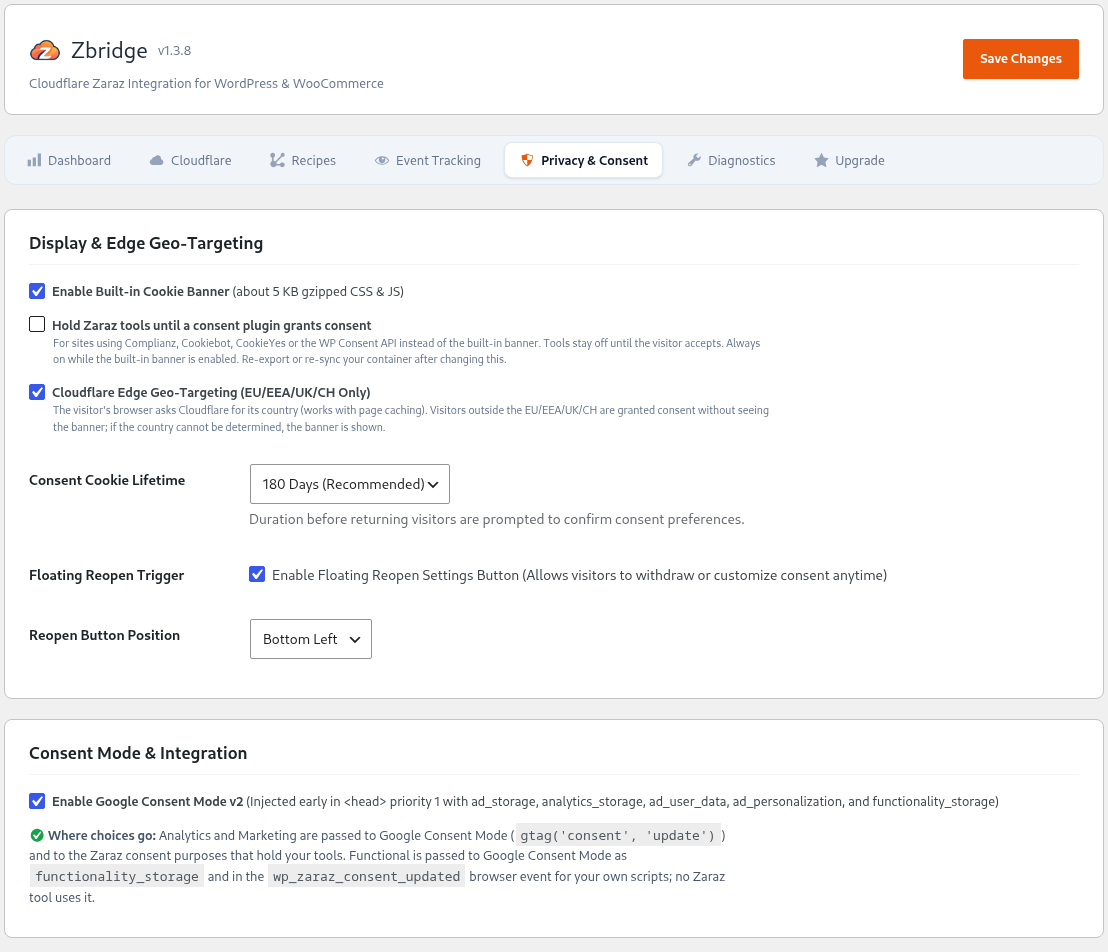
- Cookie banner and Google Consent Mode v2: A built-in banner (about 5 KB gzipped) with an EU-only option, or detection of Complianz, Cookiebot, CookieYes and the WP Consent API. Consent is passed to Google Consent Mode v2 and Zaraz.
- Instagram embeds: Show Instagram posts and reels through the Zaraz Instagram tool, which builds them on Cloudflare. Visitors load no Instagram script and get no Instagram cookies. Paste a link or use the
[zbridge_instagram]shortcode. - Cookie scanner: Scans your homepage for known cookies and trackers and groups them by category.
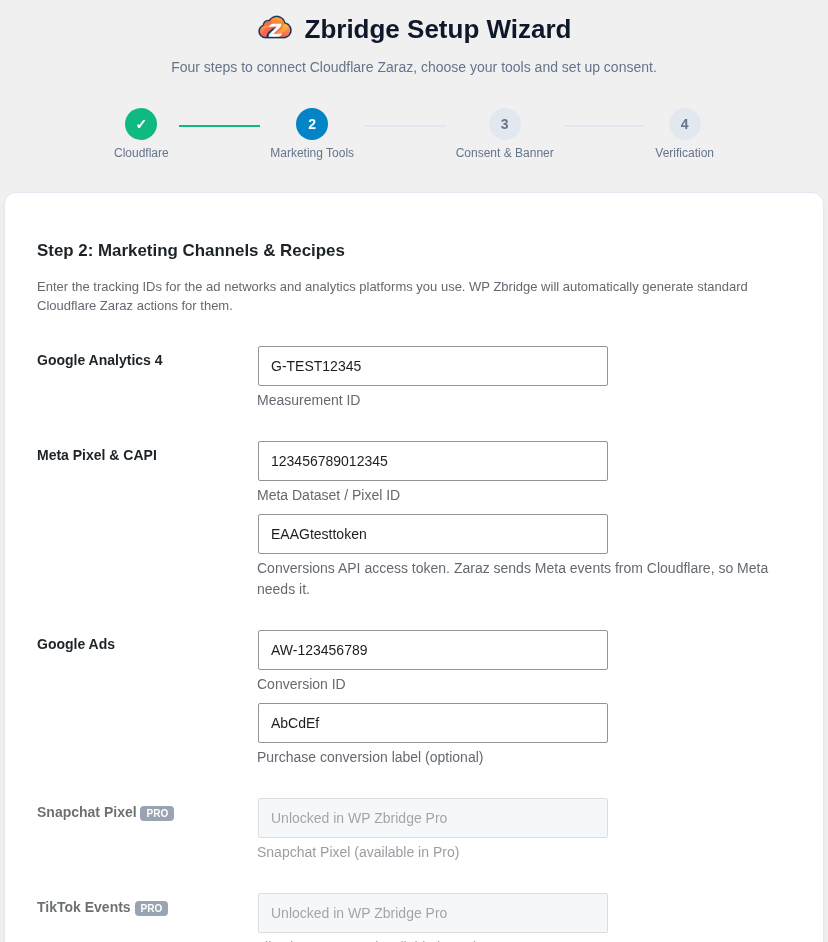
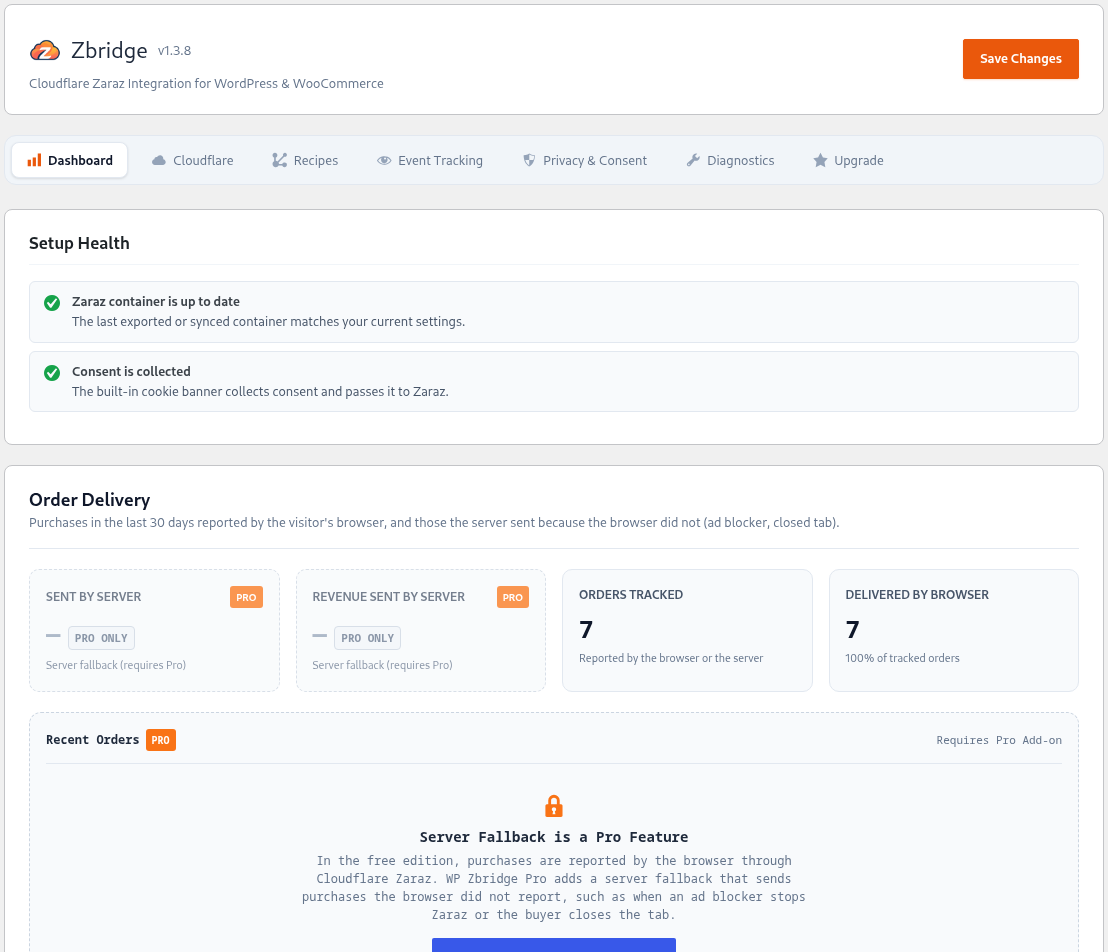
- Setup wizard and health check: The wizard guides you through connecting Cloudflare Zaraz and choosing your tools. The dashboard then checks your setup and tells you when Zaraz needs the updated container, a tool is missing its access token, or consent isn’t collected.
- Translation-ready: All visitor-facing and admin text can be translated on translate.wordpress.org.
WP Zbridge Pro
Pro adds 1-click sync to Cloudflare, Zaraz activity and failed-request reports on the dashboard, TikTok, Snapchat, Pinterest (tag and Conversions API), Bing and LinkedIn recipes, Gravity Forms, Fluent Forms and Elementor Forms, logins and sign-ups, time on page, refunds sent from the server, and a server fallback: when the browser could not report a paid order (ad blocker, closed tab), the server sends it to Zaraz.
Included Zaraz Recipes
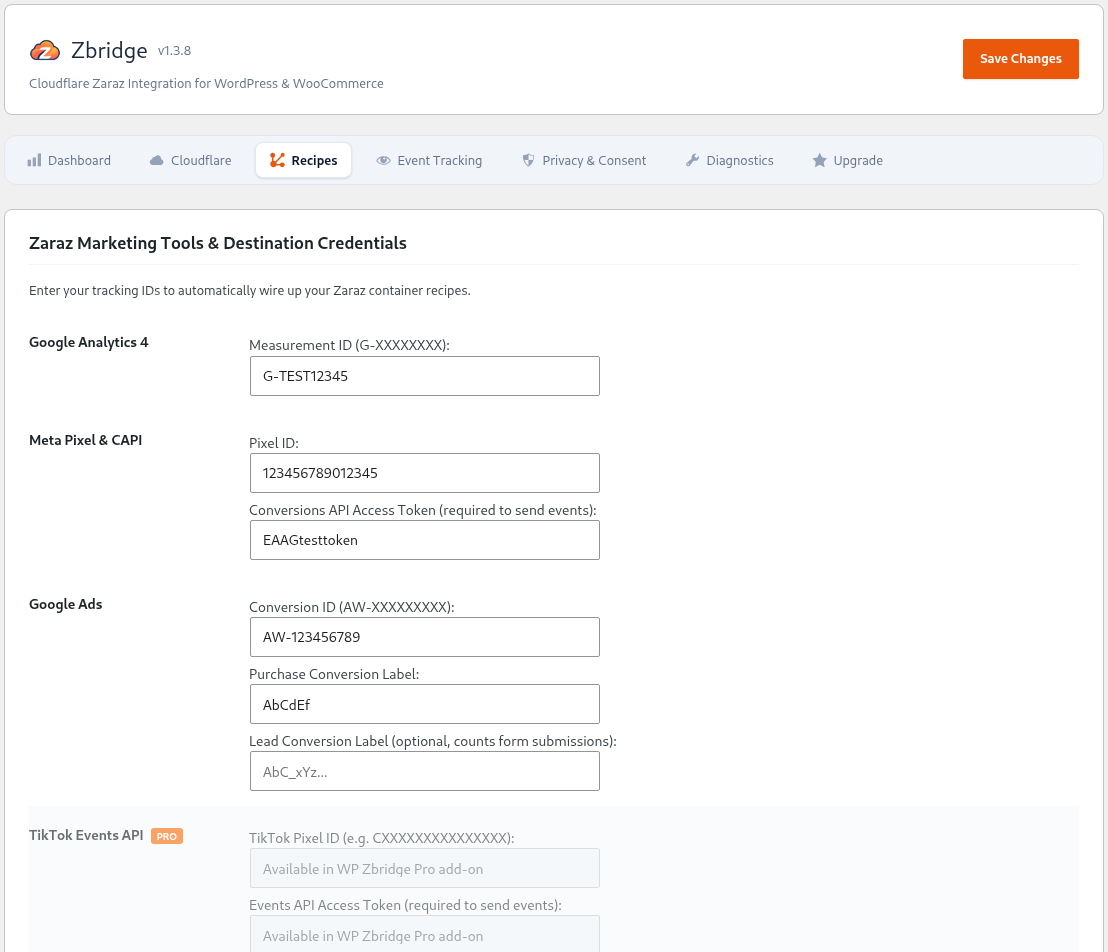
- Google Analytics 4 (GA4): Page views, e-commerce events (
view_item,add_to_cart,purchaseand more;refundin Pro), engagement events, and form submissions asgenerate_lead. - Meta Pixel & Conversions API: Page views, e-commerce events, Lead and Contact, with event properties for custom conversions. Requires a Conversions API access token.
- Google Ads: Remarketing on every page, purchase conversions with value, currency and order ID, and optional lead conversions for form submissions.
- TikTok (Pro): Page views, e-commerce events, SubmitForm and Contact. Requires an Events API access token.
- Snapchat Pixel (Pro): Page views, purchases and sign-ups.
- Pinterest Tag & Conversions API (Pro): Page views, e-commerce events, leads and sign-ups. With an optional Conversions API token, add to cart and purchases are also sent from Cloudflare’s servers; purchases carry the same event ID from both sides, so Pinterest counts them once.
- Microsoft Advertising (Bing UET) (Pro): Page views, e-commerce events and lead form submissions.
- LinkedIn Insight Tag (Pro): Page views, with optional purchase and lead conversions.
External services
This plugin integrates with external services to deploy analytics configurations and process tracking events.
-
Cloudflare Zaraz & Cloudflare API (
api.cloudflare.com):- What it is: Server-side tracking execution engine at the edge and REST API for container provisioning.
- What data is sent & when: When an administrator clicks Sync with Cloudflare (Pro), the container configuration is sent to the Cloudflare API. Tracking events from site visitors (page views, e-commerce and engagement events) are sent to Cloudflare Zaraz on your own domain. When the cookie banner or a consent plugin is used, Zaraz forwards them to each tool only after the visitor consents.
- Service Provider: Cloudflare, Inc.
- Terms of Service: https://www.cloudflare.com/terms/
- Privacy Policy: https://www.cloudflare.com/privacypolicy/
-
Google Analytics & Google Tag Manager:
- What it is: Web analytics platform configured via pre-built Zaraz recipes and audited by the local Cookie & Tracker Scanner.
- What data is sent & when: Page views, e-commerce and engagement events, forwarded by Cloudflare Zaraz. When the cookie banner or a consent plugin is used, only after the visitor grants analytics consent.
- Service Provider: Google LLC
- Terms of Service: https://marketingplatform.google.com/about/analytics/terms/us/
- Privacy Policy: https://policies.google.com/privacy
-
Meta (Facebook Pixel & Conversions API):
- What it is: Advertising attribution and conversion tracking configured via Zaraz recipes and audited by the local Cookie & Tracker Scanner.
- What data is sent & when: Page views, e-commerce events and lead events, forwarded by Cloudflare Zaraz with the visitor’s IP address, user agent and Meta browser cookies. This plugin does not send customer email addresses or phone numbers (WP Zbridge Pro can, if you turn it on, with purchases sent from the server). When the cookie banner or a consent plugin is used, only after the visitor grants marketing consent.
- Service Provider: Meta Platforms, Inc.
- Terms of Service: https://www.facebook.com/legal/terms
- Privacy Policy: https://www.facebook.com/privacy/policy/
Screenshots
Installation
- In your WordPress dashboard, go to Plugins > Add New Plugin, search for Zbridge and click Install Now.
- Click Activate.
- The Setup Wizard will launch automatically to guide you through connecting Cloudflare Zaraz.
- Choose your marketing channels in the Setup Wizard and export your pre-configured Zaraz container JSON to import into Cloudflare (or connect your Cloudflare API token in Pro for automated 1-click sync).
FAQ
-
Do I need a paid Cloudflare account?
-
No. Cloudflare Zaraz is available on all Cloudflare plans, including Free, and includes 1,000,000 Zaraz events per month at no cost. Your site must use Cloudflare as its proxy.
-
How does the Pro server fallback avoid counting an order twice?
-
When the thank-you page reports the purchase, the browser tells WordPress, and the server does not send it. Only orders the browser did not report are sent by the server, 10 minutes after payment. Both use the same order ID and event ID, so GA4 (transaction ID) and Meta (event ID) can discard a duplicate if one ever occurs.
-
Do I need to export or sync the container again after updating?
-
Only when the container changes. The Setup Health box on the Zbridge dashboard compares your current settings with the container you last exported or synced and tells you when Zaraz needs the new one.
-
Does it work with my consent plugin?
-
Yes, with Complianz, Cookiebot, CookieYes and any plugin that uses the WP Consent API. Turn on Hold Zaraz tools until a consent plugin grants consent under Privacy & Consent, and WP Zbridge passes the visitor’s choice to Google Consent Mode v2 and Zaraz. Or use the built-in cookie banner instead.
-
Does it work with page caching?
-
Yes. The bridge script is static, the EU-only banner decides in the visitor’s browser, and cart events reach the browser through WooCommerce cart fragments, so cached pages work for every visitor.
-
Does it send my customers’ email addresses or phone numbers?
-
The free plugin never does. WP Zbridge Pro has an optional setting, off by default, that adds them to purchases the server sends so Meta, TikTok and Pinterest can match them; their Zaraz tools hash the details before sending.
-
What is the difference between the free plugin and Pro?
-
The free plugin covers GA4, Meta and Google Ads, WooCommerce and engagement events, the cookie banner, Consent Mode v2, Instagram embeds and container export. Pro adds 1-click sync, TikTok, Snapchat, Pinterest, Bing and LinkedIn, the server fallback for purchases the browser missed, refunds, Gravity/Fluent/Elementor forms, logins, sign-ups and time on page, and Zaraz activity reports. See wp-zbridge.com.
-
Will this replace my existing tracking plugins?
-
For the tools WP Zbridge supports, yes: Zaraz loads them, so you can remove their separate tracking plugins or tags. Keep any tool WP Zbridge does not configure.
-
Go to Zbridge > Privacy & Consent, find Automated Cookie & Script Scanner and click Scan Site for Cookies & Trackers. The plugin loads your homepage, looks for known tracker scripts and cookies, and groups them by category.

Contributors & Developers
“Zbridge – Integration for Cloudflare Zaraz” is open source software. The following people have contributed to this plugin.
Contributors
Translate “Zbridge – Integration for Cloudflare Zaraz” into your language.
Interested in development?
Browse the code, check out the SVN repository, or subscribe to the development log by RSS.
Changelog
1.3.9
- New: Setup Health on the dashboard checks whether Zaraz has your latest container, whether Meta and TikTok have their access tokens, and how consent is collected.
- New: The setup wizard asks for the Meta access token and the Google Ads conversion ID and label.
- New (Pro): Zaraz activity on the dashboard: actions per tool, events received and requests your tools rejected, from Cloudflare’s Zaraz Monitoring API.
- New (Pro): Optional customer matching. Purchases sent by the server can carry the buyer’s email, phone, name and address for Meta, TikTok and Pinterest, hashed by their Zaraz tools. Off by default.
- Improvement: The cookie preferences dialog opens centred, with Accept All as the main button.
- Improvement: The cookie banner and admin screens are translation-ready.
- Improvement: Dashboard totals cover the last 30 days, and Cloudflare traffic statistics use Cloudflare’s GraphQL Analytics API.
- Improvement: The Instagram shortcode also accepts a pasted link or embed code.
1.3.8
- Improvement: Text domain matches the WordPress.org plugin slug (zbridge), so translations from translate.wordpress.org load automatically.
1.3.7
- Improvement: Google Ads loads on every page view, keeping the ad click ID from the landing page for later conversions and building remarketing audiences.
- New: Optional Google Ads lead conversion label that counts form submissions.
- Improvement: Form submissions are also sent to GA4 as the recommended
generate_leadevent. - Improvement: Meta events now include their event properties (form ID, file name, link URL and similar) for use in custom conversion rules.
- Improvement: The Pinterest recipe uses the Zaraz Pinterest tool.
- Improvement: TikTok, Snapchat and Bing keep their click and visitor IDs through Zaraz client storage.
- New: Instagram embeds through the Zaraz Instagram tool, by pasting a post or reel link or with the
[zbridge_instagram]shortcode. - New: LinkedIn Insight Tag recipe (Pro) with page views and optional purchase and lead conversions.
- New: Pinterest Conversions API (Pro). Add to cart and purchases are sent from Cloudflare’s servers, and purchases carry the same event ID as the Pinterest Tag so they are counted once.
1.3.6
- Improvement: Support WP Consent API change events and Cookiebot consent decline states across Google Consent Mode and Zaraz.
- Privacy: Excluded customer personal contact details from e-commerce tracking payloads.
- Improvement: Dashboard telemetry displays verified order delivery counts and browser vs server attribution split.
1.3.5
- Improvement: Preserve landing page attribution for new visitors by queuing initial pageview until consent is granted.
- Improvement: Forward visitor Zaraz consent context in server fallback purchase dispatches.
- Improvement: Standardized product ID formatting across all e-commerce events.
1.3.4
- Feature: Standardized engagement events on GA4 naming conventions (scroll, file_download, click, form_submit, login, sign_up).
- Feature: Site searches sent as Zaraz Products Searched e-commerce events across supported ad and analytics platforms.
- Feature: Standard conversion goals (Lead, Contact, CompleteRegistration) for form submissions, link clicks, and registrations.
- Improvement: Enhanced outbound link tracking precision and recipe credential validation.
1.3.3
- Feature: Client-side geo-lookup for EU cookie banner targeting to ensure compatibility with full-page caching.
- Improvement: Ensure cookie banner scripts execute reliably alongside third-party script optimizers.
- Improvement: Zaraz container export enables automated recipe actions by default.
1.3.2
- Feature: Comprehensive WooCommerce event tracking for product views, cart additions, removals, checkout steps, and purchases.
- Feature: AJAX add-to-cart tracking for product forms and block-based carts.
- Feature: Full Cloudflare Zaraz e-commerce format compliance (order_id, products, total).
- Feature: Server fallback purchase delivery with automated 10-minute deduplication for dropped browser orders.
- Feature: Dedicated Zaraz HTTP Events API endpoint per site with secure debug keys.
- Feature: Google Consent Mode v2 and Zaraz consent purpose mapping across all active tools.
- Privacy: Stripped email and telephone numbers from link click events.
1.3.1
- Improvement: Unified Zaraz container generator for manual JSON export and 1-click Cloudflare API sync.
- Improvement: Full Cloudflare dashboard import compatibility with complete UUID and container schema mapping.
- Improvement: Container exports automatically filter to only include configured tools.
- Improvement: Added Zaraz e-commerce event flag to server-side order and refund dispatches.
1.3.0
- Improvement: Enabled Zaraz automated actions for Google Analytics 4 for zero-configuration event forwarding.
- Improvement: Streamlined Google Analytics 4 recipe setup and configuration defaults.
1.2.9
- Improvement: WordPress Coding Standards compliance and normalized text domain.
- Security: Input sanitization for Cloudflare geolocation headers (HTTP_CF_IPCOUNTRY) and escaped privacy settings outputs.
- Improvement: Migrated administration stylesheets and scripts to registered WordPress enqueue hooks.
- Documentation: Standardized external services disclosure covering Cloudflare Zaraz, Google Analytics, and Meta Pixel.
1.2.8
- Feature: Cloudflare Edge Geo-Targeting detects 32 European jurisdictions (EU/EEA/UK/CH) to grant consent and eliminate banner fatigue outside Europe.
- Feature: Early Google Consent Mode v2 initialization injected synchronously in head with returning visitor cookie detection.
- Feature: Granular cookie preferences modal dialog with 4 accessible category controls (Strictly Necessary, Analytics, Marketing, Functional).
- Feature: Visual theming controls supporting Auto (OS preference), Light, and Dark modes with custom color overrides.
- Feature: Privacy policy page integration with dynamic permalink resolution and custom link text.
1.2.7
- Feature: Distinct plugin branding and separate packaging for Pro and Lite editions.
- Feature: Mutual exclusion guard preventing simultaneous activation conflicts between Pro and Lite.
- Feature: Added PRO EDITION and LITE EDITION badges to plugin metadata in plugins list.
- Feature: Public edge distribution pipeline for Lite releases via Cloudflare R2 storage.
1.2.6
- Improvement: Visual tab icons across administration settings tabs for faster navigation.
- Improvement: Hardened Cloudflare REST API synchronization routines and connection testing with robust credential validation.
- Improvement: Automated connection mode validation and manual JSON export fallback handling.
- Improvement: Structured Cloudflare Worker logging and edge observability integration.
1.2.5
- Improvement: Expanded administration interface into 7 focused views: Dashboard, Setup, Cloudflare, Recipes, Consent, Diagnostics, and Settings.
- Improvement: Direct navigation shortcuts from Dashboard telemetry cards to relevant settings.
- Improvement: Modularized package separation and distribution archive optimization.
1.2.4
- Feature: User engagement tracking suite including active time on page milestones, scroll depth, and email/tel links.
- Feature: Lead form submission tracking for Contact Form 7, WPForms, Gravity Forms, Fluent Forms, Elementor Forms, and generic HTML forms.
- Feature: User lifecycle tracking for logins, user registrations, and WordPress comments.
- Feature: Real-time telemetry dashboard with live server-side event dispatcher stream.
1.2.3
- Feature: Setup Wizard auto-hide upon completion to maintain a clean admin sidebar, with instant relaunch controls.
- Feature: License deactivation mechanism allowing domain transfers by releasing site slots on the edge registry.
- Improvement: Visual walkthrough documentation covering onboarding, Cloudflare setup, and Zaraz recipes.
1.2.2
- Feature: Live Edge Handshake Verifier with real-time Anycast latency testing and Cloudflare PoP airport code detection.
- Feature: Manual and offline WooCommerce order attribution dispatch via WooCommerce Order Actions for phone and B2B orders.
- Improvement: Optimized edge payload delivery and parameter sanitization routines.
1.2.1
- Feature: Automated 1-click Cookie & Tracker Scanner auditing scripts and categorizing discovered cookies.
- Feature: 4-Step Setup Wizard for initial onboarding.
- Feature: Reopen consent preferences floating badge for GDPR compliance.
- Feature: Pre-configured Zaraz recipe for Snapchat Pixel and Conversions API.
- Feature: WooCommerce variation Parent ID resolution to prevent catalog mismatch errors.
- Feature: Tracking for single product variant selection, checkout payment info, and site search.
- Improvement: Exclude logged-in store administrators and staff from analytics tracking.
1.2.0
- Initial release of WP Zbridge with hybrid zero-loss conversion recovery and Cloudflare Zaraz 1-click edge sync.