

Description
Search used to send people to your page. Increasingly, an assistant reads your page and answers on your behalf — and only sometimes cites you. Generative Engine Optimization is the work of making sure that when an assistant answers a question in your field, it can find your content, understand it, quote it accurately, and name you as the source.
Zen GEO does that work in WordPress. It is not an SEO plugin and does not replace one — it sits alongside Yoast, Rank Math or nothing at all, and stands down automatically where it would conflict.
What this does that an llms.txt generator does not
Publishing an llms.txt file is a few lines of code, and plenty of plugins stop there. Zen GEO
treats that as one output of the job rather than the job:
- It scores your content and tells you what to change. Twelve weighted checks model how
retrieval-augmented systems actually behave — they chunk a page, embed the chunks, retrieve a
few, and quote whichever one answers the question on its own. Every failing check names a
specific fix. - It reads page builders. Content is extracted from Elementor’s stored element tree, so pages
built with Elementor, its Pro widgets, or third-party widgets are scored on their real text
instead of an emptypost_content— which is where most content analysers give up. Zen GEO also
adds its own tab to the Elementor editor panel. - It shows which assistant read which page. Not just that AI crawlers visited: a per-page,
per-crawler breakdown, stored locally with no IP addresses and 90 days of history. - It finds the FAQ you already built. Question-and-answer pairs are read out of Elementor
accordions, toggles and Details blocks and published as FAQPage data, with nothing retyped. - It defers instead of competing. Yoast, Rank Math, AIOSEO, SEOPress and Slim SEO are detected
and Zen GEO stands down where they already emit structured data.
Write content engines can actually quote
- Key takeaways — a short bulleted summary at the top of a page. Each bullet is a complete claim, positioned where a retrieval system chunks first.
- Questions & answers — published as visible text and as FAQPage data. Nothing hidden behind JavaScript, because text an engine cannot see is text it will not quote.
- GEO analyzer — scores every page 0–100 across twelve weighted checks that model how retrieval actually works: a direct answer up front, question-shaped headings, lists and tables, concrete figures, outbound citations, structured Q&A, depth, freshness, a named author, a hand-written summary, and a specific title. Every failing check comes with a specific instruction, not a colour.
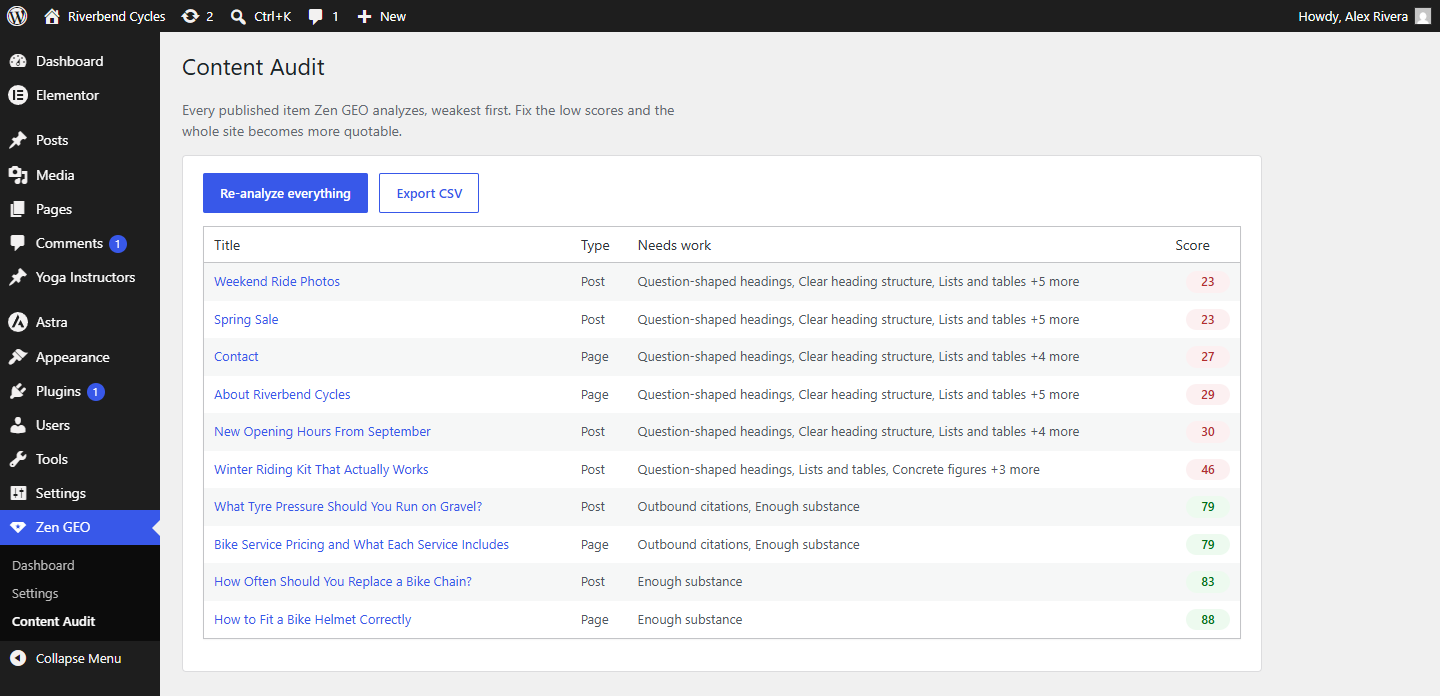
- Site-wide audit with CSV export, and WP-CLI commands for bulk work.
Prove it is working
- AI crawler analytics, stored locally: which assistants visited, how often, and exactly which pages each one read. No IP addresses, no visitor data, nothing sent anywhere.
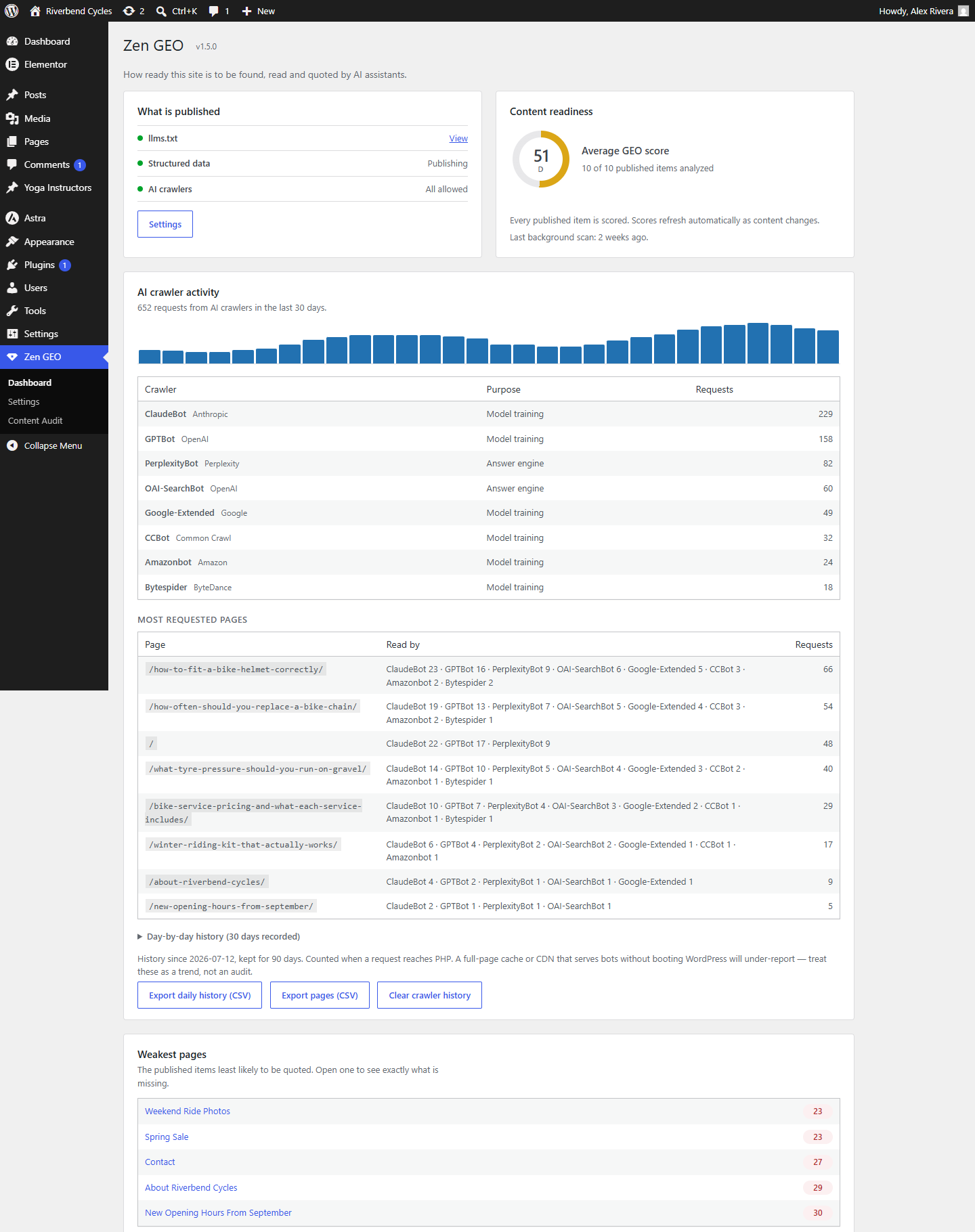
- A 30-day activity chart, per-crawler totals, the most-requested paths, and a day-by-day history kept for 90 days with CSV export.
- An optional weekly email summary to the site administrator.
Publish a machine-readable map of your site
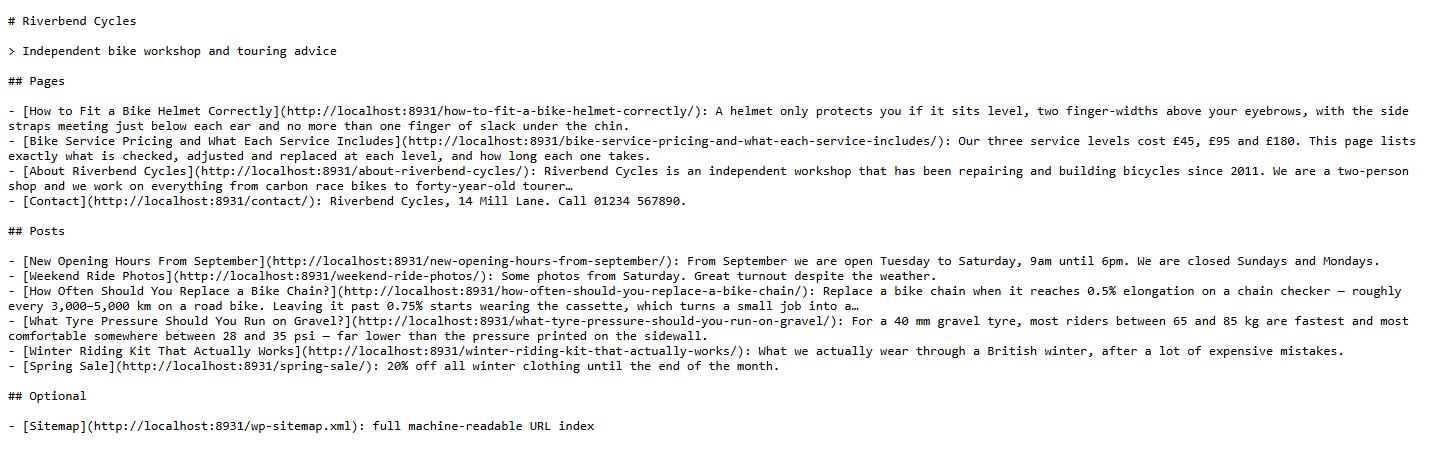
- llms.txt — a Markdown index of your site at
/llms.txt, following the llmstxt.org convention: your site name, a summary, and annotated links to the pages that matter. - llms-full.txt — optionally, the same pages with their full text inlined, for assistants that fetch one document instead of crawling.
- Markdown pages — every page also available as clean Markdown at
?zengeo=md. No theme, no navigation, no cookie banner: just headings, prose, lists, tables and links. Advertised in each page’s<head>so crawlers discover it on their own.
Decide who may read your site
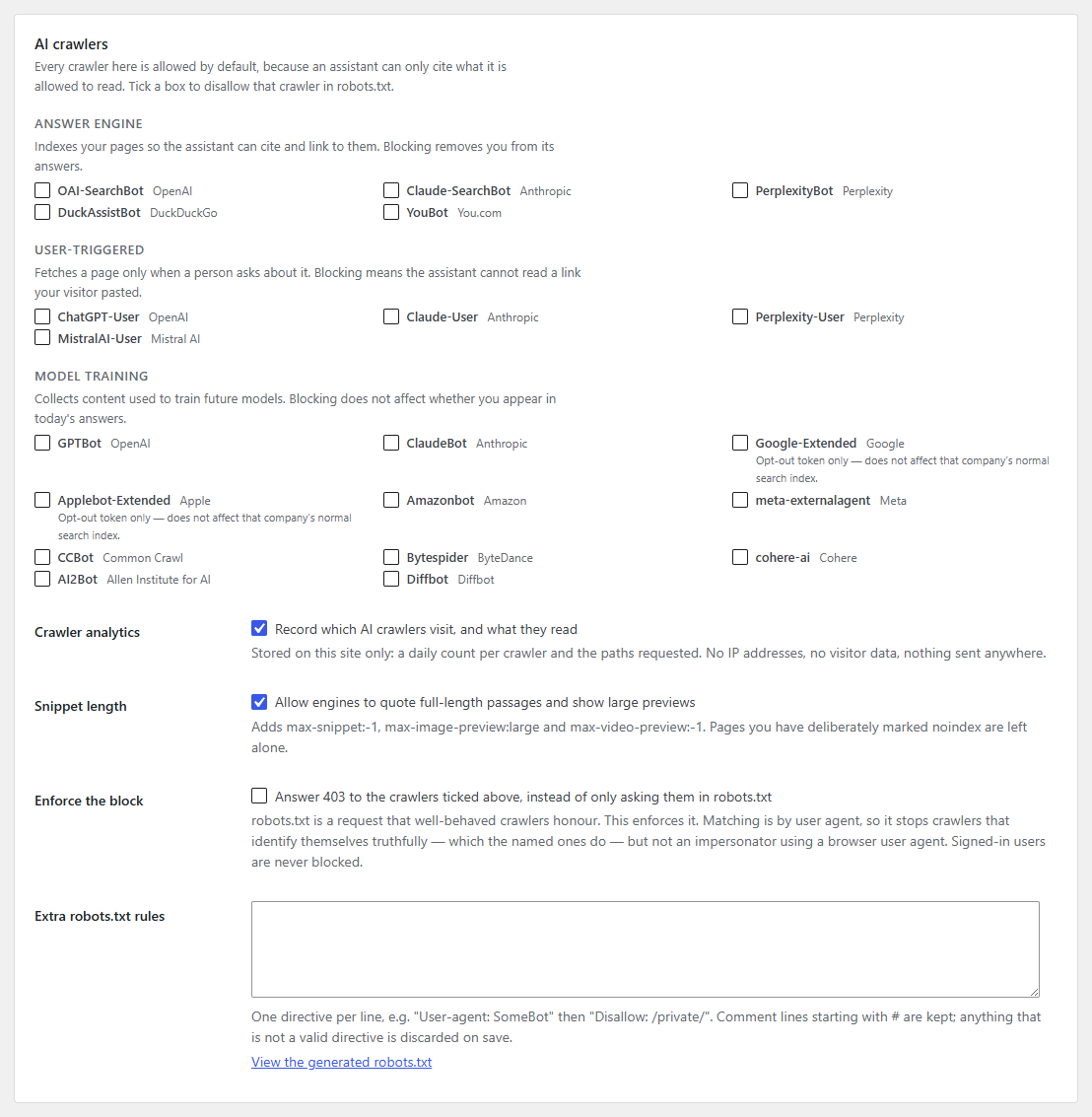
- Per-crawler allow or disallow for GPTBot, ClaudeBot, PerplexityBot, Google-Extended, Applebot-Extended, CCBot, Bytespider, meta-externalagent, Amazonbot, AI2Bot, Diffbot, YouBot, DuckAssistBot, MistralAI-User, cohere-ai and the user-triggered fetchers.
- Crawlers are grouped by what they actually do — model training, answer-engine indexing, or a fetch triggered by a real person — because blocking the second kind removes you from AI answers entirely, and most people who say “block AI” do not mean that.
- Enforced blocking: robots.txt is a request. Optionally answer 403 instead, at the PHP layer.
- Custom robots.txt directives, validated on save.
Structured data that supports attribution
- One consolidated JSON-LD graph — Organization or Person, WebSite, Article/WebPage, BreadcrumbList — with every node cross-referenced so an engine reads one coherent statement rather than a pile of fragments.
- sameAs profile links, which is how an engine confirms the name on your site is the same entity it has seen elsewhere.
- FAQPage from your Q&A pairs, speakable from your key takeaways, LocalBusiness with address and opening hours, and Product for WooCommerce.
- Detects Yoast SEO, Rank Math, All in One SEO, SEOPress and Slim SEO, and stays out of their way by default.
Privacy
Zen GEO makes no external network requests of any kind. It does not phone home, has no license server, collects no telemetry, and loads no remote assets. Crawler analytics are stored in your own database and never leave it.
Screenshots
Installation
- Upload the plugin to
/wp-content/plugins/zen-geo/, or install it through Plugins Add New. - Activate it through the Plugins screen.
- Go to Zen GEO to review what is published and choose your crawler policy.
FAQ
-
Do I still need an SEO plugin?
-
Yes, if you want one. Zen GEO does not manage titles, meta descriptions, canonicals, redirects or XML sitemaps. It handles the AI-visibility layer that SEO plugins largely do not, and defers to your SEO plugin’s structured data automatically.
-
Will blocking AI crawlers protect my content?
-
Partly, and it is worth being clear about the limits. robots.txt is honoured by the major AI companies but ignored by scrapers that do not want to be told. Enforced blocking raises that to a 403, matched on the user agent — which stops crawlers that identify themselves honestly, and not an impersonator using a browser user agent string. Anything published on a public URL can be copied by someone determined to copy it.
-
Does blocking training crawlers remove me from ChatGPT or Claude?
-
No — those are different crawlers, which is why Zen GEO separates them. Blocking a training crawler affects future model weights. Blocking an answer-engine crawler is what removes you from today’s answers and citations.
-
My crawler analytics show nothing. Is it broken?
-
Most likely not. New sites take days or weeks to be discovered. Also, requests counted here are ones that reach PHP: a full-page cache or CDN serving bots directly will under-report. Treat the numbers as a trend.
-
Does it work with Elementor?
-
Yes, in two ways. Zen GEO adds its own tab to the Elementor editor panel — beside Widgets, Components and Globals — so the score, the fixes and the Q&A fields are available while you build. And the analyzer reads Elementor’s stored element tree, so Elementor-built pages are scored on their actual headings and text rather than on an empty
post_content, which is where most content analysers give up.The tab uses Elementor’s own panel API and appears on Elementor 4.0 and later. On older versions the tab is simply absent and the WordPress meta box remains the full-featured fallback — nothing breaks.
-
Does it work with WooCommerce?
-
Yes. Product schema is emitted for products when WooCommerce is not already emitting its own, and products can be included in llms.txt and the analyzer like any other post type.
Reviews
There are no reviews for this plugin.
Contributors & Developers
“Zen GEO – Generative Engine Optimization” is open source software. The following people have contributed to this plugin.
Contributors
Translate “Zen GEO – Generative Engine Optimization” into your language.
Interested in development?
Browse the code, check out the SVN repository, or subscribe to the development log by RSS.
Changelog
1.5.0
Crawler analytics release: it now records which AI assistant read which page, keeps three
months of history, and no longer mangles non-Latin URLs.
Per-crawler page attribution
- Page requests record the crawler that made them. The “Most requested pages” table gains a
Read by column, so you can see that ClaudeBot read one page and Perplexity another — the
half that tells you what each assistant has actually ingested, rather than just that it visited. - Crawlers are ranked within each page, pages ranked by total, and 15 rows are shown.
- New Export pages (CSV) — one row per page per crawler, covering everything stored rather
than only the rows on screen.
Longer, deeper history
- History is kept for 90 days instead of 30. A day costs one small integer per crawler, so
three months is a few kilobytes — enough to see whether AI crawler interest is growing or fading. - The activity chart spans 30 days rather than 14.
- New collapsible day-by-day history: every recorded day with its per-crawler breakdown.
- New Export daily history (CSV) — one row per day per crawler, so a copy outlives the
retention window. - The card states how far the history goes back and how long it is kept.
Fixes
- Non-Latin URLs were destroyed.
sanitize_text_field()strips percent-encoded sequences, so
a path of percent-encoded Georgian, Greek, Cyrillic, Arabic, Hebrew or CJK slugs was reduced to
its punctuation — hundreds of distinct pages collapsing into meaningless rows like/glossary//
and/glossary/-/. Paths are now decoded before sanitizing, so every page counts separately and
reads properly (/glossary/აბჰაია/). - The page list could never accept a new page once full. A new path was stored with a count of
one, sorted to the bottom, and dropped by the very request that added it — so the list froze on
whichever pages happened to fill it first and never changed again. Many more pages are now kept
than are displayed, and the page seen in the current request is always retained so it can start
accumulating. - Empty state explained rather than hidden. The “Most requested pages” heading stays visible
with a line saying pages appear on the next crawl, instead of the whole section silently
vanishing and looking broken. - Page rows recorded before this release are cleared. They were either corrupted by the encoding
bug or carried no crawler, so they could not answer “which assistant read this page?” and would
have sat permanently at the top of the report. Per-crawler totals, per-day history and the
grand total are kept — the real history was never in those rows.
Scores, llms.txt, Markdown pages, structured data and crawler blocking were unaffected throughout;
every issue above was confined to the analytics display.
1.4.0
- Reads content from every Elementor widget, including ones it has never seen. The 1.3.0 accordion fix turned out to be one instance of a much wider problem: content was only read from a fixed list of control names, so anything using its own naming was invisible to the analyzer. Auditing Elementor free and Pro found 49 further text controls that were being skipped — Testimonial, Alert, Flip Box, Price Table, Blockquote, Call to Action, Animated Headline, Slides, Author Box, Image captions, Progress bars and more.
- Extraction is now generic: known names are used for their meaning (heading vs rich text) and everything else is kept when it reads like prose. Third-party and custom widgets are covered automatically, with no allowlist to maintain.
- Technical settings are still excluded — CSS ids and classes, URLs, colours, sizes, layout enums, aria labels and shortcode strings never reach the score.
- Affected sites will see scores rise, because pages built with these widgets were previously being measured as near-empty.
1.3.0
- Reads questions and answers straight out of accordions, toggles and Details blocks. Most FAQs are built in the page builder rather than typed into a plugin — those pairs now count towards the GEO score and publish as FAQPage structured data with nothing to retype. Covers Elementor Accordion, Toggle, Tabs and Nested Accordion, and the block editor’s Details block.
- Only headings that actually read as questions are treated as Q&A, so an accordion of plain section names (“Shipping”, “Returns”) is left alone rather than published as a false FAQ.
- Skips any Elementor Nested Accordion that already has its own FAQ schema switched on, so one page never carries two competing FAQPage graphs.
- Fixed: accordion, toggle and tab content was previously invisible to the analyzer entirely — a page whose whole body was an FAQ accordion scored as having almost no content.
1.2.0
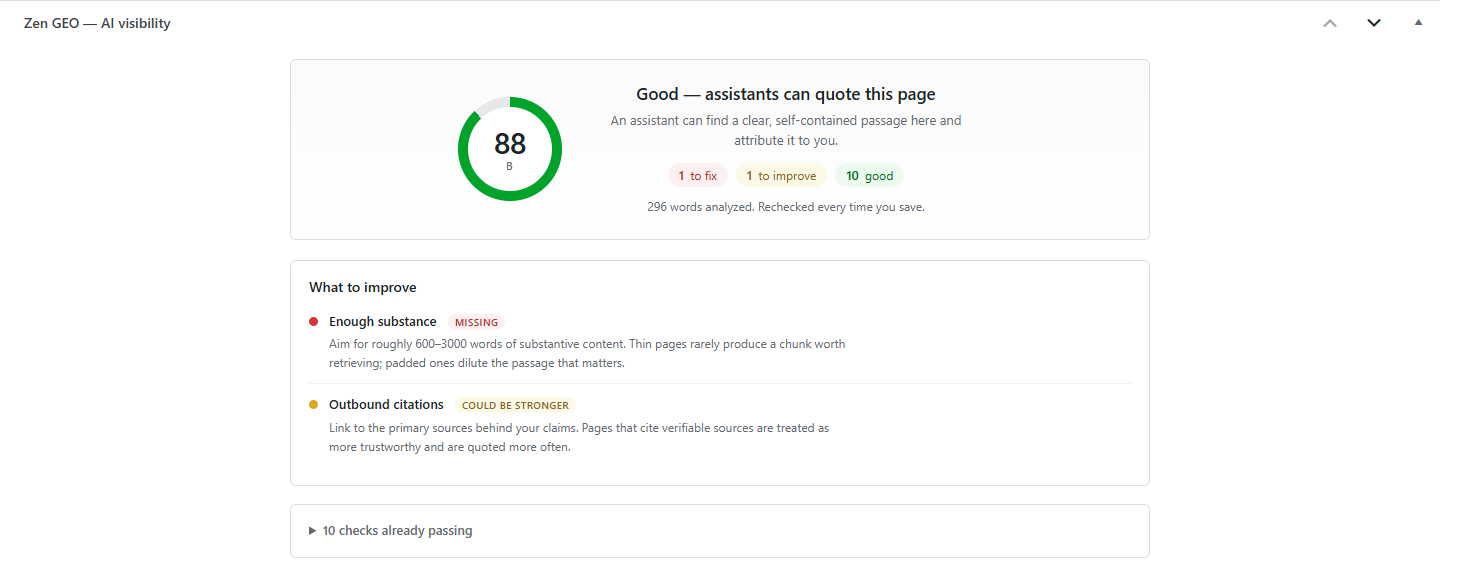
- Zen GEO now appears as a tab inside the Elementor editor, beside Widgets, Components and Globals — the score, the fixes, the key takeaways, the Q&A pairs and the visibility switch, without leaving the builder.
- Built on Elementor’s own
injectTab()panel API rather than by string-replacing Elementor’s rendered markup, so it does not break when Elementor changes a class name. - New REST endpoint (
zen-geo/v1/post/<id>) backing the panel, gated per post onedit_post. - New WordPress Dashboard widget: average GEO score, what is published, AI crawler activity over the last 7 days, and the three weakest pages.
- Fixed: the score circle on the Zen GEO dashboard lost its styling in 1.1.0 and rendered as plain text.
- Fixed: dismissing the “Zen GEO is active” notice with the ✕ did not stick, so it reappeared on every admin page load for a week. It now saves the dismissal, and clears itself automatically once you have opened a Zen GEO screen.
1.1.0
- Automatic background scoring: existing pages and posts are scored on an hourly batch after activation, so the audit and the site average are meaningful without re-saving anything. Scores also refresh themselves as they age.
- Per-page control: every page and post can be included in or excluded from Zen GEO from the editor. An excluded page is left out of llms.txt, serves no Markdown version, gets no page-level structured data, and is dropped from the audit and the site average.
- Redesigned editor panel: a single headline verdict, a score ring, a to-fix / to-improve / good tally, the specific fixes first and the passing checks folded away.
- Post-list GEO column now shows excluded pages distinctly from pages not yet scored.
1.0.0
- Initial release.
- llms.txt and llms-full.txt, served dynamically and cached.
- Markdown representation of every indexed page at
?zengeo=md, advertised via rel=”alternate”. - Per-crawler robots.txt policy for 19 AI crawlers, grouped by purpose, plus optional enforced 403 blocking and custom robots.txt directives.
- Local, IP-free AI crawler analytics with a 14-day chart, per-crawler totals and top paths.
- Consolidated JSON-LD graph: Organization/Person, WebSite, Article/WebPage, BreadcrumbList, FAQPage, speakable, LocalBusiness and WooCommerce Product, with automatic stand-down when an SEO plugin is active.
- Key takeaways and Q&A editors, published as visible text and structured data.
- GEO analyzer with twelve weighted checks, Elementor-aware content extraction, a sortable post-list column, a site-wide audit and CSV export.
- WP-CLI commands:
audit,score,llms,crawlers. - Optional weekly email report, Site Health integration, and settings import/export.