

Description
Developed by WebTech Solution — https://ratenexapro.com
WebTech Hotel Revenue Manager is a professional Revenue Management plugin for hotels using VikBooking. It analyzes your booking data and uses the AI provider configured for your WordPress site to generate strategic pricing recommendations, helping you maximize RevPAR and occupancy.
How It Works
- The plugin reads your aggregated booking metrics from VikBooking (occupancy, ADR, RevPAR).
- WordPress routes the request to the AI provider configured for your site.
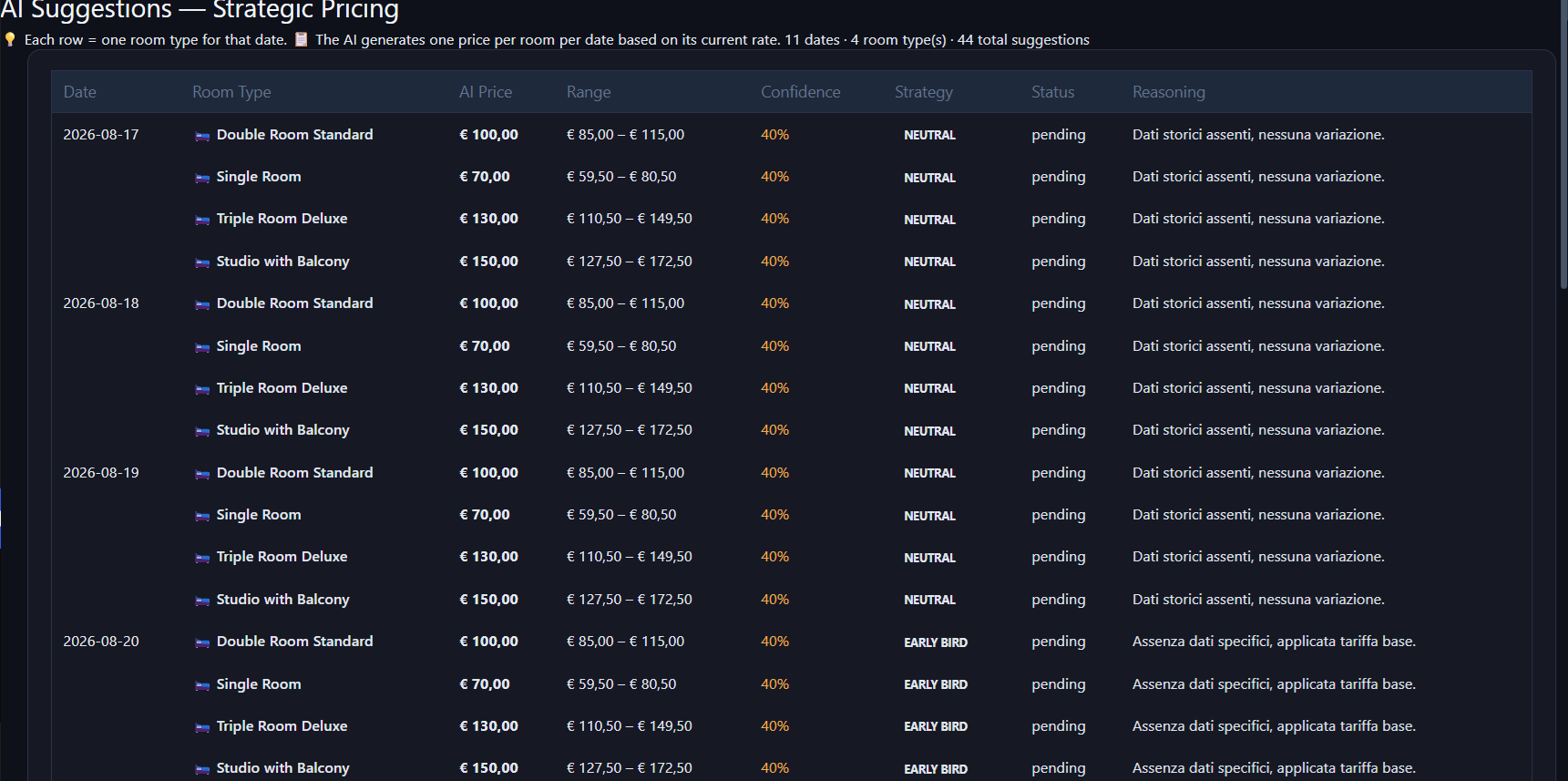
- The AI analyzes your data and generates per-room, per-date pricing suggestions.
- You review the suggestions and apply them directly to VikBooking with one click.
Key Features
- AI Price Generation — AI-powered pricing suggestions for all room types, via the AI provider configured for your site
- Live Dynamic Pricing — View and apply AI prices directly to VikBooking from the dashboard
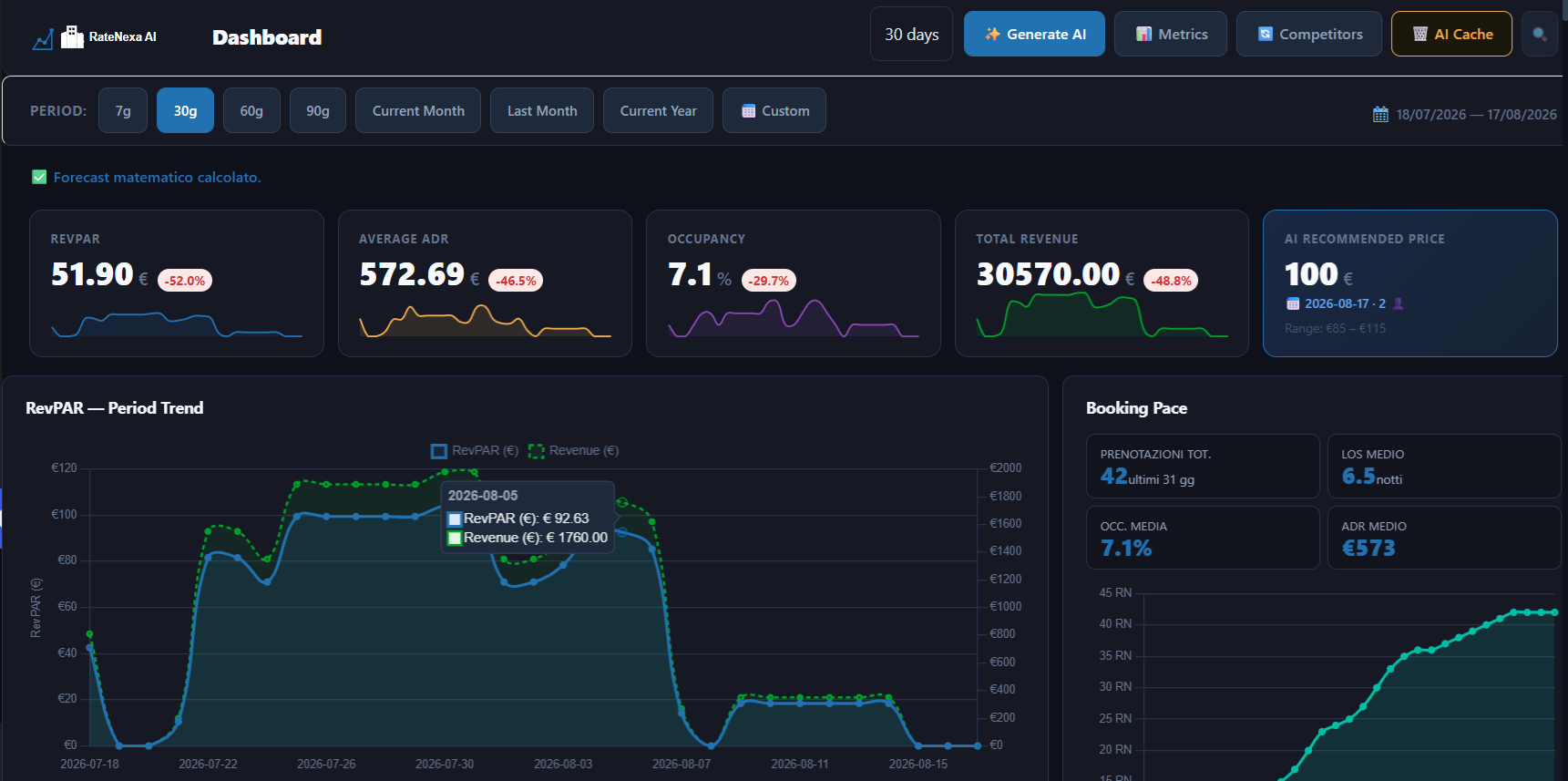
- RevPAR / ADR / Occupancy Dashboard — KPI overview with historical charts and trends
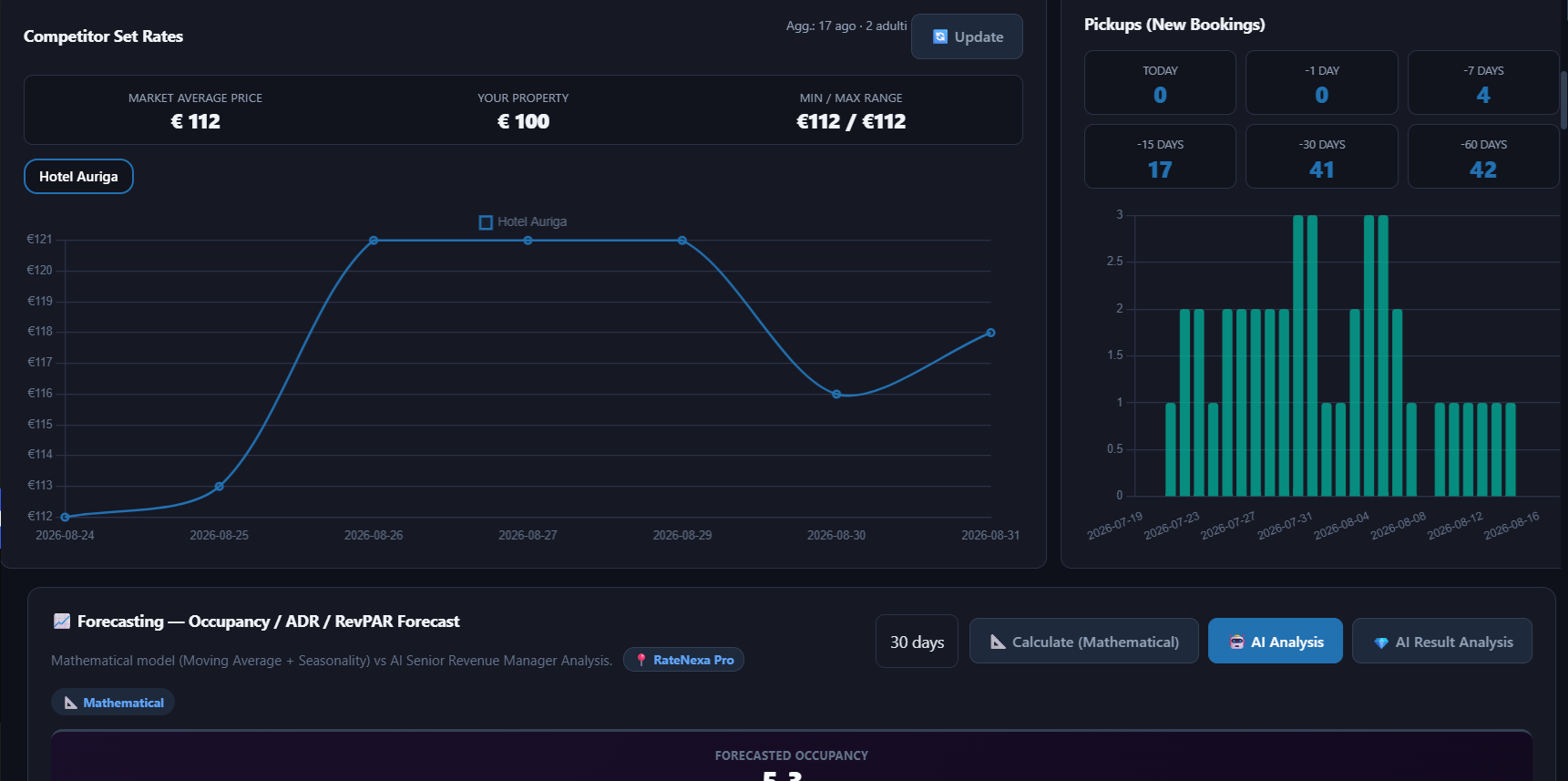
- Booking Pace — Track new bookings pace over 7, 15, 30, and 60-day windows
- Channel Mix — Visualize your booking channel distribution
- GOPPAR Estimation — Gross Operating Profit Per Available Room with configurable cost inputs
- Competitor Monitoring (SerpApi) — Track competing properties’ rates on Google Hotels
- Non-Refundable Rate Automation — Automatic NR rate discount applied alongside AI standard price
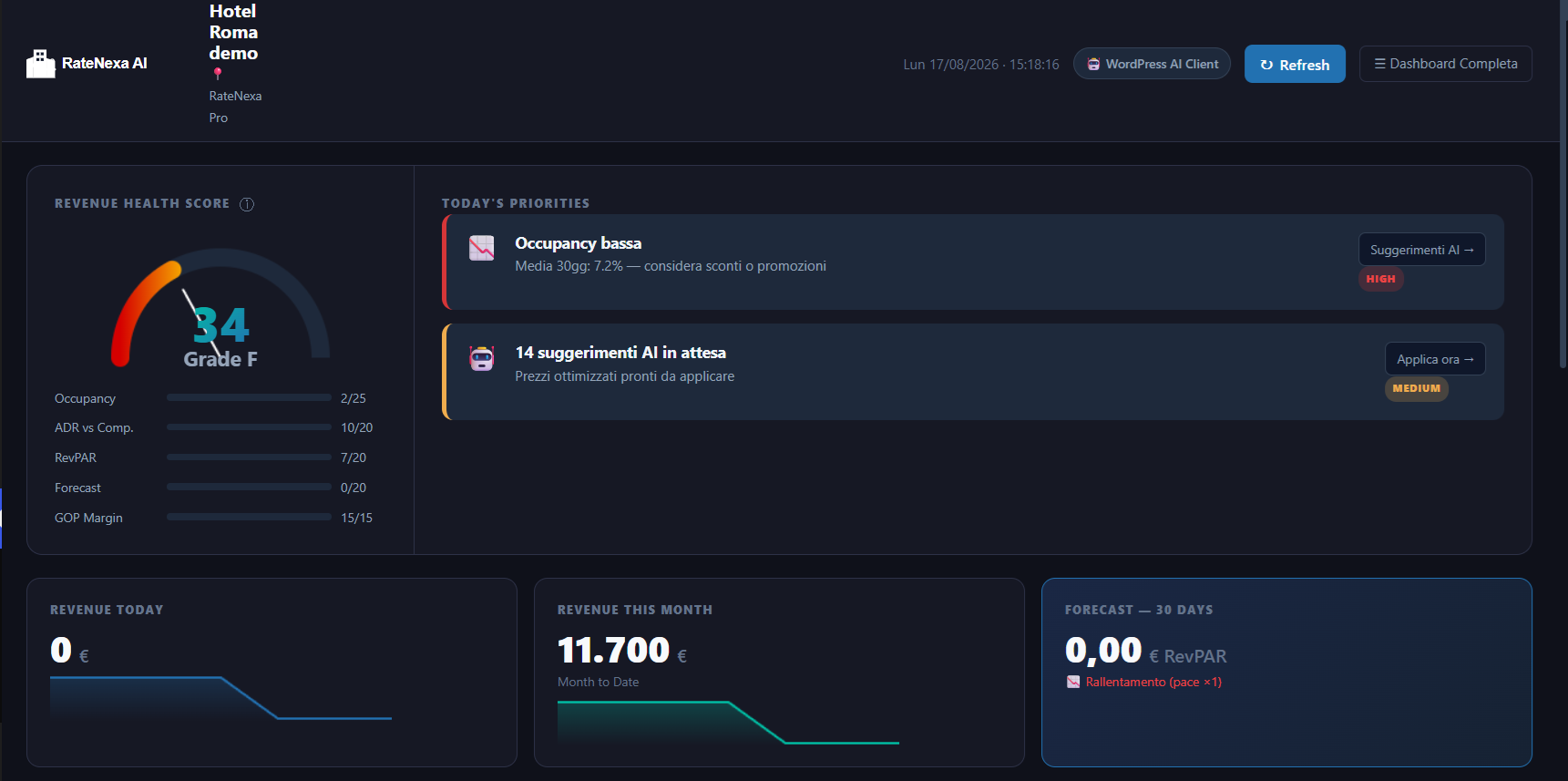
- Executive Dashboard — Revenue Health Score, priorities, and KPI summary
- Alert Notifications — Email alerts for revenue anomalies and opportunities
- AI Output Language — Choose the language of AI-generated analyses and suggestions: Italian, English, German, French, Spanish, Arabic, Chinese. Interface translations are provided through WordPress.org language packs.
API keys required
AI features use the WordPress AI Client available in WordPress 7.0 and later. The AI provider and its credentials are configured at the WordPress site level; this plugin does not store or transmit a provider API key. Competitor monitoring is a separate, optional feature that does require your own SerpApi key. Everything is documented in full in the “External services” section below.
Privacy & GDPR
This plugin does not process or transmit personal guest information (no names, emails, passport numbers, or payment data). AI features use aggregated booking and revenue metrics — booking counts, occupancy percentages, ADR and revenue totals read from VikBooking — together with non-personal property context such as property name, room names and publicly listed competitor data.
The only personal data stored locally is an anonymised administrator IP address (last octet zeroed, e.g. 192.168.1.0), recorded exclusively on security events such as invalid nonce attempts. This data is never transmitted externally and is automatically purged after 30 days.
Requirements
- WordPress 7.0 or higher
- PHP 8.0 or higher
- VikBooking plugin (required, free or Pro) — https://wordpress.org/plugins/vikbooking/
- An AI provider configured at the site level (Settings > Connectors), for the AI features
Credits
WebTech Hotel Revenue Manager is developed and maintained by WebTech Solution.
- Official product website: https://ratenexapro.com
- Company website: https://www.webtechsolution.it
© 2026 WebTech Solution. Released under the GPLv2 or later license.
External services
This plugin relies on the following external services. It does not provide them and does not charge for their usage.
AI provider, via the WordPress AI Client (required for AI features)
* API key: not handled by this plugin. Credentials belong to the AI provider plugin you install, and are entered under Settings > Connectors.
* Which service is contacted: whichever AI provider the site administrator has configured. This plugin does not select, bundle or contact any specific provider, and it holds no provider endpoint or credential. Consult the terms and privacy policy of the provider you choose.
* Purpose: generating pricing suggestions, demand analysis and revenue forecasts from aggregated booking metrics.
* What is sent: aggregated and anonymous figures only (occupancy percentages, ADR, RevPAR, booking counts, room names and base rates, configured competitor names and their publicly listed rates). The property name is included as context. No personal guest data is ever transmitted.
* When it is sent: only when an administrator generates suggestions or a forecast from the admin area, or when the scheduled generation task runs. Nothing is sent on frontend page loads.
* Requirements: WordPress 7.0 or later, which is the minimum version this plugin supports.
SerpApi (optional, for competitor monitoring)
* API key: required for this feature only. Without a saved key the plugin performs no SerpApi request and the rest of the plugin works normally.
* Provider: SerpApi LLC, Austin TX — https://serpapi.com
* Purpose: retrieving publicly visible competitor hotel rates from Google Hotels.
* What is sent: the hotel names configured in Settings, city name, check-in date and number of guests. No personal guest data is ever transmitted.
* When it is sent: only when an administrator triggers a competitor update from the admin area, or when the daily scheduled task runs. Nothing is sent on frontend page loads.
* Request volume: each configured property and each requested date may generate a separate SerpApi request. This plugin applies no local cap on the number of properties you can configure or monitor. The quotas, rate limits and costs of your chosen SerpApi plan are the only limits that apply, and you are responsible for the usage they bill.
* Terms of Service: https://serpapi.com/legal
* Privacy & Security Policy: https://serpapi.com/security
* Pricing: https://serpapi.com/pricing
Competitor monitoring is entirely optional. If no SerpApi key is configured, the plugin operates without it and no data is sent to SerpApi.
Optional extensions
RateNexa Pro is a separate plugin, distributed outside the WordPress.org directory, for properties that need an AI chat assistant, advanced AI workflows, XLSX export, or support for WooCommerce Bookings and MotoPress Hotel Booking. Its code is not included in this plugin, and no feature contained in this plugin requires a paid license.
More information: https://ratenexapro.com
Privacy Policy
This plugin connects to third-party external services and stores limited operational data locally. No personal guest data is ever collected, transmitted, or processed.
Data sent to the configured AI provider:
* What: Aggregated, anonymous hotel metrics — occupancy percentages, ADR, RevPAR, total revenue, booking counts per period, room base rates. The hotel property name (as configured in Settings) is included as context. No individual guest records, names, emails, or identifiers are ever included.
* When: Only when the administrator explicitly clicks “✨ Generate AI” in the Dashboard or via the weekly scheduled cron job (if enabled).
* Why: To generate strategic per-room, per-date pricing recommendations.
* Where: the request is routed by WordPress to the AI provider configured for the site. Consult that provider’s own privacy policy and terms.
Data sent to SerpApi:
* What: Hotel name (as configured in Settings Competitor Monitoring), city name, check-in/check-out dates (auto-generated as tomorrow/day after), number of adults. No guest data is transmitted.
* When: Only when the administrator manually triggers “Update Competitors”, or via the daily scheduled cron job. Never on frontend page loads.
* Why: To retrieve publicly visible competitor hotel rates on Google Hotels for pricing analysis.
* Security & Privacy Policy: https://serpapi.com/security
* Terms of Service: https://serpapi.com/legal
Data stored locally (on your server only, never transmitted):
* Operation log: event type, status, message, timestamp. Retained for 30 days by default (configurable). Maximum 1,000 rows.
* Security log: event type, anonymised administrator IP address (last octet zeroed, e.g. 192.168.1.0), WordPress user ID, timestamp. Logged only on security events (invalid nonce, insufficient capability). Retained with the operation log.
* Competitor prices: publicly fetched hotel rates from SerpApi. Retained for 90 days by default (configurable).
* AI pricing suggestions: generated price recommendations per room and date. Retained for 30 days by default (configurable).
* Debug log file: error and warning messages written to wp-content/uploads/ratenexa-ai/debug.log. Access is blocked by .htaccess. Maximum file size 1 MB with automatic rotation.
Administrator IP address:
The plugin logs an anonymised IP address (last octet zeroed: e.g. 192.168.1.0) exclusively for security events such as nonce failures or unauthorised access attempts. The full IP address is never stored. This data is stored in the local WordPress database only and is never transmitted externally. Retention: 30 days.
No guest personal data:
This plugin does not read, store, or transmit any personal data of hotel guests (no names, emails, passport numbers, payment data, or booking identifiers).
Screenshots
Installation
Automatic Installation
- Log in to your WordPress admin panel.
- Go to Plugins Add New Plugin.
- Search for “WebTech Hotel Revenue Manager”.
- Click Install Now, then Activate.
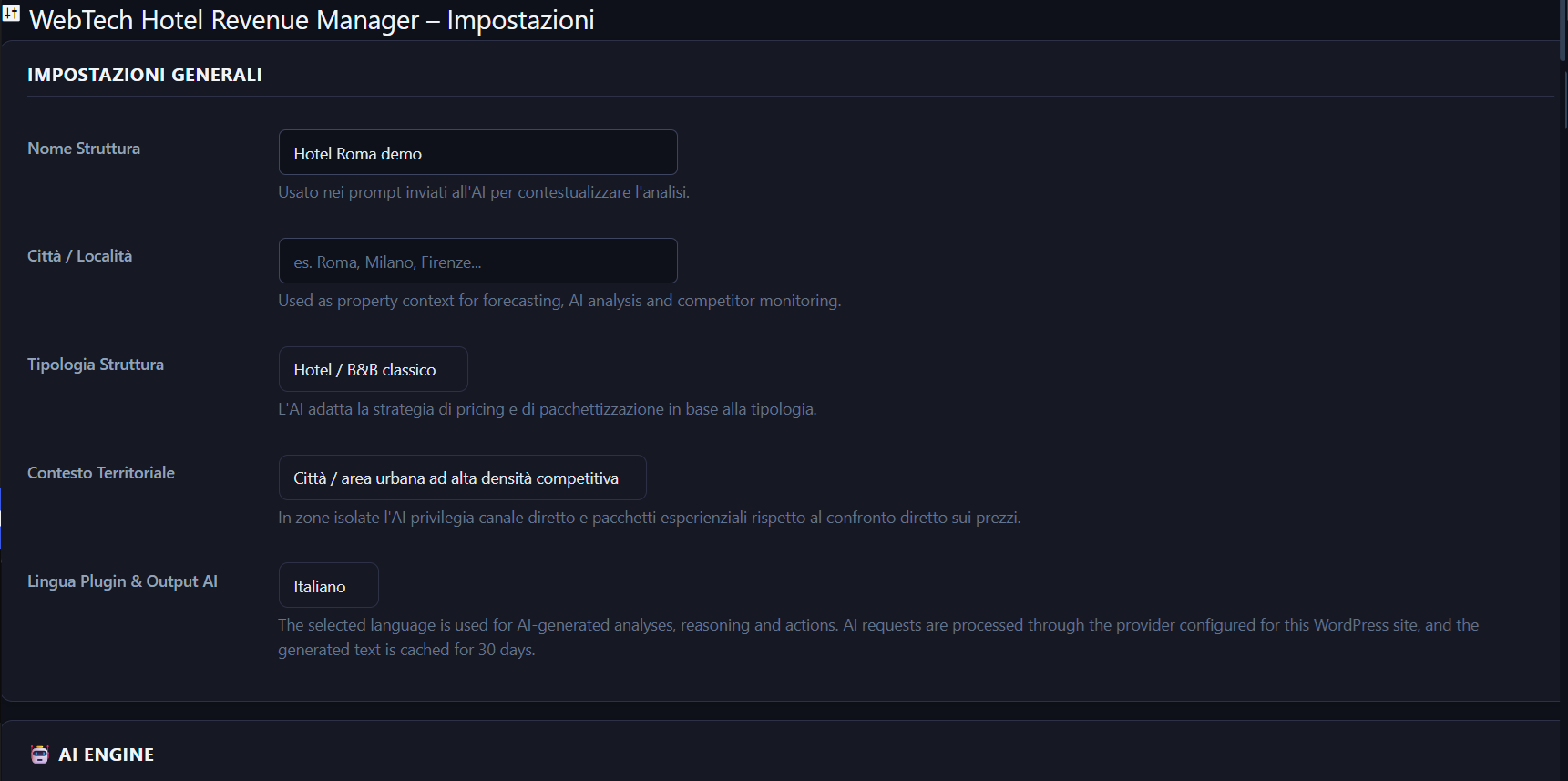
- Navigate to WebTech Hotel Revenue Manager Settings and set your property name, city and type.
- Go to the Dashboard and click ✨ Generate AI to get your first pricing suggestions.
Manual Installation
- Download the plugin ZIP file from WordPress.org.
- Go to Plugins Add New Plugin Upload Plugin.
- Choose the ZIP file and click Install Now, then Activate.
- Follow the configuration steps above.
Enabling AI features
- Make sure the site runs WordPress 7.0 or later.
- Install an AI provider plugin of your choice.
- Add its credentials under Settings Connectors.
- The plugin picks the provider up automatically; nothing is configured inside this plugin.
First Use After Installation
- Settings: Set your property name, city, and property type.
- AI provider: configure one at the site level, under Settings Connectors.
- Dashboard Generate AI: Click the button to generate your first pricing suggestions.
- Review & Apply: In the Live Dynamic Pricing table, review the AI prices and click Apply to push them to VikBooking.
FAQ
-
Does this plugin work without VikBooking?
-
This plugin requires VikBooking to be active. It is designed exclusively for VikBooking and will not function without it.
-
Do I need to pay for the AI API?
-
That depends on the provider you configure for your site. Costs are billed by that provider according to your usage; this plugin adds no commission and several providers offer a free tier.
-
Does the plugin send my guests’ personal data to AI services?
-
No. The plugin sends only aggregated, anonymous metrics: total booking counts, average occupancy percentages, average daily rates, and revenue totals per period. No guest names, emails, passport numbers, or payment information are ever transmitted.
-
Which AI provider does this plugin use?
-
Whichever one you configure for your WordPress site. The plugin sends its prompts through the WordPress AI Client and does not select, contact or bundle any specific provider.
-
Why does this plugin require WordPress 7.0?
-
Its AI features use the WordPress Core AI Client, which was introduced in WordPress 7.0.
-
How many competitors can I monitor?
-
The plugin does not impose a local limit on the number of competing properties that can be configured. Each property and date may generate a separate SerpApi request, so the limits, quotas and costs of the selected SerpApi plan still apply. You need a SerpApi key (100 free searches/month on the free SerpApi plan).
-
How does competitor monitoring work?
-
You enter the name of each competitor hotel in Settings, adding as many rows as you need. The plugin uses SerpApi to search for those hotels on Google Hotels and fetches the displayed rates. Every property and date may generate a separate SerpApi request, so quotas and costs of your SerpApi plan apply.
-
How are prices applied to VikBooking?
-
When you click “Apply” in the Live Dynamic Pricing table, the plugin creates a special pricing season in VikBooking for that specific room and date.
-
Can I undo applied prices?
-
Yes. You can manually delete the pricing seasons from VikBooking’s Rate Overview. The plugin creates seasons with the prefix “VikRevenue AI” followed by the date, making them easy to identify.
-
Is the plugin compatible with multisite?
-
The plugin is not specifically designed or tested for WordPress Multisite. It is intended for single-site hotel installations.
Reviews
There are no reviews for this plugin.
Contributors & Developers
“WebTech Hotel Revenue Manager for VikBooking” is open source software. The following people have contributed to this plugin.
Contributors
Translate “WebTech Hotel Revenue Manager for VikBooking” into your language.
Interested in development?
Browse the code, check out the SVN repository, or subscribe to the development log by RSS.
Changelog
1.8.7
- Added the Screenshots section to the readme so directory captions display correctly.
1.8.6
- Fixed an undefined variable notice when storing the raw AI response, left over from the AI Client migration.
1.8.5
- Removed obsolete SerpApi event-discovery references from comments and settings copy.
- Clarified legacy event-storage documentation.
- Updated privacy wording to accurately describe non-personal property context used by AI features.
1.8.4
- Corrected the external-service documentation, which still listed local-event extraction among the AI purposes after that code was removed.
1.8.3
- Removed the unreachable local-event discovery code, including its SerpApi search calls. Competitor rate monitoring through SerpApi is unaffected.
1.8.2
- Clarified in the licensing documentation which data categories are sent to each external service.
1.8.1
- Simplified AI availability messaging in Settings: the plugin no longer states that no provider is configured before a request has been attempted.
1.8.0
- Increased the WordPress AI Client request timeout to 60 seconds using the official Core timeout filter.
- Preserved provider-neutral AI error handling and mathematical/local fallbacks when a request still times out.
1.7.9
- Improved WordPress AI Client error handling.
- Added user-friendly timeout and provider error messages.
- Preserved mathematical and local fallbacks when AI generation is temporarily unavailable.
- Prevented raw provider endpoints and transport errors from being displayed in the admin UI.
1.7.8
- Removed an unused model price list from the API usage endpoint, which no longer carries any data.
1.7.7
- Restored AI usage tracking, which stopped recording when generation moved to the WordPress AI Client. Token counts, provider and model now come from the client result metadata.
- Costs shown in the API usage panel are labelled as an estimate, since the provider price list is not known to the plugin.
- Removed an unused internal helper left over from the AI Client migration.
1.7.6
- Raised the minimum WordPress requirement to 7.0 to match the WordPress Core AI Client dependency.
- Fixed AI event analysis availability checks to rely on the actual WordPress AI Client request instead of a provider capability pre-check.
- Preserved graceful fallback to locally stored events when AI generation is unavailable.
1.7.5
- Fixed AI features being reported as unconfigured even when a provider was connected through WordPress Connectors.
- AI requests are no longer blocked by a preliminary support check; the request is attempted and any real error is surfaced.
- Optional prompt-builder methods are now applied only when the installed AI client exposes them.
1.7.4
- Removed legacy Gemini credential migration from normal plugin upgrades.
- Clarified scheduled external-service requests in the licensing documentation.
- Removed obsolete provider-specific PHPDoc from the AI usage tracker.
1.7.3
- Updated plugin metadata and documentation to reflect the provider-agnostic WordPress AI Client.
- Removed residual Gemini-specific wording from settings, code comments and documentation.
- Updated AI-related Extensions copy to match the WordPress AI Client architecture.
- Clarified external-service documentation while keeping SerpApi unchanged.
1.7.2
- Removed dashboard script code that still called the local events endpoints removed in 1.6.9.
- Removed localized strings left over from the previous AI provider panel.
1.7.1
- Fixed the Executive Dashboard badge still naming a specific AI provider after the migration.
- Hardened the AI client calls so an unexpected client error cannot interrupt an admin page.
- Removed leftover settings script code and localized strings belonging to the old provider panel.
1.7.0
- Migrated AI generation to the WordPress Core AI Client.
- Removed direct Gemini API integration and provider-specific credential handling.
- Updated AI configuration and external-service documentation.
- Removed bundled translation files; translations are handled through WordPress.org language packs.
1.6.9
- Removed the local events admin page, its script and its AJAX endpoints. The page had no markup and was not registered in the menu, so it could not be opened.
- Removed the remaining single-competitor limit from the settings script data.
- Removed dead forecasting code that was no longer reachable.
- Updated the readme to match the features the plugin actually ships.
1.6.8
- Redesigned the extensions page to match the plugin’s dark admin theme; headings were previously unreadable against light cards.
1.6.7
- Added an optional informational extensions page describing a separately distributed plugin. It lists only capabilities that are absent from this package and does not affect any feature included here.
- Consolidated external-service documentation into a single section.
- Removed obsolete competitor-limit documentation.
- Updated visible product naming.
- Simplified duplicated AJAX security checks while retaining explicit nonce and capability verification in every callback.
- Renamed the main plugin file to match the plugin slug.
1.6.4
- Competitor monitoring no longer has any local cap: the stored list, the scheduled fetch and the settings screen all accept as many properties as you configure. Only your SerpApi plan quotas apply.
- Removed the remaining output buffer that was opened without being closed in the same flow, and removed a buffer close in the security layer that acted on a buffer it had not opened.
- Removed the Upgrade admin page and its stylesheet, together with the leftover comment describing menus replaced by an upsell screen.
- Added a dedicated External services section documenting Google Gemini and SerpApi, the data sent, when it is sent, and the request volume implications.
- Visible interface strings now use the plugin name consistently. Stored options, database tables and upload paths are unchanged.
1.6.3
- Competitor monitoring accepts an unlimited number of properties: the save routine no longer keeps only the first entry, the scheduled fetch no longer caps the list, and the settings screen lets you add and remove rows.
- Removed the Upgrade admin page and its stylesheet. The plugin no longer contains any upsell screen standing in for functionality.
- Removed the global output buffer opened on every AJAX request and left unclosed. The two remaining buffers are opened and closed inside the same function, and the security layer no longer closes buffers it did not open.
1.6.2
- Text domain aligned with the assigned plugin slug, so WordPress.org language packs load correctly. Translation files renamed accordingly.
- Fixed the events page asset check, which tested for a page hook that never matched, so its script was never enqueued.
- The direct-file-access probe detection no longer depends on a hard-coded plugin folder name.
1.6.1
- Fixed “Gemini JSON invalid”: a long AI answer split across several response parts was read only up to the first part, so the JSON arrived truncated. All text parts are now concatenated.
- When a reply is cut off mid-way, the complete suggestions are now recovered instead of discarding the whole response.
- The AI error log now records finishReason and the number of parts, making truncation easy to recognise.
1.6.0
- Competitor monitoring reworked: interface and storage revised.
- Removed the unused AI Copilot scaffolding (database table, storage methods and retention settings) that was never reachable from the interface.
- Guideline 5: implemented the alert and opportunity cron jobs, which previously only wrote a log entry and returned.
- Security: every AJAX handler now calls check_ajax_referer() explicitly, so the nonce check is verifiable by static analysis.
- Security: Cron_Manager::run_manual() no longer reads $_POST; the caller validates the input and passes it as a parameter.
- Security: admin security headers are now actually sent (the page prefix they matched against was wrong).
- Security: the plugin log directory is protected on Nginx as well, not only via .htaccess.
- SQL: table identifiers now use the %i placeholder of $wpdb->prepare() instead of string concatenation.
- Export: CSV is written through WP_Filesystem and values are escaped against spreadsheet formula injection.
- Fixed a parse error in the forecasting engine and a missing method in the Gemini service.
1.5.3
- Privacy: anonymised admin IP in security log (last octet zeroed); removed HTTP_X_FORWARDED_FOR as spoofable source; only REMOTE_ADDR used
- Privacy: SerpApi test_connection() now uses the configured property name instead of hardcoded “Hotel Roma”
- Privacy: added sslverify:true to all remaining SerpApi calls in forecasting engine
- Privacy: readme Privacy Policy section expanded with full retention schedule, IP anonymisation notice and debug.log disclosure
- AJAX: all 37 handlers audited for nonce, capability, unslash, sanitize and wp_send_json_* response
- AJAX: replaced wp_verify_nonce() in guard_ajax() with check_ajax_referer() — PHPCS nonce check native recognition
- AJAX: added sanitize_text_field() to ajax_save_api_budget, ajax_save_serpapi_key, ajax_test_serpapi, ajax_apply_price
- SQL: all SELECT/INSERT/UPDATE on wp_options replaced with get_option() / update_option()
- SQL: reduced phpcs:ignore count from 266 to 202; every remaining ignore is minimal and documented
- CSS: removed all inline style=”” from PHP views; extracted to wthrm-* classes in settings-page.css and dashboard-dark.css
- JS: replaced inline onclick/onchange with data-action delegation in settings.js
- Removed OpenAI and Claude code; at the time of this release the plugin used Google Gemini (superseded in 1.7.0 by the WordPress AI Client).
- Readme: WordPress requirement corrected to 6.2
1.5.2
- Corrected Plugin Check SQL placeholders, identifier escaping and input sanitization.
- Fixed phpcs:ignore comments placed inside SQL strings causing ReplacementsWrongNumber errors.
1.5.1
- Hardened SQL queries, sanitization and WordPress.org Plugin Check compliance.
- Replaced SELECT/UPDATE/INSERT on wp_options with get_option() and update_option() throughout.
- Fixed {$seasons} interpolation in vikbooking-adapter.php: replaced with %i placeholder.
1.5.0
- Google Gemini was the AI provider implemented at the time of this release (superseded in 1.7.0 by the WordPress AI Client).
- Removed all inline style=”” attributes from PHP view files; CSS extracted to wthrm-* classes.
- Replaced all onclick/onchange inline event handlers with data-action delegation in settings.js.
- Fixed broken ajax_debug_options method body.
- Added JS listener for Debug DB button and Reset Model action.
1.4.9
- Competitor monitoring.
- Google Gemini was the AI provider implemented at the time of this release (superseded in 1.7.0 by the WordPress AI Client).
1.4.8
- Updated information about separately distributed extensions.
1.4.7
- Added information about a separately distributed companion plugin.
1.4.6
- Fixed incorrect wpdb::prepare usage and Executive Dashboard AJAX SQL errors.
1.4.5
- Fixed identifier placeholders in prepared SQL queries to prevent invalid table names during activation.
1.4.4
- Fixed PHP parse errors in database queries that prevented activation.
1.4.3
- Full compliance update for WordPress.org.
- All features open-source with no feature gating.
- All inline script and style tags converted to enqueued files.
- All SQL queries use wpdb::prepare() with proper placeholders.
- All AJAX handlers include nonce verification.
- SerpApi URLs updated to valid endpoints.
1.4.2
- Fix: esc_js() added to nonce outputs in JavaScript strings.
- Fix: register_setting() sanitize_callback converted from closures to named methods.
- Fix: SerpApi terms/privacy URLs updated to valid links.
1.4.1
- Fix: price_index clamped to safe range [0.5, 2.5] to prevent AI anomalies.
- Fix: cron weekly AI suggestions now includes room base prices.
- Fix: AI suggestions skipped for fully booked dates.
- Fix: MySQL 5.7 compatibility.
1.3.8
- VikBooking integration improved.
- Improved competitor price parsing.
1.3.0
- Initial public release.
- VikBooking integration.
- Google Gemini AI support.
- Basic dashboard with RevPAR, ADR, Occupancy charts.