

Description
ViroBuilder is an AI website builder for WordPress that designs complete landing pages from a one-sentence description. Type “a family dental practice in Boston focused on anxiety-free care” and watch the AI design the whole page live in front of you — layout, written copy, AI-generated images, and SEO markup — then refine it by clicking any element or simply telling the AI what to change.
No templates. No drag-and-drop grind. No page-builder lock-in. Every page is designed from scratch for your business, and the result is a fast, standalone page stored as ordinary WordPress content.
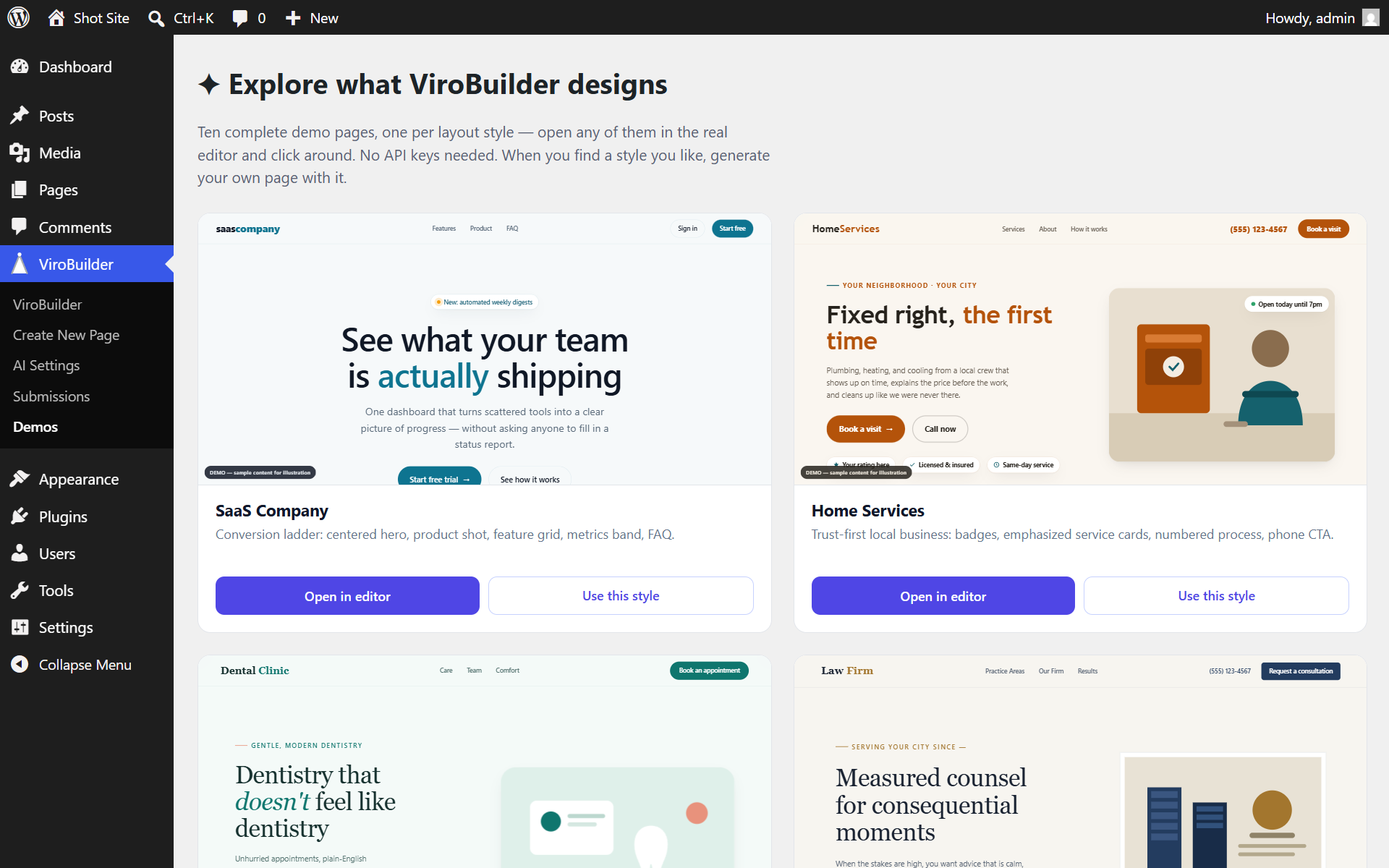
Try it before setup: the built-in demo gallery ships with ten complete demo pages — a dental clinic, law firm, restaurant, SaaS product, online store, and more — that open in the real editor with zero configuration, so you can feel exactly what you’ll get before adding any API keys.
ViroBuilder is free and uses your own API keys (BYOK): an Anthropic (Claude) key designs the pages, a Google AI (Gemini) key generates bespoke images, and an optional Pexels key provides stock-photo fallback. A guided setup wizard tests each key live, and keys are stored only in your own WordPress database.
How it works
- Describe your business in one sentence — the AI infers the industry, audience, and tone. Optionally add a location, phone, and brand color (or let the AI pick the palette).
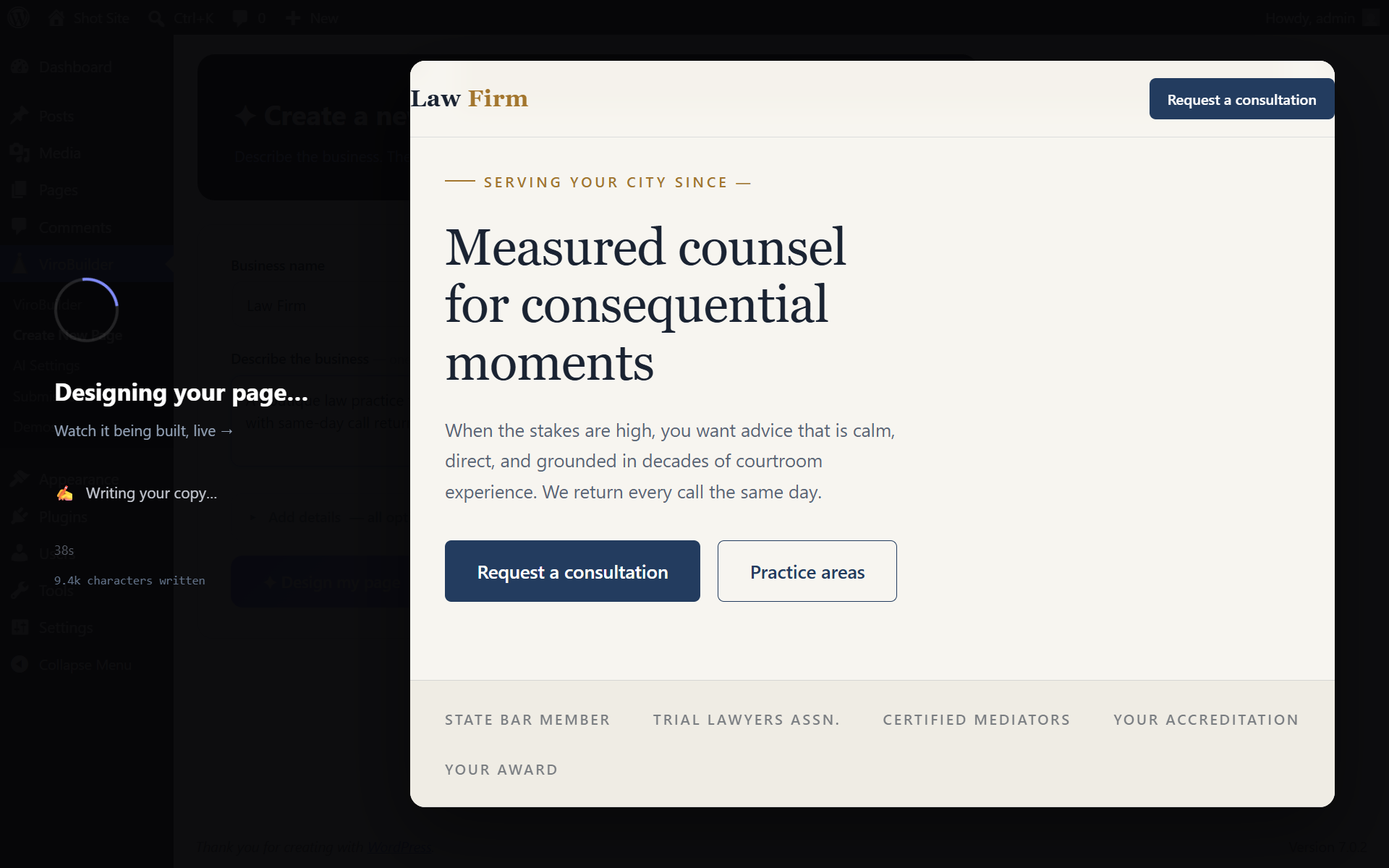
- Watch the AI design it live — the page builds itself in a real-time preview: layout, copy, and structure appear as they’re written, and AI-generated images stream in afterwards.
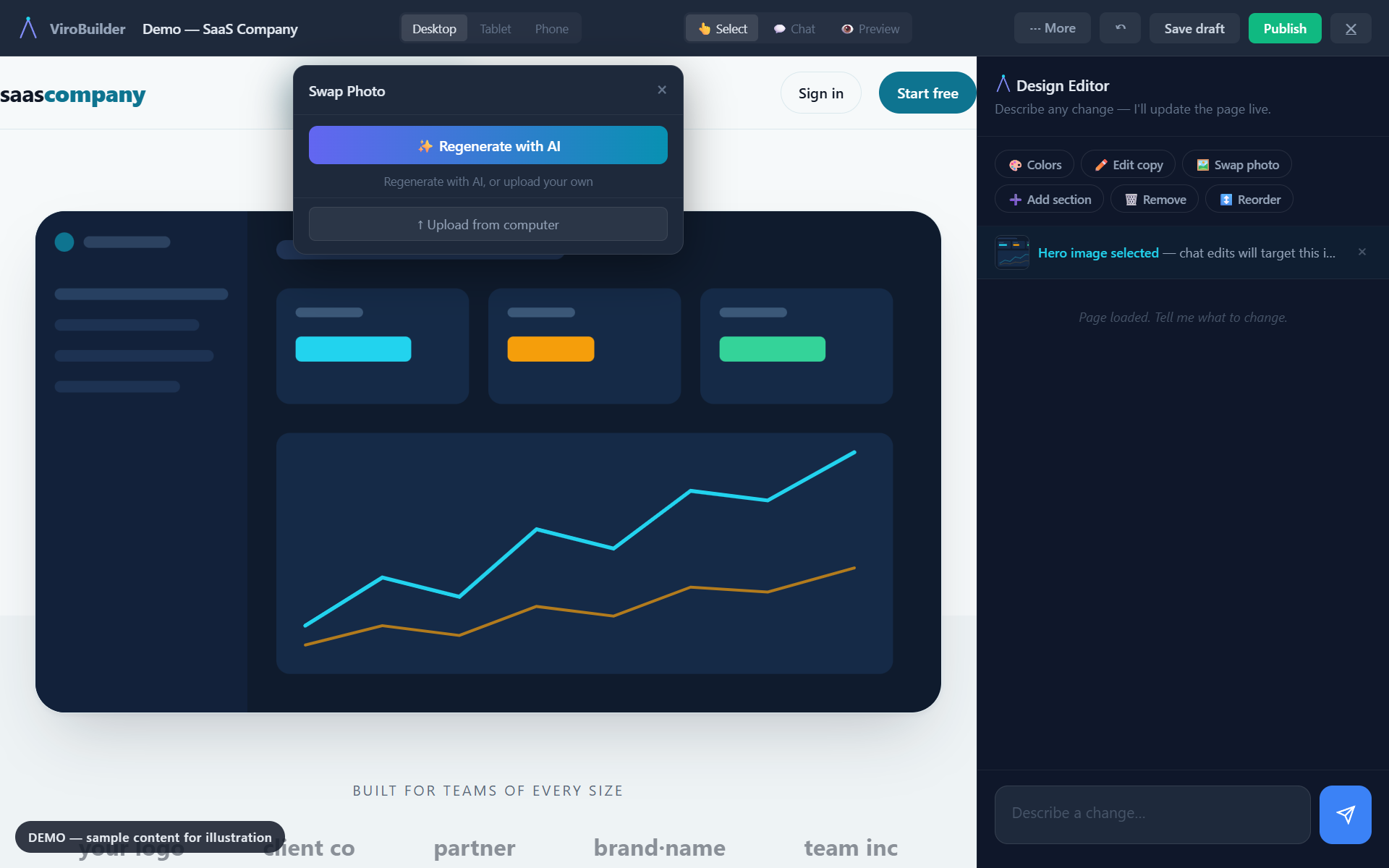
- Edit by chat or click — click any text, image, or link to change it instantly, or type instructions like “add a FAQ section” or “change the brand color to navy”. Small edits apply in seconds.
- Not feeling it? Try another take — one click regenerates the page with a completely different layout and styling, same business.
- Publish — with one-click “set as homepage”, automatic version history, and lead-capture forms that report to your dashboard.
Features
- AI page generation with a live preview. Watch the page design itself in real time — no spinner, no waiting blind.
- Demo gallery. Ten complete demo pages — one per layout style — you can open in the real editor before adding any API keys.
- AI-generated images. Bespoke photos generated for your business via the Gemini API and saved into your media library (with Pexels stock-photo fallback).
- Chat and click editor. Edit text, images, links, and colors visually, or request larger changes in plain language — small edits apply in seconds via targeted patches.
- Try another take. Regenerate any page with a different layout archetype in one click; ten structurally distinct layout styles.
- Version history. The last ten versions of every page are kept automatically and restorable from the editor.
- SEO built in. Meta description, Open Graph tags, Twitter Cards, and JSON-LD structured data on every page.
- Responsive layouts. Desktop, tablet, and phone breakpoints, previewable in the editor.
- Lead-capture forms. Submissions saved to your dashboard and emailed to you — “X new leads this week” at a glance.
- Standard output. Pages are self-contained HTML stored as ordinary WordPress content; deactivate the plugin and your pages keep working. No shortcode soup, no proprietary format.
Who it’s for
- Small business owners who want a landing page without building it section by section.
- Freelancers and agencies who build sites for clients.
- WordPress users who want AI-assisted page creation inside WordPress.
Free tier (BYOK)
The free version includes the full plugin. You provide your own Anthropic API key (for AI generation) and Pexels API key (for stock photos), and you pay Anthropic and Pexels directly for your own usage.
Pro tier (coming soon)
A paid tier is planned that would not require your own API keys. Features and pricing are still being finalized. Details will be posted at virodigital.net/virobuilder.
External services
ViroBuilder connects to the following third-party services to function:
Anthropic API (api.anthropic.com)
Used for AI-powered page design and chat-based editing. Your business description and page content are sent to Anthropic’s servers for processing. Requires a user-provided API key.
Privacy Policy | Terms of Service
Google Gemini API (generativelanguage.googleapis.com)
Used for AI image generation on generated pages. Image prompts derived from your business description are sent to Google’s servers; generated images are saved into your WordPress media library. Requires a user-provided API key.
Privacy Policy | Terms of Service
Pexels API (api.pexels.com)
Used as a fallback source of free stock photographs when AI image generation is unavailable. Image search queries are sent to Pexels; photos are saved into your media library. Requires a user-provided API key.
Privacy Policy | Terms of Service
Google Fonts (fonts.googleapis.com)
Used only for typography on the public landing pages you generate and publish. Font files are requested by your site visitor’s browser when they view a generated page; the plugin’s admin screens and editor do not load any remote fonts. Because the generated page is your own published content, you may change or self-host these fonts at any time by editing the page.
Privacy Policy
All of these services are optional integrations that power the plugin’s core function. The Anthropic, Google, and Pexels keys are provided by you and stored only in your own WordPress database. No data is collected or sent to Viro Digital LLC servers in the free tier — no tracking, no analytics, no telemetry.
Content responsibility
ViroBuilder drafts pages with AI, and AI-written copy is a starting point — not a statement of fact. The AI is instructed never to invent statistics, star ratings, awards, or brand endorsements, and any testimonial sections it creates are clearly labeled samples for you to replace with real customer quotes. You are responsible for reviewing every claim on a page before publishing: publishing fake reviews or ratings can violate consumer-protection law (for example, the FTC’s rule on fake reviews and testimonials in the United States). The editor reminds you to check this before you publish.
AI-generated images are created from your business description and saved to your media library. Review them before publishing, as you would any content on your site.
Generated pages load fonts from Google Fonts by default. If your audience is in the EU, be aware that some European courts have treated remote font loading as a personal-data transfer under the GDPR; you can self-host the fonts (edit the page’s font tags) or ask the chat editor to switch the page to system fonts.
Lead-form submissions are stored only in your own WordPress database and fall under your site’s privacy policy.
Screenshots
Installation
- Upload the
virobuilderfolder to/wp-content/plugins/or install via Plugins > Add New > Upload. - Activate the plugin through the Plugins menu.
- Go to ViroBuilder > AI Settings in your WordPress admin.
- Add your Anthropic API key — get one free at console.anthropic.com. Each page generation is billed by Anthropic at their standard API rates.
- Add your Google AI API key — get one at Google AI Studio. Used to generate bespoke images for your pages.
- Optionally add a Pexels API key — get one free at pexels.com/api. Used as a stock-photo fallback if AI image generation fails.
- Go to ViroBuilder > Create New Page.
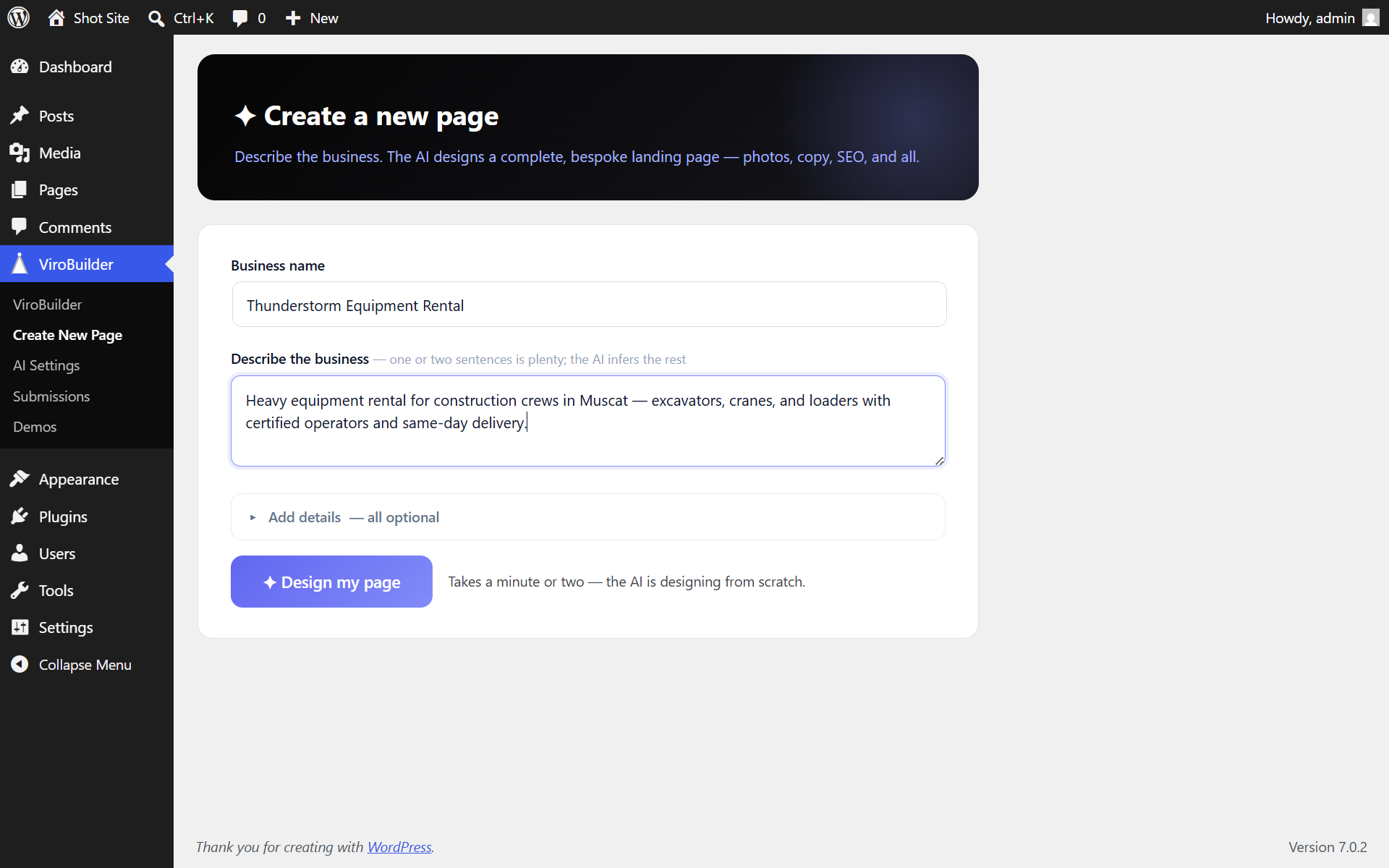
- Describe your business, optionally pick a brand color, and click Design my page.
FAQ
-
Is ViroBuilder free?
-
Yes. The plugin is free and full-featured — you bring your own AI API keys (Anthropic for page design, Google for images) and pay those providers directly for what you use, typically well under a dollar per generated page. There is no watermark, no locked features, and no forced upgrade.
-
Which AI does ViroBuilder use?
-
Page design and chat editing use Anthropic’s Claude. Images are generated with Google’s Gemini image models and saved into your media library. You connect both with your own API keys via a guided setup wizard that tests each key live.
-
Do I need Elementor, Divi, or another page builder?
-
No. ViroBuilder is a complete AI page designer on its own — it generates finished, self-contained pages with their own design system. It doesn’t depend on, conflict with, or replace your existing builder; pages it creates render standalone regardless of your theme or other plugins.
-
Can I try it before adding API keys?
-
Yes — the built-in demo gallery contains ten complete demo pages (dental clinic, law firm, restaurant, SaaS, online store, fitness studio, and more) that open in the real editor with zero setup, so you can click around and feel the editor before configuring anything.
-
How much does each page cost to generate?
-
Usage is billed directly by Anthropic at their standard API rates. ViroBuilder adds no markup to BYOK usage.
-
Do I need to know HTML or CSS?
-
No. ViroBuilder generates the complete page — layout, copy, photos, and SEO. You edit by clicking text, swapping images, or chatting with the AI. No code knowledge required.
-
Can I edit the generated pages?
-
Yes, in three ways: (1) Click any text directly in the preview to rewrite it — no AI needed, no cost. (2) Click any image to search Pexels and swap it — no cost. (3) Type instructions in the chat panel for structural changes, color updates, or adding/removing sections — each edit is a small API call.
-
What does the generated page look like?
-
It depends on your description — the AI designs a layout for each business rather than filling in a fixed template, so different inputs produce different results. A typical page includes a navigation bar, a hero section, content sections describing what the business offers, a call-to-action, and a footer, with written copy, relevant photos, and three responsive breakpoints. You can adjust any of it in the editor.
-
Does it work with my theme?
-
Yes, with any theme — generated pages use their own complete design system and render as standalone full-page documents, so your theme’s header, footer, and sidebar do not interfere. Your existing theme pages, Gutenberg content, and other plugins are unaffected.
-
Is the generated HTML clean?
-
Each page is a single, self-contained HTML document with CSS and semantic HTML5. There is no proprietary format and no page-builder shortcodes — if you deactivate the plugin, the page remains valid HTML content.
-
Can I use this for client sites?
-
Yes. The free tier works on any site where you’ve added your own API keys. A Pro tier is planned for the future.
-
What industries does it support?
-
Any. The AI designs based on your description, not a fixed template. It has been used with dental clinics, SaaS products, restaurants, law firms, real estate, agencies, e-commerce, and fitness studios — but it works for any business you can describe.
-
What happens to my page if I deactivate ViroBuilder?
-
Your pages stay. They are stored as standard WordPress page content. The only thing you lose is the chat editor for making further AI-powered edits.
-
Is my data private?
-
In the free tier, your data goes directly from your server to Anthropic and Pexels — Viro Digital never sees it. No analytics, no tracking, no telemetry. Your API keys are stored in your WordPress database and never leave your server except to authenticate with the respective APIs.
Reviews

Contributors & Developers
“ViroBuilder – AI Landing Page & Website Builder” is open source software. The following people have contributed to this plugin.
Contributors
Translate “ViroBuilder – AI Landing Page & Website Builder” into your language.
Interested in development?
Browse the code, check out the SVN repository, or subscribe to the development log by RSS.
Changelog
1.6.0
- NEW: Live streamed generation — watch your page build itself in a live preview while the AI writes it, instead of staring at a spinner.
- NEW: “🎲 Try another take” in the editor — one click regenerates the page from the same brief with a different layout and styling; your current version stays in Undo and Version history.
- NEW: Version history — the last 10 versions of every page are kept automatically and can be restored from the editor (⋯ More Version history), surviving page reloads.
- NEW: Simpler create form — a business name and one descriptive sentence is all that’s required; industry, audience, location, phone, and brand color are collapsed under “Add details”. Industry auto-detects from your description.
- NEW: “✨ Let the AI choose” brand color (default) — the AI picks a palette that fits the business instead of asking you for a hex code.
- NEW: After publishing: one-click “Set as homepage” and “Create another page” actions right in the chat panel.
- NEW: The dashboard shows “📥 X new leads this week” when your forms have recent submissions.
- IMPROVED: All AI calls now share one streaming client (chat edits, generation, retakes).
1.5.0
- NEW: Demo gallery — ten complete, structurally distinct demo pages (SaaS, home services, dental, law, restaurant, photography, online store, fitness, coaching, real estate), one per layout style. Open any demo in the real editor and try everything with zero API keys and zero network calls; demo content is clearly labeled fictional sample copy.
- NEW: “Use this style” — generate your own page with the exact layout structure of any demo you like.
- NEW: First-run setup wizard — paste each API key and it’s tested with a live API call before saving, with plain-language errors. No more failed generations from a mistyped key.
- NEW: “Test key” buttons on the AI Settings page for all three keys (works on saved keys too).
- IMPROVED: The create screen guides non-admin users to ask an administrator for key setup instead of dead-ending.
1.4.1
- LEGAL/TRUST: The AI is now explicitly forbidden from inventing verifiable claims — no fabricated client counts, review counts, star ratings, awards, certifications, or brand endorsements. Testimonial sections are generated as clearly-labeled samples to replace with real quotes.
- LEGAL/TRUST: JSON-LD structured data never includes ratings unless you provide real rating data (fabricated aggregateRating violates Google policy and consumer-protection law).
- NEW: Pre-publish accuracy check — the editor warns if sample testimonials are still on the page and reminds you to verify claims before going live.
- NEW: “Content responsibility” section in the plugin documentation covering AI copy accuracy, AI images, Google Fonts and the GDPR, and lead-form data.
- IMPROVED: Softened marketing language in the plugin description.
1.4.0
- FIX: Script tags are no longer stripped from generated pages — JSON-LD and animation code no longer appear as visible text. Pages are stored raw in post meta and rendered verbatim on a blank template (no KSES/content-filter pass).
- FIX: Sections can no longer render blank when a page’s animation script fails — a progressive-enhancement guard keeps all content visible unless JavaScript is actually running (pages now work with JavaScript disabled too).
- FIX: Truncated AI responses are detected (stop_reason max_tokens) and fail with a clear error instead of saving a half-page; the generation output limit was raised to 32k tokens.
- NEW: AI-generated images via the Google Gemini API are the default image engine. Add a Google AI key in AI Settings; every image is generated from your business brief and saved into the media library — never hotlinked. Pexels remains as a silent fallback when a key is saved.
- NEW: Progressive image loading — pages render immediately with placeholders and images swap in as each one finishes generating.
- NEW: “Regenerate with AI” option in the image swap popup; Pexels search shows only when a Pexels key is configured.
- IMPROVED: Chat edits are patch-based — the AI returns targeted search/replace changes instead of regenerating the whole document, so small copy or color changes complete in seconds instead of minutes (with automatic retry and full-regeneration fallback for structural changes).
- IMPROVED: Chat edits stream live progress into the chat panel.
- FIX: The image swap popup no longer opens clipped under the top toolbar — popups anchor to the clicked element, flip above/below, and stay fully visible on all device previews.
- FIX: Chat panel messages no longer overlap or clip as the conversation grows.
- IMPROVED: Every chat failure shows a readable message with a one-click Retry action.
1.2.0
- FOCUS: ViroBuilder is now AI-only — the plugin designs pages, it doesn’t assemble them
- NEW: Standalone “Create New Page” screen — describe your business and generate, no editor canvas needed
- REMOVED: The legacy drag-and-drop builder, widget library, and section templates (the AI designer replaces them)
- IMPROVED: Editor opens fullscreen (no admin chrome), chat input no longer clipped, cleaner top bar
- IMPROVED: AI pages self-heal — any full-HTML page is detected and routed to the chat editor automatically
- FIX: “Edit with ViroBuilder” now always opens the correct chat editor
- Roughly half the plugin’s code removed — faster, lighter, and sharper in focus
1.1.0
- NEW: AI Designer pipeline — generates complete, bespoke HTML pages (not template assembly)
- NEW: Chat-based editor — edit pages by talking to the AI or clicking directly
- NEW: Visual editing — click text to rewrite, images to swap from Pexels, links to update
- NEW: Pexels stock photo integration — auto-matched industry photos
- NEW: SEO — meta tags, Open Graph, Twitter Cards, and JSON-LD structured data
- NEW: Three-breakpoint responsive design (desktop, tablet, mobile)
- NEW: Parallax scroll effects and entrance animations
- NEW: Image selection tracking — chat edits target the image you clicked
- NEW: Progress overlay with staged design steps during generation
- NEW: BYOK / Pro tier architecture with cost transparency
- NEW: ViroBuilder brand identity (V-sparkle logo, dark theme UI)
- FIX: Timeout handling extended to 300s for complex generations
- FIX: Error handling catches Throwable (not just Exception)
- FIX: Non-JSON response handling in JavaScript
- FIX: Double-load guard prevents fatal errors on plugin update
- FIX: Section background rendering (bg_type was missing)
1.0.2
- Style preset system (Nimbus, Clarity, Pulse)
- AI copy generation with Claude Sonnet 4.6
- Recipe-based page assembly for SaaS and Health industries
- Drag-and-drop editor with widget system
- Form builder with submission management
1.0.0
- Initial release
- Drag-and-drop page builder
- Section and widget template library
- Frontend rendering engine
- Gutenberg integration