

Description
Mission is a free WordPress donation plugin built for nonprofits. Accept one-time and recurring donations, let supporters fundraise for you with peer-to-peer crowdfunding campaigns, manage donors and campaigns, give your supporters a self-service dashboard, and track everything from a modern admin, without paying for a single add-on.
Most donation plugins lock the features you actually need behind a paid tier. Recurring donations? Add-on. Custom fields? Add-on. Peer-to-peer fundraising? That one costs hundreds per year. Donor dashboards, fee recovery, exports? Add-on, add-on, add-on. Mission takes a different approach: every feature ships in the free plugin, and we’re funded by an optional tip donors can choose to add at checkout. Donors can change the tip, lower it, or set it to zero. 100% of the donation amount always reaches your nonprofit.
The result is a donation platform that grows with your organization without surprise upgrade prompts. The plugin you install today is the plugin handling your donations next year, with no upsell screens between you and your supporters.
✨ Why Mission
No paid add-ons. Ever.
Recurring donations, peer-to-peer fundraising, donor dashboards, campaign management, custom fields, tribute donations, fee recovery, exports, activity logs. All included in the free plugin. There is no “Mission Pro” version, no premium tier, and no upsell at checkout.
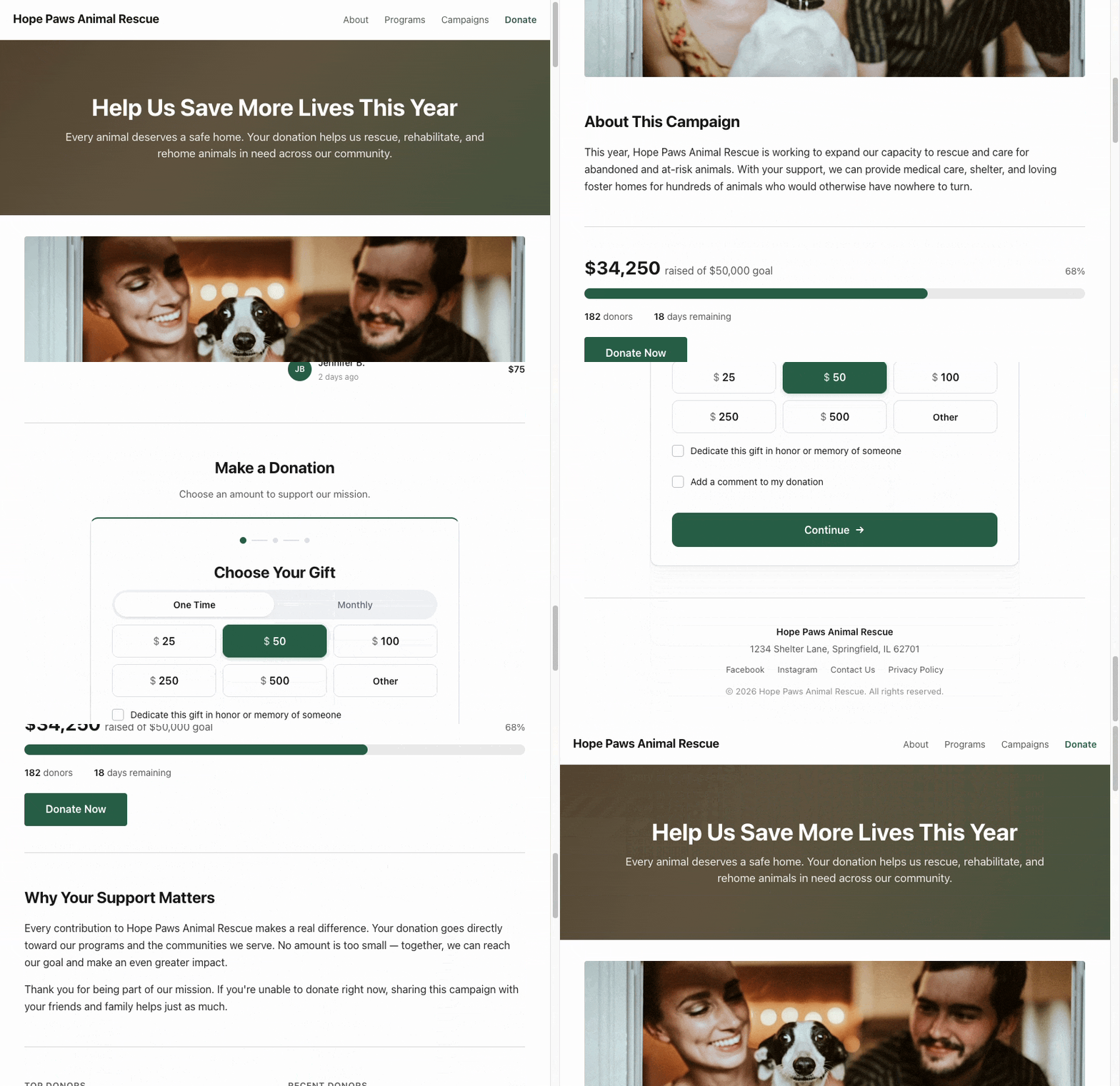
Modern donation forms that convert.
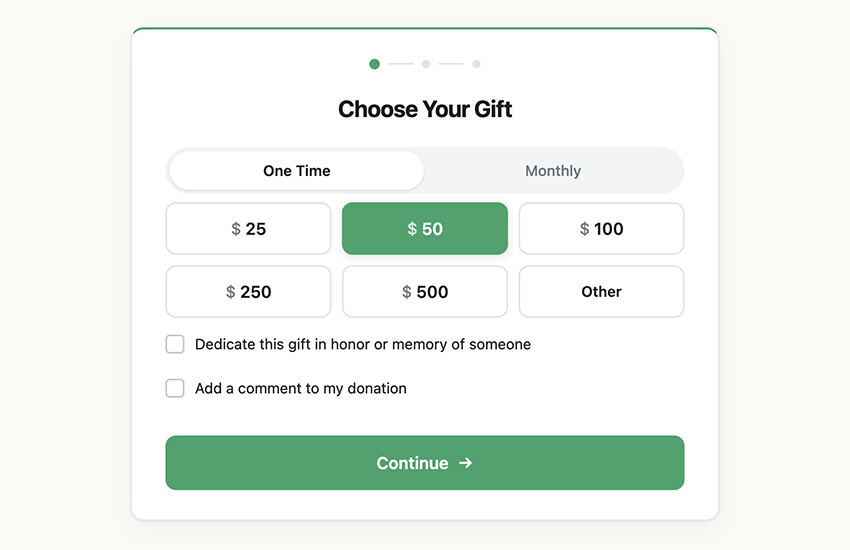
Multi-step forms with suggested amounts, custom amounts, tribute dedications, anonymous donations, optional fee recovery. Built to feel quick and trustworthy on every device.
Built for performance.
The donation form is built on the WordPress Interactivity API, so there’s no React on the public-facing site, no bloated JavaScript, and fast page loads for your donors. Donor data lives in dedicated database tables, not post meta, so reporting stays fast as your donor list grows into the thousands.
💝 Powerful donation forms
The Donation Form block can be dropped into any post, page, or campaign. Configure it once and it adapts to your campaign and your brand:
- Suggested amounts and an optional custom-amount field, configured per frequency
- One-time and recurring giving (weekly, monthly, quarterly, annually), with per-form control over which frequencies to offer
- Multi-step layout that keeps the donor focused
- Cover-the-fees option lets donors absorb processing fees so 100% of their donation reaches your cause
- Anonymous donation toggle
- Tribute and memorial dedications, with an optional notification email to the honoree
- Custom fields per form: text, textarea, select, multiselect, radio, checkbox
- Built-in client and server-side validation
- Low-specificity CSS with no
!importantrules so themes can restyle freely
🔁 Recurring donations included free
Recurring donations are the single biggest revenue lever for nonprofits, and they’re the feature other plugins charge extra for. Mission ships them free:
- Weekly, monthly, quarterly, and annual frequencies
- Automatic renewal with retry on failure
- Donor self-service: pause, resume, or cancel from the donor dashboard
- Renewal history tracked per subscription
- Email notifications for renewals, cancellations, and failed payments
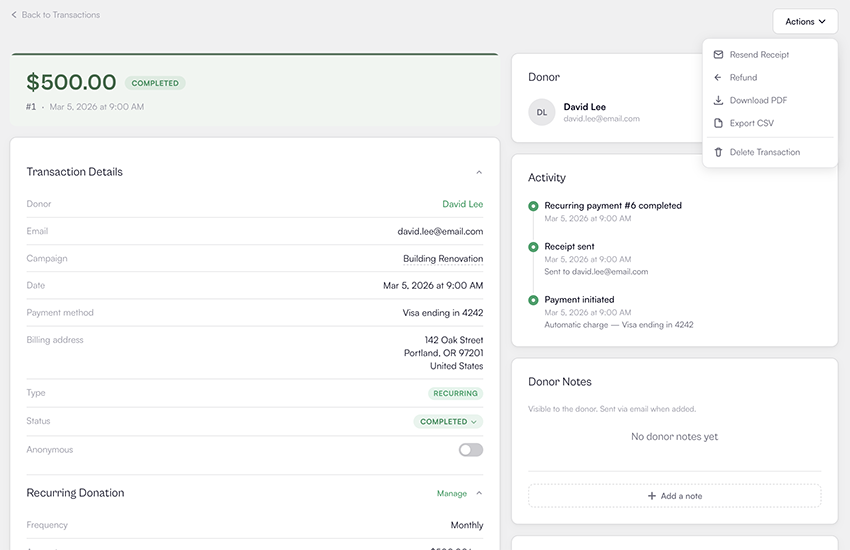
- Admin controls to pause, resume, cancel, or retry any subscription
👥 A donor dashboard your supporters will actually use
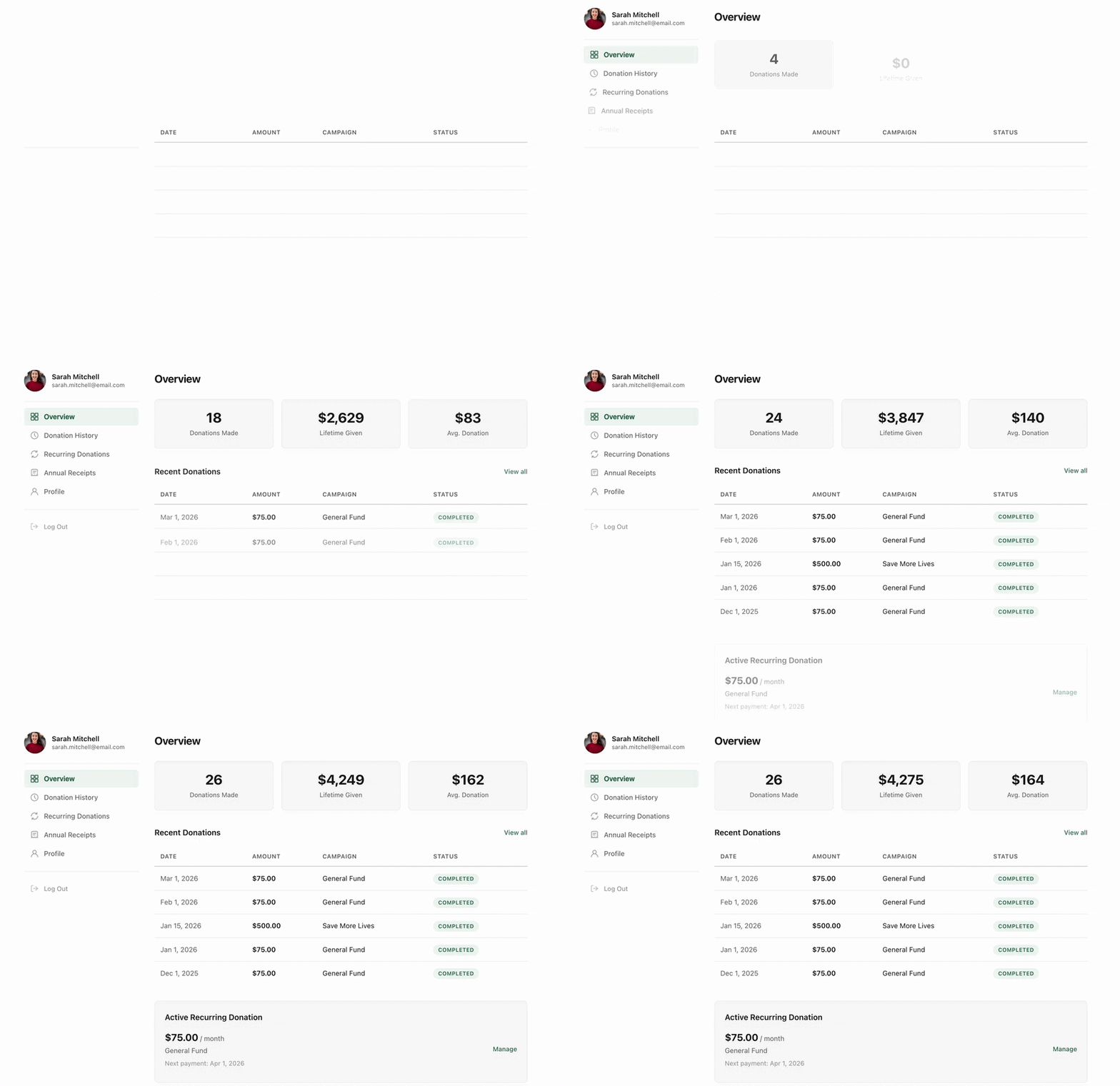
Drop the Donor Dashboard block on any page and your supporters get a self-service portal. They can:
- See a complete donation history
- Manage recurring donations: pause, resume, or cancel without contacting you
- Download a receipt for any donation
- Update their profile and email address
- Sign in with a magic-link email, so there’s no password to forget
Every action your donors can take in the dashboard is one less email in your inbox.
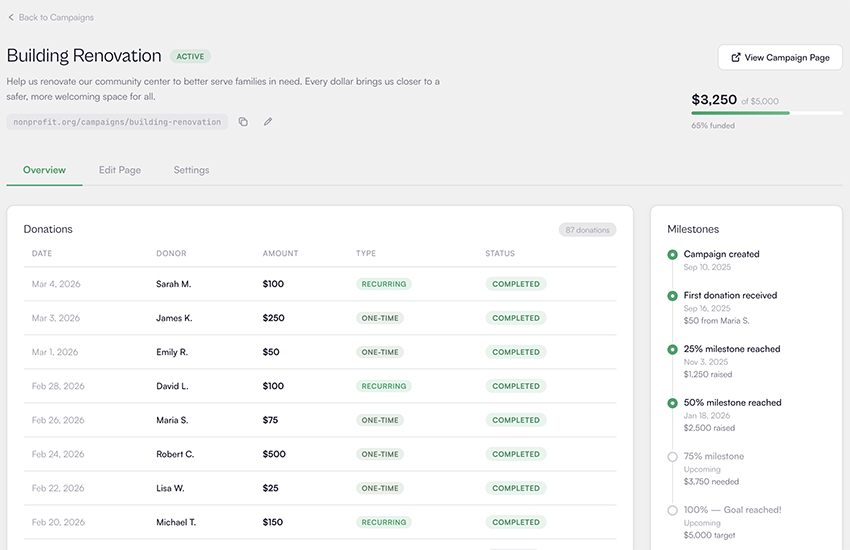
🎯 Campaign management
Run a single ongoing campaign or dozens of named campaigns side by side:
- Set goals by total raised, donation count, or unique donor count
- Auto-generated campaign pages built on the WordPress block editor
- Start and end dates per campaign
- Active, draft, and archived statuses
- Real-time aggregates that update as donations complete
Mission ships twelve campaign and donation blocks: donation form, donate button, campaign card, campaign grid, campaign image, campaign description, campaign progress bar, campaign statistic, donor wall, recent donors, top donors, and donor dashboard. Mix and match them to build campaign pages that match your brand. Not using the block editor? Every block has a shortcode equivalent that works in page builders like Elementor and Bricks.
🤝 Peer-to-peer fundraising
Let your supporters fundraise for you. Mark a campaign as peer-to-peer and anyone can sign up, on their own or as part of a team, and get a personal crowdfunding page to share:
- Supporters sign up right on the campaign page, verify their email, and their page is live in minutes
- Personal pages with a story, cover photo, goal, and live progress bar
- Teams, with captains who can invite members by email, keep the team private, promote a new captain, and manage the roster
- Approve every sign-up manually, or let pages go live instantly
- A fundraiser dashboard where participants edit their page, track progress, see their donors, and grab share links
- Donations automatically credit the fundraiser and their team, including recurring renewals
- Milestone emails celebrate 25%, 50%, 75%, and 100% of each fundraiser’s goal
- Twelve more blocks for fundraiser and team pages, including Top Fundraisers and Top Teams leaderboards, with both page layouts editable as Site Editor templates
Peer-to-peer crowdfunding is the feature other donation platforms charge hundreds of dollars a year for. In Mission it’s free, like everything else.
📊 Reports and exports you can actually use
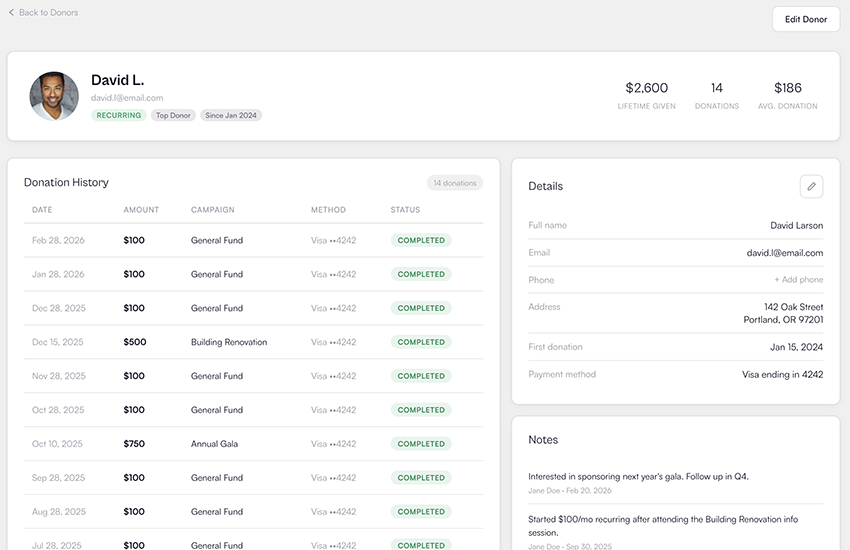
The admin dashboard surfaces what fundraisers care about: total revenue, donation count, average donation, repeat donor count, top donor, and month-over-month growth, in test and live modes side by side.
Need the data outside WordPress? Export donors, transactions, campaigns, and subscriptions to CSV or JSON in a single click.
A built-in activity log records every donation, refund, subscription event, webhook, email, and admin action with a 90-day retention window so you can audit anything that happened on your site.
🧑🤝🧑 Who Mission is for
Mission is built to fit any organization or individual raising money online:
- Nonprofits and charities
- Foundations, clubs, and NGOs
- Churches and faith communities
- Schools, PTAs, and education nonprofits
- Political campaigns and advocacy groups
- Community groups and mutual aid funds
- Individuals crowdfunding for a specific cause
🫙 How the optional tip model works
Mission is funded by donor tips, not by selling features. Here’s exactly how that works:
- At checkout, donors see a small optional tip alongside their donation amount.
- The tip is preselected at a small percentage by default. Donors can change it, lower it, or set it to zero.
- 100% of the donation amount goes to your connected Stripe account.
- Prefer a flat platform fee instead of donor tips? You can switch to a fixed 3% platform fee per form.
Source Code
The full, unminified source code for this plugin is publicly available on GitHub at https://github.com/mission-wp/mission
See the README in the repository for full development setup, contribution guidelines, and a description of the build pipeline.
External Services
This plugin connects to the following third-party services:
Stripe processes donations. Payment data is sent from the donor’s browser to Stripe via Stripe.js, and Stripe sends webhook notifications back for payment, refund, and subscription events. See Stripe’s Terms and Privacy Policy.
Mission API proxies Stripe Connect onboarding, payment requests, and webhook forwarding to your site. If you opt in to feature notifications under Tools > Features, your email is also sent here. See Mission’s Terms and Privacy Policy.
Gravatar supplies donor avatars in the admin and on the Donor Wall block. Email addresses are hashed before being sent. See Gravatar’s Terms and Privacy Policy.
Screenshots


Blocks
This plugin provides 25 blocks.
- Donate Button A customizable donate button that scrolls to a donation form or links to a URL.
- Fundraiser Title A fundraiser's heading and optional tribute.
- Fundraiser Progress Display a fundraiser's progress with a progress bar, stats, and a donate button.
- Team Members Display a team's ranked member list with per-member progress.
- Top Teams Display a ranked list of top teams for a peer-to-peer campaign.
- Campaign Progress Display campaign fundraising progress with a progress bar and stats.
- Team Image A team's cover photo.
- Account A self-service account area where donors and fundraisers can view donation history, manage recurring gifts, download tax receipts, edit their fundraising pages, and update their profile.
- Campaign Image Display the image associated with a campaign.
- Donation Form Donation form
- Fundraiser Supporters The people who donated through a fundraiser's page.
- Campaign Grid Display multiple campaigns in a responsive grid layout.
- Top Donors Display a ranked list of top donors for a campaign.
- Team Progress Display a team's progress with a progress bar, stats, and donate/join buttons.
- Fundraiser Story The story a fundraiser wrote about why they are fundraising.
- Signup Modal
- Team Title A team's name and the campaign it is fundraising for.
- Campaign Card Display a campaign as a card with image, progress, and a link to its page.
- Fundraiser Image A fundraiser's cover photo, set from their dashboard.
- Donor Wall Display a grid of donations for a campaign.
- Team Story A team's description of who they are and why they are fundraising.
- Recent Donors Display a list of recent donors for a campaign.
- Top Fundraisers Display a ranked list of top fundraisers for a peer-to-peer campaign.
- Campaign Description The parent campaign's short description, with a link to the campaign.
- Campaign Statistic Display a key statistic for a campaign, such as total raised or number of donors.
Installation
- Upload the
mission-donation-platformfolder to/wp-content/plugins/, or install Mission directly from the WordPress.org plugin directory. - Activate the plugin through the Plugins menu in WordPress.
- Open the new Mission menu and click Connect Stripe to link your Stripe account. Onboarding takes about two minutes through Stripe Connect.
- Create your first campaign under Mission Campaigns, set a goal, and customize the donation form.
- Add the Donation Form block (or any of Mission’s blocks) to a page, and you are ready to accept donations.
FAQ
-
Is Mission really free?
-
Yes. Every feature ships in the free plugin. There is no Pro tier, no premium add-ons, and no plan to introduce one. Mission is funded by optional tips that donors can choose to add at checkout. They can change the tip, lower it, or set it to zero, and 100% of the donation amount always reaches your nonprofit.
-
Will I ever be asked to pay for a feature?
-
No. There is no upgrade prompt, no upsell screen, and no premium version. The plugin you install today includes every feature Mission ships, and that is not going to change.
-
Which payment gateways are supported?
-
Mission currently supports Stripe via Stripe Connect for credit and debit card donations. We focused on building a deep Stripe integration before adding more gateways.
-
Does Mission support recurring donations?
-
Yes. Recurring donations are included free, with no add-on required. Donors can choose weekly, monthly, quarterly, or annual frequencies (configurable per form). Renewals are processed automatically via Stripe with retry on failure, and donors can pause, resume, or cancel their own subscriptions from the donor dashboard.
-
Does Mission support peer-to-peer fundraising?
-
Yes, and it’s free. Mark a campaign as peer-to-peer and supporters can sign up to fundraise for you with their own personal pages, individually or in teams, like a crowdfunding platform running on your own site. You choose whether sign-ups go live instantly or wait for your approval, fundraisers get a dashboard to manage their page and track progress, and every donation automatically credits the right fundraiser and team.
-
Do donors need an account to donate?
-
No. The donation form is fully public and requires no account. If a donor wants to manage their recurring donations or download receipts later, they can sign in to the donor dashboard with a magic link sent to the email address they used when donating.
-
Can I customize the donation form?
-
Yes. Every form has its own settings: amounts, frequencies, fields, fee handling, color, anonymous donation toggle, tribute support, and custom fields (text, textarea, select, radio, checkbox). Layout, spacing, and typography use WordPress’s native block controls, and themes can restyle the form freely thanks to low-specificity CSS,
--mission-*custom properties, no!importantdeclarations, and no inline styles. -
Can I use Mission with Elementor, Bricks, or the Classic Editor?
-
Yes. Every Mission block has a shortcode equivalent that works anywhere shortcodes do, including page builders like Elementor, Bricks, and Divi. The available shortcodes are
[mission_donation_form],[mission_donate_button],[mission_campaign],[mission_campaign_grid],[mission_campaign_image],[mission_campaign_progress],[mission_campaign_statistics],[mission_donor_wall],[mission_recent_donors],[mission_top_donors], and[mission_donor_dashboard]. Attributes mirror the block settings in snake_case, for example:[mission_donation_form campaign_id="12" amounts="10,25,50" default_amount="25"]. -
How is Mission different from GiveWP or Charitable?
-
The headline difference is the business model. GiveWP and Charitable both run on a freemium model where the most useful features (recurring donations, fee recovery, custom fields, advanced reports, peer-to-peer fundraising) are paid add-ons that stack into a meaningful yearly cost. Mission flips this: every feature is free, and the platform is funded by optional donor tips instead.
If you want a single open-source plugin without surprise costs, and Stripe handles your payments, Mission is the simplest path to launch.
-
Where can I get support?
-
Free community support lives on the WordPress.org support forum and on GitHub issues. Feature requests, bug reports, and questions are all welcome there.
-
How do I report a security issue?
-
Please report security issues privately by emailing hello@missionwp.com rather than opening a public GitHub issue. We will respond promptly and credit you in the changelog if you would like.
Reviews


Contributors & Developers
“Mission – Donation Plugin for WordPress – Fundraising & Recurring Donations” is open source software. The following people have contributed to this plugin.
Contributors
“Mission – Donation Plugin for WordPress – Fundraising & Recurring Donations” has been translated into 1 locale. Thank you to the translators for their contributions.
Interested in development?
Browse the code, check out the SVN repository, or subscribe to the development log by RSS.
Changelog
1.5.0
- Enhancement: Buttons, fields and links in the donation form, fundraiser signup, donor dashboard, campaign cards and donate button now keep their own look on any theme, including themes that add borders or outlines to every button
- Enhancement: The optional tip now stays visible to donors even when a theme or custom CSS hides it by mistake, and any form where it can’t be shown is handled the same way as the 3% platform fee option
- Fix: Plugin updates now reach returning visitors right away instead of waiting for cached block styles to expire
1.4.0
- Security: User-supplied names and titles in admin activity feed messages are now escaped before display
- New: Peer-to-peer fundraising! Create a P2P campaign and let supporters raise money for your cause with their own personal fundraising pages, on their own or in teams
- New: Fundraisers sign up right on the campaign page and manage their story, photo, goal, and sharing from a new dashboard, while admins review and manage everyone from new Fundraisers and Teams screens with an optional approval workflow
- New: Donations through a fundraiser page credit the fundraiser and their team on live progress bars and leaderboards, and seven new editable emails cover the lifecycle from welcome to goal milestones
- Enhancement: The donor dashboard is now a full account area with separate Donations and Fundraising sections that appear based on each person’s role
- Enhancement: Donation form amounts now follow the site’s language for number formatting instead of the browser’s
- Enhancement: Database updates now run on any visit, so a background plugin update can never stall donation processing
- Fix: Block cards and buttons no longer overflow their containers in themes without a border-box reset
- Tweak: Sites behind a proxy other than Cloudflare can declare trusted client-IP headers with the mission_trusted_proxy_headers filter so rate limits see real visitor addresses
- Tweak: Updated the Spanish and Finnish translations with all of the new peer-to-peer strings
1.3.3
- Enhancement: The donation form now shows a clear message when a payment can’t start or is taking unusually long, instead of an endless loading spinner
- Enhancement: The donation form now explains when the payment field can’t load, instead of failing silently
- Fix: Restored reliable checkout on pages that contain more than one donation form
- Tweak: Stripe.js now loads with Stripe’s recommended script tag for maximum compatibility with Stripe’s fraud protection
1.3.2
- New: Added a complete Finnish (fi) translation
1.3.1
- Enhancement: Faster dashboard and reports on sites with many donations
- Enhancement: New developer hooks fire when imports, exports, and cleanup operations complete, and clearing the activity log now leaves an audit entry
- Enhancement: Clearer error messages when cancelling, pausing, resuming, or updating subscriptions
- Fix: Ending a campaign now cancels or redirects all of its active recurring donations, no matter how many there are
- Fix: Restored the donate button’s filled/outline styles and the campaign image block’s border, shadow, and duotone settings
- Fix: Restored donor card rendering on the donor wall
- Fix: Improved PHP 8.0 compatibility by aligning all plugin code and bundled dependencies with Mission’s minimum supported PHP version
- Fix: Weekly recurring donations now show as recurring in admin donation lists and are accepted by the REST API frequency filter
- Tweak: Added save_silent() and recompute_aggregates() model methods for developers
- Tweak: REST API not-found errors now use entity-specific error codes (e.g. campaign_not_found)
- Tweak: The subscriptions and donor wall list endpoints now validate page and per_page ranges like all other endpoints
The full changelog for earlier releases is available on GitHub.