

Description
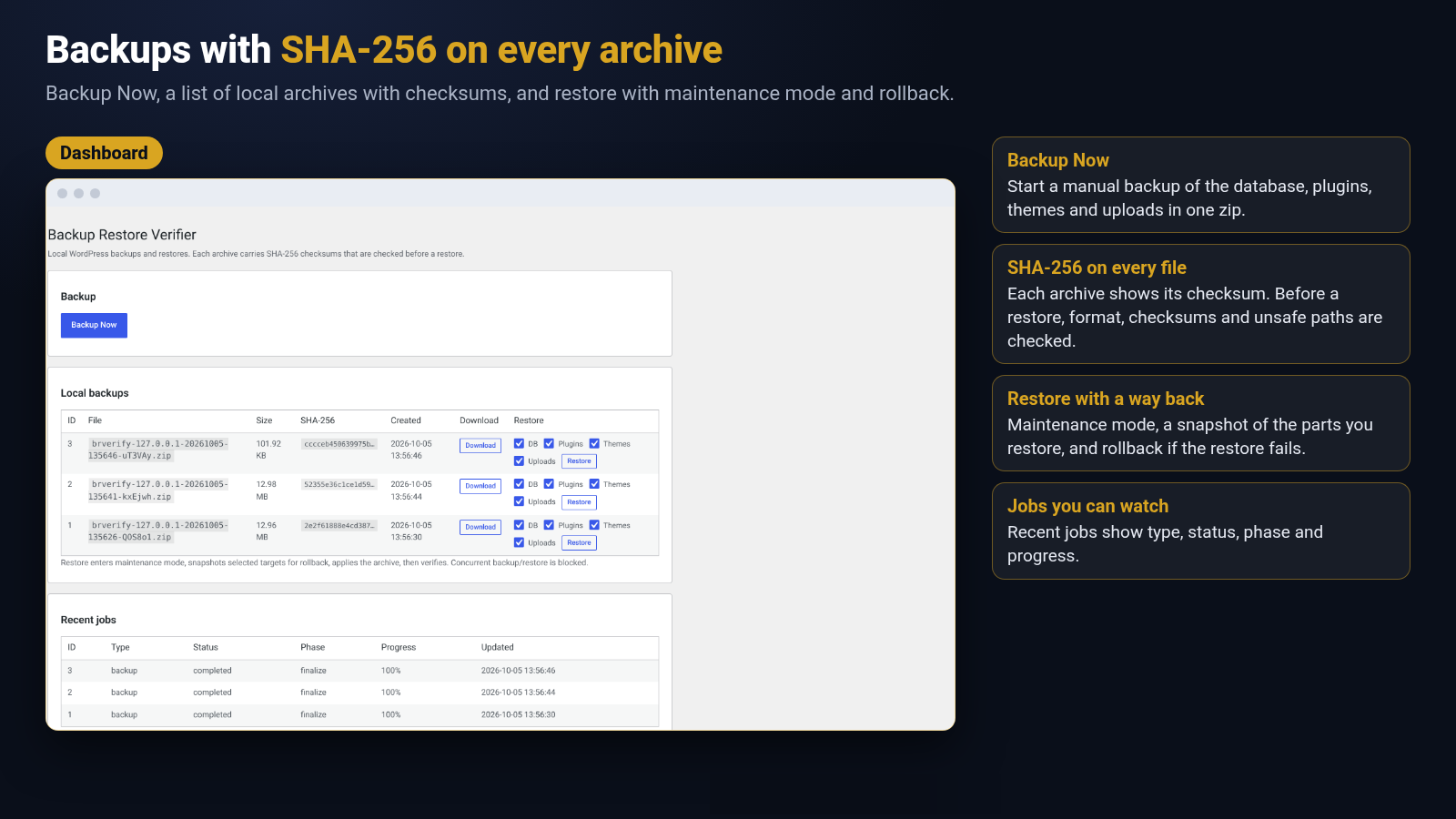
007AJ Backup Restore Verifier creates backups of your WordPress site (database, plugins, themes and uploads) as a single zip with a manifest and SHA-256 checksums. Before anything is restored the archive is validated: format, checksums and unsafe paths are checked, so a damaged or tampered backup is rejected instead of half-applied.
Everything runs on your own server. The plugin makes no external requests (see “External Services” below).
What you get
- Manual full backups with Backup Now (chunked and resumable, so large sites do not time out)
- Scheduled backups: hourly, twice daily, daily or weekly (WP-Cron), or switched off
- Retention: keep the last N backups, older ones are pruned after each successful backup
- Optional automatic backup right before plugin, theme and WordPress core updates (off by default) with its own retention and a Restore button in the admin notice
- Restore with maintenance mode, a pre-restore snapshot and rollback if something fails
- Backups are stored in a protected folder under
wp-content(web access denied); downloads need an administrator and a nonce - Failure alerts by email using the normal WordPress mail function
- A health card (PHP, WordPress, ZipArchive, disk space)
Need more? Remote storage (S3, SFTP, Google Drive and more), incremental backups, site migration and database encryption are available in a separate extended plugin from wordpress.007aj.com/shop. This plugin is fully useful on its own and shows no promotional notices; the only mention is a “Get the full version” link in its row on the Plugins screen.
External Services
This plugin does not connect to any external service. It makes no HTTP requests, sends no telemetry, sets no cookies and needs no account. Failure emails are sent with wp_mail() through the mail setup of your own site.
- Service: none contacted by the plugin. Data sent: none. When: never.
- Service: the 007AJ website, reached only through one plain link (the “Get the full version” link in the plugin row on the Plugins screen). Data sent: none by the plugin; the link opens https://wordpress.007aj.com/shop/ in your browser only when you click it, and the site’s own terms apply there. When: only when you click the link. Terms of service: https://007aj.com/terms. Privacy policy: https://007aj.com/privacy
Screenshots
Installation
- Upload the
007aj-backup-restore-verifierfolder to/wp-content/plugins/, or install the zip via Plugins Add New Upload Plugin. - Activate 007AJ Backup Restore Verifier through the Plugins screen.
- Open 007AJ Backup Restore Verifier and click Backup Now, or open 007AJ Backup Restore Verifier Settings to set the schedule, retention, failure alerts and uninstall behaviour.
- If
DISABLE_WP_CRONis true on your site, configure a real system cron that requestswp-cron.phpso schedules and job resume ticks run reliably.
FAQ
-
Does this plugin contact any external server?
-
No. See “External Services” above. There is no analytics or telemetry. Failure alerts use
wp_mail()only. -
What personal data does the plugin store?
-
By itself: the optional notification e-mail address in the settings, one user-meta flag for each user who dismissed the plugin notice, and log rows (job type, status, file names, error messages) that are not meant to hold personal data. Backup archives are copies of the site, so they contain whatever personal data the site holds; they stay in
wp-content/uploads/brverify-working/and the newest 3 are kept by default (Settings, Retention). The plugin registers suggested privacy policy text and a personal data exporter and eraser (WordPress Tools). The eraser clears the notification address, the notice flag and log rows that contain the address; existing archives are not rewritten. Deleting the plugin keeps your data unless you tick Delete all data when the plugin is deleted. -
Where are backups stored?
-
In
wp-content/uploads/brverify-working/storage/(the uploads directory, found withwp_upload_dir()), protected with deny-all.htaccess/web.config/index.phpfiles. On nginx, add a rule such aslocation ^~ /wp-content/uploads/brverify-working/ { deny all; }. Downloads require a user who can manage the plugin (administrators on a single site) and a per-backup nonce. -
What happens when I delete the plugin?
-
By default nothing is destroyed: scheduled events and transients are removed, but your settings, backup history and backup files stay, so a reinstall finds them again. If you tick Delete all data when the plugin is deleted under Settings Uninstall first, deleting the plugin also removes the options, the plugin tables and every backup file under
wp-content/uploads/brverify-working/. -
Does a restore overwrite my site blindly?
-
No. The archive is validated first (format, checksums, unsafe paths). The restore puts the site in maintenance mode, takes a snapshot of the affected components, applies the selected components, checks the result and rolls back on failure where possible.
-
Is multisite supported?
-
Not yet. On multisite the plugin refuses to run jobs instead of risking a partial result.
-
I used an earlier pre-release of this plugin under another name.
-
On first load the plugin moves its old options, tables and backup folder to the new names, so existing backups keep working.
Reviews
There are no reviews for this plugin.
Contributors & Developers
“007AJ Backup Restore Verifier” is open source software. The following people have contributed to this plugin.
Contributors
Translate “007AJ Backup Restore Verifier” into your language.
Interested in development?
Browse the code, check out the SVN repository, or subscribe to the development log by RSS.
Changelog
0.6.5
- Fix: PHP 7.4 fatal error on the Settings screen (PHP 8-only str_ends_with()). All PHP 8-only string functions are replaced with PHP 7.4-safe helpers.
- New: the plugin checks the PHP and WordPress versions and the zlib, hash and json PHP extensions before running, and shows an admin notice instead of failing; a notice also explains when the zip extension is missing.
- Change: the working and backup folder now lives in the uploads directory (uploads/brverify-working/). An existing wp-content/brverify-working/ folder is moved there automatically (once, never while a job is running) and stored paths are updated; uninstall finds both locations.
- Change: plugin, theme and content locations are found with WordPress functions instead of hardcoded constants.
- Change: removed load_plugin_textdomain(); WordPress.org loads the translations automatically.
- Change: the Settings stylesheet loads only on the plugin’s own Settings screen.
- Fix: “gmdate(): Argument #2 must be of type ?int, float given” when the site uses a city time zone or a fractional UTC offset.
0.6.4 (wordpress.org review)
- Renamed to 007AJ Backup Restore Verifier; slug and text domain are now
007aj-backup-restore-verifier. Settings, backups and history are kept (internalbrverifynames are unchanged). - Removed the promotional note from the Settings screen. The only mention of the extended plugin is the “Get the full version” link in the plugin row.
- The pre-update backup result notice now appears only on this plugin’s screens and on Updates, Plugins and Themes, and is dismissible.
0.6.4
- Restores: if a request is killed after a database statement ran but before progress was saved, the next request can safely run it again (rows are written as REPLACE into the freshly recreated table, so a repeated row no longer stops the restore with a duplicate-row error). This also applies to the automatic rollback.
- Restores: a database dump supplied by an add-on is checked against its SHA-256 across requests before the first statement runs, and must come from the database member that passed validation.
- Uploads to a destination: if the archive hash was not recorded yet, it is computed across requests instead of in one request.
- Engine support used by the extended edition for resumable steps (named per-task locks, byte ranges of stored archive members, continuing a supplied database dump across requests).
0.6.3
- Restore validation is strictly one-to-one: an archive with an extra member that has no checksum entry, a duplicated path, a missing member or an extra checksum entry is rejected before any file or database change.
- Restore applies only validated members and compares each restored file’s SHA-256 with its validated checksum before it replaces the live file; it stops if the archive changed after validation.
- PHP 7.4: very large files can now pause and continue in the next request during backup, verification and restore (built-in resumable SHA-256, about 9 MB/s on PHP 7.4; PHP 8+ uses the native hash).
0.6.2
- Large sites: file discovery, packing, verification and restore now run in small resumable steps, each limited to 20 seconds or half of max_execution_time, whichever is lower. Very large files can continue in the next request (PHP 8+). The archive writer supports archives and files larger than 4 GB (Zip64).
- Large working data (file lists, checksums) is kept in protected working files; the job record only holds small references.
- Fix: only one request can advance a job at a time (per-job lock, released automatically if the request dies), so two open admin tabs can no longer write to the same backup.
- Fix: each archive entry’s data, directory record and checksum line are committed together and rolled back together, so an interrupted or retried step cannot duplicate, drop or reorder entries.
- Verification checks the archive directory and the checksum list one-for-one and names the exact entry of the first difference.
- Failures record the real error (message, phase and file) in the job and the log.
0.6.1
- Fix: when a restore fails, the database snapshot is now always applied in full before the job reports the rollback as finished (large databases could previously be left partly restored).
- Privacy: suggested privacy policy text, personal data exporter and eraser for the data the plugin stores itself.
- Requirements lowered to PHP 7.4 and WordPress 6.3 (the code was checked with static compatibility checks; the test suites run on PHP 8.4).
- No inline styles or inline event handlers in the admin screens (utility CSS classes and one small script file instead).
- Constants are defined only if not already defined.
- Wording: descriptions now state exactly what is checked (SHA-256 checksums are checked before a restore).
- The dismissible note no longer mentions a license (this edition has none).
0.6.0
- New name and slug: 007AJ Backup Restore Verifier (
007aj-backup-restore-verifier). Options, tables, cron events and the working folder now use thebrverifyprefix; data from earlier pre-release builds is migrated automatically on first load. - Uninstall: new setting Delete all data when the plugin is deleted (off by default). Off keeps settings, history and backup files; on removes them. Scheduled events and transients are always removed.
- Backups of the previous format are still recognised and restorable.
- If the extended edition of this plugin is also active, a single notice asks you to deactivate one of them (they share the same data).
- The small note about the extended plugin is now dismissible per user and only appears on the Settings screen.
- Reviewed every form and request handler: capability + nonce checks, input sanitising and output escaping.
0.5.5
- Fix: a stale object cache after a restore could stall the next restore tick on MySQL/MariaDB.
- Fix: pre-update core “from to” versions are now read from the update package name first.
- Fix: restores started from the browser could stall because the maintenance file blocked the requests driving the job.
- New extension points for add-ons (defaults change nothing).
0.5.4
- Manifest records where a backup came from (site URL, paths, table prefix). Older backups still restore unchanged.
- Fixes for database dumps (placeholder tokens, comment lines) and for restores that replayed the plugin’s own tables.
0.5.3
- Opt-in automatic backups before plugin, theme and core updates with a separate retention cap and a restore button. A failed backup never blocks an update.
0.5.0
- Hardening release: security review of downloads, restores and AJAX; protected storage folder; packaging.
0.4.0
- Configurable schedule, retention, failure emails and a Settings screen.
0.3.0
- Restore engine: validation, maintenance mode, snapshot, apply, verify, rollback.
0.2.0
- Local backup engine: database dump, file pack, manifest, checksums, protected storage, Backup Now.