

Description
This is the official integration for ZevSend (https://zevsend.com), a transactional messaging service for email, SMS, WhatsApp, and verification codes. The plugin connects your WordPress site to your own ZevSend account and routes every email your site sends through the ZevSend email delivery API, instead of the default server mailer that is often unreliable and lands in spam. A ZevSend account and API key are required.
Unlike a generic SMTP tool, it is purpose-built for the ZevSend API: it uses your verified sending domains and approved brand name, detects sandbox versus live from your key, respects ZevSend’s per-message limits, and surfaces ZevSend’s own delivery errors in plain language. If you send with ZevSend, this is the supported way to wire it into WordPress.
Because it hooks WordPress at the wp_mail() layer, it works with everything automatically: WooCommerce order and shipping emails, password resets, new-user notifications, comment replies, and any contact form, membership, or newsletter plugin that sends mail the standard way. There is nothing to change in your theme or other plugins.
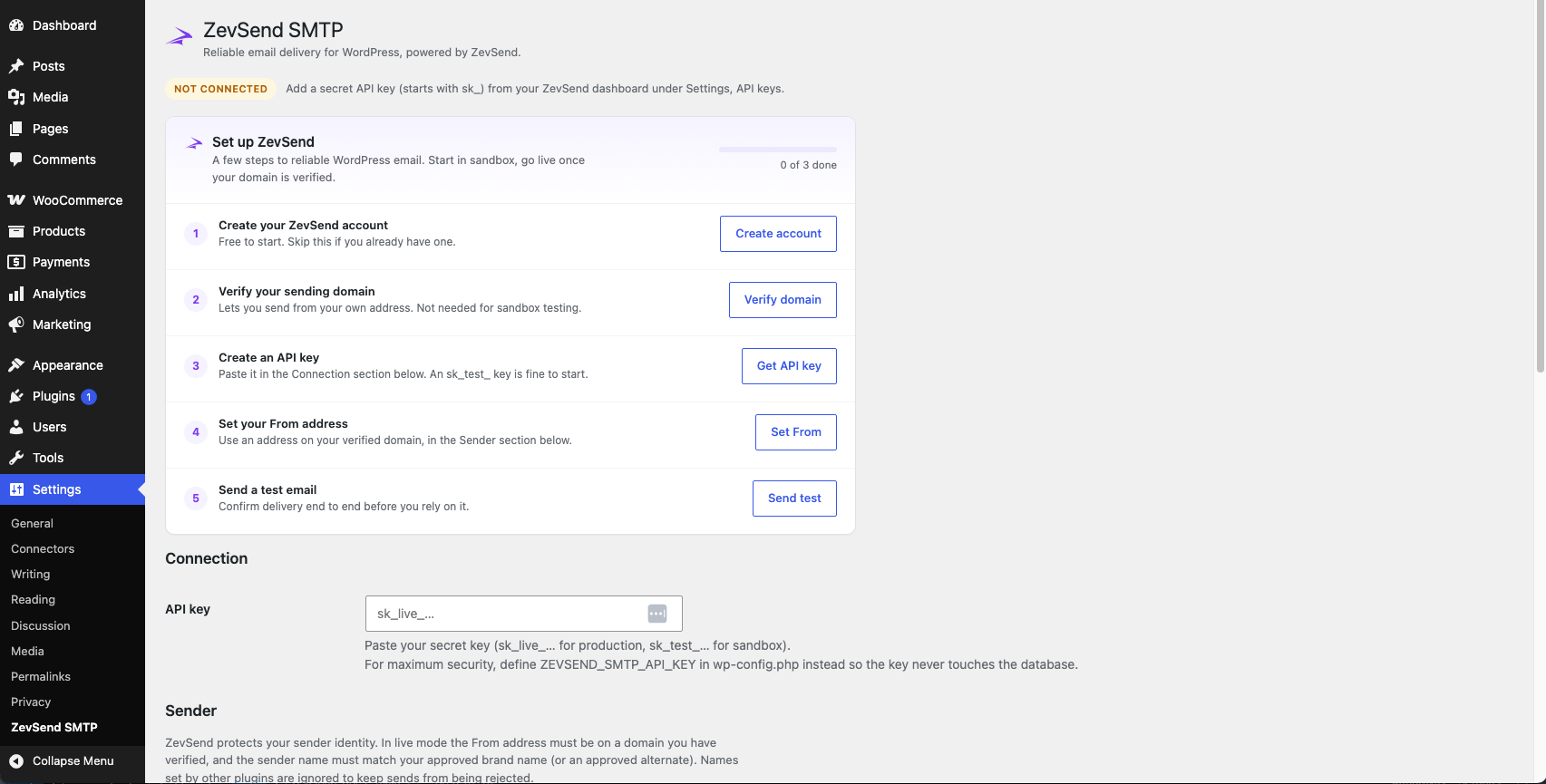
ZevSend is API based, so there is no SMTP host or port to configure. You paste one API key and choose your From address.
Key features
- One-key setup. No host, port, or encryption settings.
- Universal compatibility through the wp_mail() hook, including WooCommerce.
- Sender identity that respects your approved ZevSend brand name.
- Optional From address forcing so every email uses a consistent sender.
- Attachments supported (up to the ZevSend per-message limits).
- Built-in test email button to confirm delivery.
- Optional email log that records recipients, subject, and status. Message bodies are never stored.
- Sandbox and live modes, detected automatically from your key.
- Security first: the API key can be set in wp-config.php so it never touches the database.
ZevSend is a product of Zevop (https://zevop.com).
External Services
This plugin connects to the ZevSend email delivery API to send your site’s outgoing email. This is required for the plugin to function.
Service: ZevSend Email API
Endpoint: https://api.zevsend.com/v1/emails
When data is sent: Every time your site sends an email through wp_mail() (for example a WooCommerce order confirmation, a password reset, or a contact form notification), and when you click the “Send test email” button on the settings screen.
What data is sent: Your ZevSend API key (in the Authorization header for authentication), and the email being delivered. That email includes the recipient addresses (to, cc, bcc), the reply-to address, the From name and address, the subject, the message body, and any attachments the sending plugin included. No other site data is transmitted.
This service is operated by ZevSend. Please review their terms and privacy policy:
Terms of Service: https://zevsend.com/legal/terms
Privacy Policy: https://zevsend.com/legal/privacy
A ZevSend account and API key are required. Create a free account at https://zevsend.com and generate a secret key under Settings, API keys.
Screenshots
Installation
- Install and activate the plugin.
- Go to Settings, ZevSend SMTP.
- Paste your secret API key (starts with sk_). For maximum security you can instead define ZEVSEND_SMTP_API_KEY in wp-config.php.
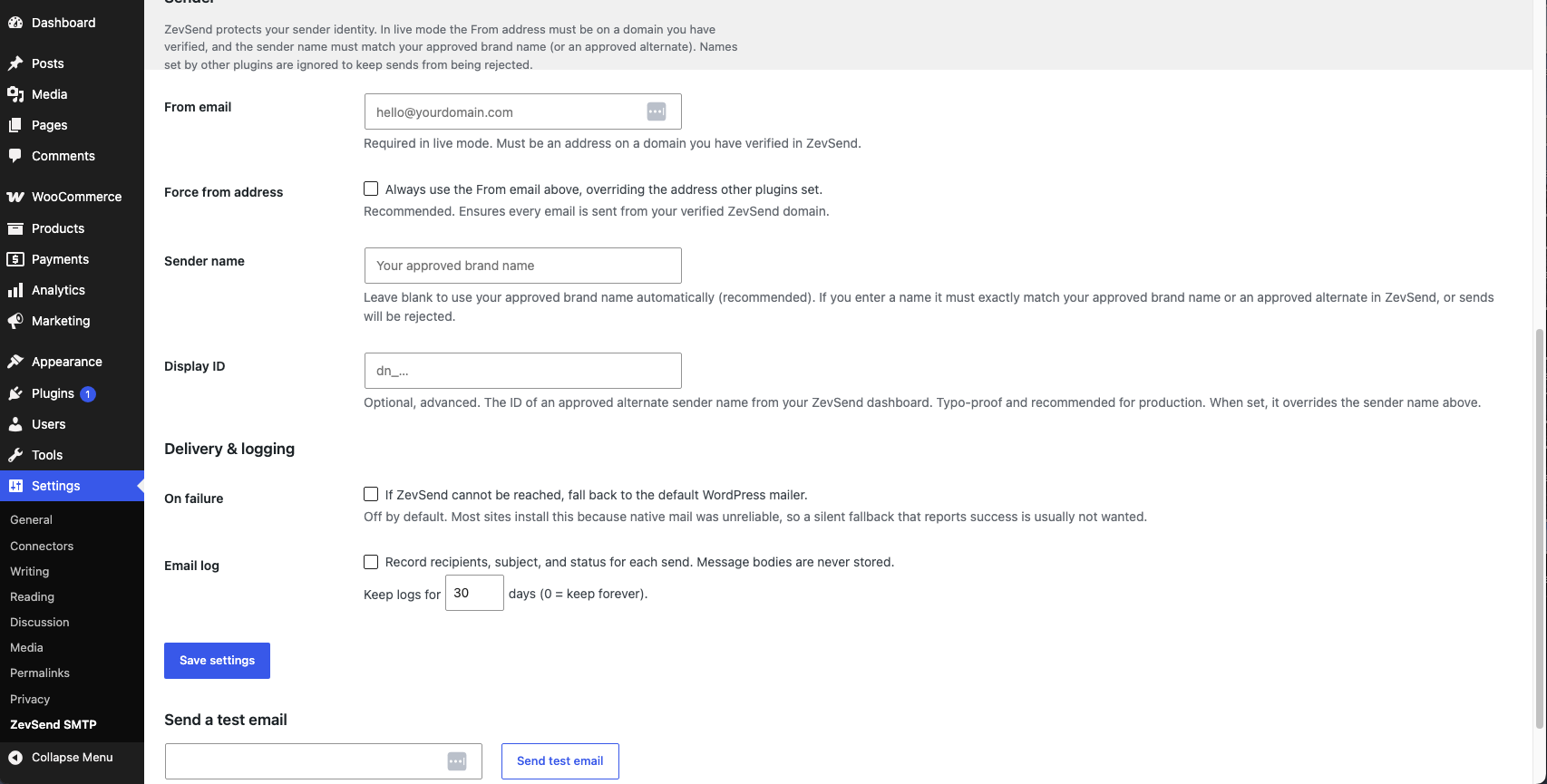
- Set your From email. In live mode this must be an address on a domain you have verified in ZevSend.
- Click “Send test email” to confirm delivery.
FAQ
-
Do I need an SMTP host and port?
-
No. ZevSend delivers over its API, so there is nothing to configure beyond your API key and From address. The word “SMTP” in the name reflects what the plugin does for you, which is fix WordPress email deliverability.
-
Does it work with WooCommerce?
-
Yes. WooCommerce sends its emails through wp_mail(), which this plugin intercepts, so all order, invoice, and account emails are delivered through ZevSend with no extra setup.
-
Where do I get an API key?
-
Create an account at https://zevsend.com, then open Settings, API keys in your dashboard. Use an sk_test_ key to trial delivery in sandbox mode and an sk_live_ key for production.
-
Why is my sender name not what I set in another plugin?
-
ZevSend protects your sender identity. In live mode the sender name must match the approved brand name on your verified domain, so the plugin does not pass through names set by other plugins, which would cause sends to be rejected. Leave the Sender name field blank to use your approved brand name automatically, enter your exact approved brand name, or set a Display ID for an approved alternate. You register and get approval for brand names and alternates in your ZevSend dashboard.
-
My live emails are rejected. What should I check?
-
Two things. First, the From email must be on a domain you have verified in ZevSend. Second, if you set a Sender name it must be an approved brand name or alternate for that domain. When in doubt, leave the Sender name blank and turn on “Force from address” so every email uses your verified domain and approved brand.
-
Is my API key safe?
-
Yes. You can define ZEVSEND_SMTP_API_KEY in wp-config.php so it never gets stored in the database. If you paste it into the settings screen instead, it is stored as a site option and is never displayed back on the page.
-
What happens if ZevSend cannot be reached?
-
By default the send is reported as failed and, if enabled, logged. You can optionally turn on a fallback that lets WordPress try its own mailer instead.
Reviews
There are no reviews for this plugin.
Contributors & Developers
“ZevSend SMTP” is open source software. The following people have contributed to this plugin.
Contributors

Translate “ZevSend SMTP” into your language.
Interested in development?
Browse the code, check out the SVN repository, or subscribe to the development log by RSS.
Changelog
1.0.0
- Initial release.