

Description
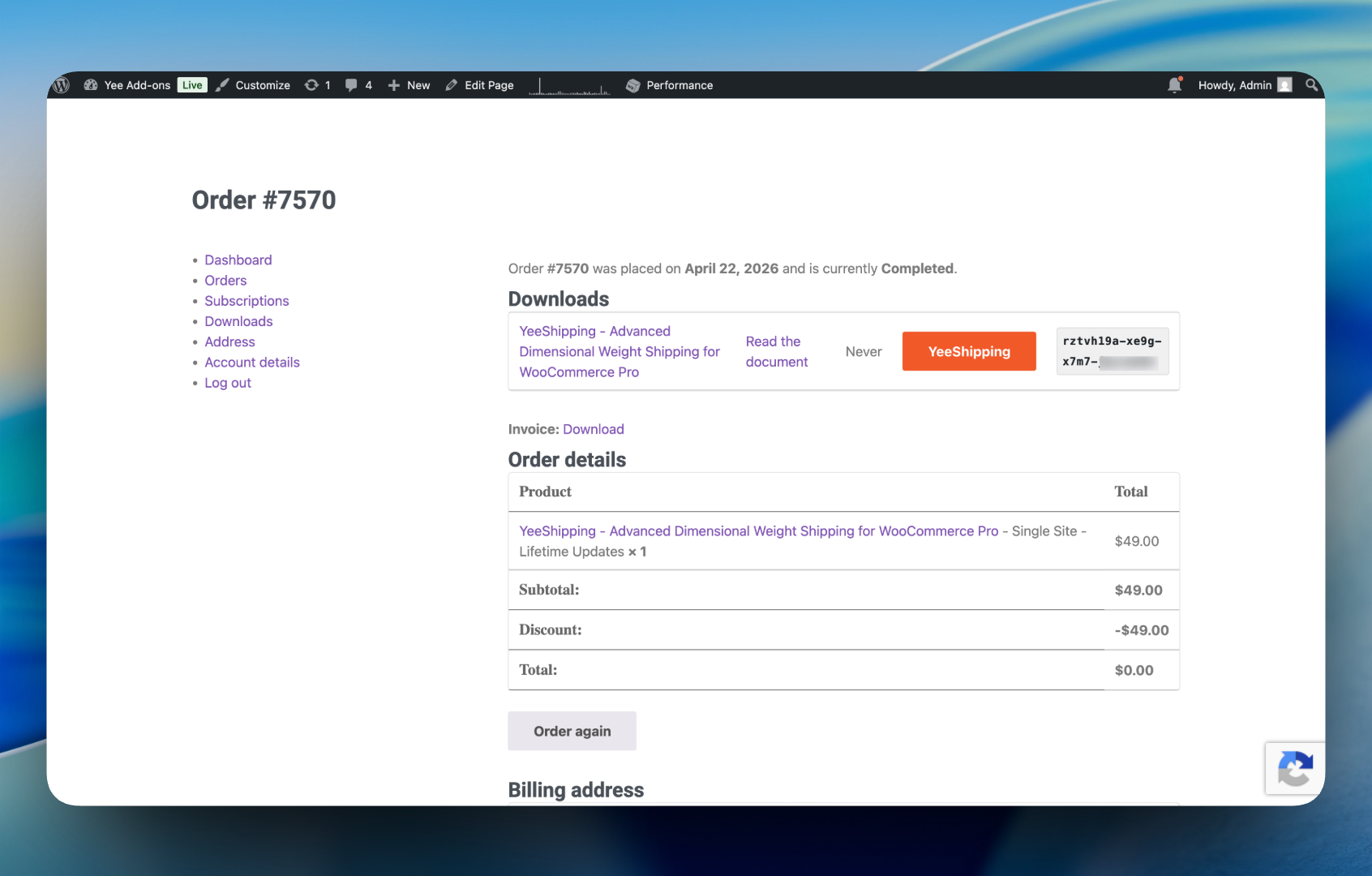
YeePurchase Code is an advanced licensing and purchase code management plugin built specifically for WooCommerce. It seamlessly integrates with your digital store to automatically generate, assign, and manage unique purchase codes or software licenses when an order is completed.
Whether you want the system to auto-generate secure UUID codes, or you want to import your own custom pre-generated codes into a pool, this plugin handles it flawlessly.
Core Features
- Dual Generation Modes: Choose between generating secure random UUIDs automatically, or serving custom codes from an imported preloaded pool.
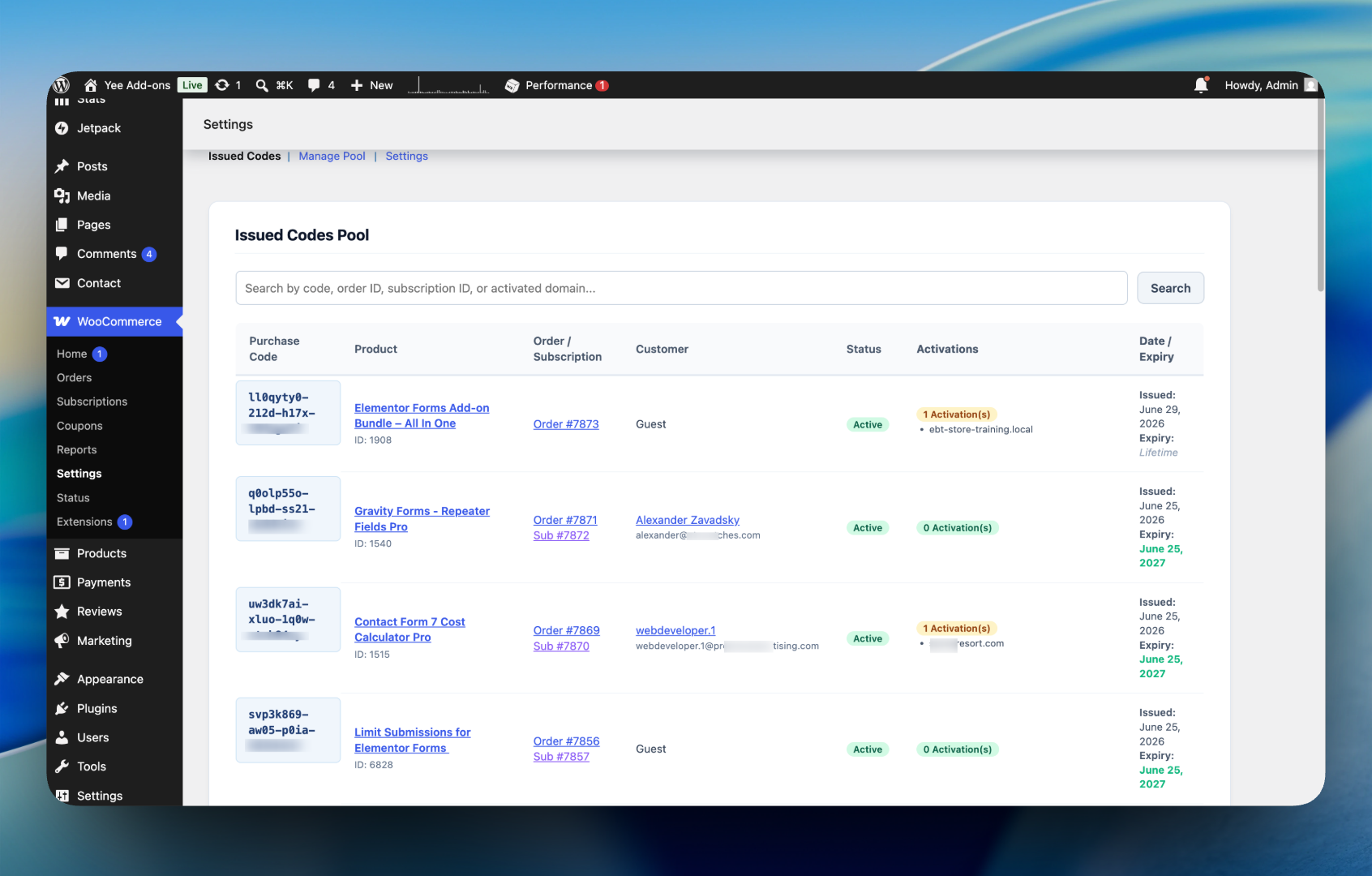
- Preloaded Code Pool: Upload CSV or TXT files containing your custom codes. Manage the pool via a beautiful dashboard with stats, utilization rates, and pagination.
- Smart Filter Rules: Selectively include or exclude specific products or entire WooCommerce categories from generating purchase codes.
- Multi-quantity & Multi-product Support: Accurately issues the exact number of codes corresponding to the quantity purchased, even in mixed-product carts.
- Robust Status Handling: Prevents duplicate code generation if an order status is toggled back and forth.
- Admin Order Metabox: View all generated codes for an order, the specific product they belong to, and manage individual domain activations effortlessly.
- Advanced “Issued Codes” Dashboard: Audit all granted licenses, filter by code, order ID, subscription ID, or activated domains.
- YeeSubscriptions Integration: Automatically sets and syncs license expiry dates with subscription renewal periods.
- REST API Ready: Built-in endpoints to validate codes, activate domains, and deactivate domains remotely from client applications or themes.
Screenshots
Installation
- Upload the
yeepurchasecodefolder to the/wp-content/plugins/directory. - Activate the plugin through the ‘Plugins’ menu in WordPress.
- Navigate to WooCommerce > Settings > Purchase Codes to configure your generation modes and filter rules.
- Ensure your digital products are correctly set up to leverage the purchase codes.
FAQ
-
How do I import my own purchase codes?
-
Go to WooCommerce > Settings > Purchase Codes > Manage Pool. Change the generation mode to “Use Preloaded Pool” in the Settings tab, then use the bulk import tool to upload a
.csvor.txtfile containing one code per line. -
Does it support customers buying multiple quantities?
-
Yes. If a customer buys a quantity of 5, the plugin will seamlessly generate or retrieve 5 distinct purchase codes and assign them to the order.
-
How do I exclude physical products from getting a code?
-
Navigate to the plugin’s Settings tab, set the Filter Rule Mode to “Exclude”, and select the products or categories you do not want to generate codes for.
Reviews
There are no reviews for this plugin.
Contributors & Developers
“YeePurchaseCode – Purchase Code for WooCommerce” is open source software. The following people have contributed to this plugin.
Contributors
Translate “YeePurchaseCode – Purchase Code for WooCommerce” into your language.
Interested in development?
Browse the code, check out the SVN repository, or subscribe to the development log by RSS.
Changelog
1.0.0
- Initial public release.
- Implemented Auto-generation and Preloaded Pool modes.
- Built Premium Dashboard for Pool Management and Issued Codes.
- Added specific include/exclude filter rules for Products and Categories.
- Enhanced Order Metabox for displaying multiple codes individually.