

Description
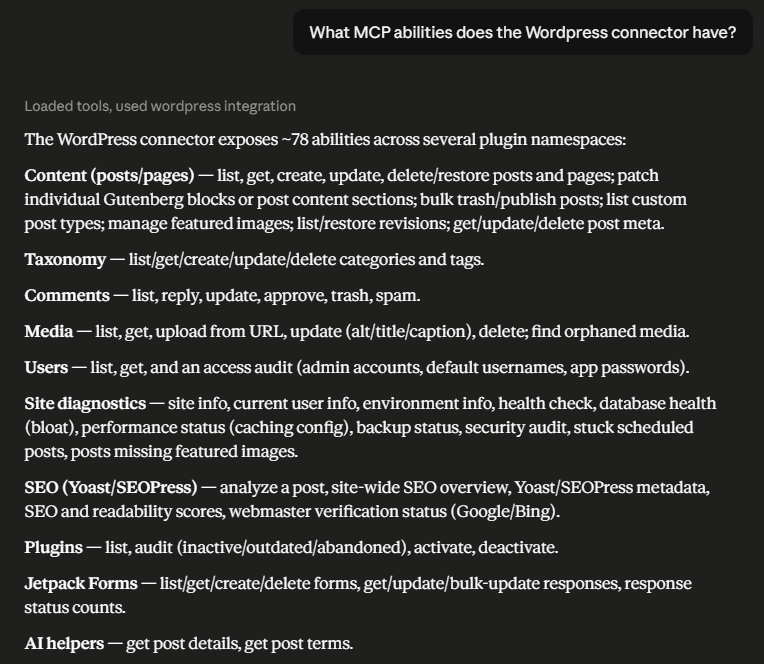
Webmastery Site Toolkit for MCP adds 70+ permission-aware abilities across 16 areas that AI agents and MCP clients can call through the official MCP Adapter plugin. It works with popular MCP clients including Claude, ChatGPT, GitHub Copilot, and Gemini.
The MCP Adapter provides the transport layer. This plugin provides the site-management vocabulary: posts, pages, media, comments, taxonomy, custom post types, post meta, content hygiene, SEO checks, public webmaster verification, site info, health, security, users, plugins, database, performance, and backup status.
Core editorial workflows work well with a dedicated Editor service account. Sensitive workflows such as plugin management, user auditing, site health, database health, backup status, performance status, and security audits require a separate Administrator service account.
Highlights:
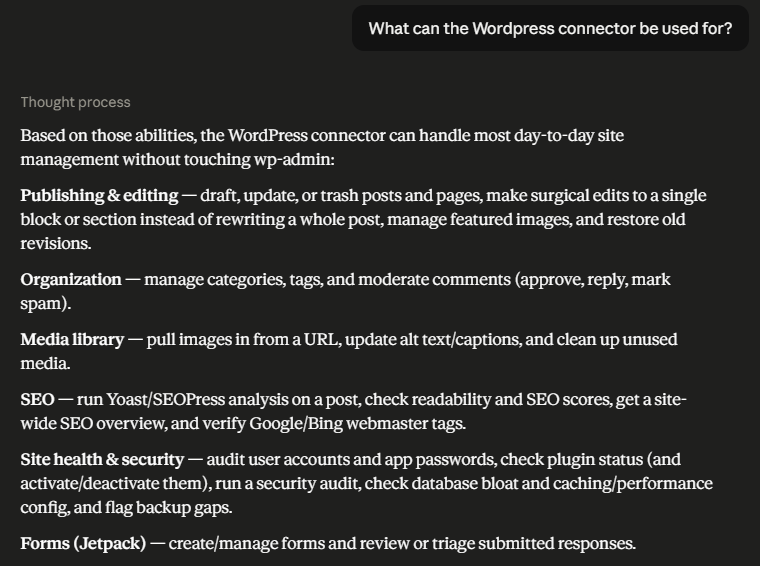
- Create, update, list, restore, trash, bulk publish, and bulk trash posts and pages.
- Inspect Gutenberg blocks and patch one targeted block or content section in posts, pages, and eligible custom post types instead of rewriting the full content.
- Manage categories, tags, comments, media metadata, featured images, and public image URL uploads.
- Discover eligible public custom post types and use generated CRUD abilities for each one.
- Read, update, and delete safe post meta, including supported Yoast SEO and SEOPress metadata fields.
- Run content hygiene checks for orphaned media, missing featured images, and stuck scheduled posts.
- Inspect safe site and current-user context, with runtime environment details reserved for Administrator accounts.
- Audit plugins, administrator accounts, backups, performance settings, database bloat, site health, and security posture.
- Analyze SEO metadata and public Google/Bing webmaster verification proof.
All abilities enforce WordPress capability checks. If the connected account cannot perform the equivalent WordPress action, the ability fails instead of bypassing WordPress permissions. List abilities for posts, pages, custom post types, media, and SEO scores also filter each returned object before exposing full details, so private, trashed, draft, pending, and scheduled content follows WordPress object/status permissions.
For full setup instructions, ability tables, and the deeper security model, visit:
https://www.virtuallyboring.com/webmastery-site-toolkit-for-mcp/
Screenshots
Installation
- Install and activate the MCP Adapter plugin first.
- Install Webmastery Site Toolkit for MCP from Plugins > Add New by searching for the plugin name, or upload the plugin zip from Plugins > Add New > Upload Plugin.
- Activate Webmastery Site Toolkit for MCP from the WordPress Plugins screen.
- Create a dedicated WordPress user for your MCP client. Use Editor for day-to-day content work.
- Create an application password for that user from the WordPress user profile screen.
- Configure your MCP client with the site endpoint, username, and application password.
- Ask your MCP client to call
mcp-adapter-discover-abilitiesand confirm thewebmastery-site-toolkit-for-mcp/*abilities appear.
FAQ
-
Which AI clients and MCP hosts work with this?
-
Any MCP client that can reach your site through the MCP Adapter works. This includes Claude (Desktop and Code), ChatGPT, GitHub Copilot, Gemini CLI, Windsurf, and Codex. Most local clients connect through the
@automattic/mcp-wordpress-remotebridge. -
Does this work without the MCP Adapter plugin?
-
No. This plugin extends the MCP Adapter plugin and depends on it for MCP transport and ability registration.
-
Does this work on WordPress.com?
-
It requires a WordPress site where custom plugins can be installed. Self-hosted WordPress and managed hosts that allow custom plugins should work. WordPress.com Free, Personal, and Premium plans do not allow custom plugin installation.
-
Which WordPress role should my agent use?
-
Use a dedicated Editor account for normal content workflows: posts, pages, taxonomy, comments, media, revisions, content blocks, and content hygiene.
Use a separate dedicated Administrator account only when you need Administrator-only workflows such as runtime environment details, plugin management, user access audits, site health, database health, performance status, backup status, security audits, or site-wide SEO overview.
-
Why use a dedicated account?
-
A dedicated account limits the agent to the role you choose, makes activity easier to attribute, and lets you revoke access by deleting the application password or user.
-
Do I need Yoast SEO or SEOPress?
-
No. Structural SEO checks still work without either plugin. Yoast-specific metadata and score abilities require Yoast SEO. SEOPress-specific metadata inspection and writes require SEOPress.
-
Are write operations safe?
-
Write operations go through WordPress APIs and capability checks. Posts and pages move to trash rather than being permanently deleted. Media deletion is permanent. Block and partial-content patching can use hashes so stale or ambiguous edits fail safely.
Publishing, scheduling, or marking content private requires the relevant WordPress publish capability. User login/email fields and author login names are not exposed to lower-privilege list responses.
-
What if discovery shows fewer abilities than the documentation?
-
The connected WordPress site may be running an older plugin version. Update the plugin on that site, then call
mcp-adapter-discover-abilitiesagain. -
Where is the full documentation?
-
The complete ability reference and client setup guide are maintained at:
https://www.virtuallyboring.com/webmastery-site-toolkit-for-mcp/
Reviews
There are no reviews for this plugin.
Contributors & Developers
“Webmastery Site Toolkit for MCP” is open source software. The following people have contributed to this plugin.
Contributors
Translate “Webmastery Site Toolkit for MCP” into your language.
Interested in development?
Browse the code, check out the SVN repository, or subscribe to the development log by RSS.
Changelog
2.5.0
- Expand targeted content patching to pages and public editor-enabled custom post types with object-level permissions and explicit unsupported-type errors.
- Refresh the WordPress.org listing to lead with the 70+ permission-aware abilities across 16 areas and supported MCP clients.
- Add an FAQ entry covering compatible AI clients and MCP hosts.
- Update the WordPress.org tags to better describe MCP-powered content automation.
2.4.1
- Harden permission callbacks and per-object filtering for posts, pages, custom post types, media, SEO score lists, plugin activation/deactivation, and runtime environment details.
- Remove plugin auto-update status from plugin responses to avoid Plugin Check updater-detection warnings.
- Require publish capabilities for private/scheduled/published status changes and bulk publishing.
- Reduce sensitive identity and fingerprinting fields in low-privilege responses.
2.4.0
- Add expanded Yoast SEO free metadata coverage for canonical URLs, breadcrumb titles, Schema.org page/article types, Open Graph and Twitter metadata, primary category, robots directives, inclusive-language score inspection, generated Yoast head inspection, and deeper sitemap index diagnostics.
- Add first-class SEOPress free metadata coverage for titles, descriptions, target keywords, canonical URLs, Open Graph and Twitter/X metadata, primary category, robots directives, breadcrumb titles, read-only metadata inspection, and SEOPress-specific site overview diagnostics.
2.3.0
- Add public image URL uploads with URL safety checks, image MIME and upload-size enforcement, optional metadata, and optional featured-image assignment.
- Add public Google/Bing webmaster verification checks without Google or Bing API credentials.
- Add Administrator-only user access, plugin, database, performance, and backup audits.
- Add content hygiene diagnostics for orphaned media, posts/pages missing featured images, and stuck scheduled posts.
- Add bulk post trash and bulk draft-publish abilities with per-ID summaries.
- Add eligible custom post type discovery and generated CRUD abilities.
- Add safe site, current-user, and environment introspection abilities.
- Add post meta read, update, and delete abilities with object-level permissions and protected-key safeguards.
- Add revision listing and restore abilities for posts and pages.
- Add category and tag get/update abilities.
- Add comment reply and update abilities.
- Add human-readable author fields to post and page responses.
2.2.0
- Add Yoast SEO score and readability score abilities.
- Persist supported Yoast SEO protected meta keys from post and page create/update abilities.
2.1.0
- Add block inspection, single-block replacement, and safer partial post body edits.