

Description
Not every order ships in one go. Items can be out of stock or on backorder, come from different suppliers or simply need more than one parcel. Partial Shipment for WooCommerce lets you record exactly what has shipped for each order item, keeps the order status up to date and shows your customers what is on its way and what is still to come.
Why use Partial Shipment for WooCommerce?
- Always know what is left to ship – shipped and remaining quantities of every item, right on the order screen.
- Fewer “where is the rest of my order?” emails – customers see a shipment badge next to each item on their order page.
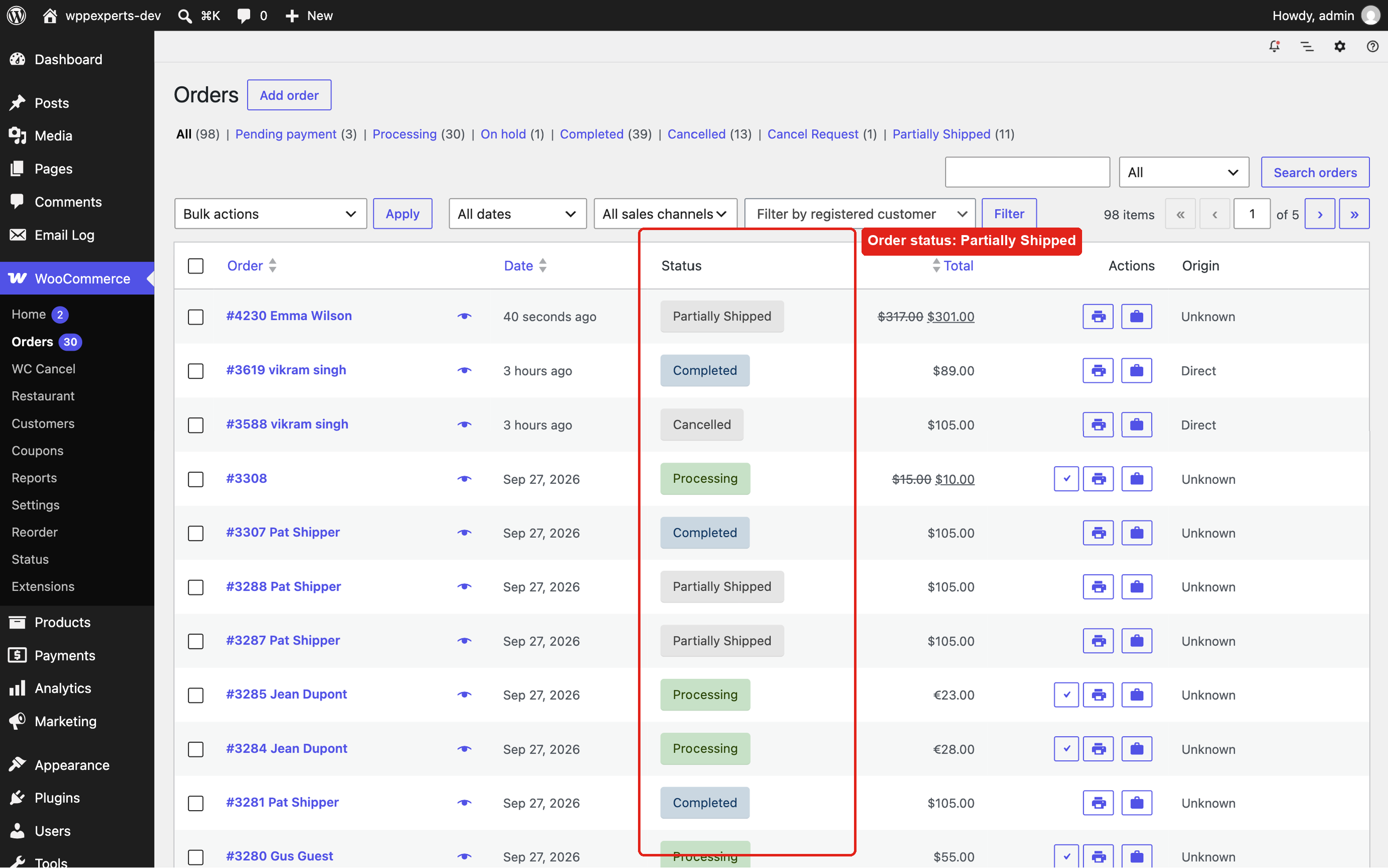
- The order status follows the shipment – Partially Shipped while items are still to ship, Completed when everything has gone (both optional).
- Refunds are taken into account – refunded quantities no longer count as “to ship”, so orders still complete correctly.
How it works
- Open an order and click Shipment under the order items.
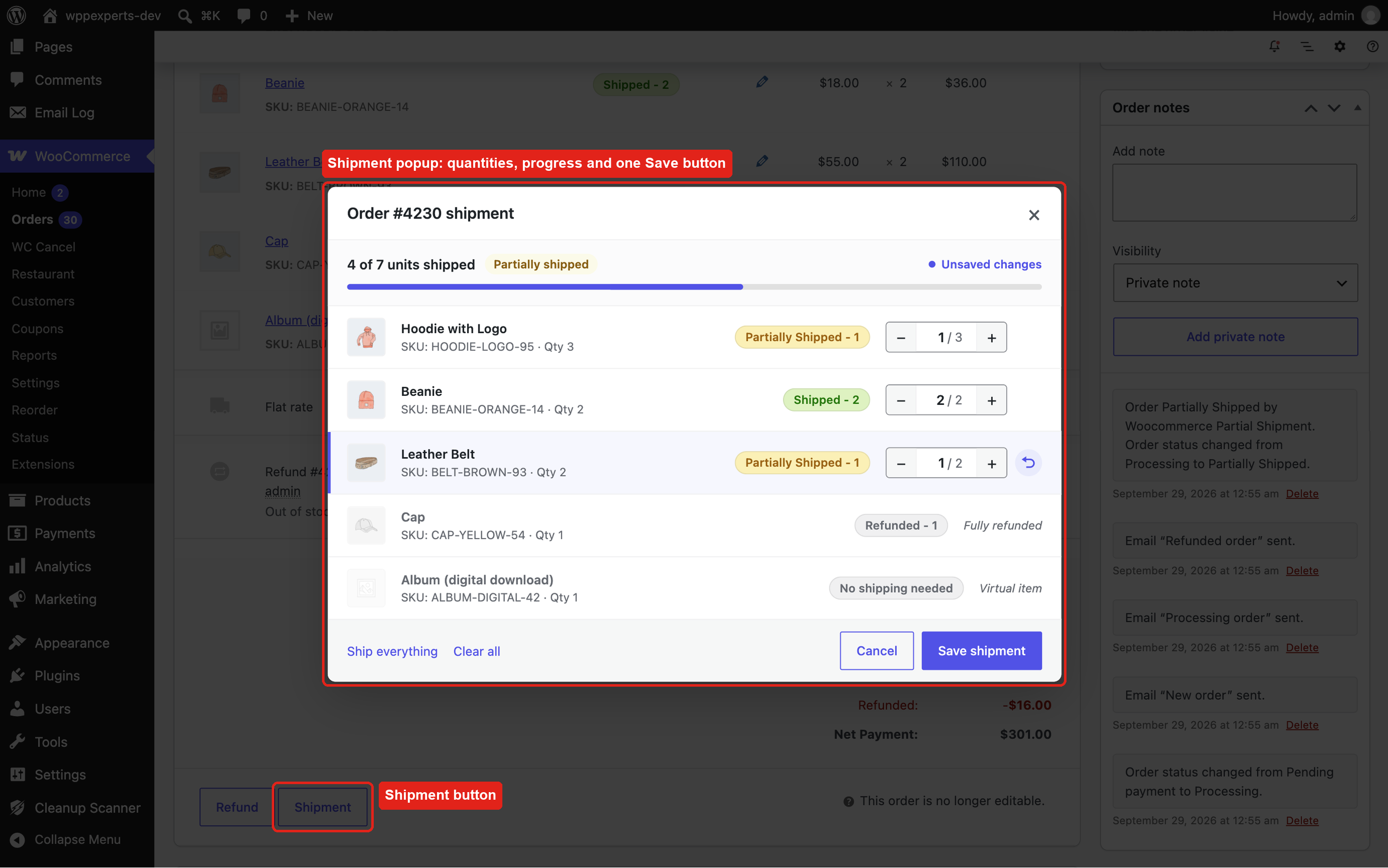
- Set the shipped quantity of each item, or click “Ship everything”, and save.
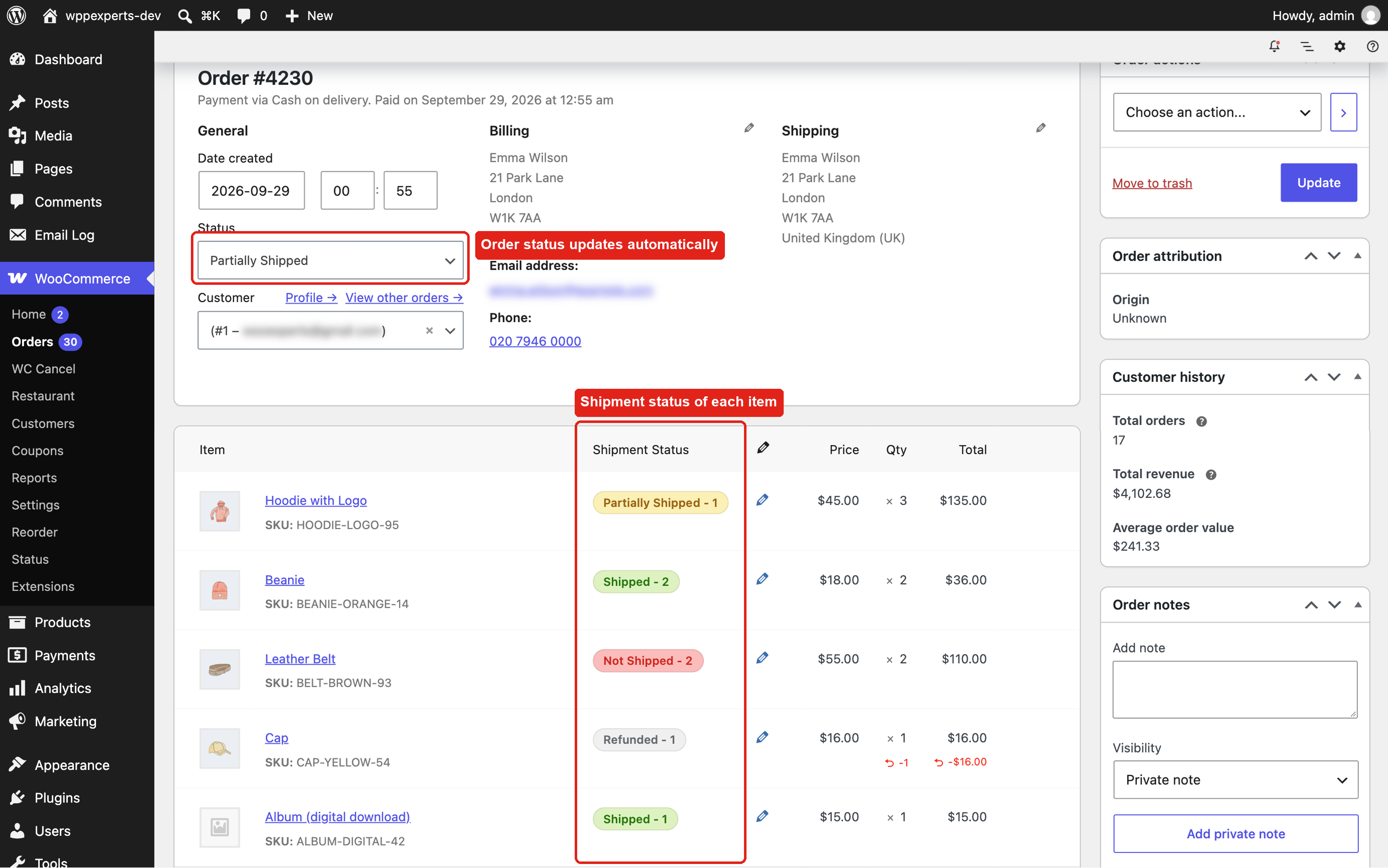
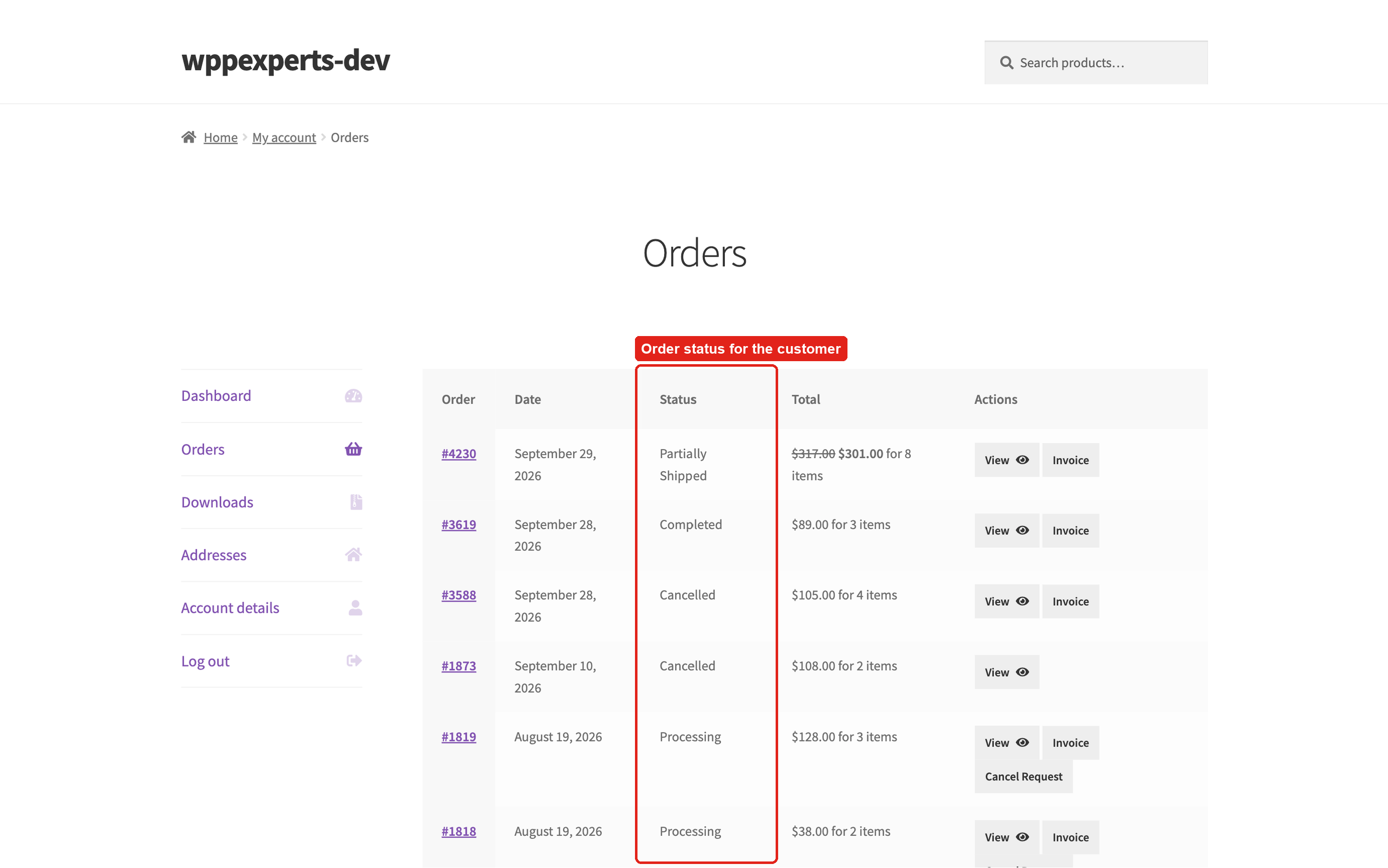
- The order status follows the shipment: Partially Shipped while items are still to ship, Completed once everything has shipped.
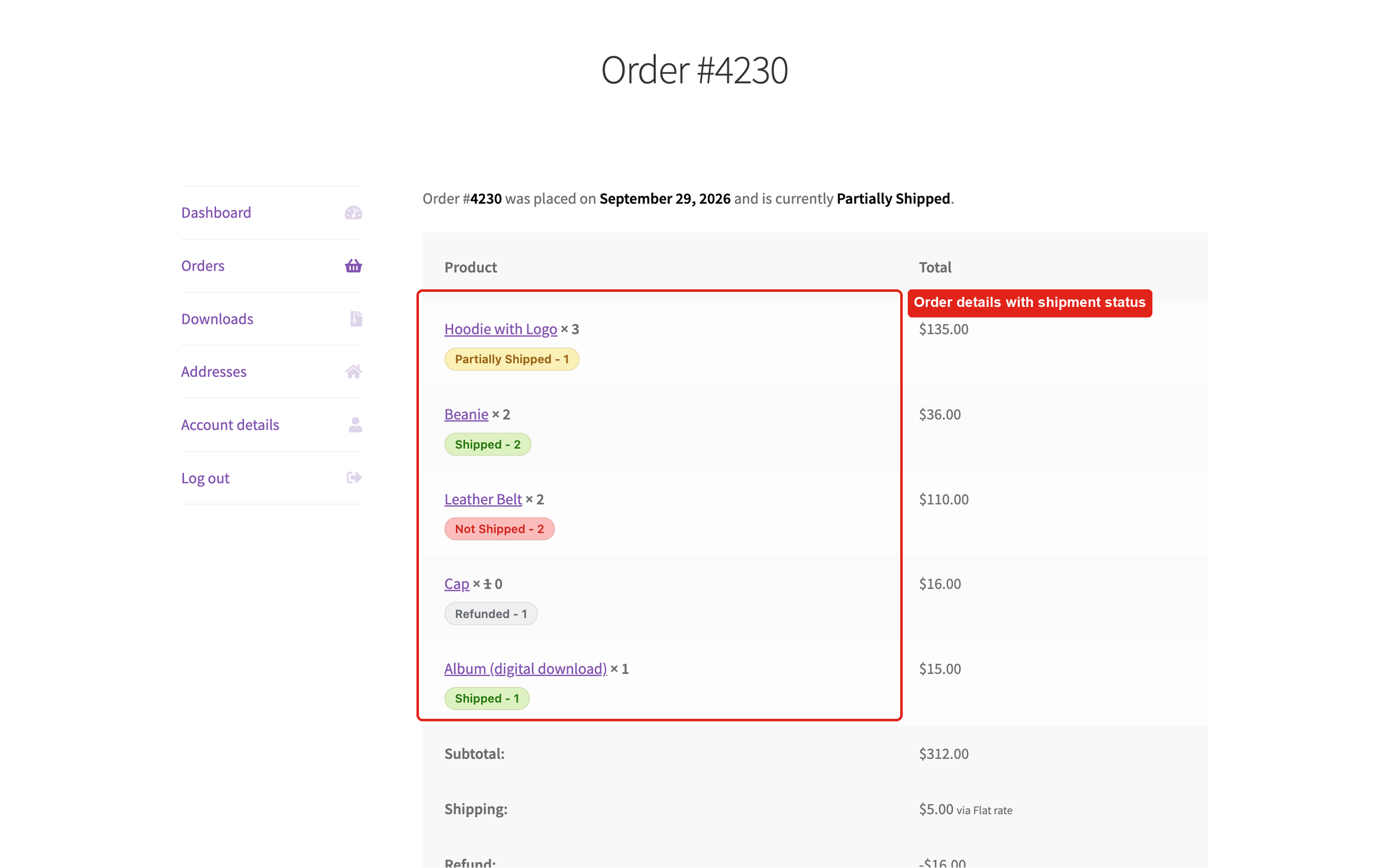
- Each item gets a shipment badge on the order screen and on the customer’s order page, and you can email the customer from the order actions.
Features
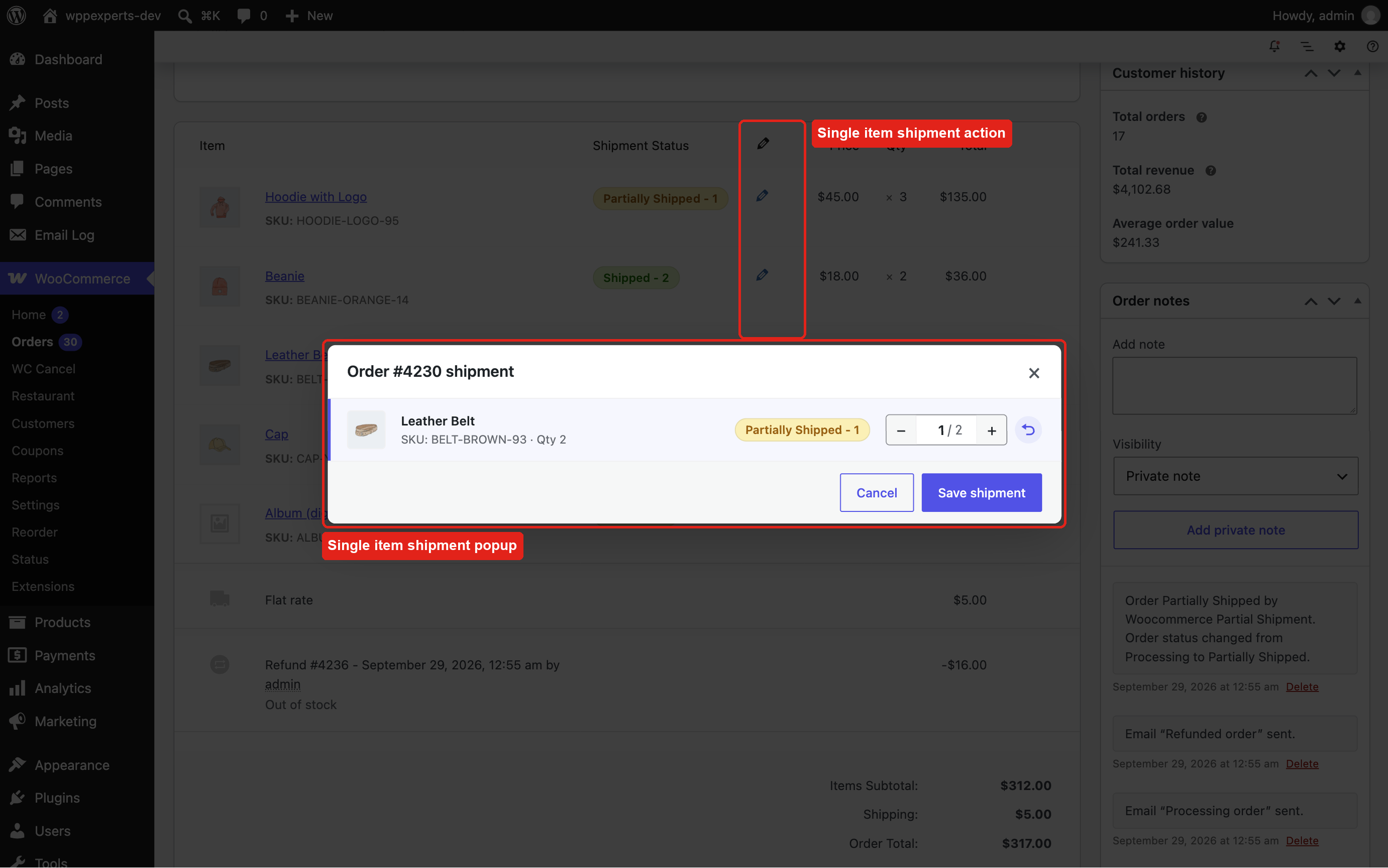
- Shipment popup on the order screen – quantity stepper per item, progress summary, product image and SKU, “Ship everything” and “Clear all”, and one Save button. The pencil icon of an item opens the same popup for that item only.
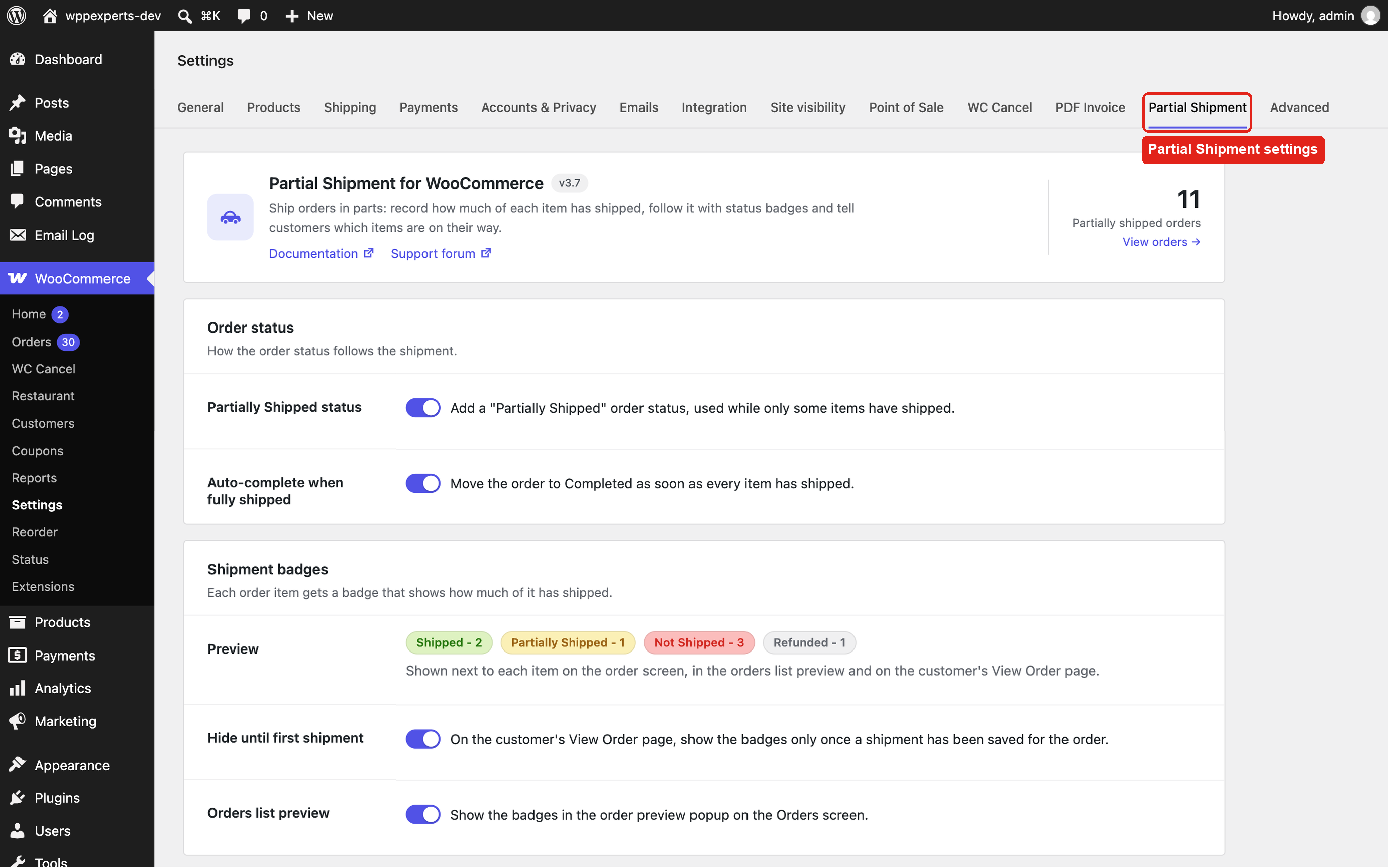
- “Partially Shipped” order status (optional) and automatic completion when every item has shipped (optional).
- Shipment badges – Shipped, Partially Shipped, Not Shipped and Refunded, with quantities, on the order screen, in the order preview on the Orders list and on the customer’s View Order page.
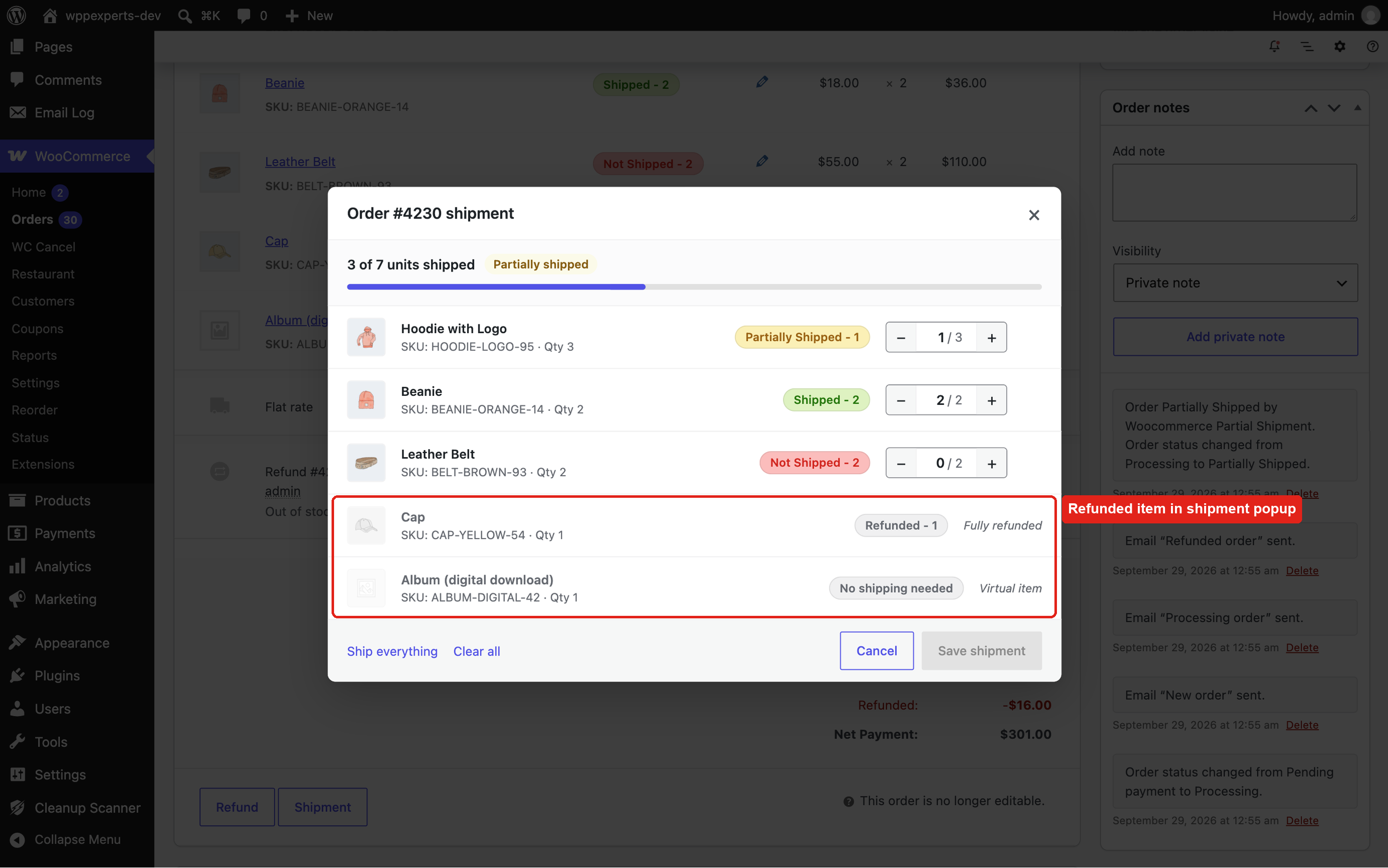
- Refund-aware – refunded quantities no longer count as “to ship”, fully refunded items show “Refunded”, and virtual items need no shipping.
- Customer email – send the “Partial shipment order” email, with the shipped and remaining items, from Order actions > Partial shipment notification. Edit it under WooCommerce > Settings > Emails.
- Existing orders – one click creates shipment records for older orders of the statuses you choose. Large stores are processed in the background in batches.
- Manual completion – completing an order by hand marks all of its items as shipped.
- Works with High-Performance Order Storage (HPOS), the Cart and Checkout blocks and multisite. Translation ready.
Privacy
Shipment records (order, items and shipped quantities) are stored in two tables in your own WordPress database. The plugin adds no tracking, sets no cookies and sends no data to external services.
⭐ Premium: Advance Partial Shipment for WooCommerce
Give customers tracking for every parcel. The premium version adds tracking numbers, shipment emails and a tracking page, so customers always know where each part of their order is.
- ✅ Multiple shipments per order – each with its own tracking number, tracking URL and shipping provider.
- ✅ Shipping providers – built-in carriers for each country, plus your own providers and tracking URLs.
- ✅ Shipment statuses – Ready, Picked, Dispatched and Delivered, with the delivery date recorded.
- ✅ Automatic shipment emails with tracking details, sent when a shipment is created or when it is marked as Picked.
- ✅ Estimated delivery date, customer notes and internal notes for each shipment.
- ✅ Customer tracking – a shipment timeline on the customer’s order page and a public tracking page (shortcode).
- ✅ Packing slips and delivery notes for each shipment (with the free PDF Invoice for WooCommerce plugin).
- ✅ REST API and webhooks to connect your warehouse or other systems.
- ✅ Fulfillment Report with CSV export.
- ✅ Bulk shipments and backfill of existing orders.
- ✅ Data retention – old shipment data can be removed automatically.
- ✅ Dedicated support from the plugin developers.
👉 Get Advance Partial Shipment for WooCommerce
For developers
wxp_partial_shipment_labelsfilter – the badge labels.wxp_partial_shipping_settingsfilter – the settings fields.wxp_backfill_batch_sizefilter – orders per background batch when creating records for existing orders (default 50).wxp_order_statusaction – fires when the shipment of an order changes ($order_id); the plugin updates the order status on it.- Email template override: copy
emails/customer-partial-shipment.phptoyourtheme/woocommerce/emails/customer-partial-shipment.php.
Screenshots
Installation
- Go to Plugins > Add New Plugin, search for “Partial Shipment for WooCommerce”, then install and activate it. WooCommerce must be active.
- Go to WooCommerce > Settings > Partial Shipment to choose the order status options and where the badges are shown, and to create shipment records for your existing orders.
- Open an order and click Shipment under the order items to record what has shipped.
FAQ
-
Can I add tracking numbers?
-
Not in the free version. Tracking numbers, tracking URLs and shipping providers are part of Advance Partial Shipment for WooCommerce.
-
Is the customer emailed automatically?
-
No. Send the email when you want from the order screen: Order actions > Partial shipment notification. It lists the shipped items and the items still to come.
-
What happens with refunded and virtual items?
-
Refunded quantities are taken off the quantity to ship, and fully refunded items show a “Refunded” badge. Virtual items need no shipping, so an order is complete once all physical items have shipped.
-
What about orders placed before I installed the plugin?
-
Go to WooCommerce > Settings > Partial Shipment, choose the order statuses under “Backfill existing orders” and run it. All items of those orders are marked as shipped; orders that already have shipment records are skipped.
-
Can I use it together with Advance Partial Shipment for WooCommerce?
-
The premium plugin replaces this one and uses the same shipment data. When the premium plugin is active this plugin stays idle and is deactivated automatically; your existing shipment records are kept and shown by the premium plugin. If you switch back, the totals of all premium parcels are shown and edited here.
-
Where can I get support or talk to other users?
-
Please open a topic in the support forum.
-
Email support@wpexpertshub.com or use the contact form. Please do not post premium questions on the WordPress.org forum.
Reviews


Contributors & Developers
“Partial Shipment for WooCommerce” is open source software. The following people have contributed to this plugin.
Contributors

“Partial Shipment for WooCommerce” has been translated into 7 locales. Thank you to the translators for their contributions.
Translate “Partial Shipment for WooCommerce” into your language.
Interested in development?
Browse the code, check out the SVN repository, or subscribe to the development log by RSS.
Changelog
3.7 – 2026-09-29
- Fix – The “partially shipped” customer email showed a raw, unrendered HTML table (product name, qty, price) instead of a formatted items table, because the items table markup was escaped as text. Both the HTML and plain-text templates now output it correctly.
- Fix – Plain-text email showed raw HTML price markup and could fatal when a product had been deleted.
- Fix – Plain-text email left out the email’s “Additional content” setting and printed a raw
tag in the footer. - Fix – The “Partial shipment notification” order action added a “manually sent” note even when the email was disabled or the order had no billing email; the note now reflects whether the email was really sent.
- Fix – Orders containing a virtual/downloadable item never switched to Completed automatically when every physical item was shipped (the virtual quantity was counted as shipped but not as shippable).
- Fix – A refund issued after shipping could leave the shipped total above the remaining quantity, so the order never auto-completed. Shipped quantities are now capped per item, and refunding the last unshipped units of a “Partially Shipped” order now completes it.
- Fix – Clicking Update in the Shipment popup with nothing shipped moved a Pending payment or On hold order to Processing (sending the “Processing order” email), and could also bring back a Cancelled, Refunded or Failed order. The status now only goes back to Processing from Partially Shipped or Completed, and cancelled, refunded or failed orders are never changed.
- Fix – “Partially Shipped” orders were not treated as paid: customers could not download their downloadable products while an order was partially shipped, and these orders were left out of the customer’s total spent and “verified owner” review checks.
- Fix – Line items whose product was deleted after the order was placed always showed “Not Shipped” and were ignored when working out the order status.
- Fix – The shipment AJAX handlers accepted item IDs belonging to other orders (and shipping lines); only product lines of the order being edited are saved now.
- Fix – Two simultaneous requests for the same order (e.g. two admins updating the shipment at once, or the order-completed hook firing twice) could create duplicate shipment rows. Shipment-row creation now re-uses the row a concurrent request just created, and new installs enforce one row per order with a unique key.
- Fix – Running together with Advance Partial Shipment for WooCommerce: the premium plugin was detected by an outdated folder name, so both plugins could load at once (duplicate settings, hooks and database errors). This plugin now stays idle while the premium plugin is active.
- Fix – After downgrading from the premium plugin, only the first parcel of an order was counted and new shipment rows failed to save (the premium plugin removes the legacy
shipment_primary_idcolumn). Totals are now summed over all parcels and edits keep working. - Fix – On multisite, the plugin did not load when WooCommerce was activated per site instead of network-wide.
- Tweak – Redesigned Shipment popup on the order screen: a progress summary with the resulting order status, product thumbnails, SKU and refunded quantities, live status badges, a quantity stepper per item, “Ship everything” / “Clear all” shortcuts and a single “Save shipment” button (replaces the tick-rows + Bulk Actions + Update steps). Changed rows are highlighted with a one-click undo, virtual and fully refunded items are shown as not needing shipping, a failed save keeps the popup open with your changes, and Enter saves. Works on small screens and with the keyboard.
- Tweak – Redesigned settings page: a header with the number of Partially Shipped orders, settings grouped into cards (Order status, Shipment badges, Notification email, Backfill), on/off switches, a live preview of the status badges, the notification email’s state with a link to its settings, and the backfill run state (running, last run). Works on small screens and follows the admin colour scheme. Option names are unchanged.
- Tweak – Backfill now runs in batches of 50 orders: the first batch runs straight away and the rest continue in the background with Action Scheduler, so large stores no longer time out. Progress is shown on the settings page, and clicking the button again during a run does not start a second one.
- Tweak – The Shipment popup no longer stays stuck behind a loading overlay when a request fails (for example after the page was left open overnight); requests are now asynchronous and show a message instead.
- Tweak – Escaped product names before inserting them into the admin Shipment popup, hardening against a stored-XSS edge case if an order item name contains HTML.
- Tweak – Added a database index on
partial_shipment_items.shipment_id, used by every shipment lookup, to keep queries fast on stores with a large order history. Existing installs get it automatically through a version-checked upgrade routine (previously schema changes only applied on a fresh activation). - Tweak – Front-end stylesheet is only loaded on My Account pages; clearer default email subject; “Status” column heading and purchase-note colspan fixed in the HTML email; email template headers now name the correct theme override paths.
- Tweak – Removed an unused localized nonce field left over from a previous refactor.
- Tweak – Only declares the WooCommerce features it supports (HPOS, Cart & Checkout blocks, product editor). Tested with WordPress 7.1 and WooCommerce 11.1.
3.6 – 2026-08-14
- New – Refund-aware shipment quantities and labels: shipped/available counts use the net (post-refund) quantity, fully-refunded items show a “Refunded” label instead of “Not Shipped: 0”, and the admin/order “Not Shipped” count now reflects the quantity still to ship.
- New – Backfill tool: create shipment records (items marked as shipped) for existing orders of one or more selected statuses (defaults to Completed). Refund-aware and skips orders that already have records.
- New – The backfill status selector uses WooCommerce’s native (selectWoo) multi-select styling.
- Tweak – Regenerated languages/wc-partial-shipment.pot; the “wc-partial-shipment” text domain is declared in the plugin header, so WordPress.org serves translations automatically.
- Tweak – Replaced the jQuery fancybox modal with a dependency-free native (vanilla JS + theme-proof CSS).
- Fix – “Unset Shipped” bulk/single action now correctly resets the item quantity to 0.
- Tweak – Improved status badge styling (pill badges, responsive width, box-sizing/font normalization).
- Tweak – Code cleanup: WpHub_Partial_Shipment_Sql renamed to Wxp_Partial_Shipment_Sql, current_time() fix, removed duplicate trunk/ and dead lang/ directories.
3.5 – 03/06/2026
- Update – security enhancements.
3.4 – 20/09/2025
- Update – Compatibility checked.
3.3 – 21/06/2025
- Fix – Escaped MySQL queries for improved security.
- Fix – Sanitized POST variables properly.
- Tweak – Compatibility check and Tested with latest version WC 9.9
3.2 – 06/09/2024
- Fix – Mark all ordered items as shipped when the order status changes to Completed.
3.1 – 26/08/2024
- Update – updated to WooCommerce HPOS compatibility.
3.0 – 23/08/2023
- Tweak – Compatibility checked.
2.9 – 29/07/2022
- Tweak – Compatibility checked.
2.8 – 22/05/2022
- Tweak – minor tweaks.
2.7 – 06/01/2022
- Fix – Virtual product error is fixed.
- Fix – Translation string fixed and added in pot file.
2.6 – 18/02/2021
- Tweak – Check if product or order item is null.
2.5 – 18/02/2021
- Fix – Fixed error during plugin activation.
2.4 – 13/02/2021
- Fix – Partially Shipping popup filled with max quantity ordered.
- Fix – Partially Shipping labels hidden for virtual products ordered.
- Fix – Filter to change the shipped label.
- Tweak – compatibility checked with latest version of wc/wp.
2.3 – 31/08/2020
- Fix – Quantity update issue fixed during manually order item editing.
- Fix – Item status fixed during manually order item editing.
- Tweak – compatibility issue fixed.
2.2 – 06/06/2020
- Fix – Extra product options and custom product field options compatibility issue fixed.
- Tweak – minor tweaks.
2.1 – 19/05/2020
- Fix – compatibility issue fixed for ordered item check.
- Tweak – Improved stored data.
2.0 – 13/05/2020
- Fix – compatibility issue fixed for latest WooCommerce version and php 7.0 and above.
- Fix – Auto Switch order status based on shipment.
- Tweak – Auto Ship all products when order marked as completed.
- Tweak – Setting option to hide label on my order page until items are shipped.
1.9 – 21/11/2019
- Feature – Multilingual ready / Translation ready.
- Fix – Order status changed to completed If all the items are marked as shipped.
- Tweak – Tweaks and tested up to latest version.
1.8 – 03/10/2019
- Fix – Tweaks and tested up to latest requirement.
1.7 – 05/03/2019
- Fix – Email Templates overriding fixed from theme.
1.6 – 01/12/2018
- Feature – Partial Shipment Email action added on order edit screen so store manager can trigger manual email when order is shipped.
- Feature – Status column added in order list popup.
- Feature – Popup settings added in partial shipment setting tab.
1.5 – 22/11/2018
- Feature – Setting added to hide status label just after order generated.
1.4 – 30/08/2018
- Bug Fix.
1.3 – 30/08/2018
- Bug Fix.
1.2 – 25/08/2018
- Bug Fix.
- UI Update
1.1 – 25/07/2018
- Bug Fix.
1.0 – 02/05/2018
- Initial release.