

Description
Watrix Drag Drop Reorder is an all-in-one reordering plugin for the WordPress admin. Drag and drop rows right on the list screens you already use — no separate ordering screen.
Features:
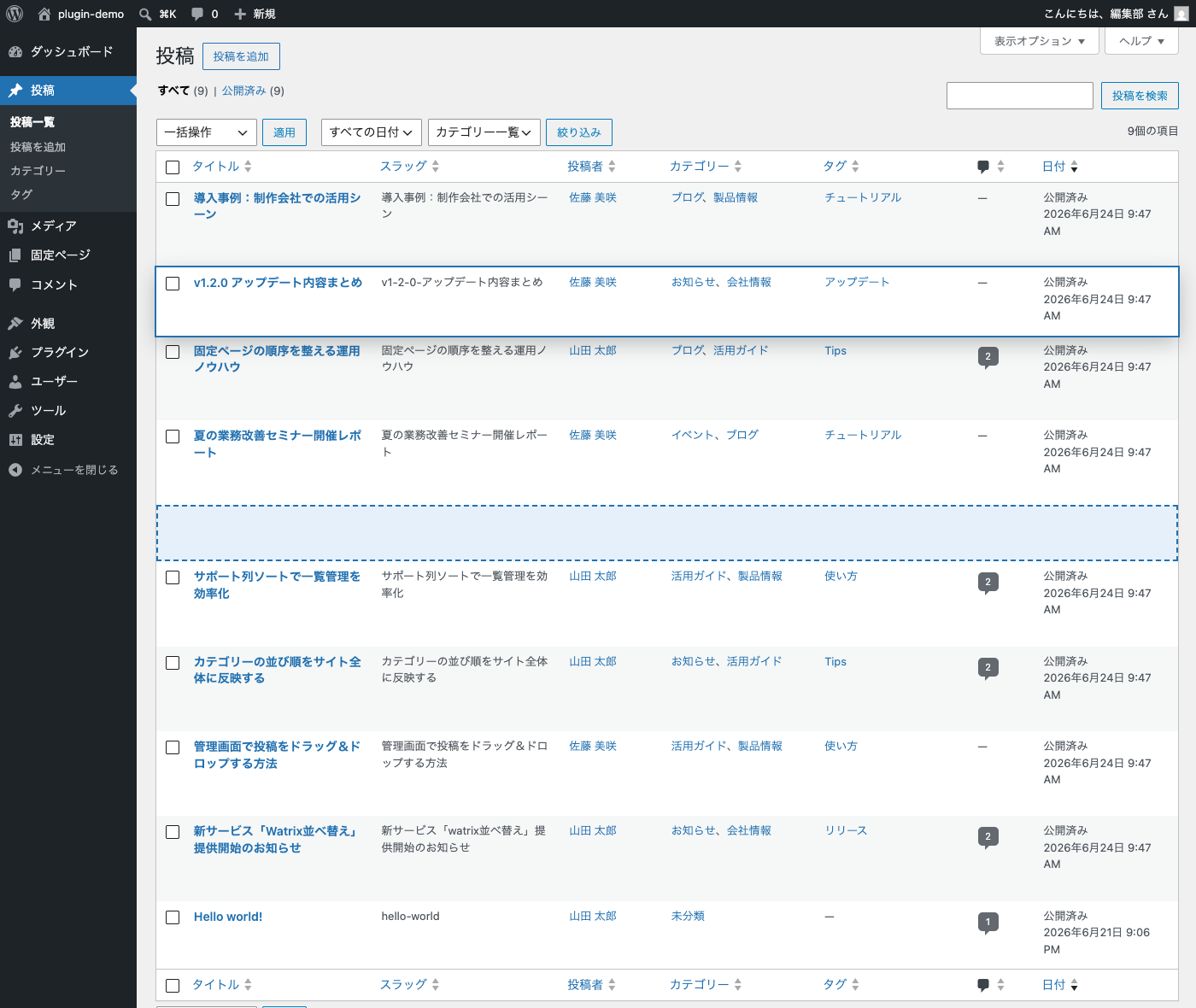
- Post order — drag and drop rows on the Posts list. The order is stored in the core
menu_orderfield and applied to the admin list (and optionally to the front end). - Page order — drag and drop rows on the Pages list, within the same parent. Fully compatible with the core “Order” attribute and Quick Edit values.
- Custom post type order — drag and drop rows on the list screens of your custom post types. Every post type registered with an admin UI is supported out of the box; hierarchical post types behave like pages (within the same parent).
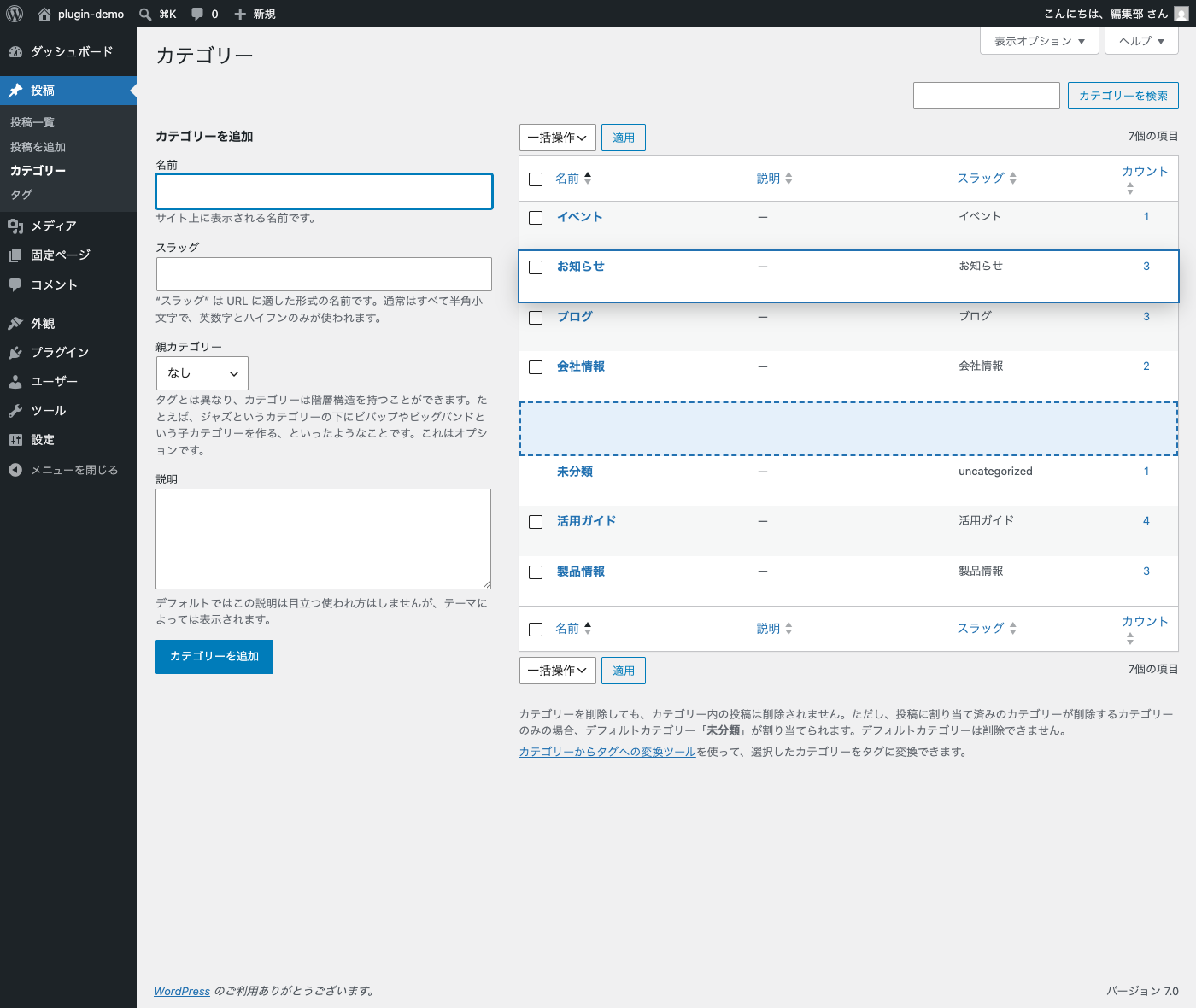
- Category & tag order — drag and drop rows on the Categories and Tags lists. The order is stored in term meta and applied to
get_terms()/wp_list_categories()when no explicit order is requested. - Sortable columns — click the Author, Categories, Tags and Comments column headers on the Posts list (and Author on the Pages list) to sort.
- Slug column — show a Slug column on the post list screens of sortable post types. Click the header to sort by slug.
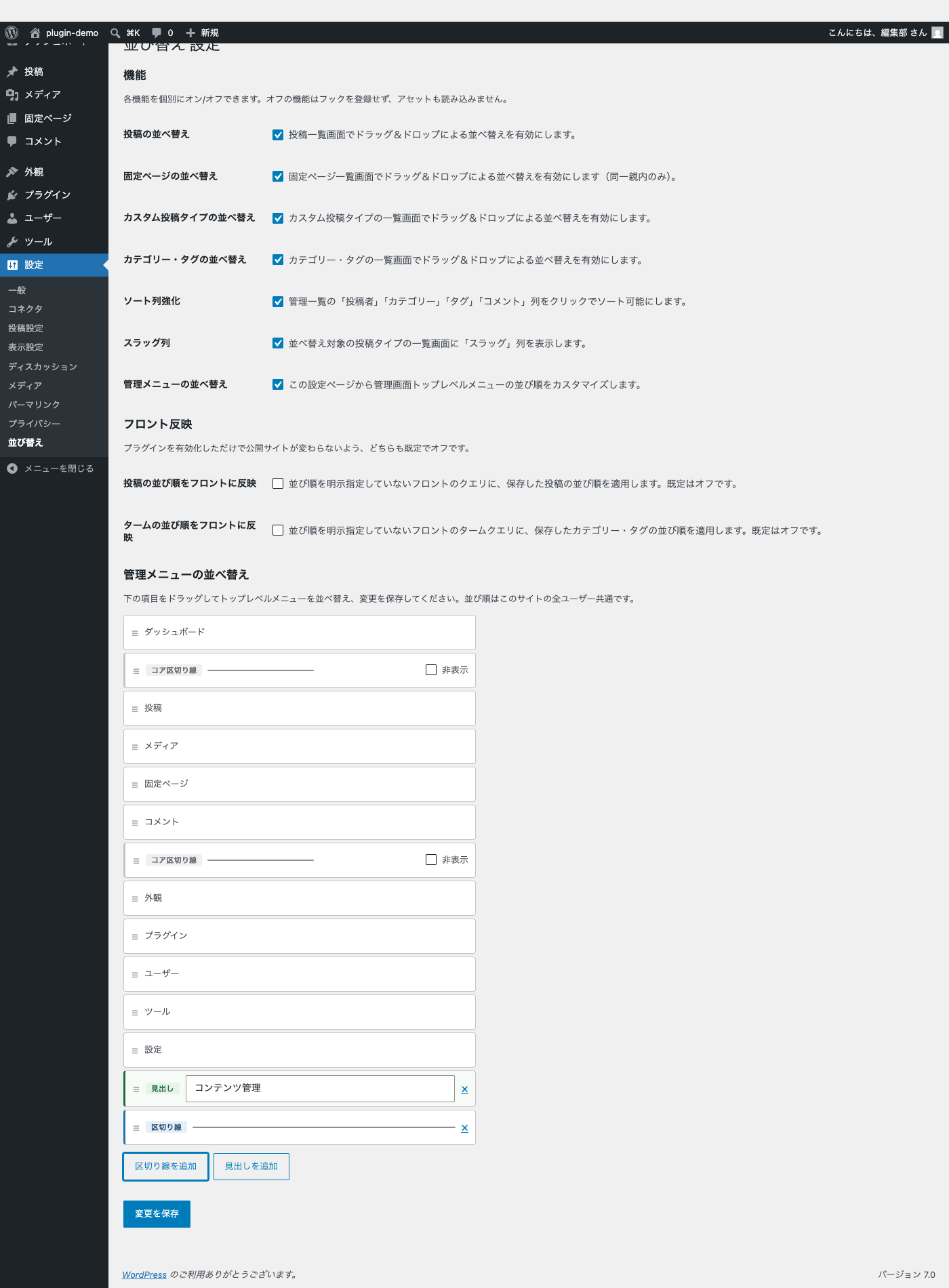
- Admin menu order — reorder the top-level admin menu from the settings page. Add, remove and label separators; hide and restore core separators.
- Each feature can be enabled or disabled individually. Disabled features register no hooks and load no assets.
- Front-end ordering is off by default, so activating the plugin never changes your public site. Opt in from Settings > Sort Order.
- Developer filters:
wddr_sortable_post_types,wddr_sortable_taxonomies,wddr_apply_front_order,wddr_apply_term_order. - Uses only the bundled jQuery UI Sortable — no external scripts, no build step.
日本語補足:
- 投稿・固定ページ・カスタム投稿タイプ・カテゴリー・タグの一覧画面で、行をそのままドラッグ&ドロップして並べ替えられます。
- 管理画面に一覧を持つカスタム投稿タイプは追加設定なしで対象になります(階層型は固定ページと同じく同一親内のみ)。
- 投稿の並び順はコアの
menu_order、ターム(カテゴリー・タグ)の並び順は term meta_wddr_term_orderに保存します。 - 固定ページは同一親内の兄弟間のみ並べ替えできます(親子関係は変更しません)。
- 投稿一覧の「投稿者」「カテゴリー」「タグ」「コメント」列、固定ページ一覧の「投稿者」列がクリックでソート可能になります。
- 並べ替え対象の投稿タイプの一覧画面に「スラッグ」列を表示できます(クリックでスラッグ順にソート)。
- 管理画面左サイドバーのトップレベルメニューを設定ページから並べ替えられます(サイト全体共通)。
- フロント(公開側)への並び順反映は既定でオフです。設定 > 並び替え からオプトインしてください。
- 7つの機能はそれぞれ個別にオン/オフできます。
Screenshots
Installation
- Upload the plugin to
wp-content/plugins/or install it from Plugins > Add New, then activate it. - Open the Posts, Pages, Categories or Tags list and drag rows to reorder them. The new order is saved automatically.
- Open Settings > Sort Order to toggle features, reorder the admin menu, or opt in to front-end ordering.
FAQ
-
Where is the order data stored?
-
Post and page order is stored in the core
menu_ordercolumn of the posts table. Category and tag order is stored in the term meta key_wddr_term_order. The feature toggles, the top-level admin menu order, and the custom and hidden admin menu separators are stored in four options (wddr_settings,wddr_admin_menu_order,wddr_admin_menu_separatorsandwddr_admin_menu_hidden_separators). No database tables are added or altered. -
What happens when I uninstall the plugin?
-
Uninstalling deletes the plugin’s own data: the four options listed above and the
_wddr_term_orderterm meta. Themenu_ordervalues are kept, becausemenu_orderis a core field shared with other features (such as the page “Order” attribute); resetting it could break ordering you set elsewhere. Your content is never touched. -
Why can’t I drag rows?
-
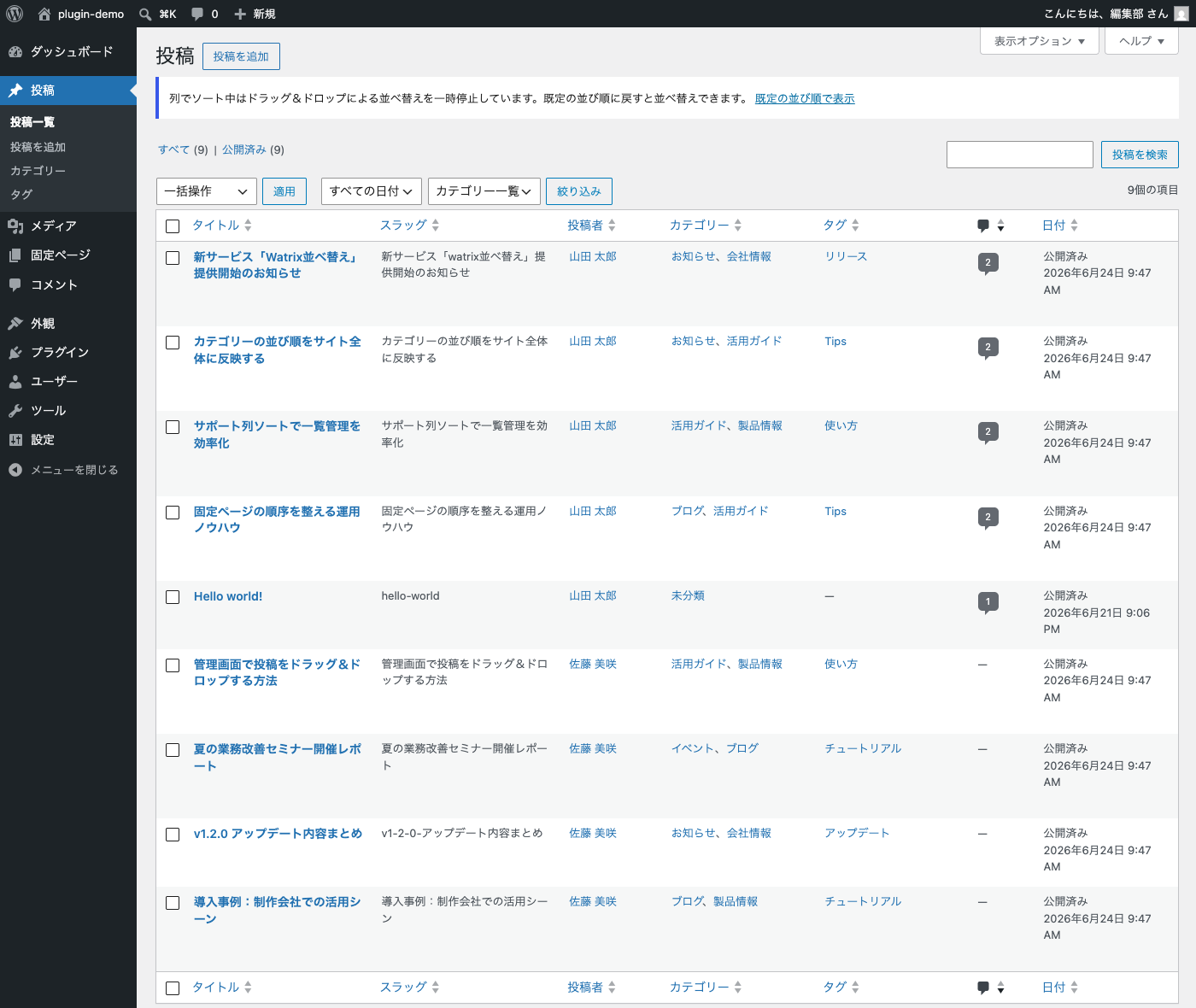
Drag and drop is paused while the list is sorted by a column (for example after clicking the Title, Author or a taxonomy column header, or when you arrive via a link that includes a sort). Reordering a column-sorted list would be ambiguous, so the plugin disables dragging and shows an admin notice instead. Click “Show default order” in the notice (or remove the sort from the column header) to switch back to the saved order — dragging works again immediately. Also make sure the feature for that screen is enabled in Settings > Sort Order.
-
I reordered posts but the front end did not change. Why?
-
Front-end ordering is off by default so that activating the plugin never changes your public site. Enable “Apply post order on front” (and/or “Apply term order on front”) in Settings > Sort Order. Note that sticky posts still appear first — that is standard WordPress behavior.
-
I dragged rows while filtering the list by category. What order was saved?
-
The global order. Watrix Drag Drop Reorder keeps a single order per post type (and per taxonomy); it does not store a separate order per category filter. Reordering a filtered list updates the global positions of the rows you see.
-
Can I use Watrix Drag Drop Reorder together with another ordering plugin?
-
No. Plugins such as Intuitive Custom Post Order, Post Types Order or Category Order write to the same
menu_orderfield and would fight over the result. Deactivate other ordering plugins before using Watrix Drag Drop Reorder. -
The order numbers looked odd right after my first drag on a large site. Is that a problem?
-
No. When existing posts have mixed or duplicate
menu_ordervalues, Watrix Drag Drop Reorder falls back to renumbering the visible page from the smallest value. This can temporarily overlap with neighboring pages, but the list stays stable (date is used as the secondary sort key) and the numbering self-heals the next time you reorder that page. -
Which post types are supported?
-
Posts, pages and every custom post type that has an admin list screen (registered with
show_ui). Custom post types work out of the box — no code needed — and can be turned off with the “Custom post type order” toggle in Settings > Sort Order. Hierarchical post types are reordered within the same parent, like pages. Developers can narrow or extend the list with thewddr_sortable_post_typesfilter. -
Does it work with custom post types and taxonomies?
-
Custom post types are supported out of the box (see the previous answer). Custom taxonomies are available for developers via the
wddr_sortable_taxonomiesfilter; a selection UI is planned for a future version. -
Anything to know for very large sites?
-
Sorting the Categories/Tags columns on the Posts list uses a JOIN with
GROUP_CONCAT, and saving a term order renumbers all terms of that taxonomy. Both are limited to the admin screens and are fine for typical sites (hundreds of terms), but may be slow on sites with many thousands of terms or posts.
Reviews
There are no reviews for this plugin.
Contributors & Developers
“Watrix Drag Drop Reorder” is open source software. The following people have contributed to this plugin.
Contributors
Translate “Watrix Drag Drop Reorder” into your language.
Interested in development?
Browse the code, check out the SVN repository, or subscribe to the development log by RSS.
Changelog
1.2.0
- Admin menu order: separators and headings are now added independently with two separate buttons (“Add separator” and “Add heading”). Up to 10 of each type.
- Headings are shown as a styled section band in the admin sidebar (background band, flush left gutter, vertically centered).
- Redesigned the settings list: each row shows a drag handle, a type badge (separator / heading / core separator) and a clearer separator line, so the row type is recognizable at a glance.
1.1.0
- Admin menu order: add, remove and label separators with optional heading text; hide and restore core separators. All from the settings page, saved with the existing Settings API form (no extra Ajax). Up to 10 custom separators.
1.0.0
- Initial release: drag-and-drop ordering for posts, pages, custom post types, categories and tags; sortable admin columns (Author / Categories / Tags / Comments); Slug column on list screens; top-level admin menu reordering; per-feature toggles; opt-in front-end ordering.