
Description
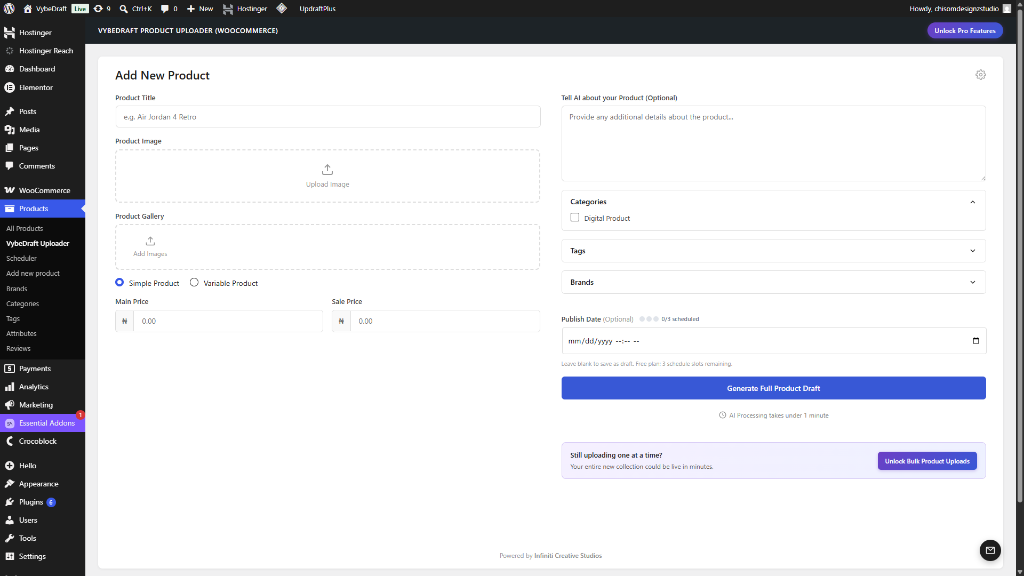
Stop spending hours manually writing product listings for your WooCommerce store. VybeDraft Product Uploader uses state-of-the-art AI Vision models to instantly generate complete, SEO-optimized product drafts from just a product image and a generic title.
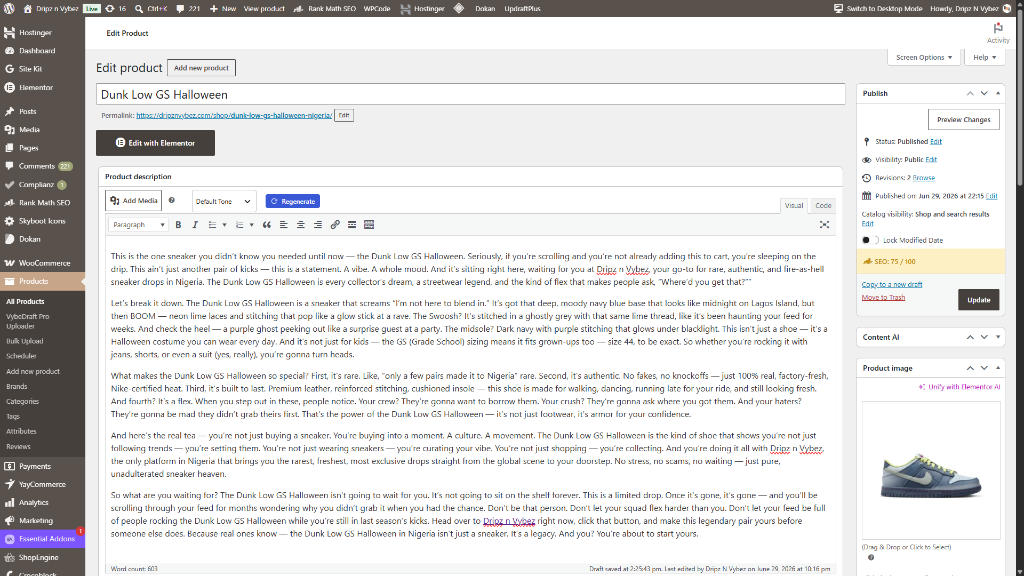
Simply upload a photo of your product (such as a shoe, shirt, or gadget), add a simple title, and watch as advanced AI writes high-converting product descriptions, concise short descriptions, generates unique SKUs, assigns categories, and suggests tags—all in a matter of seconds.
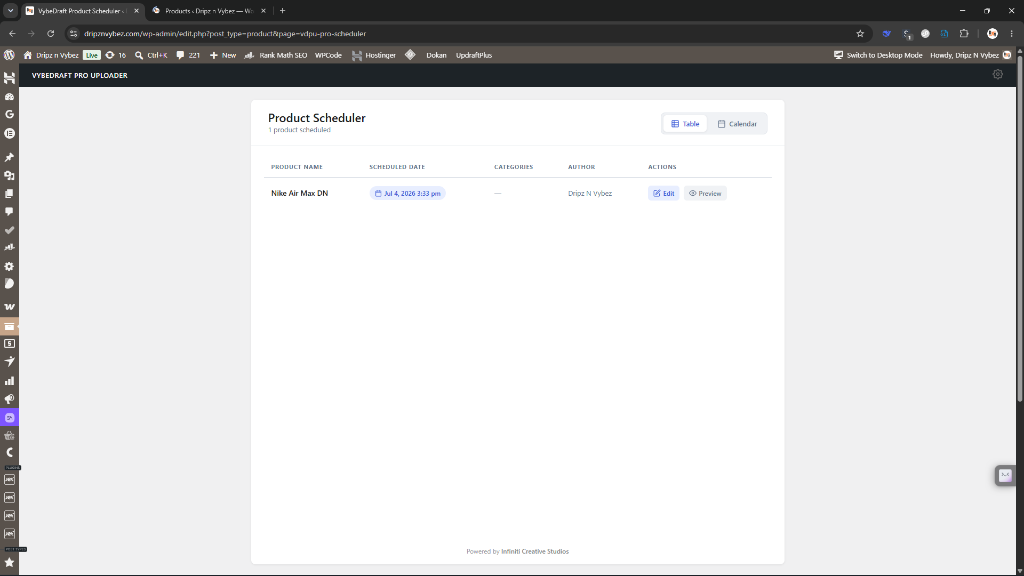
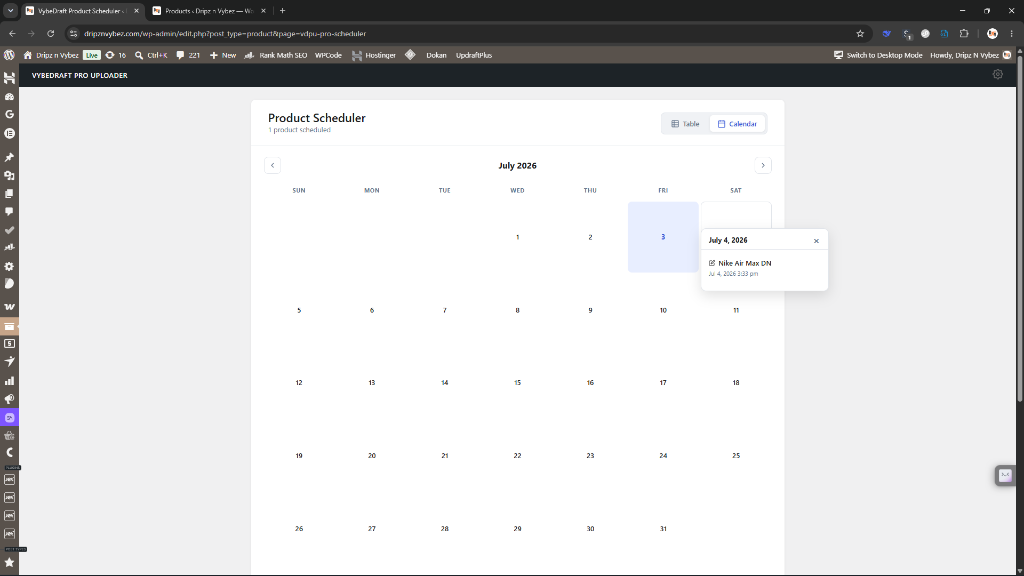
Equipped with a powerful Product Scheduler, you can schedule product releases and manage your pipeline with a clean Table and interactive Calendar view. WordPress crons can be unreliable, but VybeDraft includes a built-in recovery mechanism to ensure missed scheduled products publish automatically.
🔌 Connect Directly to Your Favorite AI Platforms (BYOK)
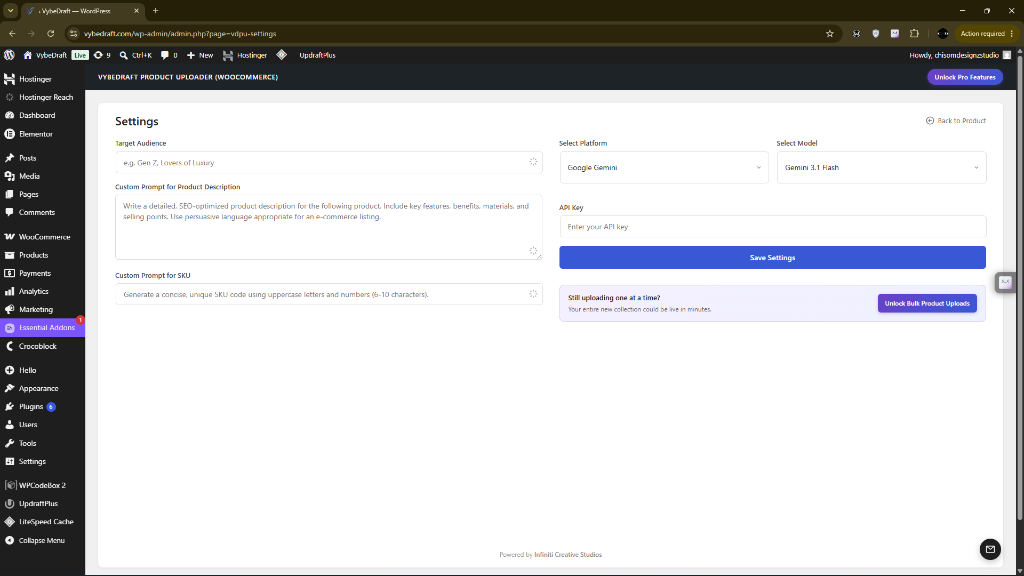
We believe in absolute privacy and cost control. VybeDraft runs on a Bring Your Own Key (BYOK) model, connecting your store directly to the world’s leading AI APIs. You pay only the raw cost per generation directly to the providers—often fractions of a penny per product—with no middleman markups!
Supported platforms include:
* OpenAI: Leverage the gold standard of AI reasoning with models like the GPT-5 and GPT-5.6 series.
* Anthropic: Utilize the Claude 4.5/5 series (including Claude Sonnet 5, Claude Opus 4.8, and Claude Haiku 4.5) for natural, copywriter-grade writing styles.
* Google Gemini: Generate listings quickly and cost-effectively using Gemini 3.0, 3.1, and 3.5 series.
* OpenRouter: Tap into a massive catalog of vision-capable models (including GPT-5, Gemini 3.5, and Claude 4.6).
✨ Key Features
- AI-Powered Content Generation: Automatically writes long descriptions, short descriptions, and tags.
- Visual Product Analysis: AI analyzes images to detect colors, materials, patterns, and features.
- Smart SKU Generation: Automatically creates unique, clean SKUs for your product drafts.
- Product Scheduler: Schedule posts and view them in custom Table or Calendar dashboard views.
- Missed Schedule Recovery: Built-in safeguards that catch and auto-publish missed scheduled products.
- Custom Brand Prompts: Tailor the AI’s writing style, tone, language, and SKU structure to match your brand identity.
- WordPress Native UI: A sleek dashboard built to feel like an organic part of WooCommerce.
- Strict Security & Compliance: Developed with clean, fully sanitized, and escaped code adhering to WP.org repository guidelines.
External Services
This plugin connects directly to third-party AI services to generate WooCommerce product content (descriptions, short descriptions, and SKUs) from your uploaded product image. No requests are made until you click the generation or bulk processing button on the dashboard. Your API key and the product image are sent directly to your chosen provider at that point.
1. OpenAI
Used to connect to OpenAI’s models (e.g., GPT-4o) via their official API.
* Service URL: https://api.openai.com
* Terms of Service: https://openai.com/policies/terms-of-use
* Privacy Policy: https://openai.com/policies/privacy-policy
2. Anthropic
Used to connect to Anthropic’s Claude models via their official API.
* Service URL: https://api.anthropic.com
* Terms of Service: https://www.anthropic.com/legal/consumer-terms
* Privacy Policy: https://www.anthropic.com/legal/privacy
3. Google Gemini (Google AI Studio)
Used to connect to Gemini models via the Google Gemini API.
* Service URL: https://generativelanguage.googleapis.com
* Terms of Service: https://ai.google.dev/gemini-api/terms
* Privacy Policy: https://policies.google.com/privacy
4. OpenRouter
OpenRouter is an AI model aggregation service that routes requests to various AI providers.
* Service URL: https://openrouter.ai
* Terms of Service: https://openrouter.ai/terms
* Privacy Policy: https://openrouter.ai/privacy
What data is sent: The product image you upload (as base64-encoded data) and a text prompt containing your product title and any optional context you provide. No personal user data or customer data is transmitted.
When it is sent: Only when you click the “Generate Full Product Draft” button. Nothing is sent automatically.
Screenshots
Installation
- Upload the plugin or install from the WordPress.org repository.
- Activate the VybeDraft Product Uploader plugin through the ‘Plugins’ menu in WordPress.
- Navigate to VybeDraft Product Uploader > Settings in the dashboard.
- Choose your preferred AI platform and input your corresponding API key.
- Save your settings.
- Navigate to Add New Product under the plugin menu to begin generating listings instantly!
FAQ
-
1. Where do I get the API keys for this plugin?
-
Since VybeDraft is a BYOK (Bring Your Own Key) plugin, you will need to generate an API key from the provider(s) you wish to use:
* OpenAI: https://platform.openai.com
* Anthropic: https://console.anthropic.com
* Google Gemini (Google AI Studio): https://aistudio.google.com
* OpenRouter: https://openrouter.ai
Simply copy the key from your provider’s developer console and paste it into the VybeDraft settings page. -
2. Are my API keys and product images secure?
-
Yes, absolutely. Because of the BYOK architecture, your API keys are stored securely in your local WordPress database. When you generate a listing, your images and prompt data are sent directly from your server to the AI provider. No middleman server sits in between, and no data is shared with us.
-
3. What if a scheduled product fails to publish?
-
WordPress’s native scheduling system (WP-Cron) relies on website traffic to trigger actions, which means low-traffic sites sometimes miss scheduled publish times. VybeDraft includes a built-in recovery check that runs in the background. If a scheduled product is missed, the plugin catches it and publishes it automatically.
-
4. Why did my product generation fail?
-
The most common reasons for a failed generation are:
* API Key issues: Your key might be incorrect, or your developer account has run out of usage credits or billing has not been enabled on the provider’s end.
* Image constraints: Make sure you are uploading a standard image format (JPG, PNG, or WebP). If the image is extremely large (above 4-5MB), try compressing it first.
* Timeout: Vision AI models process a lot of data. If your server’s connection is slow, the request might time out. Our router is configured with a generous 240-second timeout to mitigate this. -
5. Is there a limit to how many products I can generate?
-
No. The plugin itself imposes no limits on single product generation. Your only limitations are the rate limits and funding limits on your chosen AI provider developer account.
-
6. Does this plugin work with variable products (sizes, colours, etc.)?
-
Yes. VybeDraft supports both Simple and Variable product types in WooCommerce. When generating a listing for a variable product, the AI takes your product image and title into account and populates the relevant description and attribute fields. You can then configure your specific variation combinations (e.g., sizes and colours) from the standard WooCommerce product editor after the draft has been created.
-
7. Can I edit the AI-generated content before publishing?
-
Absolutely — and we encourage it. Every generated listing is saved as a WooCommerce draft, not published immediately. You have full control to review, edit, and refine any field (description, short description, SKU, price, categories, tags) before the product goes live on your store.
-
8. Can I generate listings in languages other than English?
-
Yes. You can instruct the AI to write in any language by updating your Custom Brand Prompt in the plugin settings. For example, adding “Write all product content in French” to your custom instructions will apply that preference to every generation.
-
9. Will this plugin slow down my WooCommerce store?
-
No. VybeDraft only runs inside the WordPress admin dashboard and does not load any scripts or styles on your public-facing storefront. Your customers will never be affected by the plugin being active.
-
10. Does VybeDraft work alongside other WooCommerce plugins?
-
Yes. VybeDraft integrates with the standard WooCommerce data layer and does not interfere with page builders, theme frameworks, or other WooCommerce extensions. If you experience a conflict with a specific plugin, feel free to open a support thread and we will investigate.
Reviews
There are no reviews for this plugin.
Contributors & Developers
“VybeDraft Product Uploader for WooCommerce” is open source software. The following people have contributed to this plugin.
Contributors
Translate “VybeDraft Product Uploader for WooCommerce” into your language.
Interested in development?
Browse the code, check out the SVN repository, or subscribe to the development log by RSS.
Changelog
1.0.1
- Fix: Add load_plugin_textdomain() call for localization.
- Fix: Replace file_get_contents() with WP_Filesystem API.
- Fix: Replace deprecated current_time(‘timestamp’) with wp_date(‘U’).
- Fix: Replace PHP date() with wp_date() for accurate timezone handling.
- Add: Plugin uninstall.php script to clean up options on deletion.
- Fix: Localise plugin action links and JavaScript strings.
1.0.0
- Initial public release of VybeDraft Product Uploader for WooCommerce.
- AI-powered product listing generation from a single product image and title.
- Native direct integration with OpenAI, Anthropic (Claude), Google Gemini, and OpenRouter.
- BYOK (Bring Your Own Key) architecture — API keys stored locally, no data shared with third parties.
- Automatically generates product description, short description, and unique SKU from image analysis.
- Supports Simple and Variable WooCommerce product types.
- Built-in Product Scheduler with Table and Calendar dashboard views.
- Missed schedule recovery system to catch and auto-publish products that WordPress cron misses.
- Custom Brand Prompt settings for controlling tone, writing style, language, and SKU format.
- Full WP.org security compliance: sanitized inputs, escaped outputs, ABSPATH checks, and localization throughout.