

Description
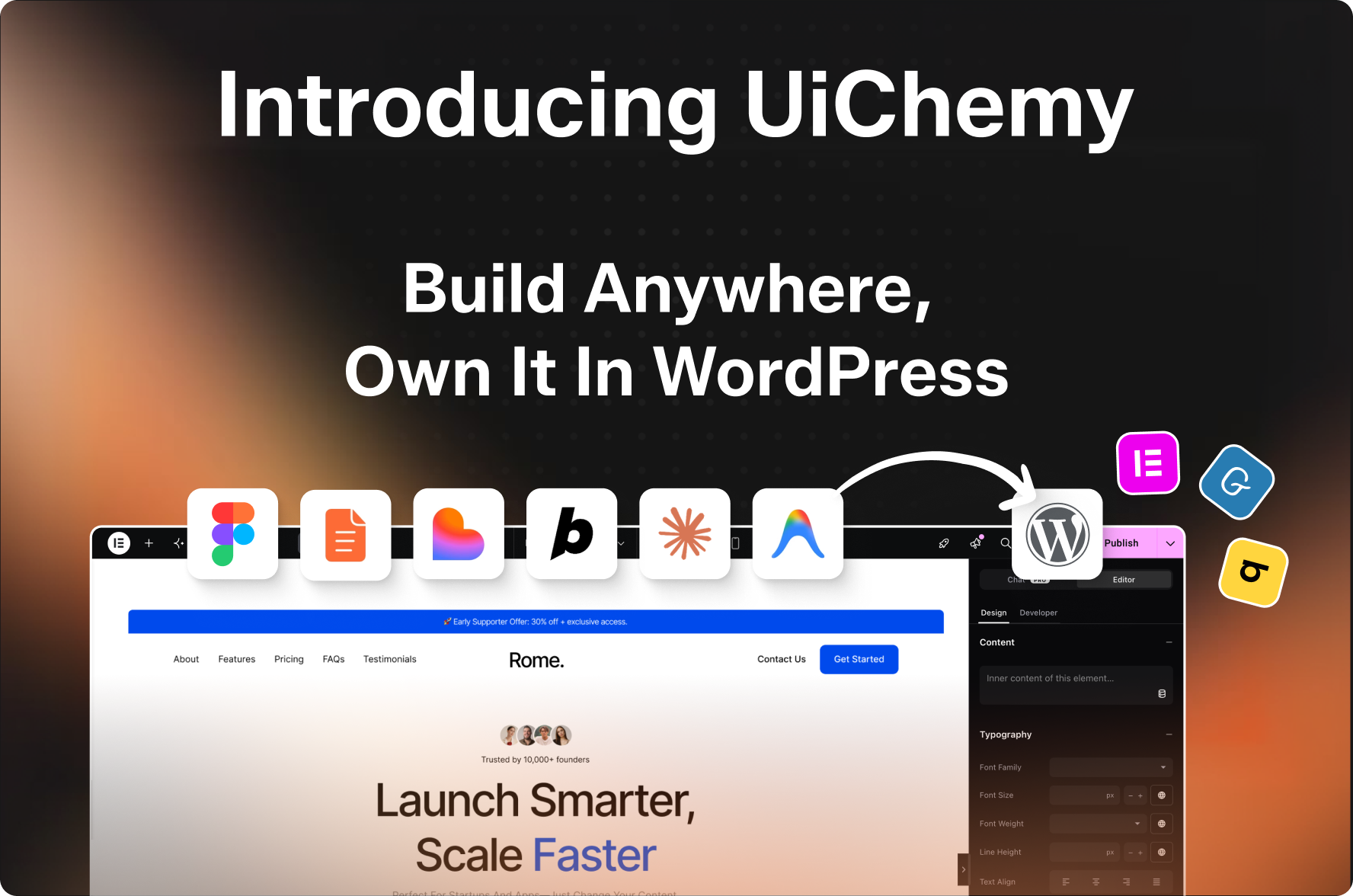
Build Anywhere. Own It In WordPress.
Start from a prompt, a client brief, a Figma design, or an AI build. UiChemy turns it into native, editable WordPress you own, in the builder you already use.
Building For WordPress Should Not Mean Building Twice
Three things go wrong on the way from an idea to a live WordPress site, and each one means doing the same work twice.
- The layout gets rebuilt by hand. Whatever you designed or generated is assembled a second time once it reaches WordPress. Same structure, same spacing, same decisions, made again on every project.
- The output cannot be edited. Many tools return an iframe, a locked template, or markup sealed inside a closed format. It renders correctly and it cannot be maintained, so every small change comes back to you instead of going to whoever owns the site.
- The page does not live on your site. When content is rendered from somewhere else, it is not in your database, not in your backups, and not something you can hand to another developer or move to different hosting.
What UiChemy Does Instead
UiChemy converts your design into WordPress using a single UiChemy Composer widget, an AI first visual editor that holds real HTML, CSS and JavaScript.
You add that one widget, once. Every section you build from then on is genuine code stored in your own database, on your own hosting, rendered natively inside your builder. Plain web standards any developer can read, with a visual editor over the top so you can change every line of it.
Not a screenshot of a design. Not an embed. Not a format only we can open. The marquee still slides. The accordion still opens. Nothing stops working because a subscription lapsed.
Rated 4.9 out of 5 and used by 90,000+ designers, freelancers and agencies.
Website | Pricing | Documentation | Roadmap | Facebook Community | Official Community | Premium Support | Video Tutorials
See UiChemy in Action
One platform, four ways in. Use whichever one matches where your work already starts.
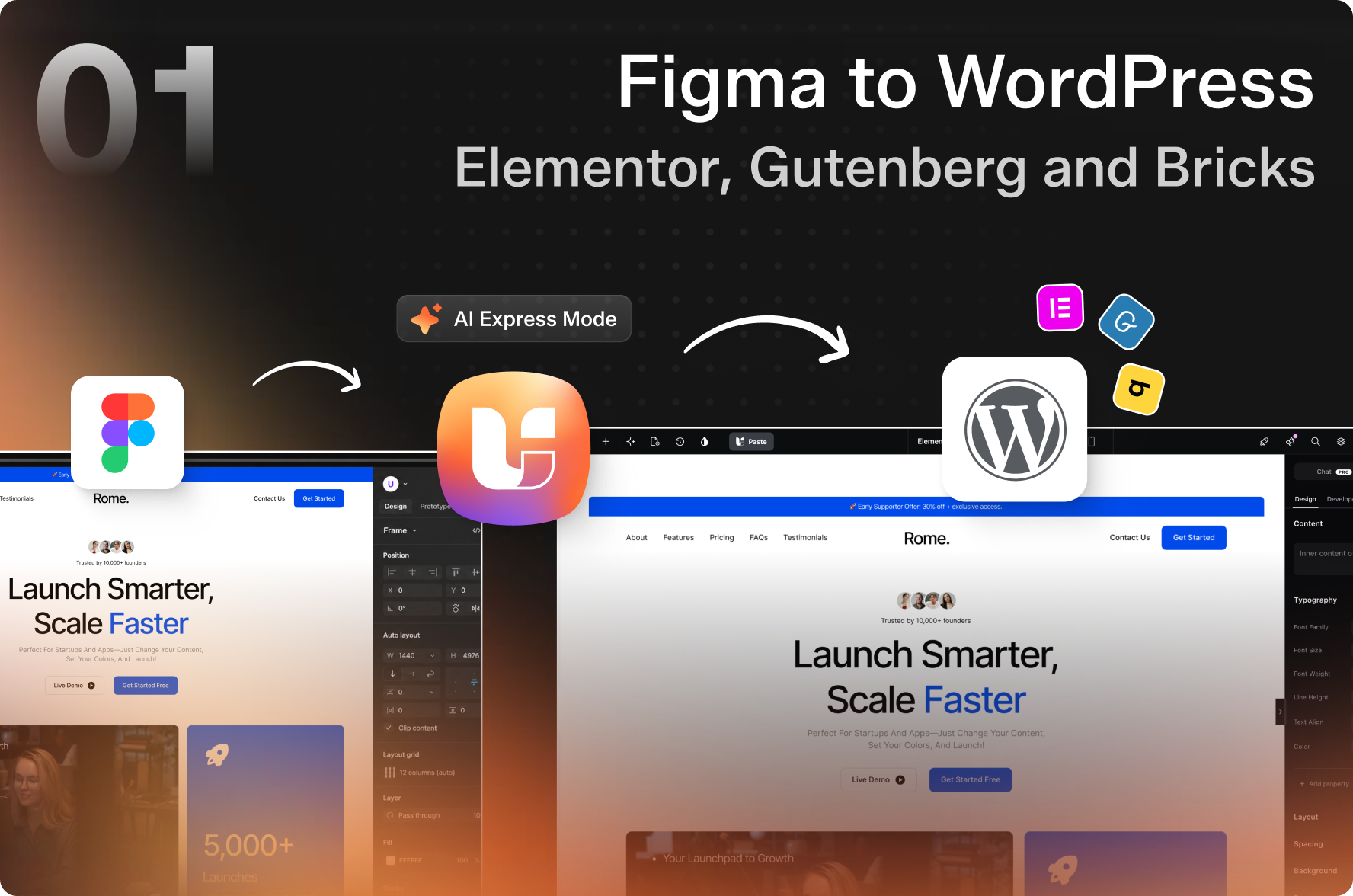
1. Figma to WordPress
Figma to WordPress converts any Figma design into editable WordPress. No rebuild, no lock-in.
UiChemy reads your frames, layers and Auto Layout the way you built them, then rebuilds the page inside your builder as a UiChemy Composer section holding real HTML, CSS and JavaScript. Your structure carries across and every part of it stays editable.
How It Works
- Design In Figma : Build in Auto Layout, following the Design Guidelines
- Run The Figma Plugin : Pick your frame and export it straight from Figma
- Connect Your Site : Link your WordPress domain once, then reuse it on every project
- Hit Import : The page opens in your builder ready to edit, not ready to rebuild
What You Get
- Global Style Sync : Figma colours and type become reusable classes in your builder’s global settings, so a brand tweak is one change instead of forty
- Responsive Output Manager : Set breakpoint rules once and stop hand-fixing every mobile view after import
- Precise Layer Mapping : Tag a layer to the exact element you want, so the output matches your intent
- Modern Image Handling : WebP, AVIF and SVG files import with the page
- Bulk And Copy Paste Import : Push a whole site in one run, or paste a single section with its media attached
Classic Mode And AI Express Mode
Classic Mode is the precision path. Tag layers to specific elements before exporting for output you can predict to the pixel.
AI Express Mode is the finishing path. No tagging. It reads every layer and applies motion, hover states, responsive breakpoints, global colours and type, then builds your header and footer during the conversion. It runs on Elementor, and Gutenberg and Bricks use Classic Mode.
Get the Figma plugin for your builder: Figma to Elementor, Figma to Gutenberg, or Figma to Bricks.
2. AI Website Creator
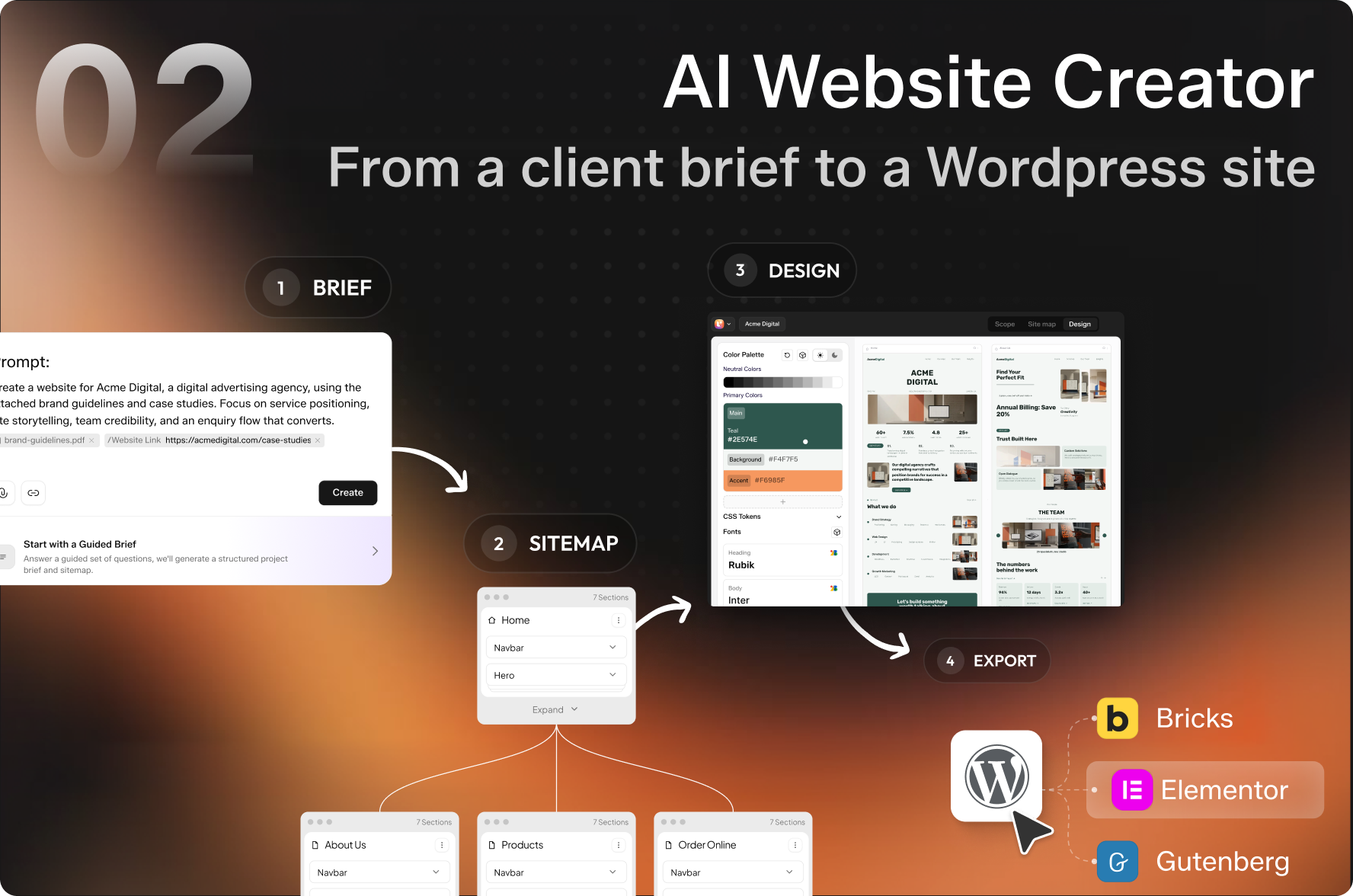
AI Website Creator turns a text prompt or a client brief into a full WordPress site you own.
A client says yes on a call and wants to see something by Friday. No design file, no budget approved for one yet, and a week of discovery in between. This closes that gap.
How It Works
Brief to Sitemap to Design to Export.
- You write the brief : A paragraph about the business, or a guided six-step brief. Paste a reference URL and it pulls in visual and tonal cues.
- UiChemy generates the sitemap : Review the pages and sections it proposes, then add, rename, reorder or delete anything before a single pixel is designed.
- UiChemy designs every page : Each one renders as a real design you can restyle, swapping palettes, fonts, layout variants and imagery.
- You export to WordPress : The finished site lands as editable pages.
What You Get
- Design Variants : Build two or three complete directions from the same brief, so a client call becomes a choice between real options instead of a debate about one mockup
- Non Destructive Export : Exporting creates new pages and never overwrites what is already live, so you can run it against a real site
- Re Export Anytime : Change the design later and push it again. This is a round trip, not a one way dump
- Safe Restructuring : Reordering the sitemap keeps the design work you already did on untouched sections
- Multi Builder Output : Send the same project to more than one builder independently, so the decision stays reversible
- 1,000+ Google Fonts : Enough range to match a brand without dropping to code
3. AI to WordPress
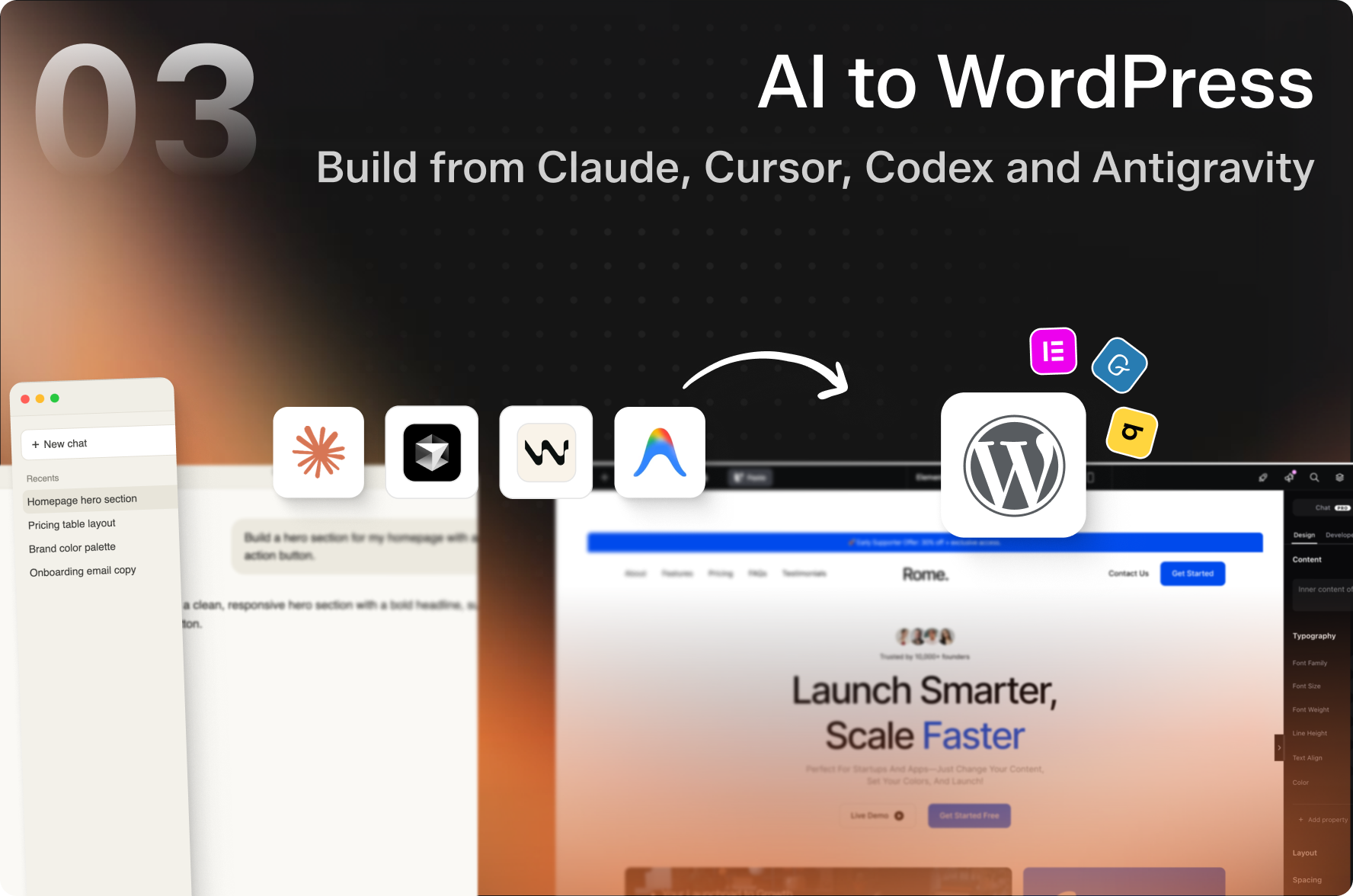
AI to WordPress moves any AI build into real, editable WordPress. Keep the design, lose the lock-in.
You built something in Claude, Cursor or Codex and it looks right. Getting it into WordPress normally means copying output, pasting it somewhere, and fixing what broke in transit. Worse, what you paste usually lands as markup nobody can edit afterwards.
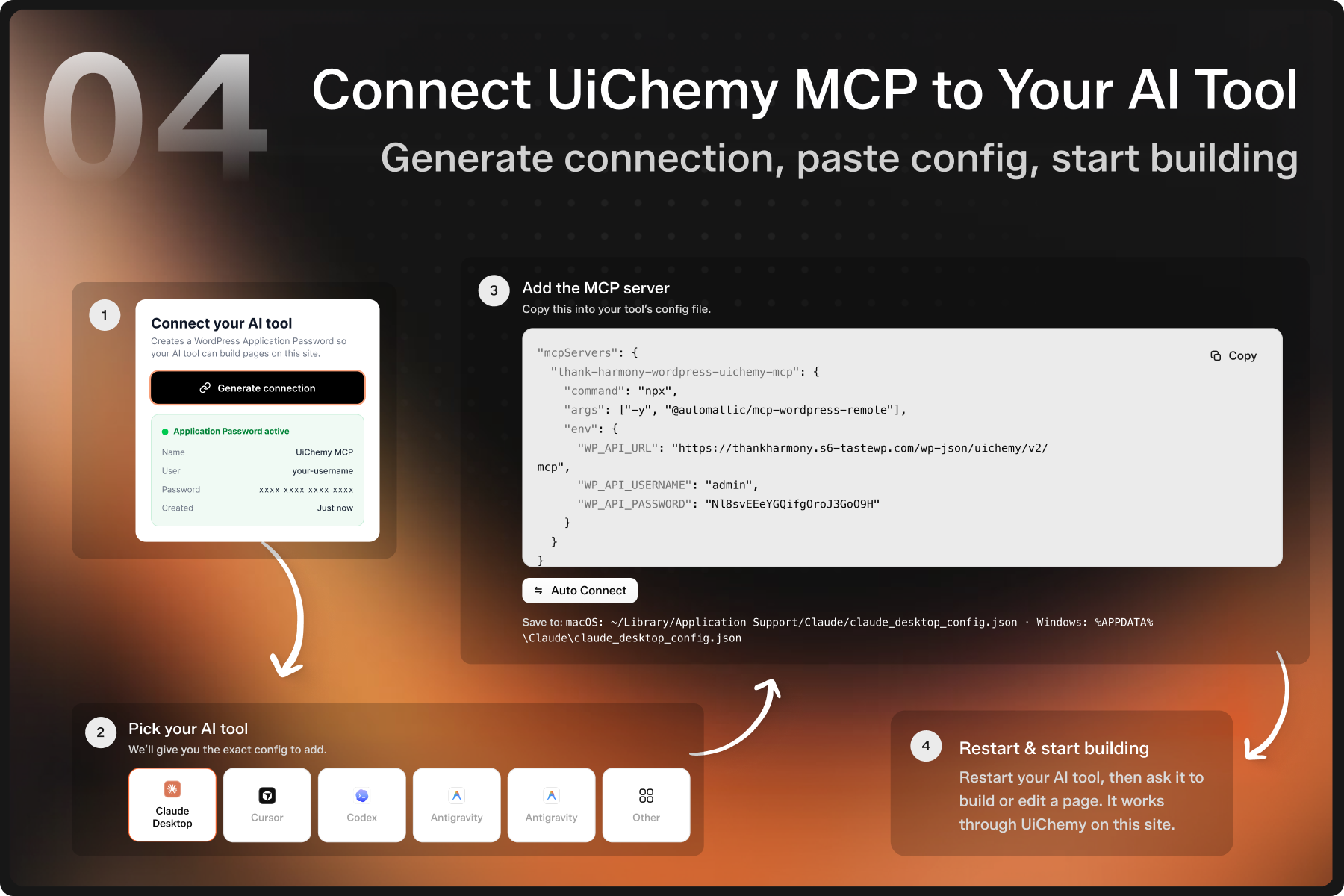
UiChemy runs a Model Context Protocol (MCP) server, so your AI tool writes into WordPress directly. It builds sections, runs conversions and edits pages on your site, and what arrives is real code in your builder.
What You Can Move Into WordPress: Claude to WordPress, Lovable to WordPress, Codex to WordPress, V0 to WordPress, Cursor to WordPress, Google Stitch to WordPress, HTML to WordPress, Wix to WordPress, Clone Site to WordPress.
How It Works
- Generate Your Connection : The plugin issues a scoped Application Password
- Pick Your AI Tool : Claude Desktop, Cursor, Codex, Antigravity or another MCP client
- Add The MCP Config : Paste the generated block into that tool’s config file
- Restart And Build : Ask for a section and watch it appear on the site
What You Get
- No Context Switching : Build and revise pages from the editor you already have open, so the browser is where you check the result, not where you do the work
- Editable Output : Sections arrive as real code in your builder, so the next person to touch the page does not need your AI tool
- Custom Post Types And Fields : Set up post types and fields through ACF or JetEngine, which covers the scaffolding most client builds start with
- Agency Repeatability : One prompt pattern produces the same section across five client sites
4. UiChemy Composer
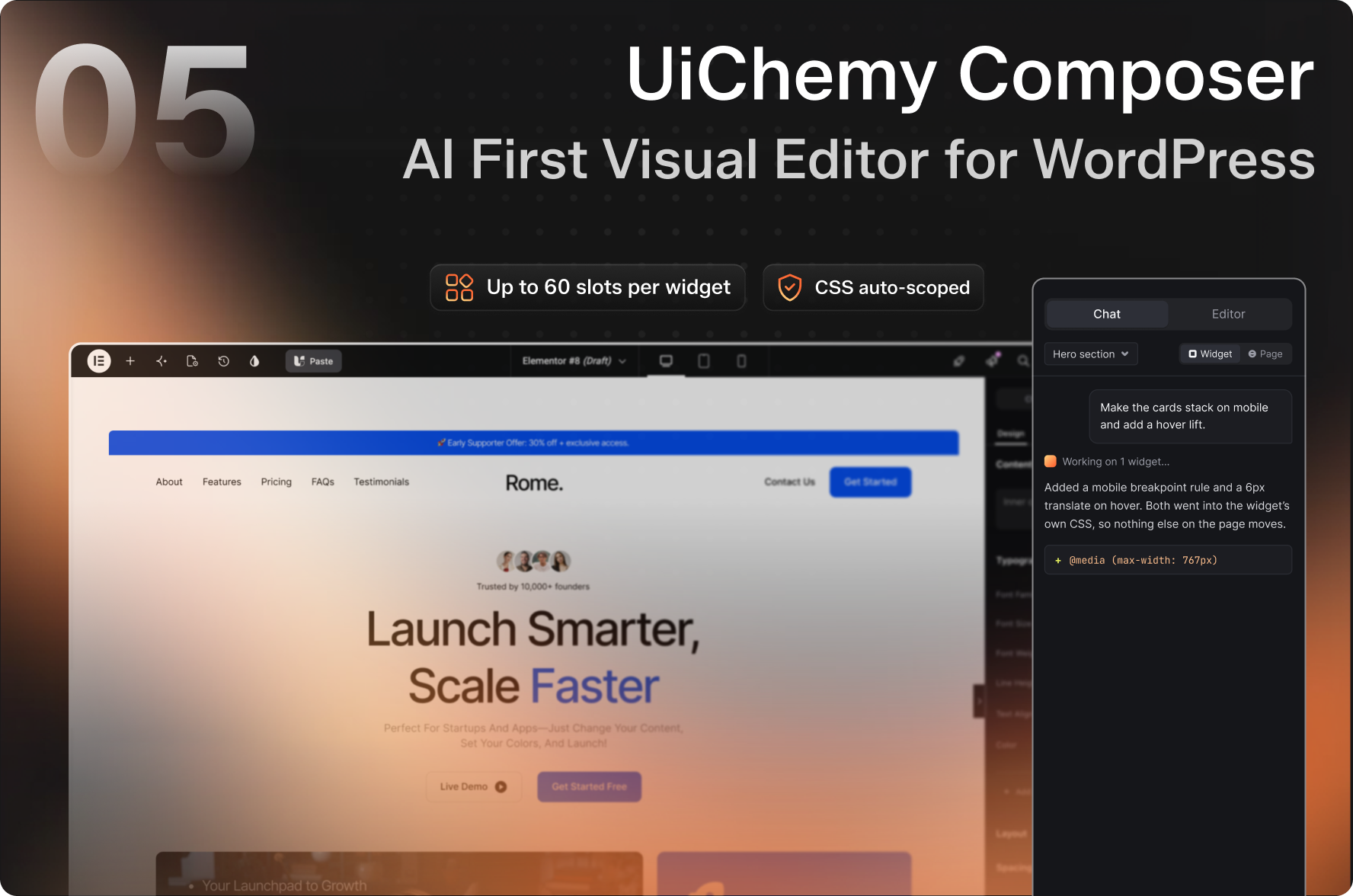
UiChemy Composer is an AI first visual editor that writes real HTML, CSS and JavaScript, right inside your builder.
Every other builder hands you a widget for each idea, and the one you need always does almost what you want. Composer works the other way round. You add one widget, once, and every section from then on is genuine code stored in your own database.
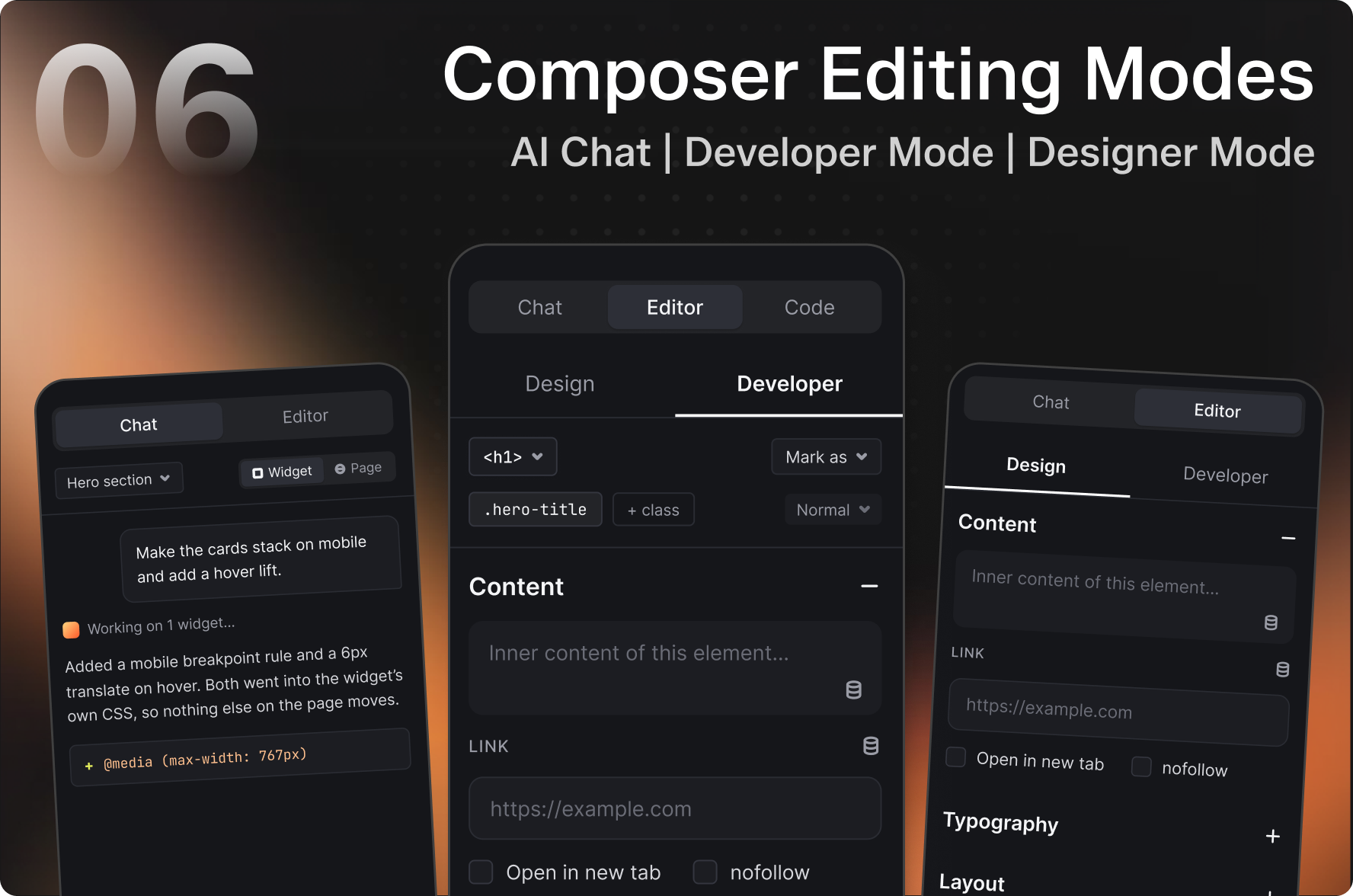
One Editor, Two Modes
Design Mode is for whoever owns the content. Text, images, links, colours and spacing, edited on the real page with layers and history. No code on screen, which is why a site is safe to hand to a client.
Developer Mode is for whoever owns the code. The class editor, layers panel, global variables, and the code for this section, this page and the whole site.
Build With Your Own AI
- Bring Your Own AI : Connect the subscription you already pay for through the CLI, or drop in your own key. OpenAI, Anthropic, Google, Claude CLI, Codex, Gemini and OpenCode
- Chat In The Editor : Prompt a new layout or change an existing one, with the full page and site already in context
- 3 Skills, 100+ Actions : The agent reaches your whole site through one site-wide MCP gateway
- Or No AI At All : Both modes work by hand if you would rather write it yourself
What You Get
- A Real Class System : Style by class as you would in any front-end project, with global colours and variables you define once
- Import A Brand, Export It Again : Move a design system between projects instead of rebuilding it per client
- Dynamic Data : Every WordPress field plus ACF, JetEngine and Metabox, with a visual query builder, loop builder, theme builder and full WooCommerce
- Forms : Describe the form and it gets built, any element can become a field, submissions collected and spam proof by default
- Agency Handover : Role Manager, front end only handover, White Label, and one dashboard for every site
- Code Split Three Ways : Site, page and section styles load separately, so only the code a page uses is served. POSIMYTH measures 90+ on Google PageSpeed in its own testing
Why Teams Move to UiChemy
- Ship In Hours, Not Weeks : The rebuild step disappears, so the gap between an approved idea and a live page is an afternoon rather than a sprint
- One Tool Instead Of Five : Design conversion, AI site generation, an in-builder code editor and an AI bridge live in the same plugin and the same account
- White Label And Client Editable : Hand over a site with your branding removed and content fields your client can safely change, without them touching the layout
- Any Builder, Any Starting Point : Elementor, Gutenberg and Bricks, from a prompt, a brief, a Figma file or an AI build, with the decision reversible later
- You Keep The Site : Everything lives in your own WordPress install, so a published page keeps serving visitors whatever happens to your plan
🔍 Our Other Products
🥇 The Plus Addons for Elementor — 120+ Elementor Widgets, Free Elementor Theme Builder & Templates
🥇 Nexter Blocks — 90+ Gutenberg Blocks, AI Website Builder, Popup Builder, Mega Menu, Form Builder & 1000+ Templates
🥇 Nexter Extension — 50+ Site Tools: Security, SMTP, Image Optimizer (WebP/AVIF), Theme Builder, Code Snippets, Performance
🥇 NexterWP Theme — Ultra-light, FSE-ready starter theme. Zero jQuery
🥇 WDesignKit — 1000+ Templates, Cloud Block Storage, Gutenberg & Elementor Builder
External Services
This plugin connects to the following external services:
UiChemy Cloud API : When you export a design from Figma, UiChemy communicates with its cloud API to process and convert your Figma design data into page builder compatible format. Design structure data (frames, layers, styles) is sent during export. No personal data is transmitted.
Privacy Policy | Terms of Use
Figma API : UiChemy’s Figma plugin reads your design data from Figma to generate the export. This requires the Figma plugin to access your currently open Figma file.
Figma Privacy Policy | Figma Terms
jsDelivr CDN : The composer’s “Add library” catalog offers a curated list of popular open-source JavaScript and CSS libraries. When you choose one, UiChemy adds a pinned cdn.jsdelivr.net URL to that widget’s assets, so visitors to the published page load the file from jsDelivr. Nothing is requested until you add a library, and you can remove or edit the URL at any time. No data about you or your visitors is sent by UiChemy to jsDelivr.
jsDelivr Privacy Policy | jsDelivr Terms
Google Fonts : The same “Add library” catalog offers a list of Google Fonts. Choosing one adds a fonts.googleapis.com stylesheet URL to that widget’s assets, so visitors to the published page load the font from Google. Nothing is requested until you add a font, and you can remove the URL at any time.
Google Privacy Policy | Google Terms
Screenshots
Installation
- Go to Plugins > Add New in your WordPress dashboard
- Search for UiChemy and click Install
- Activate the plugin
- Open the UiChemy settings page and connect your site using your Site URL and Security Token
- Pick where you want to build:
- From Figma : Install the UiChemy Figma plugin for your builder (Elementor, Gutenberg or Bricks)
- From A Prompt Or Brief : Start a project at app.uichemy.com, then sign in to the UiChemy plugin with the same UiChemy account
- From Your AI Tool : Open the AI tab, generate your connection, and add the MCP config to Claude, Cursor or Codex
- From A Blank Page : Add the UiChemy Composer widget to any page in Elementor or Gutenberg
FAQ
-
What does Build Anywhere, Own It In WordPress mean?
-
Build anywhere means the work can start wherever you already are: a written prompt, a client brief, a Figma file, or an AI build from a tool like Claude or Cursor. Own it in WordPress means what comes out is real WordPress content sitting in your own database. Elementor widgets, Gutenberg blocks and Bricks elements you can click and edit, that a client can take over, and that keep serving visitors whatever happens to your account. Nothing renders from our servers and nothing is locked behind a licence check.
-
How is this different from an AI site builder?
-
Site builders host the result for you, so the site lives on their platform and stops existing if you stop paying. UiChemy writes into WordPress you already own. The output is native Elementor, Gutenberg or Bricks elements in your own database, with your own hosting, your own domain and your own backups. You can move it, sell it, hand it to a client, or keep editing it years later without us involved.
-
My last converter produced something nobody could edit. What happens here?
-
That is the difference this plugin exists for. Converters and AI builders commonly return an iframe, a locked theme, or a block of markup that technically renders and practically cannot be maintained. UiChemy produces the builder’s own elements, so every section is draggable, restylable and editable with the tools your team already knows. Your Figma colours and type arrive as reusable globals rather than inline values, and custom CSS is scoped automatically so it cannot leak into the rest of the site.
-
Do I need a Figma file to use UiChemy?
-
No. AI Website Creator starts from a written brief instead. Describe the business in a paragraph, review the sitemap it proposes, restyle the pages it designs, then export to WordPress. You can also start from a blank page with the Composer widget and build a section by describing it to Chat AI, or drive the whole thing from Claude or Cursor through AI to WordPress.
-
Which page builders does UiChemy support?
-
Elementor, including v4 with Atomic Elements and global classes. Gutenberg, including Spectra, Kadence Blocks, GenerateBlocks and Nexter Blocks. And Bricks Builder, with global style classes, padding sync and multi breakpoint container widths. UiChemy Composer, AI Website Creator and AI to WordPress work across all three. AI Express Mode runs on Elementor, and the other two builders use Classic Mode for that path.
-
What is the difference between Classic Mode and AI Express Mode?
-
Classic Mode is the precision path. You tag Figma layers to specific widgets before exporting, which takes more setup and returns output you can predict to the pixel. It works on Elementor, Gutenberg and Bricks. AI Express Mode is the finishing path. It needs no tagging, reads every layer itself, and applies motion, responsive breakpoints, global colours and type, and your header and footer during the conversion. AI Express Mode runs on Elementor. Classic is not the old way, it is the control option.
-
What is UiChemy Composer?
-
Composer is one widget that stores real HTML, CSS and JavaScript instead of a panel of settings. Because it holds actual code, anything achievable in HTML and CSS is achievable in it, and AI can read and rewrite the real output rather than toggling options. It is also where the rest of UiChemy lands, so a Figma conversion, an AI Website Creator export and a page built through AI to WordPress all arrive in the same editable place. You work on it three ways: visually in Designer Mode, in code in Developer Mode, or by describing the change to Chat AI.
-
How do I hand a finished site to a client without them breaking it?
-
Use Designer Mode and Slots. When a design lands in a Composer, UiChemy extracts the editable content automatically, so your client sees numbered text fields, links and image pickers instead of markup. Editing those changes content values only and never touches the structure. On Pro, the Role Manager sets this per WordPress role, so an editor gets content access while the layout stays locked, and White Label removes our branding from the dashboard entirely.
-
How do I connect Claude, Cursor or Codex to my site?
-
Through AI to WordPress. UiChemy runs an MCP server, the open standard that lets an AI client call external tools. Generate the connection in the plugin, which issues an Application Password, pick your AI tool, paste the config block into that tool’s config file, then restart it. You need Node.js 18 or newer, a WordPress Administrator account, and a site reachable over HTTPS. Keep the Application Password private, because it grants admin level write access.
-
If I stop paying, do my published pages keep working?
-
Yes. Pages are built from real HTML, CSS and JavaScript stored in your WordPress site rather than pulled from our servers, so anything published keeps rendering for visitors. What needs an active plan is new work: running conversions, generating a site in AI Website Creator, or using Chat AI inside Composer.
-
Do I need Elementor Pro?
-
Not to run conversions. UiChemy works on Elementor Free. Pro is needed in two cases: if your design uses elements that map to Pro only widgets such as forms, navigation menus or sliders, or if you want headers and footers saved as templates during an AI Express Full Setup import. The Plus Addons for Elementor extends the widget range further and is optional.
-
Do I need Auto Layout in my Figma file?
-
Strongly recommended, and required for AI Express Mode. Auto Layout tells UiChemy how your spacing and alignment are meant to behave, which is what keeps the converted layout stable at other screen sizes. Absolute positioned designs still convert, they just need more adjustment afterwards. The Design Guidelines cover the file structure that converts most cleanly.
-
My import does not match the design. What went wrong?
-
Almost always the Figma file rather than the conversion. The usual causes are missing Auto Layout, layers nested in a way that does not reflect the visual hierarchy, elements sitting outside the top level frame, negative gaps that CSS Flexbox cannot reproduce, and unflattened masked images. On the WordPress side, check your theme’s content width and padding. UiChemy follows your structure faithfully, so a clean file converts accurately.
-
Can I edit everything after importing?
-
Yes. The import produces native builder elements, so you change text, swap images, restyle, reorder sections, add animation or rebuild the layout entirely using the tools you already know. There are no locked templates, no iframes and no untouchable HTML blocks. If you would rather describe the change than make it, Chat AI writes it for you.
-
Can I use UiChemy across multiple client sites?
-
Yes. Connect and manage multiple WordPress domains from a single installation, which is how most agencies and freelancers run it. Each site keeps its own connection and you switch between them in the dashboard.
-
How much does UiChemy cost?
-
Plans are based on how much you build rather than which features you get. Compare them at UiChemy Pricing. Every plan carries a 14 day money back guarantee, so you can run it on a real project before committing.
-
How do I report a security vulnerability?
-
Through the Patchstack Vulnerability Disclosure Program.
Report a vulnerability -
Where do I request features or see what is coming?
-
The roadmap is public at roadmap.uichemy.com. Submit requests, upvote existing ones, and track releases. The POSIMYTH team reviews and prioritises community requests each release cycle.
-
What support is available?
-
Community support on WordPress.org, documentation covering all four products with step by step guides, video tutorials through UiChemy Academy, and help from the UiChemy team when something specific goes wrong. Paid plans include priority access at UiChemy Support.
Reviews


Contributors & Developers
“UiChemy – Convert Figma, Prompts and AI Builds to Elementor, Gutenberg and Bricks” is open source software. The following people have contributed to this plugin.
Contributors


“UiChemy – Convert Figma, Prompts and AI Builds to Elementor, Gutenberg and Bricks” has been translated into 3 locales. Thank you to the translators for their contributions.
Interested in development?
Browse the code, check out the SVN repository, or subscribe to the development log by RSS.
Changelog
View full changelog and upcoming features: roadmap.uichemy.com
5.2.3
30 September 2026
– Improved: Editor performance improvements.
– Improved: Full translation support for the dashboard and editor
– Fixed: Various minor bugs and stability improvements.
5.2.2
25 September 2026
– Improved: Minor editor design improvements.
– Improved: Enhanced Role Manager options.
– Improved: Improved AI Import flow.
– Added: Gutenberg import support.
– Fixed: Various minor bugs and stability improvements.
5.2.1
17 September 2026
– Improved : Default settings for PIC options are now disabled in the frontend.
– Fixed : Resolved string translation issues.
– Fixed : Various bug fixes and improvements.
5.2.0
15 September 2026
– Added : AI website building now works in Bricks and Gutenberg as well as Elementor, including headers, footers and full page templates.
– Added : A visual scroll timeline for animating a section, with live scrubbing and preview right inside the editor.
– Added : 3D and WebGL sections, so a page can carry a 3D model or an animated background.
– Added : Auto-save and version history for your sections, so you can step back to an earlier state.
– Improved : A rebuilt picker for placing live site content, like post fields and product data, into your designs.
– Improved : WooCommerce dynamic support.
– Fixed : Various bug fixes and performance improvements.
5.1.2
11 September 2026
– Fixed : Minor Bug Fixes & Performance Improvements
5.1.1
11 September 2026
– Added : MCP can now set up custom post types and custom fields for you, using ACF or JetEngine.
– Added : MCP abilities can now be used with different gateways.
– Improved : More reliable AI website building, with clearer messages when a header or footer cannot be shown.
– Fixed : Various bug fixes and improvements.
5.1.0
1 September 2026
– Added : New Composer, a visual editor to fine-tune your imported designs, no coding needed.
– Added : AI Website Creator import flow, right from the Import tab.
– Added : Built-in chat assistant to help you edit your designs faster.
– Added : MCP v2, connect Claude, Cursor, Codex and other AI tools to your site to build amazing websites quickly.
– Improved : Redesigned dashboard, onboarding, and import screens for a cleaner, easier experience.
– Improved : Faster and more reliable sign-in.
– Security : Multiple security hardening improvements across login, file uploads, and site data handling.
– Fixed : Various bug fixes and stability improvements.
5.0.2
6 August 2026
– Updated : WordPress 6.9 or newer is now required.
– Fixed : Connection issue when a security plugin blocked Application Passwords.
– Improved : Clearer setup messages when the connection needs a fix.
– Fixed : Various bug fixes and improvements.
5.0.1
14 July 2026
– Improved : One-click nexter plugin and theme activation.
– Fixed : Login issue in certain server environments.
– Fixed : Various bug fixes and improvements.
5.0.0
2 July 2026
– Added : AI Mode. Convert Figma designs to WordPress with AI.
4.10.2
12 June 2026
– Fixed : Dashboard JavaScript strings are now detected by translate.wordpress.org.
4.10.1
11 June 2026
– Fixed : Made all dashboard strings translatable and updated the POT file.
4.10.0
2 June 2026
– Fixed : Global styles now sync seamlessly with Elementor’s updated Global Classes system.
4.9.0
22 May 2026
– Added : MCP server support for for AI-powered workflows.
– Fixed : Various bug fixes and improvements
4.8.2
15 May 2026
– Fixed: Prevent third-party plugin controls from creating placeholder images during import.
4.8.1
6 May 2026
– Fixed : incorrect text domain usage.
– Added : missing wp_set_script_translations calls.
4.8.0
22 Apr 2026
– Added : Grid support for Elementor.
4.7.3
26 Mar 2026
– Updated : readme.txt
4.7.2
24 Mar 2026
– Updated : Missing image asset
– Updated : readme.txt
4.7.1
19 Mar 2026
– Added : Color variable support in borders, improved gap and shadow controls
– Updated : Dashboard usability for RTL (Right-to-Left) users
– Fixed : GenerateBlocks and Kadence installation from the dashboard
– Fixed : Various bug fixes and performance improvements
4.7.0
6 Mar 2026
– Added : Elementor Atomic (v4) support with Global Classes & Variables
– Fixed : Various bug fixes and improvements
4.6.0
30 Jan 2026
– Added : Border, Border-Radius, Gap & Shadow support for Bricks
– Fixed : Various bug fixes and improvements
4.5.0
5 Jan 2026
– Fixed : SVG upload bug
– Fixed : Various bug fixes and improvements
4.4.3
23 Dec 2025
– Fixed : Warning log issue
4.4.2
12 Dec 2025
– Fixed : Minor bug with “Import as user” dropdown
– Compatibility : Updated WP compatibility
4.4.1
27 Nov 2025
– Updated : Default Elementor & Bricks boxed width
– Updated : UI improvements
4.4.0
25 Nov 2025
– Added : WEBP & AVIF image import support
– Fixed : Various bug fixes and improvements
4.3.0
17 Oct 2025
– Added : Multiple breakpoints for Boxed Width (Bricks)
– Fixed : Various bug fixes and improvements
4.2.0
16 Oct 2025
– Added : Spectra, Gutenberg Core, Kadence & GenerateBlocks support
– Added : Option to disable custom CSS for Elementor & Gutenberg
– Updated : UI improvements
– Fixed : Various bug fixes and improvements
4.1.2
20 Sep 2025
– Fixed : Bug fixes and improvement
4.1.1
13 Sep 2025
– Fixed : Bug fixes and improvement
4.1.0
29 Aug 2025
– Added : Breakpoints for boxed width of Elementor Containers
4.0.1
08 Aug 2025
– Security : Security updates
4.0.0
01 Aug 2025
– Updated : Major UI improvements
3.1.3
01 Aug 2025
– Updated : UI improvements
3.1.2
30 June 2025
– Fixed : Elementor global settings compatibility with latest Elementor version
– Fixed : Various bug fixes and improvements
3.1.1
17 June 2025
– Fixed : Various bug fixes and improvements
3.1.0
12 June 2025
– Updated : Plugin welcome UI
– Added : Bricks global style classes support
– Fixed : Media import in copy paste mode with Bricks
– Fixed : Bricks live import & page settings
– Fixed : Various bug fixes and improvements
3.0.2
28 May 2025
– Fixed : Live import with Nexter Theme Builder
3.0.1
28 Apr 2025
– Fixed : Onboarding toast message bug
3.0.0
4 Apr 2025
– Compatibility : Updated compatible WordPress version to 6.7.2
2.7.0
2 Apr 2025
– Added : API updates for Elementor container boxed width
– Updated : README
– Fixed : Various bug fixes and improvements
2.6.0
27 Dec 2024
– Updated : UiChemy paste button design for Gutenberg editor
– Added : UiChemy paste button for Bricks builder
– Added : Custom CSS for Elementor Editor
2.5.1
17 Aug 2024
– Updated : Live Import connection speed for Bricks & Gutenberg plugins
2.5.0
17 Aug 2024
– Added : Elementor Globals support for UiChemy plugin
– Fixed : Minor bug fixes
2.4.0
17 July 2024
– Added : Recommended settings for Bricks & Gutenberg
– Updated : Onboarding popup for Bricks & Gutenberg
– Fixed : Minor bug fixes
2.3.1
26 June 2024
– Fixed : Minor bug fixes and improvements
2.3.0
26 June 2024
– Updated : Added support for rest_route to reduce URL unreachable errors
2.2.0
13 June 2024
– Updated : Gutenberg image import functionality
– Fixed : Left menu UiChemy logo size
2.1.0
4 June 2024
– Added : Gutenberg & Bricks import for new and existing posts
– Fixed : Minor bug fixes and improvements
2.0.0
21 May 2024
– Added : Elementor import for new and existing posts
– Fixed : Minor bug fixes and improvements
1.2.2
21 March 2024
– Added : UiChemy Settings on-boarding process
– Fixed : Minor bug fixes and improvements
1.2.1
15 March 2024
– Fixed : Minor bug fixes and improvements
1.2.0
5 March 2024
– Fixed : Minor bug fixes and improvements
1.1.0
3 February 2024
– Updated : Design improvement
– Fixed : Minor bug fixes and improvements
1.0.0
28 December 2023
– Initial Release