

Description
After activation, open Settings > TopBar Slider to configure the plugin. All announcements, display rules, animation options, appearance controls, and optional usage settings are managed from this screen.
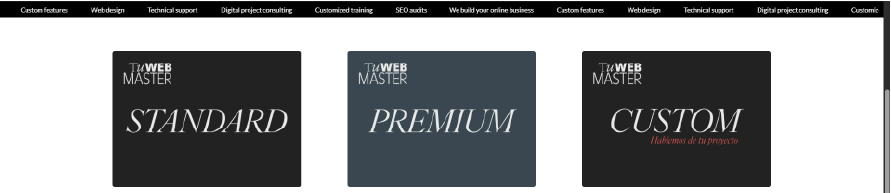
Create a clear announcement or notification bar for shipping offers, discount codes, store notices, launches, service highlights, and other important messages. Enter one plain-text announcement per line, then display the messages as rotating slides or a continuous marquee.
Tu WebMaster TopBar Slider supports rotating slides and a continuous marquee while automatically keeping sticky and fixed headers below the bar. Theme-specific offset CSS is not required.
Developed by Tu WebMaster.
Configuration
- Open Settings > TopBar Slider in the WordPress dashboard.
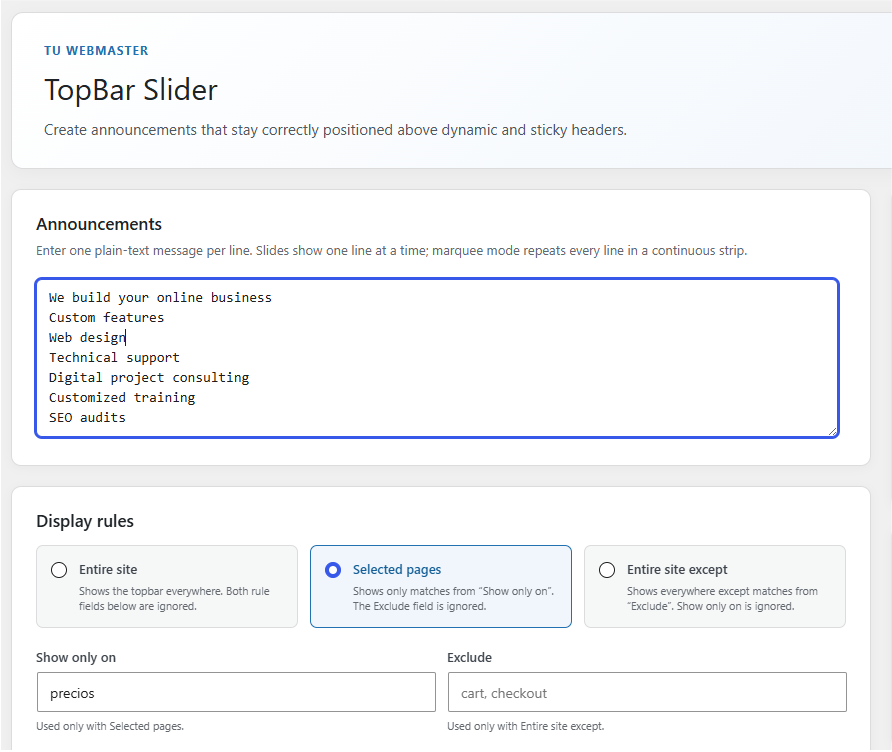
- Under Announcements, enter one plain-text message per line.
- Choose a Display rule:
- Entire site displays the topbar everywhere and ignores both rule fields.
- Selected pages displays it only on entries from Show only on and ignores Exclude.
- Entire site except displays it everywhere except entries from Exclude and ignores Show only on.
- Add page rules as comma-separated numeric IDs, slugs, nested paths, or WooCommerce views such as
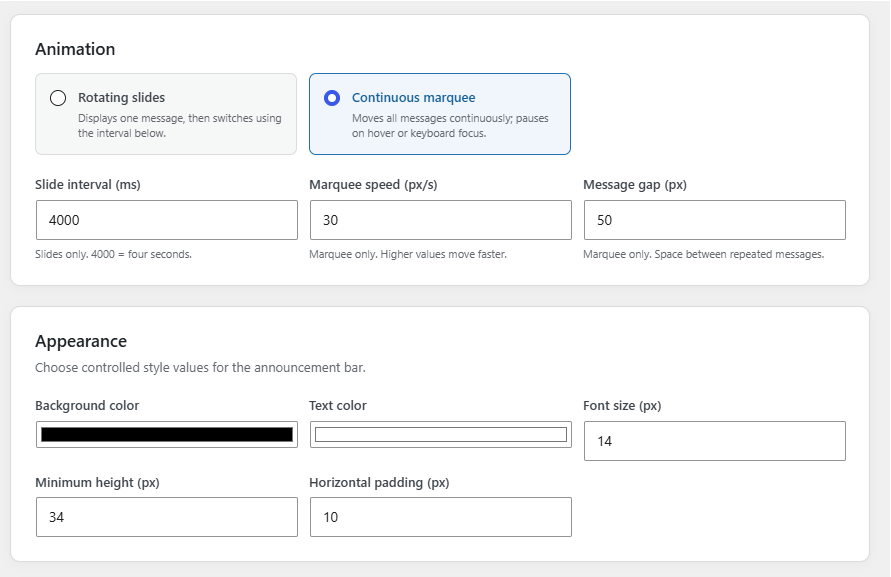
shop,cart,checkout, andmy-account. - Under Animation, choose Rotating slides or Continuous marquee. Configure the slide interval, marquee speed, and spacing between repeated messages as needed.
- Under Appearance, choose the background color, text color, font size, minimum height, and horizontal padding.
- Leave Optional usage data disabled or explicitly enable it if you want to share limited non-personal technical information.
- Select Save settings.
Features:
- Rotating slide and continuous marquee modes.
- Page inclusion and exclusion rules using IDs, slugs, or paths.
- Controlled background color, text color, font size, height, and spacing settings.
- Automatic positioning below the WordPress admin toolbar.
- Runtime detection of fixed and sticky headers without theme-specific CSS.
- Automatic layering below active dialogs, modals, and off-canvas panels.
- Responsive behavior and reduced-motion support.
- No external assets. Optional usage data is disabled until an administrator explicitly opts in.
External services
TopBar Slider can optionally send limited technical usage data to Tu WebMaster when a site administrator explicitly enables this option in the plugin settings. It is disabled by default, and the plugin works fully without enabling it. No request is made before opt-in.
When enabled, at most one request per week is sent to https://tuwebmaster.com.ar/wp-json/tuwebmaster/v1/telemetry with:
- A randomly generated installation identifier that is not derived from the domain, URL, email address, or IP address.
- Plugin, WordPress, and PHP versions.
- Site locale and multisite status.
- Selected display and animation modes.
- Number of configured slides.
The payload does not include the site URL or domain, post or page content, announcement messages, administrator or visitor details, user or customer data, email addresses, form submissions, cookies, or visitor tracking data. Tu WebMaster stores a one-way hash of the random identifier and retains telemetry records for up to 180 days. The source IP is not stored in the telemetry database; standard hosting security logs may process it under the privacy policy.
Unchecking telemetry stops future requests and sends a deletion request for that installation record. Uninstalling the plugin does the same when telemetry was enabled.
Service provider: Tu WebMaster
Privacy policy: Tu WebMaster Privacy Policy
No separate telemetry terms page is currently published; the privacy policy above governs this service.
Professional services and support
Tu WebMaster provides web design, custom WordPress development, maintenance plans, and technical support. Optional links are shown only on this plugin’s settings page.
Screenshots
Installation
- Upload the plugin folder to
/wp-content/plugins/or install the ZIP through Plugins > Add New > Upload Plugin. - Activate Tu WebMaster TopBar Slider.
- Open Settings > TopBar Slider.
- Enter one announcement per line, choose the display and animation settings, then select Save settings.
FAQ
-
Does it require custom CSS for sticky headers?
-
No. The plugin measures the rendered topbar and WordPress toolbar, then detects fixed or sticky headers at runtime.
-
Does it support page-specific announcements?
-
Yes. Use page IDs, slugs, or paths in the inclusion and exclusion fields.
-
Can I customize colors, typography, or height?
-
Yes. Use the controlled appearance settings under Settings > TopBar Slider. The plugin does not accept arbitrary CSS.
-
Does this plugin contact external services?
-
By default, no. All assets are included locally and the plugin works fully without contacting external services.
If a site administrator explicitly enables optional usage data in the plugin settings, the plugin sends limited non-personal technical information to Tu WebMaster to improve compatibility and reliability. This option is disabled by default and can be turned off at any time.
-
What happens when a modal or off-canvas panel opens?
-
The plugin detects large visible overlays and lowers the topbar layer so the dialog remains fully accessible.
Reviews
There are no reviews for this plugin.
Contributors & Developers
“Tu WebMaster TopBar Slider” is open source software. The following people have contributed to this plugin.
Contributors
Translate “Tu WebMaster TopBar Slider” into your language.
Interested in development?
Browse the code, check out the SVN repository, or subscribe to the development log by RSS.
Changelog
1.3.0
- Removed the arbitrary custom CSS field and replaced it with controlled appearance settings.
- Limited generated inline styles to validated colors and bounded numeric values.
- Clarified optional usage data throughout the settings screen, FAQ, and external services documentation.
- Added suggested privacy policy content to WordPress.
- Reduced the optional technical payload and kept explicit opt-in disabled by default.
- Added WordPress.org screenshots and expanded setup documentation.
1.2.0
- Added explicit opt-in anonymous telemetry with weekly frequency and remote deletion on opt-out.
- Added contextual links for Tu WebMaster professional services and technical support.
- Documented external service behavior, collected fields, retention, and privacy policy.
1.1.0
- Restored sanitized custom CSS settings.
- Expanded field guidance and display-rule examples.
- Optimized WordPress.org description and tags.
1.0.1
- Corrected Tu WebMaster brand presentation.
1.0.0
- Initial release.
- Added slides and marquee modes.
- Added automatic sticky-header and overlay detection.
- Added migration from the original Tu WebMaster snippet settings.