
Description
Independent project: This plugin is developed and maintained by Flavio Waser as a personal open-source project. It is not affiliated with, endorsed by or sponsored by Swiss Unihockey (swissunihockey.ch). It only reads data from their public API.
Features
- Plug & Play: Configure your Club ID once and get instant access to your club’s data.
- Calendars: Display upcoming games for teams or entire clubs. Includes ICS subscription links so visitors can add games to their personal calendars.
- Rankings: Always up-to-date league tables for any group or league.
- Statistics: Show topscorer lists and detailed game events.
- Player Profiles: Showcase individual player stats and national team members.
- Responsive: Built-in responsive tables that look great on mobile devices, with dark mode support.
- Cached: API responses are cached for one hour, so your pages stay fast and the API is not hammered.
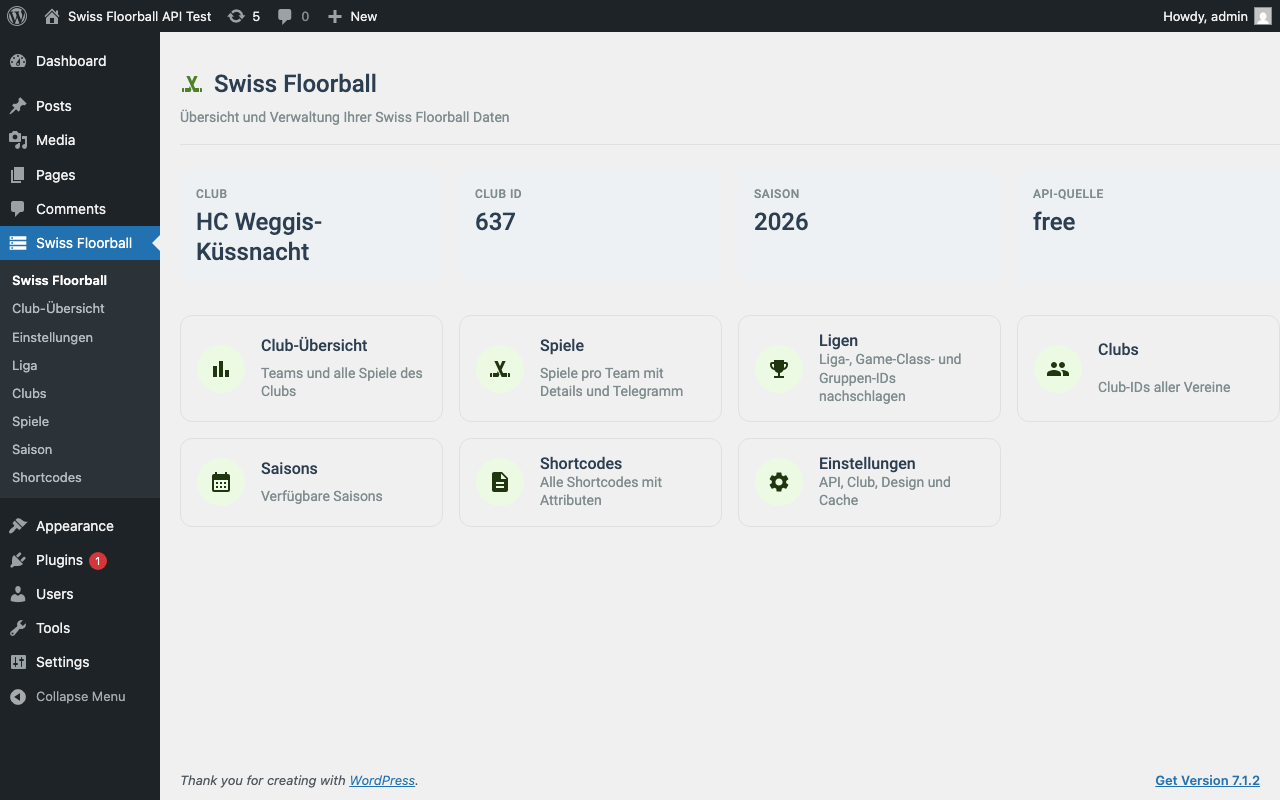
- ID finder: Admin helper pages let you browse leagues, clubs, games and seasons and copy the IDs you need for shortcodes.
Shortcodes
Use these shortcodes in any Page or Post to display data. Attributes that are left out fall back to the values from the settings page where applicable.
Club & Team Data
[swfl-club-teams]– List all teams in your club.[swfl-club-games]– Club games, shown week by week with previous/next week buttons. Attributes:season,limit,offset,show_upcoming,show_pagination.[swfl-team-games]– Games of one team, paged around the next game. Attributes:team_id,season,page_size(default 4),limit,offset,show_upcoming,show_pagination.[swfl-club-team-games]– All teams of a club with a team selector and their games. Attributes:season,page_size(default 4).[swfl-next-game]– The next upcoming game of the club, or of one team. Attributes:team_id,season,limit(default 1, max 10).[swfl-last-result]– The most recent result of the club, or of one team. Attributes:team_id,season,limit(default 1, max 10).[swfl-teams]– List teams.[swfl-clubs]– List all clubs.[swfl-calendars]– Show upcoming games + ICS link. Attributes:team_id,club_id,season,league,game_class,group.
Example:
[swfl-calendars team_id="427892"]
[swfl-club-team-games season="2025" page_size="6"]
The games, ranking and Mobiliar topscorer shortcodes mirror the official Swiss Unihockey web components (uniho-*). Attribute names with hyphens (game-class, club-id, page-size) work as well as the underscore forms. Week and page navigation need JavaScript; without it the initial view is still shown.
League & Rankings
[swfl-league-games]– Games of a league and group, navigable round by round; playoff series are grouped. Attributes:game_class,league,season,group.[swfl-rankings]– Show the ranking table. Attributes:season,league,game_class,group(name, e.g.Gruppe 1).[swfl-mobiliar-topscorer]– The Mobiliar topscorers as cards: of the whole league, or of one club whenclub_idis set. Attributes:club_id,season.[swfl-topscorers]– Show the topscorer list. Attributes:season,league,game_class,group,limit,offset,show_pagination.[swfl-groups]– List available groups. Attributes:season,league,game_class.[swfl-cups]– List available cups.
Example:
[swfl-rankings season="2025" league="3" game_class="21" group="Gruppe 1"]
Players & Games
[swfl-player]– Show player profile. Attributes:player_id.[swfl-game-events]– Show events (goals, penalties) of a game. Attributes:game_id.[swfl-national-players]– List national team players.
Customization
The plugin uses standard CSS classes prefixed with .sfa-, scoped to .swiss-floorball-plugin. You can override them in your theme’s style.css or the Customizer to match your site’s branding.
Icons
The plugin ships inline SVG icons from Material Symbols (Outlined, filled, Apache License 2.0, see THIRD-PARTY.md). No fonts or external requests are used.
- Setting: Show or hide all icons under Settings > Swiss Floorball API > Show icons (option
swfl_show_icons, on by default). - Styling: Use the CSS variables
--swfl-icon-sizeand--swfl-icon-coloron.swiss-floorball-plugin. - Filter:
swfl_icon_svglets you replace an icon. The result is sanitized withwp_kses()(onlysvg,pathandspanwith a fixed set of attributes are kept).
Example:
add_filter( 'swfl_icon_svg', function ( $svg, $name, $args ) {
    if ( 'refresh' === $name ) {
        return '<svg viewBox="0 0 24 24" width="1em" height="1em" fill="currentColor" aria-hidden="true"><path d="M12 4V1L8 5l4 4V6a6 6 0 1 1-6 6H4a8 8 0 1 0 8-8z"/></svg>';
    }
    return $svg;
}, 10, 3 );
Developer Hooks
swfl_icon_svg(Filter) – Replace the SVG markup of an icon.swfl_request_timeout(Filter) – Override the API request timeout (seconds). Takes precedence over the setting.swfl_rest_rate_limit(Filter) – Override the REST requests per minute and visitor (0 = off). Takes precedence over the setting.
External Services
This plugin connects to the Swiss Unihockey API: by default the free wc.swissunihockey.ch, optionally the Partner API on office.swissunihockey.ch, depending on the API source setting.
It is used to retrieve floorball data such as club games, team rosters, league rankings, player statistics, and calendar feeds.
What data is sent and when:
- Your configured Club ID and Season are sent to the API every time a shortcode is rendered or an admin page is loaded.
- No personal data of website visitors is transmitted. All requests are read-only.
- With the Partner API selected, your API key and secret are sent to
office.swissunihockey.chto request a short-lived auth token.
Service provider: Swiss Unihockey (Floorball Schweiz)
Terms of Service | Privacy Policy
Images from Cloudinary: Team logos and player portraits come from the API as image URLs on res.cloudinary.com (Swiss Unihockey’s image host). The visitor’s browser loads these images directly from Cloudinary when a page with such a shortcode is shown, so the visitor’s IP address and browser data are transmitted to Cloudinary. The plugin does not store or process this data.
Service provider: Cloudinary Ltd. | Terms of Service | Privacy Policy
Links to other services: Venue cells link to OpenStreetMap (built from the venue coordinates) and game links point to myapp.swissunihockey.ch. No data is sent to these sites unless a visitor clicks the link.
Disclaimer: This is an independent plugin. It is not affiliated with, endorsed by or sponsored by Swiss Unihockey (Floorball Schweiz). “Swiss Unihockey” is the name of its respective owner and is used only to describe the data source. “Swiss floorball” in the plugin name describes the sport in Switzerland and does not refer to any organisation.
Screenshots
![Club games: Games week by week with previous/next buttons ([swfl-club-games]).](https://ps.w.org/swiss-floorball-api/assets/screenshot-4.png?rev=3753590)
[swfl-club-games]).![Rankings: League table of a group ([swfl-rankings]).](https://ps.w.org/swiss-floorball-api/assets/screenshot-5.png?rev=3753590)
[swfl-rankings]).![League games: Games of a league and group, round by round ([swfl-league-games]).](https://ps.w.org/swiss-floorball-api/assets/screenshot-6.png?rev=3753590)
[swfl-league-games]).![Mobiliar topscorers: Cards for the league or one club ([swfl-mobiliar-topscorer]).](https://ps.w.org/swiss-floorball-api/assets/screenshot-7.png?rev=3753590)
[swfl-mobiliar-topscorer]).![Calendar: Upcoming games with an iCalendar subscription link ([swfl-calendars]).](https://ps.w.org/swiss-floorball-api/assets/screenshot-8.png?rev=3753590)
[swfl-calendars]).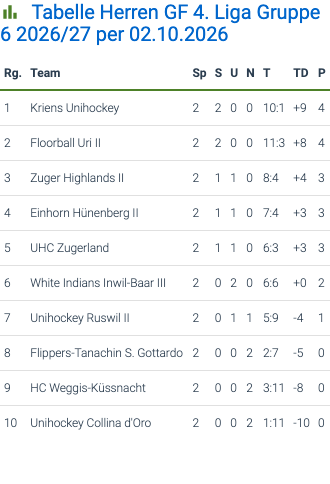
Installation
- Download the plugin from the releases page on GitHub and upload the
swiss-floorball-api.zipfile to your WordPress plugins (or install it from the WordPress.org plugin directory). - Activate the plugin through the Plugins menu in WordPress.
- Navigate to Settings > Swiss Floorball API.
- Enter your Club ID (e.g.,
427892) and the Current Season (e.g.,2025). - Click Save Changes.
- Add the shortcodes to your pages or posts.
API sources
The free API is a read-only whitelist. Shortcodes that need an endpoint it does not offer show a notice that points to the settings.
- Games, rankings, teams, clubs, seasons, cups, game details – available with: Free, Partner
- Leagues and groups (ID finder) – available with: Partner
- Topscorers, player profiles, national players, game events – available with: Partner
- Calendars / ICS links (generated by the plugin from the games) – available with: Free, Partner
Settings
- API source – Where the data comes from (
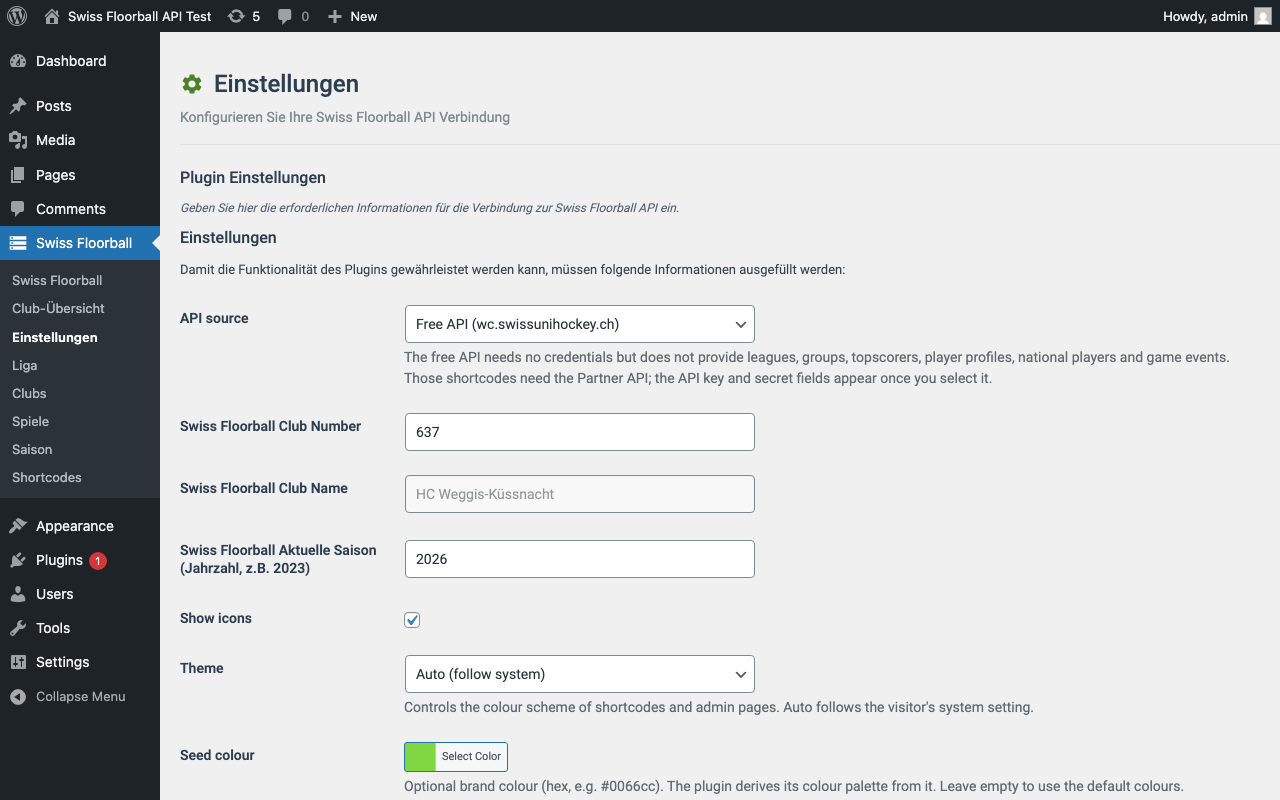
swfl_api_source). Free API (default,wc.swissunihockey.ch) or Partner API (office.swissunihockey.ch, needs credentials). See API sources above for what each source provides. - Partner API key / secret – Credentials for the Partner API (
swfl_api_key,swfl_api_secret). Only used when the source is Partner API; the plugin exchanges them for a short-lived auth token. - Swiss Floorball Club Number – Your club’s ID (
swfl_club_number), used by the club shortcodes. - Swiss Floorball Club Name – Filled in automatically from the API when you save a new Club ID (
swfl_club_name). - Swiss Floorball Aktuelle Saison – Season as a year, e.g.
2025(swfl_actual_season). Used when a shortcode has noseasonattribute. - Show icons – Show or hide all icons in the admin and in the shortcodes (on by default).
- Theme – Controls whether the plugin uses light, dark, or auto (follows system preference) colors (
swfl_theme). Option values areauto(default),light, ordark. - Seed colour – Optional brand colour as hex, e.g.
#0066cc(swfl_seed_color). Primary and secondary colours are derived from it for light and dark mode with AA text contrast. Leave empty for the default colours. - Table style –
flat(default: no border or shadow, thin row dividers, accent line under the header) orclassic(the previous boxed look) (swfl_table_style). - Table colours – Optional hex colours picked with the WordPress colour picker: accent (header line), header text, row divider and row highlight (
swfl_table_{accent,header,divider,highlight}_color). Accent and header text are adjusted to keep AA contrast in light and dark mode. Empty uses the defaults derived from the seed colour. - Striped table rows – Subtle zebra striping for table rows (
swfl_table_striped, off by default). - API request timeout (seconds) – Seconds to wait for the API, 1-30 (default 3).
The admin interface is currently in German. Under Cache Verwaltung the button Cache leeren removes all cached API responses. Changing the Club Number clears the cache automatically.
FAQ
-
Where do I find the IDs?
-
You can find Team, Club, and League IDs in the URL on the Swiss Unihockey website or by using the plugin backend to explore and copy the IDs.
-
Why does my data not update right away?
-
API responses are cached for one hour. Use the Cache leeren button on the settings page to refresh immediately.
-
Is this plugin free?
-
Yep! It’s open-source and completely free to use.
-
Is this an official Swiss Unihockey plugin?
-
No. This is an independent, unofficial plugin by Flavio Waser. It has no connection to Swiss Unihockey (swissunihockey.ch) other than reading their public API.
-
Can I use this plugin for commercial purposes?
-
Yes. As GPLv2-or-later licensed software, it can be used on any site, including commercial ones. It was built for floorball clubs and teams in Switzerland to show their data on their websites, but nothing stops other use.
-
Any further questions?
-
Just drop me a message on GitHub, LinkedIn, or via my homepage.
Reviews
There are no reviews for this plugin.
Contributors & Developers
“Swiss Floorball API” is open source software. The following people have contributed to this plugin.
Contributors
Translate “Swiss Floorball API” into your language.
Interested in development?
Browse the code, check out the SVN repository, or subscribe to the development log by RSS.
Changelog
2.1.2 – 2026-10-18
- Change: The WordPress.org plugin page is easier to read.
readme.txtis generated with the sections WordPress.org knows (Description, Installation, FAQ, Screenshots, Changelog, Upgrade Notice); tables became lists, code examples are indented blocks and emoji are gone. The nine screenshots are now published, and the release deploysassets/(banner, icon, screenshots). The icon and the 772×250 banner now have their correct sizes. No code changes
2.1.1 – 2026-10-13
- Change: Readme: the short description, FAQ and disclaimer now state clearly that this is an independent, unofficial plugin that is not affiliated with Swiss Unihockey and only reads their public API. No code changes
2.1.0 – 2026-10-11
- New: Read-only JSON REST routes under
swfl/v1:/games,/next-game,/last-result,/rankings,/topscorers. They use the shared cache and the existing rate limit; visitors get a neutral 502 on upstream errors (Issue #22) - New: Shortcodes
[swfl-next-game]and[swfl-last-result](attributesteam_id,season,limit) and the sidebar widget Swiss Floorball: Nächstes Spiel und letztes Resultat with the display mode next / last / both and an optional team ID. They read the club and season from the settings. A game counts as a result from the day after it was played. Internally the games list options gotshow_past, which keeps past games, newest first (Issue #18) - New: Scheduled cache warm-up. A WP-Cron job refreshes the games, rankings and topscorers of your club in the background (setting Cache warm-up interval (minutes), default 30, 0 turns it off), so the first visitor after a cache expiry no longer waits for the API. The option Warm up after clearing the cache refills the cache right after a manual clear.
SWFL_Client::fetch_data()got a$force_refreshargument that skips the cache read but still writes the response back. - New: List options
limit,offset,show_upcomingandshow_paginationfor[swfl-club-games],[swfl-team-games](andlimit,offset,show_paginationfor[swfl-topscorers]). Any of them shows a static, trimmed list instead of the week/pager navigation; pagination uses theswfl_pagequery argument. Example:[swfl-team-games team_id="12345" limit="5" show_upcoming="true"] - New: Configurable cache lifetime per API endpoint (games, rankings, game events, topscorers, leagues, seasons, clubs, cups, groups, teams, players, national players) on the settings page. Game events default to 120 seconds for near-live updates, rankings and topscorers to 2 hours.
SWFL_Client::fetch_data()keeps its signature; without an explicit lifetime it uses the setting of the endpoint
2.0.3 – 2026-10-11
- Security: Values sent to the Swiss Unihockey API are URL-encoded, so a request value such as a group name can no longer add query parameters of its own (parameter injection through the public REST routes and shortcode attributes)
- Security: The public REST routes
swfl/v1/*are rate limited per visitor (setting REST requests per minute and visitor, default 60, 0 turns it off, filterswfl_rest_rate_limit), and thegroupvalue accepts only letters, digits, spaces and. _ / -up to 40 characters. This stops anonymous visitors from filling the options table with cached responses - Security: The calendar feed no longer returns the upstream API’s error text to visitors; administrators still get it
- Fix: WordPress.org plugin review: escape late. Icon markup is passed through
wp_kses()where it is printed, inline CSS goes throughwp_strip_all_tags(), and table cells, row attributes, settings inputs and the unknown-response fallback are escaped at the point of output - Remove: The compatibility loader
floorball-api-for-swiss-unihockey.phpis gone, because a plugin must not change the list of active plugins itself. Sites that update from 2.0.1 or older may show the plugin as deactivated once; activate it again, the settings are kept - Change: The cache is cleared through
SWFL_Client::clear_cache()(one shared implementation instead of two copies)
2.0.2 – 2026-10-07
- Fix: WordPress.org plugin review: all PHP globals now use the single prefix
swfl. Optionsswissfloorball_*becameswfl_*(existing settings are copied automatically on the first request after the update,uninstall.phpremoves both), classesSwiss_Floorball_Api*becameSWFL_*, the constantSWISS_FLOORBALL_API_VERSIONbecameSWFL_VERSIONand the JS globalsfaAutosavebecameswflAutosave. Custom code that readsswissfloorball_*options or calls the old class names must be adjusted - Change: The main file is now
swiss-floorball-api.phpand all other files are namedclass-swfl-*.php/swfl-*. The old main file stays as a small loader that moves the activation to the new file; if the plugin shows as deactivated after a manual single update, activate it once. Admin page URLs changed toadmin.php?page=swiss-floorball-api… - Fix:
uninstall.phpnow also removes the Show icons option - Fix: Every registered setting has an explicit type and sanitize callback; the Partner API secret keeps all printable characters instead of going through
sanitize_text_field() - Change: When data cannot be loaded, administrators now also see the reason returned by the API (e.g.
No such group with name "Gruppe 4".); visitors still see the generic message
2.0.1 – 2026-10-04
- Fix: Plugin Check error:
wp_unique_id()needs WordPress 5.0.3 but the plugin supports 5.0, replaced by a local counter - Fix: phpcs warnings for the unused
$is_backendparameters, kept for backwards compatibility - Fix: Plugin guidelines: the bundled Roboto font is documented in
THIRD-PARTY.mdand ships with its licence (fonts/OFL.txt); the external services section now discloses the Cloudinary image host (team logos, player portraits) and links to OpenStreetMap and the Swiss Unihockey app; added a disclaimer that the plugin is not affiliated with Swiss Unihockey or Floorball Schweiz - Change: Internal refactoring without functional change: the large display, widget, admin and public classes are split into smaller topic classes (SonarCloud findings)
2.0.0 – 2026-10-02
- Breaking: API source switch.
api-v2.swissunihockey.chis no longer used; the default is the free API (wc.swissunihockey.ch), optionally the Partner API (office.swissunihockey.ch, API key + secret). Leagues, groups, topscorers, player profiles, national players and game events need the Partner API. See docs/migration.md - Breaking: Calendar subscriptions: the old calendar export is gone. The plugin serves its own iCalendar feed at
/wp-json/swfl/v1/calendar; previously subscribed URLs must be subscribed again - Breaking:
[swfl-rankings]takes the group name (Gruppe 1) instead of a group ID,[swfl-topscorers]ignoresgroup(endpointtopscorers/su);[swfl-club-games]and[swfl-team-games]now page by week / around the next game and need JavaScript and the public REST routesswfl/v1/*for navigation - Breaking: New table markup and styling (flat style,
.sfa-table-wrap,--sfa-sys-*tokens). Custom CSS targeting the old markup needs a check; set Table style toclassicfor the previous look - Change: Major release. The default API source is now the free Swiss Unihockey API, shortcodes follow the official web components, and the frontend and admin were redesigned (see below). Review the Remove entry before updating if you used the former API source
- Change: Settings page: the Partner API key and secret fields have clear labels and descriptions and are only shown while Partner API is selected as API source. All settings inputs and dropdowns share one compact size
- Fix:
[swfl-topscorers]now uses thetopscorers/suAPI endpoint (the oldtopscorersendpoint returned 404). Thegroupattribute is still accepted but ignored; lists for leagues with several groups may be longer (Issue #27) - Fix: Game lists no longer fail on cancelled games without a time (Issue #28)
- Fix: The admin script is versioned by its modification time, so browsers no longer serve a stale cached copy after an update
- Change:
[swfl-mobiliar-topscorer]no longer defaults to the configured club. Withoutclub_idit shows the Mobiliar topscorers of the whole league; withclub_idit filters to that club - Change: Responsive widgets without a horizontal scrollbar. Layout now follows the width of the widget (container queries) instead of the screen width, because theme content columns are often much narrower than the viewport: compact cells and wrapping text first, then minor columns (ranking details, league column, venue, logos) are hidden on narrow widths; the paging buttons wrap below the label; the dark wrapper uses less padding on phones. The calendar table headers now read Heim/Gast (they showed Goal/Resultat)
- New: Frontend icons (controlled by the Show icons setting): section titles, previous/next buttons, calendar title and subscribe link, error notices, and a map link with a pin icon on venue cells (OpenStreetMap, from the venue coordinates of the API)
- Remove: The previous API (
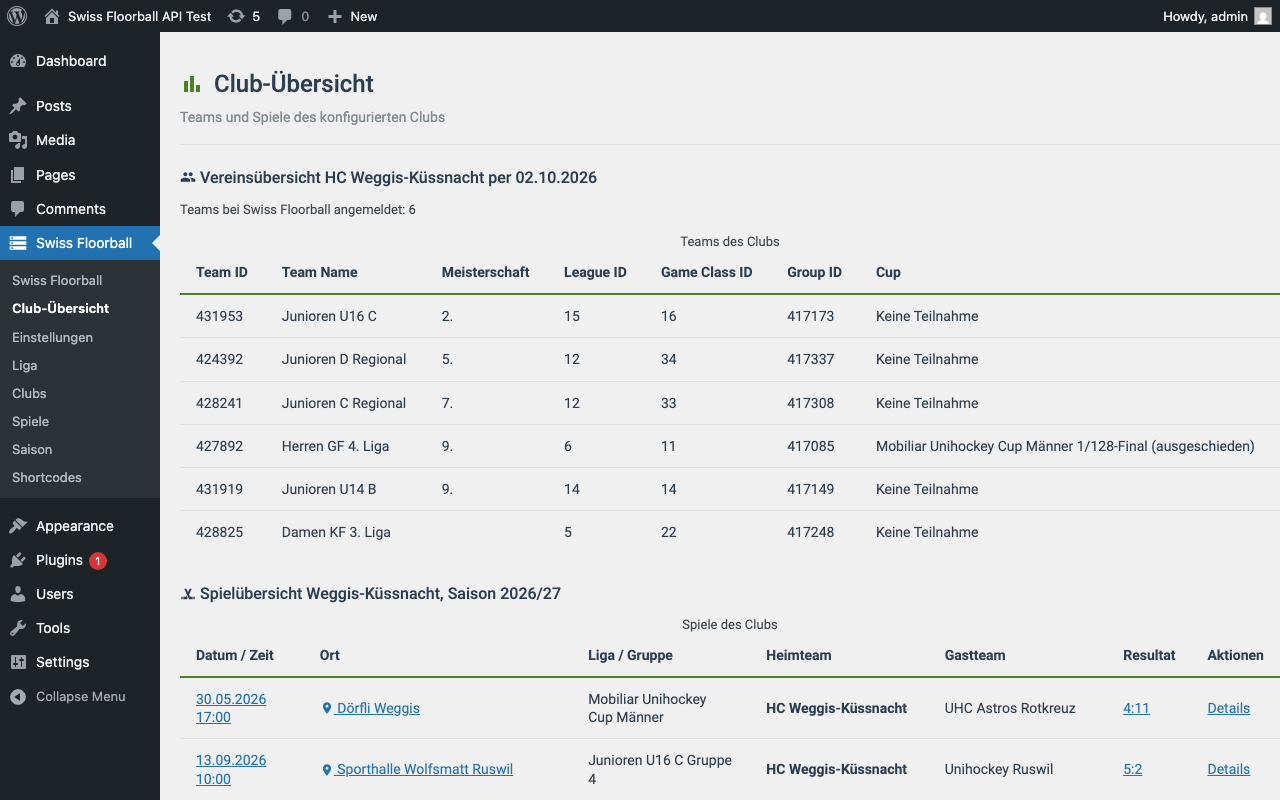
api-v2.swissunihockey.ch) is no longer an API source. Installations that had it selected fall back to the free API; leagues, groups, topscorers, player profiles, national players and game events are then only available through the Partner API. Calendar subscriptions no longer use the old calendar export: the plugin now serves its own iCalendar feed at/wp-json/swfl/v1/calendar(team_id,club_idorleague+game_class+group, optionalseason), built from the games of the free API - Change: New admin dashboard with stat tiles (club, club ID, season, API source) and navigation tiles. The club overview (teams) and the club games list moved from the dashboard to a separate submenu page “Club-Übersicht” (Issue #94)
- Change: Admin pages without big boxes: the gradient header became a slim top app bar, cards, table containers and form sections sit flat on the page (no border, shadow or hover lift), quick-access links are compact tonal buttons and the settings overview is a divided key/value list (Issue #94)
- Change: All tables share the look of the games widgets (
swfl-club-team-games,swfl-league-games): section title, scrollable.sfa-table-wrap, right-aligned numbers, highlighted rows and bold links. The admin game lists (Spiele, dashboard) now render with the same code and markup as the shortcodes plus a Details link, and the admin tables follow the flat style and the table colour settings (Issue #94) - New: Flat table style (new default) with backend settings for table style (
flat/classic), accent, header text, divider and highlight colours (colour picker, AA contrast guaranteed) and optional striped rows. The wrapper getssfa-table--flat|classic(andsfa-table--striped); chooseclassicto keep the previous boxed look (Issue #94) - New: Shortcodes modelled on the official Swiss Unihockey web components:
swfl-league-games,swfl-club-team-gamesandswfl-mobiliar-topscorer.swfl-club-gamesnow shows games week by week,swfl-team-gamespages around the next game (page_size,season) andswfl-rankingstakes the group name (e.g.Gruppe 1). Navigation uses a small script and the REST routesswfl/v1/team-gamesandswfl/v1/league-games - New: API source setting. The plugin now uses the free Swiss Unihockey API (
wc.swissunihockey.ch) by default and can be switched to the Partner API (api key + secret, auth token). Endpoints the free API does not offer (leagues, groups, topscorers, players, national players, game events) show a clear notice instead of a generic error - New: Optional Seed colour setting (hex). Derives the primary/secondary
--sfa-sys-color-*tokens, includingon-*colours with AA contrast, for light, dark and auto mode on the frontend and in the admin. Empty keeps the default look; a set value overrides--sfa-primary/--sfa-secondarytheme overrides - New: Theme setting (Auto / Light / Dark, default Auto) under Settings. Dark colours are
--sfa-sys-*tokens scoped to the plugin containers (data-sfa-themeon.swiss-floorball-pluginand.sfa-admin-wrap); Auto followsprefers-color-scheme. The old hard-coded dark block was replaced by these tokens - Fix: Plugin Check readme issues: “Tested up to” raised to 7.1 and short description shortened to 150 characters or less
- Fix: Resolve phpcs findings in admin and display classes: add translator comments, escape wp_die, use wp_safe_redirect, annotate DB queries (Issue #75)
- New: Admin dashboard restyled in Material 3 (header, tonal navigation buttons, outlined form fields, filled/outlined buttons, cards and tables) using the
--sfa-sys-*tokens; 48 px touch targets and visible keyboard focus. Markup, shortcodes and options are unchanged - Change: Frontend tables and cards in Material 3 look using only
--sfa-sys-*tokens: surface-container tables with dividers, hover/focus state layer, sticky header,.sfa-cardvariants (--elevated,--filled,--outlined), 48 px touch targets and reduced-motion support. On narrow screens tables now scroll horizontally instead of switching to a card layout - New: Visually hidden
<caption>andscopeattributes on all plugin tables for accessibility - Change: Frontend buttons (
.button,.btn), calendar subscribe link, info boxes and empty states restyled with the--sfa-sys-*tokens (state layers, focus ring, 48px touch targets, motion tokens). Themes that style.buttoninside the plugin will see the new look - Change: Failed API requests render a
.sfa-info-box--dangerbanner withrole="alert"instead of a bare paragraph; the calendar link getsrel="noopener noreferrer";.sfa-empty-state*now styled (legacy.empty-state*kept) - New: Design-token layer (
--sfa-sys-*colors, typography, shape, elevation 0-5) for the frontend and admin styles, scoped to.swiss-floorball-plugin/.sfa-admin-wrap. Existing--sfa-*variables, Roboto and dark mode are unchanged; no visual change - Fix: Add explicit request timeout (5 seconds, minimum 1 second) to API client calls, filterable via
swfl_request_timeouthook - Fix: Add
apply_filters()stub to verify_api.php for test compatibility - New: Icon infrastructure.
Swiss_Floorball_Api_Icons::get()accepts an argument array (class,label) and loads Material Symbols SVGs frompublic/icons/(calendar_month,location_on,error,info,refresh) - New: Setting
swissfloorball_show_iconsand filterswfl_icon_svg - Removed: Unused
render_sessions()stub that issued a discarded API request - New: Setting
swissfloorball_request_timeout(API request timeout, 1-30 seconds) on the settings page; it provides the default of theswfl_request_timeoutfilter, which still overrides it - Security: Replace cache-cleared notice GET parameters with transient-based notification
- Change: Default API request timeout lowered from 5 to 3 seconds
- Fix: Render player details via shortcode
[swfl-player]without dumping raw API response — now displays structured data as a table with all values escaped (PR #61) - Fix: Escape LIKE patterns in transient cleanup queries to prevent wildcard interpretation
- Fix: Admin class methods to snake_case; prefix template variables with
swfl_; apply Yoda conditions (PR #50, WPCS step 4/5) - Fix: End inline comments with full stops (WPCS 3c2)
- Fix: Rename global functions to snake_case (WPCS)
1.0.5 – 2026-08-09
- Fix: Remove FAQ answer restricting the plugin to “personal and non-commercial use” — this contradicted the GPLv2-or-later license, which grants unrestricted use including commercial. Not allowed under WordPress.org plugin guidelines.
- Fix: Add
Requires PHPandLicense URIfields to the readme header - Fix: Correct Text Domain (header + all translation strings) from
floorball-api-for-swiss-unihockeytoswiss-floorball-apito match the assigned WordPress.org slug - Fix: Rename
languages/floorball-api-for-swiss-unihockey.pottolanguages/swiss-floorball-api.potto match the text domain - Fix: Update “Tested up to” to WordPress 7.0
- Fix: Exclude
graphify-out/,.vscode,.claude, and.DS_Storefrom the release ZIP and SVN deploy via.distignore— these dev-tool artifacts (including files with&/()in their names) were failing the automated plugin scan - Fix: Update release workflow
SLUGand build/zip folder names fromfloorball-api-for-swiss-unihockeytoswiss-floorball-api - Fix: Correct
.gitignorereadme.txt casing for case-sensitive CI filesystems
1.0.4 – 2026-05-04
- Security: Add nonce and permission checks for all admin
$_GET/$_POSTactions - Security: Sanitize nonce with
wp_unslash()+sanitize_text_field()beforewp_verify_nonce() - Security: Escape all dynamic HTML attributes with
esc_attr()in settings field renderer - Fix: Add
ABSPATHguard to main plugin file and admin matches partial - Fix: Rename plugin slug to
floorball-api-for-swiss-unihockeyfor WordPress.org listing - Fix: Rename all shortcodes from
suh-*toswfl-*to meet 4-character prefix requirement - Fix: Prefix settings group and section IDs with
sfa_to avoid naming collisions - Fix: Remove
load_plugin_textdomain()call — not needed since WordPress 4.6 - Fix: Update “Tested up to” to WordPress 6.9
- Fix: Remove angle brackets from Donate link URL
- Fix: Exclude
.distignoreandREADME.mdfrom release ZIP - Improvement: Document external service (Swiss Unihockey API) with Terms of Service and Privacy Policy links
1.0.3 – 2026-05-03
- Security: Use
$wpdb->prepare()for all database queries to prevent SQL injection - Security: Sanitize all shortcode attributes with
absint()before passing to API - Security: Escape all
admin_url()outputs withesc_url() - Fix: Scoped all CSS to plugin containers to prevent styling conflicts with other theme elements (buttons, notices, etc.)
- Fix: Dark mode CSS variables scoped to
.swiss-floorball-plugin/.sfa-admin-wrapinstead of:root - Fix:
prefers-reduced-motionrule scoped to plugin elements only - Fix:
scroll-behavior: smoothscoped to plugin container instead ofhtml - Fix: Admin
.button-primarystyles scoped to.sfa-admin-wrapto avoid overriding WordPress core buttons - Performance: CSS and JS only enqueued on pages/posts that contain a plugin shortcode (frontend) or on plugin admin pages (backend)
- Improvement: Replaced all inline styles in templates with reusable CSS classes
- Improvement: Added
aria-labelto admin search input for accessibility - Improvement: Removed
console.logstatements from admin JavaScript - Improvement: Use
const/letand.includes()in admin JavaScript - Improvement: Use
require_onceinstead ofrequirefor the main plugin class - Fix: Version constant
SWISS_FLOORBALL_API_VERSIONnow matches plugin header version - Improvement: Calendar link now has correct desktop styles (was previously only styled on mobile)
- Improvement: Replaced remaining inline styles in admin partials (matches, settings, shortcodes) with CSS classes
- Improvement: Replaced hardcoded colors in admin CSS with CSS variables
- Improvement: Escaped remaining
admin_url()outputs in shortcodes partial
1.0.2 – 2026-01-02
- Fix: Mobile table background color
- Fix: Mobile table text alignment
1.0.1 – 2025-11-30
- Feature: Implement detailed matches display in admin
- Feature: Scope public CSS
- Fix: Add release workflow documentation
- Fix: Consistent language and naming in code
1.0.0 – 2025-11-29
- Initial release