

Description
Sun Form Builder is a modern, lightweight form builder for WordPress that lives natively inside the Gutenberg block editor. Drop the Sun Form block into any post, page or template and build the form visually using a rich set of field controls — no coding required.
Each form is stored as its own post (sun_forms), so you can manage all of your forms from a single dashboard, embed them anywhere with a shortcode, and customize per-form styles that are automatically compiled into a dedicated CSS file.
Highlights
- Build forms visually inside the Gutenberg block editor using the
Sun Formblock. - Reusable Email Templates powered by Twig, edited with the WordPress CodeMirror editor.
- Shortcode embedding from any builder or classic editor:
[sun_form id="123"]. - Dedicated Sun Forms admin menu with form list, email templates and settings.
- Mailchimp integration out of the box (additional integrations available in the Pro version).
- Per-form generated CSS stored under
wp-content/uploads/sun-form-builder/css/for fast frontend rendering. - SVG upload support enabled for icon/branding usage inside forms.
- Conditional asset loading — submission script and styles are only enqueued on pages that actually use a form.
- Developer-friendly: clean hooks, custom post types and filters (
block_categories_all,upload_mimes, etc.).
Field & Form Features
- Multiple field types: text, email, textarea, select, checkbox, radio, and more.
- Customizable labels, placeholders, validation and required state per field.
- Email notifications rendered through a Twig-based template (
{% for key, item in data %}etc.). - Default email template auto-created on first run so the plugin works immediately after activation.
- Admin column showing the shortcode for every form for quick copy & paste.
Integrations
Free version:
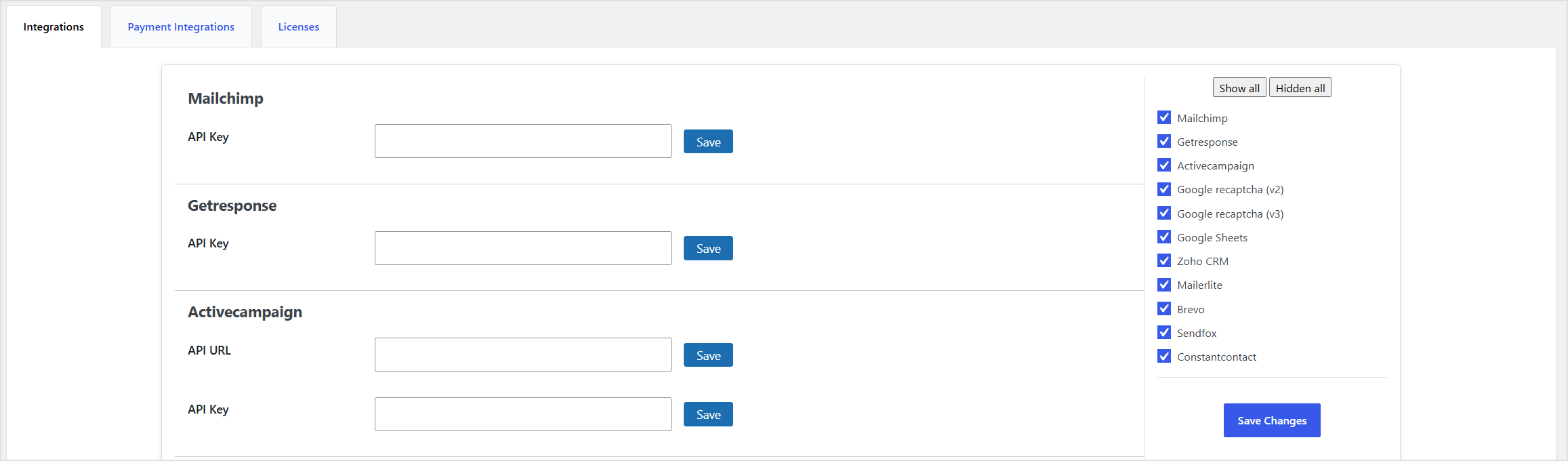
- Mailchimp — connect with your Mailchimp API key under Sun Forms Settings Integrations.
Available in the Pro version (Sun Form Builder Pro):
- GetResponse, ActiveCampaign, MailerLite, Sendinblue, SendFox, Constant Contact
- Google reCAPTCHA
- Google Sheets
- Zoho CRM
- Stripe payments
External services
This plugin connects to the Mailchimp API to add form subscribers to a Mailchimp audience you have configured. Mailchimp is a third-party service provided by The Rocket Science Group LLC d/b/a Mailchimp.
When data is sent to Mailchimp
Requests are sent to the Mailchimp REST API at https://<dc>.api.mailchimp.com/3.0/ (where <dc> is the data center derived from your API key, e.g. us1.api.mailchimp.com, us21.api.mailchimp.com, etc.) only in the following cases:
- A site administrator saves or updates a Mailchimp API key on Sun Forms Settings Integrations (the key is sent once to authenticate with Mailchimp and verify the connection).
- A site administrator configures the Mailchimp integration on a form inside the block editor — the plugin requests the available audiences, interest groups and merge fields from Mailchimp so they can be selected in the editor UI.
- A visitor submits a form that has the Mailchimp integration enabled by the site administrator.
No data is sent to Mailchimp on any frontend page view, nor when the Mailchimp integration is not enabled for a form.
What data is sent to Mailchimp
When a visitor submits a form configured to use the Mailchimp integration, the following data is sent:
- The Mailchimp API key stored on the settings page (used for authentication only, sent as an HTTP
Authorization: Basicheader). - The audience / list ID that the site administrator has selected for the form.
- The visitor’s email address from the form.
- Any additional merge fields that the site administrator has mapped between the form fields and the Mailchimp audience (e.g. first name, last name, address, phone number).
No personal data is sent to Mailchimp unless you (the site administrator) explicitly map a Mailchimp integration to one of your forms.
Mailchimp legal documents
- Terms of Use: https://mailchimp.com/legal/terms/
- Privacy Policy: https://mailchimp.com/legal/privacy/
By enabling the Mailchimp integration in this plugin, you acknowledge that the data described above will be transmitted to and processed by Mailchimp in accordance with their Terms of Use and Privacy Policy.
Credits
Built with love on top of the WordPress block editor. Email templates are powered by Twig.
Screenshots
Blocks
This plugin provides 1 block.
- Form
Installation
- Upload the
sun-form-builderfolder to/wp-content/plugins/, or install the plugin through the WordPress Plugins screen. - Activate the plugin through the Plugins menu in WordPress.
- Go to Sun Forms in the admin sidebar to create your first form.
- (Optional) Open Sun Forms Settings to connect Mailchimp and configure integrations.
- Embed a form in any post or page using either:
- The Sun Form Gutenberg block, or
- The shortcode
[sun_form id="FORM_ID"](the form ID is shown in the Shortcode column of the forms list).
FAQ
-
Do I need the Gutenberg editor to use this plugin?
-
The form builder UI is built as a Gutenberg block, so you’ll use Gutenberg to design forms. Once a form is created, you can embed it anywhere using the
[sun_form id="..."]shortcode, including the classic editor and most page builders. -
How do I embed a form in a post or page?
-
Either insert the Sun Form block from the WP Form Builder category, or paste the shortcode
[sun_form id="123"](replace123with the ID shown in the Shortcode column of Sun Forms All Forms). -
How do I customize the notification email?
-
Go to Sun Forms Email Templates, open a template and edit the HTML in the CodeMirror editor. The plugin uses Twig syntax, so you can loop through submitted fields with
{% for key, item in data %} ... {% endfor %}and output values like{{ item.label }}and{{ item.value }}. -
Where are the per-form styles stored?
-
Each form’s compiled CSS is written to
wp-content/uploads/sun-form-builder/css/{form_id}.cssand is only enqueued on pages that actually contain the form (via block or shortcode). -
How do I connect Mailchimp?
-
Open Sun Forms Settings Integrations, paste your Mailchimp API key into the Mailchimp field and click Save.
-
Does this plugin support file or SVG uploads?
-
Yes. The plugin registers
image/svg+xmlas an allowed mime type so SVG files can be uploaded through the standard WordPress media library. -
Is there a Pro version?
-
Yes. Sun Form Builder Pro adds more integrations (reCAPTCHA, Google Sheets, Zoho CRM, additional email marketing services and Stripe payments). The free plugin will automatically stand down if the Pro version is active.
Reviews
There are no reviews for this plugin.
Contributors & Developers
“Sun Form Builder” is open source software. The following people have contributed to this plugin.
Contributors
Translate “Sun Form Builder” into your language.
Interested in development?
Browse the code, check out the SVN repository, or subscribe to the development log by RSS.
Changelog
1.0.0
- Initial release.
- Gutenberg block
sun-formbuilder/formfor visual form building. - Custom post types
sun_formsandsun_email_template. - Shortcode embedding:
[sun_form id="..."]. - Per-form CSS generation and conditional asset loading on the frontend.
- Twig-based email templates with a default template seeded on first run.
- Mailchimp integration and settings page.
- SVG upload support.