

Description
SendPaw Mail makes WordPress email actually arrive. It replaces WordPress’s default
mail sending (wp_mail()) with delivery through SendPaw, so your transactional email —
order confirmations, user registrations, password resets, contact-form notifications —
reaches the inbox instead of the spam folder.
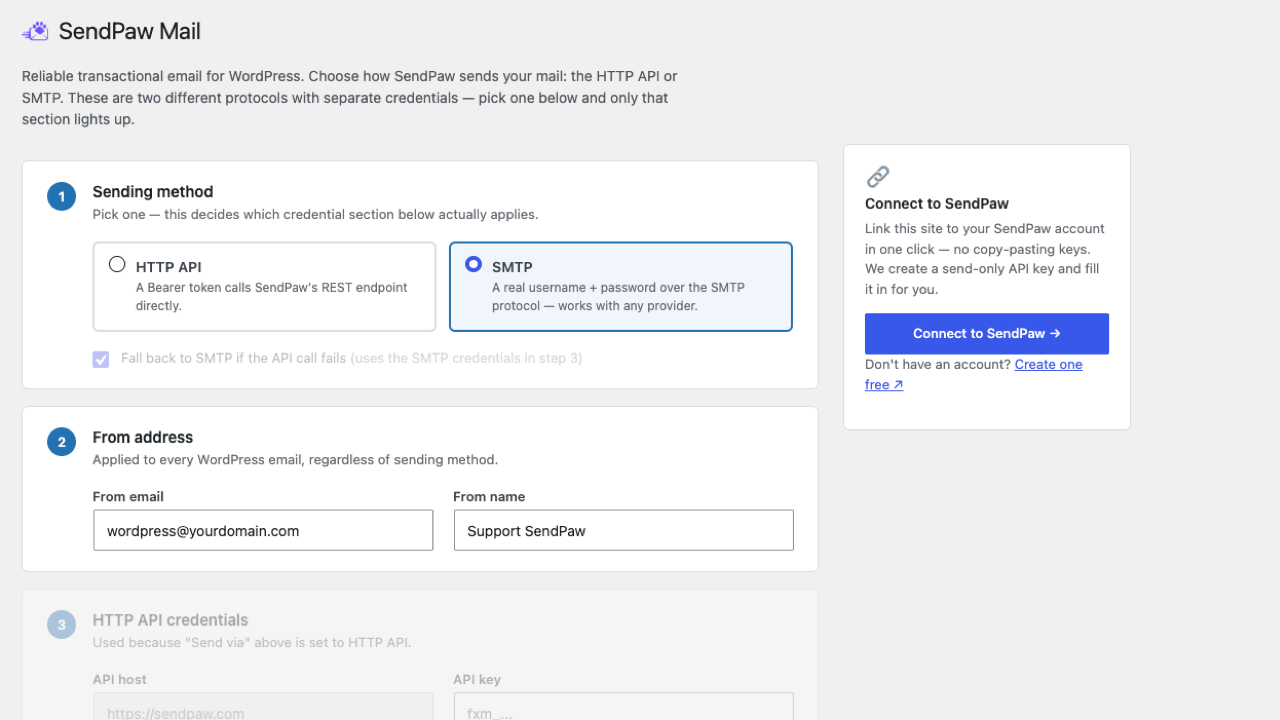
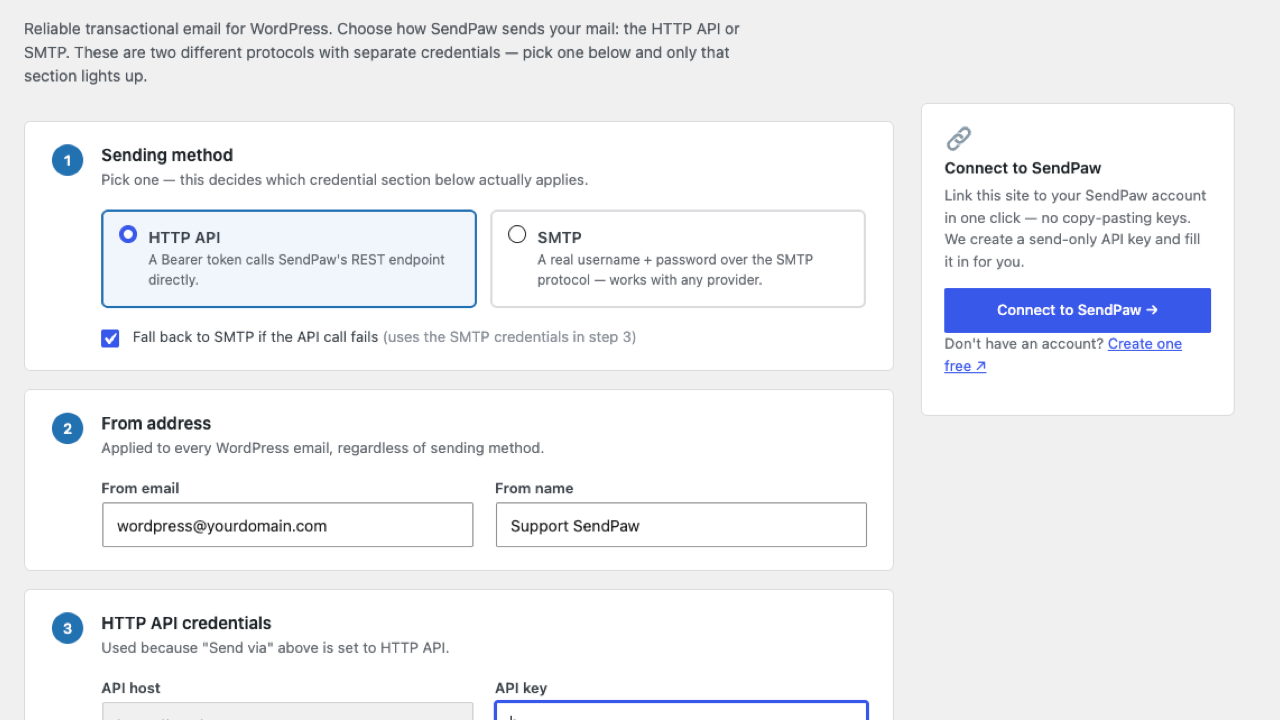
You can send using either of two independent methods, whichever suits your host:
- HTTP API — a Bearer token calls SendPaw’s REST endpoint directly. Fastest, and less
likely to be blocked by hosting firewalls. - SMTP — a real username and password over the standard SMTP protocol.
The HTTP API and SMTP are two different protocols with their own separate credentials —
pick either one as your primary sending method, with optional automatic fallback from
API to SMTP if the API call fails.
Features:
- Two independent sending methods: HTTP API (Bearer token) or SMTP (username + password).
- SMTP credentials work like any standard SMTP server — they aren’t tied to the API key,
so the SMTP settings also work with SMTP providers other than SendPaw. - Optional automatic fallback to SMTP if the API call fails.
- Every send is capped at 10 seconds total (across the API attempt and the
SMTP fallback combined), so a slow or unreachable mail server can only add
a few seconds to the page that triggered the email, never minutes — this
is what prevents 504 Gateway Timeout errors on checkout, registration,
contact forms, etc. - Automatically overrides the “From” address for all WordPress emails.
- Send a test email directly from the settings page.
Note: SendPaw is a self-hosted service, so you’ll need to enter the hostname of your own
SendPaw instance (there is no single shared hostname for all users).
External services
This plugin connects to SendPaw, an external transactional email service, to deliver the
email your WordPress site sends. Sending mail through SendPaw is the entire purpose of the
plugin, so it cannot work without contacting that service. Nothing is sent until you have
entered your own credentials on the Settings > SendPaw Mail screen.
1. SendPaw email API (https://sendpaw.com/api/v1/email)
Used to deliver your WordPress email when the sending method is set to “HTTP API”. Every
time WordPress sends an email (order confirmation, user registration, password reset,
contact-form notification, or the test email you trigger from the settings screen), the
plugin makes one HTTPS request to this endpoint containing: your API key (as a Bearer
token), the sender name and address you configured, the recipient addresses, the subject,
the message body, and any attachments passed to wp_mail(). No data is sent when no email
is being sent.
2. SendPaw SMTP server (the host you enter under “SMTP host”)
Used to deliver your WordPress email when the sending method is set to “SMTP”, or as the
automatic fallback when an API send fails. The same message data listed above (sender,
recipients, subject, body, attachments) is transmitted over an authenticated, encrypted
SMTP connection using the SMTP username and password you entered. These SMTP settings are
provider-agnostic: if you point them at a non-SendPaw SMTP server, the mail goes to that
server instead and SendPaw is not contacted.
3. SendPaw account API (https://sendpaw.com/api/v1/...), optional
Only used if you click “Connect to SendPaw” or after you have connected. The connect flow
opens SendPaw in your browser to authorise this site (protected by a one-time state value
plus PKCE) and, on approval, receives a send-only API key that is saved in your settings.
While connected, the settings screen requests your account summary (remaining email credits
and the list of your sending domains and their verification status) so it can display them
in the sidebar. Your site URL is sent as part of the connect request so the created key can
be identified. This is not used at all if you enter an API key manually.
Service provider: SendPaw (https://sendpaw.com).
Terms of Service: https://sendpaw.com/terms
Privacy Policy: https://sendpaw.com/privacy
Note: SendPaw can also be self-hosted. If you define the SENDPAW_API_HOST constant in
wp-config.php, or point the SMTP host at your own server, the requests described above go
to that instance instead of sendpaw.com, and that operator’s terms apply.
Screenshots
Installation
- Upload the
sendpaw-mailfolder to/wp-content/plugins/, or install it through the WordPress Plugins screen. - Activate the plugin.
- Go to Settings > SendPaw Mail.
- Enter the API key from your SendPaw dashboard, or click “Connect to SendPaw” to have one created and filled in for you.
- Save, then send a test email to confirm your configuration works.
If you send over SMTP instead, the SMTP host is already filled in with SendPaw’s server — you only need to add your SMTP username and password. Change the host if you send through a different provider.
FAQ
-
Which PHP versions are supported?
-
PHP 7.4 is the minimum. The plugin is compatible with PHP 8.0 through 8.5, including the
stricter null-argument handling introduced in PHP 8.1: every value is cast to string before
it reachestrim(),preg_replace()or similar, so a null coming fromwp_mail()headers
or an unset settings field never triggers a deprecation notice.The plugin declares all class properties explicitly, so it is unaffected by the deprecation
of dynamic properties (PHP 8.2) and will keep working when that becomes an error in PHP 9.
It uses no functions or extensions removed in PHP 8.5. -
Can I use a subdomain as my sending domain?
-
Yes. A subdomain such as
mail.example.comornews.example.comis added and verified as
a domain in its own right, with its own SPF, DKIM and (optionally) tracking and bounce
records published under that subdomain. Note that verifyingexample.comdoes not
automatically authorise its subdomains — add each sending subdomain separately, and make
sure theFrom:address on this settings screen matches a verified one. -
What’s the difference between API and SMTP in this plugin?
-
The API sends through SendPaw’s HTTP endpoint (faster, and less likely to be blocked by
hosting firewalls). SMTP sends using the standard SMTP protocol to SendPaw’s ingress. The
plugin can use the API as the primary method and automatically fall back to SMTP if the API
fails. -
Why do I need to enter the “Host” myself?
-
SendPaw can be self-hosted, so every instance has its own hostname — there is no single
hostname that works for every user. -
Are attachments supported?
-
Yes. Attachments passed to
wp_mail()— WooCommerce invoices, form uploads, and so on —
are sent over both transports. On the API path the server validates each file against an
allowlist of types and the operator’s size/count limits, and rejects the message if a file
isn’t allowed rather than delivering it without the attachment.
Reviews
There are no reviews for this plugin.
Contributors & Developers
“SendPaw Mail” is open source software. The following people have contributed to this plugin.
Contributors
Translate “SendPaw Mail” into your language.
Interested in development?
Browse the code, check out the SVN repository, or subscribe to the development log by RSS.
Changelog
1.1.7
- The SMTP host now defaults to SendPaw’s SMTP server, so it no longer has to be typed in
by hand. Existing installs that left it blank are filled in automatically; a host you set
yourself is never overwritten. - Replaced the settings-page logo with the correct SendPaw mark.
1.1.6
- Verified compatibility with PHP 8.5; documented that the plugin uses no functions or
extensions removed in that release and declares all class properties explicitly, so it is
unaffected by the dynamic-property deprecation that becomes an error in PHP 9.
1.1.5
- Added a “Settings” link to the plugin’s row on the Plugins screen, so the configuration
page can be reached directly after activation instead of via the Settings menu. - Added a “Documentation” link to the plugin row meta.
1.1.4
- Moved all admin CSS and JavaScript out of the page markup into properly enqueued asset
files (wp_enqueue_style()/wp_enqueue_script()), loaded only on the plugin’s own
settings screen. - Documented the external SendPaw services the plugin contacts, what data is sent and when,
with links to the terms of service and privacy policy. - Load WordPress’s bundled PHPMailer classes with
require_onceinstead ofrequire.
1.1.3
- Verified compatibility with PHP 8.0 through 8.4.
- Hardened string handling so a null value from
wp_mail()(headers, recipients) or a
settings field no longer triggers a PHP 8.1 deprecation notice. - Use
wp_safe_redirect()for the Connect flow, whitelisting only the SendPaw host. - Documented that query-string reads on the settings screen are display-only and the
Connect callback is protected by a one-time state value plus PKCE. - Fixed the internal version constant not matching the plugin header.
1.1.0
- Send
wp_mail()attachments over both the API and SMTP transports (previously dropped). - API sends now include the sender display name, matching SMTP sends.
- Fixed the SMTP timeout not honouring the remaining send-time budget.
1.0.0
- Initial release: one-screen setup, sending via the API with SMTP fallback, test email feature.