

Description
Scout is an AI-powered chatbot and live chat plugin for WordPress. It connects your WordPress site to the Scout SaaS platform, giving you a smart customer service agent that works around the clock.
Works with or without WooCommerce — service sites, information sites, and e-commerce stores all supported.
Core Features
- AI Customer Service — Answers customer questions about your business, products, services, and pricing using your own business profile and knowledge base
- WooCommerce Integration — Product search, order status lookup, cart management, and product cards with Add to Cart buttons
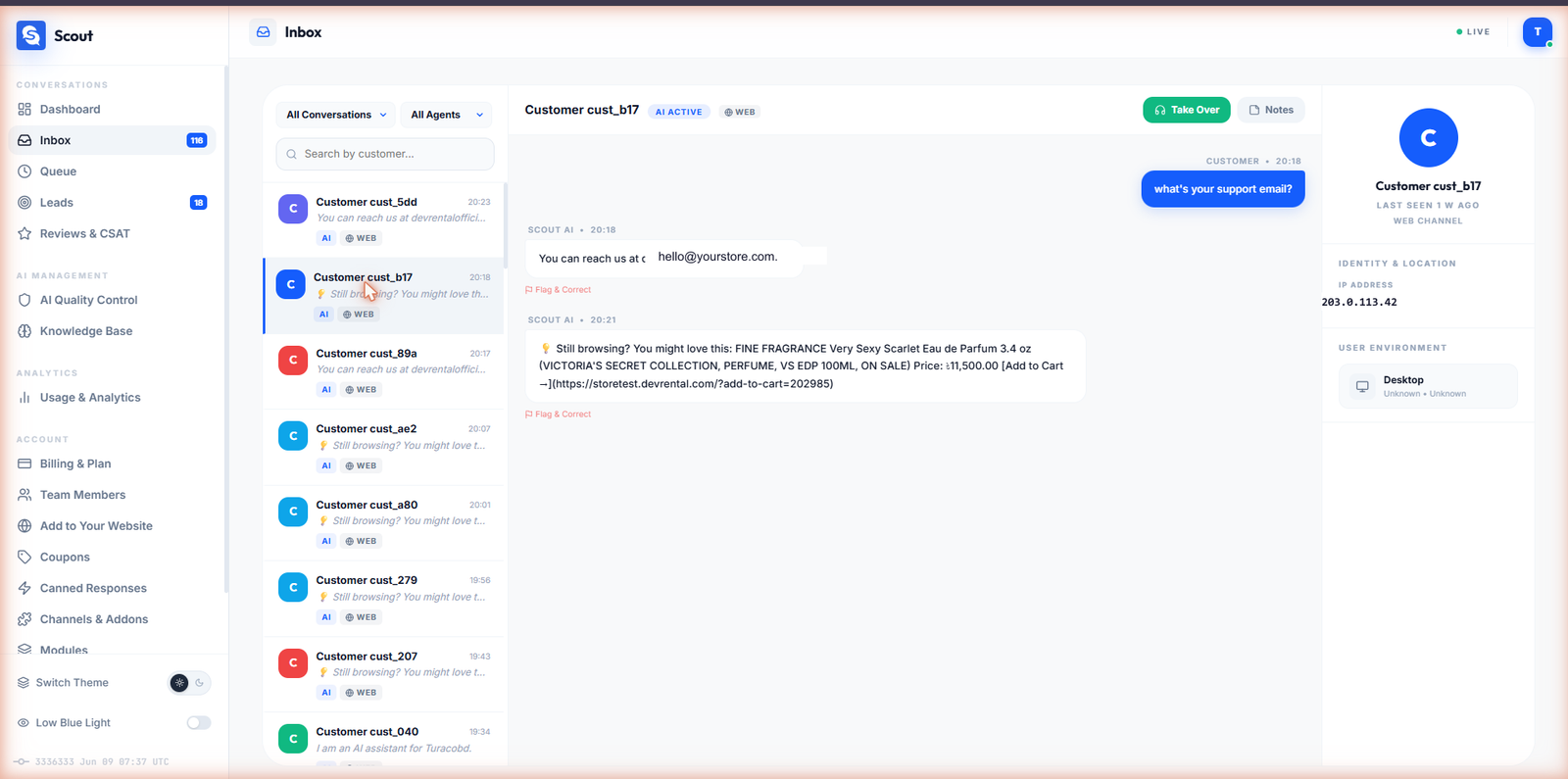
- Live Chat / Agent Takeover — Agents can take over any conversation in real time from the Scout dashboard inbox
- Multi-Channel Messaging — Connect Telegram, WhatsApp, and Facebook Messenger; conversations unified in one inbox
- Lead Capture — Automatically captures visitor name, email, and phone from conversations
- Appointment Booking — Integrates with Google Calendar to accept and manage bookings (Pro)
- Reviews Boost — Smart CSAT flow that routes happy customers to Google reviews and captures negative feedback privately (Pro)
- Webhooks — Send lead and booking data to Zapier, Make, Slack, and any webhook endpoint (Pro)
How It Works
- Sign up for a free Scout account at scout.devrental.com
- Copy your API key from the Scout dashboard
- Paste the key into the Scout plugin settings on your WordPress site
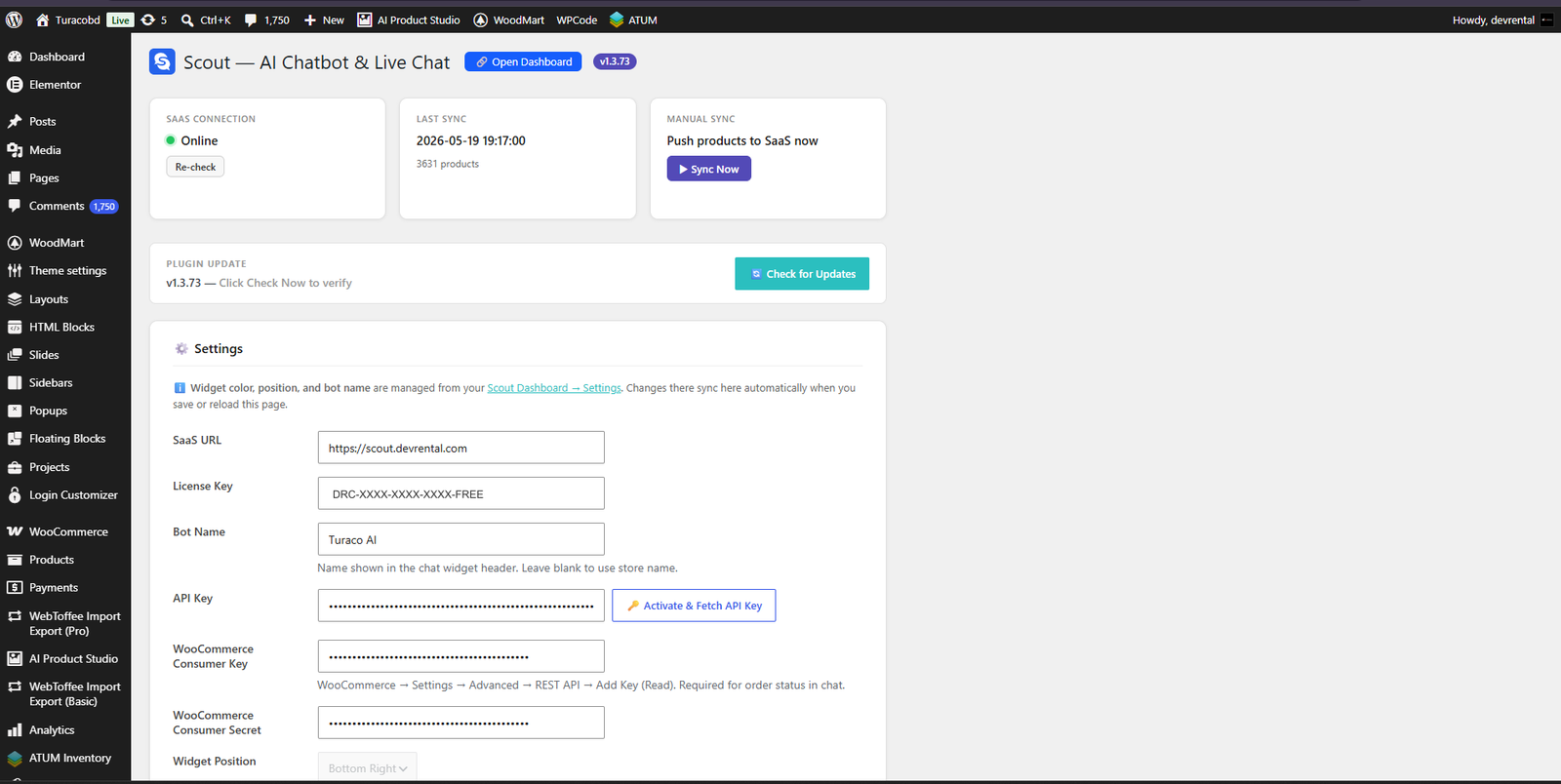
- The chat widget appears on your site immediately. Widget color, position, and bot name are controlled from the plugin’s settings page in your WordPress admin.
Plans
Scout offers a free plan plus four paid tiers — Starter, Premium, Pro, and Enterprise.
The free plan includes:
- AI chatbot widget with your branding
- Lead capture (name, email, phone)
- Product search for WooCommerce stores
- Conversation inbox and chat history
- The Scout dashboard
Paid tiers add higher conversation limits, all modules (appointments, reviews, webhooks), multi-channel messaging (Telegram, WhatsApp, Messenger), additional team seats, longer chat history, and priority support.
See current pricing and plan limits at https://scout.devrental.com/#pricing
External Service
This plugin connects to the Scout SaaS platform (scout.devrental.com), operated by Devrental, a company registered in Dhaka 1207, Bangladesh. The plugin requires a Scout account and API key to function — without them, no data is sent anywhere.
What data is sent, and when:
- When a visitor interacts with the chat widget — the visitor’s messages, and any name, email, or phone they provide, are sent to Scout to generate AI responses and capture leads.
- When you sync your store or save settings, and automatically in the background about every 15 minutes while WooCommerce is active — the following is sent to Scout so the AI can answer accurately: your product catalog; a per-product sales summary (units sold over the last 7, 30 and 90 days and all time) and order totals (last 30 days and all time); your store name, site URL, currency and timezone; the content of your return-policy page and the names of your shipping zones; and your site administrator email address, which is used as the store contact address. (Your business profile and FAQ content are held in your Scout account, not sent from your site.)
- When a visitor attaches or pastes an image in the chat — that image is uploaded to Scout so the AI can respond to it.
- When you activate your licence — your site’s address, WordPress version and plugin version are sent to Scout, which then fetches your public pages once to build a business profile for the AI. The same details are sent again automatically about once a week to keep your licence valid.
- If you enter WooCommerce API credentials on the settings page — the consumer key and secret are sent to Scout and stored there, so Scout can look up order status when a customer asks about an order. These fields are optional: leave them blank and no credentials are sent and order lookup is disabled.
Scout processes this data on secure servers located in the United States. Devrental acts as a data processor on your behalf; you remain the data controller for your visitors’ data. For transfers of EEA/UK personal data, a Data Processing Agreement (DPA) incorporating the EU Standard Contractual Clauses is available on request.
- Scout Terms of Service: https://scout.devrental.com/terms.html
- Scout Privacy Policy: https://scout.devrental.com/privacy.html
On your WordPress site the plugin stores only its own settings (API key, licence key, optional WooCommerce credentials, widget colour/position/bot name) and a short rolling log of plugin events for troubleshooting. Chat transcripts are not stored in your WordPress database. An active Scout account and API key are required to use this plugin.
Screenshots
Installation
- Upload the
devrental-chatbotfolder to/wp-content/plugins/ - Activate the plugin through the Plugins menu in WordPress
- Go to Settings Scout ChatBot in your WordPress admin
- Sign up at scout.devrental.com and copy your API key
- Paste the API key and click Save Settings
- The chat widget will appear on your site automatically
FAQ
-
Do I need a Scout account?
-
Yes. The plugin requires an active Scout account (free or paid) with an API key. Sign up at scout.devrental.com — the free plan is fully functional.
-
Does it work without WooCommerce?
-
Absolutely. Scout works on any WordPress site. WooCommerce integration is automatic when WooCommerce is active, but it is not required.
-
How do I set up the AI’s knowledge of my business?
-
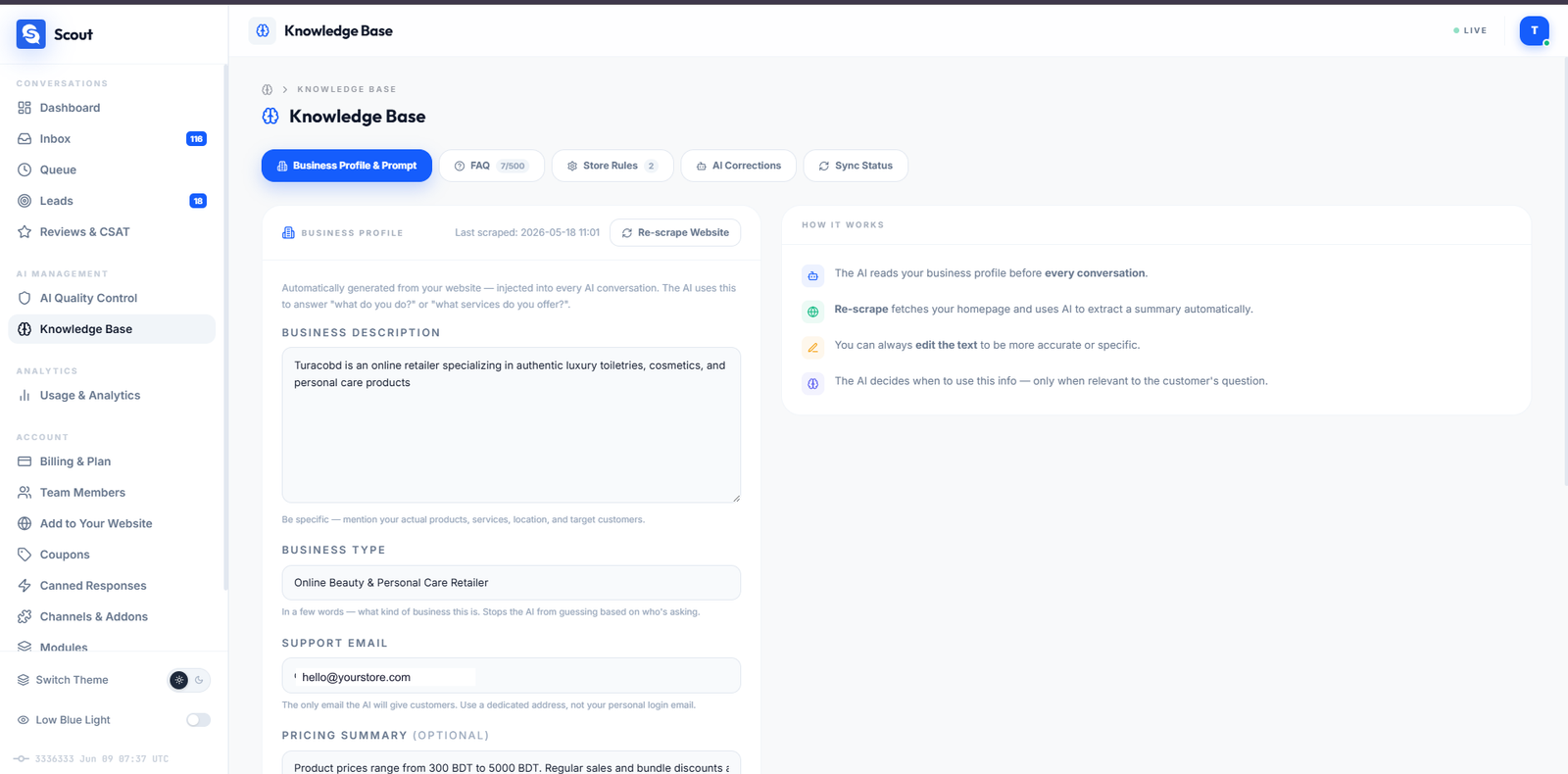
Log into your Scout dashboard at scout.devrental.com and fill in your Business Profile, FAQ entries, and knowledge base. The AI uses this information to answer customer questions accurately.
-
Can agents take over a conversation?
-
Yes. Any team member with access to the Scout dashboard can take over a conversation from the Inbox page. The widget updates in real time to show the customer they are chatting with a live agent.
-
Is WhatsApp / Telegram supported?
-
Yes, on any paid plan (Starter and above). Connect messaging channels from the Channels & Add-ons page in your Scout dashboard. All conversations — web, Telegram, WhatsApp, and Messenger — appear in the same unified inbox.
-
What data does the plugin send to Scout?
-
The plugin sends: customer messages and any image they attach, your site’s product catalog and an aggregate per-product sales/revenue summary (if WooCommerce is active), your store settings and administrator contact email, the domain name the visitor is chatting from, and a visitor identifier. Scout does not receive a visitor’s name, email or phone number unless the visitor types it into the chat. The visitor identifier is a random value generated in the visitor’s browser, or a randomly generated value created on your site if the browser cannot supply one. See the Scout Privacy Policy for full details.
-
Will it slow down my site?
-
The chat widget script is loaded in the page footer, so it does not delay your page content from rendering. The plugin also fetches a small amount of live widget state (such as whether an agent is online) from Scout during page generation; that response is cached, so at most one request is made per cache window rather than on every page load.
-
Can I change the widget color and bot name?
-
Yes — widget color, position, and bot name are set on the Scout ChatBot settings page in your WordPress admin and apply immediately, with no code changes. The content the AI uses to answer questions (business profile, FAQs, knowledge base) is managed in your Scout account.
Reviews
There are no reviews for this plugin.
Contributors & Developers
“Scout — AI Chatbot & Live Chat” is open source software. The following people have contributed to this plugin.
Contributors
Translate “Scout — AI Chatbot & Live Chat” into your language.
Interested in development?
Browse the code, check out the SVN repository, or subscribe to the development log by RSS.
Changelog
1.4.5
- Security: administrator actions (license activation, manual sync, settings save) now verify the user’s capability in addition to the security token, and the check runs before any other logic so no path can bypass it.
1.4.4
- Security: every public AJAX endpoint (chat, history, close, review, cross-channel) now verifies its security token strictly, with no exception for visitors. The widget fetches a fresh token at runtime instead of using the one embedded in the page, so strict checking works even on sites served from a full-page cache.
1.4.3
- Compliance: the chat widget’s avatar logo is now loaded from the bundled plugin asset instead of a remote server, so the plugin no longer relies on any externally hosted static asset.
1.4.2
- Fix: the chat widget could fail with “Sorry, I couldn’t connect right now” on sites using a full-page cache (LiteSpeed, WP Rocket, W3TC, Cloudflare APO, etc.). A cached page served a stale security token to anonymous visitors, so their messages were rejected. The widget is now cache-tolerant for visitors while keeping strict checks for logged-in users.
1.4.1
- Privacy: the plugin now makes no requests to the Scout service at all until you connect the site with an API key — including when saving settings, on the admin connection check, and on settings changes. No data leaves your site before you opt in.
1.4.0
- Widget color, position, and bot name are now controlled directly from the WordPress settings page and apply to this site.
- Privacy: the chat widget makes no requests to the Scout service until you connect the site with an API key.
- Internal option and code naming moved to the scoutchat_ prefix; existing settings migrate automatically on update — no action needed.
- Stricter, type-appropriate validation on every settings field.
1.3.75
- WordPress.org packaging: the distribution build no longer includes any hidden marker file, and the text domain now matches the directory slug. No functional changes for existing users.
1.3.74
- Hardened for the WordPress.org Plugin Directory: all admin output escaped, all request input unslashed and sanitized, settings registered with sanitize callbacks, and database reads documented. No functional changes for existing users.
1.3.73
- Changed: WordPress.org distribution build now receives updates through the WordPress Plugin Directory. The plugin no longer performs its own update checks on Plugin Directory installs, in line with WordPress.org guidelines.
1.3.72
- Changed: Live chat handover is now fully human-owned. After a customer is connected to your team, the “Continue with AI” button is removed (it dead-ended on Telegram/WhatsApp/Messenger). Conversations return to the AI automatically when an agent clicks “Return to AI” or after the chat goes idle, with a clear “[your bot] is active again” notice to the customer.
- Added: When no email is on file, the bot asks for one during escalation so your team can follow up.
1.3.71
- Fix: CSAT star-rating survey now auto-fires after goodbye messages on WP plugin sites without requiring a manual X-click — the trigger_csat server signal was being read from the wrong response layer.
1.3.70
- Improved: AI product cards — bot reply is now a single intro line only, product names/prices/stock are no longer duplicated in text alongside the visual cards.
- Added: Email guard — when a support email is configured, any other email address in AI output is silently replaced with the correct one, preventing hallucinated contact emails reaching customers.
1.3.69
- Improved: Human escalation confirmation now shows as a visible chat message (full speech bubble) instead of a subtle system notice — customers clearly see “Our team has been notified”.
- Fix: Name capture no longer includes conjunctions — “My name is Alex and I manage a hotel” now correctly stores “Alex” only.
1.3.68
- Added: AI cost tracking — every chat call now writes to the usage ledger with channel, provider, and estimated cost, powering the new Cost Intelligence panel for store owners.
1.3.67
- Added: GPL-2.0-or-later license declaration and readme.txt for WordPress Plugin Directory submission
- Added: Domain Path header and languages directory support
- Updated: Plugin URI to scout.devrental.com
- Updated: Author name to Devrental (consistent with WP.org account)
1.3.66
- Updated: Scout Logo v2 — new S+chat-bubble mark in plugin admin settings page
- Updated: Plugin version constants synchronized
1.3.65
- Fixed: Thinking tokens disabled in Gemini to prevent mid-sentence truncation
- Added: PERSONA LOCK and SYSTEM PROMPT CONFIDENTIALITY AI rules
- Added: positive_experience intent triggers Reviews Boost CTA
- Fixed: Goodbye messages now trigger CSAT star rating flow
1.3.64
- Added: Cart quantity persistence across product disambiguation
- Fixed: Cart page auto-refresh after chat-side add/remove
- Added: Live password match validation on signup form
- Fixed: Developer host blocklist on signup (localhost, RFC1918, etc.)
1.3.63
- Added: 45-second AbortController timeout on all fetch requests
- Fixed: Typing dots no longer spin forever on flaky connections
1.3.62
- Fixed: Widget z-index now reads from –scout-zindex CSS variable (host can override)
- Fixed: Header status text truncates with ellipsis on narrow widgets
1.3.61
- Fixed: RAG ORDER NOT FOUND prefix rewritten as internal instruction (no longer shown to customers)
- Fixed: Email addresses preserved in original case in QueryClassifier
1.3.60
- Fixed: Signup form server-side length caps and HTML bracket rejection
- Fixed: Chat textarea maxlength set to 2000 characters
1.3.59
- Fixed: history.php returns ai_paused state; both widgets show Continue with AI pill on reload
- Fixed: Default conversation limit raised from 20 to 50 in history endpoint
1.3.58
- Added: Animated chat bubble launcher (cubic-bezier scale, glow halo)
- Added: MessageCircle X icon swap with transition
- Added: Web Audio chime on AI reply when widget is closed
- Added: Auto-popup tooltip for new visitors
- Added: prefers-reduced-motion support
1.3.55 — 1.3.57
- Added: Reviews Boost module widget integration (star rating Google review link)
- Fixed: Button type attributes on all interactive elements
- Fixed: Product card display guard (no cards shown alongside denial text)
1.3.54
- Added: Cross-channel “Continue on…” bar in widget
- Added: WooCommerce AJAX add-to-cart from chat product cards
1.3.53
- Added: Cross-channel link proxy via WP admin-ajax.php (API key stays server-side)
1.3.52
- Fixed: Widget header status now reflects live-chat mode (AI / queued / human agent)
- Added: Persistent “Talk to a human” button in AI mode
1.3.50 and earlier
- See full changelog at https://scout.devrental.com/changelog