

Description
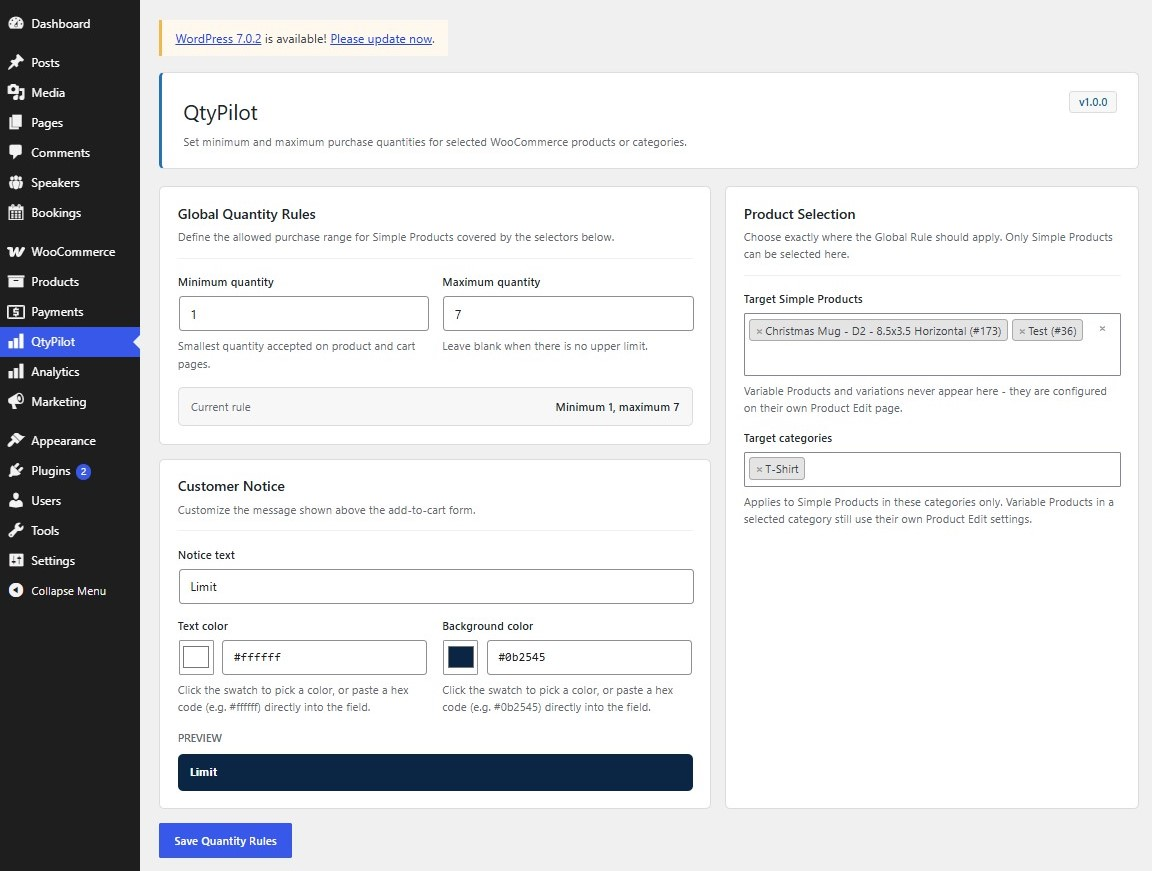
QtyPilot for WooCommerce lets store owners control exactly how many units of a product a customer can buy. Stop unprofitable one-item orders, prevent stock from being wiped out by a single bulk buyer, and enforce case-pack or carton quantities — all without touching a line of code.
The plugin covers three levels of control:
- Global rules for any Simple Product you select, applied instantly.
- Category rules so every product in a chosen category shares the same minimum and maximum, saving you from configuring products one by one.
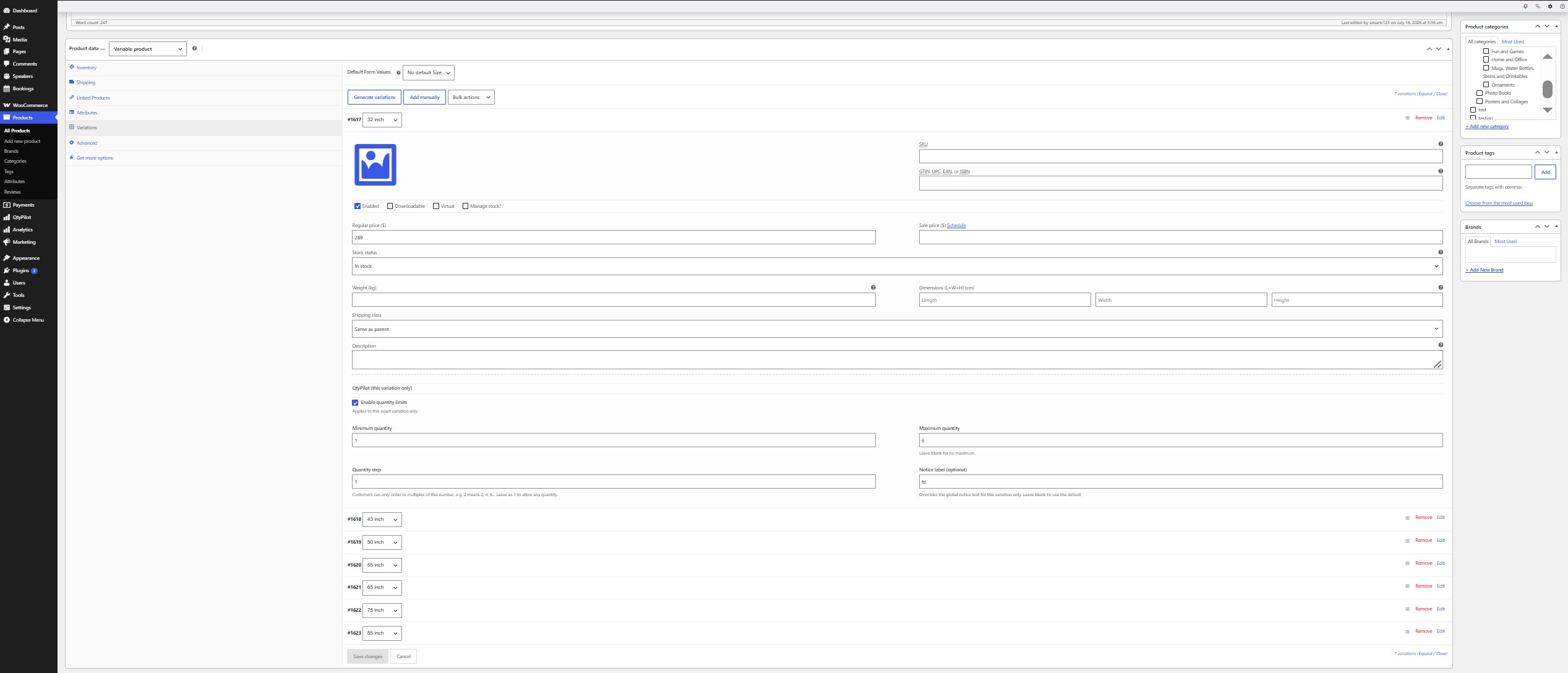
- Per-variation rules for Variable Products, where each variation (size, color, pack size, etc.) can have its own independent minimum, maximum, and quantity step — completely separate from its sibling variations.
Key features
- Set a minimum and/or maximum purchase quantity for Simple Products, individually or by category.
- Configure independent minimum, maximum, and quantity-step rules per variation on Variable Products.
- Optional “quantity step” so customers can only order in multiples (e.g. packs of 6).
- Automatic cart correction: quantities outside the allowed range are adjusted with a clear notice, both on the Cart page and at Checkout.
- Blocks Add to Cart (including AJAX add-to-cart) when a requested quantity is invalid.
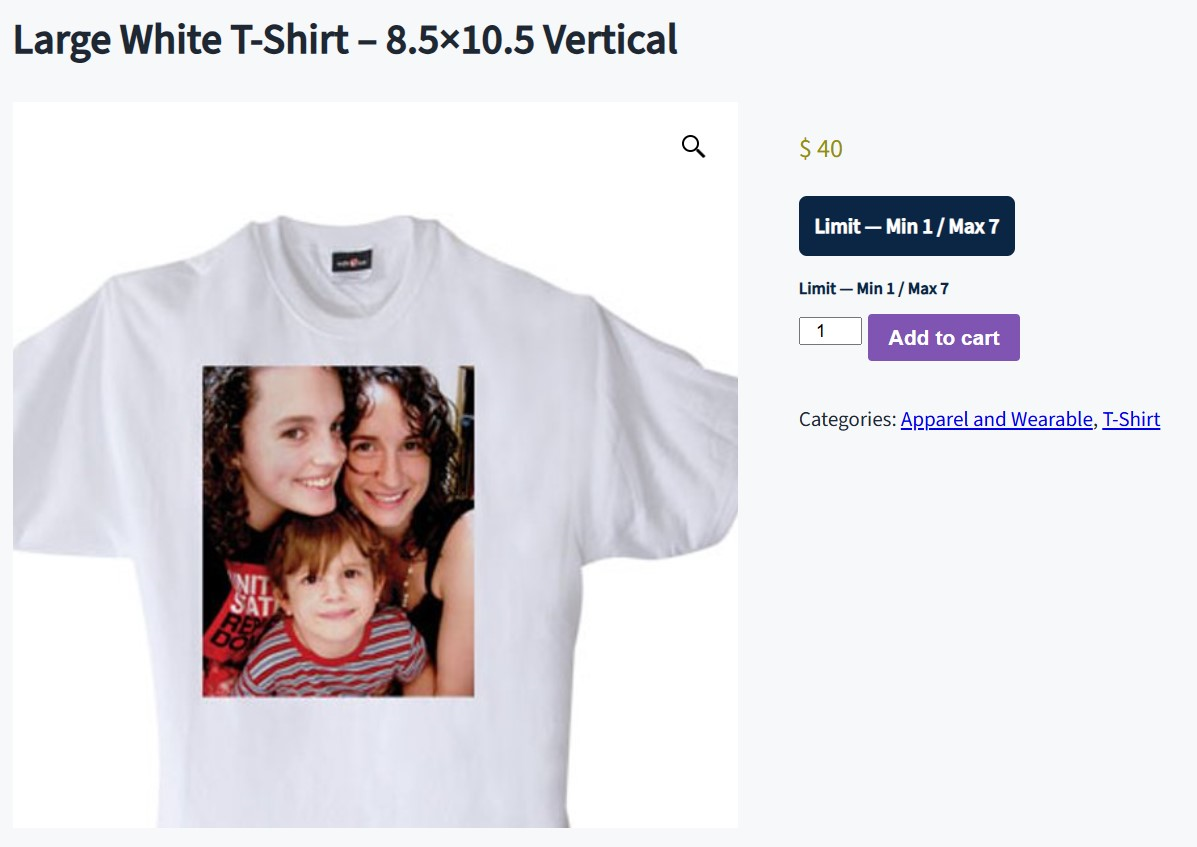
- Customizable customer-facing notice banner (text, background color, text color) shown on the product page.
- Per-variation notice label override, so each variation can show its own message when needed.
- Dedicated settings screen in your WordPress admin sidebar — no existing menus are modified.
- Lightweight: only loads its assets on the settings screen and product edit screens.
How rule priority works
A Variable Product’s own variation settings always take priority. Global and category rules never apply to Variable Products or their variations — only to Simple Products. This keeps bulk category rules from accidentally overriding the specific limits you set on a product’s variations.
Who is this for?
Wholesale and B2B stores, stores selling perishable or limited stock, print-on-demand or made-to-order shops, and any WooCommerce store that needs to enforce minimum order quantities (MOQ) or maximum purchase caps per product, category, or variation.
Screenshots
Installation
- Upload the plugin ZIP file via Plugins > Add New > Upload Plugin in your WordPress admin, or upload the extracted folder to
/wp-content/plugins/via FTP. - Activate the plugin through the Plugins screen.
- Go to QtyPilot in your WordPress admin sidebar (its own top-level menu) to set global minimum/maximum rules and choose which Simple Products or categories they apply to.
- To set limits on a Variable Product, edit the product, open the Variations tab, expand a variation, and fill in its QtyPilot fields.
FAQ
-
Where do I configure the rules?
-
Everything is managed from the plugin’s own QtyPilot menu in the WordPress admin sidebar (a top-level menu, not nested under Products). Per-variation rules are set directly on each Variable Product’s Variations tab.
-
Does this work with Variable Products?
-
Yes. Each variation gets its own independent minimum, maximum, and step fields on the Variations tab. Variation rules are never shared with or inherited from sibling variations.
-
Can I set rules for a whole category instead of one product at a time?
-
Yes, on the settings screen you can apply the Global Rule to specific categories in addition to, or instead of, individually selected products.
-
What happens if a customer already has an invalid quantity in their cart?
-
The plugin automatically corrects the quantity to the nearest allowed value on the Cart page and at Checkout, and shows a notice explaining the change.
-
Does this plugin require WooCommerce?
-
Yes, WooCommerce must be installed and active. The plugin will show an admin notice if it isn’t.
Reviews
There are no reviews for this plugin.
Contributors & Developers
“QtyPilot for WooCommerce” is open source software. The following people have contributed to this plugin.
Contributors
Translate “QtyPilot for WooCommerce” into your language.
Interested in development?
Browse the code, check out the SVN repository, or subscribe to the development log by RSS.
Changelog
1.0.1
- Fix: Use the qtypilot-for-woocommerce text domain for all translatable strings.
1.0.0
- Initial release.
- Global and category-level quantity rules for Simple Products.
- Independent per-variation quantity rules for Variable Products.
- Automatic cart quantity correction with customer notices.
- Customizable notice banner text and colors.