

Description
Pro Web Design Order Tags & Labels for WooCommerce brings a simple, visual organization layer to your WooCommerce order screens. Instead of hunting through notes or statuses, tag orders with color-coded labels like “Urgent”, “VIP”, or “Follow Up” so your team can spot what matters at a glance.
Free Features
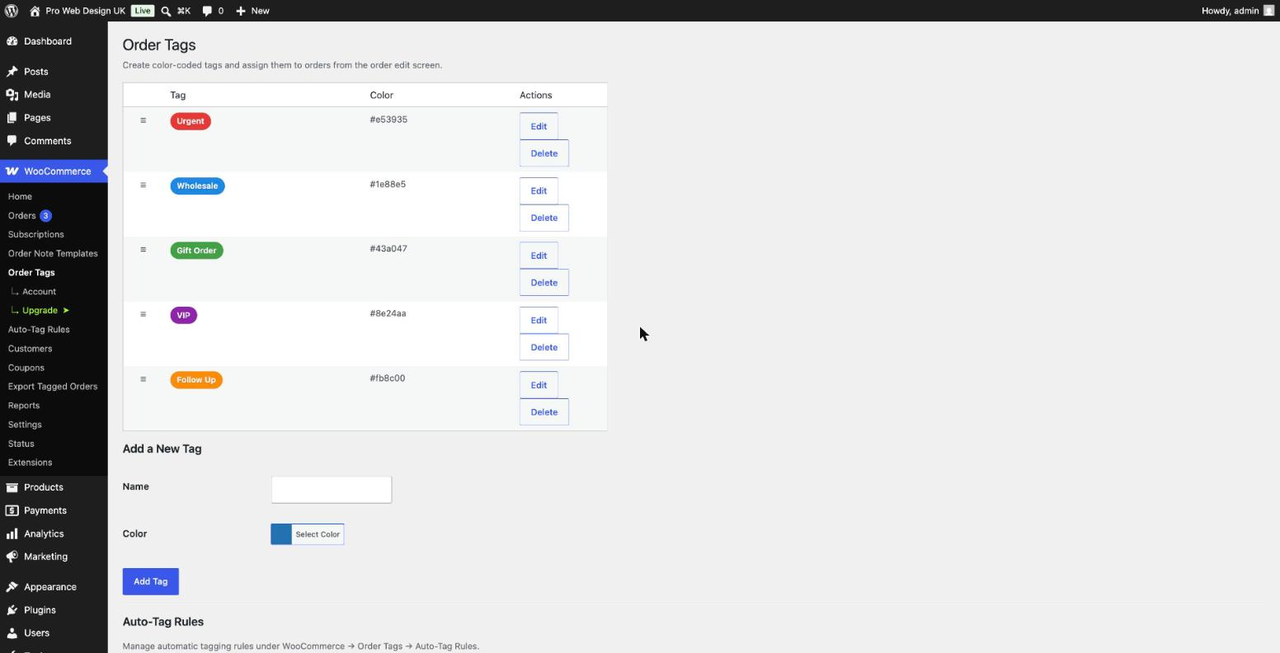
- Unlimited custom tags with your own colors
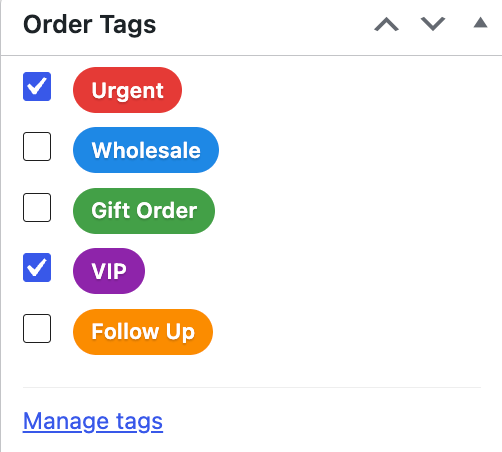
- Assign or remove tags directly from the order edit screen
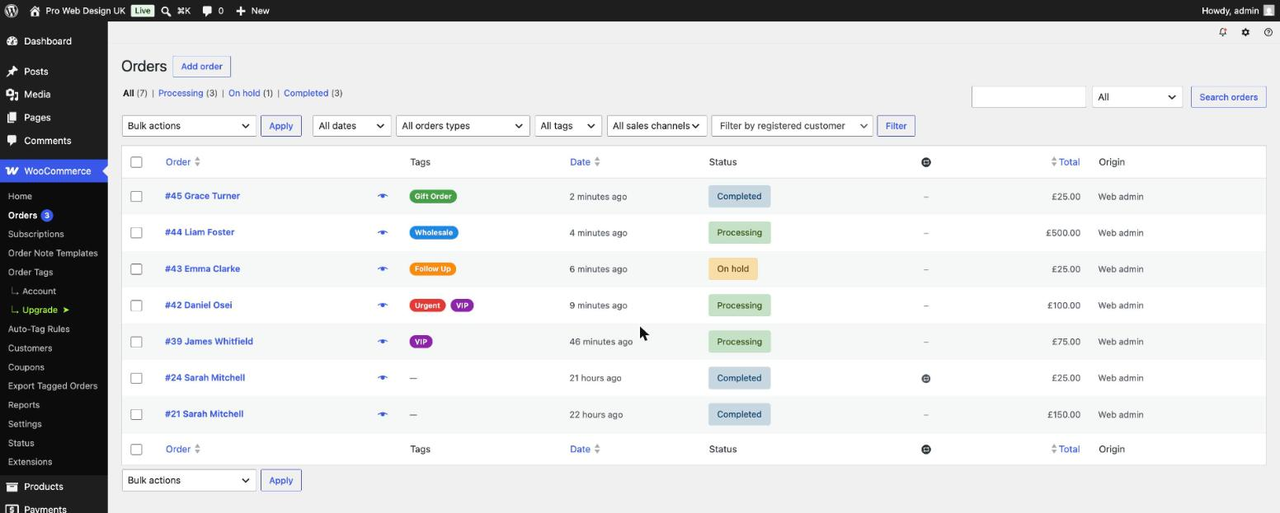
- Tags column on the WooCommerce Orders list
- Fully compatible with WooCommerce High-Performance Order Storage (HPOS)
Professional Features
- Auto-tag rules — automatically tag orders based on order total, payment method, shipping method, products, customer role, new vs. returning customer, order status, or subscription status
- Filter the Orders list by tag
- Bulk add/remove tags from the Orders list
- CSV export of tagged orders
- WooCommerce Subscriptions support
- Priority email support
Upgrade to Professional to unlock automation, filtering, bulk actions and export.
Also by Pro Technologies Limited
If you like keeping your order admin tidy, check out our other plugin, Pro Web Design Order Note Templates for WooCommerce — reusable note templates for order comments.
Screenshots

Installation
- Upload the plugin files to
/wp-content/plugins/pro-web-design-order-tags-labels-for-woocommerce/, or install directly through the WordPress plugins screen. - Activate the plugin through the “Plugins” screen in WordPress.
- Go to WooCommerce Order Tags to create your first tags.
- Open any order to assign tags from the “Order Tags” box in the sidebar.
FAQ
-
Does this work with High-Performance Order Storage (HPOS)?
-
Yes. The plugin declares full HPOS compatibility and also works on stores still using the legacy post-based order storage.
-
Does this work with WooCommerce Subscriptions?
-
Tagging subscription orders manually works on both Free and Professional. Auto-tag rules that reference subscription status are a Professional feature.
-
As many as you like — tag creation is unlimited on both Free and Professional. Professional adds auto-tag rules, list filtering, bulk actions and CSV export.
-
Can I filter the Orders list by tag?
-
Filtering and bulk tag actions are Professional features.
Reviews
There are no reviews for this plugin.
Contributors & Developers
“Pro Web Design Order Tags & Labels for WooCommerce” is open source software. The following people have contributed to this plugin.
Contributors

Translate “Pro Web Design Order Tags & Labels for WooCommerce” into your language.
Interested in development?
Browse the code, check out the SVN repository, or subscribe to the development log by RSS.
Changelog
1.1.5
- Internal: text domain changed back to
pro-web-design-order-tags-labels-for-woocommerce, matching the plugin’s actual WordPress.org directory slug (the file name, folder name and Freemius product slug stay on the originalorder-tags-labels-for-woocommerceidentifiers). Same convention already used by Order Note Templates. - Fixed: removed an invalid entry from the readme’s Contributors list.
1.1.4
- Internal: reverted the plugin’s file name and text domain back to
order-tags-labels-for-woocommercefor this (Freemius-distributed) build, keeping it internally consistent. The WordPress.org listing is a separate, independently-built package under the new “Pro Web Design” naming and is not affected.
1.1.3
- Changed: renamed the plugin to “Pro Web Design Order Tags & Labels for WooCommerce” ahead of WordPress.org submission, to avoid a naming clash with an existing directory listing
1.1.2
- Fixed: the “filter Orders list by tag” dropdown and its query logic were still present in the free version’s shared code, only inert behind a Professional check — moved entirely into a Professional-only module (excluded from the free build), matching how the other Professional modules are already handled
- Fixed: the free version’s database no longer creates the Professional-only order_tag_rules table (used by Auto-Tag Rules) at all — it is created only when the Professional build runs, and is added automatically on upgrade to Pro without touching existing data
- Internal: corrected the Contributors list and a stale cross-link in the readme
1.1.1
- Internal: Pro-only modules (auto-tag rules, bulk actions, export) moved to files the build process excludes from the free distribution entirely, instead of just skipping them at runtime
- Internal: Freemius integration function/global/hook renamed to use the plugin’s own prefix, avoiding possible naming conflicts with other plugins
1.1.0
- Changed: removed the 5-tag cap on the free plan — the free version now supports unlimited tags
1.0.3
- Minor: added a missing translators comment for a translatable string with a placeholder (i18n code-quality fix, no functional change).
1.0.2
- Fix: CSV export (Professional) could include orders that don’t really exist yet — WooCommerce’s
auto-draft/checkout-draftplaceholders created when a customer merely loads checkout, and trashed orders. Export now matches orders against the same status list WooCommerce itself uses, filtered in a single query instead of one lookup per order. - Fix: Auto-tag rules (Professional) could tag those same draft placeholders before they were real orders, leaving orphaned tag assignments once WooCommerce cleaned the drafts up.
- Fix: tag assignments are now removed automatically when an order is permanently deleted, instead of being left behind as orphaned data.
- Improvement: tidier spacing and layout on the Order Tags and Auto-Tag Rules admin screens.
1.0.1
- Fix: Professional bulk “Add tag: X” / “Remove tag: X” actions did not appear on the Orders list. The screen ID used to register the bulk actions filter was pre-computed at plugins_loaded and could mismatch the actual list screen under HPOS; registration now happens dynamically on the current_screen hook.
1.0.0
- Initial release: tag CRUD, manual assignment, orders list column, HPOS support.
- Professional: auto-tag rules, bulk actions, list filtering, CSV export, WooCommerce Subscriptions support.