

Description
Postio is a UK address, email, and phone validation API. This plugin drops UK address autocomplete onto your existing forms — automatically — so customers fill billing, shipping, and contact addresses in two keystrokes instead of twenty.
Automatic, where your builder has an address field
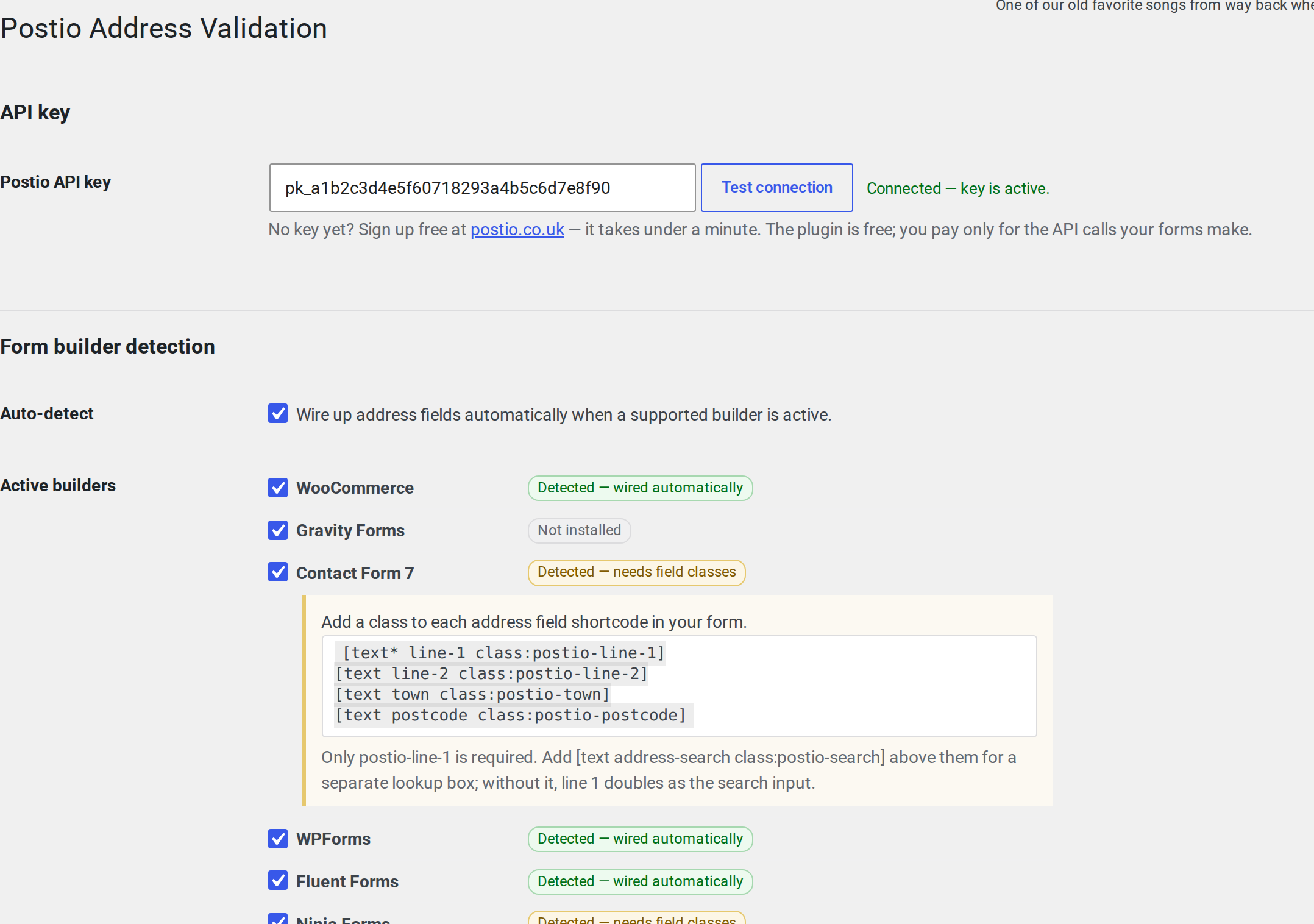
Paste your key and these wire themselves. No classes, no snippets, no per-form setup:
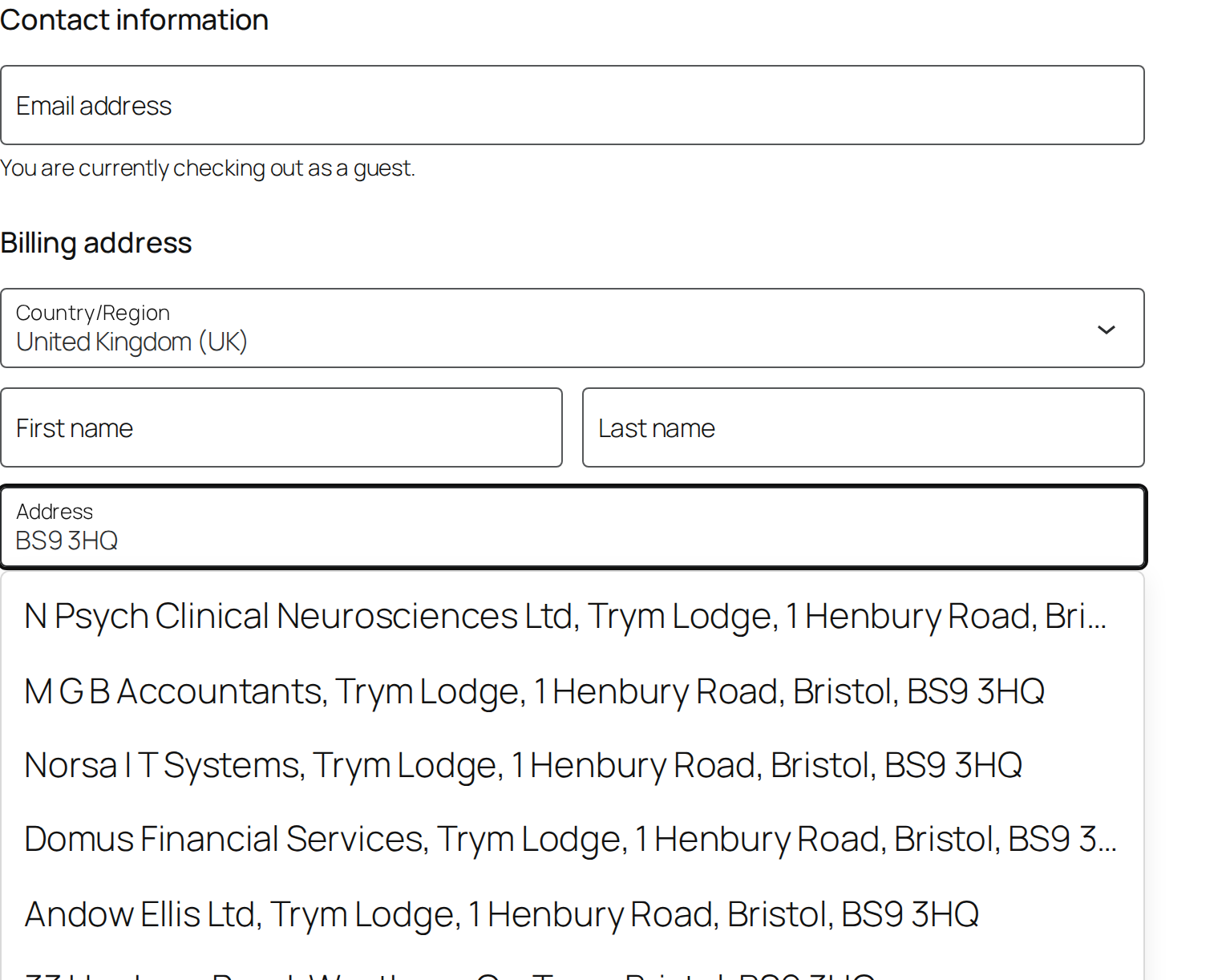
- WooCommerce — both Block Checkout (the new Cart / Checkout block) and the classic shortcode checkout, plus My Account Addresses.
- Gravity Forms — every Address field on every form.
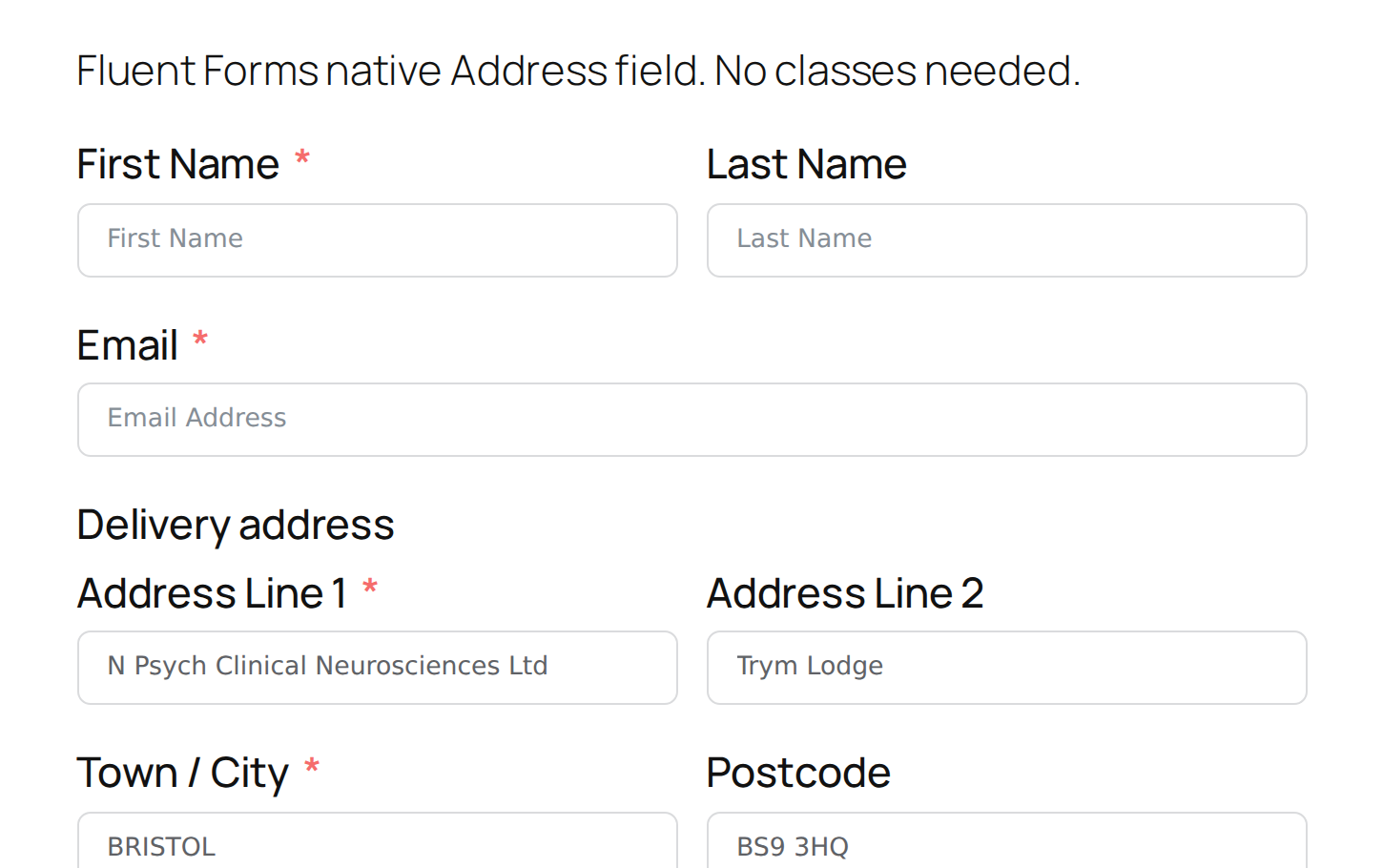
- Fluent Forms — Address field, multi-form-safe.
- Forminator — Address field with all sub-inputs.
- WPForms — Address field across every form. (The Address field is part of WPForms Pro; on WPForms Lite, use the two-minute route below.)
Two-minute setup, everywhere else
Some builders have no address field at all — there’s nothing for us to detect, because there’s nothing there. You tell us which of your fields are which by adding a class to each one, and it works exactly the same from then on:
- Contact Form 7
- Ninja Forms
- Elementor Forms (part of Elementor Pro)
You don’t have to go hunting for the classes. Settings Postio detects which of these you have installed and prints the exact snippet for your builder on the screen, ready to copy.
Anything else
Custom mappings at Settings Postio bind any search box to any set of output fields by CSS selector. That covers page builders, bespoke themes and hand-written forms — anything that renders ordinary HTML inputs.
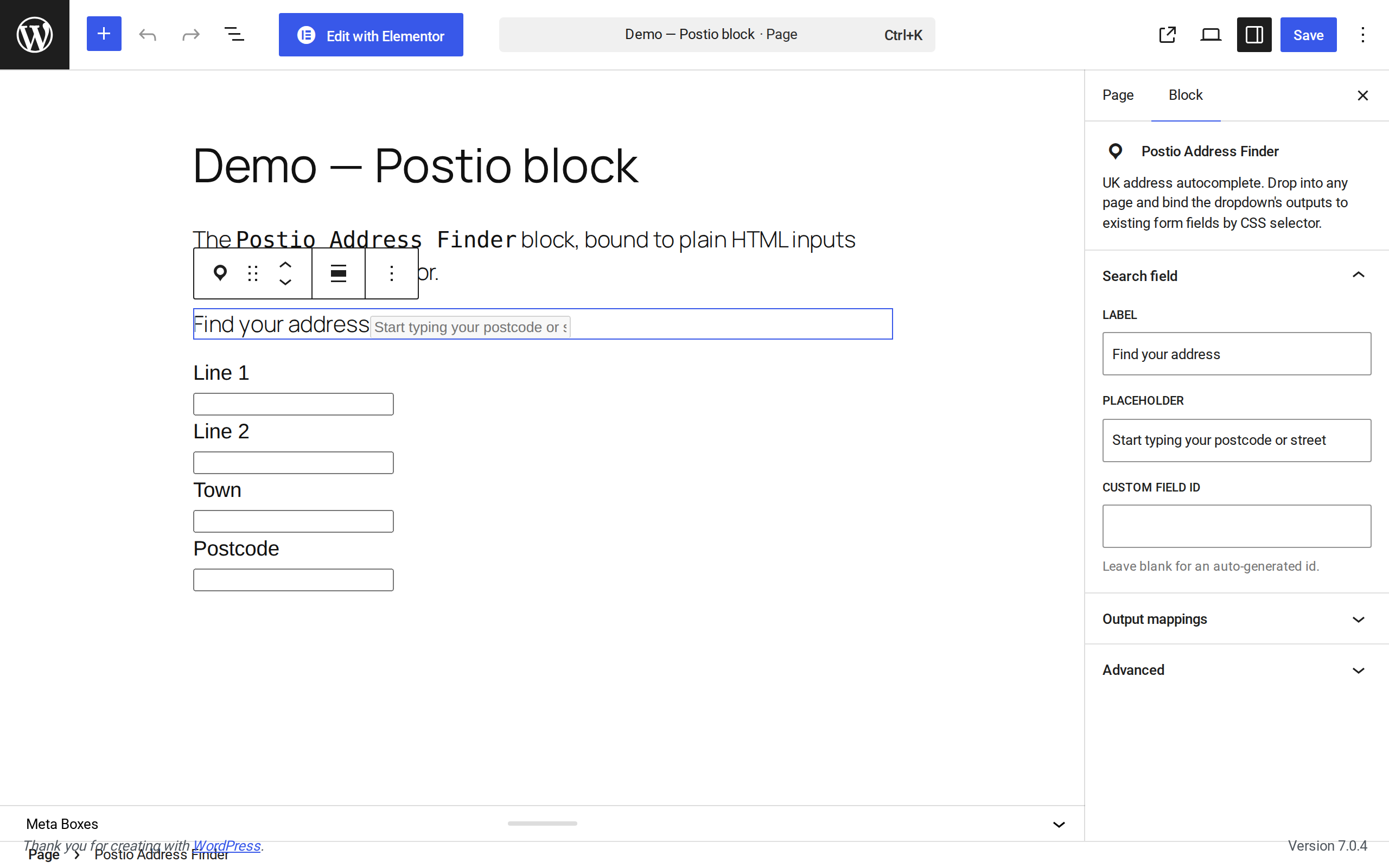
Plus a block (Postio Address Finder) that drops onto any page in the block editor for one-off address pickers.
Why Postio
- Royal Mail PAF + Ordnance Survey — the same dataset every UK address vendor uses, served from edge workers in two regions for sub-50ms typeahead.
- No accuracy compromise — you get the same dataset whether you spend £20 a month or £2,000.
- No setup tax — builders with a real address field are wired the moment you save your key. The rest take one class per field, and the plugin shows you exactly which ones on the settings screen.
- Free plugin, metered API — the plugin itself costs nothing. You pay only for the API calls your customers make. UK pricing, UK support, [postio] is a trading name of Onno Group Limited.
How it works
When the customer types into an address field on any of the supported forms, the plugin shows ranked suggestions backed by the live Postio API. On selection, every other address sub-field on the form (Town, Postcode, etc.) auto-fills.
The autocomplete script ships with the plugin — nothing is loaded from a remote CDN. It is ~4.2 KB gzipped and is only enqueued on pages that actually have a relevant form, and only when an API key is configured.
External services
This plugin connects to the Postio API to look up UK addresses. The service is required — address autocomplete cannot work without it, because the address data lives on Postio’s servers, not in your WordPress install.
- Service: Postio validation API — https://postio.co.uk (API endpoint
https://api.postio.co.uk), operated by Onno Group Limited, registered in England & Wales, company no. 08622799. Registered office: Suite 22 Trym Lodge, 1 Henbury Road, Westbury-On-Trym, Bristol BS9 3HQ. - What it does: returns matching UK addresses for a postcode or partial address, from Royal Mail PAF and Ordnance Survey data.
- What is sent: the postcode or address text typed into a wired field, your API key, and the site’s origin URL. Nothing else. No names, no email addresses, no order data, no personal data beyond the address text itself.
- When it is sent: only when a visitor is actively typing into an address field the plugin is attached to, or when you press Test connection on the settings screen. Nothing is sent until you have entered an API key, and nothing is sent in the background — there is no analytics, no usage tracking and no phoning home.
- Terms of service: https://postio.co.uk/terms
- Privacy policy: https://postio.co.uk/privacy
No executable code is downloaded from anywhere. The autocomplete script is bundled in the plugin at assets/address-finder.js.
Screenshots
Blocks
This plugin provides 1 block.
- Postio Address Finder UK address autocomplete. Drop into any page and bind the dropdown's outputs to existing form fields by CSS selector.
Installation
- Upload to
/wp-content/plugins/postio-address-validation, or install through the Plugins Add New screen. - Activate.
- Go to Settings Postio and paste your API key. Don’t have one? Signing up at https://postio.co.uk is free and takes under a minute.
- Click Test connection to confirm.
That’s it for WooCommerce, Gravity Forms, Fluent Forms, Forminator and WPForms Pro. If you use Contact Form 7, Ninja Forms or Elementor Forms, the settings screen will show you the one class to add to each address field.
FAQ
-
Do I need a paid Postio account?
-
You need a Postio account. The plugin itself is free; usage is metered against your Postio API credits.
-
Which form builders are supported?
-
WooCommerce plus seven form builders. Five of the eight wire themselves; the other three take one class per field, with the snippet shown to you on the settings screen. Anything not on the list works through Custom mappings. Want a builder added to the automatic list? Email admin@postio.co.uk, or open an issue at https://github.com/postio-uk/postio-wordpress-plugin.
-
My builder isn’t listed — will this still work?
-
Yes. Go to Settings Postio Custom mappings and add a row. Each row binds one search input (by CSS selector) to one or more output fields — line 1, line 2, town, postcode. That covers any theme or builder that renders plain HTML inputs, which is nearly all of them.
-
How do I wire up a Contact Form 7 form?
-
CF7 has no built-in address field, so opt in by class. On each address field shortcode, add the matching class —
class:postio-line-1,class:postio-line-2,class:postio-town,class:postio-postcode.Add an optional
[text address-search class:postio-search]field above the address fields if you want a dedicated lookup input separate from line 1. Without it, line 1 doubles as the search input — typing into it shows suggestions, picking one fills line 1 and the other fields.Only
postio-line-1is required. Anything missing is left untouched. -
How do I wire up a Ninja Forms form?
-
Add Display CSS Classes on the relevant fields —
postio-line-1,postio-line-2,postio-town,postio-postcode. Addpostio-searchto a dedicated lookup field if you want one separate from line 1. Onlypostio-line-1is required. -
How do I wire up an Elementor Forms form?
-
Elementor Forms is part of Elementor Pro. On each address field’s Advanced Custom CSS Classes, add the matching class —
postio-line-1,postio-line-2,postio-town,postio-postcode. Addpostio-searchto a dedicated lookup field if you want one separate from line 1. Onlypostio-line-1is required. -
Will Postio overwrite my country dropdown?
-
No. Country fields are intentionally not auto-mapped: most form builders use ISO country codes (
GB,US) in their dropdowns, but Postio returns the constituent UK country (England,Scotland, etc.). Setting an unmatched value would clear the dropdown, which is worse than leaving it on whatever the customer already chose. -
Does this work outside the UK?
-
Postio’s data is UK-only (Royal Mail PAF + Ordnance Survey). Use it on UK address forms.
-
What about GDPR?
-
The plugin sends no customer data to Postio’s servers — only the postcode / search terms the customer types into the autocomplete, and only while they’re typing. No customer data is logged on Postio’s side beyond the request itself.
-
Where is the source for the bundled script?
-
assets/address-finder.js is a build of the
@postio/address-finder-bundledpackage (MIT licensed), published on npm. You do not need to go anywhere to read it: the complete original TypeScript source is embedded in the source map shipped alongside it,assets/address-finder.js.map. The plugin’s own source is at https://github.com/postio-uk/postio-wordpress-plugin.
Reviews
There are no reviews for this plugin.
Contributors & Developers
“UK Address Autocomplete & Postcode Lookup for Forms & WooCommerce” is open source software. The following people have contributed to this plugin.
Contributors
Translate “UK Address Autocomplete & Postcode Lookup for Forms & WooCommerce” into your language.
Interested in development?
Browse the code, check out the SVN repository, or subscribe to the development log by RSS.
Changelog
1.0.0
- First release on the WordPress.org plugin directory.
0.2.0
- Settings link on the Plugins screen, next to Deactivate.
- One-time notice after activation prompting for the API key. Dismissible, and it clears itself once a key is saved.
- Settings Postio now shows the real state of every builder — not installed, detected and wired automatically, or detected but needing field classes.
- For Contact Form 7, Ninja Forms and Elementor Forms, the exact classes to add are shown inline on the settings page when that builder is detected.
- Clearer API key help text: signing up is free.
- Tested against WordPress 7.0.
- Removed the weekly usage ping entirely. The plugin now contacts nothing except the validation API, and only when someone is actually using an address field.
- The autocomplete script now ships with the plugin instead of loading from a CDN — no executable code is fetched from anywhere.
- Readme rewritten so the class-based route is a first-class path, not a footnote — it covers more installs than the automatic one.
- Corrected: the WPForms Address field is part of WPForms Pro, not Lite.
0.1.0
- Initial release.
- Auto-detects WooCommerce, Gravity Forms, Contact Form 7, WPForms, Fluent Forms, Ninja Forms, Forminator, Elementor Forms.
- Block-editor block:
Postio Address Finder. - Custom mappings UI for any other form builder.